Blogs
|
The primary reasons for doing the eLearning Tour was that it is hard to see examples of what is being done by fellow eLearning professionals and get a sense of the patterns that exist. As part of pulling together the tour, I asked for contributions from this blog and from Learn Trends. I received quite a few responses. Far more than I could accommodate. And while I believe that I gave a flavor of what's happening out there through the tour, my gut tells me that it would be helpful to capture more examples. So first question - after participating or viewing the videos for the event: Is it helpful to capture examples? Should we look to capture more examples? Assuming that the answer is that it would be helpful, then the next question is naturally how we will do this. Most of the people who submitted were quite willing to spend time pulling screen shots together and talking through their example. But my belief is that putting up a series of videos like the current videos might not be quite right. In my recent exchange in the post Metalearning with Vic Uzumeri about the use of video, I questioned capturing examples or other knowledge pieces via video, and the accessibility of that information. Vic's response: After a bit more than a decade of experimentation, I have formed some strong opinions about video's role: Video is at least as valuable a knowledge capture tool as it is a knowledge delivery medium. There is absolutely nothing wrong with recording an expert on video, then hunting through the video to help you write a text manual or text and image eLearning course. You can grab stills to illustrate the points. Just because you record it doesn't mean that you have to inflict it on some innocent viewer. The shorter the video the better. Chunk, chunk, chunk - then use other media to organize the chunks. Including synchronized subtitles makes a rapid seek far more effective. You still can't really search video content directly, but you can search a companion transcript, text descriptions and meta-tags. Video is superior to text for explaining some types of knowledge. There are tons of things that should never be put in a video and no one should ever be forced to watch - a talking head reading a dry script is my pet peeve. I think that's well said and when I have been thinking about how we should capture examples, I have found myself debating the merits of: A 30 minute call where we use a Google Doc or something similar for real-time editing of a screen shots and description/notes around the example. This would then get published as a web page. A 15 minute web session where we record a discussion and include text notes from the chat, possibly editing those later via something like a Google Doc - maybe a real-time editing session. We would then publish a web page with the recording and the text on the same page. Something else???? Part of my goal here is to find an easy, repeatable way to QUICKLY and EASILY capture these examples. Particularly, given the shear number: It shouldn't require more than 30 minutes of my time (or another moderators time). It should be easily scanned. It should be easily indexed by Google. It should be HTML, i.e., not in PDF. It should be easy to have other people moderate the capture sessions. Again, assuming that people are interested in seeing more examples, my question is: How should we capture examples? eLearning Technology
Browse eLearning Content
Tony Karrer
.
Blog
.
<span class='date ' tip=''><i class='icon-time'></i> Jul 14, 2015 01:35pm</span>
|
|
by Lori Smith
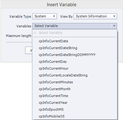
Last week I showed you Captivate's date variables. This week, let's take a look at the Time variables, the System Information variables, and a handy little variable called cpInfoMobileOS. Specifically, I am going to address the variables listed in the table below using 2:15 PM and 32 seconds as my example. Perhaps you do not like military time (24 hour) and instead you want to use 12 hour time. A little advanced action can easily convert military time to 12 hour time. I have also created two user variables to help out: am_or_pm and myHour. When added to a text caption as shown below, the variables will display 2 PM. Now let's talk about the cpInfoEpochMS variable. It can be used to determine the play time for a lesson (or part of a lesson). By subtracting the value of the variable at the beginning of the lesson from its value at the end of the lesson, you can calculate the lesson's play time down to the millisecond. In the image below I have created a couple of Advanced Actions that make use or CpInfoEpochMS and a few user variables that I created:startTime, endTime, and timeElapsed.First, you need to capture the lesson's start time using this Advanced Action: At the desired point in your project, capture the time and calculate the timeElapsed. Last but not least, let's cover the cpInfoMobileOS variable. It's only job is to indicate if the learner is using a desktop computer of a mobile device (iPhone, iPad, etc). If you have certain elements or slides in your project that you want to behave differently depending upon the learner's device, you can use this variable in a conditional Advanced Action to create the desired behavior.
***
Looking to learn Adobe Captivate? We offer several Captivate classes. Feel free to contact us to learn other ways to meet your training requirements.
Icon Logic Blogs
.
Blog
.
<span class='date ' tip=''><i class='icon-time'></i> Jul 14, 2015 01:35pm</span>
|
|
Written by Chris Osborn Today's Q&A discusses how you can keep employees and trainers from falling into boring routines during onboarding. Access 7,000+ Employee Training Resources BizLibrary offers 7,000+ training videos in various business training topics, with new courses added every day. Got Content? In this eBook we discuss how to decide what’s right for your employees and organization, how to incorporate off-the-shelf learning resources into an effective employee learning strategy, and how to find the right off-the-shelf solution for your organization.. BizLibrary's Mobile Learning App meets the needs of today's digital learners. Employees no longer wait for training departments to push learning content to them. Employees are used to pulling information to themselves, when they need it, on their own terms and conditions, and on their own devices. Video Transcription Hi, Chris Osborn, VP of Marketing with BizLibrary with today's Q&A. Today's question comes from Krista, she's an HR manager at a professional services organization, and her question is about explaining why we do things during employee onboarding. She wanted to know how to prevent trainers from being overly process-driven order-takers for new employee onboarding training. Well, it's a common issue with onboarding. It can get to be about processes. Here's your benefits, you HRIS system, here's your handbook, and now here's your mandatory compliance training, etc. Well, by treating our onboarding training like this, we miss a great opportunity. Employees are NEVER more fully engaged than when they first start a job, so let's take advantage of that! Talk about why. Why the organization has these goals for the year, why these are our products or services that we provide, why this employees job is important and how it contributes to the success of the organization. WHY is a really important concept. Once we understand WHY we're asked to do things, adults generally very well at other important things like making decisions, taking appropriate risks, directing their own learning, and keeping motivated and engaged because they understand the purpose behind their role. So don't leave out the why during employee onboarding and take it out of being process-driven and you're going to have a lot better results.
Chris Osborn
.
Blog
.
<span class='date ' tip=''><i class='icon-time'></i> Jul 14, 2015 01:34pm</span>
|
|
by Megan Pitkin
While I was working as a bedside nurse, my organization decided to adopt a new way of approaching patient care and improve workflow: Lean. As described in this article about Lean in health care, "Lean is an industrial managerial system that aims to eliminate process waste in the forms of transportation, inventory, motion, waiting, overproduction, over-processing, and defects." While Lean was originally intended for industrial applications, the article describes the efforts of Dr. M. Peggy Hays, associate professor in the UAH College of Nursing, to bring industrial Lean practices in healthcare."Nursing staff today have more and more duties," said Dr. Hays. "How can they make their job more efficient so they can focus on patient care, which is why they got into the profession in the first place?"According to the article, Dr. Hays said that "healthcare applications [for Lean] include unearthing greater efficiencies in emergency room waiting times, operating room use, use of nursing rounds, medication rounds, processing patient paperwork in administrative offices, and workflow of the staff."The planning and assessment phase for my unit started with the team receiving Lean education and concluded with a list of probable projects and action items needed for the week. Because the main action item was patient wait times, data was collected for the time it took for call lights to be answered.An initial assessment found that we walked over five miles each shift between patient rooms for medication delivery, gathering of supplies, locating equipment, and patient care needs. After streamlining workflows, reorganization of the medication rooms, and standardizing equipment processes, my walking was reduced by a mile for my first shift of the implementation week. With the improved processes and reduction in the amount of walking required for the nurses to complete their tasks, there was a significant decrease in call light wait times. Seeing how successful Lean was in my unit and throughout the organization, I began to question if the Lean principals could be applied to the materials I used in my Electronic Medical Records (EMR) training classes. While adopting an industrial process in the creation of training materials may sound like a stretch, I'd like to illustrate one simple way that I applied the Lean principles to a PowerPoint presentation I use in my classes.Since standardization is a key Lean component, I used my organization's approved fonts and colors on my first slide. I also organized my lesson plan sections and agenda using approved colors, and I used the colors in a very deliberate way. For example, in the image below notice that "Locating the Patient" is a dark purple on my agenda slide. I used that same dark purple banner on all of the slides in the "Locating a Patient" segment of the course. (One of those slides is shown below.) Lastly, I color-coordinated the supporting training materials, like pocket guides, so that they match the colors used in the presentation. As a nurse, it is encouraging for me to see more hospitals doing an excellent job of implementing Lean tools that manufacturing has been evolving for more than half a century. As an Instructional Designer, I have been pleased with the overwhelming positive feedback I have received by adopting these Lean philosophies into the creation of materials for EMR classes. ***If you like Megan's articles, you'll love her live, online classes such as Train the EMR Trainer.
Icon Logic Blogs
.
Blog
.
<span class='date ' tip=''><i class='icon-time'></i> Jul 14, 2015 01:34pm</span>
|
|
I received an inquiry from a reader who was trying to find tools that they should use for creating their eLearning Script. They are in a Mac and PC environment and they have to pass scripts around fairly widely for review and input. The scripts are for eLearning with media (voice-over and video). They are considering a pretty wide range of solutions from eLearning specific, to media specific, to standard tools like Word and PowerPoint, to doing it as rapid prototypes using an authoring tool. I was going to respond and then I realized that I hadn't looked at tools in this space in quite a while, so I'd like to hear from readers: What do you use to create your eLearning Scripts? What tools should this person consider? Please add your comments. I'll try to compile things in this post a bit like we do in the Big Question so that it becomes a pretty good resource based on responses. eLearning Technology
Browse eLearning Content
Tony Karrer
.
Blog
.
<span class='date ' tip=''><i class='icon-time'></i> Jul 14, 2015 01:34pm</span>
|
|
View and download the webinar slides. View the webinar recording. 5 Ways to Build a Better Leadership Development Program - Webinar 10.09.14 from BizLibrary Try out BizLibrary's Online Library! BizLibrary provides 7,000+ training videos and eLearning courses in various business training topics, with new courses added every day. Got Content? How to Use Off-the-Shelf Content to Build Strong Employee Learning Programs In this eBook we’ll discuss how to incorporate off-the-shelf learning content into your employee learning program. BizLibrary's Mobile Learning App meets the needs of today's digital learners. Employees no longer wait for training departments to push learning content to them. Employees are used to pulling information to themselves, when they need it, on their own terms and conditions, and on their own devices.
Chris Osborn
.
Blog
.
<span class='date ' tip=''><i class='icon-time'></i> Jul 14, 2015 01:33pm</span>
|
|
by Kevin Siegel
I was recently contacted by a client who wanted me to create software simulations of mobile apps. At first I thought he wanted me to create software simulations that could be accessed and used by mobile devices. Since I use Articulate Storyline and Adobe Captivate for my eLearning development, publishing projects as HTML5 would have taken care of his requirement. However, the client wasn't looking to create content that would play on mobile devices; he wanted lessons that were captured from a mobile device.
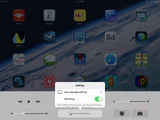
Neither Captivate nor Storyline are available for mobile devices so creating software simulations directly on those devices wasn't an option. One workaround was to create screen captures of the mobile app, upload them to DropBox, and then use the images in Storyline or Captivate as backgrounds. At that point, it would be a simple matter of adding hotspots and text to the backgrounds to create interactive eLearning. Of course, going the screen capture route would have required potentially hundreds of images.I'm betting you're wondering if there's an easier way to capture software simulations of mobile apps. And there is: mirroring. There is a ridiculously easy-to-use application (Reflector) that will project (mirror) just about any mobile device onto a desktop or laptop screen. From there, Captivate or Storyline can be used to capture whatever is being done on the mobile device.Here are the steps I took to create an interactive a simulation of my iPad in Adobe Captivate:To begin, I downloaded and installed the Reflector program to my MacBook Pro. (There's a free trial of the Reflector available. Once you determine that you like it, and I'm thinking you will, you can purchase Reflector outright for a paltry $12.99. You can also purchase group licenses.)I made sure that my MacBook Pro and my iPad were on the same wireless network, then I started Reflector on my Mac.I switched to my iPad and enabled AirPlay. (While most mobile devices support AirPlay, accessing the option varies from device to device and from operating system to operating system. My iPad is using iOS8. To enable AirPlay, I swiped up from the bottom of the device to display the Control Panel. I tapped AirPlay, scrolled down, and selected my MacBook Pro. I also enabled Mirroring.)
Like magic, my iPad was projected to my MacBook Pro. Anything I did on the iPad was mirrored on my laptop. The image below is my iPad's settings.And here's what the mirror image of my iPad looked like on my Mac:Any gestures, taps, or swipes I performed on my iPad were displayed at the same time on my Mac. However, any clicks I made to the mirror image displayed on my Mac had no affect on the iPad.I started Adobe Captivate and recorded a Software Simulation. During the recording process, I targeted the iPad as the Application to be recorded. When I finished recording, the result was a Captivate project just like any of the thousands of projects I've recorded over the years. I was able to add interactivity, quizzes... the works... and then publish as SWF, HTML5, or both. Pretty cool, eh?
See also: More Reflection***If you'd like to learn more about eLearning, come hang out in my next eLearning basics mini course. And if you'd like to learn more Captivate, Presenter, or Storyline, we've got a great collection of live, online classes for you.
Icon Logic Blogs
.
Blog
.
<span class='date ' tip=''><i class='icon-time'></i> Jul 14, 2015 01:33pm</span>
|
|
This week's interesting finds from across the web. Curated by Jessica Petry @JessLPetry THE OPPORTUNITY IN A CUSTOMER COMPLAINT via businesst2community.com "Statistics suggest that when customers complain, business owners and managers ought to get excited about it. The complaining customer represents a huge opportunity for more business." - Zig Ziglar The Opportunity In A Customer Complaint image Social Media The Truth About Engagement2 Complaining Customers An Opportunity Early in my career I discovered the truth in Zig Ziglar’s quote, that handling customer complaints was actually a huge opportunity and not something to fear. Why you should be interested? Every organization has customers. Every employee interacts with customers, whether they are internal or external. For most human resources and training professionals our customers are our employees. When our employees or customers come to us with a complaint, criticism or suggestions - it should be respected. When someone is unhappy with something and they take the time to tell you, they respect you. Listen. Think about the last time you had a bad service experience...did you say something? Probably not. You probably walked away with a bad impression of the service rep that you encountered and the business they work for. How many of our employees have left us because of bad "service"? 5 WAYS AMAZON HAS CHANGED HOW EVERYONE THINKS ABOUT CUSTOMER EXPERIENCE via winthecustomer.com If you don’t like change, your going to like irrelevance even less. If you’re looking for an example of the customer experience revolution, Amazon has shown the way to innovate and dominate by putting the needs of customers first. Making experience the heart of business strategy, Amazon has shown that customer service and customer experience really do matter and are critical to staying relevant to today’s Internet-savvy, socially connected customers. Why you should be interested?How can you improve your customer - or employees - learning experience? How can you remove the barriers to learning and development? How can you make it simple for your employees to get what they need when they need it? No matter what industry you’re in, things are changing fast. Our employees are more connected than ever. New technologies and products are coming to market faster than ever before. Job roles are in demand that didn’t even exist 3 or 4 years ago. Are you, as an organization, prepared to meet these new demands? The key points outlined in this article can be great reflection questions to pose about the learning experience that you're providing your employees. If you're a BizLibrary Client - woohoo - we take the same philosophy as Amazon when it comes to development of learning technology, user experience and learning content. 4 NON-NEGOTIABLE TRAITS OF CUSTOMER FOCUSED CEOS via Michelfalcon.com To be customer focused, a CEO must pay great attention to past, present and future customer behaviours, motivations and aversions. Take a moment to think. Do you work with a customer focused CEO? I mean, not one who says he is but one who backs up their word with action. Why you should be interested? Honestly, you can't do much to change your CEO. But back to theme of this post - our employees are our customers - I like some of the suggestions from this article. If you're not a frontline supervisor you can sometimes get disconnected from the reality of your employees work world. The idea of an Employee Advisory Board is affordable way to engage employees - listen and understand what's great and not so great. Stay curious and keep learning. Jessica Petry is a Senior Marketing Specialist at BizLibrary. LinkedIn Twitter About.me Scoop.it Try out BizLibrary's Online Library! BizLibrary provides 7,000+ training videos and eLearning courses in various business training topics, with new courses added every day. 30+ free training and development resources curated from ALIGN 2014 Download presentations, handouts and more from BizLibrary's annual Client Conference. BizLibrary's Mobile Learning App meets the needs of today's digital learners. Employees no longer wait for training departments to push learning content to them. Employees are used to pulling information to themselves, when they need it, on their own terms and conditions, and on their own devices.
Chris Osborn
.
Blog
.
<span class='date ' tip=''><i class='icon-time'></i> Jul 14, 2015 01:32pm</span>
|
|
Weekly Hot eLearning Hot List 5/22/09 - 5/29/09Top Posts The following are the top posts from featured sources based on social signals. Presentation: Blogs in Education- Don't Waste Your Time, May 22, 2009Implementing New Learning Technology? Choose the Right Pilot Group- Kapp Notes, May 22, 2009Capture Examples- eLearning Technology, May 29, 2009Twitter: The #1 Tool for Learning- Upside Learning Blog, May 26, 2009Adobe eLearning Suite: is it worth it?- Clive on Learning, May 29, 2009Text to Speech- eLearning Technology, May 28, 2009Poll:What is your favourite eLearning software?- Don't Waste Your Time, May 23, 2009Discovering Instructional Design 6: Developing Objectives- The E-Learning Curve, May 28, 2009Examples of Using Virtual 3D Spaces for Learning- Kapp Notes, May 26, 2009Financial Investment- eLearning Technology, May 26, 2009Discovering Instructional Design 4: The Affective Domain- The E-Learning Curve, May 25, 2009Top 5 reasons for implementing LMS: LC Survey- Upside Learning Blog, May 24, 2009Discovering Instructional Design 3: A Systems Approach- The E-Learning Curve, May 22, 2009Favorite 10 Tools For Creating Learning- Business Casual, May 28, 2009Skype screen-sharing collaboration & feedback- WISE Pedagogy, May 28, 2009More Digital Natives- Upside Learning Blog, May 28, 2009ASTD / ISPI Social Learning Workshop- Social Enterprise Blog, May 27, 2009Gaining Audience Attention >- MinuteBio, May 27, 2009Discovering Instructional Design 5: Stages in the Affective Taxonomy- The E-Learning Curve, May 27, 2009Twitterfall - letting the web work for you- eLearning Acupuncture, May 26, 2009Brain rule #9- Clive on Learning, May 26, 2009How Do You Build A Team?- Blogger in Middle-earth, May 26, 2009 Top Other Items The following are the top other items based on social signals. 7 Tips for Better E-Learning Scenarios, May 26, 2009Top 100 Tools for Learning 2009, May 24, 2009Modern Corporate Training: The Enterprise Learning Framework, May 24, 2009Poll Everywhere : Use Twitter in PowerPoint, May 27, 2009Royalty-Free, Podsafe, and Stock Music, May 25, 2009Googley design, May 26, 2009Ideas and Thoughts from an EdTech " How the book destroyed Community, May 23, 2009WordWrap macro, May 29, 200925 Tools: A Toolbox for Learning Professionals, May 22, 2009Jay’s new book on learning metrics, May 25, 2009The Power of Community | workforce.com, May 28, 2009What would Andrew do?, May 26, 2009The Excellent Inevitability of Online Courses - Chronicle.com, May 27, 2009Creating scenarios for learning - a four-step guide, May 27, 2009Learning and Working in Complexity Workshop, May 29, 2009Will Higher Education Be the Next Bubble to Burst?, May 28, 2009Integrating work support systems, May 27, 2009 Top Keywords Social Learning (18)Instructional Design (25)Free (36)Collaboration (17)Poll (4)Develop (15) eLearning Technology
Browse eLearning Content
Tony Karrer
.
Blog
.
<span class='date ' tip=''><i class='icon-time'></i> Jul 14, 2015 01:32pm</span>
|
|
by Jen Weaver
As we make our way towards Scandinavia, let's explore some common cultural facts about Norwegians and their expectations when it comes to Training & Development. Test your knowledge of Norwegian Culture
True or False? Norway remained neutral during World War II.
True or False? Norway is a monarchy.
Quick Tips for Training & Development in Norway1:
As members of the least punctual culture in northern Europe, Norwegians often run 10 to 15 minutes late for appointments. Be prepared to wait, but always arrive promptly yourself. While it's common for meetings to begin a bit behind schedule, be sure to end your classes on time, especially if they run until the end of the workday.
While English is widely known in Norway, the official language is Norwegian and may be the preferred language for use in your training materials. Even when fluent in English, many Norwegians prefer written communication in their native tongue.
More analytical than emotional, Norwegians tend to view outside information cautiously, and they are often slow to make decisions.
Communication is typically blunt and straightforward, and it's the cultural norm to accept statements at face value.
Individual freedom and independence are highly valued. As such, any kind of debt is avoided, as it's viewed as an impediment to one's freedom.
Family units are perceived as a way to maintain stability and structure in life. Norway's social welfare system perpetuates this support as well and is a great source of pride for the Norwegian people.
Gender roles are greatly minimized in Norwegian culture, as both parents share childcare responsibilities and women have great freedom in behavior and personal or professional aspirations.
Norwegians are quiet people, so avoid speaking too loudly or boisterously.
Talking with your hands in your pockets is considered too casual for business interactions, and the American "okay" gesture is perceived as rude.
Although Norway is a very affluent country, gift-giving is not acceptable in business interactions due to strict anti-bribery laws.
Knowledge Answers from Above:
True. Although it was occupied by Nazi Germany during World War II.
True. It's a constitutional monarchy with the king as chief of state.
References:
1Morrison, Terri, & Conaway, Wayne A. (2006). Kiss, bow, or shake hands (2nd ed.). Avon: Adams Media.
***
Developing international training and development materials? Contact Jen at Carmazzi Global Solutions. And if you love Jen's articles, check out her new Localization mini courses.
Icon Logic Blogs
.
Blog
.
<span class='date ' tip=''><i class='icon-time'></i> Jul 14, 2015 01:31pm</span>
|