Blogs
|
eLearning Learning Hot ListMay 1, 2009 to May 31, 2009Here is the best stuff from May 2009 via the eLearning Learning site. Hope you enjoy.Top Posts The following are the top posts from featured sources based on social signals. The Truth About Twitter- Social Enterprise Blog, May 11, 2009Twitter Tips: for Teachers & Educators- Don't Waste Your Time, May 9, 2009Twitter and Webinars- eLearning Technology, May 14, 2009Presentation: Twitter in Education - Don't Waste Your Time, May 12, 2009The Challenge of Training the PlayStation Generation- The E-Learning Curve, May 15, 2009Adobe eLearning Suite: is it worth it?- Clive on Learning, May 29, 2009Implementing New Learning Technology? Choose the Right Pilot Group- Kapp Notes, May 22, 2009Presentation: Wikis in Education- Don't Waste Your Time, May 19, 2009List of System Variables in Cp4- Adobe Captivate Blog, May 15, 2009Presentation: Social Bookmarking with Delicious- Don't Waste Your Time, May 15, 2009New Way of Learning- eLearning Technology, May 4, 2009Discovering Instructional Design, Part 1- The E-Learning Curve, May 19, 2009The Ten Commandments of eLearning- Upside Learning Blog, May 8, 2009Avoiding the Virtual Ghost Town- Kapp Notes, May 6, 2009Meeting icebreaker-How to get a group to acknowledge differences in perceptions.- Business Casual, May 16, 2009Audio in eLearning: Cultural Differences?- Learning Visions, May 12, 2009Overcoming Objections to Social Learning - One Week at at Time- Engaged Learning, May 8, 2009Skype screen-sharing collaboration & feedback- WISE Pedagogy, May 28, 2009MOBILE LEARNING - eLearning Tour Part 1 - Hosted by Corporate Learning Trends and Innovation- Discovery Through eLearning, May 21, 2009How I use social media to learn- Adventures in Corporate Education, May 17, 2009Lies, damned lies, and Wikipedia…- ThirdForce Blog, May 8, 2009#ela2009 workshop George Siemens: social networking technologies for teaching and learning transformation- Ignatia Webs, May 29, 2009More on Social Learning and the Military- Social Learning and Communities of Practice, May 28, 2009Gaining Audience Attention >- MinuteBio, May 27, 2009Twitterfall - letting the web work for you- eLearning Acupuncture, May 26, 2009How Do You Build A Team?- Blogger in Middle-earth, May 26, 2009Tips for Working with SMEs- Bozarthzone , May 21, 2009Social Networking in Times of Stress and Personal Emergencies- Electronic Papyrus, May 11, 2009Aligning Learning Theory with Instructional Design- The E-Learning Curve, May 21, 2009Developing a PLE Using Web 2.0 Tools- Don't Waste Your Time, May 10, 2009Informal Learning Technology- eLearning Technology, May 11, 2009Capture Examples- eLearning Technology, May 29, 2009Presentation: Blogs in Education- Don't Waste Your Time, May 22, 2009 Top Other Items The following are the top other items based on social signals. A List Apart: Articles: In Defense of Eye Candy, May 16, 20099 Free Tools That Help Me Build Better E-Learning, May 5, 2009Control and Community: A Case Study of Enterprise Wiki Usage, May 4, 2009Facilitating Online | Centre for Educational Technology, May 19, 20097 Tips for Better E-Learning Scenarios, May 26, 2009The Eight Classic e-Learning publications? | Tony Bates, May 8, 2009Are Your E-Learning Courses Pushed or Pulled?, May 19, 200925 Tools: A Toolbox for Learning Professionals 2009, May 19, 2009The End in Mind " A Post-LMS Manifesto, May 8, 2009Micro-blogging at Work, May 30, 2009Using Elgg as as Social Learning platform, May 2, 2009Learning with 'e's: e-Learning 3.0, May 4, 2009Does technology change the nature of knowledge? | Tony Bates, May 8, 2009Learning 2.0 and Workplace Communities - 2009 - ASTD, May 18, 2009Modern Corporate Training: The Enterprise Learning Framework, May 24, 2009Learning 2.0, May 5, 2009The future is people, not technology, May 30, 2009Learning Management Systems 2009 - 2009 - ASTD, May 21, 2009Engage Your Learners By Mimicking the Real World, May 12, 2009Sensemaking, PKM and networks, May 17, 2009The Mobile Learning Engine (MLE) for Moodle, May 18, 2009Royalty-Free, Podsafe, and Stock Music, May 25, 2009A closer look at using a social media platform ..., May 10, 2009Learning as a Network, May 7, 2009Become a chief meta-learning officer, May 3, 2009Modernize Corporate Training: The Enterprise Learning Framework, May 24, 2009 Top Keywords Learning Management System (28)Social Learning (52)Social Media (56)eLearning (172)Mobile Learning (27)Knowledge Worker (9)Instructional Design (52)Free (105)Knowledge Management (23)eLearning Tools (58)Trends (40) eLearning Technology
Browse eLearning Content
Tony Karrer
.
Blog
.
<span class='date ' tip=''><i class='icon-time'></i> Jul 14, 2015 01:28pm</span>
|
|
The Articulate folks have done it again... they've added some new and amazing features that we think will put a smile on the face of existing Storyline users and the eLearning development community in general.
Attend this mini 3-hour course and get up to speed on Storyline 2's hottest new features and their practical uses. You will learn new ways to bring content to life, fine-tune the way your course looks and feels, and learn how to get your work done faster than ever before.
Using hands-on exercises focus on Storyline's new features, you will walk away ready to take full advantage of this awesome update.
Learn more and sign up here!
Icon Logic Blogs
.
Blog
.
<span class='date ' tip=''><i class='icon-time'></i> Jul 14, 2015 01:28pm</span>
|
|
View and download the webinar slides. View the webinar recording. 10 Tips to Overcome the Training Usage Dip | BizLibrary Webinar 11.04.2014 from BizLibrary Try out BizLibrary's Online Library! BizLibrary provides 7,000+ training videos and eLearning courses in various business training topics, with new courses added every day. 10 Tips for Marketing Your Employee Training Program In this eBook you'll learn 10 ways to improve the marketing of your online employee training program and boost employee engagement and participation. BizLibrary's Mobile Learning App meets the needs of today's digital learners. Employees no longer wait for training departments to push learning content to them. Employees are used to pulling information to themselves, when they need it, on their own terms and conditions, and on their own devices.
Chris Osborn
.
Blog
.
<span class='date ' tip=''><i class='icon-time'></i> Jul 14, 2015 01:28pm</span>
|
|
by Barb Binder
Adobe FrameMaker 12 supports GREP Find/Change (General Regular Expression Print), but I tend to forget about it because it's not prominently featured in the Find/Change dialog box.One of my major headaches in a FrameMaker layout job is updating hyphens to en dashes between ranges of numbers, as outlined in my article on GREP in Adobe InDesign. Without the aid of GREP, I run 10 replacements, 1- to 1-. 2- to 2-, etc. It's tedious, but if I wait until I have all the files in the book, I can do it once and be done with it.Until today. Thanks to a series of misfortunate events which made me sit back and think, "Isn't there a better way?", the lightbulb finally illuminated. A little voice piped up and said, "Barb! Copy the string from the InDesign blog post and paste it into FrameMaker!" And with one minor change, it worked perfectly.Here's the setup in FrameMaker:
For your copy and pasting pleasure:
Find Text: (?x)\b(\d+)-(\d+)\bChange to Text: $1-$2
Don't forget to change from a Simple Search to Regular Expressions and, once you test the string, remember you can update the entire book. (Always test before you click Change All!)This simple GREP query will find all digits separated with a single hyphen and change those hyphens to en dashes. Now, if we could just get Adobe to add the widgets that make figuring this out easier and the ability to save these strings for future reference!
***
Looking to learn Adobe FrameMaker? Check out our live, online FrameMaker classes.
Icon Logic Blogs
.
Blog
.
<span class='date ' tip=''><i class='icon-time'></i> Jul 14, 2015 01:28pm</span>
|
|
eLearning Learning Hot List - May 29, 2009 to June 5, 2009 Top Posts The following are the top posts from featured sources based on social signals. Adobe eLearning Suite: is it worth it?- Clive on Learning, May 29, 2009Capture Examples- eLearning Technology, May 29, 2009Mistakes made in Academic Blogs- Don't Waste Your Time, June 3, 2009Time Spent- The Learning Circuits Blog, June 1, 2009Presentation: Camtasia in eLearning- Don't Waste Your Time, June 4, 2009Does Deliberative Practice Lead to Quick Proficiency?- eLearning Technology, June 3, 2009Should you Care about Google Wave?- Social Learning and Communities of Practice, June 4, 2009Favorite 10 Tools For Creating Learning- Business Casual, May 28, 2009The Various Roles of Instructional Design (work in progress)- Jonathan's ID, June 5, 2009#IeL09 Technology and the Next Gen Learner- In the Middle of the Curve, June 5, 2009Discovering Instructional Design 8: Developing Material for Learning Programs- The E-Learning Curve, June 5, 2009Webinars - A Cool Marketing Tool- ThirdForce Blog, June 5, 2009#IeL09 The Social Web and Learning- In the Middle of the Curve, June 5, 2009#IeL09 Successful Implementation of Online Collaboration- In the Middle of the Curve, June 5, 2009Our Top 10 Learning Tools 2009- Upside Learning Blog, June 4, 2009Firefox Bookmark Shortcuts- eLearning Technology, June 4, 2009Technology in Education- Don't Waste Your Time, June 3, 2009Discovering Instructional Design 7: Objectives Analysis- The E-Learning Curve, June 3, 2009The When and What of M-Learning- Element K Blog, June 2, 2009Web 3.0: yes, they went there- WISE Pedagogy, June 1, 2009 Top Other Items The following are the top other items based on social signals. 4 Simple Tips for Recording High-Quality Audio, June 2, 2009Does Google Wave Mean the End of the LMS?, June 2, 2009Micro-blogging at Work, May 30, 2009The future is people, not technology, May 30, 2009Price Ranges for Learning Management Systems in 2009, June 1, 2009Collaborative Learning « Social Enterprise Blog, June 3, 2009Organizing for Performance Effectiveness, June 1, 2009Co-operation for Networks, June 1, 2009Social tools for networks, June 1, 2009Picky, picky, May 29, 2009Case Study: Royal Bank of Canada, June 3, 2009Grains of sand, June 3, 2009ONLINE FORUM: Lights, Camera, Action - Using Media to Engage the Learner, June 2, 2009Top Keywords Collaboration (38)Knowledge Management (15)Expert (16)Conversation (23)Management (42)Technology (60)Performance Support (16) eLearning Technology
Browse eLearning Content
Tony Karrer
.
Blog
.
<span class='date ' tip=''><i class='icon-time'></i> Jul 14, 2015 01:28pm</span>
|
|
View and download the webinar slides. View the webinar recording. Try out BizLibrary's Online Library! BizLibrary provides 7,000+ training videos and eLearning courses in various business training topics, with new courses added every day. The Career Journey and Learning Across Generations In this eBook you'll learn the demographic, behavioral, performance, and future demands of each career stage - early career, mid-career and late career. BizLibrary's Mobile Learning App meets the needs of today's digital learners. Employees no longer wait for training departments to push learning content to them. Employees are used to pulling information to themselves, when they need it, on their own terms and conditions, and on their own devices.
Chris Osborn
.
Blog
.
<span class='date ' tip=''><i class='icon-time'></i> Jul 14, 2015 01:28pm</span>
|
|
by Jennie Ruby
We are finding some agreement, those of us sharing our pet peeves. First, Lisa J. Stumpf voices her agreement with Michael Stein:
I totally agree with Michael. Moot is much different in meaning and sound than mute! And keep the "t" sound out of often!
And on the topic of pronunciation (have you heard people say "pro-nounce-ee-a-shun"?), Julie Walawender gives us "processes":
One of my pet peeves is the mispronunciation of the plural form of process. The correct pronunciation is pros-es-iz, NOT pros-es-eez. An online resource suggests that this new pronunciation is increasing in popularity, perhaps by mistaken analogy with such plurals as "theses" and "hypotheses," with which it has no connection. I've also heard users attempt to make a parallel to "matrices." Drives me nuts!!
Right? That "eez" on the end always sounds a little pompous to me--but a trip to Merriam-Webster's New Collegiate Dictionary (Eleventh Edition) indicates that the long e is used equally often by educated speakers as the short e! But again, Webster's is descriptive, meaning it is a record based on observation of how people are actually using and pronouncing words, rather than an analysis of how words should be pronounced and used.
So Julie is absolutely right that processes, from the Latinprocedere, has nothing in common with theses or hypotheses, which come from Greek words. Given that, together with my feeling that it is pompous, I would guess that the origin of this pronunciation is in hypercorrectness. Hypercorrectness occurs when people create "a nonstandard linguistic form or construction on the basis of a false analogy (as ... "widely" in "open widely")." In other words, when they try so hard to get it right that they get it wrong.
Speaking of getting it wrong, Laura Gillenwater writes in to clarify her pet peeve about impact, which I mistakenly took to be complaint about its use as a verb:
One small clarification...I actually wasn't complaining about the use of impact as a [verb], but, rather, its incorrect use when the person means "effect." So, for example, I'm fine with
The impact that the asteroid made when it hit the Earth 246 million years ago can still be seen today.
But I'm not okay with,
The price of that new TV has an impact on whether people will buy it.
Finally, one more pronunciation peeve: Tanya Davis writes,
I have a pronunciation pet peeve. It is "our." Most people pronounce it as "r," when it should be pronounced just like the word "hour"!
If you've got some peeves, feel free to post them as comments below. If I have not featured yours yet, it means I'm either hording it or researching it, one or the other, but I intend to publish them all. (Haha!, a self-peeve just happened! When I proofread the previous sentence, I found I had typed [or autocorrect had helped me type, I'm not sure which] punish instead of publish! Don't you hate it when that happens? Is that a new category of peeve? The SELF-peeve? Write in if you have any of those that you are willing to share. We have a new category: pronunciation.)
Icon Logic Blogs
.
Blog
.
<span class='date ' tip=''><i class='icon-time'></i> Jul 14, 2015 01:28pm</span>
|
|
View and download the webinar slides. View the webinar recording. Get updates, invitations and free resources from BizLibrary by signing up! Additional Resources: Five Barriers from Charles Jennings Everyday we create 2.5 quintillion bytes of data. So much that 90% of the data in the world has been created in the last two years alone. SOURCE: IBM Understanding Big Data: Analytics for Enterprise Class Hadoop and Streaming Data How Executives View Learning Metrics by Patti and Jack Phillips, CLO Magazine, Dec 2010 Creating a Frictionless Learning Experience by Dean Pichee Cox eLearning Consultants, Learning Solutions Forecast: 2014 Edition Make Training Stick by Barbara Carnes The Importance of Agility HR Exec Online
Chris Osborn
.
Blog
.
<span class='date ' tip=''><i class='icon-time'></i> Jul 14, 2015 01:28pm</span>
|
|
A really great question this about Time Spent month on the Learning Circuits Blog … okay so I'm the one who writes the question. Please contribute your answers. Each person's answer (like mine in this post) individually might not be that interesting, but collectively I think there's something pretty interesting. For example, I can already see that TV is losing out to lots of other activities. My Typical Day Like a lot of the people answering, there is no such thing as a typical day. I'm involved in a bunch of different things all at the same time. How my time gets distributed really depends on the day. But here are some elements of how I spend my time: I spend the vast majority of my time talking with people about particular business needs, market opportunities, technology opportunities, product specifications, social media marketing, researching related information, position of products in the market, talking to partners, VCs, etc., generally helping businesses figure out how they can be successful. I spend about 2-3 hours each week writing blog posts. This can either be early morning hours or weekends in the morning. For example, I'm writing this on Sunday morning. I used to get up on Sunday mornings and read the newspaper from cover to cover. Now I get up on Sunday mornings and open up my blog editing tool and begin to write. I also will take the Sunday morning time to run through my reader to "catch up." At any time during the week, I save interesting topics for blog posts into a big electronic pile whenever I encounter them. So, if I happen to see something that sparks - oh, I should look at that - I save it into the pile and take a look at it when I have time to think and write about it. I also will save interesting questions that I've encountered because of particular work with clients. So a lot of my blog posts directly or indirectly relate to clients or to start-ups that I'm working on. I spend maybe an hour or two each week on various outside topics such as Professional Speaking, Communities and Networks, that is related to public topic hubs for Browse My Stuff. This doesn't pay back in monetary terms, but it definitely pays back in learning and networking terms. I spend 0-60 minutes each day catching up on topics being discussed via Twitter, different LinkedIn groups, blogs, other discussion groups, etc. I used to open CNN.com at lunch time. Now I will jump onto these sources. I have roughly one 30-minute conversation per day with someone new who I've met through blogging, LinkedIn, or some other virtual networking activity. In most cases, this is directly related to a particular presentation, project, start-up, etc. I've never really felt great about connecting with people without somewhat having a reason. But connecting around something that I'm working on is fantastic. Closely related to the above, I probably average 15 minutes per day on LinkedIn searching for people. When you add all the time I spend with social media, it's quite a bit. However, when I do my Top-Down Strategy to look at how I spend my time, what information sources to consume, etc. … my time is pretty well aligned with what makes sense. Finding the Time One of the main reasons I wanted to ask this question is explained by Jenise in her response to the question: I have heard Dr. Tony Karrer speak in person at my local ASTD chapter. We all sat dumbfounded to hear how much he knows, calculating in our brains how much time he must spend online, on the WWW, each day. He has a family, so we bluntly asked him… "Do you spend time with your family?" He does, but we left the meeting wondering how he balances his work and his life. The reaction Jenise had is quite common after presentations and it boils down to: I'm already too busy, how the heck can I also do all of what you are telling me about? So part of the question were the specific questions: How did you find time for all the relatively newer things like reading blogs, twitter, social networks, etc.? What are you doing less of today than you were 3-5 years ago? I've worked a bit with Stedman Graham and something he said really sticks with me: We all have 24 hours in a day. What makes us different is how we choose to spend it. In looking at my response above and what I described in Top-Down Strategy, I've made some very specific choices about where I spend my time - and a lot of it is replacement. I consume far less mainstream media - I don't watch the evening news, I skim the Sunday paper (3 hours has turned into 15 minutes), I'm watching less TV - but that's more a function of my kids keeping me busy. I've replace the Radio with listening to podcasts. I've cut out / down trade publications. I used to get Information Week, InfoWorld, CIO, Training, etc. I still even get a few of these. But, as I've described in Stop Reading - Skim Dive Skim and Information Radar I find that the vast majority of these publications trail what bloggers are talking about and they have to be superficial in comparison. So, I've tuned them out and I've instead spent more time with very specific sources. While I still buy lots of books, I read a book from cover to cover far less often than I did 5 years ago. Actually, I'm trying to remember the last time I read a book cover to cover. Instead, I'm using my skimming behavior on books. Good news is that with Safari and Kindle and things like that … pretty soon this will be a more natural integration. I've cut down on local networking events. I used to go to a lot of these and even served on boards. I still go to a few and I organize a local CTO Forum. But I've cut down and I use Pre-Networking to make sure it's going to be a good use of time. One thing that I've realized is that rather than committing 4 hours to an evening meeting to meet 5 random people to have a few minutes of conversation pales in comparison to the value of spending an hour on LinkedIn findings interesting people related to specific topics and scheduling 30 minute conversations with them. I've similarly cut down on conferences. I still like to go in order to get together with people I already know. And by presenting, it helps me build new connections. Still there's a question in my mind of the value of doing a conference vs. the value of spending time doing something like Learn Trends. Right now, I'm doing more virtual stuff and less in-person. Life Part of the question behind the question is whether the replacement of these things makes life better or worse. I don't have any more time than I had 5 years ago. And some people would see replacing 3 hours with the Sunday paper with writing this blog post as a bad thing. I personally don't see it that way, but I'm sure it's open to debate. Right now, mentally, I think I'm talking to you. Yes, you. Well actually not you, but a theoretical model in my head of who you are. But still it feels like a kind of conversation. It also continually puts me in a better learning mode - I'm not sitting passively consuming. I'm active. I'm writing. I'm conversing. But probably the best part of all of this has been the greatly increased interaction with other people to discuss targeted questions. Reaching out through LinkedIn to have 30 minute conversations is a beautiful thing. Discussing things via blog comments or blog posts is beautiful. Getting online together via Learn Trends is great. By the way, I still spend lots of time playing volleyball, taking my kids to all their events, having a generally great life here in sunny Southern California. In fact, once I'm done with this post, my kids and I will be heading to the beach for volleyball and some fun. Life is better with social media. eLearning Technology
Browse eLearning Content
Tony Karrer
.
Blog
.
<span class='date ' tip=''><i class='icon-time'></i> Jul 14, 2015 01:28pm</span>
|
|
by Kevin Siegel
I've written about Captivate's Smart Shapes a few times since Adobe first introduced them. If you want to know what they are, check out this article. If you want to learn how to use Smart Shapes as buttons, I've got you covered. This time I'm going to cover how you can use Smart Shapes instead of Text Captions in just about every development scenario.
Since Smart Shapes are far more flexible (when it comes to formatting) than standard buttons or text captions, I'd love to see Adobe completely replace text captions and buttons with Smart Shapes down the road (perhaps Captivate 9... 10?). As it stands, standard text captions are used whenever you record a software simulation or enable feedback captions for interactive objects (you can use Hint, Success, and Failure captions for Click Boxes, Buttons, and Text Entry Boxes).
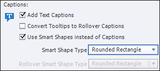
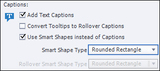
If you'd like to use Smart Shapes instead of Text Captions during the Software Simulation recording process, open Captivate's Preferences dialog box (Edit menu if you're using Windows; Adobe Captivate menu if you're using a Macintosh).From the Recording group at the left side of the dialog box, select Modes. Finally, for each mode you'd like to use, enable Add Text Captions and Use Smart Shapes instead of Captions. You can select the type of Smart Shape you want to use via the Smart Shape Type drop-down menu. When you record your next Software Simulation, the standard Text Captions will automatically be replaced with Smart Shapes.
As I mentioned above, you can also use Smart Shapes instead of standard captions when adding Hint, Success, and Failure captions. It's a simple set up (assuming you're using Adobe Captivate 8.1), reopen the Preferences dialog box. From the Category list, select Defaults. Lastly, from the General area, select Use Smart-Shapes for SFH Captions instead of Text Captions.
The next time you enable Hint, Success, or Failure captions for an interactive object (via the Properties Inspector), the feedback captions will automatically be Smart Shapes. If you'd like to change the shape of the Smart Shape, it's a simple matter of selecting the shape and, on the Properties Inspector, using the Basic drop-down menu.
***
If you'd like to learn more about eLearning, come hang out in my next eLearning basics mini course. And if you'd like to learn more Captivate, Presenter, or Storyline, we've got a great collection of live, online classes for you.
Icon Logic Blogs
.
Blog
.
<span class='date ' tip=''><i class='icon-time'></i> Jul 14, 2015 01:28pm</span>
|