Blogs
|
by Kevin Siegel
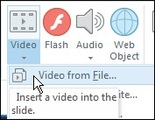
You can easily insert videos into Storyline from just about any video format. All you need to do is click the Insert tab on the Ribbon. From the Media group, click Video drop-down menu and choose Video From File.
I was working on a project recently and inserted a video onto one of my Storyline slides using the step above. Upon previewing the slide, I saw that a portion of the video needed to be trimmed. Fortunately, trimming a portion of a video is just as easy as inserting a video... and you don't have to leave the Storyline application.
First, select the video on the slide. Next, click the Video Tools Options tab on the Ribbon.
At the left of the Ribbon, click Edit Video to open the Articulate Video Editor.
Once you're in the Video Editor, click Trim.
By default, the first and last half-second of the video is selected for Trimming. All that you need to do now is extend or reduce the Trim Start and/or Trim End markers as needed to specify the areas of the video that need to be trimmed.
When you're done, click Save & Close and the video is trimmed. It can't get much easier than that.
***
If you'd like to learn more about eLearning, come hang out in my next eLearning basics mini course. And if you'd like to learn more Adobe Captivate, Adobe Presenter, or Articulate Storyline, we've got a great collection of live, online classes for you.
Icon Logic Blogs
.
Blog
.
<span class='date ' tip=''><i class='icon-time'></i> Jul 14, 2015 01:27pm</span>
|
|
View and download the webinar slides. View the webinar recording. Closing the Employee Skills Gap: A Framework for Future Success | Webinar 11.20.14 from BizLibrary Try out BizLibrary's Online Library! BizLibrary provides 7,000+ training videos and eLearning courses in various business training topics, with new courses added every day. Closing the Skills Gap: a Framework for Future Success In this eBook, we will ignore the political and social static that dominates a lot of the conversation about "skills gap." What we want to do instead is focus on the data about where organizations are struggling to find talent, and then offer some practical advice, best practices, and tips to help find or nurture talent to fill both current and future skill gaps. BizLibrary's Mobile Learning App meets the needs of today's digital learners. Employees no longer wait for training departments to push learning content to them. Employees are used to pulling information to themselves, when they need it, on their own terms and conditions, and on their own devices.
Chris Osborn
.
Blog
.
<span class='date ' tip=''><i class='icon-time'></i> Jul 14, 2015 01:26pm</span>
|
|
I've been getting more and more messages these days that are asking me to take a look at a particular product or service. I wish I had time to look at all these great things, but I find that I have to be pretty selective about where I will spend my time. I have a tendency to talk about things that are a little less bleeding edge than some other bloggers. I want to see that they are proven in the market somewhere before I'm generally going to jump on them. So, I may be a little harder to convince to review something - although I'm sure that most bloggers do very similar filtering. So I thought it would be worthwhile to post on how I evaluate whether I'm going to spend time on a request to look at a particular product or service offering. I have a tendency to get a bit of push-back on these types of posts: Profile Photos, Profile Photo, Questions Before You Ask. Yes, I'm exposing bias here. Yes I'm making a snap judgment about how much time I'm going to spend. You have to do this in life. The amount of time I will spend relates to a variety of factors … What's your position/role? I generally will spend a lot more time with people at the top of this list than people at the bottom of the list. Possible Client Entrepreneur / CEO Chief Marketing Officer / VP Marketing / Product Management Business Development / Sales PR Person at Company PR Person at PR Firm Of course I'm going to spend time with someone who I believe is legitimately a potential client. I'm also more willing to spend time talking to key players in a company. Once you get to someone who likely is motivated and compensated for purely getting the word out through any and all means, it becomes more of a one-way relationship. That doesn't mean I won't engage with a PR person, but I'm much more likely to ignore a classic PR-driven request. Corollary: PR Firms have a lower probability of success in blogger outreach. Are you engaged in social media? I'm not sure when this started happening to me, but I look at things like: Do you have a blog? Is it a marketing only blog? Or an interesting blog? Are you a thoughtful person with some interesting discussions on your blog? Do you have a LinkedIn profile? What's your background? I get so much value from my blog relationships and social network relationships. If it appears you are going to be a good blog connection or LinkedIn Connection, I'm naturally going to be more interested in engaging in a conversation with you. Corollaries: Blog before you do blogger outreach. Engage with social media before you do social media outreach. Interesting Product / Service Let's assume that you are a person in a PR firm representing a client with no blog and you don't have a LinkedIn profile (not sure why you wouldn't). Is there a chance that I will spend time looking at your product / service? Yes, but you are going to need to spend some time to be in position to get me to spend time. You have spent time figuring out how this product / service is different / interesting in the market place. Your message to me should indicate some real thought. You know that there are five types of competitors in the market and here's where this product fits into that. Add value with your research. Take a look at Questions Before You Ask. The percentage of PR people who really do this is very small because they don't really understand the domain and thus can't really engage in a more interesting conversation with a blogger. You've looked at my blog and know who I am and some things I've written about before that relate to your product. I likely have talked about stuff in your domain. Otherwise, it may not make sense for me to blog about your product / service. So, how about reminding me of that, but adding some thoughtful information about how the product / service is interesting. Corollary: Do your homework. Nothing New Here The reality is that this really is nothing new. Using the Browse My Stuff site B2B Marketing Zone, I found some interesting articles on Blogger Outreach: PR and Blogging Outreach: Practical Tips 8 Tips about Blogging Outreach: 1. Bloggers are not journalists 2. Read the blog first 3. Develop a relationship Don't pitch, get "coverage" and then leave. It's like getting ready for a hot first date and being taken to a McDonald's for dinner. When you start corresponding with the blogger, maintain the relationship. 4. Be Transparent 5. Customize your emails 6. Grammar and spelling do count 7. Don't disregard the smaller bloggers 8. Read Naked Conversations: How Blogs are Changing the Way Businesses Talk with Customers by Robert Scoble and Shel Israel. At least read the the section about "Blogging Wrong & Right." My Top 5 Blogging Outreach Mistakes Number 5: Oops - I thought that was MISS Blogger, not MISTER Blogger Number 4: Spellcheck is a wonderful technology…when you USE it Number 3: I’m not stalking you honestly. Could you just puhleeze respond to me? Number 2: Sorry - didn’t realize you just wrote about this… yesterday! And the number 1 mistake that I’ve made pitching a blogger: Who cares about YOUR interests, it’s all about ME Blogger Outreach for PR - Worst Practices 1. Just send a press release. 2. Act like you expect coverage. 3. Send exactly the same message two (or more) times. 4. Promise something you can't deliver. 5. Don't acknowledge return correspondence. 6. Don't acknowledge coverage. If you want more you can go to: Pitching Bloggers Blogger Outreach for PR: The Importance of Follow-Up How Not to Pitch a Blog eLearning Technology
Subscribe to the Best of eLearning Learning for updates from this blog and other eLearning blogs.
Tony Karrer
.
Blog
.
<span class='date ' tip=''><i class='icon-time'></i> Jul 14, 2015 01:26pm</span>
|
|
by Willam van Weelden
I have previously taught you how to embed YouTube videos in a RoboHelp project. While immensely popular, YouTube is not the only video site. This week, let's focus on embedding videos located on the Vimeo website.
First, access the Vimeo site, locate the video you'd like to use, and then click the Share button located on the video.
Next, go to the Embed field and copy the embed code.
Now that you've got the embed code copied, the rest of the work occurs in RoboHelp. Go ahead and open a RoboHelp topic, switch to HTML mode, and then paste the embed code in the topic as shown below.
Lastly, you'll need to edit the HTML just a bit. In the src attribute, type http: in front of the url.
Save the topic, generate the layout, and open the topic in your browser to see the embedded video.
Note: Vimeo includes a hyperlink with a description below the video. Retain this link unless you have the correct license for removing it.
***
Looking to learn RoboHelp? We offer a live, two-day online RoboHelp class once a month. Feel free to contact us to learn other ways to meet your RoboHelp training requirements.
Icon Logic Blogs
.
Blog
.
<span class='date ' tip=''><i class='icon-time'></i> Jul 14, 2015 01:26pm</span>
|
|
This is somewhat last minute notice, but Learn Trends will be having a free online discussion tomorrow on the topic of:Social and Network LearningSocial learning and social networks continue to grow in prominence in corporations, organizations, and universities. The impact of networks, however, remains somewhat misunderstood. How should organizations "restructure" on network principles? How can ROI be calculated? Are networks a superior method of organization learning and development? How can professionals re-create wholeness of understanding in fragmentary conversations and information shared through social networks? What lessons can learning professionals apply from Facebook, Twitter, iPhone applications, and other software and technology trends?Join LearnTrends on June 18th for presentation and discussion on the social, networked learning and organizations. Topics include: ROI of networks, Value Networks, fragmented conversations and sensemaking, and the next stages of social and learning networks in organizations.All sessions will be held online and recordings will be made available after the event.Moderators:What is Social and Network Learning?George Siemens and Tony Karrer - 9:30 AM PacificROI and Social and Network LearningTony Karrer and Will Thalheimer - 10AM Pacific TimeOrganizational Challenges of Social and Network LearningVerna Allee - 11 AM Pacific TimeDave Snowden - Noon Pacific TimeTo attend the event or to be notified about future events, sign up to Learn Trends. eLearning Technology
Subscribe to the Best of eLearning Learning for updates from this blog and other eLearning blogs.
Tony Karrer
.
Blog
.
<span class='date ' tip=''><i class='icon-time'></i> Jul 14, 2015 01:26pm</span>
|
|
Written by Chris Osborn Today's Q&A discusses who decides what skills are promotable, and more importantly how to align those skills with current and future orientations in order to best benefit your organization. Access 7,000+ Employee Training Resources BizLibrary offers 7,000+ training videos in various business training topics, with new courses added every day. How to Measure the Impact of Employee Soft Skills Training We know great "people skills" when we see them or experience them. However, soft skills don’t always lend themselves to easy measurement for excellence. Measure the business impact . . . Well, that’s just not something the ROI and traditional approaches to training investment don’t really help us do very effectively unless we dig deeper. BizLibrary's Mobile Learning App meets the needs of today's digital learners. Employees no longer wait for training departments to push learning content to them. Employees are used to pulling information to themselves, when they need it, on their own terms and conditions, and on their own devices. Video Transcript Hi, Chris Osborn, VP of Marketing with BizLibrary with today's Q&A. Today's question comes from Marilyn, she's an HR director at a financial services company and she wants to know who decides what skills are promotable in the context of succession planning and high potential development programs. Well, Marilyn, the short answer is YOU decide, but the real question, the more challenging question, is HOW do you determine the skills that you're going to need to develop? And you have two orientations. You have current orientation and a future orientation. So by current orientation, I mean what is it you need your organization, you leaders to do TODAY to meet the challenges that you're facing right now. So what are your goals, what is your organization trying to do, so what HAS to happen today? But in terms of succession planning and the development of high-potential employees, the more important orientation is your FUTURE needs, looking ahead. What are we going to need to do to be successful 18, 24 months in the future? And an old-fashioned consultants tool, SWOT analysis, really helps determine what those skills might be. SWOT is an acronym that stands for strengths, weaknesses, opportunities, and threats. So, for strengths: what are the skills that we're going to need to amplify or take advantage of the current strengths our organization have? What skills or competencies do we need to build to minimize the risks associated with our current weaknesses? And then, for the opportunities, what are we going to need to do to be successful in the future? What are the market opportunities? What are new products, what are innovations we can roll out that are really going to help us move ahead and what are the skills that we're going to need to develop in our future leaders to help us take advantage of those opportunities? And then threats, can we meet the next round of threats with the current skillset of our organization or do we need to look at a different set of skills and competencies to adequately meet the threats our organization is going to face? So, who determines the skills that are promotable? You do! But the most important question you have to ask is HOW will you determine those skills? Using an old-fashioned SWOT analysis will help you do that.
Chris Osborn
.
Blog
.
<span class='date ' tip=''><i class='icon-time'></i> Jul 14, 2015 01:26pm</span>
|
|
by Jennie Ruby
Starting off our pet peeves this week are two about fake words. Julie Vails gives us
Anyways. That is not a word!
Anyways is a dialect entry in Webster's. Certainly it does not belong in business writing.
Lisa Blaski calls out
Made-up words--for example making the word "solicit" into "solicitating."
That is a great example of a "back formation." People invent incorrect verbs by working backward from the noun form, in this case, solicitation. Since the noun has that extra syllable in it, they put that syllable into the verb form, or in some cases just make up a verb that does not exist. Here are a couple of others:
Conversate, conversating (from conversation)
commentate (from commentator)
emote (from emotion)
What happens next is that the dictionary writers observe these words and some of them become accepted usage, like curate (from curator).
That extra syllable creeps into some other words as well, such as preventative (should be preventive), but that is not even a back formation from anything!
Stacey Edwards gives us a wordy phrase as a pet peeve:
I frequently see the phrase "in order" added to a description of how to accomplish a particular task. For example, in order to bake a cake, you must have an oven. I cannot think of an example when "in order" actually adds any information or is required for clarity.
And rounding out this week's batch, Mary Gerhardt gives us another example from a regional dialect:
My pet peeve is when people pair the verb need with a past-tense verb, for example, "Those dishes need washed," or "This project needs finished." I respect and appreciate regional dialects, but I cringe when I hear it in a formal business setting or see it in corporate documents. I believe this is just an Iowa phenomenon.
What they are leaving out, of course, is to be.
The hoard continues to grow, and I will keep sharing the peeves. In a few weeks we will try another direction; but for now, stay peeved, my friends, stay peeved.
Icon Logic Blogs
.
Blog
.
<span class='date ' tip=''><i class='icon-time'></i> Jul 14, 2015 01:25pm</span>
|
|
View and download the webinar slides. View the webinar recording. Additional Resources: Status Quo Ebook Measuring Soft Skills Ebook ATD Infographic on Change Agents Try out BizLibrary's Online Library! BizLibrary provides 7,000+ training videos and eLearning courses in various business training topics, with new courses added every day. How to Build a Business Case for Online Employee Training In this eBook, we will identify the 5 steps to building a business case and best practices for delivering impact through training and development. BizLibrary's Mobile Learning App meets the needs of today's digital learners. Employees no longer wait for training departments to push learning content to them. Employees are used to pulling information to themselves, when they need it, on their own terms and conditions, and on their own devices.
Chris Osborn
.
Blog
.
<span class='date ' tip=''><i class='icon-time'></i> Jul 14, 2015 01:25pm</span>
|
|
I am pulling together an online only event for Learn Trends that will occur on July 23. I'm seeking several kinds of panelists who can contribute to the discussion. Please contact me via email: akarrer @ techempower.com if you are interested in being on one of the panels. Or if you know someone who I should recruit.This event focuses on the issues raised in Business of Learning. The event is:Future of the Business of LearningYou can click the link for a bit more detail and to sign up to Learn Trends. The crux of the session is looking at:While training as a publisher of courses and courseware faces an increasingly challenging market, what other things can learning businesses successfully sell to internal or external customers?The session will have several panels looking at different perspectives on these questions.CLOs /VPs Learning from inside medium to large corporations who will discuss:* What new offerings are they selling or trying to sell to internal customers?* What new offerings are they looking to buy to bring into their company?Training CEOs who run companies that sell particular training offerings to corporations* What new offerings are they selling or trying to sell?* What are the key challenges they face in selling these?* Are they moving beyond blended learning to social learning solutions?Software/Services CxOs Vendors who provide other kinds of software or services to corporations* What new offerings are they selling or trying to sell?* What are the key challenges they face in selling these?Industry Analysts and Others* What do they see as being the new kinds of offerings that will get traction in the market?* What should CLOs, training companies and Vendors do to create and sell these offerings?This should be a lively conversation.Roughly scheduled from:9 AM - 1 PM Pacific Time / 4 PM - 8 PM GMTJuly 23 eLearning Technology
Subscribe to the Best of eLearning Learning for updates from this blog and other eLearning blogs.
Tony Karrer
.
Blog
.
<span class='date ' tip=''><i class='icon-time'></i> Jul 14, 2015 01:25pm</span>
|
|
Articulate Storyline is one of the hottest eLearning development tools in the world. We are proud to announce that our newest book, "Articulate Storyline 2: The Essentials" is now shipping.
"Articulate Storyline 2: The Essentials" is a step-by-step workbook that teaches you the top Storyline features and will have you creating interactive eLearning projects in as little as two days.
There are tons of activities supported by a mountain of screen shots. As you work through the lessons, there are challenge exercises (Confidence Checks) that will immediately put your new-found skills to the test and reinforce what you've learned.
You'll use Storyline to create projects from scratch. You'll work with slides, learn how to add text, images, characters, and shapes. There are lessons that will teach you how to add interactivity to your slides via buttons, Triggers, text entry areas, and hotspots. And you'll learn how to create quizzes, and how to publish your eLearning projects for the widest possible audience.
Click here for more information or to order.
Icon Logic Blogs
.
Blog
.
<span class='date ' tip=''><i class='icon-time'></i> Jul 14, 2015 01:25pm</span>
|