Blogs
|
View and download the webinar slides. View the webinar recording. Try out BizLibrary's Online Library! BizLibrary provides 7,000+ training videos and eLearning courses in various business training topics, with new courses added every day. Build, Borrow, or Buy. In this eBook we’ll discuss three options for acquiring content for your employee learning and development program. BizLibrary's Mobile Learning App meets the needs of today's digital learners. Employees no longer wait for training departments to push learning content to them. Employees are used to pulling information to themselves, when they need it, on their own terms and conditions, and on their own devices.
Chris Osborn
.
Blog
.
<span class='date ' tip=''><i class='icon-time'></i> Jul 14, 2015 01:29pm</span>
|
|
In Social Media Conversations, I posted the story of how this post came about. Briefly, I sent Ken Allan the following question: Any thoughts on how deliberative practice relates to becoming something less than an expert. It seems like it should be applicable to all levels of achievement, but everything I'm reading is the study of becoming an expert. Is that just aspirational, or is deliberative practice also studied for quick attainment of proficiency? And he responded with Proficiency and Deliberative Practice. The best way for me to process something like his post, is for me to walk through it and take notes. In this case, I'm going to create a post out of it. Ken starts with some foundation around terms of 'expert' and 'proficient' and it is really a spectrum: all according to where the benchmarks lie for ‘proficient’ and for ‘expert’. Then he gets at the crux of where my question comes from … expert status is more difficult to achieve these days: It is becoming increasingly more difficult for expertise to reach expert level. The matter of change, which can arrive every 6 months to a year, or even more frequently in technology, will limit the efficiency of any aspiring expert in reaching true expert level. This is the reason that I wrote the question. I think of myself as being proficient at learning new subjects quickly, maybe even getting to an expert level at aspects of that. But I'm not an expert in any of these subjects. Jack of all trades. My core questions were: In this time of rapid change, is expertise really the goal anymore? Does Deliberative Practice Lead to Quick Proficiency? Ken landed on the same alternative goal, "quick proficiency" … Here were some of his strategies: identify the required base-knowledge/skills, foster strategies for these to be recognized as key, and provide avenues for their appropriate acquisition and practice cull redundant and/or recursive procedures or procedural loops in workplace routines provide incentive for revisiting and refining/updating key knowledge/skills/procedures (used to be called ‘training’) to clarify current understanding foster a culture where its acceptable to ask questions to do with key knowledge/skills/procedures - in other words, it's OK not to be an expert. Good stuff. It's interesting to see how these relate to and enhance the core elements of Deliberative Practice: Deliberate practice identifies specific, defined elements of performance that need to be improved and works them intently independent of actual performance. Goals are set around each element of performance. Feedback and coaching is continuously available. Deliberative practice is hard, not fun and separated from actual performance. In reading studies on deliberative practice, it's pretty clear that there's a nice body of research showing that this works. And the reality is that likely you've seen this with your kids - think improving soccer skills, study skills, etc. However, do these same elements hold true when we are talking about a world where expertise is not the goal? Where quick proficiency is the goal? Where most people will be in a role for only a few years? Where they need to get up to speed immediately? I'm also trying to figure out how this relates to Work Literacy. I believe that some of the methods described in the Tool Set series are actually part of a core set of work skills where concept workers should develop expert level. However, even there, with the rapid change in these tools and methods, rapid proficiency might be a better goal. And the use of these work skills are often about rapid proficiency or leveraging the expertise of others to act like an expert. I don't expect that there's a simple answer to any of this and the great thing about social media conversations is that they can take their time. I hope you will contribute your thoughts to this conversation. eLearning Technology
Browse eLearning Content
Tony Karrer
.
Blog
.
<span class='date ' tip=''><i class='icon-time'></i> Jul 14, 2015 01:29pm</span>
|
|
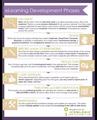
Curious about how to get started with eLearning? Need to explain the process to a new client? Keep this chart handy. (Click the image below to view larger and save.)
Feeling inspired? Check out our Getting Started with eLearning course.
Icon Logic Blogs
.
Blog
.
<span class='date ' tip=''><i class='icon-time'></i> Jul 14, 2015 01:29pm</span>
|
|
This week's interesting finds from across the web. Curated by Jessica Petry @JessLPetry 5 ENGAGEMENT SURVEY QUESTIONS MILLENNIAL EMPLOYEES CRAVE via QuantumWorkplace.com Let’s talk about millennials in the workplace. [Sigh] As a millennial in the workplace myself…I’m tired of hearing about millennials in the workplace. Articles, blogs, and research studies that claim to have "figured out" my generation filter into my inbox everyday. [Insert eye roll] But for whatever reason, a few key pieces managed to capture my attention, and I read up on the topic. And because I absolutely hate the fact that I’ve been sorted into a stereotypical bucket based on the year I was born (and because just like everyone else—I think I’m unique), I cringe when I write the following: the findings aren’t completely off base. Why you should be interested? If there an HR - Learning - Talent Management blogging popularity contest millennials and employee engagement would win. This articles combines them both! The article not only gives you five clear questions to include in engagement surveys, but also provides the added bonus of how to take action. WHAT WILL MILLENNIAL MANAGERS EXPECT FROM HR? via TalentCulture.com The challenges of recruiting and retaining Millennials have been well-documented. They’re demanding. If they don’t find meaning in their work, they’ll go someplace else. They expect flexibility in how they do their job. To hear many recruiters, managers and HR professionals tell it, Millennials are an exceptionally challenging generation of employees. Now they’re becoming managers, and that could pose new challenges to HR organizations that have already struggled with Gen Y’s approach to work. For example, citing a study by EY, USAToday says that Millennial managers are often seen as entitled and don’t score well as team players. Why you should be interested? Gen Y employees now make up about a third of the workforce, more and more are moving into management roles. Some of them are managing employees that are older than them. It can be a real source of conflict in the workplace. By understanding what influences, pressures and expectations millennials may bring to their new roles we can help increase "generational intelligence." HOW TO GET MILLENNIALS TO WORK AT YOUR WORKPLACE via Human Capital Media Industries like construction and manufacturing are booming, but workers are lacking. Here’s how to get top millennial talent on board in your industry. Why you should be interested? A lot is said about the SKILL GAP in America, but what's really being done about it. I love the ideas shared in this video. If you work for an organization in manufacturing, construction or heavy industry then this is a reality for you. Stay curious and keep learning. Jessica Petry is a Senior Marketing Specialist at BizLibrary. LinkedIn Twitter About.me Scoop.it Try out BizLibrary's Online Library! BizLibrary provides 7,000+ training videos and eLearning courses in various business training topics, with new courses added every day. The Career Journey and Learning Across Generations Download this eBook for practical tips for developing employees at early career, mid-career and late career. BizLibrary's Mobile Learning App meets the needs of today's digital learners. Employees no longer wait for training departments to push learning content to them. Employees are used to pulling information to themselves, when they need it, on their own terms and conditions, and on their own devices.
Chris Osborn
.
Blog
.
<span class='date ' tip=''><i class='icon-time'></i> Jul 14, 2015 01:29pm</span>
|
|
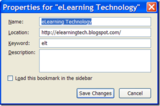
I had asked in Blog Post Updates - Effective Pattern? how to update a previous post. I'm still not sure I have the answer. I wanted to add something to Browser Keyboard Shortcut Basics. Since the title of the previous post is a bit different, I'm going to create a new post that is just about this one thing and then I guess I'll cross link. By the way, if you are not sure what Ctrl+T does, then go visit the previous post. Firefox allows you to add a "Keyword" to any bookmark. This becomes a string you can type in the address bar in order to launch that bookmark. For any of your common bookmarks, it's worth your time to set keywords so that you can launch it in a new tab without having to click on anything. Ctrl+T elt<enter> Opens the page. Internet Explorer offers a similar capability with hot keys. eLearning Technology
Browse eLearning Content
Tony Karrer
.
Blog
.
<span class='date ' tip=''><i class='icon-time'></i> Jul 14, 2015 01:29pm</span>
|
|
by Kevin Siegel
Buttons are the most common form of interactivity that you'll find in just about any Storyline project. Using Triggers, you can control what happens should the learner successfully click a button (such as Go to the next slide or Show Layers).
Over the next few weeks I'm going to teach you how easy it is to add buttons to any Storyline slide, how to add Triggers, and how to control Button states.
Add a Button to a Slide
Open or create a Storyline project and then open a slide.
Select the Insert tab on the Ribbon.
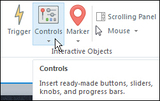
From the Interactive Objects group, select Controls and then select Button 1.
Draw a button on the slide as you would any shape.
Label and Name a Button
With the button you just drew selected, label the button by typing directly into the button. (The text should be short and sweet and clearly indicate the button's action to the learner.)
On the Timeline, double-click the name Button1 and give the button a common-sense name. (In the image below, I'm working on a slide containing multiple buttons. Each has been labeled and named.)The Label will be seen by your learners when they work through your lesson. The Name is never seen by the learner and serves as a development tool for you when you begin working with Triggers. Note: If you are not happy with the appearance of the button, you can always change the way a button looks just like any other shape in Storyline.
Add a Trigger to a Button
When you add a button to a slide, it's begging to do something... anything. You can add a Trigger to a button easily via the Triggers panel. The Trigger can result in any number of actions. For instance, a Trigger can jump a learner to a different slide, open a web page, show or hide a layer, or change the state of an object.
On the Triggers panel, click Create a new trigger to open the Trigger Wizard.
From within the Trigger Wizard, select the desired options. In the image below, I wanted a Continue button that I added to the slide to take the learner to the next slide when the button is clicked. I selected Jump to slide as the Action, next slide as the Slide, User clicks for When, and the slide's Continue button as the Object.If you're thinking that the Trigger Wizard looks overly simplistic based on the image above, you'd be correct. However, looks are often very deceiving in Storyline. As you experiment with different actions from the Actions drop-down menu, I think you'll be surprised by how much the options in the Trigger Wizard change to support the selected Action. The Wizard is actually very flexible and powerful and allows you to create some very complex interactions.
Next time: Button States.
***If you'd like to learn more about eLearning, come hang out in my next eLearning basics mini course. And if you'd like to learn more Captivate, Presenter, or Storyline, we've got a great collection of live, online classes for you.
Icon Logic Blogs
.
Blog
.
<span class='date ' tip=''><i class='icon-time'></i> Jul 14, 2015 01:29pm</span>
|
|
Written by Chris Osborn Today's Q&A Wednesday discusses what situations you should, and shouldn't, need an HR rep around for. Access 7,000+ Employee Training Resources BizLibrary offers 7,000+ training videos in various business training topics, with new courses added every day. Got Content? In this eBook we discuss how to decide what’s right for your employees and organization, how to incorporate off-the-shelf learning resources into an effective employee learning strategy, and how to find the right off-the-shelf solution for your organization.. BizLibrary's Mobile Learning App meets the needs of today's digital learners. Employees no longer wait for training departments to push learning content to them. Employees are used to pulling information to themselves, when they need it, on their own terms and conditions, and on their own devices. Video Transcript Hi, Chris Osborn, VP of Marketing at BizLibrary with today's Q&A. Sarah is an HR manager at a large non-profit and she wants to know if an HR rep should always be present when managers have difficult conversations with employees. Well, the short answer is no, but it does make sense. So let's start with a few considerations as you think through when your HR team should be involved with your managers. First, ask yourself if there's an adverse job action at stake. Is this about a suspension, a termination, a pay cut, some disciplinary action that's got to be written up and recorded in case you have to take an adverse action even later. In that situation, it makes a lot of sense to have HR there to guide the manager through the conversation, really regardless of the experience level of the manager. So that's one situation that does make sense. However, if the subject of the meeting is coaching for performance improvement, probably no. Something much more involved, like a corrective action might be involved, but if it's just a coaching conversation probably not. The other factors you need to consider in the coaching situation, in fact, if it's going to be related to improved performance: what's the employee/manager relationship like? Is it a trusting relationship? Is the employee going to be rational or going to respond emotionally or in a volatile way? In those situations, it might be good to have another person present. And last, but not least, the most important factor in all of this has to do with the skill and experience of your manager as a coach. If the manager has good coaching skills, good communication skills, is adept at handling complex situations, you're far more likely to let the manager handle those meetings on their own. So, does HR have to be present every time you have a difficult conversation with an employee? No, but there are certain circumstances where it makes sense for everybody's benefit.
Chris Osborn
.
Blog
.
<span class='date ' tip=''><i class='icon-time'></i> Jul 14, 2015 01:29pm</span>
|
|
I've been really enjoying the discussion around Does Deliberative Practice Lead to Quick Proficiency? One of the interesting points raised via the discussion: If you can get an expert level answer by asking for help through social networks how does that compare to being an expert? I regularly use LinkedIn for Finding Expertise and Searching for Expertise - LinkedIn Answers. I will have conversations with people who are experts in their area and get their answers and even ask them about other answers I'm getting. I just did this to get help with an upcoming presentation about the use of Web 2.0 Tools inside insurance companies with fantastic results. Granted you need a base level of knowledge to understand what you are getting, but you certainly don't need to be a true expert. Side note: Are you reading this and not currently linked to me on LinkedIn - please read: My LinkedIn Connection Approach. Now consider how we Evaluate the Performance of Concept Workers by looking at signals such as: Process - They went through a reasonable process to arrive at their conclusions. Reasonable - Their conclusions are reasonable in your opinion (if you can formulate one). Compare - If you took what they did and compared it to what you would expect from other similar performers, would they have arrived at the same result. This raises the question: By going to outside experts with the appropriate base knowledge doesn't that constitute a good answer based on this criteria? In fact, Sue Waters said in a comment that being a Connector (well connected and knowing how to leverage those connections) is really what it's all about: I don't need to know the answers because my personal learning network is so extensive, and extremely diverse, that I know who can help me with the answer. This also means I can normally get them answered before most people can. Which means people also turn to me because they know 1) I will help them find the answer 2) they know I will be able to find it quickly. Sue does caution us: It is a huge danger that people are confusing online presence with being an expert. The other danger is to take online information at face value without questioning if the information is true. I would point out that the first danger is akin to the danger of confusing confidence with expertise. That happens all the time and is made even harder by the fact that confidence level about answers is inversely proportional to expertise (see Vic's comment in Social Media Conversations). Similarly, just because you find someone everywhere online doesn't mean they are an expert. And certainly, you can't just talk to one person or read one blog post and assume you have an answer to anything. It's always more complex than that. I believe there's really something here in terms of Leveraging Networks is Key Skill that allows us to get expert level answers via social networks. This is the most important Knowledge Worker Skill Gap. And it makes a lot of the discussion around Network Feedback, Using Social Media to Find Answers to Questions, Learning through Conversation very important topics. I welcome your thoughts. eLearning Technology
Browse eLearning Content
Tony Karrer
.
Blog
.
<span class='date ' tip=''><i class='icon-time'></i> Jul 14, 2015 01:28pm</span>
|
|
by Jennie Ruby
I'm not sure it's the best of luck to start the New Year peeved, but when it's a grammar pet peeve, I cannot resist. Here are two pet peeves from Laura Gillenwater, both of which I end up covering in every writing class:
Two of my current pet peeves are the misuse/overuse of the word "utilize," instead of "use" and the word "impact," instead of "affect" or "effect" (depending on whether "impact" is being used as a verb or noun).
Let's start with the first one: You are so right, Laura! Using the word utilize is overkill when the word use will do just fine. Although the dictionary does indicate that utilize is a synonym for use, utilize does have a more specific meaning that goes beyond the plainer verb use: you utilize something that was previously going to waste or not being used for the purpose you now propose. A sentence like this would be a specific place where utilize is more specific than use:
Why don't we utilize some of the empty classrooms as offices?
Here is an example where use is definitely better:
We used three reams of paper to print the phone directory.
On the word impact, however, I like to allude to the impact wars of the late 1980s. Sorry, Laura, but those of us insisting that impact is a noun, not a verb, long ago lost that fight. Webster's dictionary now lists impact as both a verb and a noun and has done so for at least 15 years. Not that many of us in the writing and editing business don't still protest that decision. When I double-checked Webster's just now, I saw a comment by a reader complaining that impact should be used only as a noun.
Yep, many of us are still bitter over this. But we lost. Webster's is a widely respected dictionary, but it is descriptive, rather than prescriptive. That means it tries to reflect how people are actually using a word, rather than how people should use a word. And right now, Webster's solidly supports impact as a verb. Sigh.
Nevertheless, I could not agree more with Laura's opinion here:
It's "business-ese" stuff like this that really annoys me. If people would just write more naturally, more like they talk (but with correct grammar), most of their writing would really be much better.
Michael Stein adds a new category to the pet peeves parade:
Two pronunciation pet peeves: Saying mute when you mean moot. Pronouncing the t in often.
Post your pet peeves below. I've got a bunch more stored up, and now we have the new category to add to: pronunciation.
***
If you love Jennie's articles, you'll love her classes. Check out some of Jennie's mini courses.
Icon Logic Blogs
.
Blog
.
<span class='date ' tip=''><i class='icon-time'></i> Jul 14, 2015 01:28pm</span>
|
|
View and download the webinar slides. View the webinar recording. Try out BizLibrary's Online Library! BizLibrary provides 7,000+ training videos and eLearning courses in various business training topics, with new courses added every day. Creating a Competency-Based Training Program: A How-To Guide In this eBook we’ll discuss a straightforward seven-step process any organization can use to implement a CBT starting today. BizLibrary's Mobile Learning App meets the needs of today's digital learners. Employees no longer wait for training departments to push learning content to them. Employees are used to pulling information to themselves, when they need it, on their own terms and conditions, and on their own devices.
Chris Osborn
.
Blog
.
<span class='date ' tip=''><i class='icon-time'></i> Jul 14, 2015 01:28pm</span>
|