Blogs
|
The Great Recession of 2008 through 2010, devastated more than our economy. The cost in shattered lives and destroyed careers is still affecting millions of people who remain under employed, out of work or who have just simply left the job market all together. At the height of this economic cataclysm, I worked in the career coaching and outplacement industry and observed first-hand the impact of the recession on people and their careers. What I saw, and sadly, what I continue to see repeated by many professionals are some fundamental mistakes in career management that can help mitigate the impact of economic disruption. No person is immune or 100% safe from the vagaries of economic uncertainty. But job losses were lower for more educated workers, and the total income losses have been lower for educated workers, too. However, even highly educated, skilled professionals felt the impact of layoffs, reduced hours, lower wages and the loss of benefits. The bad news in all of this seems overwhelming, and for many job seekers and underemployed and long-term unemployed people the career news has been nothing but bad for five or six years now. We don’t have to simply accept things as they are. We have choices. Each person can take control over their career, and by making an affirmative choice to take control; each person can become less dependent on the whims of a volatile and uncertain job market. During the Recession, I worked with hundreds of people who lost their jobs. What I observed in my outplacement clients, were three broad categories of professionals with different responses to their laid off status: Professionals who found jobs quickly, Professionals who did not find jobs during my coaching work with them (up to 6 months) despite best efforts, Professionals who did not really make a concerted effort to find new work. What I learned very quickly was that there was a radical difference between the approaches to career management between people who found new jobs quickly - even in a very difficult economy - and those that viewed the situation as hopeless or were not successful. Here are the differences I observed: 1. Ownership. It’s very easy to hand control of our careers to our employers. Most of us do exactly that, but it’s also a big mistake. We each own our careers, so handing or conceding control to somebody else is a major mistake. By ownership I mean taking responsibility for keeping skills and knowledge current and up-to-date, keeping networks (both virtual and analog or in-person) vibrant and alive, keeping abreast of developments in a chosen field, and keeping resumes up-to-date. (Have you looked at online resumes lately?) It’s not that we are always "on the prowl" for a job, but we should be reviewing our accomplishments regularly and making sure we have career accomplishments we can point to with a sense of pride each year or so. My coaching clients that took ownership in most of these ways had success finding new jobs quickly, even in the face of a terrible economy and job market. Their skills were current and they knew what was going on in their chosen field and they knew which organizations in their area (geographic or industrial) might be expanding or hiring. They also had a network they were already using, so it was east to tap into it quickly to gain insights into potential openings and they could move quickly. In stark contrast to these successful professionals, were people who appeared to feel comfortable in their jobs. They might have worked in the same job or company for ten or fifteen years, and they’d developed a sense of complacency. So they did not stay current with technology and developments either in their field or industry, because they did not see the need to do so. Another massive setback for many of these professionals was their slow adoption of social media as a networking tool. A failure to keep current on skills and developments in their chosen field and a failure to keep current with broader technology seemed to go hand-in-hand for most of the less successful job search clients. This linkage was NOT uniform, but was common enough to merit calling it a clear trend or indicator. Some professionals came to their job search not knowing much about social media or social networking, but they learned quickly. Many of these professionals found jobs or had a lot of success finding opportunities. What was even more important, in my opinion, is that they set the stage for the next important differentiator between long-term career success and stagnation. 2. Dedication to Continuous Learning. Professionals who think they are "playing it safe" by sitting back on their current career credentials are actually taking massive risks. The status quo will not prepare professionals in any field for future success. Name a single professional function that requires the same body of knowledge and skill set today as it did five years ago? Technology advances alone account for huge changes in the ways in which we work, communicate and interact. Technology literacy is nearly the price of admission for many professions today, and that doesn’t even scratch the surface of changes in professions dominated by jobs or job families that didn’t exist five or six years ago like big data science, digital marketing or cloud computing to name just three. For professionals to survive in this type of world, we all need a renewed commitment to personal and professional development as a part of our dedication to continuous learning. It’s no longer a luxury, it’s a career necessity. 3. Networks as a Valuable Career Resource. I like to meet new people. I freely admit it. During the Great Recession, I met a lot of people who told me over and over, "Networking is easy for you; you like to talk to people." But what many job seekers do not understand is that the trick to networking is to stop networking. That’s right. Stop. Networking as we’ve traditionally thought about it sucks. It always has and it always will. You have to think about networking and a network as a career asset, not a job search asset. If the only time you hear from somebody is when he or she needs something from you or are looking for a job, what is the completely normal and natural reaction? It’s usually not very flattering or helpful, is it? There is a saying I’ve seen that goes - if you’re waiting until you need a network to build one, you’re too late. That is entirely correct. Networking as means to build a career resource requires active participation with your connections to ask and answer questions, offer assistance, make connections, provide expertise and work towards building and establishing your professional brand. "Networking" in this manner is not a passive activity. When treated like this, your network becomes a place, tool and resource to help foster career growth. Your network is vital to career health and success, and this is a place where you can turn for advice, counsel and answers to difficult questions. Likewise, since you are an active member of your network, your connections view you as a trusted resource and come to you for answers and help. An approach like this to professional networking certainly doesn’t sound like "networking your way to a job." It’s this perspective and treatment of your network that turns a network into a true career resource. CONCLUSION It’s your career. Own it, and own all that comes with it. A career is your most important and valuable asset. Treat your career like that, and your career will take on a new and different shape. Nobody else will ever look out for your best career interests as well as you. Be responsible for your own career growth, skill development and knowledge base. Last, but not least, maintain an active and vibrant professional network that is built upon the value you bring not upon things you need. When you can look at your career with confidence that this type of approach brings, you will no longer be under any other person’s control for your livelihood. You will claim true ownership of your own career, and that is a valuable lesson learned for all of us from the Great Recession. Chris Osborn is the Vice President of Marketing at BizLibrary. LinkedIn Twitter Try out BizLibrary's Online Library! BizLibrary provides 7,000+ training videos and eLearning courses in various business training topics, with new courses added every day. 30+ free training and development resources curated from ALIGN 2014 Download presentations, handouts and more from BizLibrary's annual Client Conference. BizLibrary's Mobile Learning App meets the needs of today's digital learners. Employees no longer wait for training departments to push learning content to them. Employees are used to pulling information to themselves, when they need it, on their own terms and conditions, and on their own devices.
Chris Osborn
.
Blog
.
<span class='date ' tip=''><i class='icon-time'></i> Jul 14, 2015 01:31pm</span>
|
|
In Learning, Extended Brain and Topic Hubs, I talked about the story behind the launch of Speaking Pro Central. While I've been speaking and conducting workshops for quite a while, I've never really treated this aspect of my professional life … well professionally. So, this post (and since Blogger only allows posts) represents a first step. For subscribers, I apologize - you only will see this once and then it becomes a fixture on the site that I can update. Dr. Tony Karrer is an expert on innovative uses of technology that improves human performance and drive business results. Tony educates individuals, businesses and organizations on social media, web 2.0 tools and the associated methods and skills. Considering that he's a Ph.D. in Computer Science, Tony's speaking style is energetic, personal, and funny (sometimes intentionally). Tony personalizes every presentation to make sure that it addresses the specific needs of the audience and is adept at adjusting during presentations to ensure that the audience is understanding and getting value. He is author of the award-winning eLearning Technology blog, founder of Work Literacy, and creator of eLearning Learning. Dr. Karrer’s experience is diverse including founding CTO of eHarmony, associate professor of Computer Science, and consultant to Credit Suisse, Citibank, Lexus, Microsoft, Nissan, Universal, IBM, Hewlett-Packard, Sun, Symbol Technologies and many others. He was valedictorian and attended USC as a Tau Beta Pi fellow, one of the top 30 engineers in the U.S. where he received a M.S. and Ph.D. in Computer Science. Email Tony for his speaking fee information (akarrer@techempower.com). Speaking and Workshop Topics Tony can speak on a wide variety of topics, but here are a few recent topics that might spark ideas. eLearning 2.0 Work Literacy Learning 2.0 - Changes in Workplace Learning Learning 2.0 - Practical Applications for Organizations Social Media for Consultants Tapping the Social Grid Getting Traffic Through Social Media B2B Lead Generation Via Social Media Long Tail Search Engine Optimization Social Networks for Business Generation Recent Presentations and Workshops Tony presents, moderates and does workshops at a wide range of association, professional, corporate and organization events as well as online events. Here are some examples of types of recent presentations and workshops. ASTD TechKnowledge Keynote Institute of Management Consultants ASTD Chapter Meetings ASTD Workshops ISPI Chapter Meetings Technology Council eLearning Guild Harvard Business School UCLA Entrepreneurs Conference Cal Tech Entrepreneurial Forum Keynotes and Workshops at Vendor Conferences Keynotes and Workshops at Corporate Conferences Vendor Webinars Testimonials "I have known and worked with Tony since the early 90's, and he has delivered a number of very popular presentations and wrap-up sessions at conferences my colleagues and I have produced." William Brandon, eLearning Guild "I wanted to thank you for the clear, fun and insightful information. Its good to hear of the solid business and learning applications for these technologies." Director of Learning, WellPoint Tony gets great reviews from his presentations and workshops. Here's a few of the evaluation comments from a recent one: Awesome!! Enjoyed being able to see live examples. Benefited from the barriers + work around discussion Tony did a great job of providing an overview of various tools available. Nice job! Excellent thorough, relevant & engaging! Outstanding!!! Tony is a great evangelist for web 2.0 - I’m pumped to use more Excellent! Loved the way he started by gaining and understanding of current knowledge of audience Great applicable knowledge to be applied Tony is awesome…time well spent. Thank you! Great case study application to process and think about application of ideas! Now feel much better informed and confident to implement social tools in my organization, feel like the unknown has been "exposed" and best practices can be implemented Outstanding!! Wow! Opportunities Schedule Tony to speak at your event by emailing akarrer@techempower.com eLearning Technology
Browse eLearning Content
Tony Karrer
.
Blog
.
<span class='date ' tip=''><i class='icon-time'></i> Jul 14, 2015 01:31pm</span>
|
|
by Jennie Ruby
Thank you to all those who sent in grammar pet peeves! I'll talk about them here over the next few weeks.
First, Ann Ray brings us premise versus premises.
A premise is a basis for an argument:
I see his point, but I have to question his premise that municipalities should do all trash collection for free.
In the plural form, premises can mean multiple bases for an argument, or premises can mean a building and its grounds. This latter use comes from legal documents in which the location is identified in the "preliminary and explanatory" section of a deed or other real estate document (Webster's). It should always be used as plural, and a very strong usage tradition has this word always appearing in the phrase "on the premises." Weirdly, I usually hear this pronounced "premiss-iss," whereas the plural meaning bases for an argument I usually hear pronounced as "premis-eeze," although there is some crossover.
We can adjust your eyeglasses right here on the premises.
Here are Ann Ray's examples:
A local funeral home advertises that they do cremation on premise.
A huge telecom company writes about wiring the premise!
Jim Dages complains that young folks these days say on accident instead of by accident. The whole issue of which preposition goes with a particular word or phrase is utterly one of usage. Usage is basically a feel for or conventions for how people use words in phrases and sentences. I have also heard people in my kids' generation say "on accident." I don't know where it came from, and I failed to cure any of them of it.
***
If you love Jennie's articles, you'll love her classes. Check out some of Jennie's mini courses.
Icon Logic Blogs
.
Blog
.
<span class='date ' tip=''><i class='icon-time'></i> Jul 14, 2015 01:30pm</span>
|
|
View and download the webinar slides. View the webinar recording. Try out BizLibrary's Online Library! BizLibrary provides 7,000+ training videos and eLearning courses in various business training topics, with new courses added every day. Closing the Skills Gap In this eBook we’ll discuss how to nurture talent for current and future skills gaps! BizLibrary's Mobile Learning App meets the needs of today's digital learners. Employees no longer wait for training departments to push learning content to them. Employees are used to pulling information to themselves, when they need it, on their own terms and conditions, and on their own devices.
Chris Osborn
.
Blog
.
<span class='date ' tip=''><i class='icon-time'></i> Jul 14, 2015 01:30pm</span>
|
|
Keeping with the theme of creating posts that really shouldn't be posts, but I need to have an appropriate page in my blog, I thought I should take the opportunity to create a page where I can list any and all disclosures about relationships with vendors, people, companies that may appear in my writing or speaking. Editorial Firewall Before I mention these relationships, with any and all companies that I work with in a consulting capacity and who I will discuss in my blog, I include in my contract what I call an editorial firewall clause. That clause says: I have a responsibility to provide unbiased content in my blog, presentations and consulting. All relationships will be disclosed and transparent. All communications in my blog, presentations and consulting will be authentic. In other words, there is no editorial control by anyone over spoken or written statements. There is no offer of editing comments to have a positive slant. I will talk about competitors. Basically, I'm going to say what I'm going to say. You might think that this would be an issue, but I have yet to have any trouble. The reason is that it really doesn't do a vendor any good to have anything but a fair representation of where they fit in the market. What they are good at. When you might use someone else. It's a waste of everyone's time to say anything else. Disclosed Relationships I'm sure this list will grow over time, but the two that I know I should mention are … Adobe - Member of the eLearning Advisory Board - High level discussions with Adobe around product direction. Upside Learning - Advisor discussing product and services direction, positioning and product marketing. If you have any questions, comments or concerns - feel free to email me at: akarrer@techempower.com eLearning Technology
Browse eLearning Content
Tony Karrer
.
Blog
.
<span class='date ' tip=''><i class='icon-time'></i> Jul 14, 2015 01:30pm</span>
|
|
by Megan Pitkin
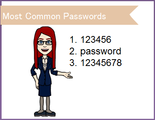
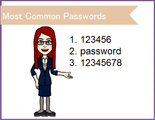
During one of my recent Electronic Medical Records (EMR) classes, a student asked about best practices for creating a password. Many people use the same password for everything (and I mean everything... from accessing Facebook to logging into their online banking account). Believe it or not, passwords are often very easy to guess. In fact, here are the top three most common passwords in use today:Note: The image above features an avatar of Megan. If you'd like to create your own avatar, check out AJ's article.
Given the rampant reports about hacked accounts that have occurred in every industry, a strong password has never been more important. This is especially true in healthcare.
To create more secure passwords:
Use passwords with eight or more characters with characters of mixed types. (Keep in mind that common substitutions for passwords like Med1c1ne are vulnerable and random combinations are difficult to remember, like m%&5Bg$d.)
Use passphrases. Short words with characters or spaces separating are easy to recall. Rather than using common phrases, it is best to use random words as your phrase such a dog walk leash or sing_moon_jump.
Do not use the same combination of username/password for multiple sites.
Ensuring safety and protection for patients by properly creating and protecting passwords is critical. I found it surprising that the FBI's most wanted cyber hacker got arrested the same week this question was asked of me. Why was he caught? His cat's namewas his password.I won't elaborate on why I felt this was ironic, but I do feel it is important to highlight this cautionary tale.
Patient information is precious and should be treated appropriately since healthcare workers are the majority of keepers and the first point of contact for the electronic medical records.Note: If you're finding it difficult to keep track of your passwords (perhaps you're following my advice and you're using different passwords for every site), consider a password manager. PC Magazine has a nice list of some of the top password managers available.
***If you like Megan's articles, you'll love her live, online classes such as Train the EMR Trainer.
Icon Logic Blogs
.
Blog
.
<span class='date ' tip=''><i class='icon-time'></i> Jul 14, 2015 01:29pm</span>
|
|
This week's interesting finds from across the web. Curated by Jessica Petry @JessLPetry HOW TO GET EMPLOYEES TO CARE ABOUT THEIR PROFESSIONAL DEVELOPMENT via FastCompany.com Jim sits in front of his workstation with a grin on his face as he prints off his training certificate. It’s proof that he completed a compulsory four-hour online course on workplace safety; in reality, it only took Jim 18 minutes to click through the videos and pass the assessment with educated guesses. Does this sound familiar? It should. It’s typical of many companies’ approach to professional development, which is scary when you consider that U.S. companies spent more than $70 billion on corporate training in 2013. Why you should be interested? No matter how fantastic your training and development resources are; how easy and simple to use your learning platform is; how supported it is from the "top down," if your employees don't care, then your efforts won't work. This article outlines five great tips for making professional development relevant and useful to all employees. LET'S TALK ABOUT BULLYING via Joel Peterson I have a question for you. Have you witnessed bullying? Maybe you didn't recognize it right away but you've seen it, right? When you were in school, did you see a group of kids teasing another kid uncomfortably? Or as you walked down the street, did you come across two people in a heated exchange in which one of them was overly aggressive? At work, are you aware of a co-worker, manager, or a boss who's always making comments and jokes about another employee in a way that you see makes the employee uncomfortable? Why you should be interested? Workplace bullying is an important topic of discussion and honestly sometimes overlooked. We're moving so fast to keep up with new technology, or our competitors, or market trends, at the cost of what - what about keeping up with the health and well-being of our employees? Estimates suggest that somewhere between 25 and 50% of the workforce has been subject to some form of bullying in the workplace. The state of California just announced a new law that expands California's anti-harassment training law, AB 1825 . Employers must include as part of AB 1825 training information about "abusive conduct." The new law kicks in January 1, 2015. BizLibrary should have new resources to comply with the new law available soon. In the mean time here's preview of an anti-bullying course available now: WHY LEADERS SHOULD FOCUS ON EMPLOYEE INVESTMENT, NOT ENGAGEMENT via switchandshift.com The modern workplace is a collection of new technologies, new business strategies, and new leadership methodologies… and the same staggering number of disengaged employees. What was once an emerging trend is now a full-blown problem that costs US businesses an estimated $450 to $550 billion each year. However, the cost of poor employee engagement is hardly confined to a monetary figure. Disengaged employees are unhappy and unmotivated. They pass on opportunities to develop as professionals, learn new skills, share ideas, and collaborate with teammates. Careers are derailed. Dreams are dissolved. A person’s excitement in being hired by a great company in a role they’ve always desired — which in many cases takes years of hard work and difficult life decisions — can vanish quickly in the face of a demeaning manager or an unresponsive, unappreciative company. Making visible investments in an employee is about acknowledging value, fostering growth, and showing appreciation. Employees want to feel they have value. They want to grow as professionals, and they want to know their hard work is noticed and appreciated. Why you should be interested? Everyone's talking about employee engagement, a lot of the time the conversation immediately goes to ping pong tables, kegs, open work spaces, flexible schedules - which sure they might help on the surface. This article looks at engagement at a deeper level. It's about communicating value, providing and encouraging individual growth and showing appreciation. It's one of the best articles I've read on the topic. Check it out. Stay curious and keep learning. Jessica Petry is a Senior Marketing Specialist at BizLibrary. LinkedIn Twitter About.me Scoop.it Try out BizLibrary's Online Library! BizLibrary provides 7,000+ training videos and eLearning courses in various business training topics, with new courses added every day. 30+ free training and development resources curated from ALIGN 2014 Download presentations, handouts and more from BizLibrary's annual Client Conference. BizLibrary's Mobile Learning App meets the needs of today's digital learners. Employees no longer wait for training departments to push learning content to them. Employees are used to pulling information to themselves, when they need it, on their own terms and conditions, and on their own devices.
Chris Osborn
.
Blog
.
<span class='date ' tip=''><i class='icon-time'></i> Jul 14, 2015 01:29pm</span>
|
|
This post is just a quick reminder of the beauty of interesting new social media conversations and social media relationships. Ken Allan and I have had several interesting exchanges via our blogs and around the eLearning Learning site. I'm not even sure what I would call Ken - it's somewhere in the peer, colleague, friend space. I've never met Ken and I don't think we've had a real-time conversation (apologies to Ken if that's not true). And the list of these kinds of relationships that I have is fairly long. But it's a beautiful relationship with wonderful conversations. As an example, during a recent email exchange, I threw in a question that I had been pondering: Any thoughts on how deliberative practice relates to becoming something less than an expert. It seems like it should be applicable to all levels of achievement, but everything I'm reading is the study of becoming an expert. Is that just aspirational, or is deliberative practice also studied for quick attainment of proficiency? This morning I wake up to find his post: Proficiency and Deliberative Practice. I'm about to go post about that particular topic so I can collect my thoughts on it. But I had to also comment on the beauty of that kind of exchange. And there's this interesting element that it's a public conversation. It's part of the appeal of Twitter - you get to peer into a little snippet of public conversation. Of course, blog conversations can go deeper. And I'm not saying it's an either or. I still like to use the analogy of a huge cocktail party when describing social media. Everyone is standing around and you likely can engage them in really great conversations. But, there are some patterns and norms at cocktail parties and in social media conversations. 95%+ of vendors don't get social media conversations. They believe that sending a press release to a blogger works. Good luck with that. Go ahead and send it, but don't expect results. Think about walking around a cocktail party passing out flyers. Well received? You do need to Spend Time in social media to be able to engage in these conversations. My experience with Browse My Stuff has shown me that most bloggers are quite open and willing to engage. I am quite willing to engage in social media conversations - see Conversation Topics Okay, now onto Ken's post. Thanks Ken! Oh, and it goes without saying that I welcome comments, posts and other social media conversations. eLearning Technology
Browse eLearning Content
Tony Karrer
.
Blog
.
<span class='date ' tip=''><i class='icon-time'></i> Jul 14, 2015 01:29pm</span>
|
|
by Kevin Siegel
Last week I wrote about how you can use Reflector to create software simulations and demonstrations from your mobile device.
I received emails from several people who, having read the article, downloaded Reflector and attempted to create a simulation using Adobe Captivate or Articulate Storyline. While most folks were successful in reflecting the mobile device onto the computer, several people reported that none of the actions they took on the mobile device were captured by the eLearning tool. As I mentioned in last week's article, the reflection of the mobile device you see on the computer is passive; you cannot control the reflection with the computer. Instead, you can simply see what's happening on the mobile device through your computer.During the simulation recording process, if you're creating a software simulation, programs like Captivate and Storyline only capture the screen if you click your mouse (or manually create a screen capture by pressing the appropriate keyboard shortcut). Since you're not clicking anything on your computer (remember, the computer is simply showing you a reflection of the mobile device), neither Captivate nor Storyline will capture anything.Unless...On your computer, start the recording process using Captivate or Storyline. Just prior to performing an action on your mobile device, click the reflection on your computer to create a screen capture. Next, on the mobile device, perform the action. Back on the computer, click the reflection again to create a second screen shot that shows the result of whatever it is you did on the mobile device. Continue this process over and over until you have completed all of the processes you wish to simulate on the mobile device.If clicking over and over again to create a simulation sounds too difficult, all three of the top eLearning development tools (Camtasia Studio, Captivate, and Storyline) excel at creating videos. If you create a video of the reflected mobile device, everything you do on the mobile device is captured because the video isn't creating individual screen shots, it's capturing everything you do without discrimination.
***If you'd like to learn more about eLearning, come hang out in my next eLearning basics mini course. And if you'd like to learn more Captivate, Presenter, or Storyline, we've got a great collection of live, online classes for you.
Icon Logic Blogs
.
Blog
.
<span class='date ' tip=''><i class='icon-time'></i> Jul 14, 2015 01:29pm</span>
|
|
View and download the webinar slides. View the webinar recording. Try out BizLibrary's Online Library! BizLibrary provides 7,000+ training videos and eLearning courses in various business training topics, with new courses added every day. Coaching Skills for Managers and Leaders In this eBook we’ll discuss emerging principles in employee coaching for managers and the objective of coaching in organizations. BizLibrary's Mobile Learning App meets the needs of today's digital learners. Employees no longer wait for training departments to push learning content to them. Employees are used to pulling information to themselves, when they need it, on their own terms and conditions, and on their own devices.
Chris Osborn
.
Blog
.
<span class='date ' tip=''><i class='icon-time'></i> Jul 14, 2015 01:29pm</span>
|