Blogs
|
Written by Chris Osborn Today's Q&A Wednesday discusses the recommended training follow-up intervals. Chris Osborn, VP of Marketing with BizLibrary talks about how traditional interval-based evaluations are giving way to a new method. Access 10,000+ Employee Training Resources BizLibrary offers 10,000+ training videos in various business training topics, with new courses added every day. How to Measure the Impact of Employee Soft Skills Training We know great "people skills" when we see them or experience them. However, soft skills don’t always lend themselves to easy measurement for excellence. Measure the business impact . . . Well, that’s just not something the ROI and traditional approaches to training investment don’t really help us do very effectively unless we dig deeper. BizLibrary's Mobile Learning App meets the needs of today's digital learners. Employees no longer wait for training departments to push learning content to them. Employees are used to pulling information to themselves, when they need it, on their own terms and conditions, and on their own devices. Video Transcript Hi, Chris Osborn, VP of Marketing with BizLibrary. Today's question comes from AJ, and he's an HR director at a creative services firm, and he wants to know whats the recommended time for followup for training or the reevaluation of training and there really is a whole range of thought in this area, so I'm going to give you sort of the standard, traditional way of thinking about it and then I'm going to suggest a new way of thinking about it which we think is really the best practice. Well, first, if you really want to check whether training is stuck or not, it's immediate. You want to find out right away if employees have learned something and you want to find out if employees have learned something that they can apply right away on the job. Sort of think of the Kirkpatrick-Phillips Methodology of measuring the impact of training, sort of levels one and two. And then in intervals of 30 days, after about thirty days after employees have gone through a training course, you might want to evaluate whether their performance has improved and whether they're continuing to apply what they learned. A traditional way to go next would be about 90 days, so three months out, and then another 180 days. Are employees continuing to improve their skills and apply what we've taught them? All of that is pretty traditional, all of that is pretty standard, and when I first entered the training world those were the intervals that I typically used to measure whether the training contents delivered had worked, and that was pretty much standard practice. Well, the problem is we saw a pretty big drop-off in the application of training over those intervals, and ultimately what we've learned since then is that the right interval is everyday. Everyday we need to check and see that our employees are applying what they've been learning, and this is why your managers have to be stakeholders and heavily involved in the training and development of your employees. Your managers are by far the most important factor in the effectiveness of your employee training program. You have to get them involved early on, they have to be involved during the training and after the training so they are a part of what's going on so that every single day you make continuous improvements and learning a part of what's going on in your organization so you don't have to worry about the intervals at which you're measuring the impact of training. It becomes an integral part of your organization where continuous improvement and continuous learning is expected, and it becomes a fabric of your organization, and everyone is invested in ongoing improvement and ongoing learning.
Chris Osborn
.
Blog
.
<span class='date ' tip=''><i class='icon-time'></i> Jul 14, 2015 01:20pm</span>
|
|
by Jen Weaver
As we continue our journey around the world, let's explore some common cultural facts about Poles and their expectations when it comes to training and development.
Test Your Knowledge of Polish Culture
The name "Poland" is a descriptor of the country's geography. Does it mean:
The borderlands?
The hill country?
The flatlands?
True or False? Polish businesspeople often speak German.
True or False? Prussian is also a common language in Poland.
Quick Tips for Training & Development in Poland1:
Poland is a male-dominated society. Female trainers may find it hard to be taken seriously, even though women have been advancing into more predominant roles in recent years.
Polish is the official language, but many businesspeople speak German as well as English. Clarify language preferences before beginning your class. Just because most Poles can understand English does not mean it's the preferred language for training.
Catholicism is a highly predominant religion, with less than two percent of the population identifying with another religion. Approximately ten percent of Poles describe themselves as "nonreligious."
Security is a high priority for Poles, and they are determined to maintain their freedom after a difficult history with both Russia and Germany. As such, Poles tend to prize individualism and the contributions a person can make in larger groups as a whole.
Poland is a hierarchical society, and there is a tendency for decisions to be made at a higher level or by consensus of "privileged" individuals.
Truth is a combination of facts along with subjective feelings and personal relationships. An individual's religious ideologies also often come into play when making decisions.
Business appointments start and end on time.
Many Poles opt to not take a lunch break and to work straight through the day. "Work lunches" are often scheduled for around 4 or 5 p.m., and employees do not go back to work after taking lunch. Keep this in mind and clarify time expectations when determining your class schedule.
A local Polish advocate will go far when establishing new business relationships. Try to identify a champion of your initiative within the company or someone closely associated and respected through corporate connections.
Poles tend to be more soft-spoken than North Americans, and business attire is conservative professional.
Knowledge Answer from Above:
(c) Poland is mostly flat.
True. Not much of a surprise, considering Poland's location along the German border.
False. While once used, Prussian became extinct in the 1700's.
References:
1Morrison, Terri, & Conaway, Wayne A. (2006). Kiss, bow, or shake hands (2nd ed.). Avon: Adams Media.
***
Developing international training and development materials? Contact Jen at Carmazzi Global Solutions. And if you love Jen's articles, check out her new Localization mini courses.
Icon Logic Blogs
.
Blog
.
<span class='date ' tip=''><i class='icon-time'></i> Jul 14, 2015 01:20pm</span>
|
|
Just read an article in the Guardian The long tail of blogging is dying (Found via Donald Clark). But recently - over the past six months - a new trend: fewer blogs with links, and fewer with any contextual comment. Some weeks, apart from the splogs, there would be hardly anything. I didn't think we'd suddenly become dull. He points to backup evidence of this from a NYT article and based on Technorati's 2008 survey of the state of the blogosphere, which found that only 7.4m out of the 133m blogs it tracks had been updated in the past 120 days. As the New York Times put it, "that translates to 95% of blogs being essentially abandoned". I don't doubt that a lot of blogs are started and abandoned. People change their focus. Lives get busy. Blogging definitely takes work. I have a limited view of blogging, but I do get to see quite a bit because of Browse My Stuff. What about eLearning blogs? Because of eLearning Learning, I track eLearning blogs closely. When I go back and look at: More eLearning Bloggers - many of the new bloggers stopped blogging soon after. They had the experience and then stopped. This somewhat supports the Technorati numbers. While there are these abandoned blogs, overall I believe there's been a nice growth of eLearning blogs from a wider variety of sources over the past few years. When I first started blogging in 2006, it seemed like all the bloggers were exactly the same people who spoke at conferences. Now, there are more practitioner blogs . And there are more good quality vendor blogs. I remember asking Product Vendor Blogs - Where are They? Now I find quite a few on eLearning Learning. And the analysts have joined in (Brandon Hall and Bersin have blogs). I'm sure that this will continue to change, but I would question the notion that long tail blogging is dying. Possible Reasons for the Guardian Drop Off Over the past three years, I've certainly noticed that while I read (actually skim dive skim) through a lot of blogs, I find I spend less and less time on mainstream publications. They simply are too general in most cases. I used to read the Guardian all the time. Now, I only saw this article because of Donald Clark's mention. I do think that some of the limited kinds of blog posts that are essentially - here's an interesting article - has moved to twitter or other status updates. It's not worth a blog post if that's all you are going to say. And, honestly, I'd much rather engage in a discussion with a blogger than with a mainstream publication that will never engage back. Twitter Not a Good Substitute I personally don't think that Twitter is a good replacement for blogging as learning tool. It's great for quick sharing. And quick, limited conversations. Deeper discussion requires blogging. You can find a lot more thoughts around blogging via my post: Top Ten Reasons To Blog and Top Ten Not to Blog eLearning Technology
Subscribe to the Best of eLearning Learning for updates from this blog and other eLearning blogs.
Tony Karrer
.
Blog
.
<span class='date ' tip=''><i class='icon-time'></i> Jul 14, 2015 01:20pm</span>
|
|
Elearning! Magazine named BizLibrary, the industry’s largest online employee learning solutions provider for organizations nationwide, first place winners for the Best of Elearning! 2014 Award in three categories. BizLibrary won for Best Soft-Skills Content , Best Social Learning and is a co-winner for Best Mobile Application . For the fourth year-in-a-row, BizLibrary also received an Award of Excellence for Best Learning Management System (SaaS) . Winners for each category were revealed in Elearning! and Government Elearning! Magazine December 2014/January 2015 issues and will be honored at the Enterprise Learning! Summit on January 15, 2015. "Being recognized year after year in the Best of Elearning Awards program is a huge honor for our company. This is a great honor, because this is one industry award voted on by the market itself. We strongly believe in the learning solutions we offer, and it’s just wonderfully gratifying that the market believes in the value of our solutions so strongly, too," said Dean Pichee President and Founder of BizLibrary. In the same issue of the publication, Jerry Roche, Editor of the Magazine wrote a column called, "The Most Popular Products in the Learning Universe." December 2014 / January 2015 Elearning! Magazine, p. 13. "We are extremely proud to be one of two vendors to dominate this list of outstanding products by having the #2 (The BizLIbrary Collection - our Soft Skills Content entry), #4 (Community - our Social Learning entry) and #9 (BizMobile, our Mobile Learning entry) products on the list. When you combine these solutions with our LMS which was also recognized, I think we can safely say we have one of the very best comprehensive online learning solutions available on the market," commented Chris Osborn, Vice President of Marketing, BizLibrary. BizLibrary has been recognized as a finalist in the LMS category for the past 4 years. This is also the second straight year for its social learning and mobile learning applications to be recognized by voters. About Elearning! Media Group Elearning! Media Group serves the $220 billion enterprise learning market. Elearning! Media Group, owned by B2B Media Group, LLC, consists of 13 media products including: Elearning! Magazine, Government Elearning! Magazine, e-magazines, e-mail newsletters, Alerts, website, Web Seminar Series, Elearning! Institute, Enterprise Learning! Summits and Enterprise Learning! Conference & Expo. In combination, these brands reach more than 2 million executives, practitioners and professionals, all evaluating or implementing enterprise learning and workplace technologies across their organizations each year. Suppliers and practitioners can follow us: online at www.2elearning.com; on Twitter: 2elearning, #ELC14, #ELSummit; via Facebook: Elearning!-Magazine; and, LinkedIn: Elearning! Magazine Network or Enterprise Learning! Events. About BizLibrary BizLibrary is a leading provider of online employee training and eLearning solutions. Our award-winning content collection contains more than 7,000 online employee training videos covering every business training topic, including communication skills , leadership and management, sales and customer service, compliance training , desktop computer skills , and more. BizLibrary’s Learning Portal, Content Management System, and LMS (Learning Management System) help managers improve and manage employee learning. Learn more at www.bizlibrary.com .
Chris Osborn
.
Blog
.
<span class='date ' tip=''><i class='icon-time'></i> Jul 14, 2015 01:19pm</span>
|
|
I do a lot of presentations where one of the topics is how to use LinkedIn more effectively as part of your knowledge work. In most cases, I will ask for a show of hands: How many of you have a LinkedIn Account? - Generally 50-70%. How many of you actively use LinkedIn? - Generally down to 10%. How many of you get really high value from LinkedIn? - Now down to 2-5% I am continually surprised by this result (Getting Value from LinkedIn). I can't remember how I could get things done without LinkedIn. And I consider knowing how to effectively use LinkedIn to be a core Work Literacy. I wanted to collect together some of the resources I've found that can help you get more out of LinkedIn. And, don't forget to look at my LinkedIn Connection Approach Rethought. Consider whether it makes sense for you to introduce yourself and connect via LinkedIn.Based on a comment I just received, if you only have time for one resource - visit:LinkedIn for Finding ExpertiseIt shows the basics of what a lot of this is about.LinkedIn Basics Tips on using LinkedIn The Unofficial LinkedIn User's Guide for Executives and Professionals LinkedIn Tips 10 Ways to Use LinkedIn LinkedIn Tips and Tweaks: Do More with your LinkedIn Account 20 Ways to Use LinkedIn Productively Making Your LinkedIn Business Network Pay Dividends Ten Etiquette Tips for LinkedIn LinkedIn Learning Center LinkedIn How-Tos The Social Media Starter Kit: LinkedIn How to Use LinkedIn 10 Part Series: Can LinkedIn Work for You? Top 10 mistakes people make on LinkedIn 7 more things to avoid on LinkedIn Leveraging LinkedIn Leveraging Networks is Key Skill Searching for Expertise - LinkedIn Answers LinkedIn for Finding Expertise Crowdsourcing in the Small Networks and Communities LinkedIn - Prospecting No - Conversation Yes Social Grid Follow-up Expert Level Answers via Social Networks Profiles, Recommendations and Network Building Grow Your Network While You Don’t Need It Make Your LinkedIn Profile Work for You Your Reputation: Create a Permalink Growing Your Network Online Approach to LinkedIn Connections LinkedIn Facebook Twitter - Different Connection Style Write Your LinkedIn Profile for Your Future LinkedIn as Cult Builder Top 3 Ways to Add LinkedIn Connections and Why You Should Care Is Your Networking Profile Up to Date? LinkedIn PR | Top 10 Ways to Become a Subject Profile Photos Introducting Your Network to Each Other How My Blog Turbo Powers My LinkedIn Connections Minding Your Networking Manners with Socialminder Guy Kawasaki's profile makeover: Before and After Writing great recommendations Elements of a Good LinkedIn Recommendation Are You Missing An Opportunity With Your LinkedIn Tag Line? Using LinkedIn For Travel and Meetings Breaking the Ice at a Meeting with LinkedIn Using LinkedIn to Fill Out Your Business Trip Using LinkedIn for Travel Connecting with People in Your Network When Traveling Groups on LinkedIn 5 ways to get more from your LinkedIn Groups 5 Tips for Creating, Promoting and Managing a LinkedIn Group What are They Talking About? (LinkedIn e-Learning Groups) - These are some of the learning focused groups on LinkedIn. Directory of Social Networks for Learning Professionals - Includes learning networks that are outside LinkedIn as well. Learning Communities List - Also learning communities including some LinkedIn groups. Other Resources Linked Intelligence The Official LinkedIn Blog The Executive’s Guide to LinkedIn Networlding Alltop LinkedIn eLearning Technology
Subscribe to the Best of eLearning Learning for updates from this blog and other eLearning blogs.
Tony Karrer
.
Blog
.
<span class='date ' tip=''><i class='icon-time'></i> Jul 14, 2015 01:19pm</span>
|
|
Written by Chris Osborn This week's Q&A video discusses why it's funny that we don't consider every hire a "high potential" employee, and gives tips on what to look for in your next hire that can help you identify them as high potential. Access 10,000+ Employee Training Resources BizLibrary offers 10,000+ training videos in various business training topics, with new courses added every day. How to Measure the Impact of Employee Soft Skills Training We know great "people skills" when we see them or experience them. However, soft skills don’t always lend themselves to easy measurement for excellence. Measure the business impact . . . Well, that’s just not something the ROI and traditional approaches to training investment don’t really help us do very effectively unless we dig deeper. BizLibrary's Mobile Learning App meets the needs of today's digital learners. Employees no longer wait for training departments to push learning content to them. Employees are used to pulling information to themselves, when they need it, on their own terms and conditions, and on their own devices. Video Transcript Hi, Chris Osborn, VP of Marketing with BizLibrary. Today's question comes from AJ, and he's an HR director at a creative services firm, and he wants to know whats the recommended time for followup for training or the reevaluation of training and there really is a whole range of thought in this area, so I'm going to give you sort of the standard, traditional way of thinking about it and then I'm going to suggest a new way of thinking about it which we think is really the best practice. Well, first, if you really want to check whether training is stuck or not, it's immediate. You want to find out right away if employees have learned something and you want to find out if employees have learned something that they can apply right away on the job. Sort of think of the Kirkpatrick-Phillips Methodology of measuring the impact of training, sort of levels one and two. And then in intervals of 30 days, after about thirty days after employees have gone through a training course, you might want to evaluate whether their performance has improved and whether they're continuing to apply what they learned. A traditional way to go next would be about 90 days, so three months out, and then another 180 days. Are employees continuing to improve their skills and apply what we've taught them? All of that is pretty traditional, all of that is pretty standard, and when I first entered the training world those were the intervals that I typically used to measure whether the training contents delivered had worked, and that was pretty much standard practice. Well, the problem is we saw a pretty big drop-off in the application of training over those intervals, and ultimately what we've learned since then is that the right interval is everyday. Everyday we need to check and see that our employees are applying what they've been learning, and this is why your managers have to be stakeholders and heavily involved in the training and development of your employees. Your managers are by far the most important factor in the effectiveness of your employee training program. You have to get them involved early on, they have to be involved during the training and after the training so they are a part of what's going on so that every single day you make continuous improvements and learning a part of what's going on in your organization so you don't have to worry about the intervals at which you're measuring the impact of training. It becomes an integral part of your organization where continuous improvement and continuous learning is expected, and it becomes a fabric of your organization, and everyone is invested in ongoing improvement and ongoing learning.
Chris Osborn
.
Blog
.
<span class='date ' tip=''><i class='icon-time'></i> Jul 14, 2015 01:19pm</span>
|
|
by Kevin Siegel
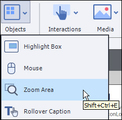
Zoom Areas are typically used to emphasize an important area of a slide background. They are especially useful if you want your learner to automatically get closer to a specific area of the screen.To insert a Zoom Area, click Objects on the Main Toolbar and choose Zoom Area. Zoom Areas consist of two parts: the area of a background that you want to highlight (Zoom Source) and where the zoomed area of the background will appear (Zoom Destination). In the image below, I have positioned and resized the Zoom Source over the area of the slide background that I want to get larger. Then I positioned and resized the Zoom Destination on the slide. Remember, the Zoom Source won't move or resize when the lesson is viewed by the learner... that's the job of the Zoom Destination.Right away you can see that there is a problem with the image in the Zoom Destination. Because a Zoom Area simply enlarges the Zoom Source, and I've resized the Zoom Destination quite a bit, the image in the Zoom Destination is blurry.To fix the problem, you'll need a larger version of the image shown within the Zoom Source. In this case, I have the original photo of the handsome male model shown on the screen (in addition to being much larger, it has also been cropped similar to the image in the Zoom Source).To swap out the blurry image in the Zoom Destination with the better image, double-click the Zoom Destination to open the Properties Inspector. On the Properties Inspector, click Add new image. Click the Import button and open the larger version of the photo.Compare the Zoom Destination below with the version above. The quality of the Zoom Destination image is much better.If you would like to see a free demonstration of this concept, check out the IconLogic YouTube channel.
***
If you'd like to learn more about eLearning, come hang out in my next eLearning basics mini course. And if you'd like to learn more Captivate, Presenter, or Storyline, we've got a great collection of live, online classes for you.
Icon Logic Blogs
.
Blog
.
<span class='date ' tip=''><i class='icon-time'></i> Jul 14, 2015 01:19pm</span>
|
|
by Sally Cox
There is an art to creating a strong LinkedIn profile. One of the most powerful assets in your LinkedIn profile is the Summary. Most people put minimal thought into it, but honestly, it's a golden opportunity to make yourself shine.
Tips to Creating a Stronger Profile
Be clear on your objective before you begin. What do you want recruiters and prospective employers to gain from reading your summary? How do you want them to feel?
Gather your content. Put everything in place so you can begin to write the summation. List your greatest accomplishments, and a sentence about each one. Try to capture not only what YOU got out of the experience but more importantly, how the company benefited. If the team cut costs by 70% under your management, that needs to be part of the sentence.List your values and passions. If saving African wildlife is high on your priority list, make sure you notate that in some way. Aside from your professional accomplishments, people like to see snippets of the real you.List things you can do better than anyone, things that make you stand out. If Project Management is a strength of yours, or you're a competitive swimmer, these traits can both accurately portray your dedication and look good on a profile.Awards, accolades, achievements--gather them and include both personal and business accomplishments.List things that make you unique. Find out what they are and include the strongest ones. For example, I worked for "Mister Rogers' Neighborhood" in the 1980s, as designer. It was long ago, but that one event on my resume or LinkedIn profile is a conversation starter, more than any other. It may not even pertain to my current work, but it's a great way to start a conversation that gets me noticed--and remembered.Writing Your SummaryBegin with a strong statement, a "bang," if you will. You could ask a question, make a statement, or just list a few of your skills for a dramatic opener. Make it memorable. Weave your story, including snippets from the information you gathered in earlier steps. Mix up your content to make it more interesting, so it doesn't read like a list, and use correct grammar and punctuation.End with a call-to-action, remembering your summary needs to be 2,000 characters or less. Tell your readers where they go to learn more about you, or how they can contact you. (This may not be necessary if you've listed it elsewhere on your profile, but make sure they know how to find you.)
***
Check out Sally's 3-hour mini class on Building a Strong LinkedIn Profile.
Icon Logic Blogs
.
Blog
.
<span class='date ' tip=''><i class='icon-time'></i> Jul 14, 2015 01:19pm</span>
|
|
As part of preparing for the July 23 free online session on the Future of the Business of Learning, I've had a bunch of conversations with CLOs/VP Learning, CEOs of Training Companies, Marketing and Sales Consultants to Training Companies, Industry Analysts, Software and Services Vendors. I am really looking forward to July 23 when we come together to discuss this. It's going to be interesting. There are some real nuggets that I'm finding that you will hear about. I would highly encourage you to join in and book the day. If nothing else, seeing the Intuit case study to think through and discuss outsourcing to your customers and rethinking return on training investment. Register Here There's a bit more detail on the particular sessions via the link above. I will announce the panelists in a day or two. I felt compelled to capture a few thoughts as I've been having these conversations: Tough Times - No One Jumping Statistics are made real when you run into actual examples. For example, 10% unemployment doesn't always translate. Having friends or family lose their job hits home. When you talk to someone who's training business is off 20-30%, it hits home. Imagine your paycheck getting cut 25%. Actually, if you are a smaller training company, it's worse than that. You likely are now scraping by with virtually zero paycheck. And possibly incurring debt. At the same time, while we all know this is tough times from training, no one I've talked to is on the ledge ready to jump. Instead, I think that everyone recognizes that there's always going to be need for skill development. And overall, learning is more important than ever. Mature or Declining Industry? When I first introduced this topic, I probably should not have used an analogy between publishing and training. No one knows for sure what the total spend on training (using formal learning methods) will be in the future. Will it overall go up a lot? Down a lot? Stay relatively the same? Training is definitely in much better position than publishers who relied on advertising dollars. I personally believe that the overall market for training using formal learning models is going to be on a long, slow downward trend. We are currently experiencing a big drop (similar to the drop in 2001). Training never quite recovered from the 2001 drop. And likely after this drop, we won't quite recover again. My guess is that even the most optimistic person sees a relatively modest growth percentage and pessimists probably line up with me. But what I find is that anytime I say that Training (using Formal Learning Models) might be transitioning into a relatively flat or declining industry - people hear - "Training is Dead." (see Long Live? for an example). So, please help: How can I effectively explain that training might be a mature or declining industry and still keep folks listening? One thing I have tried to do is use an analogy. On a phone call the other day, I used the unfortunately analogy of the railroads. At one point railroads were in hyper growth mode, then they matured and consolidated. Then they were supplanted by cars, trucking and airlines as other forms of transportation. I don't think that any of the railroads managed to really transition themselves into other forms of transportation. It's a classic example of the innovator's dilemma (see The Innovator's Dilemma of Learning). Of course there are still railroads. This did not go over well. Partly it was that there was a funny moment when I realized how tough things were for the auto and airlines. But also, no one wants to see themselves as the railroads. Differentiation and Innovation Opportunities No matter your take on the overall training spend, there's clearly lots of differentiation and innovation opportunities. A lot of what I've been hearing is about successful differentiation in the marketplace. Training companies and internal training organizations who focus on things that matter to organizations or who have offerings that are more than content seem to be having a better time of it. There's also some incredible innovation going on as well. The Intuit example that will be presented and the implications of it for internal and external training organizations is going to be worth the entire time investment. Tough Questions - Tougher Answers I hope you won't come on July 23 expecting easy answers. The core question that I asked: While training as a publisher of courses and courseware faces an increasingly challenging market, what other things can learning businesses successfully sell to internal or external customers? is definitely a tough question. ISA did a session in March looking at a very similar question and it's clear there are no easy answers. A big part of what makes these questions tough was beautifully captured by Tom McKee, CEO of Ken Blanchard, You can't sell what people aren't willing to buy. Many of our internal customers are simply not ready to buy solutions that look like something more than courses and courseware. There are exceptions and definitely opportunities for innovation. But realistically, a lot of what we will be talking about is what organizations should be doing today to be in position for the future. This is going to be fun, hope you will join the conversation. eLearning Technology
Subscribe to the Best of eLearning Learning for updates from this blog and other eLearning blogs.
Tony Karrer
.
Blog
.
<span class='date ' tip=''><i class='icon-time'></i> Jul 14, 2015 01:19pm</span>
|
|
by Jennie Ruby
Adobe Presenter Video Express is a new version of the video software that comes with Adobe Presenter 10. With it you can record a video of both you and your computer screen at the same time. When you open it from the Presenter ribbon within PowerPoint, you can create a video of yourself and your PowerPoint slides. Once you have recorded your video, you can then edit the project to show either your face, the computer screen, or both. Its intent is to allow you to record yourself presenting your slides just as you would to a live audience.
Tips for Improving Your Videos
Set up your camera so that you can look into it as you give the presentation. On a laptop with a built-in camera, this is easy, because as you look at the screen, the camera typically faces you from the top center of the screen.However, even this placement means that often your eyes will be looking down at the screen instead of up into the camera. If you have to read every word of the script, or if you look at your slides while talking, your eyes will be down the entire time.Try printing your script landscape, in large print, and tacking it up behind the camera so that you can glance at it and then back to the camera very easily. (Think: teleprompter.)Better yet, memorize the script, or become very familiar with it, and then just have note cards posted in back of the camera.If you can purchase professional photography lights, that's a great way to go. With a lower budget, daylight is your best bet--but not direct sunlight. Set yourself up so that you face a window, with curtains or blinds at least partially drawn to even out the light. You may need to supplement the light with some lamps. Make sure there are no shadows or patterns on the wall behind you. The camera's back should be to the window as it faces you.What is behind you? Some of it will show in the video. A blank wall is best. If there are bookshelves, make sure the books are neat and organized. A potted plant might be a good thing. For specialized topics, you might want a backdrop that relates to the topic. If your office is messy, consider getting a curtain to hang behind you.
Check out my video showing how you can inexpensively set up your office for creating videos.***Looking for training on Adobe Presenter? You can't go wrong with our $79 mini courses. There's a three hours on Adobe Presenter and another on Video Express.
Icon Logic Blogs
.
Blog
.
<span class='date ' tip=''><i class='icon-time'></i> Jul 14, 2015 01:19pm</span>
|