Blogs
|
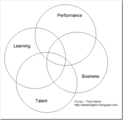
One of the more interesting aspects of the discussions I've had over the past few weeks as I prepare for the free online conference on the future of learning is the perspective on the focus and scope of responsibility of internal learning organizations and external learning/training companies. Caveat: This is definitely not a new issue. I'm not really claiming any great new insights. It's a first cut at a developing mental model. This is only partially formed and I need help to flesh out my thinking. Please let me know what you think. Does this ring true? Does the model work for you? Do you similarly hear these kinds of clues? And what other clues do you use to identify? What are the implications? With all that said, I believe that I'm beginning to get a handle on the differences in focus that people bring to bear around their responsibilities. The following crude diagram captures a bit of it: I'm finding that learning professionals of all types (IDs, CLOs, VP Learning, C-level at Training Company, etc.) tend to own a different view of their responsibilities in this space. Learning - Responsible for ensuring learning objectives are achieved regardless of the delivery mode. Talent - Responsible for ensuring that talent is analyzed, selected and developed to meet the needs of the organization. Performance - Responsible for ensuring that behavior change occurs in a way that improves performance. Business - Responsible for ensuring that business objectives are met. Know the "Right Answer" Let's say that we are interviewing a potential new learning professional. We pose the question to them: What do you see as the responsibility of a learning organization? Many (probably most) learning professionals are smart enough to be able to answer the question such that they focus on creating solutions that are ultimately about all of these. They would position themselves right in the middle of the diagram. This is, of course, the right answer although a very adept job seeker will be able to adjust the answer quickly based on the focus on the organization that's doing the interviewing. If you've done much interviewing in your life, you know that asking this kind of question is most often not effective. Instead, it's much better to find out by asking about specific examples of projects they've worked on and listen to the focus. You ask about things like the types of solutions that they've used, what were the objectives, how did they tackle the problems, etc. Of course, I'm not interviewing people for a job. Normally, I'm talking to people with the goal of getting help on particular needs, e.g., how is social learning being used in insurance companies or other highly regulated industries, how does this technology work out in practice, what other things should I be looking at to solve this issue. In this case, I've had a bunch of conversations around the Business of Learning and this model is somewhat falling out from the discussions. But it's still conversations and I'm coming to fairly quickly recognize some clues that indicate the focus of the individual. So what are some clues about the focus that you can listen for? Learning Focus Clues The person is showing learning focus when you hear: "… learning objectives … " "… learners …" "We have very limited budget and our focus needs to be on building critical, core skills." "I wish we had the time and money to spend on informal and social learning solutions." "We want to make sure that our informal learning still ensures that we meet the learning objectives?" "Our trainers don't have time to get involved with the learners after the training." Performance Focus Clues The person is showing performance focus when you hear: "behavior change" "performer support" "toolkits and job aids" "involve the managers" "back on the job" "feedback" Business Focus Clues The person is showing business focus when you hear: "customer satisfaction" (or a host of other business metrics) "metrics" (and they don't mean Level 1 and 2) "move the needle" "we probably don't need much training" Talent Focus Clues The person is showing performance focus when you hear: "fill the talent pipeline" "talent mix" "job profiles" "succession planning" "competencies" "recruiting and selection" "performance review process" Notes, Questions and Thoughts Unfair Bias around Learning Focus? As I wrote down the clues that indicate a learning focus, I felt I was being unfair. I've talked to a lot of very smart people who clearly have the learning focus. I respect them, consider them to be valuable contributors, and feel like I'm being unfair when I put down those clues. I feel I should somehow even this out a bit. But I wasn't sure how. Obviously, this is partly personal bias. All things being equal (which they never are), I'm guessing my focus is more a business and performance focus. I was a professor for 11 years and still do lots of presentations and workshops where clearly the focus is learning. Certainly Work Literacy has a learning and performance focus and is a passion of mine. But day-to-day, my passion and where I probably play best are things like data driven solutions. Working on eHarmony for its first 4 years with a combined purpose of making money, making better marriages and supporting a rather complex performance was fantastic. Working with emerging or established companies is fantastic. Looking at social learning as a performance mechanism is fantastic. So maybe I have a strong bias towards business, performance, and then learning and that's why it doesn't sound quite right the way I've positioned it. You will notice I didn't say much about talent focus. I'm know about it. I do work in it. I've actually done data driven solutions in that space. But it's not my normal focus and I feel a little bit removed from a talent focus. I definitely struggle the most when talking with people who have a very strong talent focus. So, I'm really not sure how to level this playing field a bit so that my bias is not coming through. Thoughts? Also, I'm sure that most people do flow between these things a bit, but have a more natural home. I'm not quite sure how that fits into this whole discussion. Separation of Performance and Business Focus? I debated on separating performance and business focus. You may notice that they two overlap more than most of the other sections. That's intentional. I believe that there are quite a few people who take a combined business and performance focus. There are relatively fewer who are dominant on the performance focus - but occasionally I run into people who seem to come at it with that focus. Talent and Performance Intersection? When I first did the diagram I intentionally did not have an intersection point right in the middle - and specifically it excluded intersection of Talent and Performance. Most people who I talk to who have a talent focus seem to come at this whole picture from a completely different angle. They describe goals in terms of looking at the overall mix of talent in the organization. They look at the picture much more holistically. They are quite often trying to align this with top level goals of the organization, but in many cases they really are not talking about moving the needle. They care about learning as part of development and to build important competencies in the organization and to fill the talent pipeline. So, intersection with learning and business - not necessarily focus - is clear. Intersection between talent and performance seems less common. Normally the folks who look at the big picture talent issues are far removed from day-to-day behavior and performance. They would claim that they look at it in terms of skills and competencies. They need to know about behavior in the form of job profiles, selection, performance reviews, etc. But the reality is that they are typically not thinking about what it takes to directly help to get the sales people to sell more, or change how retail sales managers get the associates to act in a way that improves customer satisfaction, etc. They won't be building a job aid anytime soon. They are likely not talking to the performers or facilitating interactions on the job to get performance to improve. It's a level indirect from that. As I said, I initially put these as non-intersecting, and then I thought about people who work directly with sales management that really do take a look across all of these issues. I'm not saying that all sales management improvement professionals take this approach, but certainly some do. They look at who the sales people are, how they get selected, the comp packages. But they also look at the sales support materials, sales meetings. They get in and get dirty day-to-day. So, clearly this kind of dual focus exists, especially around specific goals. Organizational Expectations When I discussed the "right answer", I pointed out that an adept learning professional seeking a job would quickly adapt to the interviewer and make sure that their answer corresponded to what the person wanted to hear. You would listen for clues and use the language that fits. Same as what I just described. Of course, that happens in organizations as well. The collection of people in the organization establish what the expectation is around focus. If they expect you to have a learning focus and deliver formal training solutions and not bother them back on the job when they are doing real work, you will quickly find yourself taking a learning focus in order to fit. Meaning and Use of the Model? I debated on whether this model is useful and meaningful enough to post. It's pretty much an internal mental model that developed based on many discussions (and really many years). That doesn't mean it will make sense for anyone else. Nor does it necessarily suggest that it's useful. So, can you tell me whether this makes any sense to you? In terms of use, for a long time - without having thought through this model, I've known that there's incredible friction trying to move someone from a particular focus. This comes up all the time in practice: To convince someone who's primarily learning focused to spend time and effort on solutions that come after training, you need to talk about it in terms of additional learning transfer opportunities. The learning won't stick unless we get out there after they are back on the job and reinforce it. We can talk about "office hours" where learners come together to discuss issues they face when they are back on the job. And you know going in that this all will be a tough sell. You need to talk to most talent focused people in talent terms. If you have a toolkit / set of job aids, you need to talk about it in terms of reducing the time to competence or how it fits with development planning. If you are talking to business or performance focused people, prepare to get in and get dirty. You need to be prepared to be in there working with the people to get the performance to change or the needle to move. I'd suggest not using the words "learning objective" … they may perceive you as "one of those people" … they'll let you know when they will need some of that kind of thing. But this is more than language. It translates into how they think about tackling problems and the kinds of solutions that they consider. Again - this is all partially formed and I'm really hoping that you will weigh in with thoughts. eLearning Technology
Subscribe to the Best of eLearning Learning for updates from this blog and other eLearning blogs.
Tony Karrer
.
Blog
.
<span class='date ' tip=''><i class='icon-time'></i> Jul 14, 2015 01:18pm</span>
|
|
by Kevin Siegel
When Camtasia developers need to add attention-grabbing visual affects to a software demonstration created using the Camtasia Recorder, the work is typically accomplished by editing the recording in Camtasia Studio. However, using Camtasia's Effects Toolbar, you can add several attention-grabbing visuals while you are recording your video.
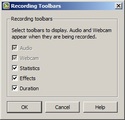
Start the Camtasia Recorder. Enable the Effects toolbar by choosing Tools > Recording toolbars and selecting Effects (click the OK button to close the Recording toolbars dialog box).
Create a video by clicking the Rec button on the Camtasia Recorder.After the 3-2-1 countdown, the Effects tools appear on the Recording toolbar.
Select the ScreenDraw tool to display different Drawing tools. You can select from among frames, lines, highlights, ellipses and even a pen.
At this point, you can use the tools to draw all kinds of shapes on the screen (at the same time that you're creating the video).
Note: You can erase all of the screen drawings by once again clicking the ScreenDraw tool.
***
If you'd like to learn more about eLearning, come hang out in my next eLearning basics mini course. And if you'd like to learn more Captivate, Presenter, or Storyline, we've got a great collection of live, online classes for you.
Icon Logic Blogs
.
Blog
.
<span class='date ' tip=''><i class='icon-time'></i> Jul 14, 2015 01:18pm</span>
|
|
To download the webinar slides. To view the recording. Try out BizLibrary's Online Library! BizLibrary provides 10,000+ training videos and eLearning courses in various business training topics, with new courses added every day. Coaching Skills for Managers and Leaders In this eBook we’ll discuss emerging principles in employee coaching for managers and the objective of coaching in organizations. BizLibrary's Mobile Learning App meets the needs of today's digital learners. Employees no longer wait for training departments to push learning content to them. Employees are used to pulling information to themselves, when they need it, on their own terms and conditions, and on their own devices.
Chris Osborn
.
Blog
.
<span class='date ' tip=''><i class='icon-time'></i> Jul 14, 2015 01:18pm</span>
|
|
by Jennie Ruby
Suppose you have hired voiceover talent to record the audio for your Adobe Presenter project. You give the voiceover artist the script. The script is organized by which slide in your PowerPoint presentation each audio segment belongs to. When you get the voiceover recordings back, you just import each segment to the slide it belongs to. When you preview your presentation, everything plays smooth as silk until--there is a click-activated animation on slide 12. Now, as the pre-recorded audio plays, the slide just sits there, and the animation is never activated. Uh-oh.
That's where synchronization comes in. In Adobe Presenter, you can synchronize slide animation with the imported audio in just a few mouse clicks.
Start with the animated slide active in PowerPoint's Normal view. The animation in my example slide is a simple text build, with each bullet point appearing on mouse click.
From the Presenter tab on the Ribbon, go to the Audio group and click the Sync button.
The presentation opens in Slideshow view, and the Synchronize dialog box opens. At the left, click the green Sync-change timings button.
The audio begins to play, and the Next animation tool becomes available.
When the audio mentions the next bullet point, click the Next animation tool to cue the animation.
Click through the remaining animations on the slide, then click the square Stop button.
Now that you have synchronized the audio with the animations, click the Play button to review your work. The slide audio plays, and the animations occur at the points where you clicked. If you are satisfied with the results, click Save. Otherwise, click Discard and try again.
Close the Synchronize dialog box and you'll find that your project now sports perfectly synchronized audio and animations.
Note: You could synchronize a longer audio clip across multiple slides. However, for ease of corrections and updates, the best practice is to have a separate audio clip for each slide.
***
Check out my mini courses on Adobe Presenter. To attend my class, all you need is access to the Internet, Microsoft PowerPoint, and a trial version of Presenter. Find out how easy it is to transform your existing PowerPoint decks into fully functioning eLearning.
Icon Logic Blogs
.
Blog
.
<span class='date ' tip=''><i class='icon-time'></i> Jul 14, 2015 01:18pm</span>
|
|
I personally believe that one of the areas where learning professionals need the most help is how communities and networks impact learning and building individual and facilitation skills around these: Knowing how to individually leverage Network Skills and Communities to help with work and learning tasks Community and Network Facilitation Skills to help others learn and work using networks and communities In my post Networks and Learning Communities, I looked a bit at this topic. But, I by no means consider myself an expert and find that I spend quite a bit of my time building my network skills so I can do this more effectively. So I was super excited when I saw that Nancy White, who helps me learn about all things communities and networks, posted a response to the New Skills for Learning Professionals Big Question for July 2009. When I looked at her first post, I was actually disappointed because it wasn't really about networks and communities. My disappointment was purely my own making. But Nancy came through and posted her follow-up pieces and especially Part 3 and the Online Facilitation Wiki that was a great launch point for me to read a bit more. I also used both the Communities and Networks Connection and Work Literacy to source additional reading. So, starting with her post I've spent the past few hours going through a lot of material, processing the information and writing this post. I've come to few realizations from the process. My Focus is on Networks There were great definitions of communities, groups, networks, facilitation, management, etc. I realized during the process that I mostly focus on networks and less on actual communities. Community - a group of people with bounded membership who have some shared, congruent interest and interact with each other over time. Network - a constellation of individuals associated via fuzzy, unbounded membership and overlapping … not fully congruent … interests For me a couple of examples: LA CTO Forum - definitely a community. Meet once a month. Invite only. Learning and peer support. Somewhat a classic community or practice. Learn Trends - not quite sure this fits Nancy's definition of a community - it looks like one, but my sense is that it's somewhere in between a community and a network Where I spend most of my time is with the blogging network and various other networks. In some ways, Learn Trends is just part of this network allowing us to meet at various points and act a bit more community like. We share our interest of learning. There's quite a lot of discussion/debate whether blogs act as networks or community. Probably don't want to kick that hornet's nest. And I'm not alone in my questioning / focus. Take a look at: How relevant are communities of practice in a network age? My Community Facilitation Skills are Hopeless One thing I started to realize is that good community facilitation takes time, desire, skills and appropriate mentality. For the LA CTO Forum, I have a couple of cohorts who help to organize things, but there's quite a bit more we could be doing. For Learn Trends, Jay, George and myself do not spend time on facilitation. We should. But we don't. In fact, this is probably a great opportunity for someone to learn about facilitating an online community. Does anyone want to jump in who does have time, desire, skills (or willing to learn) and appropriate mentality to help facilitate the Learn Trends community? I found this great piece - The Art of Hosting Good Conversations Online - I will go back to refer to this quite a bit to remind me of all the kinds of things I should be thinking about. But frankly, I will have to grow these skills over time based on specific situations. It doesn't look good for me to become a really adept, willing community facilitator. Network Weaving I don't like the term, Network Weaving, but that's what Nancy calls it - although I don't think she likes it either. In the eLearning space there's this very complex network of people, organizations, content that forms this amorphous thing where we all play. The combination of blogs, sites like LinkedIn, various discussion groups, etc. weave us all together in a weird way. We still have the core human desire to connect. Many of us enjoy learning and discussion around these topics. But we really don't act like a community. And people vary widely in their connectedness and activity level. What I found on Network Weaving left me wanting something quite different … I would run into materials that talk about how you analyze and map networks. Such as the advice: Improved connectivity starts with a map - knowing the complex human system you are embedded in. I'm sorry, but I'm simply are not going to try to really map out this incredibly complex network. Of course, the folks who are writing this are networking mapping folks who come at it from that perspective. I think it would be a really interesting picture and there's real value in it. But it's only a starting point if it's relatively easy to do. Instead, what I'm asking about is: What could I do to get more from the network? What can I do to help other people get more from the network? And when I say "Get more" … I think about the ability to tap a larger network of folks, get to them for help more quickly and easily, learn from them faster, more easily establish conversations, draw them together into ad hoc groups as needed, and ??? a lot of things I don't know even what they are yet ??? In fact, some of the nuggets I found helped me think a bit about this knowledge gap. In What Networks Do?, they point to filter, amplify, convene among other things. With Browse My Stuff I should have thought of social filtering a lot sooner. I'm sure I'm missing a lot. And, I'm probably thinking about this more than most. Which leaves me with … Where's the help for Network Skills? Nancy talks about how community facilitation skills sound a lot like network skills. After reading a lot of the material, I'm not convinced that the mapping is that easy and I certainly don't get the path from one set to specific actions in the other. So, I know some of the materials I've produced such as the LinkedIn Guide for Knowledge Workers. The ironic thing is that like network themselves - how to kinds of information around network skills seems to be missing. Most of it is unfortunately more tool centric. So where's the help for building my / our / their Network Skills? eLearning Technology
Subscribe to the Best of eLearning Learning for updates from this blog and other eLearning blogs.
Tony Karrer
.
Blog
.
<span class='date ' tip=''><i class='icon-time'></i> Jul 14, 2015 01:18pm</span>
|
|
View and download the webinar slides. View the webinar recording. Try out BizLibrary's Online Library! BizLibrary provides 10,000+ training videos and eLearning courses in various business training topics, with new courses added every day.
Chris Osborn
.
Blog
.
<span class='date ' tip=''><i class='icon-time'></i> Jul 14, 2015 01:18pm</span>
|
|
by Kevin Siegel
Using Captivate's Text to Speech feature allows you to quickly convert written text to voiceover audio. It's an awesome feature. However, we recently had a client who felt that Paul (that was the Speech Agent we used for the project) spoke too fast. The client wanted to know if we cloud slow him down a bit.
While you might think that controlling the cadence used by the Speech Agent was beyond your control, it's actually really easy. Prior to converting a slide note to speech, just add a bit of code (known as Voice Text Markup Language or VTML) to the text.
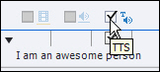
For example, if you want a Speech Agent to say I am an awesome person, all that you would normally have to do is write the text in the Notes window, click the TTS check box and then click Text to Speech.
In the Speech Management dialog box, select a Speech Agent and then click Generate Audio.
If you feel like the resulting voiceover audio is too fast or too slow, you can change the speed. In the slide Note, add the following code in front of the text: <vtml_speed value="50">. At the end of the text, type </vtml_speed>.
Click the Text to Speech button and regenerate the audio (the existing audio will be replaced with the new audio file). You'll find that the agent's speed has been cut in half (thanks to the 50 you added as part of the VTML code). You can experiment with the speed values until you find a speed that works best for you and/or your client.
If you'd like to learn more about VTML or see more tags, review the users guide for the VTML Tag Set by clicking here.
***
If you'd like to learn more about eLearning, come hang out in my next eLearning basics mini course. And if you'd like to learn more Captivate, Presenter, or Storyline, we've got a great collection of live, online classes for you.
Icon Logic Blogs
.
Blog
.
<span class='date ' tip=''><i class='icon-time'></i> Jul 14, 2015 01:17pm</span>
|
|
I've done a few posts in the past that take a look at the topics that are Hot Topics in Training. In each case, these are crude in that they look only at what terms people are using in a given content set. Back in 2007, I pointed out various aspects of what I was seeing: strategy/strategic and performance are back as topics after dropping way down in 2006 surprisingly trainer is also back, you would think in the age of eLearning 2.0 this would be down notable dropping topics: games, simulations, knowledge, interactive and blended Karyn Romeis commented: Hmm. I have doubts about the validity of these data. Perhaps some topics are on the wane because they have become so integrated as to be invisible and no longer a topic to remark about. Just a thought. And she's absolutely correct, that these are only general indications of what people are talking about. Also, it only indicates what the presenters and conference organizers (for that data set) thought that the audience would be interested in and was worth presenting at the conference. I still maintain that it's helpful to keep an eye on these things. And now, because of eLearning Learning, I have a much better way to track these things over a much more interesting content sets. Background Explanation By selecting LMS, I've selected content that is the latest and best stuff that's associated with the term LMS. The keywords on left side are changed to keywords which are more closely associated with that term. For example, we see terms now at the top like Learning Management System, AICC, SCORM. Take a look at the companies: Saba (28) GeoLearning (17) SumTotal (22) Meridian (9) Cornerstone (19) You notice the counts are out of order (not descending). That's because they are ordered according to how closely the system thinks the companies are associated with the selected term within the content set. This works across any subset of the content including sources, keywords and arbitrary searches. For example, when I view my blog's content through the eLearning Learning lens, it shows me that relative to other sources of content in the system, I tend to talk about: eLearning 2.0 (130) Work Skills (26) PWLE (16) Flash Quiz (8) Knowledge Work (40) That's a pretty fair representation of topics that I talk about. Topics by Year By selecting 2009, I've selected a subset of the content, but in this case it's basically content associated with this year. When you look at the keywords on the left you see things like: Social Learning (356) Social Media (411) Twitter (725) Google Wave (22) Camtasia (76) Adobe Captivate (71) Social Network (460) Now, the content set in this case are highly skewed towards innovators as compared to the topic sets being used by my past analysis (training conferences). But still, this gives a general indication and it's especially interesting when you compare it to 2007: Corporate Blog (20) Personal Learning (23) eLearning Tools (323) Software Simulation (21) Qarbon (6) Second Life (135) PowerPoint (148) Google Scholar (9) Authorware (16) Ah the good old days of 2007. Seems so long ago. :) How about 2005? Folksonomy (11) Knowledge (233) Off-shore (7) Leadership (44) Creative Commons (16) Back when we still had hope that folksonomy (tagging) would make sense of the flood of content. Year by Topic You can also go the other way to see things like selecting Twitter and you can see that the associated years are: 2009 2020 2008 2020? That indicates that someone is talking about that year and about twitter in the same content. So, predictions for the future and how twitter might relate. This stuff is definitely not exact, but it gives a general indication. Twitter is a hot topic right now as compared to some others. The years associated with Wiki suggest it was more discussed a couple years ago and now is discussed less. 2006 2010 2007 Does the associated years for SharePoint suggest it's a technology for the future? 2010 2015 2011 2013 You can pretty much do this endlessly. I often will use this technique when I run into a new company to see if anyone is blogging about it and generally what is associated with it. Looking Back So when I go back to Hot Topics in Training, the topics that were hot then and by looking at the associated years I can get a sense that: assessment - not discussed as much now (e.g., 2001 2002 2000 2003 2004 are associated years) virtual classroom - still current strategy - old flash - still current performance - old - not sure why - shouldn't this be a perennial topic? roi - old enterprise - future and old games - still popular This is definitely something that I'll be using as I go forward. eLearning Technology
Subscribe to the Best of eLearning Learning for updates from this blog and other eLearning blogs.
Tony Karrer
.
Blog
.
<span class='date ' tip=''><i class='icon-time'></i> Jul 14, 2015 01:17pm</span>
|
|
View and download the webinar slides. View the webinar recording. (Link to recording in Go to Webinar) Recording on Youtube: Try out BizLibrary's Online Library! BizLibrary provides 10,000+ training videos and eLearning courses in various business training topics, with new courses added every day.
Chris Osborn
.
Blog
.
<span class='date ' tip=''><i class='icon-time'></i> Jul 14, 2015 01:17pm</span>
|
|
by Jennie Ruby
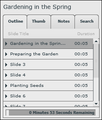
When you add a sidebar to your project in Adobe Presenter, you have the option of displaying a table of contents (TOC), which in Presenter is called the Outline. The Outline automatically lists the title of each slide, and viewers can click any title to navigate to that slide. Sweet! But let's say you preview your project, and one or more slides turns up in the Outline as "Slide x," where x = the slide number. Not quite as sweet. A slide title like "Slide 5" tells your viewer nothing, making navigation using the Outline a matter of guesswork.
The solution to this problem is not difficult, but it does require visiting a number of places in your presentation and in Presenter. First, you need to know how Presenter got the titles for the slides that are listed correctly in your Outline. If your slide has a Title placeholder in PowerPoint, Adobe Presenter picks up that title automatically. So one solution is simply to give every slide in your presentation a title.
However, you may not want a title to appear on every slide. Some slides might be images or graphics only. No problem. You can still assign the slide a title in Presenter that will only be displayed in the Outline.
On the Adobe Presenter tab of the Ribbon, from the Tools group, click Slide Manager.
The Slide Manager dialog box lists all of the slides in your project. Notice in my example below that slides 1 and 2 have titles (in quotes after the slide numbers), but slides 3 and 4 do not.
Among the options for each slide is Navigation Name. Click the word None, replace it with the title you want to have displayed in the sidebar Outline, click the OK button, and you are done.
However, in my case, since these slides are just images, I decided not to give each a unique name. Instead, I want it to be clear from the sidebar Outline that these are merely continuations of the previous titled topic. For each, I want the navigation name to be (Continued). Now, I could give each one that navigation name right here in the Slide Manager, but there is a way to cover all unnamed slides at once.
After closing the Slide Manager, click the Theme tool on the Ribbon.
At the bottom of the Adobe Presenter Theme Editor, click the Modify Text Labels button.
Scroll to the bottom of the list of labels, and the second to last one is Unnamed slide title.
Double-click the text Slide %n and replace it with (Continued).
Click the OK button to save your change. Click the OK button on the Theme Editor to close it.
Now, when you preview your project, all of the unnamed slides show up as (Continued) in the Outline. As a bonus, this word also appears in the list of Thumbnails.
***
Check out my mini courses on Adobe Presenter. To attend my class, all you need is access to the Internet, Microsoft PowerPoint, and a trial version of Presenter. Find out how easy it is to transform your existing PowerPoint decks into fully functioning eLearning.
Icon Logic Blogs
.
Blog
.
<span class='date ' tip=''><i class='icon-time'></i> Jul 14, 2015 01:17pm</span>
|