Blogs
|
Wesley Fryer discusses How are you dealing with TMI? (Too Much Information) (found via Stephen Downes). Wesley points us to a post by Kevin Washburn "TMI! Information Overload and Learning." where Kevin points out: TMI floods the brain with data, preventing comprehension and elaboration, and thus, preventing learning. Jonah Lehrer suggests the danger of too much information is "it can actually interfere with understanding." Why? Because the brain has a do-it-yourself attitude toward learning. Wes also asks us to consider: current visual list of education applications from the website "All My Favs." I’m overwhelmed just looking at these choices! This is similar to the list of Web 2.0 tools that I often use in my presentations. All of these represent potential metacognitive tools and methods. Life was simple 25 years ago. We knew how to use the card catalog, journal indices, microfiche readers. We had quarters in our pocket for the Xerox machine. We knew how to use Interlibrary Loan. We knew how to take notes. It's a lot more complicated these days. And I think that we need to recognize that it's more than the "Too Much Information" aspect of the issue. It's really that we need to adapt to new methods and tools. It's a big skills, knowledge, performance gap - see Work Skills Keeping Up. And I personally believe that it's a big mistake to Not Prepare Workers for Web 2.0. It's why I created Work Literacy about a year ago. Wes has some specific suggestions in his post for how to deal with TMI. I try to address this through posts such as: Tool Set LinkedIn Guide for Knowledge Workers Top-Down Strategy Better Memory Information Radar Processing Pages with Links Networks and Learning Communities Collaborate Twitter as Personal Work and Learning Tool Search I look forward to collaborating on this very important topic. eLearning Technology
Subscribe to the Best of eLearning Learning for updates from this blog and other eLearning blogs.
Tony Karrer
.
Blog
.
<span class='date ' tip=''><i class='icon-time'></i> Jul 14, 2015 01:19pm</span>
|
|
The BizLibrary Collection has changed dramatically since we introduced it last year. In fact, we’ve added more than 8,000 new training programs and 5 new topic areas in just the past year. And we haven’t just added programs, we’ve also retired more than 4,000 programs whose production quality or dates no longer meet our stringent standards. We think it’s important for us to keep our content library fresh and current, and I think these numbers show just how serious we take this effort. And our users ratings have reflected our increased quality and updated content. For the first time in our history, our average course rating for ALL courses rated over the past year has been greater than 3.6 out of 5 stars. We watch these ratings and comments closely, and they help keep us on our toes in terms of quality and freshness. The courses highlighted in the "Top 4 Topic Areas of 2014!" represent the most popular from the BizLibrary Collection. Try them out and let us know what you think! Workplace Safety Back Injury Prevention - Blueprints for Safety Electrical Safety: What Everyone Should Know Management & Supervision A Manager's Guide: To Lead or Not to Lead Conflict Management: Unavoidable Truths Customer Service SMILE! Business Friendly Customer Service - The Core Values of Delivering Exceptional Service Anti-Harassment It's Not Just About Sex Anymore™ Harassment and Discrimination in the Workplace The Right Side of the Line: Creating a Respectful and Harassment-Free Workplace Try out BizLibrary's Online Library! BizLibrary provides 10,000+ training videos and eLearning courses in various business training topics, with new courses added every day.
Chris Osborn
.
Blog
.
<span class='date ' tip=''><i class='icon-time'></i> Jul 14, 2015 01:19pm</span>
|
|
IconLogic and the eLearning Brothers have joined forces to bring you the very best in training and eLearning assets.Beginning today, when you complete any of the following IconLogic classes you will receive a free one-year paid subscription to the eLearning Brothers eLearning Templates (a $499 value).
Adobe Captivate Beginner
Adobe Captivate Advanced
Articulate Storyline Beginner
Articulate Storyline Advanced
Free Sample PacksComplete any of IconLogic's 3-hour eLearning mini courses and you'll receive a free sample pack of eLearning assets from the eLearning Brothers.
Icon Logic Blogs
.
Blog
.
<span class='date ' tip=''><i class='icon-time'></i> Jul 14, 2015 01:19pm</span>
|
|
This is probably the last update on the upcoming online conference. We are finally announcing the speakers and a bit more about what they will be discussing.On July 23 - click the following to: Launch the SessionYou won't want to miss this ... Intuit talks about their move to outsource learning development to their customers and redefining value of learning. Hearing Dave Wilkins talk about selling social learning solutions. Or Gary Wise talking about selling incremental changes to learning designs on the path to richer solutions. Amit Garg discussing where his innovation team is focusing. Or senior leaders from major training companies talk about the challenges and opportunities in the market. This is going to be really great stuff. Future of the Business of Learning Free Online Event July 23 9 AM - 2 PM Pacific Time (Click on times to see Time Zone Conversion) Brought to you by: Learn Trends, ISA and Training Magazine Network.Moderated by Tony Karrer. Register Here Description: Corporate training departments and training companies are facing challenging times. It’s clear to thrive they need to focus on business critical issues for the organization, provide solutions provide real value, differentiate their offerings, and look at ways to provide value beyond being a publisher of courses and courseware. However, that’s easier said than done. This online event will bring together people with a variety of perspectives on what we should be doing today to set ourselves up for success going forward. We will look at questions that include: Is this a temporary downturn or changing landscape? How will demand change? What will internal or external customers pay for that's not traditional training? What's already selling today? What business models, products, companies should we be watching? What should we be doing today to be in position for the future? Panel #1 - Industry Perspectives 9 AM - 10 AM Pacific Time This distinguished panel will provide overview of the challenges going on in the industry, major trends that they are seeing, what is selling and what’s not, and where they believe that organizations need to go to be successful going forward. Josh, a long time analyst and source for trends in learning product and market data, trends and expert advice, will provide us with perspectives on what’s going on. Paul, a connector between training companies and other kinds of providers and the marketplace, has some very specific suggestions on where training companies need to focus. Lisa, as President of ISA and a long-time consultant to training companies, understands a lot of the challenges they face. Josh Bersin, CEO and President, Bersin and Associates Paul Terlemezian, President, iFive Alliances Lisa Fagan, President, Amplify Selling Panel #2 - Internal Training Perspectives 10 AM - 11 AM Pacific Time This panel consists of senior managers responsible for aspects of corporate learning who will discuss what they are doing today and opportunities they see in the future. Gary will talk about his Prepare-Deploy-Reinforce (PDR) model, how it represents an incremental transition, and how he sells to various audiences. Rob will talk about how he sees his offerings transition in the future. Allessandria from Intuit will discuss how they’ve outsourced parts of their development to their customers and have changed how they view "return" on learning investments. Gary Wise, Sr. Director Learning Architecture, Cincinnati Children's Hospital Rob Robertson, SVP, Learning Technology and Architecture, Citi Allessandria Polizzi, PhD, Group Manager, Accountant Training & Relations, Intuit Panel #3 - Training Company Perspectives 11 AM - Noon Pacific Time This panel consists of senior executives at training companies who are looking at how they can create more compelling offerings in the market. They will discuss aspects of how their offerings are evolving and the kinds of new offerings they are trying to sell. Ann, who facilitated a session for ISA with CEOs of Training Companies to look at the future of the business of learning, will start the session with an overview of key take-aways from that session. Jeff, Pete and Ben will all discuss their particular perspectives on what it’s going to take to be successful going forward. Because of their very different kinds of companies and offerings, we’ll likely have a lively discussion. Ann Herrmann-Nehdi, CEO Herrmann International Jeff Sugerman, President and CEO, Inscape Publishing Pete Weaver Senior Vice President of Leadership Solutions and Chief Learning Officer, DDI Ben Snyder, CEO, Systemation Panel #4 - Software and Services Perspectives Noon - 1 PM Pacific Time This panel consists of senior executives at software and services companies who are trying to create compelling offerings in the market. They will discuss aspects of how their offerings are evolving and the kinds of new offerings they are trying to sell and the challenges they have selling these offerings. Amit will discuss their interesting innovation team that works closely with training company partners to showcase new offerings that the partners can sell in the marketplace such as mobile, performance support, simulations and games, integrated accountability, and social learning solutions. Dave will discuss the challenges and opportunities around social learning solutions. Holly and Monika will talk about capitalizing on development opportunities that exist in every day work environments. Amit Garg, Director, Upside Learning - The Training Company Back Office Dave Wilkins, Executive Director of Product Marketing, Learn.com Monika Ebert, CEO, DifferentLensHolly St. John Peck, CEO, Peck Training Group Panel #5 - Discussion 1 PM - 2 PM Pacific Time We will transition into a more open discussion around what we heard and what we think are some of the important answers coming from the session. We have several interesting folks joining the discussion that I’m sure will challenge us a bit. Some of these folks include: Jay Cross Harold Jarche Ray Jimenez eLearning Technology
Subscribe to the Best of eLearning Learning for updates from this blog and other eLearning blogs.
Tony Karrer
.
Blog
.
<span class='date ' tip=''><i class='icon-time'></i> Jul 14, 2015 01:18pm</span>
|
|
View and download the webinar slides. View the webinar recording. Try out BizLibrary's Online Library! BizLibrary provides 10,000+ training videos and eLearning courses in various business training topics, with new courses added every day. The Career Journey and Learning Across Generations In this eBook you'll learn the demographic, behavioral, performance, and future demands of each career stage - early career, mid-career and late career. BizLibrary's Mobile Learning App meets the needs of today's digital learners. Employees no longer wait for training departments to push learning content to them. Employees are used to pulling information to themselves, when they need it, on their own terms and conditions, and on their own devices.
Chris Osborn
.
Blog
.
<span class='date ' tip=''><i class='icon-time'></i> Jul 14, 2015 01:18pm</span>
|
|
by Kevin Siegel
When I teach Camtasia, one of the activities that garners the largest "that's cool" factor is how easy it is to animate any object. During class, we not only animate an object, we get it to grow and rotate while it's flying around the screen. Sound awesome? Here's how to do it:
Insert an object onto the Camtasia stage (you can animate anything... in the image below I've added a rectangle callout, added a bit of text and positioned it in the middle of the stage).
Extend the playtime for the object so it sticks around for a bit (right-click the object on the Timeline and choose Duration). In the image below, I have extended the duration for my callout to 20 seconds. Now for the fun part, to animate the object, position the playhead as far left on the Timeline as it will go.
Ensure the object you want to animate is selected and choose Tools > Visual Properties. On the Visual Properties panel, click the Add animation button. On the Timeline, the selected object now sports a blue circle. The blue circle is an animation's starting point.
On the Stage, drag the object left to remove it temporarily from the stage. On the Timeline, position the Playhead 5 or 10 seconds to the right of the first blue circle.
On the Stage, ensure that the object is still selected and click the Add animation button on the Visual Properties panel to add a second blue circle to the Timeline. On the Stage, drag the object to the middle of the Stage. In the images below, I've added a third animation (and then, on the Stage, I dragged my object to a third position... and I resized and rotated it to boot... if you're following along, you can add as many or few animations to the Timeline as you like). To test the animation, rewind the video and then click the Play button on the Video Preview playbar. Go ahead, say it... that's pretty cool! If you'd like to see a video demonstration of adding animations to a Camtasia project, check out the IconLogic YouTube channel.
***
If you'd like to learn more about eLearning, come hang out in my next eLearning basics mini course. And if you'd like to learn about Camtasia, Captivate, Presenter, or Storyline, we've got a great collection of live, online classes for you.
Icon Logic Blogs
.
Blog
.
<span class='date ' tip=''><i class='icon-time'></i> Jul 14, 2015 01:18pm</span>
|
|
Written by Chris Osborn In today's Q&A Wednesday, BizLibrary's VP of Marketing Chris Osborn details a simple three-step program to motivate employees who exhibit lack of interest in learning. Access 10,000+ Employee Training Resources BizLibrary offers 10,000+ training videos in various business training topics, with new courses added every day. How to Measure the Impact of Employee Soft Skills Training We know great "people skills" when we see them or experience them. However, soft skills don’t always lend themselves to easy measurement for excellence. Measure the business impact . . . Well, that’s just not something the ROI and traditional approaches to training investment don’t really help us do very effectively unless we dig deeper. BizLibrary's Mobile Learning App meets the needs of today's digital learners. Employees no longer wait for training departments to push learning content to them. Employees are used to pulling information to themselves, when they need it, on their own terms and conditions, and on their own devices. Video Transcript Hi, Chris Osborn, VP of Marketing with BizLibrary with today's Q&A. It comes from Andrew, he's an HR director at a marketing services organization and he has a question that a lot of us have faced: he wants to know what you can do to motivate people to learn who really approach their job as a 9 to 5 thing and aren't motivated at all. Well, this is a really difficult challenge and many organizations face it with many employees. In fact, many organizations face it with far too many employees. So, what do you do? Well, the first thing you have to do is begin with sort of a foundational, and this is interesting it happens in a marketing organization, with a foundational marketing challenge. You have to explain why learning is important for every employee and in today's marketplace it really isn't a difficult message to communicate. Just step back and think about what has happened to our economy in the last five or six years. Many, many jobs have disappeared and those jobs aren't coming back but what we're also seeing is the emergence of many, many new jobs and the demand for many new skills. Where are those employees going to come from? Where are those people going to come from? Well, they're going to come from people that have the ability to learn new skills, acquire those skills, and bring them to employers who want them. If that's not motivation to learn, I don't know what is. So that becomes the message. You have to explain to people to be viable in this economy, for you, for your personal career benefit, to help you and your family succeed, being dedicated to continuous learning, continuous improvement and continuous skills upgrades matter. They matter to keep you relevant not only to this job and our company but they matter to you. Let's keep your skills up to date, let's find ways to make sure you're on the leading edge and on top of what's happening in your profession and our company. And let's also make this required and let's make it a part of everybody's job in the organization. The second thing you have to do is get your managers and supervisors engaged in delivering that message. Make it a part of their job to develop their employees. And then last but not least, you have to hold those employees accountable for professional growth and development and if employees refuse to learn and refuse to grow to meet the needs of the organization, you may need to make a change and find employees who WILL grow and help your organization develop. There isn't any easy answer to this but ultimately that's the trick. First, explain why it's important to the employees, second, get your managers involved and third hold those employees accountable. If you do those three things you have a good chance to motivate those reluctant employees.
Chris Osborn
.
Blog
.
<span class='date ' tip=''><i class='icon-time'></i> Jul 14, 2015 01:18pm</span>
|
|
I just got through posting the eLearning Learning Best Of for this week: Knowledge Skills Mentoring Tips - Best of eLearning Learning There's something that doesn't make sense to me, so I need your help! Best of eLearning Learning is a Must Subscribe I could be completely wrong, but I feel like these Best Of posts represent a really valuable contribution to people who don't have the time to read all of the posts from all the great eLearning bloggers and all the other sources that we track and include on eLearning Learning. In fact, even for me, and I'm on the extreme end of reading blogs, I often miss good items that are surfaced through the Best of eLearning Learning lists. In my experience doing presentations to learning professionals, polling the audience I find that roughly: 10% - use an RSS Reader to monitor blogs as sources of content related to their professional interests 90% - do not use an RSS Reader, but do subscribe to various email lists and other sources of content related to their professional interest The Best of eLearning Learning is really aimed at the 90% audience. It's my belief that if you are interested in eLearning and only could subscribe to a single email (or RSS feed), you should subscribe to the Best Of feed. I also don't know that there's anything close to that available anywhere else. And I also believe that even if you are in the 10% you probably should subscribe (although via RSS) to the Best Of list just to help make sure you didn't miss good stuff during the past week, month or year. Or to put this another, rather blunt way - If you had to choose to subscribe to eLearning Technology, this blog, or the the Best of eLearning Learning, you should subscribe to the Best of eLearning Learning. Of course, the right answer is to subscribe to both. ;) Please Help Me Figure This Out My expectation is that eLearning Learning with it's higher traffic rates and great content should be acquiring new subscribers at a faster rate than this blog. But that's not the case. Both are growing. But for the first 5 months of this year eLearning Technology adds about 20 new subscribers per day at a fairly constant rate and eLearning Learning is adding about 10 per day since it started a few weeks ago to offer email subscriptions. Heck, I would think that most of the subscribers here would immediately have subscribed to the Best of eLearning Learning and the numbers would be much higher already. All of this doesn't make any sense to me: Any thoughts on an explanation? Have you subscribed to the Best of eLearning Learning? Why or why not? Part of the issue may be reaching the 90% audience. By definition, the 90% are not subscribed to this blog and are not reading this. So maybe there's an additional question: How can bloggers reach the other 90%? I'd appreciate your help in figuring this out. eLearning Technology
Subscribe to the Best of eLearning Learning for updates from this blog and other eLearning blogs.
Tony Karrer
.
Blog
.
<span class='date ' tip=''><i class='icon-time'></i> Jul 14, 2015 01:18pm</span>
|
|
by Jennie Ruby I watched a documentary the other day featuring a number of interviews with different speakers. When each speaker appeared for the first time, text displayed near the bottom of the screen to identify the person being interviewed. In fact, when that person appeared again later in the film, the text appeared again briefly to remind the audience who was talking. When you create a self-video with Adobe Presenter Video Express, you can do the exact same thing to identify yourself.
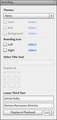
Here's how to add descriptive text to any section of a video:After you've recorded a video, open it in the Adobe Presenter Video Express editor. Place the playhead at the point in the video where you want the identifying text to appear. Since this is going to be identifying text, you'll want to place it at the first point where you appear in the video.At the lower left, click the Branding tool to open the branding pane.
At the bottom of the branding pane, under Lower Third Text, enter your name and job title. At the lower right, you can also set how many seconds you want the text to stay onscreen.When you play the video, the identifying text appears, just like in a documentary. Here I am in my starring role as Human Resources Director, in my upcoming video, A Tour of Headquarters.
***Looking for training on Adobe Presenter? You can't go wrong with our $79 mini courses. Get up to speed in three hours on Adobe Presenter or on Video Express, or sign up for both. Learn more.
Icon Logic Blogs
.
Blog
.
<span class='date ' tip=''><i class='icon-time'></i> Jul 14, 2015 01:18pm</span>
|
|
View and download the webinar slides. View the webinar recording. Ideas for Marketing Methods / Techniques Try out BizLibrary's Online Library! BizLibrary provides 10,000+ training videos and eLearning courses in various business training topics, with new courses added every day.
Chris Osborn
.
Blog
.
<span class='date ' tip=''><i class='icon-time'></i> Jul 14, 2015 01:18pm</span>
|