Blogs
|
View and download the webinar slides. View the webinar recording. Try out BizLibrary's Online Library! BizLibrary provides 10,000+ training videos and eLearning courses in various business training topics, with new courses added every day. Closing the Skills Gap: a Framework for Future Success In this eBook, we will ignore the political and social static that dominates a lot of the conversation about "skills gap." What we want to do instead is focus on the data about where organizations are struggling to find talent, and then offer some practical advice, best practices, and tips to help find or nurture talent to fill both current and future skill gaps. BizLibrary's Mobile Learning App meets the needs of today's digital learners. Employees no longer wait for training departments to push learning content to them. Employees are used to pulling information to themselves, when they need it, on their own terms and conditions, and on their own devices.
Chris Osborn
.
Blog
.
<span class='date ' tip=''><i class='icon-time'></i> Jul 14, 2015 01:17pm</span>
|
|
There are a wide variety of local events in the Los Angeles area that I periodically attend. I must say that I go through phases where I attend more events for a while and then I pull back and only attend a few. Right now, I'm in a fairly selective mode. So, when I go to an event, I want to make sure that I get the most I can from the time. Generally, it's a commitment of 3-4 hours between driving, networking, program. I have to make sure that I get at least as much value from that 3-4 hours as I would from spending the same time using LinkedIn for Networking - and that's tough competition. Over the years, I've somewhat changed what I'm looking for when I attend a local event. It used to be that I first looked for good content. A program that had interesting speakers and where I expected to learn a lot. Now, unless its someone really great, I don't go because of the program. Most often I can spend 30 minutes on my own to get a better result in terms of content than I get from 60 minutes at an event. And most in-person events do not give you a back-channel or much opportunity for Q&A. Side note: I very much enjoy local events where I'm the moderator because then I do get to shape the topic to my interests. Obviously, if it's not content, then the key ingredient is who else is going to be in the room. Quick Decision Process I spend about 5-10 minutes deciding if I'm going to attend. The way I do this is simple. I try to find a list of people who are attending the event. Many events now publish the list such as the following: If they don't have a similar list and I can't find the event on Facebook or LinkedIn or somewhere else, then likely I won't attend. I've found that it suggests that it's not going to be a good group and I definitely won't be able to pre-network so even if it's a good group, it will be hard for me to get much value from the group. Using the list of attendees, I randomly sample 5-10 people. Actually, it's most often not random, I choose more people who have Profile Photos (but don't get me started on that). I choose people with names that are a bit more unique so that it will be more likely to find them on LinkedIn. I have the LinkedIn Browser Toolbar installed which gives me a right click action … So I can see a few mini-profiles: Okay, I won't be spending more time on this list and I won't be attending. No offense to attorneys and investment advisors, but the attendee list suggests this is general networking mixer and not likely worth the time investment. Side note: there generally is a high correlation between the people who have profile pictures on the site and the people who have profile photos on LinkedIn. If the results had been better, then I would have spent time drilling down on people like Lee: I don't know Lee, but by scrolling through his profile I can see some possibly interesting things to discuss. Does Browse My Stuff make sense from a channel marketing standpoint? What is happening from an eLearning 2.0 perspective around channel training? So, Lee and I could have a very nice conversation. Gee - maybe I should change my mind and plan to attend. I could go back and look for 4 or 5 other Lee quality people and decide to attend after all. Alternatively, I can reach out to Lee directly through LinkedIn and just set up a quick 30 minute call. In fact, that's what I will do after I'm done writing this post. And 95% likely that we'll talk within a few days. That's what makes it harder to convince me to go to a local event. But, let's assume that I was going to the event after all, then I would spend time on what I discussed on my Socal CTO blog in my post on Prenetworking. Pre-network the Event Assuming that I am seeing a few different Lee-quality people, then my next step is that I'm going to pre-network with them prior to the event. I try to do this roughly about 2-3 days ahead of the event. That way the list of people attending is fairly complete and there's still time for back and forth with the person. I will go through the list of attendees more thoroughly on this pass looking for anyone who I want to meet at the event. I look to find 5-8 people. You want to have a large enough list of people because some won't end up going and if you've committed to meeting someone at the event, you will end up going. And you could find yourself at an event waiting for that one person talking to attorneys and wealth planners. For each of those people on your pre-network list, you simply send a "Get Introduced Through a Connection" to them: It's nice that I have multiple people who can introduce us. It gives me a nice touch point with someone I already know. And they can vouch for me in the introduction. You don't get that when you are at the event. Then you compose your message. The nice thing is that the subject is easy - name the local event. My message to Lee would be very similar to what I'd say when I would meet him in person. Maybe something like: Hi Lee, I saw you on the attendee list for the upcoming event. I'm planning on going as well and it looks like we might have some good things to discuss. It looks like you have a background in eLearning and I'm going to be curious to hear how you are applying it for channel sales. I also have a technology that I think might apply in an interesting way. I just wanted to make the connection so that I'd be sure to meet up with you at the event. Tony You generally will get a very positive response to this kind of message and your time at the event will be much better because of the pre-network effort that you've put in. This technique equally applies to conferences and other kinds of events. Unfortunately, few conferences provide attendee lists. eLearning Technology
Subscribe to the Best of eLearning Learning for updates from this blog and other eLearning blogs.
Tony Karrer
.
Blog
.
<span class='date ' tip=''><i class='icon-time'></i> Jul 14, 2015 01:17pm</span>
|
|
by Jennie Ruby
I often point out in my classes on writing eLearning voiceover scripts that a script is necessary so that when you record the audio you don't skip anything, don't stumble, and don't say "um." However, using a voiceover script for eLearning is way more useful than just that.
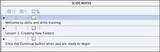
Let's say for example that your eLearning project will be developed in Adobe Captivate. Captivate allows you to type--or copy and paste--the script into Slide Notes, similar to the slide notes you might be familiar with in PowerPoint. From there, you can use the notes in several different ways.
First, just as in PowerPoint, you can create handouts that print the Slide Notes along with an image of each slide, like this:
Second, if you are going to record the voiceover yourself, you can display the notes in the recording dialog box, like a miniature teleprompter, for your ease in recording the audio. At the bottom of the recording window, click the Captions & Slide Notes button to display the notes.
Third, if you are hiring voiceover talent to record the audio, you can provide the script to that professional, slide by slide, so that he or she can record the audio for each slide separately.
Then, fourth, once you either record the audio yourself or import the recordings from your voiceover talent, you may need closed captioning. Once you have pasted the voiceover script phrase by phrase into the Slide Notes pane, you can create the closed captioning just by clicking a check box.
And if you have accurately divided the script into phrases as shown above, it will automatically be synchronized with the audio. Below, you can see the yellow markers indicating the closed caption that goes with each audio segment.
Fifth, suppose instead of hiring voiceover talent and instead of recording the audio yourself, you decide to go with Text to Speech. Since Captivate comes with several high-quality computerized voices from NeoSpeech, this is a viable option. Just as with the closed captioning, creating the Text to Speech from the Slide Notes is very easy. In the Slide Notes pane, you click the TTS check box.
Then you open the Speech Management dialog box, where the Slide Notes are automatically imported, click the Generate Text button at the bottom, and you've got your voiceover audio.
And as before, to get closed captions with that, you just click the Audio CC check box.
Sixth, and finally, if you are creating accessible eLearning that is 508 compliant, then the final thing you can do from that one voiceover script is automatically import the Slide Notes to the Slide Accessibility dialog box. This contains the text to be read by screen readers, for those accessing the training through audio only.
So, let me count them up--yep, that would be six (6) ways to use a voiceover script to help in the development of eLearning with Adobe Captivate. By starting with a good voiceover script, you not only create a clear and well-planned audio, but you also save tons of work by using the script to automatically generate any or all of these aspects of your eLearning project.
Are your scripts up to the task? Join me for my afternoon mini course on how to write a good voiceover script.
***Need more help with your script? Look for our hourly consulting service. We'll help you evaluate, substantively edit, or rewrite your voiceover script to make sure it is up to par.
Icon Logic Blogs
.
Blog
.
<span class='date ' tip=''><i class='icon-time'></i> Jul 14, 2015 01:17pm</span>
|
|
by Kevin Siegel
After producing your Camtasia projects, the net result is a collection of independent web files, scripts, videos and other assets. If you are looking to group multiple Camtasia projects together to create a single course, you'll need to upload the lessons to Screencast.com, YouTube, or a Learning Management System. But if you want to create a website that includes a menu of your lessons, you will need to get a webmaster involved... someone who can create a website that links to all of the produced files that make up your course.
If you don't have access to a webmaster, Camtasia MenuMaker will prove invaluable. MenuMaker packages documents, graphics, multimedia files and videos all into a single menu intended to be placed onto a CD-ROM, DVD or other type of drive.
Before creating a menu, produce two or more Camtasia projects as videos.
To create a menu, open a Camtasia project and choose Tools > Studio tools > Camtasia MenuMaker. From within the MenuMaker Wizard, select Create a new project using the Wizard and click the OK button. Next you can choose a Template for your menu. After selecting a Template, click Next. Find and open your produced videos (in the image below, I've added three videos to my menu). On the final screen, give your menu a title and click Finish to create the menu. And that's it! Of course, if you want to control the look of the menu, there are plenty of things you can do to customize it... but that's a story for next week.
***
If you'd like to learn more about eLearning, come hang out in my next eLearning basics mini course. And if you'd like to learn more Captivate, Presenter, or Storyline, we've got a great collection of live, online classes for you.
Icon Logic Blogs
.
Blog
.
<span class='date ' tip=''><i class='icon-time'></i> Jul 14, 2015 01:17pm</span>
|
|
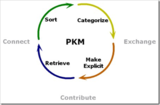
Great dialog between Harold Jarche and Stephen Downes around Harold's PKM process … Stephen Downes wrote in response: … what does the concept of a ‘method’ here imply? That there is a ‘best’ way to manage knowledge an information? Isn’t that what we’ve learned there isn’t? It’s a pick-and-choose sort of thing: the way we manage information has a lot to do with the information, and a lot to do with who we are and what we want the information for … Harold responded with Other PKM processes where he shows some other models and states: To be clear, my intention is to show what works for me and perhaps some part of this may work others. All of my articles on PKM are descriptive, not prescriptive. Take what you need, as there are no "best practices" for complex and personal learning processes. Harold and I have discussed this exact issue before and we are both on the same page that Personal is really important word in Personal Knowledge Management. Studies of Personal Information Management say that what works is often highly personal. However, a lot can be gained from sharing approaches and practices. Anyone who has seen me present know that I give a big caveat with the word Personal on the slide. While I use the words, "you should" … what I mean is that "you should consider and maybe try" … not necessarily "you should adopt" … What works for me, may or may not work for you. However, there are some people who take that to mean that they can be successful continuing to use the same approaches without being aware of, considering or trying alternatives. That's a real mistake. And Harold and Stephen are great at trying to provide ways to think about and think through these alternatives. So, while I push a lot around tools and methods for work and learning: Tool Set 2009 Work Skills Keeping Up Top-Down Strategy Better Memory Information Radar Processing Pages with Links Networks and Learning Communities Collaborate Twitter as Personal Work and Learning Tool Search Browser Short Cuts Pre-network with LinkedIn Network Skills LinkedIn Guide for Knowledge Workers Blog Learning and the list goes on. ( In fact, Work Literacy is pretty much this topic. ) This is a good opportunity to add the same caveat: The real intent is to provide context, alternatives and suggestions of where things might apply. Your mileage will vary. eLearning Technology
Subscribe to the Best of eLearning Learning for updates from this blog and other eLearning blogs.
Tony Karrer
.
Blog
.
<span class='date ' tip=''><i class='icon-time'></i> Jul 14, 2015 01:17pm</span>
|
|
View and download the webinar slides. View the webinar recording. Try out BizLibrary's Online Library! BizLibrary provides 10,000+ training videos and eLearning courses in various business training topics, with new courses added every day. How to Measure the Impact of Employee Soft Skills Training We know great "people skills" when we see them or experience them. However, soft skills don’t always lend themselves to easy measurement for excellence. Measure the business impact . . . Well, that’s just not something the ROI and traditional approaches to training investment don’t really help us do very effectively unless we dig deeper. Start measuring your soft skills training and download this eBook today.
Chris Osborn
.
Blog
.
<span class='date ' tip=''><i class='icon-time'></i> Jul 14, 2015 01:17pm</span>
|
|
I'm doing a free webinar in a few weeks where I will be discussing some of the major trends that are affecting models of learning. I think this will be an interesting discussion and I welcome your participation. Models for Learning in a New World This is a very interesting time to be a learning professional. Fragmentation of jobs, increasing concept work, and constant change all put a premium on learning. At the same time, we are seeing an explosion of information sources, greatly increased accessibility of experts and expertise around the world, and new tools emerging every day. This environment means that workplace learning is changing. We have to look beyond formal learning solutions towards solutions that support self-directed and social learning. In this session, Dr. Karrer will discuss the big picture trends that are impacting workplace learning. He will present how learning solutions are evolving in organizations to meet changing needs. Holly and Monika will discuss a model for learning that integrates various learning strategies that combine formal, performance support and informal learning. Come join this interesting presentation and discussion around models for learning in a new world of learning. Presenters: Dr. Tony Karrer, TechEmpower, Inc. Holly St. John Peck, Peck Training Group, LLC Monika Ebert, Different Lens, LLC Date/Time: Tuesday, August 25th 10-11 AM Pacific, 1-2 PM Eastern, 5 PM GMT Register for the Webinar eLearning Technology
Subscribe to the Best of eLearning Learning for updates from this blog and other eLearning blogs.
Tony Karrer
.
Blog
.
<span class='date ' tip=''><i class='icon-time'></i> Jul 14, 2015 01:16pm</span>
|
|
View and download the webinar slides. View the webinar recording. Try out BizLibrary's Online Library! BizLibrary provides 10,000+ training videos and eLearning courses in various business training topics, with new courses added every day. Succession Planning and the Development of Your High Potentials In this eBook we’ll cover both aspects and provide some practical suggestions for selecting the right participants and the development your high potential employees.
Chris Osborn
.
Blog
.
<span class='date ' tip=''><i class='icon-time'></i> Jul 14, 2015 01:16pm</span>
|
|
by Willam van Weelden
Merged help is the process of combining outputs from multiple RoboHelp projects into a single help system. While the content is created from multiple projects, your users see a single, integrated help system.Over the next couple of weeks I will teach you how to create merged help for several output formats. Since RoboHelp's layouts work differently, I will go over each layout in turn.
Why Merge Help?
Generally speaking, if any of the following items are true in your environment, merging may be for you:
You have a very large project (thousands of topics). Splitting the project into smaller projects may make maintenance easier.
Multiple writers work on separate parts of the documentation and you don't have source control. Without source control, only a single author can work in a project at the same time. Having multiple smaller projects makes collaboration without source control easier.
You need to update parts of the help separately from other parts. If you have a single project, you create an output for the entire project. You can publish only changed files, but you can't update only a single part. With merged help, you can.
You have modules that are reused in different products. With merged help you maintain a single version, and reuse that.
Which Outputs can I Merge?
You can merge the following outputs:
Adobe AIR
Microsoft HTML Help (CHM)
FlashHelp
Multiscreen HTML5
Responsive HTML5
WebHelp
Master Project and Child Projects
When you merge help, you always have one master project and any number of child projects. The master project is the glue that holds everything together. When you generate your output, the master project makes sure that your help system is shown as an integrated whole.
Your master project is a regular RoboHelp project. You can use any features you want in the master project.
Merged Microsoft HTML Help
Generate a CHM file for every child project. (Using the Single Source Layouts pod, generate Microsoft HTML Help.) Then open the project that is to be the master project.Open the layout's table of contents and click New Merged Project. On the HTML Help tab, click the browse button (the yellow folder) and open the CHM file of the child project you published. Click Yes when prompted. Click the OK button to merge the CHM file. The child project will appear in the Master project's TOC.
Save your project and generate the layout.
All that's left to do is deliver both CHM files as your help system.Whenever the child project changes, generate the CHM from the child project. Replace the CHM in the master project directory and generate your master project. You can also replace the child project CHM in the output directly.
***
Looking to learn RoboHelp? We offer a live, two-day online RoboHelp class once a month. Feel free to contact us to learn other ways to meet your RoboHelp training requirements.
Icon Logic Blogs
.
Blog
.
<span class='date ' tip=''><i class='icon-time'></i> Jul 14, 2015 01:16pm</span>
|
|
Have you ever wanted to have a single list of the various free webinars brought together in a single place? In conjunction with eLearning Learning, we are working with Jon Udell (thanks Jon) to use his calendar aggregation technology to bring together a list of free webinars that we believe will be of interest to learning professionals. Free eLearning Webinars Let me know if you think this will be valuable. Integrated with Best of eLearning Learning We are planning to include events that are coming up in the Best of eLearning Learning each week. We just did exactly that for the post: Learning Management Systems Flash Technology - Best of eLearning Learning where we listed three upcoming webinars. Hopefully another reason to subscribe to the best of eLearning Learning. Get the Word Out Hopefully this can grow to address both sides of this need - consumers and producers. As a consumer, I seem to randomly run into webinars like you probably did when I just announced: Free Webinar - Models for Learning in a New World. Because they hit me somewhat randomly, I most often don't schedule it into my calendar at that time. I know that I'll make a decision later about the event. As a producer, I know that getting the word out on a webinar can be very difficult. I will publish the information about the webinar I just mentioned on my blog, but that hits exactly the same audience. I will tweet about it. Hopefully a few people will Retweet. But it doesn't reach all that wide. I'm hoping that this will become a good way for producers to get the word out. By the way, if you are producing events that will be of interest to a learning professionals audience, then drop me an email. Thoughts and Ideas We are just beginning this process. We have some ideas on where this will go and how to make it better, but I would really like to get your input. Is this a good idea? What can we do to make this better? eLearning Technology
Subscribe to the Best of eLearning Learning for updates from this blog and other eLearning blogs.
Tony Karrer
.
Blog
.
<span class='date ' tip=''><i class='icon-time'></i> Jul 14, 2015 01:16pm</span>
|