Blogs
|
by Sean Stoker
In our own, considered, humble opinion, we have an awesome blog that every eLearning professional should read.But sometimes we like to see what our colleagues are doing, which means taking a look at the multitude of eLearning knowledge that exists all over the web. Here are a few blogs that you simply must bookmark and read on a consistent basis:
eLearning Industry. This website publishes original eLearning content with 360 authors and more than 90 original articles published per month.
The eLearning Coach. Instructional design know-how from a highly experienced eLearning guru, Connie Malamed.
E-Learning Provocateur. E-Learning Provocateur is the brainchild of Ryan Tracey, a member of eLearn Magazine's editorial board. Tracey hopes to "provoke deeper thinking" in the world of eLearning.
Cathy Moore. Cathy Moore is an impassioned advocate for interesting and stimulating eLearning. As a speaker and adviser she is in very high demand, and her impressive resume includes companies such as Lockheed Martin, Microsoft, Wells Fargo, FedEx, and even the American Government, amongst a multitude of others.
E-Learning 24/7 Blog. Blogger Craig Weiss was recently named the most influential person in the eLearning industry. He is an expert on Learning Management Systems and a well-known public speaker.
OpenSesame. OpenSesame is a unique website that allows for easy buying and selling of eLearning Courses.
The Learning Generalist. Written by Sumeet Moghe of Thoughtworks Technologies Pune.
Social Learning Blog. An industry blog brought to you by LMS giant Interactyx.
Upside Learning. One of the most socially shared eLearning blogs on the internet.
Technology Enhanced Learning Blog. By David Hopkins, the 2014 ALTC Learning Technologist of the Year.
Learning Solutions Magazine. The eLearning Guild's publication, boasting more than 1000 articles since 2002.
Rapid eLearning Blog. By Tom Kuhlman, an eLearning pro with two decades of experience.
I Came, I Saw, I Learned. An informative blog about the software and design side of things from IconLogic.
Allison Rossett. A blog hosted by Dr. Allison Rosset, an eLearning expert and professor of Educational Technology at San Diego State University.
The Spicy Learning Blog. "The Spicy Learning Blog" is posted by Saffron Interactive, Europe's prolific eLearning organization.
Kasper Spiro. From the mind of Kasper Spiro, CEO of easygenerator.
Docebo E-Learning Blog. A blog created by Docebo, one of the Top Ten Learning Management Systems of 2015.
LMS Blog. Insider knowledge from the respected LMS, Latitude Learning.
E-Learning Acupuncture. An eLearning blog created by accomplished scientist and Educational Developer at Queen's University, Eric Tremblay.
E-Learning Academy. Tips from e-coach Alison Bickford.
Is there a blog you would like to add to this list? Feel free to name your go-to blog in as a comment below.
***
Looking to learn to create your own eLearning? We offer several live, online classes that'll get you up and running in no time. Classes range from 3-hour mini courses to full-day, multi-day events.
Icon Logic Blogs
.
Blog
.
<span class='date ' tip=''><i class='icon-time'></i> Jul 14, 2015 01:14pm</span>
|
|
In the T+D article Learning Gets Social, Tony Bingham paraphrases something I said: In the May issue of T+D, Tony Karrer, an e-learning technologist and CEO of TechEmpower, encouraged companies to start adapting to the current trend in informal learning because otherwise, they will find themselves marginalized in the business. I thought it would be good for me to put some context around what I meant by this. Especially given that there's been some push-back on the term "marginalized." In the Business of Learning, I pointed out that there were some pretty significant questions facing the training industry. Budgets have been hammered this year, and there's a question as to what spending levels will look like going forward. During the Free Online Conference - Future of Learning we heard different perspectives. Skill Building Still in Demand. There was definitely the belief that there are continued need for skills development. If anything, there is increased need. Catalogs / Courses Commoditization. At the same time, the business of selling a catalog of courses is seen as being tough going forward. Unless you do something to differentiate yourself in a real way, you will be more and more of a commodity. Many Ways to Differentiate. We heard several people talking about focus on performance. We heard about use of assessments. There was discussion about a lot of the things that need to happen outside the training event. While there are great content vendors out there, I really didn't hear anyone who was claiming that being a content vendor was a great business right now. Instead, they talked about other kinds of things that would differentiate them in the marketplace. I believe the same thing is true for internal learning and development organizations. If you are seen as being the place you go for training / content production, there will still be need for your work, but it will be under greater pressure, just like external training suppliers. There are some other big picture trends going on that have impact on this: Faster pace Greater focus and value on high end concept work Job fragmentation - fewer people in any single job role Shorter job tenure These pressures suggest that there are greatly increased learning needs within organizations. However, less of these learning needs will be successfully met by traditional methods. If you look at what makes a good situation for formal learning: Large Audience Similar Level / Needs Known, Stable Content Few Out of Bounds Cases Of course, these are almost the opposite of the trends I mentioned. So, while formal learning solutions will make a portion of how learning will occur, the increased demand for learning will be met through other forms. This leaves us with the questions: What the role of learning and development relative to all of this? If L&D leadership chooses to focus primarily on traditional methods and less so on informal learning opportunities, will they be marginalized in the business. eLearning Technology
Subscribe to the Best of eLearning Learning for updates from this blog and other eLearning blogs.
Tony Karrer
.
Blog
.
<span class='date ' tip=''><i class='icon-time'></i> Jul 14, 2015 01:14pm</span>
|
|
View and download the webinar slides. View the webinar recording. Webinar handouts: Customer Experience Strategy and Core Values Development Plan Performance Management Competencies Try out BizLibrary's Online Library! BizLibrary provides 10,000+ training videos and eLearning courses in various business training topics, with new courses added every day. How to Measure the Impact of Employee Soft Skills Training We know great "people skills" when we see them or experience them. However, soft skills don’t always lend themselves to easy measurement for excellence. Measure the business impact . . . Well, that’s just not something the ROI and traditional approaches to training investment don’t really help us do very effectively unless we dig deeper. Start measuring your soft skills training and download this eBook today.
Chris Osborn
.
Blog
.
<span class='date ' tip=''><i class='icon-time'></i> Jul 14, 2015 01:14pm</span>
|
|
by Mira Rubin
If you've spent any amount of time working with Adobe InDesign, you probably know how to create Paragraph and Character styles. Nested styles take Paragraph styles to a whole new level with complex formatting you can apply with the click of a button. Nested styles are ideal when the paragraphs being formatted follow a consistent pattern such as entries in a catalog, directory, or bibliography.
Let's take the example of a contact list, where each entry is a paragraph with the following elements in common:
Last name, First name: (Phone Number Exchange) Phone Number
In this example, the paragraph structure is an assemblage of modules separated by markers--the comma between last name and first name, the colon before the phone number and the parentheses around the number exchange. You can apply different formatting to the modules using the markers as transition points. The trick to nested styles is to first create character styles that capture the variations in formatting. The character styles are then assembled to build a super smart paragraph style.
The example we'll use employs four variations in formatting. The phone number itself will be captured in the foundation paragraph style and the other three formats will be captured as character styles.
To begin, set up the paragraph so the last name, first name, number exchange and phone number all have distinct formatting. Be sure to include the comma, the colon, and the parentheses around the phone number exchange.With the Type Tool cursor positioned in the last name, choose Window > Styles > Character Styles. When the panel opens, hold the Alt key (Windows)/Option key (Mac) and click the Create new style button at the bottom of the panel. When the New Character Style dialog opens, name the style lastName. Notice the summary of formatting properties in the Style Settings section of the dialog. Click OK to close the dialog.Repeat the process and create character styles that capture the formatting of the last name and the phone number exchange (name the styles accordingly). Now comes the fun part--assembling the paragraph style from the character style components.Because InDesign captures paragraph properties from the formatting of the text at the cursor location, position the Type Tool cursor in the main phone number text. Choose Window > Styles > Paragraph Styles and, when the panel opens, Alt+Click/Option+Click the Create new paragraph style button at the bottom of the panel. Name the style listing.Click the Drop Caps and Nested Styles category at the left of the New Paragraph Style dialog to display the nested styles options.Click the New Nested Style button, then click the drop-down menu to the right of the word None in the first text field. Choose lastName from the list of character styles.You want the last name and the comma following it to have the same formatting so, ensure that through is selected in the second column of options.Select the word Words in the third column, and press the comma key on your keyboard to enter the comma as the delimiter.Click the New Nested Style button again, this time assigning the firstName style and a colon as the delimiter.Click the New Nested Style button a third and final time and assign the exchange style with a closing parenthesis as the delimiter. (Click OK to complete the style and close the dialog.) To use the style, select the paragraphs you want to format and click the style name in the Paragraph Styles panel.Whether it be one paragraph or a thousand, as long as the paragraphs in your document are uniformly structured, nested styles make it possible to apply complex formatting reliably and consistently at the click of a button.
***
Looking to learn Adobe InDesign? Check out these live, online classes.
Icon Logic Blogs
.
Blog
.
<span class='date ' tip=''><i class='icon-time'></i> Jul 14, 2015 01:14pm</span>
|
|
I'm looking to find lots of examples of where informal or social learning has been used successfully in the workplace and where it was led by the L&D organization. This can either be already written up, or it can be the name of a person and organization where it was done.Can you provide me pointers?If you would be more comfortable, feel free to send me information via an email: akarrer@techempower.com. eLearning Technology
Subscribe to the Best of eLearning Learning for updates from this blog and other eLearning blogs.
Tony Karrer
.
Blog
.
<span class='date ' tip=''><i class='icon-time'></i> Jul 14, 2015 01:13pm</span>
|
|
by Kevin Siegel
Last week I taught you how easy it is add a hyperlink to caption text in Adobe Captivate. This week, let's tackle object hyperlinks.
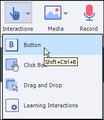
First of all, keep in mind that any interactive object can take a learner to a website. Interactive objects include, but aren't limited to, click boxes, buttons, text entry boxes, and smart shapes (assuming the smart shape is being used as a button).To insert an interactive object, click Interactions on the Main toolbar. In this example, I'm going to use a Button. With the object selected, go to the Properties Inspector and select the Actions tab. From the On Success drop-down menu, choose Open URL or file.Select Web Page from the Link To drop-down menu and then type in the web address. And just like I mentioned last week when creating a text hyperlink, prior to clicking the OK button, visit the drop-down menu to the right of the web address. Select New from the list of options. (This will ensure that the page that appears after the learner clicks is a new page or tab, rather than a page that replaces the current lesson.)
When viewed via a web browser or a PDF, the learner will be taken to the web address you specified in the Link To area if the interactive object is clicked.***
If you'd like to learn more about eLearning, come hang out in my next eLearning basics mini course. And if you'd like to learn more Captivate, Presenter, or Storyline, we've got a great collection of live, online classes for you.
Icon Logic Blogs
.
Blog
.
<span class='date ' tip=''><i class='icon-time'></i> Jul 14, 2015 01:13pm</span>
|
|
This is an area of employee development most organizations invest time and energy in just about every year. It’s important, and it’s relevant. It’s also evolving, and therein lies the issue with most leadership development programs. Many programs are not evolving with changing market conditions and the changing needs of organizations. Here are some questions to ask about your current leadership development program as a check list: Have you reevaluated your leadership competencies in the last 6-12 months? Have you performed a SWOT analysis to test whether your current leadership’s capabilities are effectively addressing organizational strengths and weaknesses? Have you performed a SWOT analysis to test whether your have necessary future leadership capabilities to effectively addressing organizational opportunities and threats? Is your organization agile and adaptable enough to address rapidly changing competitive challenges or product innovations? Has your organization introduced innovative new products or services in the last 12 months? Would you describe collaboration AND innovation as organization strengths today? If you answered "no" to three or more of these questions, you might need to reevaluate the current state of your leadership development efforts. In today’s rapidly evolving, complex and highly ambiguous business environment, organizations should be looking to increase their capacity for improvement, learning and change as competitive differentiators. Leaders - both current and future - will be critical in all of our organizations’ success in improving on these important organizational competencies. Try out BizLibrary's Online Library! BizLibrary provides 10,000+ training videos and eLearning courses in various business training topics, with new courses added every day.
Chris Osborn
.
Blog
.
<span class='date ' tip=''><i class='icon-time'></i> Jul 14, 2015 01:13pm</span>
|
|
by Jennie Ruby
Right at a time when flat design has become the rage, removing the three-dimensional look that for 30 years (happy anniversary to Windows this November!) has informed us that "this thing looks like you can poke it in! It must be a button!" people are starting to worry and become uncertain about the clear vocabulary that has helped us to write about software and computers for just as long.
In a recent class I had one participant tell me her office has forbidden the word "click" in favor of "select." Another told me that her office had done just the opposite!
The two concerns in question are whether the word "click" loses its meaning on mobile devices, and whether the word "click" is exclusionary toward individuals with disabilities or different abilities.
The good news is that using the word "click" is not ableist, nor is it declaring the hegemony of mouse users over mobile device users. It is just the standard word in technical communications to indicate "execute," on certain kinds of interactive items on screens. In other words, "click" means "hey you, button, do that thing you do."
The button, as with so many things in the computer realm, is an analogy to real-world little pokable nubbins that make things happen on electric devices from vacuum-cleaners to doorbells. Even real-world buttons have undergone some changes in the ways people use them. The buttons on my microwave and stove are now flat to the surface and covered with a plastic sheet so that spaghetti sauce and porkchop grease can't get in and ruin the mechanism. But you still actuate them by pressing them--and most of them still emit a satisfying "click" sound (or a beep) when you do so.
By analogy, "click" is whatever action you do to an on-screen button to make it do its thing. It is executed on various devices and by various computer users in various ways. Many of us already made the leap from "press and release the left button on a mouse device" to "press and release the left side of your mouse even though it no longer has a button" to "press and release the entire touchpad on your Mac laptop so that emits a click sound" to "tap ever-so-gently on the hair-trigger touchpad of your new Windows laptop" to "tap once on the screen of your iPad or phone" to "tap once on the screen of your touch-screen laptop" to "tab to the button and press the Enter key on your keyboard." And with Windows Speech Recognition, to actuate a button, you actually speak the word "click," as in, "Click OK;Click File; Click Bold; Click Save; Click Close," and so on.
To back away from the word "click" right now is as unnecessary, and even nonsensical, as deciding that the Save icon has to be changed because no-one has used an actual mini floppy disk since 2005. The Save icon has become a symbol that will retain its meaning like other permanent glyphs, such as the Arabic numerals or the smiley face. And the word "click" is the way you indicate "actuate" for certain screen items.
But that is not to say that the word "click" should be used for every screen action. By now I hope I have made clear that a "click" is a characteristic of certain screen items-buttons, icons, tools-not of the physical method by which you actuate them. So even though you may also click your mouse to execute the following actions, the word "click" is not the clearest vocabulary word for them.
You "choose" something from a menu, because you are "choosing" from a list of "choices," and once you "choose" the one you want, the chosen command is immediately executed.
choose File > Close
You "select" something that, once you select it, stays selected. You select a cell in Excel. You select part of the text in a document. You select an option from a list and the option stays selected-as in a drop-down list or a list-box. You select a radio button, and you select a checkbox. And they stay selected. Until you "deselect" them.
select the Portrait Orientation radio button
select the Kerning checkbox
from the Font drop-down list, select Verdana
select the first paragraph in your document
deselect the Enable Live Preview checkbox
You "press" a key on a keyboard or a real button on an actual piece of hardware. (The word "press" definitely cannot be used to describe what you do to an on-screen button, because it may create ambiguity: Does "Press Home" mean on the screen or on the keyboard?)
press the Enter key
press the F6 key
press the Power button (on the microwave)
And finally, you "click" an on-screen button, an icon, or a tool.
click the OK button
click the Bold tool
click the Wifi icon
As this vocabulary discussion continues, I would love to hear your take. Is your office using "select" for everything? Are you using "press" for mobile devices? Or tap? Are you combining commands, as in "click or tap the link"? Email me.
References
Microsoft Manual of Style for Technical Publications: "Do not use choose as an alternative to click or double-click. Choose does not convey any additional information to those who do not use a mouse, and such users normally understand the equivalent action that they must take when a procedure step says to click."
Web page: Use Speech Recognition to operate windows and programs
***Do you need to learn how to write eLearning scripts? Come check out my live, online mini course.
Icon Logic Blogs
.
Blog
.
<span class='date ' tip=''><i class='icon-time'></i> Jul 14, 2015 01:12pm</span>
|
|
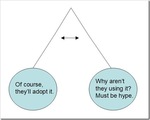
You can find all sorts of interesting resources via eLearning Learning around Adoption. Not surprising, the terms most closely associated with Adoption are Adoption of Social Software and Adoption of Enterprise 2.0. There are some great resources on this such as: Ten tips for choosing & using social software Adoption of Web 2.0 and eLearning 2.0 Revisited Social Media - The Challenge of Adoption - Rob’s Dummies Guide The secret sauce to successful Enterprise 2.0 adoption Facilitating Adoption of Web 2.0 Tools Adoption Ideas Webinar Software - Adoption Advice Enterprise 2.0 - What's the PU? Web 2.0 Adoption in the Enterprise - It's Personal Adoption Pendulum As I do presentations where I discuss Tools and Methods for Knowledge Work, I find myself wondering about adoption levels of these tools, and the following pendulum definitely describes how my feelings swing back and forth: Social Software Deployment Levels Over the past few years, there's definitely been greater deployment of social software in the Enterprise. Dion Hinchcliffe declared 2009 - The year of the shift to Enterprise 2.0. Reported numbers vary widely … Forrester: Despite the novelty of the technologies (only 3 years old), the percentage penetration is very high, about half of all enterprises globally. Survey Results: Enterprise 2.0 Adoption: 98% of those surveyed are using Enterprise 2.0 technologies for internal communication and collaboration within their company. The most popular technologies used are instant messaging (74%), wikis and team workspaces (67%), and blogs (51%). And my personal experience is that it's pretty rare to run into an organization that is not at least planning on adopting some social software solutions. And I'm certainly seeing a lot of SharePoint. Deployment vs. Adoption But it's important to keep in mind that deployment of social software does not mean adoption / use. A new report by web usability guru Jakob Nielsen tells us: A main finding from our study's interviews is that most companies are not very far along in a wholesale adoption of Web 2.0 technologies. But the same report tells us: Social software is not a trend that can be ignored. It's affecting fundamental change in how people expect to communicate, both with each other and the companies they do business with. Email Comparison Often people cite the adoption of email as a technology adoption cycle with the claim that social software will follow a similar path. Certainly, email went through a bit of a similar early pattern where there was sporadic adoption, lots of debate, executives that had their secretaries (they were not administrative assistants at the time) print their email and put it in their inbox (and I mean an actual inbox). Eventual adoption of email was a certainty. Once enough people in the organization adopted email, it was very hard for any individual to avoid adopting it. It would just be too inefficient not to adopt it. You were somewhat forced into learning the skills required. Typing, basic computer use, email etiquette. Of course, this was over the course of several years. Distributed Content Editing In thinking about various social software, I'm not so sure that I believe that adoption is nearly so neat. Some technologies seem like they will reach tipping points in organizations where resistance will become hard. There will be enough people using the technology that it will reach a tipping point where you pretty much have to adopt it. An example of that is the adoption of Distributed Content Editing via an agreed to technology such as Wiki, Shared SharePoint Documents, Google Docs, etc. Once a work team agrees that will be how they collaborate on a given piece of content, it becomes very inefficient for an individual within the team to not adopt the same technology. Sending a Word document in an email when there's a collaboratively editable version of the content somewhere else causes enough pain that the group forces the use of the new technology through peer pressure. Once enough people in the organization adopt that as the approach, it becomes hard for other forms to exist. I personally expect that the days of emailing around documents will be long forgotten. Instead, the model shown by Google Docs with an email that alerts you to a shared document being the norm and successive alerts coming via email or RSS about changes. You won't think of things like the location of the document (local, email attachment, network drive, SharePoint) or multiple versions in files at all. Oh, and real-time editing with multiple authors will be standard. Discussion Group Software Comparison While I believe that adoption of tools for distributed content editing is a sure thing, in looking at other tools, I suspect that adoption patterns are going to be quite different. Many of the tools that we include in the list of social software are things that may be more like discussion group software. This software has been around for many years. There is a network effect with the adoption of discussion groups. If enough people in a group adopt it's use, then it becomes more valuable and progressively harder to remain a part of the group and not adopt the use of the software. Adoption of discussion group software certainly has followed a very different path than email. It's pretty rare where work teams and certainly not organizations have made it the norm to adopt the software. Instead, it's most often left up to the individual to make a personal choice about adoption and adoption level. Lurking is considered legitimate peripheral participation. Not reading everything is often okay. The adoption pattern is quite different than adoption of email or collaborative content editing. I'm wondering if there aren't quite a few of the tools that we discuss as social software that will follow this kind of adoption. A prime example are blogs. Blogging is somewhat a personal/network version of discussion groups. I would guess that it will have limited adoption - but that's not to say that even with limited adoption it doesn't bring value. In fact, part of the comparison is that discussion groups and blogging both bring value with limited adoption. Social Networks With this slightly different lens, I'm wondering what this means for the adoption of social networks as a means of expertise location. If you look at what I've said above, I'm asking: What's the pressure from others in the organization or work team to adopt? What happens if you don't or partially adopt? In the case of email and collaborative content editing, pressure is high and partial adoption doesn't work. In the case of discussion groups and blogs, pressure is generally low and partial adoption is generally okay. With social networks there will be some level of pressure to participate. If you want to be seen as an expert in the organization, you really need to play along. However, you can likely get away with only partial adoption. You may not really use it as a means of finding expertise yourself. So, while I feel there's tremendous value in social networks as a means of expertise location, I'm currently thinking that adoption is going to be a bit like adoption of LinkedIn. Widely varying levels of participation, even for those who are registered. Social Bookmarking Social Bookmarking has a stronger pressure level when it's adopted by a work team. If you are tasked with research, and you don't share what you find via a social bookmarking system, the team likely will put pressure on you to do so. The perceived utility (PU) of social bookmarking is not that high, it's perceived ease of use (PEOU) is high and with the network effect, it would seem that social bookmarking should be something that gains widespread adoption. However, that's not what I'm seeing out there. Awareness of these tools is lower than other forms of social software. IT organizations are adopting these more slowly. This seems like a long-term winner. Am I missing something? Questions In previous looks at this, I've relied more on the traditional TAM model looking at things like Perceive Utility and Perceived Ease of Use. What I'm talking about in this post is that we need to take into account work team and organization network effects that bring pressure as an important factor in adoption. We also need to recognize what adoption might look like (partial). All that said, a bit of this is crystal ball gazing. What will social software use look like inside organizations in 3-5 years? Where tools should IT be providing and organizations be facilitating and support? Should organizations encourage adoption? I can't say that I'm not going to swing back and forth on the pendulum a bunch more times. I certainly am curious what people think around this. How it Feels Sometimes I'm sure we can all relate to this: eLearning Technology
Subscribe to the Best of eLearning Learning for updates from this blog and other eLearning blogs.
Tony Karrer
.
Blog
.
<span class='date ' tip=''><i class='icon-time'></i> Jul 14, 2015 01:12pm</span>
|
|
View and download the webinar slides. View the webinar recording. Try out BizLibrary's Online Library! BizLibrary provides 10,000+ training videos and eLearning courses in various business training topics, with new courses added every day. To download The First 7 Things to Do When You Get Promoted from Kevin Eikenberry, click here .
Chris Osborn
.
Blog
.
<span class='date ' tip=''><i class='icon-time'></i> Jul 14, 2015 01:12pm</span>
|