Blogs
|
View and download the webinar slides. View the webinar recording through TrainingIndustry.com View the slides via Slideshare
Chris Osborn
.
Blog
.
<span class='date ' tip=''><i class='icon-time'></i> Jul 14, 2015 01:09pm</span>
|
|
by Kevin Siegel
You're developing an eLearning module in Adobe Captivate or Articulate Storyline. There's a slide that plays for 45 seconds. As you're listening to the audio, you'd like a screen object to appear in sync with the voiceover audio or some other screen action.
If the object in question is already on the slide, you can certainly select the object on the Timeline and drag it until its left edge gets to the desired part of the Timeline. Of course, if the slide is playing for a significant amount of time, that's going to require a lot of dragging.
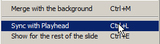
One technique that I use when I want to match screen actions to voiceover audio is called Sync with Playhead (in Captivate) or Align with Playhead (in Storyline).
In the image below, I've positioned the Captivate Playhead on the Timeline by clicking at the top of the Timeline.
The technique is identical in Storyline (except as you'll see in the image below, the Playhead looks a bit different).
On the Timeline in either program, I can then right-click an object that I'd like to automatically move to the Playhead position and choose Sync with Playhead (Captivate) or Align with Playhead (Storyline).
***
If you'd like to learn more about eLearning, come hang out in my next eLearning basics mini course. And if you'd like to learn more Captivate, Presenter, or Storyline, we've got a great collection of live, online classes for you.
Icon Logic Blogs
.
Blog
.
<span class='date ' tip=''><i class='icon-time'></i> Jul 14, 2015 01:09pm</span>
|
|
I just saw a post by Amit Garg Top 47 eLearning & Workplace Learning Blogs. His list was very similar to the list of sources that eLearning Learning includes. It made me wonder how many sources does eLearning Learning include? Turns out it's exactly 99. Please let me know if I'm missing any blogs that produce good content on eLearning and more particularly Workplace eLearning that would make sense to include. eLearning Learning is looking for a bit deeper posts that focus on applied issues. If you don't want to subscribe to all 99 sources individually, then you can subscribe to either the Full Feed or Best Of feed from eLearning Learning. The full feed provides snippets from each source. And the Best Of feed provides a weekly summary with the top content from all of these sources. The Best Of also includes upcoming free elearning webinars. Personally I find that this is high value even though I try to stay up on all the latest and best content. I'll also mention that there's one source that's a bit different than the others. It's Tony Karrer delicious links. As I find interesting items that are not part of these sources, I manually mark those. It's part of the overall social filtering that the technology relies on. I would definitely welcome involvement of more content collectors. So … Wanted: Content Collectors and heck, might as well mention… Wanted: Calendar Curators So here are the 99 sources in no particular order: The Learning Circuits Blog eLearning Technology Clive on Learning Corporate eLearning Strategies and Development In the Middle of the Curve Tony Karrer delicious links Rapid eLearning Blog Learning Conversations Learning Rocks Game Changing Idea Informal Learning Big Dog, Little Dog Janet Clarey e-Clippings (blogoehlert) Learning Matters! eLearning Acupuncture Breakthrough eLearning Discovery Through eLearning eLearning Weekly Engaged Learning eLearning Community 2.0 eContent Jane Hart - Pick of the Day Internet Time Experiencing eLearning Learning Next Learning Design and Performance Improvement Adobe Captivate Blog Learning and Technology Learning Circuits eQuixotic Mobile Learning Learning Visions Will at Work Learning Business Casual Bamboo Project ThirdForce Blog eLearning Learning Posts Social Learning and Communities of Practice Jonathan's ID eLearning 3.0 Blog Bozarthzone subQuark eLearning Roadtrip Road to Learning There Is No Chalk Spicy Learning The E-Learning Curve Electronic Papyrus trainingwreck E-learning in the Corporate Sector Daretoshare Dont Waste Your Time eLearning Development News Performance Learning Productivity Performer Support Good Practice Learning in a Sandbox Simply Speaking The eLearning Coach Learning on the Leading Edge Learning Developments Work 2.0 Blog WISE Pedagogy Learning and Working on the Web Learnlets Social Enterprise Blog elearnspace Element K Blog Upside Learning Blog Courseware Development Ignatia Webs MinuteBio Lars is Learning Kapp Notes Adventures in Corporate Education Dave's Whiteboard Blender - Training Solutions Clark Aldrich Learning Journeys The Learned Man Blogger in Middle-earth T+D Blog Designing Impact Onlignment Learning Journal Learn and Lead Joitske Hulsebosch eLearning Making Change Nigel Paine Sticky Learning Social Media in Learning Take an e-Learning Break Bottom-Line Performance Skilful Minds Gram Consulting The Boggs e-Learning Chronicle Vikas Joshi on Interactive Learning Visual Lounge I wonder who will be number 100? eLearning Technology
Subscribe to the Best of eLearning Learning for updates from this blog and other eLearning blogs.
Tony Karrer
.
Blog
.
<span class='date ' tip=''><i class='icon-time'></i> Jul 14, 2015 01:09pm</span>
|
|
View and download the webinar slides. View the webinar recording through Go to Webinar. Access the slides through Slideshare: Access the recording through YouTube: Try out BizLibrary's Online Library! BizLibrary provides 10,000+ training videos and eLearning courses in various business training topics, with new courses added every day. The Career Journey and Learning Across Generations In this eBook you'll learn the demographic, behavioral, performance, and future demands of each career stage - early career, mid-career and late career. BizLibrary's Mobile Learning App meets the needs of today's digital learners. Employees no longer wait for training departments to push learning content to them. Employees are used to pulling information to themselves, when they need it, on their own terms and conditions, and on their own devices.
Chris Osborn
.
Blog
.
<span class='date ' tip=''><i class='icon-time'></i> Jul 14, 2015 01:09pm</span>
|
|
by Willam van Weelden
I've previously taught you how to create links between Merged HTML Help projects. This time, let's tackle merged WebHelp. Merging WebHelp differs from merging HTML Help in that you select the RoboHelp project to merge instead of the output.
Prepare a Master Project
Open the master project's table of contents and click New Merged Project.
On the FlashHelp/WebHelp/Multiscreen/Adobe AIR tab, click the Browse button and open the RoboHelp project you want to merge.
Click the OK button to merge the project. (The child project will appear in the master project's TOC.)
Save your project and generate your master project.
Generate Merged Projects
Once you've created the master project, you need to generate the merged projects to the correct folder in the master project's output folder.
When you generated the master project, RoboHelp created the following folder structure:
For every child project, place the WebHelp output into the mergedProjects\<project name> folder. (Meaning that the child project called Child 1 has to be placed in the folder WebHelp\mergedProjects\Child 1.)
Once you generate all child projects to the correct location, open the master project output to see the results:
***
Looking to learn RoboHelp? We offer a live, two-day online RoboHelp class once a month. Feel free to contact us to learn other ways to meet your RoboHelp training requirements.
Icon Logic Blogs
.
Blog
.
<span class='date ' tip=''><i class='icon-time'></i> Jul 14, 2015 01:09pm</span>
|
|
Great post from Charles Jennings -Down But Not Quite Out: what can we learn from the plights of Learning Tree International and Readers Digest? Learning Tree reported a decline of 31.2% in earnings compared to 2008. Operating expenses were down from $22 million to $14.6 million ($1.5 million of that contributed by producing less of those damn catalogues). And overall operating profit was down by 40.7% compared to the same period in 2008. Net income was down 44.7%. This is similar to what I've been discussing in the Business of Learning and we are both citing Learning Tree's woes. This whole topic has got me thinking about all of the implications and I've been regularly posting on it: Update on Future of Business of Learning New Learning Solutions Marginalized Getting Started Charles discusses what Learning Tree (and all training providers are up against). There's free content and the assumption that content should be Free. Charles talks about the Changing Expectations of CLOs: Many CLOs in large corporations around the world now subscribe to the view that most organisational learning is informal and even where formal learning is used they expect more than a one-off event from their suppliers. The expectation is that the provider will make on-going support available through some form of online forum and email at least, or make their content available online in an on-demand way such as the excellent Books 24x7 has done. And CLOs want to integrate their provider's learning materials and learning tools with their own internal systems so that they can be made available across the corporation. This echoes what I've heard from several other CLOs. At the same time, I would be cautious on the word "many" - yes, there are many, but quite a few CLOs still take a very traditional view of their focus (see Learning Performance Business Talent Focus) and are fairly traditional in their view of solutions. Many vendors are looking forward to the day when CLOs are willing to pay for more of these things. The reality is that many vendors offer expertise - but if CLOs are not willing to pay for accessing that expertise outside the classroom, then it's not going to work out from a business model perspective. Charles discusses the Reuters Institute of Technology which won a CLO Magazine Award for innovation. The Institute didn't include any courses from suppliers such as Learning Tree, but was rich with resources from Books24x7, TechChek (a web-based technical skills assessment tool), internal company communities and knowledge sharing wikis. A ning site, podcasts, video learning resources, RSS feeds from the large technology providers such as Cisco, Sun and Microsoft, and a number of other facilities including a range short formal modules deep-linked from the corporate LMS that could be pulled on-demand. A lot to be learned from these kinds of examples. Thanks for sharing Charles. eLearning Technology
Subscribe to the Best of eLearning Learning for updates from this blog and other eLearning blogs.
Tony Karrer
.
Blog
.
<span class='date ' tip=''><i class='icon-time'></i> Jul 14, 2015 01:09pm</span>
|
|
Coaching employees is a standard competency of management and leadership positions. Often times this skill is found to be an afterthought or only pointed out as a weakness when results are poor. Managers are critically important to the health of our organizations - there’s a ton of research to back it up. Great managers, usually have great relationships with their employees. It comes down to people and the processes needed to support our people and organization. The good news is that coaching is a skill that can be taught and learned. There are some traits that are important such as having a positive attitude and approach to work and life in general, being future oriented and curiosity. These traits help coaches and the employees they help look beyond the day-to-day tasks we all have to complete, and look at the world for the possibilities the future holds, not as limited by the mistakes of the past. Coaching skills include being highly collaborative, facilitating learning and being a teacher. These skills also reflect an "outward" world view and an approach to work that focuses first on the success of others or the team. It’s such a highly connected world, that coaches must embrace a form of work, connection and learning that fully embraces this aspect of the workplace. Some coaches are born, but coaching skills can be learned and improved. Here are four key competencies to develop with your managers to make them great coaches: COMMUNICATION: Complex communications skills are necessary for effective coaching. These skills include active listening, understanding how to frame and ask questions, courageous conversations, etc. Coaching is not the time for your more senior leaders to learn these skills. Recommended Resource: Cutting Edge Communication: Overcoming Setbacks "The leaders who work most effectively, it seems to me, never say ‘I’. And that’s not because they have trained themselves not to say ‘I’ . They don’t think ‘I’. They think ‘we’; they think ‘team’. They understand their job to be to make the team function. They accept responsibility and don’t sidestep it, but ‘we’ gets the credit…This is what creates trusts, what enables you to get the task done." Peter Drucker PERFORMANCE MANAGEMENT: Since the core objective of the coaching relationship is to improve performance, your coaches need to understand exactly what elements of the work environment actually serve to improve employee performance. This may seem like a ridiculously self-evident part of coaching, but it’s surprising and almost shocking how many "coaches" do not really understand performance management and improvement. They may be great communicators and skilled business professionals. But they may have no foundational comprehension of things like motivation (intrinsic compared to extrinsic), engagement, productivity, conflict resolution skills, etc. The precise blend and mix of performance improvement elements in each organization will vary some, but generally you want to make sure coaches understand the principles of and causes of motivation and engagement, and how to apply these principles to improve day-to-day performance. Recommended Resource: Coaching Your Team to Higher Performance BUSINESS ACUMEN Coaches need to have a high degree of business acumen. This forms a foundational set of knowledge and experience from which the coach can pull lessons and advice for her employee, subject or student. Business acumen is a highly evolved competency. Well-developed sense of business acumen usually takes time to establish in employees. Having coaches with a deep core understanding of the way businesses operate and the ability to translate the understanding into effective decision making is vital to successful coaching of junior mangers and leaders. EMOTIONAL INTELLIGENCE The global workplace is getting more complicated. Workplaces are more diverse in any demographic metric - age, gender, nationality, cultural, linguistic, etc. Emotional intelligence has always been at the heart of successful leaders, and likewise emotional intelligence is required for successful and effective coaches. No two employees are the same. Effective coaches know how to reach, guide and develop every employee they touch. This skill, these results, require a highly developed sense of emotional intelligence to read and understand people and to respond to the wide variety of coaching situations that will arise. "Emotional Intelligence is the largest single predictor of success in the workplace….Emotional Intelligence is managing feelings so that they are expressed appropriately and effectively enabling people to work together smoothly towards their common goals." Daniel Goleman, Working with Emotional Intelligence Recommended Resources: This 7 course series on Emotional Intelligence includes: What is Emotional Intelligence? Developing Self-Awareness Developing Self-Motivation Developing Self-Regulation Developing Effective Relationships Developing Empathy Looking for online resources to develop the coaching skills of your managers and leaders? Sign-up for a free trial here ! We provide our clients with thousands of video and eLearning courses. Whether you’re targeting leadership development, new manager and supervisor training, project management, communication, computer skills, compliance or safety, we pretty much have something for everyone. So, try out some courses…have your employees try out some courses. Just fill out the short form to the right and start a free 30-day, no risk, no obligation trial! Check out the BizLibrary Collection! --> -->
Chris Osborn
.
Blog
.
<span class='date ' tip=''><i class='icon-time'></i> Jul 14, 2015 01:09pm</span>
|
|
by Kevin Siegel
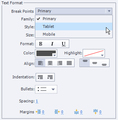
The ability to create Responsive Projects was introduced last June with the arrival of Adobe Captivate 8. During the development process, you can basically create and work on multiple screen sizes (called break points) in one Captivate project. When you publish the responsive project, the learner will automatically be served the break point appropriate for the device they're using.As I've created more and more Responsive Projects, one of the big concerns is to ensure the fonts and font sizes used in each break point is appropriate for the display size. For instance, I might want my font size to be 14 points in my Primary Break Point, 12 points in my Tablet Break Point, and a bit smaller in my Mobile Break Point.While I could manually change the font formatting used on my slides, Break Point by Break Point, if I've got a lot of slides, that means I've got a ton of work to do.As an alternative to manually formatting the slide objects, visit the Object Style Manager (via the Edit menu). Select an Object Style and in the Text Format area, notice that there's a Break Points drop-down menu. The menu contains three options: Primary,Tablet, and Mobile. Select each Break Point in turn and set the desired Font Family, Size, Format, Color, etc. When finished, click the OK button and you'll see your changes immediately on the project's three Break Points.
***
If you'd like to learn more about eLearning, come hang out in my next eLearning basics mini course. And if you'd like to learn more Captivate, Presenter, or Storyline, we've got a great collection of live, online classes for you.
Icon Logic Blogs
.
Blog
.
<span class='date ' tip=''><i class='icon-time'></i> Jul 14, 2015 01:09pm</span>
|
|
We wrapped up our free elearning webinar on Models for Learning in a New World. My portion was a fast paced look at several important environmental trends such as: Decreased L&D budgets (see Business of Learning) Faster pace Increased workforce mobility Shorter job tenure Increased job fragmentation - fewer numbers in any one role Constant increase in complexity Greater concept work Need for faster proficiency Changing expectations for learning The bottom line is that Learning and Development needs to do more with less these days or they will be marginalized. We also have so many more kinds of solutions we can offer. I described some common eLearning 2.0 patterns that are emerging much along the lines of my previous post Examples of eLearning 2.0. Questions There were some great questions during the session. Unfortunately, we didn't have much time to discuss. 1) Two issues that come up, at least in the world of training in a government environment, is that of a) security of information, and b) control of the information given to the learner to make sure it is accurate. Can you comment on those two issues? Both of these concerns/objections come up quite often even outside of government. Security of the information is something that hopefully your IT organization is already dealing with. I recommend adopting their tools and their security mechanisms. If that's not possible, then start with content that doesn't have the same level of security concerns. Control can be similarly avoided as an issue by initially moderating all edits. Yes that takes work, but it's less work than keeping all the content up-to-date yourself. Over time you will have some areas where moderation can be removed. 2) How do you sale to the NON-Gen Y's and Millennials who are in upper management who fear things like wiki's? 9) When introducing these new learning methods, I have the impression that the resistance from organisation is lies more in the new role of the training department rather then new technologies. Is this also your experience? Resistance can come from a lot of places. I used to find IT very resistant, but now I'm finding more often there are allies with IT who are helping to make this stuff happen. I gladly jump on their shoulders (and systems). So, I would agree that new technologies is less the issue. More often real resistance comes from senior VPs who are not willing to okay something they don't really understand. Yammer (internal twittering) is almost impossible to explain to someone who has no experience with any social networking (and probably not with anything more than email lists). My suggestion is that you don't really try to sell Yammer or a Wiki or any other kind of tool. Instead, you simply say that you want to provide a means of editing the content more easily, or following up on the training to get dialog to happen, or whatever the obviously smart solution is that you are proposing. As a side note, I think selling Twitter/Yammer is harder than selling social bookmarking and wikis. Twitter/Yammer is something new. Social bookmarking and wikis are often a smart replacement with obvious side benefits. Many of the suggestions in Learning 2.0 Strategy still hold: 1. Start Tactical and Bottom Up 2. Avoid the Culture Question 3. Avoid Highly Regulated Content (and Lawyers) 4. Learning Professionals Must Lead 5. Prepare Workers for Learning 2.0 6. Technology is Tactical not Strategic 7. Avoid the CIO 3) Tony, what is "secondments" that is listed on your last slide? http://en.wikipedia.org/wiki/Secondment 4) How is "accountability" for learning specific things being handled in 2.0? 5) How do we ensure learning transfer with Learning 2.0 methodologies. This was discussed a fair bit during the session. You can certainly still test whether learning objectives were achieved, but … the point is often that "learning transfer", i.e., testing knowledge, is not really the thing you are going after. Instead, you often don't quite know what content will be covered and accountability is more the end result - for example, a presentation might need to be created. I might use the analogy of the thesis associated with an advanced degree. You are not testing for content, rather you are expecting the completion of a process leading to something that is fairly well defined. You will evaluate using much the same way that we Evaluate Concept Work. 6) Can you comment on the advantages/disadvantages of company-created social sites (private networking sites) vs public sites such as Twitter and Facebook. Not sure I even know how to answer this. Most of the time, there's pretty clear separation between private and public sites in terms of your goals and use cases. I will say that sometimes companies get it a bit wrong when it comes to leveraging existing sites to create value that extends beyond the firewall. For example, having a robust group and network on LinkedIn can be quite valuable when you have employees who should be able to reach outside the firewall for expertise and can leverage LinkedIn to find internal expertise as well. Similarly having content that flows outside to partners, customers, etc. can be an interesting solution. I do think there are interesting opportunities here. However, most L&D are focused much more on the private kinds of solutions at this point. 7) Is there a method to map different models of learning to different types of projects? Great question. I don't know. There are lots of patterns emerging, but I don't think there's a "method" yet. Is there a method for mapping blended learning to types of projects even taking away some of the newer complexities of learning 2.0? Not sure. Help? 8) We are in the brainstorming sessions of creating a blog and podcast. What tips or advise can you give on the focus and direction of these? We want to allow users to get to know us and our abilities. One of the challenges we have is that many departments don't understand that we could help them identify and solve many training issues. We would like to create a "Get to Know Us" site where we discuss what we are working on lately and some of the recent products we have released. This is interesting. I personally would be really concerned about making sure that my blog or podcasts were valuable to my target audiences. Creating an internal newsletter as a blog or podcast that doesn't have compelling information may find few followers. I think rather than "Get to Know Us" or "What we Offer" - maybe instead focus on "Smart Ways to Solve Your Problems" … Taking a focus on case examples or new methods or ??? that is all around how they can get their work done better would seem to be much more interesting. How about becoming an aggregator for them of this kind of information? Show them interesting solutions at other (related) organizations so that they can have a more interesting conversation with you. In some ways, I would think of this as you taking the lead in learning the kinds of things that they would want to have time to learn about themselves. How are other organizations using these things? How are they improving performance? What are some interesting trends out there? Bring that together for them. That's high value for you and them. I'd think that's a compelling internal blog and/or podcast. One last note - podcast implies that you have a set of people who have access to iPods / iPhones and time to listen. I personally, listen sporadically to podcasts. A blog would be much better to reach me personally. Maybe you have a good audience for the podcast. But my guess is that the blog will fit much better. Heck, you can probably get the blog posts emailed to people. :) eLearning Technology
Subscribe to the Best of eLearning Learning for updates from this blog and other eLearning blogs.
Tony Karrer
.
Blog
.
<span class='date ' tip=''><i class='icon-time'></i> Jul 14, 2015 01:09pm</span>
|
|
View and download the webinar slides. View the webinar recording through Go to Webinar. Access the slides through Slideshare: <p View the recording from YouTube below: Looking for online learning resources for your employees? Sign-up for a free trial here ! We provide our clients with thousands of video and eLearning courses. Whether you’re targeting leadership development, new manager and supervisor training, project management, communication, computer skills, compliance or safety, we pretty much have something for everyone. So, try out some courses…have your employees try out some courses. Just fill out the short form to the right and start a free 30-day, no risk, no obligation trial! Check out the BizLibrary Collection! --> -->
Chris Osborn
.
Blog
.
<span class='date ' tip=''><i class='icon-time'></i> Jul 14, 2015 01:08pm</span>
|