Blogs
|
Join us on April 8th, 2015 as our Expert Presenter Nancy Friedman, "The Telephone Doctor," shares her valued insight on customer service, communications, client retention, loyalty and customer experience. Nancy is the President and Founder of Telephone Doctor Customer Service Training and helps companies improve the quality and effectiveness of their customer service and provides brilliant telephone techniques. During our webinar, The Golden Nuggets of Communication , Nancy will share communication skills for you and your entire staff. It’s for everyone! Enjoy the antics of Nancy and be prepared to laugh and learn with us. The object of the webinar will be to teach you and your staff how to handle stressful situations, be better at communications and learn Telephone Doctor techniques that will last forever. "Nancy Friedman is one of the true treasures of the training industry, and her ability to teach with humor and real life examples makes any chance to hear Nancy present an absolutely fantastic experience." Said Chris Osborn, VP of Marketing. "Her expertise in communications skills coupled with her presentation abilities is why we are so delighted to announce Nancy Friedman’s participation in the Expert Presenter webinar series. And this isn’t an April Fool’s joke! The Telephone Doctor herself will entertain, motivate and teach in what promises to be a truly excellent webinar." To register, click here , or visit www.bizlibrary.com/webinars for all upcoming webinars.
Chris Osborn
.
Blog
.
<span class='date ' tip=''><i class='icon-time'></i> Jul 14, 2015 01:08pm</span>
|
|
by Kevin Siegel
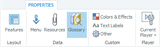
I had a client recently who needed to include a Glossary in their Storyline eLearning course. Fortunately, this kind of functionality is simple to add to any Storyline project.To begin, open or create a Storyline project. Click Player (located in the Publish group on the Ribbon). From the Data area of the Properties, click Glossary and then from the bottom left of the dialog box, click Add. In the Glossary Term dialog box, type a Term and Definition. When finished, click the Save button. Repeat the process as necessary.The final step is telling Storyline that you want the Glossary to appear in the published lesson. From the top of the Player dialog box, select Features. From the list of Player Tabs, select Glossary.
Preview or publish the project to see the Glossary. In the image below, you can see the finished Glossary as a tab beside Menu that can easily be accessed by the learner.
***
If you'd like to learn more about eLearning, come hang out in my next eLearning basics mini course. And if you'd like to learn more Captivate, Presenter, or Storyline, we've got a great collection of live, online classes for you.
Icon Logic Blogs
.
Blog
.
<span class='date ' tip=''><i class='icon-time'></i> Jul 14, 2015 01:08pm</span>
|
|
Sell More by Sharing Usage Strategies Have you ever been in line behind a wide eyed child at Baskin Robbins? One who is listing each flavor, and the pros/ cons of choosing it? I recently had this happen, and it made me think of sales. I recognized that look, I’ve seen it before from Prospects time and time again. With unlimited use of thousands of titles, our library has a unique value proposition. We offer flexibility and choice, but sometimes it can be a little overwhelming. I had a wise mentor once tell me that a confused mind never buys, and I believe that. At BizLibrary, we measure Client success though a wide range of data points. One thing we’ve found consistently over the years is that the more a Client uses our Library, the more likely they are to renew and continue their relationship with us. So how can we take them from wide eyed and overwhelmed, to a long term Client with great usage? In over 10 years in New Business Development at BizLibrary, one of the strategies I think has helped me win the most deals is what I have dubbed the "Usage Conversation". People may like the concept of the library, and it may even solve a problem they’ve been focused on fixing, but what if you could solve more problems with the same budget? That’s where the "usage conversation" helps. The main goal is to help the Client or Prospect see additional training topics or challenges they can apply the library to improve or solve. Once we find the Pain Points, Challenges and Initiatives we can help with, we like to make sure they aren’t missing other benefits and values. We offer content in a wide range of topics, including Sales, Customer Service, Management, Leadership, Safety, Compliance and Computer Skills, to name just a few. Since these are generally standard areas of employee training, I make sure to dig deeper into each area. How are they training on that topic? What resources are they using? Where do they get those resources? How do they work? What are their challenges or gaps? Can the Library help? How would they use it? Another benefit of this exercise is that it often helps the Client or Prospect communicate the fit of our solution internally, by verbalizing it with them through our conversation. Empowering your Client to solve more problems with the same budget can create additional value and benefits the prospect was not looking for initially, and which makes their decision simpler. They can realize reduced costs by discontinuing usage of other specialty vendors or consultants, increase readiness by being able to quickly respond to other needs that they weren’t shopping for or thinking of yet. By giving them some time back through our library of "ready already" content, we can find out what that time will allow them to focus on instead. More 1-1 coaching? Developing Company Specific training? Those also become value added benefits of choosing our Library. Our Marketing Team frequently releases resources helping to enable Prospects and Clients to identify and create successful usage strategies. These resources will offer you some great usage ideas that you can discuss with your Prospects and Clients, to help them get more from the Library. Check out our latest release in the "New Marketing Collateral" area below, and click the links to access all of our eBooks and webinars. Enabling through Education and Empowerment, Tom --> New Course Releases: Distracted Driving Single video course. Preview Course Selling at a Distance: Closing the Sale 12 part series. Preview Course Succession Planning: 8 Critical Steps 4 part series. Preview Course --> Recent eBooks: How to Create a New Manager Training Program Download How to Create a Marketing Plan for Online Training Download How to Measure the Impact of Employee Soft Skills Training Download
Chris Osborn
.
Blog
.
<span class='date ' tip=''><i class='icon-time'></i> Jul 14, 2015 01:07pm</span>
|
|
I'm co-founder and CTO of a new start-up, Fantasy World, that creates fun, online games that allow groups of people to have fun, win prizes, play-along with celebrities, and most of all to socialize outside the normal context of the group. It's backed by a major entertainment company and my co-founder comes from the fantasy sports space.Our first game has just launched, Survivor Football '09.If you like American rules football (sorry this is not soccer), and you would enjoy socializing with a group of people who read this blog, please sign-up and join the Fight Club that is called - the eLearning Fun Club. I'd especially welcome any of you who can help us make better picks during the season, i.e., actually have some knowledge of Fantasy Football. I'm a fan, but have never done fantasy football before. Luckily the game is pretty simple, but still helpful to have a couple of ringers in our fight club to help us out.Here's a video that explains a bit more about the game:When you join, make sure you select the eLearning Fun Club as your fight club. That's where we will be hanging out. In addition to Fight Clubs, there are prizes. You can choose the prize you want at any time prior to the start - Week 2 kick-off.Some of the other fight clubs are offering prizes in addition to the prize that you play for. I don't specifically have a prize in mind for the winner of the fight club yet.Any ideas on what we could give? Maybe a copy of some books from authors who read this (and would want to play)? Maybe something from one of the vendors who reads this?More generally, I believe that this represents something we will see more of in the future. Interesting ways to socialize that is outside the original venue and how we are used to socializing. I'm curious what Nancy White might have to say about this kind of thing. But that's likely another whole series of blog posts. eLearning Technology
Subscribe to the Best of eLearning Learning for updates from this blog and other eLearning blogs.
Tony Karrer
.
Blog
.
<span class='date ' tip=''><i class='icon-time'></i> Jul 14, 2015 01:07pm</span>
|
|
by Willam van Weelden
Adobe released RoboHelp 2015 last week, a major upgrade sporting several enhancements. This week we take a first look at some of the big changes.
Ribbon Based InterfaceThe menu has been redesigned to make RoboHelp easier to use. Options are sensibly arranged and menu inconsistencies have been cleaned up. Lesser known features like search synonyms are much easier to find and use.
Small improvements, such as working with tables, make editing content much easier.
One of my favorites is the Locate Item tool. Open a topic and select an image or a Captivate movie. Click the Locate Item tool and the item will be highlighted in the Project Manager.
Skins and Layouts
RoboHelp 2015 includes new WebHelp skins and Responsive HTML5 layouts. The WebHelp skins are clean and modern. Both WebHelp and Responsive HTML5 support Right-to-Left languages. Though for WebHelp you will have to use one of the six new skins.The Responsive HTML5 Layouts have more customization options. It is now possible to choose which panes to include in the output, just as with WebHelp. The layouts have Facebook share and Twitter buttons included as well.
Important Enhancements:
Named Conditions: Sensible names for Conditional Build Expressions.
Dynamic filters: Conditional Build Tags on steroids. Dynamically switch Conditional Build Expressions in your output for fine grained control.
Improved search results: Control the topic preview text in search results.
Mobile App output: Create a mobile app without any coding.
Right-to-Left: Output for right-to-left languages.
Find and Replace: The Find and Replace pod has new powerful features.
Scalable video: Adobe Captivate videos scale in Responsive HTML5 output.
I've mentioned what I consider to be the most important enhancements in RoboHelp 2015. Stay tuned for articles on each of these enhancements in the weeks to come.
***
Looking to learn RoboHelp? We offer a live, two-day online RoboHelp class once a month. Feel free to contact us to learn other ways to meet your RoboHelp training requirements.
Icon Logic Blogs
.
Blog
.
<span class='date ' tip=''><i class='icon-time'></i> Jul 14, 2015 01:07pm</span>
|
|
Have you ever been in a line, wondering why it’s taking the person in front so long? First I’ll have to admit, I was making a poor lunch decision, but this happened to me the other day at a backed up drive-through, and it made me think of how we can help prospects buy. With unlimited use of thousands of titles, our library has a unique value proposition. We offer flexibility and choice, but sometimes choice can be a little overwhelming. Overwhelmed prospects get confused, confusion creates uncertainty, and uncertainty extends and complicates the decision making process. So how can we take them from overwhelmed, to on-board? By sharing usage ideas that help target their content use. Bizlibrary frequently publishes valuable resources that help enable our Partners, Prospects and Clients to identify and create successful usage strategies, among other topics. These resources will offer you ideas that you can share, so take advantage of them! Please take a moment to check out one of this months featured ebooks How to Create a New Manager Training Program . Download it, read it and share ideas with your Prospects and Clients to help them better target specific business challenges and needs. Take a few more minutes to browse our additional libraries of eBooks , Infographics , Webinars and Competency Guides to help find other ways to align the content library to your Prospect and Client needs. If you think these types of resources would be beneficial to share with your Prospects and Clients, lI would like to discuss some of the marketing enablement tools and strategies that BizLibrary can provide to help you sell more, faster! Complexity can be the enemy of success, so let’s make it easy for our Prospects and Clients to see the value of our solution. A confused mind never buys, they may just sit in front of that menu forever. Make it a successful month! Tom --> New Course Releases: Distracted Driving Single video course. Preview Course Selling at a Distance: Closing the Sale 12 part series. Preview Course Succession Planning: 8 Critical Steps 4 part series. Preview Course --> Recent eBooks: How to Create a New Manager Training Program Download How to Create a Marketing Plan for Online Training Download How to Measure the Impact of Employee Soft Skills Training Download
Chris Osborn
.
Blog
.
<span class='date ' tip=''><i class='icon-time'></i> Jul 14, 2015 01:07pm</span>
|
|
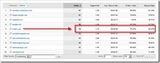
Richard Hoeg points out that for his blog Twitter = High Visits But Low Conversion. Basically, he shows his "referring sites" from Google Analytics for the past two weeks: His conclusion: Folks who visit from Twitter don't visit as many pages and spend less time of the site. Of course, that made me wonder if twitter really was bringing lower quality clicks than other sources. That's contrary to what I would expect. You would think that someone who gets a link referred by someone they know would visit and then look around. It should be pretty qualified. So, I looked at a similar view of referring sites: Indeed, people coming from twitter are the lowest in pages viewed per visit and near the bottom in time on site and highest bounce rate. Likely they were interested in the specific item that they came there for, but still it's a bit disappointing that they don't click around a bit more. Of course, a relatively small percentage of traffic from twitter actually comes from "twitter.com" - many people use tools like TweetDeck. And I believe many of these are reported as Direct Traffic. So, I went to the list of All Traffic sources: and while Direct Traffic does have a good number of referrals, it really doesn't provide good results. Basically, it's about the same as organic search traffic. And some of the Direct Traffic that comes from twitter is lumped in with Direct Traffic from other sources including RSS readers. And I believe that those other sources likely are higher quality clicks. Notice that google.com as a referring source (likely Google Reader) is better than Direct generally. Bloglines also has better numbers. I tried to get a bit more detail by using bit.ly to see more about sources, but unfortunately, they also run into the same issue with the different twitter sources. Here's their description of "referring sites": Direct Traffic includes people clicking a bit.ly link from: - Desktop email clients like Microsoft Outlook or Apple mail - AIR applications like Twirhl - Mobile apps like Twitterific or Blackberry Mail - Chat apps like AIM - SMS/MMS messages It also includes people who typed a bit.ly link directly into their browser So they can't help differentiate either. Bottom line, everything I'm seeing suggests that Richard was right: Twitter brings lower quality clicks What's also interesting here is that there's been quite a bit of high profile discussion around Does This Blog Get More Traffic From Google or Twitter? where there was a question of whether twitter brought more traffic than traditional sources. For Fred Wilson, he gets pretty huge twitter traffic.For Richard and I, we don't get nearly the same levels and it's not even close. Twitter delivers some traffic, but it's still small compared to search.It's surprising that Fred Wilson is not looking at the question of the quality of his twitter traffic either. Aggregators Bring Traffic One last thought, it's been a while since 2007 Traffic Stats - Hopefully a Meme where I looked a bit at my traffic numbers. They've grown considerably over the years, but a lot of the statistics have remained consistent. One of the really interesting things I saw in Richard's stats and in my stats was: Two Aggregators (eLearning Learning and Work Literacy) are among the top 5 in referring sites. On Richard's eLearning Learning was number 7 as a referrer. For him, they were 100% new visitors and had pretty good pages clicked and time on site. For me, it was also pretty good quality traffic. This is somewhat validating the concept behind these sites and the Browse My Stuff concept. And all of this makes me think:Marketers interested in quality clicks should focus less on twitter and more on blogging, search and aggregation. eLearning Technology
Subscribe to the Best of eLearning Learning for updates from this blog and other eLearning blogs.
Tony Karrer
.
Blog
.
<span class='date ' tip=''><i class='icon-time'></i> Jul 14, 2015 01:07pm</span>
|
|
by Kevin Siegel
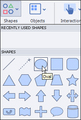
Smart Shapes were introduced in Adobe Captivate several years ago. Similar to PowerPoint's Shapes feature, Smart Shapes in Captivate allow you to draw stars, ovals, banners, and more on a slide. Once drawn, it is easy to switch from one Smart Shape to another (without having to redraw).To draw a Smart Shape, visit the Shape tool and select any one of the Shapes. One the slide, drag your mouse to draw the shape. If you're unhappy with the Smart Shape (perhaps you meant to draw a star but you drew an oval), visit the Properties Inspector and, assuming the shape you drew is still selected, simply pick a different shape. The ability to create a Smart Shape and change it on the fly is awesome... but that ability pales in comparison to your ability to not only reshape the Smart Shape (and create shapes limited only by your imagination), but save your custom masterpiece as a Smart Shape for later use in any Captivate project.To customize a Smart Shape, right-click a drawn shape and choose Convert to freeform. Drag the points to create any kind of shape. If you need to add more points (the points will disappear if you deselect the Smart Shape), right-click the Smart Shape again and choose Edit points. When you're finished creating the Smart Shape, right-click the shape and choose Save Smart Shape. Name the Smart Shape and then click the OK button. From now on, the saved Smart Shape will be available in the list of Shapes.
***
If you'd like to learn more about eLearning, come hang out in my next eLearning basics mini course. And if you'd like to learn more Captivate, Presenter, Camtasia, Studio, or Storyline, we've got a great collection of live, online classes for you.
Icon Logic Blogs
.
Blog
.
<span class='date ' tip=''><i class='icon-time'></i> Jul 14, 2015 01:07pm</span>
|
|
View and download the webinar slides. View the webinar recording through Go to Webinar. Looking to develop your employees communication skills? Sign-up for a free trial here ! We provide our clients with thousands of video and eLearning courses. Whether you’re targeting leadership development, new manager and supervisor training, project management, communication, computer skills, compliance or safety, we pretty much have something for everyone. So, try out some courses…have your employees try out some courses. Just fill out the short form to the right and start a free 30-day, no risk, no obligation trial! Check out the BizLibrary Collection! --> -->
Chris Osborn
.
Blog
.
<span class='date ' tip=''><i class='icon-time'></i> Jul 14, 2015 01:07pm</span>
|
|
Based on my post Top 99 Workplace eLearning Blogs several people contacted me with suggestions for additional blogs to include in eLearning Learning. So, I'm happy to say that eLearning Learning now includes the 15 following great sources in addition to the 99 previously listed: Living in Learning ZaidLearn Off Course-On Target Viplav Baxi Meanderings The Writers Gateway Speak Out eLearning Path Learnability Matters IDiot Games can Teach Free as in Freedom eLearning NOT As Usual Getting Down to Business Leveraging Learning Web Courseworks Several of these came courtesy of Mainsh's list - Blogs by Indian Learning Professionals and Companies. Thanks for helping Manish. I'm excited to have all of these new sources as part of eLearning Learning. It helps me find great stuff and especially to make sure that I don't miss good stuff. With the Best Of feature, I know that I'll see what's coming up as the good stuff each week and month. For example, yesterday I posted the Best Of August 2009: LMS - LCMS - Camtasia - Best of eLearning Learning - August 2009 It included several great posts that I had missed during the month. eLearning Technology
Subscribe to the Best of eLearning Learning for updates from this blog and other eLearning blogs.
Tony Karrer
.
Blog
.
<span class='date ' tip=''><i class='icon-time'></i> Jul 14, 2015 01:07pm</span>
|