Blogs
|
by Jennie Ruby
A colleague wrote to me because she was trying to remember that little rhyme used by teachers to help us remember how to spell words with the letters e and i:
I before e, except after c
Or sounding like a, as in neighbor or weigh
Probably 40 years or more after learning this rhyme in elementary school, she still had it right. Of course, later in life we find out that things are a little more complicated than what we learned back then. As a copyeditor, I made up an additional sentence for the end of the rhyme:
Or certain weird words such as
Either, neither, seize, weird, and leisure
Well, okay, my additional sentence doesn't exactly rhyme, but at least it gets the job done.My question for you this week is this: Do you remember other little rhymes, tricks, or memory aids for grammar and spelling from your school days? Please share them with the rest of us. We'll take a look, see if they need updating, see if they are still true, and see if we can still get use out of them long after we've been out of school.
***
Here are the results from last week's questions about spelling preferences:
Dialogue beat dialog
Catalog beat catalogue
Sync overwhelmingly beat synch (Kay Honaker pointed out that synch looks like it would rhyme with inch.)
In a surprise upset, advisor beat adviser by a landslide.
High-tech shut out hi-tec, with no one choosing the latter.
Wi-fi was also a winner by a mile, but wifi did get a few votes, even though, as Kay Honaker commented, wifi looks like it should sound like wih-fee.
I like clear results, and the results among this newsletter's readers are quite clear. So add these spellings to your style guide and join the crowd!
***
If you love Jennie's articles, you'll love her classes. Check out some of Jennie's mini courses.
Icon Logic Blogs
.
Blog
.
<span class='date ' tip=''><i class='icon-time'></i> Jul 14, 2015 01:39pm</span>
|
|
This week's interesting finds from across the web. Curated by Jessica Petry @JessLPetry PERFORMANCE SUPPORT - MORE THAN JUST TRAINING via elearningindustry.com Learning and Development managers often make the mistake of just focusing on either training or performance support when there is a difference between the two. This article underlines the key differences and zooms in on the features that performance support tools should have in order for them to be effective. Why you should be interested? If you have employees that say "they just don't have time for training," emphasizing the performance support you provide can be a great way to get them engaged. Performance support is a great complement to formal training for several reasons - it's not disruptive, it focuses on application - you can use it right now, short, easy to digest and it helps improve skill efficiency. Some of my favorite included in the BizLibrary Collection are for desktop computer skills. IS SOCIAL NETWORKING GOOD FOR LEARNING via Chief Learning Officer Social networking technology can help organizations improve communication and collaboration, and drive productivity and business performance, but implementation challenges may inhibit enterprise social networks’ ability to maximize learning potential. Why you should be interested? The market is growing. The worldwide enterprise social software applications market's revenue was valued at $1 billion in 2012, and market revenue could grow to $2.7 billion in 2017. What's behind the rapid growth? There are huge bottom line benefits for your organization. As a remote employee I depend on BizLibrary's social learning platform everyday. Enterprise social networks can reduce costs, increase employee engagement, open up collaboration, enhance your organization's competitive advantage and bridge the gap between formal and informal learning. It's a critical component to a next generation learning strategy and will ensure that you are able to meet the learning needs of your employees and organization. 20 WORKPLACE INFOGRAPHICS EVERY MANAGER MUST SEE via Good.co Business management requires you to juggle many different tasks. It can be difficult to know what to do if your business is performing adequately but you’re still hoping for more. From company culture to time and meeting management tips, these 20 workplace infographics can help you figure out how to become not just a good manager, but a great manager. Why you should be interested? Because providing evidence-based facts and data sometimes speak louder to your managers and senior level executives than wise words coming from HR and Training and Development. These infographics can be shared as they are (some great visuals) or you can grab important pieces of data and research to use in your next business case or presentation. Key topics highlighted include: creating a high-performance culture, employee engagement, the cost of meetings, time management, customer experience, compensation best practices, mental health and more! Enjoy! I'm such a sucker for good infographics. Stay curious and keep learning. Jessica Petry is a Senior Marketing Specialist at BizLibrary. LinkedIn Twitter About.me Scoop.it
Chris Osborn
.
Blog
.
<span class='date ' tip=''><i class='icon-time'></i> Jul 14, 2015 01:39pm</span>
|
|
Hot List - May 8, 2009 to May 15, 2009 Once again, used eLearning Learning to generate a list of the best from last week.The following are the top posts from featured sources based on social signals. The Truth About Twitter- Social Enterprise Blog, May 11, 2009Twitter Tips: for Teachers & Educators- Don't Waste Your Time, May 9, 2009Twitter and Webinars- eLearning Technology, May 14, 2009Developing a PLE Using Web 2.0 Tools- Don't Waste Your Time, May 10, 2009Informal Learning Technology- eLearning Technology, May 11, 2009Presentation: Social Bookmarking with Delicious- Don't Waste Your Time, May 15, 2009The Ten Commandments of eLearning- Upside Learning Blog, May 8, 2009Online Coaching- eLearning Technology, May 13, 2009Audio in eLearning: Cultural Differences?- Learning Visions, May 12, 2009Presentation: Twitter in Education- Don't Waste Your Time, May 12, 2009Overcoming Objections to Social Learning - One Week at at Time- Engaged Learning, May 8, 2009The Challenge of Training the PlayStation Generation- The E-Learning Curve, May 15, 2009Presentation: Social Bookmarking with Delicious- Don't Waste Your Time, May 15, 2009Designing engaging e-learning- Clive on Learning, May 11, 2009Lies, damned lies, and Wikipedia…- ThirdForce Blog, May 8, 2009Hashtags in Twitter and walls, fountains, ways to keep everyone's remarks in the picture- Ignatia Webs, May 15, 2009Social learning adoption?- Road to Learning, May 8, 2009Learning, Models and Other Tricks- Blogger in Middle-earth, May 9, 2009The following are the top other items based on social signals. The Eight Classic e-Learning publications? | Tony Bates, May 8, 2009The End in Mind " A Post-LMS Manifesto, May 8, 2009Does technology change the nature of knowledge? | Tony Bates, May 8, 2009Engage Your Learners By Mimicking the Real World, May 12, 2009A closer look at using a social media platform ..., May 10, 2009The Twitter Book, May 15, 2009The Learning Age, May 14, 2009All information is suspect, May 12, 2009How to Get the Most Out of a Conference, May 7, 2009Designing Authentic Learning Tasks, May 11, 2009Jing - The Missing Manual, May 10, 2009Coaching informal learning, May 9, 2009Adding value to information, May 12, 2009 Hot Keywords for the Week Twitter (35)TechSmith (3)LinkedIn (13)Social Learning (14)Learning Strategy (5)Social Media (17) eLearning Technology
Browse eLearning Content
Tony Karrer
.
Blog
.
<span class='date ' tip=''><i class='icon-time'></i> Jul 14, 2015 01:39pm</span>
|
|
by Kevin Siegel
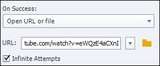
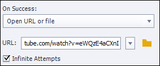
If you need to include YouTube videos in your Captivate eLearning project, the traditional technique was to insert a click box or button on a slide and, on the Properties Inspector, use the Open URL or File action to target the video's URL. When the learner clicks the click box or button, the URL action will take the learner to the YouTube video in a web browser window.The URL action works wonderfully, but I recently had a student in one of my Captivate classes tell me that she needed to embed the YouTube video on her slide. (She needed to include the video with other slide objects and animations.) This is the perfect use case for the new YouTube Learning Interaction.To embed a YouTube video on a Captivate slide, first go to YouTube and copy the URL for the video to your clipboard.From within Captivate, open or insert a slide and choose Interactions > Learner Interactions.From the Interactions dialog box, scroll down, select the YouTube interaction, and click the Insert button.On the Configure Interaction dialog box, paste the URL you copied earlier into the Video URL area.There are several options in the dialog box such as AutoPlay and Loop, but I think the coolest option is located in the lower left: Particular time in the Video.Using this handy option, you can take learners to a specific time in the YouTube video. In the image above, I've specified that the learner should go directly to the 1 minute mark of the video.After setting your options, click the OK button and a placeholder for the video will be added to the Captivate slide. You can use the Properties and Timing Inspectors to control the position and timing for the object just like any other slide object.And that's it... if you preview the lesson in a web browser, you'll be able to test the link to the embedded YouTube video.
***
Looking for instructor-led training on Adobe Captivate? Check out our live, online, instructor-led Captivate classes.
Icon Logic Blogs
.
Blog
.
<span class='date ' tip=''><i class='icon-time'></i> Jul 14, 2015 01:39pm</span>
|
|
One of the greatest outcomes from the constant use of mobile devices, apps and everything else in our lives that is slowly being connected to the internet is that for the first time, regular everyday users care about the ‘emotional experience’ of using products, apps, and everything else we come into contact throughout our days.
I love listening to people talk about their favorite smartphones and how they make passionate arguments about why they prefer them over the competition. Try asking "and how does that make you feel?"
Think about your own daily experiences, I bet you find yourself (I know I do) coming up with ideas for how the everyday appliances in your house can be easily improved with a few tweaks.
Suddenly we have all become Interaction Designers! And in my opinion that is a great thing, because this type of thinking makes you better at whatever it is you do.
This morning I came across this great video where several leading designers were asked to describe five of their favorite design experiences and describe the reasons why they felt an emotional connection to these experiences.
"The design of a product isn’t really about aesthetics, it’s about the experience created from the product"
via 5 designers pick their 5 favorite product experiences, hear more at Roadmap — Tech News and Analysis.
Here’s the video, it’s well worth watching it in its entirety:
Chime in with your own experiences and reasons for the emotional connection!
Product Design is about Emotional Experiences [Video] was first posted on November 7, 2013 at 9:14 am.©2014 "The mLearning Revolution Blog". Use of this feed is for personal non-commercial use only. If you are not reading this article in your feed reader, then the site is guilty of copyright infringement. Please contact me at rjjacquez@gmail.com
RJ Jacquez
.
Blog
.
<span class='date ' tip=''><i class='icon-time'></i> Jul 14, 2015 01:39pm</span>
|
|
View and download the webinar slides. View and download the webinar recording. Try these courses and more! BizLibrary provides 7,000+ training videos and eLearning courses in various business training topics, with new courses added every day. Got Content? How to Use Off-the-Shelf Content to Build Strong Employee Learning Programs In this eBook we’ll discuss how to incorporate off-the-shelf learning content into your employee learning program. BizLibrary's Mobile Learning App meets the needs of today's digital learners. Employees no longer wait for training departments to push learning content to them. Employees are used to pulling information to themselves, when they need it, on their own terms and conditions, and on their own devices.
Chris Osborn
.
Blog
.
<span class='date ' tip=''><i class='icon-time'></i> Jul 14, 2015 01:39pm</span>
|
|
I just got through reading Jay's post and article (with Clark Quinn) around Become a chief meta-learning officer - one of the hot list items from two weeks ago. It's a great article, definitely worth a read. It discusses the needed transition in focus of a CLO The scope of the job of the CLO is mushrooming. CLOs will neither prosper nor even survive if they fail to take responsibility for the overall learning process within their organizations. … Your charter as Chief Meta-Learning Officer is to optimize learning throughout the organization, not just in the pockets that once belonged to HR. This takes a broader perspective than what you deal with day-to-day. You’ve got to rise above the noise to see the underlying patterns, and then optimize them. The reality is that this equally applies to Learning Organizations and Learning Professionals. The broader perspective he is talking about is to look beyond formal learning to informal learning, social learning, collaborative learning, and personal learning. What was particularly interesting about his article was the use of the term meta-learning. Wikipedia defines meta-learning (in education) as: The idea of metalearning was originally used by John Biggs (1985) to describe the state of ‘being aware of and taking control of one’s own learning’. you can define metalearning as an awareness and understanding of the phenomenon of learning itself as opposed to subject knowledge. Implicit in this definition is the learner’s perception of the learning context, which includes knowing what the expectations of the discipline are and, more narrowly, the demands of a given learning task. Within this context, metalearning depends on the learner’s conceptions of learning, epistemological beliefs, learning processes and academic skills, summarized here as a learning approach. A student who has a high level of metalearning awareness is able to assess the effectiveness of her/his learning approach and regulate it according to the demands of the learning task. Jay's article is really using metalearning in a different way - take responsibility for learning across the organization. Look at all the different ways learning can occur. Close the training department. Etc. Still, when I read the title, I couldn't help but think that Chief MetaLearning Officer was particularly apt, especially when you take "metalearning" according to its definition above. Metalearning is really about: being aware and taking control of one's own learning It is a critical element to success moving forward. And it's exactly what I've been talking about over the past few years. The only way to handle long tail learning is to focus on providing the tool set and personal learning and working skills (work literacy) that are central to concept work. Where work and learning are not separate, metalearning is really the focus of performance improvement. In Learning, Extended Brain and Topic Hubs, the focus is really on a new process for learning. Being aware and in control of the process is metalearning. Nancy Devine in a comment suggested "schema building" which is similar to pattern identification. But all of this is really about metalearning. Way back in 2006, I wrote Improving Personal Learning - A Continuing Challenge for Learning Professionals, that also cited a CLO article on Implementing Learning How-to-Learn Strategies (which doesn't seem to exist anymore). Three years later, we recognize the increasing importance, and the need for greater metalearning development opportunities and the role of learning professionals and learning organizations in this. Is metalearning a good term to encapsulate what we are talking about? eLearning Technology
Browse eLearning Content
Tony Karrer
.
Blog
.
<span class='date ' tip=''><i class='icon-time'></i> Jul 14, 2015 01:38pm</span>
|
|
by AJ Walther
Do you work for an organization that uses many charts? Do all of those charts need to be formatted to match specific corporate branding? Does this take you ages? Utilizing PowerPoint's custom Chart Templates might just save you a lot of time.
Create a Chart Template
Insert a chart in PowerPoint
Format the chart to reflect your company's branding guidelines.
Ensure the chart is selected (it will have a gray border) and choose Chart Tools Design > Save As Template.
Give the chart template a name. (PowerPoint will automatically save the chart template where it needs to go.)
Repeat this process for all charts that need a template. (You won't be able to apply a chart template to a different kind of chart, so you'll need to do this for every type of chart you plan to use.)
Apply a Saved Chart Template
Select a chart that requires your corporate formatting.
From the Ribbon, choose Chart Tools Design > Change Chart Type.
From the Change Chart Type dialog box, select theTemplates folder from the categories at the left.
From the My Templates area, hover over each chart to view its chart name.
Choose your desired chart template and click the OK button.
You might have to do some additional formatting based upon the amount of information in your chart, but overall this process should save you a lot of design time.
Share a Chart Template With Your Team
There are a few ways that you could distribute your chart template to others on your team. Here is one of the easiest ways:
Send a presentation to everyone on your team that would need to utilize the chart template. (Keep in mind that the template needs to includes one properly formatted chart of every type your company may need to use.)
Instruct your team to follow the instructions above to save the Chart Templates to their systems.
And that's it... everyone should now have readily available chart templates on their systems.
***
If you love AJ's articles, you'll love her Optimizing PowerPoint Design for eLearning & Presentations mini course.
Icon Logic Blogs
.
Blog
.
<span class='date ' tip=''><i class='icon-time'></i> Jul 14, 2015 01:38pm</span>
|
|
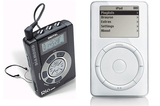
Apple iPod vs. Diamond Rio MP3 Player
Twelve years ago yesterday, Steve Jobs and Apple introduced the first iPod using the amazing tagline: 1,000 songs in your pocket.
With those words, a simple little device changed the way we listen to music, revolutionized an entire industry, and in my opinion launched the modern mobile revolution. Many people may argue that it was the iPhone in 2007 that catapulted the mobile revolution forward, but I believe the iPhone wouldn’t have existed without the iPod.
The first iPod featured a ten hour battery, a 5 GB hard drive capable of storing 1,000 songs encoded in MP3 format, and a mechanical scroll wheel that served as it’s main interaction UI, with a center select button and 4 auxiliary buttons around the wheel.
The iPod was revolutionary in that it was the first device to put the spotlight on user experience and this to me was an important element for what would be the future of mobile computing.
The iPod wasn’t the first MP3 player in the market, there were many before it (including the popular Rio MP3 Player), but it was the first device that included a great user experience with a minimalistic design approach, and the UI controls were located precisely were they need to be. Ergonomically speaking, it was perfect and it only required one hand to use.
Fast forward 12 years later and here we are with powerful smartphones and tablets doing amazing things anytime and anywhere, in large part because the iPod opened our eyes to what was truly possible, provided we pay attention to the small details and simplify design, as well as place touch targets precisely where they need to be for an outstanding user experience.
Happy 12th Birthday iPod!
What About You?
I still have my very first iPod and still consider it a marvel of modern engineering. What do you remember thinking about the first iPod? Please share below.
Want to Learn How to Design Mobile Learning (mLearning)?
My 6-hr Online Workshop - Transitioning from e-Learning to m-Learning Design Training - will show you how.
When: November 21 - 22, 2013
What Time: 9am - 11pm Pacific Time each day for a total of 6 hours
Where: Online. A link will be provided after you Register
Register here: http://www.eventbrite.com/event/9279676763
What Students Say about the mLearning Workshop by RJ Jacquez from RJ Jacquez
Happy 12th Birthday iPod! [The Beginning of the Mobile Revolution] was first posted on November 11, 2013 at 12:09 pm.©2014 "The mLearning Revolution Blog". Use of this feed is for personal non-commercial use only. If you are not reading this article in your feed reader, then the site is guilty of copyright infringement. Please contact me at rjjacquez@gmail.com
RJ Jacquez
.
Blog
.
<span class='date ' tip=''><i class='icon-time'></i> Jul 14, 2015 01:38pm</span>
|
|
Webinar brought to you in partnership with TrainingIndustry.com View and download the webinar slides. View the webinar recording. Try out BizLibrary's Online Library! BizLibrary provides 7,000+ training videos and eLearning courses in various business training topics, with new courses added every day. Got Content? How to Use Off-the-Shelf Content to Build Strong Employee Learning Programs In this eBook we’ll discuss how to incorporate off-the-shelf learning content into your employee learning program. BizLibrary's Mobile Learning App meets the needs of today's digital learners. Employees no longer wait for training departments to push learning content to them. Employees are used to pulling information to themselves, when they need it, on their own terms and conditions, and on their own devices.
Chris Osborn
.
Blog
.
<span class='date ' tip=''><i class='icon-time'></i> Jul 14, 2015 01:38pm</span>
|