Blogs
|
by Anita Horsley
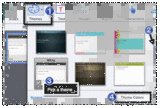
When working in Adobe Captivate, it's possible that you will need to use colors that match your corporate brand. In that event, you'll be happy to learn that Captivate 8 allows you to easily create custom Theme colors. And once you've created your Theme colors, you can apply those colors to just about any slide object or learner interaction.The first step to creating custom Theme colors is to apply a Theme to a project. To do that, click Themes on the toolbar and select any of the available Themes (Captivate provides several Themes out of the box).Each Theme comes with a collection of Theme colors. You can use those colors as is or customize them. To access the Theme's colors, click Themes and then click Theme Colors. Scroll through the list of colors and select any one of the Themes you like. To customize the Theme colors, click the Customize button.Click the title of the current color theme and type your own theme name. Click the color swatches to replace the existing colors with your own. (Note: If your company does not have a style guide and you're looking for some guidance when it comes to selecting Theme colors, you may consider using your website colors. You can use the eye dropper tool to match the colors used on your website.) As mentioned earlier, you can apply your custom Theme colors to just about any selected Captivate object. For instance, if you insert a Smart Shape, the Fill area on the Properties Inspector will include your custom Theme colors.You can use customized Theme colors on Interactions. There will be a Theme Style option at the right of the Interaction. If you click Custom, you'll have access to Theme colors.
***
Looking for instructor-led training on Adobe Captivate? Check out our live, online, instructor-led Captivate classes.
Icon Logic Blogs
.
Blog
.
<span class='date ' tip=''><i class='icon-time'></i> Jul 14, 2015 01:46pm</span>
|
|
View and download the webinar slides . View the webinar recording. 5 Barriers to Effective Employee Training Programs - Webinar 08.21.14 from BizLibrary Get updates, invitations and free resources from BizLibrary by signing up! Additional Resources: Five Barriers from Charles Jennings Everyday we create 2.5 quintillion bytes of data. So much that 90% of the data in the world has been created in the last two years alone. SOURCE: IBM Understanding Big Data: Analytics for Enterprise Class Hadoop and Streaming Data How Executives View Learning Metrics by Patti and Jack Phillips, CLO Magazine, Dec 2010 Creating a Frictionless Learning Experience by Dean Pichee Cox eLearning Consultants, Learning Solutions Forecast: 2014 Edition Make Training Stick by Barbara Carnes The Importance of Agility HR Exec Online
Chris Osborn
.
Blog
.
<span class='date ' tip=''><i class='icon-time'></i> Jul 14, 2015 01:45pm</span>
|
|
I received a response that I didn't expect on my post Profile Photo. In that post, I suggested that you should always add a profile photo: Don't join that new Ning group without attaching your photo. Add it to your Elluminate and WebEx profiles. Because profile photos help me: Believe that you are a real person and begin to connect with you. Remember you. Believe you are serious. I also suggested that for business networking: Don't use anything other that photorealistic photos. Have a reasonably complete LinkedIn profile. The comments I received basically told me that I'm making unfair, snap judgments and I'm showing my bias. And I want to thank everyone who commented and who called me on that bias. You are quite right that I'm biased. But let's set the context here - I don't already know you or your name. I'm running into you on a business networking site. All I have is often your Photo, Name and sometimes a Company and Title. I have limited time. My goals are generally directed learning goals or maybe I'm thinking about issues with my business or my clients. I need to quickly decide if I'm going to spend time with you and/or your content. Will this be a smart use of time? That sounds horrible. I'm going to use that little bit of information to decide if I will go look you up on LinkedIn, or send you a message about something, or otherwise interact. But that's the reality of what happens. And profile photos are part of the picture. This is not new. It's happened for years at business mixers. People need to control their time as part of in-person networking. They also make snap judgments at business mixers. And they have the person, their name, possibly title and company. They make quick judgments. They choose to speak to your or not. I'm not saying this is fair or right … I'm saying this micro-decision is going on all the time and you are not likely to change it (although you've got me to think about my own bias). I think you ignore it at your peril. Now consider the impression left by the images that I've pulled down from various business networking sites shown below. And consider that people are going to make snap judgments on whether they will spend time. Dating and Profile Photos Because I was involved in eHarmony at the start, I may be especially sensitive to this subject. eHarmony was (and is) quite different from dating sites in that the true vision was to create successful (happy and long) marriages. And they have been successful doing that. For a long time eHarmony resisted showing pictures because of the belief that this skews someone's impression of the individual, and you may choose someone other than your soul mate because of a profile photo. Users demanded a profile photo. This is not much of a surprise. Here's what was found on Yahoo personals: When our researchers looked at personal photo statistics, here's what they've found: A profile with one personal photo receives five times as many replies as a profile without a personal photo. A profile with three photos receives seven times as many replies as a profile without a personal photo. A profile with five photos receives nine times as many replies as a profile without a photo. Granted, eHarmony has a very different mission and purpose from a personals site like Yahoo, but profile photos turned out to be important there as well. And what does this tell us - profile photos are important. Profile Photos Other Opinions and Advice Seth Godin tells us that profile photos are important in business as well: If it's important enough for you to spend your time finding and connecting with new people online, it's important enough to get the first impression right. If you use any online social network tool, the single most important first impression you make is with the 3600 to 5000 pixels you get for your tiny picture. Seth's number 6 advice backs me up on conceptual photos/images: 6. Conceptual photos (your foot, a monkey wearing glasses) may give us insight into the real you, but perhaps you could save that insight for the second impression. There's definitely belief in the book business (and some debate) that having the right picture is very important for book sales. Antonia Hodgson, the editor-in-chief at the publisher Little, Brown, it’s more important than ever, "The author photo is now just the beginning of a process of getting to know the author." And I would claim profile photos are the starting point in building a relationship online. A couple of other interesting links that I found on this topic: Is Your Networking Profile Up to Date? Smile in Your Photo Closing Thought One closing thought - you may look good in a bathing suit, but you don't wear it to a business mixer. Or at least I think I would remember you if you did. Instead, you look the part. Profile photos are part of your image, your brand. Look the part. eLearning Technology
Browse eLearning Content
Tony Karrer
.
Blog
.
<span class='date ' tip=''><i class='icon-time'></i> Jul 14, 2015 01:45pm</span>
|
|
This morning while reading the latest news, I came across a CNET news article, entitled "Flash quietly re-emerges on Amazon’s Kindle Fire."
Speaking to All Things Digital in an interview published on Tuesday, Amazon’s Kurt Kufeld confirmed that his company has been quietly testing Flash support with Kindle Fire owners since February. The effort was offered under the guise of an "experimental streaming viewer" when users would watch Flash video on certain popular sites such as Fox.com, CBS.com, and NBC.com. According to Amazon, the technology relies partly on the Silk browser running on Amazon’s KindleFire, as well as the company’s cloud-based technologies. Kufeld told All Things Digital that it’s part of a broader effort on Amazon’s part to "solve customer frustrations."
"One we heard often from customers was that they wanted to view Flash content," he said.
via Flash quietly re-emerges on Amazon’s Kindle Fire | Mobile - CNET News.
As someone who strongly believes that it’s time to leave Flash behind and embrace a new web that is plug-in free, I shared the story on Twitter with the following prefix:
We need to let Flash go and move on >> Flash quietly re-emerges on Amazon’s Kindle Fire http://t.co/D23BZMfRZm
— RJ Jacquez (@rjacquez) July 10, 2013
My tweet initiated a very interesting thread with help from some of my friends on Twitter, who don’t quite agree with my views on this.
What do you think, is it time to abandon Adobe Flash in learning design and embrace new, more modern technologies like HTML5, CSS 3 and Javascript instead?
Here’s the entire thread and please chime in by leaving a comment below:
[View the story "Is it time to Abandon Flash in eLearning Design?" on Storify]
Send to Kindle
RJ Jacquez
.
Blog
.
<span class='date ' tip=''><i class='icon-time'></i> Jul 14, 2015 01:45pm</span>
|
|
You know the old adage "What if you train them and they leave?" "What if you don't train them and they stay?" This infographic includes some key data points to support your investment in employee training and development. Download a copy of the infographic, "Is Employee Training and Development Worth the Investment?" by clicking here. Learn something new! BizLibrary provides 7,000+ training videos and eLearning courses in various business training topics, with new courses added every day.
Chris Osborn
.
Blog
.
<span class='date ' tip=''><i class='icon-time'></i> Jul 14, 2015 01:45pm</span>
|
|
There's a fantastic post by Stephen Downes - New Technology Supporting Informal Learning. In his post, he really is looking primarily at the University of Manitoba's Connectivism Course that he designed and delivered with George Siemens to 2200 students in Fall 2008 and you can tell that he's busy thinking about the technology behind the Fall 2009 course. So as you read this, keep in mind that Stephen was primarily talking about technology that can support a Formal Learning Event that heavily leverages Informal / Social Learning as it's primary mechanism. It's definitely worth a read. Somewhat random thoughts as I reviewed the post. Training Modalities Stephen tells us at the outset: Online learning today is beginning to be dominated by developments in games, simulations and related technologies. (Akili, 2007) I was just recently looking back at my post Training Methods and have been evaluating submissions as part of preparing for the upcoming eLearning Tour. Both of these suggest that Stephen's use of the term "dominated by" is probably misleading. Complexity Stephen and I see similar kinds of complexities: our best response to the variability and complexity of the subject matter along with the changing nature of the learner is to design systems that are decentralized, to push learning decisions down the hierarchy or out to the edges of the network. Stephen goes through a great description of the course. There's a lot to learn from that experience. Certainly one of the things that jumps out at me was the same learning goals challenges that we faced in the work literacy course that we ran during a similar timeframe: Because there were so many people contributing to the course, and because the content of the course actually shifted and varied according to participation and input into the course, it was necessary to emphasize to students that their role in the course was not to attempt to assimilate all course content. This was neither possible nor desirable. Rather, students were told that their role was to select and sample course content, pursuing areas of interest, reading related material from both within and outside the course, and then to contribute their unique perspective based on this reading. For flow learners with flow learning goals, this likely worked quite well. For directed learners, likely this was a bit disconcerting. Still the fact that within the context of a formal learning event, they heavily use student activity aggregated together is a very interesting model. In some ways, you could say that this might be an interesting model to experiment with as a formal/informal hybrid at the start of some new project. A facilitated, get up to speed on a subject, kind of thing. I'd be curious to hear thoughts on that kind of learning experience. I also find it interesting to see the parallels to what I'm doing right now as I explore aspects of professional speaking. I'm using aggregation and interactions with various bloggers on the topic to learn about it. This is the same technology that is behind eLearning Learning and Communities and Networks Connection. It allows multiple people to contribute to the aggregator and tries to filter and organize that content. Stephen was dealing with that as part of the course and had to make daily sense of what was going on. Possibly some of the social signals that we could use could have helped him, and I'll be curious how he automates more of that for the Fall 2009 class. PLE Functions Stephen's description of the main elements in the personal learning environment (PLE) was very interesting: In the PLE project being undertaken by the National Research Council, the functionality of the PLE is depicted in four major stages: to aggregate, that is, to collect content from the individual's and other online content service providers, where aggregation includes elements of recommendation, data mining and automated metadata extraction ; to remix, or to organize content from several different sources in different ways, including through automated clustering; to repurpose, or edit, localize, or otherwise modify or create new content; and to feed forward, or send the content to subscribers and other web services, either via RSS syndication, email, Twitter, or other relevant services. (Downes, Theory of Learning Networks, 2004) PLE functions: aggregate remix repurpose feed forward It's interesting to see this perspective on the PLE where it is part of the Connectivism course and students are naturally motivated (or required) to share. When I look at this from more the PWLE (Personal WORK and learning environment) perspective, I find that there are similar functions, but possibly a different mind set. Looking back at my Tool Set series at the start of this year, there were very similar kinds of capabilities being described. At first, when I looked at Stephen's list of functions, I felt like he was too content centric and had left out the people (see Networks and Learning Communities). In many cases, I find myself searching for the right person as an answer to my learning / work need rather than finding the right content. And I feel that Leveraging Networks is Key Skill and the most important Knowledge Worker Skill Gap. However, as I read further in Stephen's description he said: A network of PLEs is a learning network. And certainly the effect of the network of PLEs is similar to the search for individuals that I describe. People naturally congregate and interact around content that they've found interesting. This is an issue that I've found fascinating about networks - content-centric vs. people-centric. If you think of Flickr, Wikipedia, Delicious - these all are content-centric networks. The content is the central element but there's lots of social aspects and interaction. Whereas when you look at LinkedIn (leaving aside Answers and Groups), it's a people-centric network. LinkedIn certainly is adding all kinds of content-centric connection opportunities with Answers and discussions via Groups. Thanks Stephen for a great post and a lot of insights into the technology side of supporting informal learning. eLearning Technology
Browse eLearning Content
Tony Karrer
.
Blog
.
<span class='date ' tip=''><i class='icon-time'></i> Jul 14, 2015 01:45pm</span>
|
|
I have been on vacation for three weeks taking a break visiting my parents and celebrating my son’s 7th birthday. I am back and looking forward to more great mobile conversations. I hope you are doing well and thanks for staying tuned in to my writing.
James Kendrick over at ZDNet wrote a nice article entitled "10 advantages Windows 8 tablets have over the iPad and Android." Here’s what he said right before the list:
… 10 features in this collection that give Windows 8 an advantage over the competition are by no means the only ones. They are significant enough to break them out from the rest.
via 10 advantages Windows 8 tablets have over the iPad and Android | ZDNet.
Around the same time, stories related to how Microsoft is doing thus far with their Surface tablet began to come out. Here’s one in particular that is very telling:
[the] Surface RT tablet recently led to a write-down totaling $900 million.
That number turned out to be greater than the amount of revenue earned on the entire Surface product line.
According to GeekWire, total Surface revenue reached $853 million on June 30, 2013.
via Surface Revenue Falls Below Microsoft’s $900 Million Write-Down (MSFT) | Benzinga.
I don’t disagree with James in that all the features he mentioned are unique to Windows 8 tablets, and I’m not entirely sure these may even be some of the reasons why consumers are not buying the Surface tablet from Microsoft, but the list got me thinking about what ‘mobile is NOT about.’
I do think features like ‘multiple users‘ and the ‘snap view‘ are nice features, but beyond that, everything else mentioned, is exactly what we need to get as far away as we can as we move again from the old PC paradigm and into an increasingly mobile world. Namely:
1. Peripherals
A slide I use in my Mobile Learning workshops to illustrate ways in which mobile is different than the traditional PC.
James points out that attaching peripherals to Windows 8 tablets, such as a 1T portable hard drive, is one of the advantages, as compared to Apple tablets and Android tablets, that do not come with USB ports.
One thing that amazes me about the PC revolution is that after more than 25 years, we still need to download drivers every time we plug-in a new peripheral to the back of our computers.
Whatever happened to the promise of ‘Plug-and-Play‘? Mobile is about letting go of the past, in order to invent new ways of working better and enjoying the experience.
Tablet makers, who add USB ports to their devices can’t let go of the past. We shouldn’t have to carry around heavy hard drive with us, what we need to do is embrace the cloud as a storage innovation and improve how our devices automatically synchronize what’s important to us. The goals is to grab whatever device may be closest to us.
We don’t need to plug-in a mouse to our tablet, we need to invent new ways of interacting with our screens using our fingers. Mobile is about doing more with less.
2. Full-blown file manager
"The Windows File Manager has long been a fixture on desktops" writes James. True but did it truly make us more efficient? I mean even today we struggle to figure out where exactly we placed that important file, is it in My Documents folder or on my Desktop? We still have to wait for our Windows and Mac desktop computers to finish indexing our files before we can search for a file we desperately need to edit. Fortunately companies like Apple are taking cues from mobile and the web and making things easier on Desktop with features like tagging and Finder tabs, which will be available in the next version of OS X, Mavericks.
Mobile represents an opportunity to start fresh and learn from the past and I for one I’m glad I don’t have to worry where I store my files on my smartphones and tablets.
3. Pen Support
As for tablets with Pen Support, Steve Jobs said it best:
"It’s like we said on the iPad, if you see a stylus, they blew it. In multitasking, if you see a task manager… they blew it. Users shouldn’t ever have to think about it."
Users shouldn’t ever have to think about it indeed!
4. Run Powerful Software
If I had to pick one thing the PC revolution was characterized for, I would have to say that it was ‘The more features, the better.’ This is the paradigm that brought us to what we consider today to be ‘powerful software,’ lots of features sprinkled across lots of menus and lots of panels.
Mobile on the other hand is about simplicity, it’s about doing more with less.
I leave you with something I wrote awhile back that I think applies here:
I believe in this article, McKenzie makes an excellent point about how we should think about designing for mobile and I feel these same principles apply to all of us in mLearning:
Now we need services that require less typing, fewer buttons, simple swipe and pinch actions, browsing that seamlessly integrates vertical and horizontal movement, larger images, and fewer data hooks that clutter up the user experience.
via When Designing Mobile Learning, Think Less is More [#mLearning] | The mLearning Revolution Blog.
Upcoming Events:
Here’s a list of some of my upcoming events and conferences:
August 13-14: From e-Learning to mLearning Design Training [6-hr Online Workshop] http://bit.ly/SxiAN6
If you are looking for Speakers for your 2013 eLearning, mLearning and Mobile Events, please contact me http://bit.ly/xP46WP
Here's a recent Keynote Presentation I delivered for ASTD Houston: http://bit.ly/153Vr8C
September 5-6: I'm teaching a two-day Articulate Storyline class online: http://bit.ly/14uc02j
Send to Kindle
RJ Jacquez
.
Blog
.
<span class='date ' tip=''><i class='icon-time'></i> Jul 14, 2015 01:44pm</span>
|
|
View and download the webinar slides. View the webinar recording. Additional Resources: "It's not just succession to the top - it's getting the right person in place for every job. Some of tomorrow's key jobs may not even exist now." Robert M. Fulmer, Growing Your Company's Leaders Top 10 Job Titles That Didn't Exist 5 Years Ago via LinkedIn "Managers need to stretch, challenge, and coach their high-potential employees… Without multi-dimensional dialogue about these issues, managers tend to hold on to their high-potential people instead of helping them along an intentional developmental pathway. High-potentials then may interpret this as a lack of company support and will be inclined to look elsewhere." Ron Ashkenas, The Paradox of High Potentials Harvard Business Review A Succession Plan for First Time Managers, Maria Plakhotnik and Tonette S. Rocco, T&D Magazine, December 2011 Leadership Development Courses and Videos "The hallmark of someone with learning agility is that they learn lessons from diverse experiences and are able to distill those down to rules of thumb so that, when they're put in an unfamiliar situation, they aren't stumped by it. It's almost becomes a price of entry for success now, especially in leadership and executive roles." Victoria Swisher, Becoming an Agile Leader.
Chris Osborn
.
Blog
.
<span class='date ' tip=''><i class='icon-time'></i> Jul 14, 2015 01:44pm</span>
|
|
by Kevin Siegel
Let's face it, some of the eLearning content you are required to create is a bit... shall we say, dry? A tad boring? A teeny bit heavy on the text and short on graphics?
One easy way to spruce up your eLearning content is to add characters (or guides). But where do you find quality images to use as guides? The good news is that both Articulate Storyline and Adobe Captivate offer some awesome, and most importantly, free Characters--out of the box.
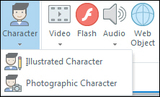
Let's take a look at the Character features in both programs. While Characters have been around for several years in Captivate, and in both versions of Storyline, the images below are taken from the most recent versions of both programs, Captivate version 8; Storyline version 2.Articulate Storyline 2To insert a Character on a Storyline slide, open a slide and from the Insert tab on the Ribbon, click Character. You'll find two choices in the Character drop-down menu: Illustrated Character and Photographic Character. In the image below, I've selected Illustrated Character, which opened the Characters dialog box. From here, you'll find multiple Characters, Expressions, and Poses.I found the Expression options particularly cool... plenty from which to choose.Shown below are Storyline's many poses. And if you look in the lower right of the dialog box, you'll even find three pose directions (Left, Front, Right).And perhaps my favorite thing about Storyline's Characters is how easy it is to change the appearance of an inserted Character. In the Image below, notice that you can select a Character and totally change it to another character, change its Expression, Pose... even its Perspective. Simply awesome!If you'd rather work with Photographic Characters, go back to the Character drop-down menu and choose Photographic Characters. As with the Illustrated Characters, you'll find multiple actors and poses.Adobe Captivate 8To insert a Character in Adobe Captivate, simply choose Media > Characters.Similar to Storyline, Captivate's Characters dialog box presents you with several Categories, Characters, and Poses. (In the image below, I've selected a Character and Pose from the Business Category.)If Captivate's Illustrated Characters work better for you, choose Illustrated from the Category drop-down menu and you'll be presented with four Illustrated Characters and various poses.If you want to change the Character's pose in Captivate, you'll need to manually delete the Character from the slide and replace it with another (not as cool as Storyline's edit-on-the-fly technique, but perfectly functional).Note: The Characters shown above aren't limited to Storyline and Captivate. You'll find many of the same Characters in Presenter.
Downloadable eLearning CharactersIf you're not happy with the selection of characters that come with those programs, you'll find resources on the web offering thousands of eLearning characters. While you'll need to purchase those characters (typically in groups or packs), you are almost guaranteed to find the perfect character to fit within your scene.
Two companies in particular jumped out when I went on an Internet search for characters: the eLearning Brothers and eLearning Art.Between the two, the eLearning Brothers is likely the better-known company (orange anyone?). They call their Characters "cutout people," and they've got thousands of them. Over on the eLearning Art website, characters are referred to as "people cutout images." And like the eLearning Brothers, there are plenty from which to choose.Another quick Internet search took me to eLearning.net where I found several free characters.If you'd prefer stock photography for your eLearning projects, the eLearning Coach has compiled a handy list of resources. Lastly, check out AJ's article on free zombie characters... perfect for the season.
***
Looking for instructor-led training on Adobe Captivate? Check out our live, online, instructor-led Captivate classes. If Articulate Storyline is more your style, we've got you covered there too.
Icon Logic Blogs
.
Blog
.
<span class='date ' tip=''><i class='icon-time'></i> Jul 14, 2015 01:44pm</span>
|
|
Paul Angileri who write the blog There Is No Chalk just left a comment on my recent post Profile Photos (see also Profile Photo):I once had someone comment to me on a non-professional email address of mine. They said it seemed to imply something negative. This was the only person ever to have mentioned it to me, and for the life of me I still can't see the person's POV on it. There's certainly no profanity of vulgarity in the email address, yet someone had a mildly negative reaction to it and at the very least seemed to imply that the very structure of the email address would likely preclude that person from communicating with me.Many of the recent comments really have helped to focus the discussion on the right issues - your brand, your audience and what they perceive. Subquark has convinced me that there are cases where a creative image and likely name make a lot of sense to help promote a creative business. It aligns with the brand. And if someone is not interested in interfacing with someone creative, that's not really the audience anyhow.As long as we are talking about possible bias when someone encounters you online, let's discuss email addresses. Again, in professional networking, your email address should align with your brand, the perception that you want to convey with your audience and the cultural norms of where you are networking. NamesIt's safest to use your name. It's probably a bit of a risk to use any kind of non-name. Again, the situation is a quick decision (less than a second) where you look at the person and decide if you will spend more time on this. What do you get from each of the following?snuggybear83john.mcelhonesurferchampAgain, there are likely cases where more creative names make sense. But make it a conscious decision.Domain Bias?The other thing I would suggest is a likely bias out there on domains. Please help me out on this ... what do you think when you see the following domains?aol.comyahoo.comgmail.comjohnmcelhone.com eLearning Technology
Browse eLearning Content
Tony Karrer
.
Blog
.
<span class='date ' tip=''><i class='icon-time'></i> Jul 14, 2015 01:44pm</span>
|