Blogs
|
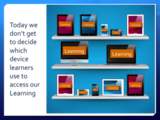
Today we don’t get to decide which device learners use to access our Learning - slide used in my mobile learning workshop
According to a new forecast from the International Data Corporation (IDC), the shift from traditional Personal Computers to Mobile Devices continues forward faster than expected, and with no slowing down in sight.
This naturally bodes well for all who follow the mobile learning revolution, but it also puts enormous pressure on learning designers to develop learning that can be consumed beyond just the desktop computer.
As I say in my presentations and workshops, today we don’t get to decide which devices learners use to access our learning.
"What started as a sign of tough economic times has quickly shifted to a change in the global computing paradigm with mobile being the primary benefactor," said Ryan Reith, Program Manager for IDC’s Mobility Trackers. "Tablets surpassing portables in 2013, and total PCs in 2015, marks a significant change in consumer attitudes about compute devices and the applications and ecosystems that power them. IDC continues to believe that PCs will have an important role in this new era of computing, especially among business users. But for many consumers, a tablet is a simple and elegant solution for core use cases that were previously addressed by the PC."
via IDC Forecasts Worldwide Tablet Shipments to Surpass Portable PC Shipments in 2013, Total PC Shipments in 2015 - prUS24129713.
RJ Jacquez
.
Blog
.
<span class='date ' tip=''><i class='icon-time'></i> Jul 14, 2015 01:49pm</span>
|
|
Written by Chris Osborn Feedback and coaching are essential parts of employee growth. Today's Q&A Thursday video gives tips on how to give honest, constructive feedback. Stay Up-to-Date on the Most Current Business Training Trends BizLibrary offers 7,000+ training videos in various business training topics, with new courses added every day. 10 Tips for Marketing Your Employee Training Program In this eBook we’ll discuss you'll learn 10 ways to improve the marketing of your online employee training program and boost employee engagement and participation. BizLibrary's Mobile Learning App meets the needs of today's digital learners. Employees no longer wait for training departments to push learning content to them. Employees are used to pulling information to themselves, when they need it, on their own terms and conditions, and on their own devices. Video Transcription Hi, Chris Osborn, VP of Marketing with BIzlibrary with today's Q&A. Today's question comes from Robyn. She's a manager at a multi-location manufacturing facility, and she wants to know how you help managers understand that they need to be honest regarding employee shortcomings in addition to strengths. She says its imperative an ongoing record of weaknesses and strengths. We had mentioned that feedback and coaching can work best after wins and employees are most engaged and successful when working in areas of strength during a webinar this week. Robyn's question touches on a great point. We DO have to be open and honest with employees about their weaknesses too. First, we're not all as self-aware as we'd like, so we have to help employees understand both their strengths AND weaknesses. So, how's the best way to do that? My first recommendation is to NOT be confrontational. That's rarely a good strategy. If you don't believe me, just think about the political mess we see everyday in Washington. How well has confrontation solving problems there? So, try asking employees about times they felt most productive. Then, ask them to compare those experiences to times they felt frustrated, or least productive. In which situation would they rather work the most often? They will tell you most productive. Then help them compare the competencies they had to apply in each situation. The competencies and skills they had to apply while least productive are almost certainly going to be their weaknesses. So ask the employee which situation they'd rather work in. Productive, using strengths? Or unproductive, using weaknesses. The answer is going to be pretty obvious and very clear and now you've helped them address and understand both their strengths and weaknesses. Just coach your managers to keep a record of that and now you have a place to really coach and develop your managers. You help them build strengths and avoid weaknesses.
Chris Osborn
.
Blog
.
<span class='date ' tip=''><i class='icon-time'></i> Jul 14, 2015 01:49pm</span>
|
|
by Willam Van Weelden
A few weeks ago I showed you how you can use multilevel lists to easily create complex lists with multiple levels. But multilevel lists are far more powerful than I could show you in a single article. This week, I'm going to expand on the multi-level list theme by teaching you how to add sub-numbers to lists:
Sub-numbering is important for many procedures and legal documents. You simply can't have sub numbering in RoboHelp without multilevel lists, unless you want to manually type in all sub-numbers. But with multilevel lists, you control this behavior right from the style sheet!To add sub-numbering to a Multilevel List, first Create a multilevel list. Then, on the Project Manager pod, double-click your style sheet to open the Styles dialog box.
In the Styles dialog box, select your multilevel list. From the Apply Formatting To drop-down menu, choose a level that will use the sub-numbers.
Click in the Edit Style field and, from the Insert Level drop-down menu, choose 1.
Click OK to close the Styles dialog and save your changes.
And that's it. From this point forward, any of your multilevel lists can include sub-numbering (as shown in the image below):
***
Looking to learn RoboHelp? We offer a live, two-day online RoboHelp class once a month. Feel free to contact us to learn other ways to meet your RoboHelp training requirements.
Icon Logic Blogs
.
Blog
.
<span class='date ' tip=''><i class='icon-time'></i> Jul 14, 2015 01:49pm</span>
|
|
One of the hardest things to find are real-life examples of different kinds of eLearning solutions. On May 21, Learn Trends will be hosting a free online event where the people who have developed interesting eLearning solutions will demonstrate and briefly discuss what they've done.This is an online call for people who can "demonstrate" their system. Even if you can't participate - please help me get the word out on this.Because of my concerns about bandwidth - demonstrations will really be screen shot slides. Sorry. This makes it a bit harder to demonstrate 3D worlds, video based training, etc. But it can still be done - just screen shot it and plan to explain it.Generally we are looking for examples of a variety of different kinds of solutions. We hope they will vary from practical solutions to common problems to leading edge solutions. Some example areas and this is by no means inclusive:Self-Paced CoursesPerformance Support ToolsMobile LearningCollaborative LearningSocial / Network Learning3D LearningGamesToolkitsInteresting ToolsWe especially would like participants who are developing solutions inside of organizations to participate. These are most often the hardest examples to see.To participate, you must be available May 21 from 9AM to Noon Pacific Time.If you are interested, please send me an email (akarrer@techempower.com) with:A brief descriptionA couple of example screen shotsWe expect to have more examples than we can show and discuss in the 3 hours, so we will likely only be able to choose some of what is sent in. We will try to choose a variety of different examples that represent effective patterns.We are also trying to come up with ways to effectively share examples that are not shown real-time during the session.Two last things:Please help me spread the word about this.If you know of places that examples already are captured, please point me to those. Another aspect of this is beginning to capture examples that will be available online. eLearning Technology
Browse eLearning Content
Tony Karrer
.
Blog
.
<span class='date ' tip=''><i class='icon-time'></i> Jul 14, 2015 01:49pm</span>
|
|
Have you ever sat in your office questioning why numbers aren’t where they should be or why performance isn’t higher than expected? It’s easy to immediately blame the employee- to start picking apart habits- say they should be working longer hours, wondering why aren’t they doing it this way, why are they doing it that way… ultimately thinking… maybe they aren’t right for the job. I certainly have had these thoughts. It’s easy for a manager who is under stress and pressure to immediately react to problems. Whether it is to tell the employee that they need to improve, change or work harder- these often don’t yield long term results. These actions can often be destructive, by creating fear and an unhealthy work environment. Additionally, these actions can impact other employees infecting the culture. Some managers know it is important to put a coaching plan in place, but often wonder why they fail. Is it the process or the employee? What I have learned is that you have to take a step back and ask yourself 3 questions about the employee. Do they have the capacity to perform? - does the employee have the attitude and willingness to learn and grow into a top performer? Are they curious? - does the employee want to learn new things and show a desire to learn those things? Do they have a positive attitude? - are they excited about personal growth? If the answers to these 3 questions are yes, then you have employee that is coachable! Forget about what they have done in the past. Forget about what they should be doing. Determine what skills today they need help with and develop a plan. A coaching process looks like this: Meet with your employee and share with them your confidence in their abilities and willingness to solve the problem. Specifically describe the performance problem, using data and examples. Focus on the specific behavior that needs improvement. Identify with the employee if there are any barriers from allowing them to work on or address this problem. Work to remove those roadblocks. Ask the employee for ideas on how to correct the problem. Discuss potential solutions , provide training recommendations and list actions to take. Write down an action plan and get buy in! List what the employee will do and what you will do as their leader in working on a solution. Find an end in sight- A specific time and date for follow up and progress check-ins must be included. Reinforce good performance - Catch employees doing it right and demonstrating positive behaviors. This will help boost employee confidence. If you are struggling with coaching employees, take time to revisit the 3 magic questions. Coaching employees is a standard competency of management and leadership positions. Often times this skill is found to be an afterthought or only pointed out as a weakness when results are poor. Coaching employees is a very rewarding experience that builds trust and a positive work environment. It produces results and contributes to the bottom line. Make time for coaching employees, the right employees. Shannon Kluczny , VP of Client Services at BizLibrary Follow Shannon on Twitter at @Skluczny13 ABOUT SHANNON: I thrive on ensuring my staff has the best tools and resources available to continue to develop themselves. I respect others that are continuously learning, sharing and growing. My philosophy is if you're not learning, you're standing still. Social Media has also played a tremendous role in ongoing development, especially my own. I have an onsite and virtual team that I work with on a daily basis, and that's been a lot of fun to organize. I work hard to build a team of individuals with a variety of strengths that are intrinixly different and blend well in a multi-generational team. The best part of my team is that we all can learn from each other. We laugh, compete and work hard. Developing the Coaching Skills of Your Managers and Leaders It comes down to people and the processes needed to support our people and organization. Download this complimentary eBook to get started with developing the coaching skills of your managers today! BizLibrary's Mobile Learning App meets the needs of today's digital learners. Employees no longer wait for training departments to push learning content to them. Employees are used to pulling information to themselves, when they need it, on their own terms and conditions, and on their own devices. - See more at: /technology/bizmobile.aspx#sthash.umjsk4e5.dpuf
Chris Osborn
.
Blog
.
<span class='date ' tip=''><i class='icon-time'></i> Jul 14, 2015 01:49pm</span>
|
|
by Jennie Ruby
I've talked about assure, ensure, and insure in the past, but I think these supremely confusable words deserve a reprise.
Assure--to tell someone not to worry, is the way I think of it, as in the word reassure. This is also the word that the term quality assurance is based on. Here, I think of it as a process that allows a company to assure customers that the product is of high quality.
The postal clerk assured me that the package would arrive on time.
Ensure--to make sure or to make certain. This verb is the one you want when you ask a student to double-check something:
The clerk ensured that the correct zip code was printed on the label.
Please ensure that the checkbox is selected, then click the OK button.
Insure--You are safest in usage on this one if you are talking about purchasing insurance. However, the U.S. military tends to use this also as a synonym for ensure.
All of the specific usage I am discussing here goes beyond what descriptive dictionaries, such as Merriam Webster's, indicate. I found their differentiation of these terms to be too vague, compared with the standards I have typically been asked to follow when doing professional copyediting. So to be precise, make the distinctions indicated here.
Here's a second set of confusing words: comprise/compose/constitute.
Comprise--just memorize that the phrase is comprised of is always wrong. The larger thing comprises the parts, or draws them together:
The monument comprises a stone obelisk and a colonnade.
Compose--to make up. Is composed of is correct:
The monument is composed of two parts: a stone obelisk and a colonnade.
***
This Week's Challenge: Which is correct?
We ensured/insured the ring for $3,000 after the jeweler apprised/appraised its/it's value.
He told the participants to ensure/insure that their computers were logged out after the class.
He also ensured/assured them that their files would not be erased.
The new app is composed of/is comprised of two parts.
The new app composes/comprises two separate parts, both of which are better than/then competing online services.
Ensure/insure/assure that the dialog box is closed before exiting the program.
The training program is comprised of/is composed ofdemonstrations, exercises, and quizzes.
The individual programs of which the suite is comprised/of which the suite is composed/which the suite comprises are also available as stand-alones.
Feel free to post your answers below as comments.
***
If you love Jennie's articles, you'll love her classes. Check out some of Jennie's mini courses.
Icon Logic Blogs
.
Blog
.
<span class='date ' tip=''><i class='icon-time'></i> Jul 14, 2015 01:49pm</span>
|
|
Looking at the responses in Social Learning Designer to my services positioning template: For _________ (buyers) we help in their desire to __________ (benefits) by ________ (services) unlike others we _____________ (differentiation). There were only three responses: Jane Hart: I work with learning depts to help them create more participatory, collaborative approaches to learning - rather than just shoving content at people Colleen Carmean: for learning orgs, we help in their desire to increase knowledge within the org by shaping systems that make info needed available to anyone at anytime. Unlike others, we do this by creating distributed spaces, places and tools for sharing, finding and creating knowledge. John: For learning organizations we help build productive, skilled, thinking individuals and teams. Unlike others we do this in a collaborative, active, constructive manner. This sparked a couple of quick thoughts … Buyers / Audience - Learning Dept / Organizations I'm guessing that each of these responses are from a vendor perspective as they define the audience the same and it's not the organization itself, it's the learning organization / department. Benefits - Learning / Knowledge In my post Social Learning Measurement - Will Thalheimer points out there are basically three reasons to measure learning: 1. To prove benefits 2. To improve the intervention 3. To improve learning. And I think you could make an argument that our benefits could fall in any of the three camps: business benefits, better interventions, improved learning. When I read each of the benefits above, I read them to be 3 - improved learning. The closest to a real business benefit is "productive, skilled, thinking individuals" - but that's still a distance from what most business people would think of in terms of real business benefits. This is really a critical positioning issue … is our benefit improved learning or business benefits? I realize there will be times for us to define ourselves as one or the other, but I hope that we seek to define ourselves in terms of business benefit. In my post Social Learning Measurement - there are a host of things that we can measure around Social Learning (which was the focus of the post where these responses occurred). These include things like: Networking patterns Learning efficiency Learning outcomes Contribution patterns Content usage patterns Content quality Idea to development initiation cycle time Retention/Employee turn over Time to hire Prospect identification cost Prospect to hire conversion rate Hiring cost Training cost Time to acclimation for new employees And most of these really are measuring learning outcomes or Intermediate Factors in Learning (see also Intermediate Factors). Real business outcomes really fall into either: increased revenue or reduced cost. The rest are accepted intermediate factors for the business such as improved time-to-market, customer satisfaction, employee satisfaction, etc. And there can be lots of these intermediate factors. So going back to a positioning question - I wonder if we shouldn't all be talking about specific kinds of business outcomes or intermediate factors that can be achieved? eLearning Technology
Browse eLearning Content
Tony Karrer
.
Blog
.
<span class='date ' tip=''><i class='icon-time'></i> Jul 14, 2015 01:49pm</span>
|
|
View and download the webinar slides. View the webinar recording. Additional Resources, Information and Inspiration: "...if employees' relationship with their managers is fractured, then no amount of perks will persuade the employees to perform at top levels. Employee engagement is a direct reflection of how employees feel about their relationship with the boss." Source: Self-determination Theory And Facilitation Of Intrinsic Motivation, Social Development And Well-being, American Psychologist Association From Bud to Boss: Secrets to Successful Transition to Remarkable Leadership by Kevin Eikenberry and Guy Harris A Succession Plan for First Time Managers, Maria Plakhotnik and Tonette S. Rocco, T&D Magazine, December 2011 Why Good Managers are So Rare, Harvard Business Review When a Millenial Moves from Buddy to Boss, American Management Association Drive by Daniel Pink 7 HR Law Training Topics for New Managers (and Experienced Ones Too!) In this eBook we’ll discuss: The main legal pitfalls that new managers need to avoid and what their legal responsibilities are as a manager The challenges faced by new managers The risk and costs associated with not training managers on employment law Legal responsibilities of managers.
Chris Osborn
.
Blog
.
<span class='date ' tip=''><i class='icon-time'></i> Jul 14, 2015 01:48pm</span>
|
|
by Kevin Siegel
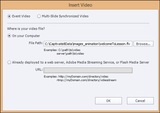
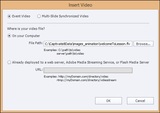
You can add several types of video into a Captivate project, including AVI, MOV, and Flash Video (FLV or F4V). To insert a video, open or create a Captivate project and then choose Video > Insert Video to open the Insert Video dialog box.
You have two choices when inserting video: Event Video (typically video that is expected to play on only one slide) or Multi-Slide Synchronized Video (video that is expected to play across multiple slides). Most developers elect to use Event Video since videos that are confined to a single slide are easier to control.After you've made a decision between Event Video or Multi-Slide Synchronized Video, the next big decision is to load the video from a file that is already on your computer (by selecting On your Computer), or link to the video that is stored on a server (by selecting Already deployed to a web server, Adobe Media Streaming Service, or Flash Media Server).If you choose On your Computer (which most developers do), you simply Browse to the video that's on your computer or network drive, open it, and the video will be inserted onto the slide. From there, you use the Properties Inspector to set the video's timing and other attributes. It's a clean process with one major drawback: when you publish an eLearning lesson containing video, the resulting output could be quite large. And large lessons take longer to open and view over the Internet than smaller lessons that don't contain video.Instead of embedding the video in a Captivate project, you lower the size of the project and decrease load times for learners accessing your published content by linking to the videos that are stored on a server.If you have a web server, you can upload the videos to the server in advance and simply copy/paste the URL to the video into the URL field. Your corporate IT can set you up with a web server or, if you're up to the challenge, you can create your own web server using free media server software.If you don't have a web server, your server cannot handle large amounts of traffic, or you simply don't want to create your own server, a media service could be the way to go. Generally speaking, media services are servers available in the cloud that house your videos for you. When a learner watches your eLearning content and comes across a video you've added to a slide, the video is streamed from the media server to your learner. There are several pay-as-you-go companies/websites that provide media servers including Adobe Media Streaming Service, Wowza, Subsonic, and Plex.I'd love to get feedback from you about this topic. I've created a quick poll that asks how you're using video in eLearning and, just as important, where you're storing the videos. You can take the poll here.See also: Adobe Media Server 5 With Kevin Towes and a review on five of the top-selling media servers.
***
Looking for instructor-led training on Adobe Captivate? Check out our live, online, instructor-led Captivate classes.
Icon Logic Blogs
.
Blog
.
<span class='date ' tip=''><i class='icon-time'></i> Jul 14, 2015 01:48pm</span>
|
|
Written by Chris Osborn Today's Q&A Thursday discusses how to use your training & development programs to recruit and retain top talent. Stay Up-to-Date on the Most Current Business Training Trends BizLibrary offers 7,000+ training videos in various business training topics, with new courses added every day. 10 Tips for Marketing Your Employee Training Program In this eBook we’ll discuss you'll learn 10 ways to improve the marketing of your online employee training program and boost employee engagement and participation. BizLibrary's Mobile Learning App meets the needs of today's digital learners. Employees no longer wait for training departments to push learning content to them. Employees are used to pulling information to themselves, when they need it, on their own terms and conditions, and on their own devices. Video Transcription Hi, Chris Osborn, VP of Marketing at BizLibrary with today's Q&A. Today's question comes from Jessica. She's an HR specialist at a small SAAS technology company. She wants to know how we can using our training & development program to recruit top talent. I'm going to amplify the question a little bit to include retaining top talent as well. First, advertise your employee development program as a benefit. But do more than just talk about its existence. Explain the elements, and actual benefits to employees and their careers. For instance, if you have a tuition reimbursement program, explain the details. For instance, how long before an employee is eligible to participate. What the program covers, such as graduate degrees or certification programs, things like that. Second, use video. If you look at the best in class recruiting pages in various websites, they always include video elements. Use video to illustrate your development programs, and make sure to get testimonials from current employees. Last, add a video or at least a written greeting and statement from the president of your organization about your program and its importance. I know its obvious, but if the goal is to use your training program to attract talent, you have to make the program a highly visible element of your recruiting plan. So include marketing pieces and emails, your website, and social media and any other place you're trying to catch the attention of top talent. You can use your employee development and training program to attract and retain top talent, but you can't do it if you stay quiet about it. So use video, use it in marketing, get it out there in social media, and for goodness sakes get testimonials from employees and you can make great use of employee development, not only to raise the performance of employees, but to attract and retain the employees your organization needs to be successful.
Chris Osborn
.
Blog
.
<span class='date ' tip=''><i class='icon-time'></i> Jul 14, 2015 01:48pm</span>
|