Blogs
|
It's very common for organizations to require completion of some number of hours of learning as part of a certification, continuing education or compliance. There are many, many examples out there. The International Association for Continuing Education and Training defines CEUs purely in terms of "contact hours" Continuing Education Units One Continuing Education Unit (CEU) is defined as ten contact hours of participation in an organized continuing education experience under responsible sponsorship, capable direction, and qualified instruction. The recent California AB 1825 requires two hours of "effective interactive training" on sexual harassment for all supervisors. They include the following definition (which is at least a bit better than most CEU definitions): "Effective interactive training" includes any of the following: (A) "Classroom" training is in-person, trainer-instruction, whose content is created by a trainer and provided to a supervisor by a trainer, in a setting removed from the supervisor’s daily duties. (B) "E-learning" training is individualized, interactive, computer-based training created by a trainer and an instructional designer. An e-learning training shall provide a link or directions on how to contact a trainer who shall be available to answer questions and to provide guidance and assistance about the training within a reasonable period of time after the supervisor asks the question, but no more than two business days after the question is asked. (C) "Webinar" training is an internet-based seminar whose content is created and taught by a trainer and transmitted over the internet or intranet in real time. An employer utilizing a webinar for its supervisors must document and demonstrate that each supervisor who was not physically present in the same room as the trainer nonetheless attended the entire training and actively participated with the training’s interactive content, discussion questions, hypothetical scenarios, quizzes or tests, and activities. The webinar must provide the supervisors an opportunity to ask questions, to have them answered and otherwise to seek guidance and assistance. (D) Other "effective interactive training" and education includes the use of audio, video or computer technology in conjunction with classroom, webinar and/or e-learning training. (E) For any of the above training methods, the instruction shall include questions that assess learning, skill-building activities that assess the supervisor’s application and understanding of content learned, and numerous hypothetical scenarios about harassment, each with one or more discussion questions so that supervisors remain engaged in the training. They also include: "Two hours" of training is two hours of classroom training or two hours of webinar training or, in the case of an e-learning training, a program that takes the supervisor no less than two hours to complete. When it comes to online learning / eLearning, commonly this requirement for some number of hours translates to some amount of time spent in the online course. Someone just asked me questions about this and it's a problem that I've faced many times myself. I'm hoping that you will chime in with your thoughts. And I think we would all love to see pointers to influential resources that we could use in the future to help argue our case. Problem 1 - Measure time equivalence? I'm sure you've been through the design discussion where you figure out how you will show that people spent at least ten hours in the online course so they get their online CEU credits. You've probably also sat through discussions about what to do if someone manages to finish in less than ten hours. And you may have experienced this effect when you went through online traffic school. Many of them force you to be online for some amount of time. Most often the simple answer is to make sure that you have enough audio or video to ensure seat time is met. Oh, and you disable the next button. In other words, you ensure that the design of online learning enforces CEU credits based on seat time. But what if you don't want to do that? What if you have something that is text-based? Or exploratory? Are there common measures for time equivalence not based on time online or seat time? Problem 2 - Reduced Time for Online? I know that many of you reading this want to jump to the part where we convince the organization that they are wrong to base their standards on number of hours. However, most of us are well aware that in most cases it will not be possible to get a large complex organization to change it's standards, so we have to work within the standards. At the same time, we know that: We can do things like speeding up the audio without loss of comprehension. Variability of learner pace means that many learners can learn the same amount in less time. We can often teach the same concepts faster in online Learning / eLearning. So … How can we convince the organization that our variable length eLearning is worth X CEU Credits even when seat time may not come out to the set amount of time? Problem 3 - Collaborative, Informal, Social Learning? Now the hard part. We know that forcing someone through 10 hours of courseware is probably not the best idea, especially if we want them to learn a lot and have a good experience. We can certainly bring in a social element through a webinar (and these have the nice property that there are time lengths). But what about using other kinds of social learning. Can we effectively measure the time equivalence of collaborative, informal, social learning? How can we convince an organization that participation in collaborative, informal, social learning experiences equates to some amount of time equivalence? Problem 4 - Influencing the Organization? Again, in most cases, we won't be able to actually change how the organization measures these things. And when you look at from their perspective, they don't want to write up the specific content that must be covered, because it's too broad and will change. Thus, they are really just saying - you need to go through X amount of learning. Are there other good ways to define X amount of learning? What have you seen that are good ways to handle online CEU credits? What influential examples exist that might help us influence the organization? eLearning Technology
Browse eLearning Content
Tony Karrer
.
Blog
.
<span class='date ' tip=''><i class='icon-time'></i> Jul 14, 2015 01:54pm</span>
|
|
We're deep into day 2 here in Chicago. This crew has been hard at work writing scripts and producing eLearning using every tool under the sun including Adobe Captivate, Adobe and Articulate Presenter, Articulate Storyline, and Techsmith Camtasia Studio.
Icon Logic Blogs
.
Blog
.
<span class='date ' tip=''><i class='icon-time'></i> Jul 14, 2015 01:54pm</span>
|
|
Written by Chris Osborn A huge roadblock you may face as a manager is employees who are unwilling to engage in further professional development. Maybe they say they don't have time. Maybe they feel they're already good enough at their job. Today's Q&A Thursday video discusses the dangers of this attitude, and how you can resolve it. Stay Up-to-Date on the Most Current Business Training Trends BizLibrary offers 7,000+ training videos in various business training topics, with new courses added every day. 10 Tips for Marketing Your Employee Training Program In this eBook we’ll discuss you'll learn 10 ways to improve the marketing of your online employee training program and boost employee engagement and participation. BizLibrary's Mobile Learning App meets the needs of today's digital learners. Employees no longer wait for training departments to push learning content to them. Employees are used to pulling information to themselves, when they need it, on their own terms and conditions, and on their own devices. Video Transcription Hi, Chris Osborn, VP of Marketing with today's Q&A. It comes from Debbie. She's an HR manager at a technology company. In the webinar about building a business case, we talked about being prepared to overcome common objections from senior leaders. And one of the most common objections that we run across is questions whether or not employees actually use the training tools once we buy the solution. Debbie's question got to a very specific issue in this pretty complicated area. Her question is how do you get employees engaged in training who think they're already good enough at their jobs and don't have time for training? There are two critical aspects to the question therefore there are two parts to the answer. First, the idea that any employee is ever "good enough". So let me begin the answer to this question by asking another: can you think of certain important jobs in this economy that didn't exist even five years ago? And the answer to that, is yes! Very quickly! You can think of lots of them. Digital marketing experts, big data scientists, Adobe specialists, Android developers, iOS developers, there are a range of jobs that didn't exist just a few years ago. And think about your organization's future. Do you know exactly what skills and jobs you're going to need to be successful 6 months from now? 12 months from now? 18 months from now? If you know for sure, you're a lot smarter than me. If you don't know for sure, you're going to have to have a workforce that's adaptable, flexible, and agile enough to acquire skills and master jobs that don't exist today. So the idea that any of us are ever "good enough" in this market just isn't true. Second, if this is your culture, you have a manager problem too. Your managers have to understand the value of continuous learning in a world of constant change. So you're going to have to work hard to get your managers to understand exactly the point I just made. If you're going to succeed in this marketplace, constant and continuous learning and a dedication to ongoing improvement has to be a foundational part of what you do. So if we're going to keep this up as an organization, if we're going to be competitive, if we're going to improve, we simply owe it to each other as employees and professionals to be dedicated to continuous learning and improvement. It's a commitment we need to make to our colleagues. So that's it in a nutshell. So how do you get people engaged? You have to convince them that jobs may not exist today that they're going to need to master in the future, you have to get your managers engaged in it, and you have to shift the culture to make sure people understand that we owe it each other to be dedicated to continuous improvement.
Chris Osborn
.
Blog
.
<span class='date ' tip=''><i class='icon-time'></i> Jul 14, 2015 01:54pm</span>
|
|
2012 has been an amazing year for mobile!
This year we have seen technology companies introduce a myriad of mobile devices of all sizes, prices and operating systems. In 2012 Apple announced the iPhone 5, two new iPads and the new iPad mini; Google unveiled their first tablet, the nexus 7 and later the 10″ version; Amazon gave us three Kindle Fire HD tablets. Not to be outdone, Samsung announced the Galaxy Note II and the Tab Tablet, and of course Microsoft announced the Surface Tablet.
Earlier this year Comscore reported that 2014 will be the year in which the number of mobile users will surpass desktop users for the first time. Here’s another statistic that bodes well for mobile, Apple sold more iPads in Q4 2011 than any individual PC manufacturer sold PCs. And what can we say about the acquisition of Instagram by Facebook for a cool 1 Billion dollars earlier this year? Instagram was not only a mobile-first success story, but until recently it was a mobile-only photo sharing service.
One final statistic I would like to include here is the fact that as of September 2012, Android alone accounted for 1.3 million activations a day, that’s roughly 39 million activations a month. Wow!
In 2012 tech giants like Google, Yahoo, Adobe, Microsoft, Intel and HP posted disappointing earning results. What’s amazing about this is that these are companies that prior to the modern mobile revolution appeared to be invincible in their own fields. The rise of mobile is forcing companies like these everywhere to rethink their strategies and business models in order to compete and stay relevant in this new mobile world we live in.
Clearly there’s a strong technology shift happening now. This is a shift that affects us all and one that comes with lots of opportunities, as well as challenges.
I am very encouraged by the progress I have seen this year from learning professionals embracing the idea of mobile learning. However we need more from our Industry and it’s my hope that 2013 will be the year we fully immerse ourselves into what I call the ‘Post-eLearning era‘ and seize the potential of mLearning.
With that said, here are 8 things I believe we must do in 2013 to leverage mobile and advance mobile learning:
1. Embrace Change and Adopt a new Mindset
Mobile changes everything from the way we learn new things by interacting with information on our mobile devices, to the way we design the next generation of learning experiences for the mobile learner. To fully realize the potential of mLearning, though, we need to think outside the eLearning box and question many of our traditional practices. We need to realize that we are no longer developing learning for the stationary learner, sitting in a stationary chair, in front of a stationary PC. Unlike some people who think that things like the price tag of a mobile device or its battery are holding mobile learning back from full adoption, I’m convinced technology has little to do with what’s holding us back from crossing the chasm.
In order to seize the potential of mLearning we need to embrace the change this new paradigm brings. More than anything else the mobile revolution is about adopting a new mindset, a new way of looking at things and being open to the new world around us. eLearning had its day but now we have a new blank canvas in front of us and we need to step up to the plate and make the most of this new paradigm shift.
Charles Darwin said it best:
"It is not the strongest of the species that survives, nor the most intelligent that survives. It is the one that is the most adaptable to change." - Charles Darwin
2. Become an Active, Observant Mobile user
This one is an obvious one but it’s worth repeating. The bottom line is that it’s tough (if not impossible) to develop for mobile users if you are not an active mobile user yourself. If you don’t yet have a smartphone (and you don’t think you are getting one for Christmas) go out and get one yourself, if you can afford it, get two or three. The more devices you have for testing, the better. The two most popular mobile OSes are iOS (e.g. iPhone) and Android (e.g. Samsung S3). Surf the web on these devices, it’s quite different from the desktop but get used to it because this is your next development frontier. Download as many apps as you can and ask yourself what you like and dislike about each of them. This is important because you can then implement a lot of the things you like about the app experience into your own mobile learning projects. Get yourself a Tablet or two as well for the same reasons I listed above.
3. Think Mobile-First and Desktop-Second
LinkedIn’s head of mobile, Joff Redfern, speaking at the 2012 Mobile Business Summit, said the following about what mobile-first thinking means to LinkedIn:
"Mobile First is not about doing something first on mobile and then on the desktop. It’s a way of life"
I couldn’t agree more, thinking mobile-first should be something all of us embrace as a new way of life going forward.
One of the biggest realizations in the mobile era is that the traditional PC has now been reduced to just one of many screens in today’s new multiscreen world. We need to design for this truth.
One of the many advantages of thinking mobile first and desktop second, is that it forces you to focus and prioritize because of the limited canvas size you are working with on mobile, as compared to the PC. You can read more about the advantages of thinking mobile first here.
4. Resist the temptation to simply convert your eLearning desktop to HTML5
Conversely, the opposite of thinking mobile first, is to develop for the desktop first and treat mobile as an afterthought. Sadly companies like Adobe with tools like Captivate 6 are promising that you simply have to take exactly what you have on the desktop and simply pass it through their new feature called Publish to HTML5, and your mLearning problems are solved. No so fast though, not only do features like this not work as advertised, but even if they did, it would still just be a poor attempt to retrofit an old course into a new medium. My advice is to resist the temptation and instead try and reimagine what your existing courses need to look like on mobile, considering the context in which people use mobile devices, plus all the sensor superpowers built into mobile devices, and then go out and look for the right tools and technologies that will help you bring your ideas to life.
5. Embrace Simplicity
As an industry, we have been conditioned to think that the more animations we have in our courses, the more engaging they are for the learner. Tools vendors focus their entire marketing strategies (I know I was one of them) on selling "more interactive" features. Every new version comes with more interactions, more widgets, more timelines, more triggers, more ways of animating text, and more support for all those animations in PowerPoint. As users of these tools, we feel that unless we use all of these cool features in a Project (or on a single slide), we are likely behind the trend, and so we end up burying the real course objectives in a sea of animations.
However the mobile experience is about simplicity, it’s about sharing one big idea per screen and nothing more, it’s about looking at what’s really important and then getting rid of everything else, the fluff.
Our new mantra in 2013 should be simplify, simplify, simplify!
6. Don’t put limits on Mobile Learning
I completely understand why it’s convenient to look at mLearning today and want to assign specific learning tasks to it, such as performance support and job aids for example, but I think it’s too early to start limiting mLearning to just these obvious applications.
I am fully convinced that when you couple the mobility and physicality of mobile, with all the other sensor superpowers inherent in mobile devices (i.e. digital compass, gyroscope, audio, dual cameras, bluetooth, proximity, etc), we will actually create better learning experiences on mobile, as compared to what we have today through desktop eLearning. I recommend you hold weekly brainstorming sessions with your teams, where you start to reimagine your learning on mobile devices.
7. Explore other Tools beyond the Usual Suspects
Existing eLearning development tools do exactly what they were designed to do, namely help us rapidly develop eLearning courses for the desktop. However developing mLearning is very different from designing traditional eLearning and I believe we need new tools that are built from the ground up and that embody everything that is great about mobile, including a new mindset, new templates, simple, yet powerful and beautiful experiences and most of all, tools that can display these learning experiences in a personalized way on every screen. It is for this reason I recommend you to think outside the eLearning box and explore other tools out there for inspiration. If you are not following my colleague @MayraAixaVillar, you should be, she is always discovering new tools and blogging about the pros and cons about them, as she shares her personal take as to the applicability of these tools in learning design. Mayra has done several reviews on her blog HERE.
8. Learn everything you can about mLearning
Finally, make 2013 the year you really sink your teeth into all things mobile and mobile learning. Read and subscribe to as many blogs, newsletters and Podcasts on mLearning as possible, attend conferences, webinars and workshops whenever you can. Also learn everything you can about new technologies like HTML5, responsive design, CSS3 and begin to let go of some of the older technologies like Flash.
Here’s to having an amazing 2013!
Upcoming Events:
Here’s a list of some of my upcoming events and conferences:
February 20: From e-Learning to mLearning Design Training [6-hr Online Workshop] http://bit.ly/SxiAN6
If you are looking for Speakers for your 2013 eLearning, mLearning and Mobile Events, please contact me http://bit.ly/xP46WP
8 Things we MUST do in 2013 to seize the potential of mLearning from RJ Jacquez
RJ Jacquez
.
Blog
.
<span class='date ' tip=''><i class='icon-time'></i> Jul 14, 2015 01:54pm</span>
|
|
That heat you felt as you walked past that room was our own Jennie Ruby catching everyone ablaze with her enthusiastic session at the Online Learning Conference yesterday.
It was a jammed-pack room and Jennie didn't disappoint as she instructed attendees on the best practices for creating and presenting voiceover audio for eLearning.
Icon Logic Blogs
.
Blog
.
<span class='date ' tip=''><i class='icon-time'></i> Jul 14, 2015 01:54pm</span>
|
|
It is 8:30am. A text arrives from your client. He’s doing a fast burn because his management made a decision that impacts his team without consulting him. He has a meeting in 30 minutes and he needs to speak to you…his coach. One of the reasons you are coaching him is that he is prone to emotional outbursts with his management and staff. And now he’s ready to blow up at his boss. What do you say to him when you get him on the phone? Coaching is one of the hot topics in today’s world. Coaches have various formal avenues to learn the structure, process and techniques of coaching. This provides training in the "science" of coaching. But success in coaching does not come just from process and technique. So, what is the "art" of coaching? The "art" of coaching has to do with listening. It is about building trust. It is about the questions you ask. It is about understanding the context of the client’s issues. It is about wisdom. It is about pulling information from the client. It is about pushing feedback. And it is about creating shared success. Let’s go back to the client that is about to explode. Once I got the client on the phone, the first thing I did was to ask how he was doing and what I can do to help. This brought us back to our relationship and the trust we’ve built over previous sessions. Next, I asked him to walk me through the events that had transpired. I asked him to help me understand what was actually happening. This helped the client focus on facts and sequencing versus his reaction to the events. Now that he was calm I restated the facts demonstrating that I had been listening to him. Again, this came from trust and kept us present with each other. What next? What can I do to help him deal with the situation in an objective manner? The next question was critical. "John, I know this seems like a big deal today. Six months from now, will you be thinking of this? Will this be something at the front of your mind?" He paused. He processed. He then said: "I may get upset if I think about it but no, this will not be the biggest thing I’m dealing with six months from now." We then went on to discuss how he can approach the meeting with his boss. He agreed that he needed to go into the meeting asking questions to better understand what happened and why. He agreed that, while he may be upset, this meeting was not the time to deal with the emotional component. He needed to stay present and focus on his business objectives. Coaching is extremely rewarding work. A good coach remembers that it is all about the client. Process can provide good structure and support to the coaching engagement. True success will come from the artistry of the coach. Kevin Pallardy is an executive coach, talent management consultant and the Managing Director for BPI Group.
Chris Osborn
.
Blog
.
<span class='date ' tip=''><i class='icon-time'></i> Jul 14, 2015 01:53pm</span>
|
|
First, I would like to wish you a Happy New Year. May 2013 be the year each one of us creates a dent in our own Universe!
Don’t look now, but there’s a revolution happening everywhere driven primarily by the rise of mobile.
Virtually every process and every product is being "reimagined" because of mobile.
Companies in every industry are embracing the mobile revolution, and are putting forth strategies to make sure they offer great experiences for their users on mobile devices.
There’s one common denominator among these companies, namely their mantra is to simplify everything, from their websites for their mobile users, to the mobile apps they design for their customers.
I think there’s an important lesson here for all us in eLearning transitioning to mLearning. I believe the most important first step in this transition is to simplify what we have today on the desktop, as we embrace mobile as a new delivery medium, and as we design for this new frontier.
Only by simplifying our existing learning design, will we be able to reimagine these learning experience on mobile devices and delight our learners who are increasingly mobile.
Here’s what I wrote in a previous post about embracing simplicity:
As an industry, we have been conditioned to think that the more animations we have in our courses, the more engaging they are for the learner. Tools vendors focus their entire marketing strategies (I know I was one of them) on selling "more interactive" features. Every new version comes with more interactions, more widgets, more timelines, more triggers, more ways of animating text, and more support for all those animations in PowerPoint. As users of these tools, we feel that unless we use all of these cool features in a Project (or on a single slide), we are likely behind the trend, and so we end up burying the real course objectives in a sea of animations.
However the mobile experience is about simplicity, it’s about sharing one big idea per screen and nothing more, it’s about looking at what’s really important and then getting rid of everything else, the fluff.
via 8 Things we MUST do in 2013 to seize the potential of mLearning | The mLearning Revolution Blog.
A company I want to highlight today, which is doing exactly this, is LinkedIn. The company’s mission statement is to connect the world’s professionals to make them more productive and successful. One of the ways in which LinkedIn is accomplishing this is by simplifying everything they do, from the friction-less interactions they are implementing on their site (e.g. endorsements), to the new versions of their iPad and iPhone apps, which are simple and enjoyable to use.
Another way in which LinkedIn is simplifying things for their customers is by embracing ‘mobile-first‘ thinking and desktop second.
There’s a great video below from Joff Redfern, head of mobile products at LinkedIn, talking about LinkedIn’s approach to designing for mobile and there’s one thing in particular that I recommend we all embrace as we design learning for multiple screens, namely:
"Mobile first is not necessarily about trying to do something first on the mobile and then on the desktop. It’s a way of life"
Redfern was speaking at the Guardian Mobile Business Summit 2012 conference in London, where he outlined LinkedIn’s evolving design approach to mobile devices, and said that all the company’s product teams now share a mantra: "Simplify."
via LinkedIn explains why ‘simple is beautiful’ on mobile devices | Technology | guardian.co.uk.
Here’s the Video:
Over to You:
If you have practical ways in which you are embracing this mantra of simplify, simplify, simply in learning design, please share below. Here’s to a great year of mLearning design!
Upcoming Events:
Here’s a list of some of my upcoming events and conferences:
February 20: From e-Learning to mLearning Design Training [6-hr Online Workshop] http://bit.ly/SxiAN6
If you are looking for Speakers for your 2013 eLearning, mLearning and Mobile Events, please contact me http://bit.ly/xP46WP
RJ Jacquez
.
Blog
.
<span class='date ' tip=''><i class='icon-time'></i> Jul 14, 2015 01:53pm</span>
|
|
Over on Learn Trends, we've posted the days/times for the next two online sessions.May Learn TrendsMay 21 - 9AM - Noon US Pacific TimeI'll be organizing this one and the specific topic and speakers will be getting announced in about a week. It should be good.June Learn Trends - Networked and Social LearningJune 18 & 19 - Times TBDGeorge Siemens will be organizing a two day session on Networked and Social Learning. For example, I will be doing a session on Social Learning Measurement and ROI.If you are interested in these, please click the links above to go to the Learn Trends site and sign up. eLearning Technology
Browse eLearning Content
Tony Karrer
.
Blog
.
<span class='date ' tip=''><i class='icon-time'></i> Jul 14, 2015 01:53pm</span>
|
|
by Kevin Siegel
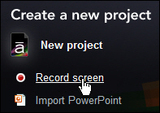
Recording screen actions with Articulate Storyline couldn't be much easier... all you need to do is click Record screen on the Storyline Welcome screen and off you go.
During the recording process, Storyline records your screen actions using three different modes: View, Try, and Test. Once you have finished recording, the Insert as dialog box opens and, if you select Step-by-step slides, you can choose to insert any of the three modes into your project.
But what happens to the two unused modes? And what if you change your mind about the mode you used and instead want to use one of the other modes? At first glance, the unused modes are thrown away. If you want to use a different mode, it seems like you'll need to re-record. But that wouldn't be much fun, would it?
You'll be happy to learn that Storyline keeps each of the modes hidden away in the project and you can insert them into the project whenever you want.
From the main toolbar, click the Record Screen tool to display the mode you're currently using.
Click the thumbnail of the inserted mode and the Insert as dialog box opens.
Select one of the other modes from the Step-by-step slides drop-down menu and click the Insert button. The slides will be added to the project as a new scene.
***
Looking for instructor-led training on Articulate Storyline? Check out our live, online, instructor-led Storyline classes. We've also just rolled up three new mini-courses. Check them out here.
Icon Logic Blogs
.
Blog
.
<span class='date ' tip=''><i class='icon-time'></i> Jul 14, 2015 01:53pm</span>
|
|
View and download the webinar slides. View the webinar recording. Additional Resources: Five Barriers from Charles Jennings Everyday we create 2.5 quintillion bytes of data. So much that 90% of the data in the world has been created in the last two years alone. SOURCE: IBM Understanding Big Data: Analytics for Enterprise Class Hadoop and Streaming Data How Executives View Learning Metrics by Patti and Jack Phillips, CLO Magazine, Dec 2010 Great add from Randall: "Training" is the "what" of learning, and "education" is the "why" of learning. "Technology in education. Technology should enhance the learning experience, but never impede learning. Like a phone is always on, water always comes out of your faucet, or electricity comes out of a wall socket, you should never have think about the technology used in learning. It should just be there, but invisible." Creating a Frictionless Learning Experience by Dean Pichee Cox eLearning Consultants, Learning Solutions Forecast: 2014 Edition Make Training Stick by Barbara Carnes The Importance of Agility HR Exec Online
Chris Osborn
.
Blog
.
<span class='date ' tip=''><i class='icon-time'></i> Jul 14, 2015 01:52pm</span>
|