Blogs
|
by Jennie Ruby
Answers to the Confusing Words for 200 challenge are brought to you by Donna Knoell.
The Washington Monument is taller than/then the Capitol dome.
Lunch was later than/then we thought.
The paddleboard is much longer than/then most surf boards.
First we paddled up the creek, than/then we paddled down.
The mouth of the Magothy River is much wider than/then the mouth of the Severn.
The instructors were much more adept/adapt/adopt at maneuvering than/then the beginners were.
We wanted to adept/adapt/adopt the puppy, but first it needed some shots.
How adept/adapt/adopt are you at balancing on a floating board?
You have to adept/adapt/adopt your stance to the circumstances.
Is there some way we can adept/adapt/adopt this oar, which is much too long, for use with a canoe?
Other correct answers came from Eric Nilsson, Chris Zimmel,Stacey Edwards, Melanie Elick, Tara Allen, Ginny Supranowitz, Karyn R Smith, Michael Stein, Stacie Oste,Patrick Brown, Toni Wills, James Dorman, Kim Bullman, Jim Dages, Mindy Clark, Karyn Highet, Kay Honaker, Lynn Walpole, Rocky Willett, Denise Miller, and Krista Allen [roughly in order of receipt].
Although many of you missed the fact that number 6 had two confusing words in it, I did not count that against you if you got all the rest correct.
Number 2 was the hardest one, with many hapless souls choosing then, when it should be than. I think the tricky part was that a time was mentioned, and then is used to indicate time. However, the time was being compared to another time, so the sense of comparison was needed, giving us the word than.
***
Confusing Words for 300
The world principle is always some kind of rule. Notice that rule and principle both end in -le. Principal is not only the head of a school, but also the most important aspect or the main part of anything--the main part of a mortgage loan, for example.
The most important principle in plumbing is that water runs downhill.
You can pay off a little extra principal each month to shorten the length of your loan.
Farther is a distance (remember--farther). Further is an extension, a deeper discussion, or a verb meaning to extend or pursue.
She bicycled farther than he did.
We need to examine this question further.
To further this discussion, we will need more data.
Let's take a look at these confusing words in action. (Watch out for sentences that contain two problems!)
What is the main principle/principal involved in this physics problem?
Do you remember the principle/principal of your elementary school?
The principle/principal mathematical principle/principal involved in calculating a tip is moving the decimal point.
How much principle/principal will we pay off in the first year of the loan?
What are the principle/principal parts of speech in Latin?
How much further/farther can we drive before needing gas?
Mars is further/farther from Earth than the moon is.
How much further/farther can we pursue this discussion before we get into a fight?
Can we farther/further our goals by raising the interest rate a little farther/further?
The lake is a little farther/further away from the road than/then the playground.
Feel free to post your answers below as comments.
***
If you love Jennie's articles, you'll love her classes. Check out some of Jennie's mini courses.
Icon Logic Blogs
.
Blog
.
<span class='date ' tip=''><i class='icon-time'></i> Jul 14, 2015 01:58pm</span>
|
|
I'm not quite sure what Jay was thinking when he decided to do this, but I'm curious to see what happens. He's pulled together a 24 Hour Continuous Learning Event: Conversations about Learning in Organizations He's got folks from around the world who are going to help participate over the course of 24 hours. Here's the FAQ. He's pulled in quite a few people who's names you will know: Marcia Conner Connie Green Stuart Henshall Michelle Lentz Christopher Peri Harold Jarche Clark Quinn Nancy White Rob Paterson Mark Sylvester Ellen Wagner Curt Bonk Charles Jennings Jon Husband Dave Wilkins Brent Schlenker Barry Shields George Siemens Luis Suarez and many more. They will be discussing topics that include: Learning in an era of networked intelligence Show me the money: examples of the payback of social/networked learning New roles for learning professionals Changing corporate culture to accommodate the new learning Making informal learning concrete Twitter and the march toward real-time learning How can we get learners to take responsibility for their own learning? CGI: Bringing the internet inside for informal learning & transformation Case examples of informal learning in corporations. Measuring the results of informal learning Personal learning environments: you show me yours, I'll show you mine and more. eLearning Technology
Browse eLearning Content
Tony Karrer
.
Blog
.
<span class='date ' tip=''><i class='icon-time'></i> Jul 14, 2015 01:58pm</span>
|
|
Written by Chris Osborn Today's Q&A Thursday discusses the best way to track metrics for your business case for employee learning. Stay Up-to-Date on the Most Current Business Training Trends BizLibrary offers 6,000+ training videos in various business training topics, with new courses added every day. How to Build a Business Case for Online Employee Training This complimentary eBook will help you get your online training proposal approved. It identifies the 5 key elements of a business case, discusses best practices, and includes examples to help you make your case solid. BizLibrary's Mobile Learning App meets the needs of today's digital learners. Employees no longer wait for training departments to push learning content to them. Employees are used to pulling information to themselves, when they need it, on their own terms and conditions, and on their own devices. - See more at: /technology/bizmobile.aspx#sthash.umjsk4e5.dpuf Video Transcription Hi, Chris Osborn, VP of Marketing with BizLibrary here with today's Q&A. It comes from Andrew, and he's the VP of Human Resources and Development at a Financial Services Company. And his question has to do with metrics for building a business case. Which is interesting, given where he works and his level. Remember, he works at a financial services company, so they're dealing with financial metrics as a business all the time. And Andrew's question really isn't about the metrics. They have them. It's how do you sort through them. This is really a big data question and I want to provide a common sense approach for getting at this because one of the things that we talk about when we're referring to business strategies and learning strategies and especially strategies for making a business case for employee learning is to take this approach: complexity is your enemy. Simplify things, simplify your business case. You don't need exotic, new, strange metrics to build your business case. You're already measuring the success of your business in a variety of ways. Use the same key performance indicators that you're already using to tell you whether your business is doing well or not. Benchmark where you are on key areas that you think your learning and development program is going to affect. Find out where you are today, where you were six months ago, and where you're going to be as you move forward and that's how you're going to build your business case. Focus on those bottom line areas that you're looking to improve performance and track how you improve performance in those areas, linking it with those bottom line impacts using existing metrics. That's how to get at making a business case. Again, we don't need to create metrics for this, you already have them so big data's an issue, for organizations of all shapes and sizes. We have so much information coming at us. Don't let the static get in the way of what you're trying to do. There's a story, there's a narrative in the data, and you probably already have it. So ask yourself these two questions:what will success look like and how will I know it for my employee development program. When you've answered those two foundational questions, you've figured out the key pieces that you need to build your business case.
Chris Osborn
.
Blog
.
<span class='date ' tip=''><i class='icon-time'></i> Jul 14, 2015 01:58pm</span>
|
|
One thing I stress in my mLearning workshops is the fact that having an iPad-only strategy for Learning is not a thorough mLearning Strategy.
Granted, the iPad accounts for 91% of all tablet web traffic and that statistic alone is compelling enough to make you want to focus your entire learning development efforts on just this tablet, however as you think about your own mLearning strategy, I strongly encourage you to think instead about the multiscreen world we live in and develop for it.
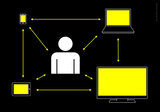
Right now, we have the traditional desktop PCs and Laptops, Tablets and Smartphones, but it’s not too early to start thinking also about smart TVs, game consoles and dashboards in cars, and why not the foldable screens of the future. As content developers, our mission is to make sure our stuff will be accessible by our audiences from any of these screens and in ways that provide a great experience on each one of these many screens.
In this post I want to share with you a great presentation I found on Slideshare, that inspired me for my workshops, and that helps me make a case for developing a multiscreen mLearning strategy vs. an iPad-only strategy.
The presentation has some of the most impressive and concise slides I’ve seen on the topic of multiscreen development, and it’s by a German company called Precious Design Studio.
The presentation is based on the simple idea that: "More and more people interact in an "ecosystem of screens".
So True!
The company goes on to say that:
During the last years, our design studio has been involved in many different projects - from designing mainly websites and desktop software in our early days, to smartphone apps, prototypes for TV interfaces and more recently, applications for tablet devices.
Working for all those devices was interesting and challenging. Not just because of the diverse screen sizes and input methods, but because we learned in our user research how different the contexts are in which these gadgets are used.
Even more interesting, however, is the question how those devices relate to each other. What does it mean for the digital products and services we are designing, when PCs, smartphones, TVs and other electronic devices are connected? What implications does it have on the interfaces, if people are interacting in an ecosystem of screens?
via Multiscreen Patterns | precious, strategic design & visual language.
Precious Design Studio’s presentation was most likely aimed at audiences of web designers, but I think it’s 100% applicable to us transitioning from eLearning to mLearning, too.
Interacting in an ecosystem of screens
For one thing, today’s connected Learners interact in an ecosystem of screens. So for us in the Learning Industry, it should not be just about designing great isolated learning experiences that may only be consumed on desktops and iPads, it’s also about developing a multiscreen strategy that will make our content accessible anywhere, especially as Learners acquire more devices and begin expecting that their ‘learning’ follows them as they shift between devices.
Three Patterns of an Ecosystem of Screens for mLearning
Precious Design Studio discovered six patterns of the ecosystem of screens, however I think three apply to us and provide a great blueprint for how we should approach our learning design.
1. Coherence in Multiscreen Learning Design
This could just be the most important patterns for us, because we need to make sure our learning experiences are not just accessible through PCs, Laptops, and multiple devices, but that we optimize our content to take advantage of each screen’s capabilities and the context in which our learners use each device. This is where I believe Responsive Web Design will play a big role moving forward.
2. Synchronization in Multiscreen Learning Design
This is another pattern to keep in mind when designing for a multiscreen world. All of us mobile users expect the products and services we use to not only follow us from device to device but to remember where we left off on one device and continue from there on the next device. The presentation mentions the Kindle ecosystem as an example (see slide 13 in the original presentation). I would also put the Netflix experience as an example in this category.
3. Device Shifting in Multiscreen Learning Design
This is another important trend for us to keep in mind as we design the next generation of learning experiences. Most of us already own one of more desktop PCs, perhaps a Laptop, at least one tablet, one smartphone if not more, and throughout the day, chances are we reach for the device that is closest to us. So let’s design with this device-shifting in mind.
Don’t get me wrong, the other patterns in the presentation are also important, and as time goes by we will surely find creative ways to design learning experiences, where devices will complement each other to provide an amazing experience, like the Scrabble app on the iPad and iPhone (see slide 19 in the original presentation), as well as perhaps use our smartphone or Tablet to take a quiz while consuming the main course on the big screen TV.
I leave you with the presentation below and if you are interesting in hearing more of my thoughts on multiscreen design, embracing simplicity and thinking mobile-first, join me and the eLearning Guild for a presentation on mLearning, October 16th HERE.
Furthermore, if you are interested in learning more about what’s convered in the 4hr mLearning workshop I’m delivering to companies, click HERE.
Patterns for Multiscreen Strategies.
RJ Jacquez
.
Blog
.
<span class='date ' tip=''><i class='icon-time'></i> Jul 14, 2015 01:58pm</span>
|
|
by Kevin Siegel
If Microsoft PowerPoint is your starting point for developing eLearning content, you can reuse that content in any of the top eLearning development tools including Adobe Presenter, Adobe Captivate, and TechSmith Camtasia Studio.
This week I'm going to show you how to use Articulate Storyline and PowerPoint to jump start the eLearning development process.
You can either create a new Storyline project using a PowerPoint presentation or import PowerPoint content into an existing Storyline project. In the image below, notice that there is an Import PowerPoint menu item on Storyline's Welcome screen.
After clicking Import PowerPoint and opening the PowerPoint presentation, the Import Slides dialog box opens. You can select all of the PowerPoint slides or pick and choose. Once you've selected the slide(s) you want, click the Import button.
The PowerPoint slides are imported into the Storyline project as Storyline slides and you'll end up in Story View.
Unlike Camtasia (where the presentation becomes one, uneditable video), or Captivate (where each slide is converted to an uneditable video), opening a Storyline slide reveals an interesting possibility: the original PowerPoint slide objects can be manipulated. For instance, in the image below, the PowerPoint text box says "To continually develop..."
Without leaving Storyline, I was able to edit the text in the image below to "To usually develop..."
The ability to edit the PowerPoint content directly in Storyline is awesome. However, there is no link between Storyline and the original PowerPoint presentation. If your subject matter expert is still making changes to the original PowerPoint presentation, you won't see those changes in Storyline (moreover, you'll have to make those changes in Storyline yourself). If the PowerPoint presentation is a moving target, you might want to wait until all of the PowerPoint edits are final prior to importing the presentation into Storyline. As I showed you last week, a Captivate project and original PowerPoint presentation can be linked. If the PowerPoint presentation is updated, you can easily get those updates to appear in Captivate. You might want to keep this fundamental difference between Captivate and Storyline in mind when choosing between the two development tools.
According to Articulate Support, here are some other limitations you should keep in mind when importing PowerPoint content:
Imported text may not look the same way it does in PowerPoint. You may find some variations in font size, line spacing, alignment, colors, or bullets.
Presentation size: If your PowerPoint presentation is a different size than your Storyline project, you may need to make adjustments to the size and placement of objects after importing them. Or, you can change your story size to match your PowerPoint presentation before importing.
Embedded fonts: Storyline doesn't support embedded fonts from PowerPoint. If a font used in the PowerPoint presentation isn't installed on your computer, Storyline will apply the default Articulate font to the imported text.
Animations and slide transitions: PowerPoint entrance and exit animations are supported in Storyline and will be imported--though some will be converted to Fade animations. Similarly, some PowerPoint slide transitions are supported in Storyline, while others get converted to Fade transitions. Emphasis animations and motion paths aren't supported and won't be imported into Storyline.
SmartArt Graphics will be imported as images.
Tables will be imported as images.
Equations will be imported as images.
Slide numbers won't be imported into Storyline.
3-D rotation: Objects with 3-D rotation will be imported as images without 3-D rotation.
GIF images: Animated GIFs will be imported as static images.
Line thicknesses: Border and line widths may appear slightly different in Storyline.
***
Looking for instructor-led training on Articulate Storyline? Check out our live, online, instructor-led Storyline classes.
Icon Logic Blogs
.
Blog
.
<span class='date ' tip=''><i class='icon-time'></i> Jul 14, 2015 01:58pm</span>
|
|
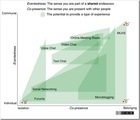
Interesting image from post by Dave White - Eventedness that relates to our social experience with different tools. It looks at how each technology relates to feeling of being present with others and whether that presence is felt beyond a specific limit of an event. Co-presence comes from being embodied as avatars this definition includes what is experienced when an individual is certain that their contribution (usually in text form) will be read and responded to by others. For example it is possible to get a strong sense of the presence of others when microblogging because the exchanges are often frequent, they often reference each other and the response time can be a matter of seconds. Messages are linked to the particular point in time and their value erodes over time. There is a relationship between the speed in which the value of nodes of communication erode within a technology and the potential for Co-presence. In addition the individuals’ level of trust that their contribution will be understood and responded to within a particular technology has a large bearing on both Co-presence and Eventedness. It is of note that there is very little latent social presence in MUVEs. When you log-off your presence all but evaporates leaving almost no trace of your identity or that fact that you were in the MUVE. He also points out something quite interesting that I had not really considered the same way is that part of the value of social networking sites and microblogging is that you feel connected to the person even though they are not real-time online at that point. In other words, the social experience extends beyond the specific event. I'm not 100% sure I fully grasp the implications and meanings of the terms he uses and their importance to the social experience. But, I think the part that really is interesting here is better captured in his post - That Was an Interesting Experience - "Teaching and learning in virtual worlds is an experience." Taking part of a teaching session in a Multiuser Virtual Environment (MUVE) is more than simply using a tool or achieving a task, it feels like an event, a particular moment in time when you have the chance to interact with others at a level of intensity which is rarely felt in other online spaces. There is definitely something different about "getting together" with other people and the social experience using these different tools. How much you feel connected to them varies greatly. Pictures and Connection I need to do a full post on this, but I receive quite a few LinkedIn Connection requests - My LinkedIn Open Connection Approach - and it's surprising how often I will get them from people who briefly met me somewhere and they don't have a picture on their profile. That's really a bad move from a social experience standpoint: I have trouble associating names with faces and you are making it really hard to remember you. It says - "I'm not serious" - and makes it less likely that I will connect with you. Most importantly, it hurts the effect that Dave White is describing - the connection. Without that picture I simply won't feel as connected to you. But it's also surprising to me that we don't use pictures elsewhere. Way back in Ten Predictions for eLearning 2008, I predicted Virtual Classroom Tools - Meeting Tool + Second Life Lite A medium size Virtual Classroom / Meeting Tool will announce features in 2008 that are not 3D immersive, but that are more like Mii characters in a 2.5D world. This will allow more natural kinds of interactions in classroom settings, especially for things like breakout activities. I got this horribly wrong in that it hasn't happened, but I still think that this will happen. As I look at Dave White's posts, I believe this is an important fundamental part of the social experience that should be happening. When I watch how my kids play with games, if there's an avatar tool, they often fail to ever play the game because they run out of time having spent so much time creating a good avatar. Yesterday, I was at a bowling alley / arcade and several of the games at an arcade had customizing my ride kids of features. Why? Because it makes us feel more connected to the experience? It goes from a game to a social experience. Why the heck doesn't each tool - WebEx, Adobe Connect, Elluminate, etc. ask for a bit more profile information in order to try to make it have a better social experience? A picture and a link to their LinkedIn profile (or other profile page)? Sure the pictures would be hard to fit in the tiny space, but I guarantee you would feel more connected. Heck - on most blogs that show who are recent visitors, they don't show a list of text names. They show a list of pictures. These tools also should have a view that gives you a 2.5D representation of what's going on. They should allow a natural placement breakout into rooms. These tools should hire some Mac designers to create something that's not 3D, but that gives a greater feeling of presence. In the meantime, I think it's likely up to us to define how we can use the existing capabilities in ways that make it a better social experience. I cannot claim to be good at this myself, but I want to thank Dave for reminding me of the importance of social experience. I'd very much welcome thoughts on this. eLearning Technology
Browse eLearning Content
Tony Karrer
.
Blog
.
<span class='date ' tip=''><i class='icon-time'></i> Jul 14, 2015 01:58pm</span>
|
|
Change is the new normal. Okay, that’s not really that profound. Change has always been normal in business, but the pace of change in almost every facet of business management continues to accelerate. There is an exception, and the exception appears to be the way most organizations approach employee learning and development. Learning and development in most organizations remains stuck in a model that is rooted in a world view that looks positively dated and out-of-touch to employees. Here are ten learning trends that we believe leaders ignore at their own peril in the coming months. YouTube comes to work. Rise of the Millennial Generation (Demographic Tsunami) The demographic shift in the workforce caused by the massive influx of Gen Y into American workplaces profoundly affects nearly everything we do. These employees bring a whole new set of expectations and attitudes to work with them and since their numbers are so large, we have no choice but to adapt, or we risk becoming irrelevant. Open and Immediate Access to the Content We Want It’s tempting to add this to the many influences of Gen Y on the workforce, but that’s not entirely fair nor would that be accurate. Everyone that uses the Internet to access content is used to immediate, on-demand access to the content of their choosing, on the device of their choosing. We all go to news sites, sports sites, Facebook, blogs, Instagram, YouTube, Twitter and a host of other outlets for content to find exactly what we want, when we want it. This is the way the Internet works today. Video (Short-Form) Most of the content we absorb on the Internet today is dominated by one format - video. YouTube gets more traffic than any website other than Google. During peak traffic hours, streaming video occupies the majority of the bandwidth is use in the US market. Short videos at YouTube frequently enjoy millions of views. Most internet users view short videos each day and multiple videos each week. Simply stated, short-form video is the content media of choice for most adults today. You have to accept the fact that mobile is here to stay. BYOD Bring Your Own Device (BYOD) is commonplace, but most organizations are slow on the realization of exactly how to take full advantage of this growing trend to drive improved business results. The facts are inescapable. Employees are bringing their smartphones and personal tablets to work, and more employees will do so in the future. http://www.zdnet.com/one-third-of-smartphone-owners-go-byod-behind-it-departments-back-7000016406/ Mobile & HTML5 In the Winter 2014 issue of Training Industry Magazine, Doug Harward identified "Key Trends in 2014," and he referred to one as "Conformance of Content to Modality." We agree, but I thought it might help to state this trend in more narrowly defined terms. Simply stated, technology has come a long way since we first heard the term "mobile learning" coined. The promise of mobile learning was more illusory than realized, but the technology on two critical fronts has advanced to the point that the realization of mobile learning is in the here and now. HTML5 allows content producers to build video files that learners can access on any device, any place at any time. Additionally, learning platforms (the best ones) are fully responsive to mobile devices and allow for complete tracking and reporting of learning of streaming video courses. Mobile learning is here. Responsive Web Design Comes to Learning We’ve seen responsive web design for a few years applied to leading edge websites, but developers in a few leading edge places (Like BizLibrary) are bringing responsive web design principles to learning platforms as the move to mobile proceeds full speed ahead. Organizations are changing the rules of the road. Budgetary Pressure The adage, "Do more with less," remains a staple in corporate board rooms and strategic planning sessions. It’s especially true when it comes to employee learning and development. We’re not seeing the deep cuts we saw a few years ago in spending on employee training, but investment levels and staffing levels remain comparatively low. This means organizations of all sizes have to find creative ways to reach employees with targeted, meaningful and effective learning solutions. This is true even though learning may never have been more important as we see organizations struggle to meet skill and knowledge gaps, innovate to stay competitive, hire and retain knowledge workers and meet the demands of a rapidly changing environment where continuous learning will be the price of admission. Upside Down Hierarchy (Everyone is Learner and Teacher) One of the effects or lasting impacts of the Great Recession is the loss of an enormous number of middle management jobs across every sector of the economy. The result is a "leveling" of organizational structures. Another massive influence driving organizations to a far more democratic approach to work and learning is social media. In social media, anyone can comment and everyone can have a voice. Employees away from work expect that sort of level playing field in their interactions with others. They routinely share and absorb content and information created by other social media participants. These same behaviors and expectations follow employees to work, and when we add the simple fact that most organizations are flatter in terms of management layers, we have a hierarchy that promotes a learning culture where everyone can both learn and teach. Collaboration Rules & The Rules of Collaboration This leads directly to the rise of collaboration as a critical competency for leaders and organizations alike. Organizations that can move information from key person to key person quickly, easily and without limitations will be better positioned for innovation and agility in a marketplace where rapid change and fluidity will be defining characteristics. Likewise, those same organizations will need to cultivate collaboration as a key competency among leaders and employees. Collaboration will rule as an operational model for successful organizations. Therefore, collaboration skills will rule as a pathway to success for leaders and teams. Competency-Based Training Still Matters In this volatile, uncertain, complex and ambiguous world, how can organizations create a sense of order and direction for employee learning and development? The on-demand, instant gratification approach to learning that IS an important trend can lead to chaos and learning without a purpose. That’s exactly why a never-ending focus on competency-based training will rise in importance for organizations that set the tone for learning best practices. Employees will direct and manage their own learning. L&D professionals will deliver less and facilitate more learning in this environment. Competencies will form the framework for employees as they search for ways to improve their skills and move their careers forward. We simply have to show them the way, make sure they have access to learning content that will improve their performance in critical competency areas, and the results will be there at the end of the day. Stay Up-to-Date on the Most Current Business Training Trends BizLibrary offers 7,000+ training videos in various business training topics, with new courses added every day. 10 Trends and Tips for Leading and Employee Learning - The Rules of the Road Are Changing In this eBook we’ll discuss the final four tips that are trending for leadership and employee learning. BizLibrary's Mobile Learning App meets the needs of today's digital learners. Employees no longer wait for training departments to push learning content to them. Employees are used to pulling information to themselves, when they need it, on their own terms and conditions, and on their own devices.
Chris Osborn
.
Blog
.
<span class='date ' tip=''><i class='icon-time'></i> Jul 14, 2015 01:58pm</span>
|
|
Let’s get one thing out of the way, the future of eLearning isn’t about adding more ‘animations‘ to our existing eLearning (in the name of making courses more engaging), neither is it about an eLearning 2.0 or 3.0 vision. No, the future of eLearning and Learning in general is Mobile Learning or better yet Multiscreen Learning, either way we can abbreviate it as mLearning.
Mobile Challenges
Every new computing paradigm has challenges and the new mobile revolution is no different. However unlike some people who think that things like the price tag of a mobile device or its battery are holding mobile learning back from full adoption, I’m convinced technology has little to do with what’s holding us back from crossing the chasm.
You see, time will take care of technology, processors in mobile devices will get faster, connections will become more ubiquitous, in fact, it’s likely most cities will have the right infrastructure to provide us with WiFi-everywhere in the near future. As for the batteries in our smartphones, they will last longer or better yet, will be replaced all together by solar power technology.
So if technology isn’t the real challenge for us in transitioning from eLearning to mLearning, then what are the real challenges?
Here are 5 things I think are more difficult to overcome than technology, on our way to the promise mLearning land:
1. Having The Right Mindset
Again, it’s not about Technology, time will take care of advancing technology forward, it always has and always will, but even if innovation in mobile suddenly halted today (not likely), we would still have a lot to work with in mLearning (i.e. with all the sensor superpowers) in order to create amazing learning experiences on mobile.
The reality is that we don’t like change and mobile is a new way of thinking. Mark Twain said it best:
"The Only person who likes change is a wet baby"
But we need to embrace change in order to make the most of this new opportunity mobile presents tu us, and reinvent our Learning Industry in the process. What we need in eLearning is not an evolution, it’s a revolution and mLearning is just the kind of paradigm shift we need to make this happen.
2. Embracing Simplicity
In my opinion, this is a big challenge for Instructional Designers everywhere. As an industry, we have been conditioned to think that the more animations we have in our courses, the more engaging they are for the learner. Tools vendors focus their entire marketing strategies (I know I was one of them) on selling "more interactive" features. Every new version comes with more interactions, more widgets, more timelines, more triggers, more ways of animating text, and more support for all those animations in PowerPoint. As users of these tools, we feel that unless we use all of these cool features in a Project (or in a single slide), we are likely behind the trend, and so we end up burying the real course objectives in a sea of animations.
However the mobile experience is about simplicity, it’s about sharing one big idea per screen and nothing more, it’s about looking at what’s really important and then getting rid of everything else, the fluff. Again, mobile learning is about thinking different, almost unlearning everything we know and starting over and reimagining the entire learning experience. I will be talking more about this next week in a webinar I’m doing with the eLearning Guild.
3. Lack of mLearning Tools
I’m not convinced that existing eLearning tools will evolve into great tools for true mLearning design.
Don’t get me wrong, I do think that existing eLearning tools do exactly what they were designed to do, namely help us rapidly develop eLearning courses for the desktop.
The problem I see, is that for a little while now, we have entered a "post-eLearning" era and new tools are needed to help us meet today’s connected and mobile learners’ expectations. I strongly believe we need new tools that are built from the ground up and that embody everything that is great about mobile, including a new mindset, new templates, simple, yet powerful and beautiful experiences and most of all, tools that can display these learning experiences in a personalized way and on every screen.
4. Thinking Desktop-First and Mobile-Second
Most people today think desktop-first and mobile-second, if at all, and that’s a big problem. One of the quickest ways to immediately improve our desktop eLearning is to start thinking mobile-first and then go back to our desktops and apply the simplicity that is derived from embracing mobile constraints that come with smaller screens. For more information, check out this post I did on the advantages of thinking mobile-first in mLearning.
5. The Tempation to simply convert desktop eLearning to HTML5
And last but not least is the temptation to hit the new HTML5 publish button in the latest versions of some tools, that allows us to take our existing desktop courses exactly as they are and make them available in HTML5 with the promise that this will check off the mLearning box. Not so fast however.
One of the biggest technical differences between eLearning and mLearning is that eLearning was created for that very tiny mouse pointer, while mLearning requires a much bigger touch target for our fingers. This minor, seemingly insignificant difference changes everything in terms of design, and it’s yet another reason why ‘one size does NOT fill all‘ in eLearning and mLearning. Take Microsoft’s design guidelines for their Windows Phone 7 platforms for example, which recommends that each touch target be at least 9mm in size and that there be at least a 2mm space between actions.
There you go, these are the top 5 challenges I believe we need to overcome as we transition from eLearning to mLearning.
Please share your challenges by leaving a comment below, and thanks in advance for sharing this article with your Twitter follower.
RJ Jacquez
.
Blog
.
<span class='date ' tip=''><i class='icon-time'></i> Jul 14, 2015 01:58pm</span>
|
|
by Jennie Ruby
Answers to the Confusing Words for 300 challenge are brought to you by Jay Herman:
What is the main principle/principal involved in this physics problem?
Do you remember the principle/principal of your elementary school?
The principle/principal mathematical principle/principal involved in calculating a tip is moving the decimal point.
How much principle/principal will we pay off in the first year of the loan?
What are the principle/principal parts of speech in Latin?
How much further/farther can we drive before needing gas?
Mars is further/farther from Earth than the moon is.
How much further/farther can we pursue this discussion before we get into a fight?
Can we farther/further our goals by raising the interest rate a little farther/further?
The lake is a little farther/further away from the road than/then the playground.
Correct respondents: Kathi Reynolds, Judy Bragg, Chris Zimmel, Lisset Vega, Aimee Bosse, Ginny Supranowitz, Mindy Clark, Beth Grace, Tanya Davis, Vera Sytch, and Martha A. Phillips.The problems the most people missed were number 6 and number 9, both involving further versus farther, and understandably so. How much further/farther can we drive can be construed as either how much more or how much longer (in time), which could justify using the word further. However, I wanted to see the answer farther, referring to the distance. In raising the interest rate further/farther, I was looking for the answer further, in the sense of more. However, a strict reading of Merriam Webster's take on these words could allow the idea of how much farther (distance upward) can we raise the interest rate.And bunches of you still missed additional problems later in the sentences! Watch out!Confusing Words for 400It's hard to get possessive pronouns versus contractions correct, not because we don't know them, but because we forget to check or we make a too-hasty decision.Here are a few that will get you if you are not careful:
it's (it is)
its (belonging to it)
you're (you are)
your (belonging to you)
who's (who is)
whose (belong to whom)
Give these a try, and watch for multiple problems in the same sentence.
Its/It's not a forgone conclusion that your/you're going to get these right.
Your/you're spelling checker may not correct these errors.
Your/you're likely to forget to save your/you're file if you leave work to / too quickly.
Whose/who's to blame if the database is not updated properly?
Whose/who's keys are these?
The program may crash if its/it's cache is not cleared.
The client whose/who's form was received yesterday told us there was an error in its/it's text.
Whose/who's on first? asked the comedian whose/who's name escapes me at the moment.
As always, feel free to post your answers below as comments.
***
If you love Jennie's articles, you'll love her classes. Check out some of Jennie's mini courses.
Icon Logic Blogs
.
Blog
.
<span class='date ' tip=''><i class='icon-time'></i> Jul 14, 2015 01:58pm</span>
|
|
Through blog comments and blog posts, an interesting conversation is emerging around - Conversations as Part of Concept Work. It somewhat started with my post Reduce Searching Start Talking where I suggest that there are points in our concept work where we need to be ready to move from search to conversation. In the comments there … Maria H tells us - I think there is time and purpose for all types of information transfer (for lack of a better phrase) and helping people learn when to use the right one is our challenge. Ken Allan really somewhat crystallizes it as a question of "Knowing WHEN to switch?" Or more broadly, when is each kind of method appropriate given a specific concept work need. In Conversation Questions, I pushed this a bit further based on Nancy Dixon - What Do We Get From Conversation That We Can't Get Any Other Way? - looking at the areas of value, but also left it with the challenging question of not only knowing when to switch, but also knowing who to ask and how to ask the right questions. In Love the Conversation - Ken Allan discusses the complexity of helping concept workers with the skills around this: The question here is where to start. It is likely too complex for a practical guiding taxonomy to be drawn up and be of any use. Drafting a program to teach adults to use the right means of knowledge transfer is probably at least as difficult as teaching children to be discerning about information accessible on the Internet. There are no hard and fast rules for this. Yet there is no doubt that discernment forms a large part of selecting efficient and effective means for knowledge transfer. While this is complex, it's very important. There are very specific limits to using codified knowledge and that Conversation Learning is essential. Unfortunately, I'm not sure that we really are doing much to address this important Knowledge Worker Skill Gap. What's nice is that Ken has helped me to get to these core questions: When Who How Part of the Who and How question, we've discussed before in the Big Question - Network Feedback - where we discussed different places to reach out for help from your networks. There was certainly no clear answer and some suggestion that we should be aggressive about reaching out to many of your networks. I've also discussed it in I've talked about it in Leveraging Networks Skill and Networks and Communities. Codified Conversations Separately, Harold Jarche provided some interesting thoughts around issues of codified knowledge, individuals and conversations. He reminded me of Dave Pollard experience with knowledge management (and it's a conversation I've had directly with Dave): So my conclusion this time around was that the centralized stuff we spent so much time and money maintaining was simply not very useful to most practitioners. The practitioners I talked to about PPI [Personal Productivity Improvement] said they would love to participate in PPI coaching, provided it was focused on the content on their own desktops and hard drives, and not the stuff in the central repositories. Dave basically went through a transition from looking at KM as big central codified knowledge bases to going out to individuals and work teams in the organization to figure out how they could be helped on a tactical level. Dave provides a very interesting picture of information flows in 2025. While his focus still seems to be more on codified knowledge, look at what his first item is: conversations. There is, of course, a really interesting question of how that conversation is captured. Dave certainly looks at that in his post - the scattered electronic conversation that occurs today. eLearning Technology
Browse eLearning Content
Tony Karrer
.
Blog
.
<span class='date ' tip=''><i class='icon-time'></i> Jul 14, 2015 01:57pm</span>
|