Blogs
|
by AJ Walther
There are many reasons you may want to globally change every instance of a font in a PowerPoint presentation. Maybe you inherited a presentation from someone else and it needs a little work. Maybe you've had a change of heart about your own design choice. Maybe a client would prefer a different font. Whatever the case, manually changing every occurrence of a font could become a time-consuming task. Luckily, PowerPoint comes with a quick and easy tool to handle the heavy lifting for you. Here's how to use the Replace Fonts tool:
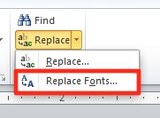
From PowerPoint's ribbon, choose Home > Editing and click the down arrow next to Replace to view more options.
From the Replace drop-down menu, choose Replace Fonts to open the Replace Font dialog box.
From the Replace drop-down menu, choose the font you'd like to find and replace.
From the With drop-down menu, choose your new font.
Click the Replace button.
Just like that, you've replaced every instance of the original font!
***
Want more creative PowerPoint ideas to take your eLearning to the next level? Attend our Optimizing PowerPoint Design for eLearning and Presentations live, online, instructor-led course.
Icon Logic Blogs
.
Blog
.
<span class='date ' tip=''><i class='icon-time'></i> Jul 14, 2015 02:18pm</span>
|
|
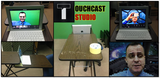
WOW! Thanks to my e-mail resource/ideas sharing buddy Paul Kurchina, I just discovered this morning a cool interactive video authoring tool called TouchCast. TOUCHCASTTouchCast claims to be a new medium that looks like video, but feels like the web. The Desktop version brings powerful features to video producers, including a robust compositing engine, multi-camera support, video import, and Hot Spot creation. TouchCast's unique authoring environment allows you to effortlessly add anything from the web, images, and other interactive features into your video in real-time. As you can do your interactive video features on-the-fly there is no, or little need for post-production editing. PRODUCTION OUTPUTI have yet to try the powerful TouchCast desktop version with multi-camera support, but I did explore the iPad version, and this is what I managed to swoosh up within minutes after playing around with it this morning (Direct link to the video).(Important Notice: My eyes were looking at the wrong corner of the iPad! Not the camera side....LOL! Blooper!)CLICK HERE to experience the interactive video on the TouchCast site (More interactive than the embedded one). Please try!FEEDBACKWhat do you think of the TouchCast iPad (studio) version output (besides my performance)?If we exclude the lack of crispiness of my cropped self in-front of the background (might be due to iPad camera quality or lighting issues?), it is the coolest interactive video authoring tool I have come across in a long time.At the moment, you can only record 5 minute videos on the iPad version (for free), and upload up to 60 minutes of your video output to TouchCast's cloud space. Also, there is no post-editing features once you have recorded your interactive video on the iPad version (probably available in the commercial version). As I am really NOT an expert in video production, and know that there are many other cool video authoring tools, please suggest other ones that can empower you with a video production studio from a mobile smart device, tablet, notebook or desktop (for free, or a small fee)...Thank you :)
Zaid Ali Alsagoff
.
Blog
.
<span class='date ' tip=''><i class='icon-time'></i> Jul 14, 2015 02:18pm</span>
|
|
Using various social signals we came up with the following as being the hot items during February 2009 via eLearning Learning. You can find a bit more on this capability in the post Hot List. Enjoy. Top Posts and other Items The ‘Least Assistance’ Principle eLearning is not the answer Multi-Generational Learning in the Workplace Here’s How I Built That PowerPoint E-Learning Template Informal learning - what is it? What Goes in the LMS? Blogging in a Walled Garden Sacred Training Cows What is Informal Learning Design elements - a graphics style manual Mathemagenic " PhD conclusions in a thousand words: blogging practices of knowledge workers Why Doing Things Half Right Gives You the Best Results Pedagogy - MoodleDocs How to Find the Right Wiki for Your Project or Organization Hot Keywords During February - Social Media Business Conversation Twitter MindTouch Scuttle CourseMill Tools Sample Pinnacle Adobe TechSmith Atlassian Apple eLearning Technology
Browse eLearning Content
Tony Karrer
.
Blog
.
<span class='date ' tip=''><i class='icon-time'></i> Jul 14, 2015 02:18pm</span>
|
|
First off, congratulations to my old team at Adobe for launching Adobe Captivate 6. It has now been 6 months since I left Adobe and this is the first version of Captivate that I get to explore from the outside.
I did not participate in the beta program, nor was I invited by my old PR team to be part of the press tour, so my very first look at the new Captivate 6 was the day it was announced, after downloaded a trial copy.
Like many of you, I too watched some of the sneak peeks the team was showing off in preparation for the launch, but other than that, I had no idea what to expect.
Well, actually I did have an idea of what to expect, or at least I thought I did, since I was part of the initial talks for what would be in the next release of the product, right before leaving the company.
The thing is, almost nothing I thought would be in the product ended up making in Adobe Captivate 6. In fact there was one killer feature related to mobile learning (mLearning) that we had talked about as a team, but its nowhere in Captivate 6.
I can’t tell you what that is because of confidentiality, but I can tell you that it would have been revolutionary and a real game-changer and without this, it’s tough for me to pick that one killer feature that I believe every product launch should come with.
After playing around with the trial, my first impressions unfortunately aren’t positive, to me the product feels half-baked, almost rushed (perhaps just in time for mLearnCon?), some of the new features feel disjointed and out of place and if you want my honest opinion, it feels like in the middle of development, the team changed directions most likely because Articulate launched Storyline. I feel like the team quickly scrambled to make sure the next version of Captivate could include some of the same features that Storyline users have come to love since the launch, for example Interactions, Themes, Actors, etc.
One thing that always frustrated me working on Captivate at Adobe was that we were always very "reactionary," for the most part features were added just to make sure we looked good when reviewers compared us to other products, it was that need for a feature in order to get that coveted check-mark when put side-by-side against one of our competitors.
This is precisely what Captivate 6 feels like to me, Storyline introduced Characters, so the Captivate team says we need Actors to compete; Storyline introduces lots of interactions, Captivate introduces Smart Learning Interactions, Storyline introduces slide templates, Captivate comes out with Themes, Camtasia has Zoom-and-Pan, no problem we will add Video slides in Captivate 6 the team likely said.
I’m a bit surprised there are no Triggers, States, Slide Layers and oh, where’s the Captivate Mobile Player iPad app?
I wish companies would be original in their development plan and stuck with it all the way and not waver just because one of their competitors comes out with something cool in the middle of their development cycle.
Haphazard Effort
In looking at most features, it seems to me that most features could have easily been extended all the way. Here are some examples.
Whether you like the new User Interface or not, on the surface we have to admit it’s much better than the old plain, color-less UI in Captivate 5 an 5.5. However the changes are only on the surface, if you dig deeper, almost every dialog box I’ve seen is still plain and color-less. Take a look for yourself at the Questions dialog box, as well as Advanced Interactions, Advanced Actions, Skin Editor and pretty much all other dialog boxes.
And then from time to time you find message boxes that someone in QA just missed it completely, such as this one (notice the out-of-place question mark on the second line).
And then there is the new Actors feature in Adobe Captivate 6. I feel this could have been so much more than just bundling multiple stock photos of the same person in different poses. For the record, I’m still not convinced the future of eLearning is crowding slides with a bunch of photographic characters of people in different poses, but for the sake of argument, Storyline beats Captivate 6 hands-down here.
In Storyline, Characters is a real feature, you pick your Character, position it where you want, adjust the timing accordingly, manipulate it via Triggers and you’re done. Then if you need to change its Expression, Pose and or Perspective, you don’t have to disrupt the timing or the triggers that affect it, and it just works. You simply double-click the Character and up come options for character, expression, pose and perspective. Not so in my experiments with Captivate, the Actor appears to be literally an image and thus if you need a different pose or expression, you must replace the image you inserted initially and potentially have to readjust the timing via the timeline. Again just a half-hearted effort here.
DOES ADOBE EVEN UNDERSTAND MOBILE?
I don’t mean Adobe as a company, clearly the Dreamweaver, Shadow, inDesign and the Edge teams do, I’m talking about how the Adobe Captivate team thinks about Mobile and Mobile Learning. In following their tweets, they claim that ‘real’ mLearning is pausing a course on the desktop and continuing from there on the iPad is where it’s. Really, isn’t that something we have been doing for years via SCORM for desktops at least?
What about creating unique mobile experiences, that are radically different from their desktop counterparts and that delight mobile users?
My initial tests of the new Publish to HTML5 were so bad that I doubt any company out there, that is serious about delivering a powerful mobile experience to their Learners would even consider this functionality a viable mLearning solution. And I’m not even referring to all the features that are unable to make it across to HTML5 (see question types no supported below). Even if every single feature in Captivate could get published to HTML5, I’d still question the idea that mobile learning is simply about converting your desktop eLearning courses to HTML5. Oh and where’s Tin Can support for tracking mLearning?
I could go on an on talking about how I feel about how convoluted and disjointed new features are in Captivate 6, such as having to go out to a separate video editor in order to apply zoom-and-pan, but I really wanted to get this out now while my first impressions are fresh.
I will continue to make short posts and/or video screencasts highlighting my feelings about all the other new features.
Conclusion
Sadly I’m very disappointed with what I’ve seen out of the new Captivate version, and I say sadly because for years this product was my baby, from my early days working at eHelp, later Macromedia and more recently Adobe as a Senior Product Evangelist for Captivate and the eLearning Suite.
It’s not even this particular version that disappoints me; it’s the overall lack of vision that Adobe has clearly shown in this release. There’s nothing in there that addresses real solutions for today’s trending topics, such as Cloud computing, Mobile Learning, Responsive Design, Adaptive publishing, Mobile Apps, etc.
Having said, I cannot recommend this version of Captivate nor would I recommend relying on Adobe as the future vendor that can deliver innovating and breakthrough eLearning and mLearning experiences for the 21st Century.
Share your thoughts and ReTweet this post if you get a chance!
Update: I also published a post on what I would have liked to have seen in Adobe Captivate 6 for true mobile learning development.
RJ Jacquez
.
Blog
.
<span class='date ' tip=''><i class='icon-time'></i> Jul 14, 2015 02:18pm</span>
|
|
Written by Jessica Batz View and download the webinar slides. View the webinar recording. Employee Training and Development: How to Measure Effectiveness and Impact - Webinar 04.30.14 from BizLibrary Employee Training and Development: How to Measure Effectiveness and Impact This eBook shows you the keys to success in today's volatile, uncertain, complex and ambiguous world. BizLibrary's Mobile Learning App meets the needs of today's digital learners. Employees no longer wait for training departments to push learning content to them. Employees are used to pulling information to themselves, when they need it, on their own terms and conditions, and on their own devices. - See more at: /technology/bizmobile.aspx#sthash.umjsk4e5.dpuf
Chris Osborn
.
Blog
.
<span class='date ' tip=''><i class='icon-time'></i> Jul 14, 2015 02:18pm</span>
|
|
by Kevin Siegel
Unless you've been deliberately avoiding them, it's a good bet you've come across images similar to the one below.
The image is known as a QR code. As you can see, QR codes are images that are made up of black and white squares. They are typically used for storing URLs or other information and can be scanned by QR Readers. In fact, if you have a smart phone, it may already have a QR Scanner. If so, scan the image above with the QR Reader and you'll be taken to the IconLogic website.
There's plenty of software you can find on the Internet that will allow you to create your own QR codes (some are free; some will cost you a few bucks). However, if you own Adobe FrameMaker 12, you have that ability to create QR Codes right now.
Open or create a FrameMaker document and click where you want the QR code.
Choose Special > Generate QR Code to open the QR Code Builder.
In the File Name field, give the QR code a name (it will be saved as a PNG image) and specify a storage location.
From the Type drop-down menu, select the type of QR Code you'd like to create (you can select from SMS, URL, Phone, Email, and Text).
In the image below, I selected URL from the Type drop-down menu and then typed the IconLogic website URL.
The final step is to set the size of the URL from the Size drop-down menu. (You can select a size from the Image Dimensions drop-down menu or type your own value into the Image Dimensions field.)
Click the Insert button to insert the QR Code into the FrameMaker document.
And that's that. If you only wanted to use the QR Code in your FrameMaker document, you're done. However, if you want to use the QR Code in a different program, or include it in a newsletter like I did above, you'll find the QR Code image file in the folder you specified when you named the image (see step 3 above).
***
Looking for instructor-led training on Adobe FrameMaker? Check out our live, online, instructor-led FrameMaker classes.
Icon Logic Blogs
.
Blog
.
<span class='date ' tip=''><i class='icon-time'></i> Jul 14, 2015 02:18pm</span>
|
|
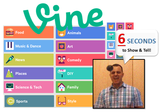
What can you learn in 6 seconds? Or what can you teach (show or tell) in 6 seconds? VINEVine (please don't confuse it with 'Wine'!) is a mobile service (owned by Twitter) that lets you capture and share short looping videos (6 seconds or less). Like Tweets, the brevity of videos on Vine inspires creativity. The Vine app is free for iPhone, Android and Windows Phone.Today, millions of people are using it around the world, and it is one of the fasting growing social media tools around.LEARNIf you thought 60-second lectures were short, what about learning nuggets that are 6 seconds or less? Can Vine be used for learning and teaching at the University level?Ponder this...SourceWOW! If humans' attention span is only 8 seconds, then 6 seconds or less could be awesome for a quick learning nugget. Even instructional designers will be impressed if you can chunk your learning nugget to 6 seconds or less. As Vine loops (rewinds and play again) the published video content, the mother of all learning techniques is automated into this learning tool...Finally, Vine is a powerful tool to capture and share learning moments on-the-fly. So, it is another perfect tool for mobile learning and sharing. SHOW & TELLBut, what can you show or tell in 6 seconds or less? The lecturer will only be able to say, "Hi, my name is Zaki. Today I am going to..." CUT!!! Vine forces you to get to the point quickly in a creative way to spark that learning moment. Though, perhaps it would have been cool to be given at least 29 seconds or less to show (tutorial), but let's be open minded and explore the learning possibilities with this 6 second video capturing constraint.Here we go: Teaching with Vine from Shelly TerrellWOW! Also, don't forget to explore the 6 Second Science Fair (Creative ways to express science in 6 seconds). IMUSo, how could we use this mobile learning tool at our University? If we are open minded and imaginative, there are actually many ways we could use this tool to inspire learning and student engagement. For example, here are three (3) ways we could use Vine for learning and teaching:Lab Exercises and ExperimentsLecturers or students use their mobile cameras to capture key moments of their lab experiments. This could be anything from the 'How to' to the 'Outcome'...Kaboong! Field TripsStudents' video capturing interesting things discovered while they are on field trips or hospital postings, which can be shared and discussed further with their community or group.Student AssignmentsStudents can be assigned to act out scenarios, professional dialogues, how to communicate with patients, role play, storytelling, etc. They could also use it to give feedback and share opinions/critiques on various topics in a course. If you need more than 6 seconds, you could always create multiple videos (or scenes). Part 1, Part 2, Part 3, etc. I am sure, you can think of many other ways to excite learning and spark student engagement using Vine. Just let your imagination go ____!Imagine: From 45 minute lectures to 6 seconds video learning nuggets. What's next?The 1-second video learning swoosh :)
Zaid Ali Alsagoff
.
Blog
.
<span class='date ' tip=''><i class='icon-time'></i> Jul 14, 2015 02:18pm</span>
|
|
Herbert Marshall McLuhan, the late, great philosper, who is known for coining powerful expressions, such as "the medium is the message," had one quote in particular that has stuck with me for a long time, namely:
"The past went that-a-way. When faced with a totally new situation, we tend always to attach ourselves to the objects, to the flavor of the most recent past. We look at the present through a rear view mirror. We march backwards into the future."
This became known as the rear-view mirror effect.
"We march backwards into the future" Wow. Very powerful stuff indeed.
I believe this helps us understand what we are seeing today in this new era of mobile computing. It’s human nature to hold on to principles we feel comfortable with, as we tackle new paradigm shifts. I’m seeing this everywhere in eLearning and mLearning, including how tool vendors scramble to figure out how to get their users from eLearning to mLearning.
And I saw this effect again yesterday as I watched Microsoft unveiled their upcoming Tablet called Surface.
I admire the fact that in designing and manufacturing a Tablet, Microsoft chose not to "copycat" the iPad and instead took a chance with a bold new approach to Tablet computing.
Having said that, I’m not sure I agree with their approach as compared to Apple with their iPad.
In fact I think Microsoft’s latest move epitomizes what Mr. McLuhan meant by the rear-view mirror effect. Microsoft is holding on to everything they know about the PC as they figure out how to compete in a mobile, Post-PC era.
While watching the Keynote video, I noticed Steven Sinofsky from Microsoft described Microsoft’s vision of the tablet as follows:
"We have a vision for reimagining the Tablet, we see a Tablet that has been designed the way Windows has been designed. We see a Tablet that represents a unique vision for the seamless expression of entertainment and creativity. A Tablet that works and play that way that you want to. A tablet that’s a great PC. A PC that’s a great Tablet."
I was right there with him until he said "A Tablet that’s a great PC. A PC that’s a great Tablet."
And then I heard another thing that made me think that Microsoft doesn’t really understand mobile. This one is from Steve Ballmer himself
"If you use your PC to design and create things, this is for you. Imagine if we built this so we could use all the apps you’re familiar with."
In seeing the demos in the video, it’s clear to me that Microsoft really looks at a Tablet as a traditional PC. The Surface even comes with a USB port, so does mean users will be able to attach a mouse? What about the beauty of touch computing? They also showed a full blown version of Word running on the Tablet. They are literally taking everything in Windows in "shrinking" it down for the 10″ tablet display.
Imagine if Adobe would have decided to port the behemoth Photoshop software to the iPad instead of developing Photoshop Touch? I think it would have a disaster. Or imagine if Avid Studios would have done the same with their desktop software instead of developing a unique Tablet experience as they did with Avid Studio, their iPad app?
I’m sure there are lots of people, who will argue that we do in fact need all the PC apps to run on a Tablet, but I disagree, I think Mobile presents new opportunities and as such we need experiences uniquely designed for mobile, without a mouse and certainly without full-blown MS Office applications.
This is how I think about eLearning vs. mLearning. We have an opportunity in the Industry to revolutionize learning with a "less is more" attitude and whatever we do, we should not simply convert our desktop eLearning to HTML5 and call it mobile learning.
How very True this is with every new era in computing "We march backwards into the future" Marshall McLuhan #mobile
— RJ Jacquez (@rjacquez) June 20, 2012
Share your thoughts and ReTweet this post if you can spare a click or a finger tap.
Read more of my thoughts on Mobile and Mobile Learning here: http://rjacquez.com/category/mobile-learning/
RJ Jacquez
.
Blog
.
<span class='date ' tip=''><i class='icon-time'></i> Jul 14, 2015 02:18pm</span>
|
|
Nancy Devine has been really helping me recently with comments on my blog on posts Topic Hubs, Good Writing, Search, Corporate Training. But it was a twitter comment (side note: Twitter Forces us to Transmit the Big Idea) that really made me pause and go - wow, I need to think about that: @tonykarrer people are hungry to connect w/others, to talk about things that matter to them, to learn. This is so very true. Look at the speakers in SharePoint Update who came and willingly pitched in and helped. And most thanked me for the opportunity to spend 3 hours plus preparation and time in discussions. Why - because it's a topic that matters to them and they could connect with others to learn. Nancy nailed it! As Learning Professionals, we should be constantly thinking about creating opportunities for people to connect and learn. When I think about the SharePoint Micro Virtual Conference, that's what it was all about. Creating connection points for myself. Inviting others to join. It was really a set of conversations that I wanted to have on my own. I just included others. And they wanted to have that same discussion. I'm hoping I can get the total effort down a bit to continue to put these things on. It was a huge help to have Kim Caise, Steve Tuffill and Scott Skibell. If we get this figured out, I think we are onto something. Give them opportunities to connect - as Nancy says - they are Hungry to Connect. eLearning Technology
Browse eLearning Content
Tony Karrer
.
Blog
.
<span class='date ' tip=''><i class='icon-time'></i> Jul 14, 2015 02:18pm</span>
|
|
Click here to view the event's Facebook PageTHE STORYOn May 28th (2014), a passionate and inspiring Brother named Murtala Kazaure (above the MMU logo) from Multimedia University (MMU) connected with me on Facebook (Thanks to Siti Hamimi Burkan). As we started sharing ideas and thoughts about learning and e-learning, he suggested that I should come to MMU to share my experiences with their students and academics. I thought about it, and then suggested that I come to MMU to give a 1-2 hour talk (about 'Becoming Creative Super Learners'), which then grew into a 3-hour workshop as we discussed. Then Murtala shared this idea to his colleagues and some MMU academics, and as a result a committee was established to manage this event. As they discussed and more minds joined to explore the idea, the idea grew bigger and bigger and today the idea has evolved into a full-day workshop and seminar with multiple speakers entitled 'Empowering Digital Learning in the 21st Century' (2nd September). Anything is possible when you have an idea and people with passion, creativity and drive to make it happen! WOW! THE EVENTHere is more about the event...(Click on the images below or Command/CTRL+ your screen to expand the view)The speakers are:The first half-day will be a workshop facilitated by me, and after lunch the other three inspiring speakers above will share their learning wisdom (Seminar style).WORKSHOP Imagine if you could read a 200-page book in 20 minutes? In today’s information overloaded disruptive world driven increasingly by innovation, we are required more than ever to transform the way we learn and think in terms of speed and creativity. In this half-day workshop, we will explore some of the things that we can do to stimulate and empower our brains and senses to be more focused, learn faster, and think more creatively. It fuses the latest in neuroscience about how the brain learns, technology, and instructional design to awaken and empower educators to design more effective and engaging learning content and environments. The most important message is that our brains can be rewired to be ‘Creative Super Learners’ at any age. LEARNING OUTCOMESAt the end of this workshop, you will be able to:Discuss how the brain learns.Use at least 2 techniques to optimize your learning mindset and senses.Use at least 3 techniques to increase your reading speed with comprehension.Use social curation tools to discover, collect, organize, and sharing learning resources. Use at least 2 techniques to improve your memory.Use at least 2 tools to empower creative and critical thinking.PARTICPANTSA digital guestbook of all the participants who also displayed a digital mindset for learning and sharing (direct link):Created with Padlet(No login required to add yourself...just double click or double tap anywhere to post anything)ACTIVITIESLinks (URLs) to all the digital learning activities during my workshop:Google Challenge - KahootSpeed Reading Test - Online version - Offline versionParticipants Speed Reading level- Poll (Anonymous)- Speed Reading Tools: AccelaReader, Spreed, Acceleread & QuickReader Twitter Hashtag- #MEDL14- TweetbeamDisney's Creative Thinking Strategy- Dreamer Wall- Realist Wall- Critic WallSLIDES Here we go: Becoming Creative Super Learners at MMU! By @zaidlearn from Zaid Alsagoff COME!If you aspire to learn HOW TO LEARN more effectively using your brain and technology, I strongly recommend that you attend this workshop and seminar at MMU. If you can't attend, why not send your son or daughter to attend (preferably above 16)?CLICK HERE to know more and register!Be prepared to juggle balls, too :)
Zaid Ali Alsagoff
.
Blog
.
<span class='date ' tip=''><i class='icon-time'></i> Jul 14, 2015 02:18pm</span>
|