Blogs
|
"A LEARNING TOOL is defined as any software or online tool or service that you use either for your own personal or professional learning, for teaching or training, or for creating e-learning solutions."- Jane Hart (Alternative Top 100 Tools for Learning by Learning Professionals only) 3 BIG QUESTIONSWhat are the BEST (e-)learning tools for learning and teaching?Who are USING them for learning and teaching?Who are the EXPERTS in using them? DREAM MISSION!Here is the MISSION VIDEO to get you started: Not only will you discover the top 100+ learning tools in this list, you will also discover who are the experts in using them. Listly is being used to empower these 3 big questions to the world of learning.Secret hint? Connect with the experts, and why not invite them to train you and your University/School/Corporation staff further (online or Face-to-face), if they are really awesome!WARNING! We provide no guarantee that those who claim to be experts are really experts. So, please check their online work (if none, forget them immediately!), and challenge any proclaimed experts with some extremely tough questions and tasks, before inviting them for anything.100+ LEARNING TOOLSPlease participate in this awesome mission by voting for your favorite learning tools and add the ones that you think are missing. While doing so, please also share which tools you are using, and whether you are an expert in using them. Top 100+ Learning Tools on Planet Earth!View more lists from Zaid Ali Alsagoff
Zaid Ali Alsagoff
.
Blog
.
<span class='date ' tip=''><i class='icon-time'></i> Jul 14, 2015 02:24pm</span>
|
|
Written by Jessica Batz View and download the webinar slides. View the webinar recording. Short Video - Big Results - Add Oomph to Employee Training - Webinar 04.16.14 from BizLibrary
Chris Osborn
.
Blog
.
<span class='date ' tip=''><i class='icon-time'></i> Jul 14, 2015 02:24pm</span>
|
|
I came across this interesting article on Forbes.com, which also includes a short video (below) of Mark Zuckerberg answering a question from the audience and basically saying that the iPad is not mobile.
The question was about whether Facebook would build an iPad app, which at the time of the question (November 2010) it didn’t exist. The author argues that Facebook’s lack of a mobile story should terrify investors, especially now that Facebook is a public company.
There are many ways of interpreting what Mark said and what he really meant by it, was he kidding about it, was it his way of dissing Apple or did he actually believe the iPad was just like a PC and not really a mobile device, and thus serving iPad Facebook users the same desktop version of Facebook.com would suffice?
In my opinion, I think Mark and many people for that matter, believe that with the beautiful Retina display of the new iPad, the size factor and the millions or pixels it now sports, they don’t really need to worry about creating content that adapts to the iPad and other Tablets.
This is where I disagree.
I strongly believe the iPad is a mobile device and all of us who publish content online should spend some time optimizing our content not only for smartphones, but also for Tablets accordingly and differently from what we offer our desktop readers. This is one of the reasons why I’m a big fan of Responsive Web Design because it allows us to create content once that intelligently adapts to various screen sizes and devices.
Please watch the video and chime in on whether you agree or not in that the iPad is mobile via the poll below:
You hear that? About an iPad, "it’s not mobile… it’s a computer." So that would suggest an iPad is merely an extension of the desktop PC website. Ok.
via Here’s the 30 Second Zuckerberg Video That Should Terrify All Facebook Investors - Forbes.
Note: There is a poll embedded within this post, please visit the site to participate in this post's poll.
RJ Jacquez
.
Blog
.
<span class='date ' tip=''><i class='icon-time'></i> Jul 14, 2015 02:24pm</span>
|
|
I need some help with appropriate way to handle a somewhat common situation. Let me set this up a bit … I've said many times in presentations and on this blog that I really like to get questions. To me, that's the fun part. It's so much fun that I spend time on posts like Social Grid Follow-up just going through and answering the questions that came up during the presentation. I also have an open invite to engage me around Conversation Topics. Both of these helps me learn, understand what is interesting to others, and where people find challenges. Linked In Question Template One of the things that I mentioned in the Social Grid Follow-up post was a particular template for asking for help via LinkedIn: Hi <X>, I'm hoping you'll be open to a brief conversation. From your profile you have a great background and it seems like you'll have lots of thoughts around my issues. I'm working on XXX. I've spent a fair bit of time researching and have been finding YYY. I'd like to set a time to discuss this with you and get your thoughts. The Questionable Question Possibly because I had just written this, when I received the following inquiry: I was wondering if you could provide me with your definition of a "Rapid Elearning Tool". I cant find an industry definition for this only examples of tools. There was a bit more around the context for this question (why they were interested). I sent the following response: You will find varying definitions, a couple of posts: http://elearningtech.blogspot.com/2006/06/what-is-rapid-elearning_13.html http://elearningtech.blogspot.com/2006/09/rapid-elearning-more-definition.html You can also take a look through: http://www.elearninglearning.com/rapid-elearning/&query=definition&showMore=true&sort=relevance It's pretty rare I won't respond, but I think there's something important in the template above - show that you've done your basic homework and turn your question into something more interesting. Question Homework Before you ask me (or anyone) a question you should: 1. Search My Blog Clearly this person had not searched my blog for definition rapid eLearning. There are a couple of ways they could do this: 1a. Use site: on Google http://www.google.com/search?hl=en&q=site%3Aelearningtech.blogspot.com+rapid+elearning+definition 1b. Use eLearning Learning to search my blog http://www.elearninglearning.com/?query=rapid+elearning+definition&source=elearning-technology The exact posts that I cite come up pretty easily. FYI - there's a search box under the eLearning Learning logo that goes directly to search results on the eLearning Learning site which is much better than blogger's search. 2. Search Other Blogs and Web Pages In this case, it's pretty easy to see what other people are saying via eLearning Learning: http://www.elearninglearning.com/?query=rapid+elearning+definition http://www.elearninglearning.com/rapid-elearning/&query=definition You can also use plain old Google Search: http://www.google.com/search?q="rapid+elearning"+definition When you ask me a question, it's good to cite what I've already said, but it's MUCH BETTER to also mention some other sites and what they have to say on the matter. 3. Keep a List of What You've Found 4. Read through What You Find 5. Compose What You Find Into a Preliminary Answer 6. Figure Out What the Real Question Is 7. Ask the Real Question Good Question Basis If you go back to the template above, it's quite intentional that I'm saying: I've spent a fair bit of time researching and have been finding YYY. This is where I include what I've found so far and what it's been telling me. If I was going to ask someone about the definition of Rapid eLearning I would certainly cite some definitions out there. In fairness, they said that the definitions they found were lists of tools. But they didn't put in links to those posts and they clearly had not searched my blog and read through my existing posts. My Question to You Now here's my question - If I receive a question from a person that has clearly not done these steps, is it appropriate for me to simply send them a link to this post? Others must run into this right? What do you do? Are these appropriate steps to gently providing guidance on how to ask better questions without offending and discouraging further questions? eLearning Technology
Browse eLearning Content
Tony Karrer
.
Blog
.
<span class='date ' tip=''><i class='icon-time'></i> Jul 14, 2015 02:23pm</span>
|
|
by Willam Van Weelden
In previous articles you've learned about RoboHelp's User Defined Variables (how to create them, group them, and use them in topic titles).
As a brief review, variables can contain information that occurs frequently in your project, such as a product name, company name, or copyright notice. After creating the variable, you can insert it into any RoboHelp topic or onto a template by simply dragging and dropping. Now here's the cool part. Assume your company name now appears throughout your project and now you want to change it. Without the variable, you would have to search your entire project and update the company name. Thanks to variables, all you will need to do is update the definition of the CompanyName variable, and you will change the displayed company name project-wide in just a few seconds.
One issue you'll come across when inserting variables within a topic is that, by default, the variable text looks like regular topic text. In the picture below, I challenge you to locate the variable.
Did you find the variable text? I'm betting that the answer is no. So what's the big deal? This can be particularly frustrating if you need to replace regular text with a variable. For example, you can highlight regular text in a topic and convert it to a variable by dragging the variable on top of the text. That's an awesome feature. Before I begin however, I need to be able to tell, at a glance, if the text I'm looking to replace is already a variable. As it stands, I have no idea since I cannot tell the difference between a variable and regular text.
Luckily, RoboHelp has a handy feature that allows you to distinguish between variables and regular text in topics. To enable this feature, simply choose View > Show > Fields.
Voila. All variables in topics are now shown as green text. Best of all, variables only show up green in your project... when you generate a layout, the green color will not be visible to your users.
***
Looking for instructor-led training on RoboHelp? We offer live, online training once each month. We can also bring the same great training onsite to your facility. Interested? Contact us for details.
Icon Logic Blogs
.
Blog
.
<span class='date ' tip=''><i class='icon-time'></i> Jul 14, 2015 02:23pm</span>
|
|
CLICK HERE to view the recording. *The audio is a bit loud and noisy (Zaid only!), so you are strongly recommended to lower the volume to enjoy the session more. Insya-Allah, next time it won't happen. Still learning :) ONLINE TALKLooking forward to team up with 'Dr. Nellie Deutsch' again (first round!) to explore the DNA (or ingredients) of a 21st Century Educator during the Moodle MOOC 4 (MM4) course. The explored ingredients are NOT based on scientific findings, but it is based on my decade+ long experience with learning (using technology) in higher education and interacting with many of the top learning professionals around the world, including the 'Top 50 e-Learning Super Heroes' of 2013. DESCRIPTIONDuring your lifetime you have probably experienced inspirational educators, or witnessed inspiring lectures. But, what about you? Are you such an educator? If not, why not? In this online talk, we will explore some of the ingredients top educators in the 21st century have, and how we can learn from them to reinvent ourselves to reach our true potential as an educator. Are you up for the challenge?SLIDESHere we go: DNA of a 21st Century Educator at #MoodleMOOC 4 (MM4)! from Zaid AlsagoffAUDIOClick Here to download the audio narration (only) of the webinar (Source).YOUTUBE VERSIONDr. Nellie Deutsch THANKS for recording and uploading the YouTube version (Using Camtasia). FEEDBACK"Engaging and not a dull moment in his talk. Learned a lot. Interactive session. Now this is a 21st Century Lesson!" - Norhayati Maskat"Great class! Very funny presenter! And I loved the slides and all the e-learning resources shown in class. Certainly I'm going to check all that out and use with my students :D" - Robson Leite Dos Santos"I have enjoyed this presentation even at 4.00am" - Brian Boneham"Zaid Ali Alsagoff is an amazing speaker, educator, and learner. Thank you." - Dr. Nellie DeutschMore...INTRODUCE YOURSELFIf you are attending the webinar (or have watched it), please share something about yourself in this Padlet wall:Created with Padlet
Zaid Ali Alsagoff
.
Blog
.
<span class='date ' tip=''><i class='icon-time'></i> Jul 14, 2015 02:23pm</span>
|
|
Written by Chris Osborn Today's Q&A Thursday discusses how to get owners involved in the performance review process. Stay Up-to-Date on the Most Current Business Training Trends BizLibrary offers 6,000+ training videos in various business training topics, with new courses added every day. 7 HR Law Training Topics for New Managers (and Experienced Ones Too!) This complimentary eBook discusses 7 key employment laws that all managers should know in order to prevent inviting legal liability. BizLibrary's Mobile Learning App meets the needs of today's digital learners. Employees no longer wait for training departments to push learning content to them. Employees are used to pulling information to themselves, when they need it, on their own terms and conditions, and on their own devices. - See more at: /technology/bizmobile.aspx#sthash.umjsk4e5.dpuf Video Transcription Hi, Chris Osborn, VP of Marketing with BizLibrary with today's Q&A. It comes from Tori, she's an HR Manager at a Professional Services firm, a small company, and she has an interesting question. How do you get the owners to participate in performance reviews? They haven't had performance reviews in 3 years in this organization. Well, obviously, performance reviews aren't that important to ownership. So, there's a couple things that you need to do. First, you have to convince ownership and senior management in any organization, for that matter, that the effective management of performance is important to the business. If you can make that business case, you've taken an important step in the right direction. The second thing is to get your hands wrapped around I think an interesting, but very important concept that a lot of HR managers, especially traditional managers have a hard time grasping- and that is to forget about the annual performance review. There's a lot of good data out there and research that tells us that the annual performance review is actually counter productive. It does more harm than good. It rarely does the things that we want to have happen with the management of employee performance, that is to motivate people, to actually improve performance. It's demotivating, it decreases performance, it does all kinds of bad things for organizations. What we need to do instead is shift our focus into a daily routine where what we're doing is providing people regular, ongoing encouragement and feedback. That's how we manage performance effectively. It's not an annual meeting, it's a daily meeting. It's a conversation all the time about how employees are doing. If you'll give up the notion that an annual performance review is important, convince the ownership or leadership that effective management of performance is important and can lead to positive business results, and then adopt best practices that we know work- daily feedback, clear goals, manage those goals, and teach your managers to do that, you're going to be in a lot better place and you don't have to worry about those performance reviews that haven't happened.
Chris Osborn
.
Blog
.
<span class='date ' tip=''><i class='icon-time'></i> Jul 14, 2015 02:23pm</span>
|
|
I’m not a coder, nor am I much of a gamer but I would imagine that with all the interactivity that games include, it must be fairly complicated to develop one.
Perhaps this is why game developers have thus far gravitated toward developing games as native apps. Perhaps HTML5 technologies weren’t ready for primetime.
Maybe this is about to change. Yesterday, appMobi showed off Boom Town, a game built entirely in HTML5. I love this quote from a story on ReadWriteWeb and it got me thinking about the future of mobile learning, which I see happening on the mobile web vs having to develop native apps for all the platforms available:
Have you ever downloaded a game on an iPad and wished you could save your progress and then pick it up on an Android smartphone? Maybe later you wanted to continue in the browser on Facebook. Native apps do not behave that way on iOS and Android. An iPhone game is limited to iPhones and iPads; an Android game is limited to Android devices. Part of this is by design. Apple and Google want to keep you within their own environments.
Check out this amazing video:
via Finally, a Cross-Platform HTML5 Game.
Surely if these guys have built this awesome game entirely in HTML5, this bodes well for us in mobile learning, who need to develop once and make our learning accessible to anyone on any device. Thoughts?
Note: There is a poll embedded within this post, please visit the site to participate in this post's poll.
RJ Jacquez
.
Blog
.
<span class='date ' tip=''><i class='icon-time'></i> Jul 14, 2015 02:22pm</span>
|
|
by Kevin Siegel
Over the past few weeks I've been writing about the hot new features you'll find in Adobe Captivate 8 such as the new, easier to use, interface and responsive projects. Those two features are arguably the top changes you'll see if you're upgrading from Captivate 5, 5.5, 6, or 7 to Captivate 8.
As I've become more and more comfortable using Adobe Captivate 8, it's the seemingly minor improvements to the program that have me the most excited. Take Image Buttons for example. You've always been able to insert image buttons in Captivate. For the past several years, the most common way to insert a button was to choose Insert > Standard Objects > Button. Alternatively, you could use a tool on the little-used Object Toolbar to insert a button. Finally, if you're a keyboard junkie, you could press [control] [shift] [b] on your keyboard to get the job done.
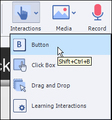
Captivate 8 offers a streamlined path to inserting a button. First of all, the ill-fated Object toolbar is gone. Since I never used it, I, for one, am not going to miss it. However, the Insert menu no longer includes a Standard Objects menu item. Say what? So if the Object toolbar is gone and there's no menu item for adding a button, does that mean the only way to insert a button onto a slide is to press [control] [shift] [b]? While you can still use the keyboard shortcut to insert a button, check out the top of the Captivate window. You'll see a new toolbar that essentially combines the old Main toolbar and the old Object toolbar into one, streamlined toolbar.
To add a button, find the Interactions drop-down menu on the new toolbar and choose Button.
A button will be added to the middle of the selected slide, just like previous versions of Captivate. Of course, I've never been fond of the standard text buttons available in Captivate. Instead, I either use Smart Shapes as buttons, or I use Image buttons. Over the years, my main complaint about Captivate's image buttons was that the buttons that shipped with Captivate were, to put it kindly, terribly boring.
I was pleasantly surprised to find that the buttons available in Captivate 8 are much, much better. Here's how you access the new image buttons and, along the way, set Image Buttons as the default when inserting buttons on a slide.
First, choose Edit > Object Style Manager. At the left side of the dialog box, select Button from the list of Standard Objects.
From the middle of the Object Style Manager dialog box, select Default Image Button Style.
From the top right of the dialog box, select Set as Default.
The next time you insert a button onto a slide, the button will use the Default Image Button Style. Next you'll specify which image will be used by the inserted image Button.
From the Button area, scroll down and review the images available for the Image Button. As I mentioned above, the list of available buttons in older versions of Captivate was very short, and very uninspiring. I'm sure that the enhanced images available in Captivate 8 won't make a graphic designer jump up and down with excitement. However, I'm neither a graphic designer nor an illustrator. I have to admit that I was excited to see the new images. In fact, I was so excited, one of my feet actually spasmed when I saw the improvements. (It was just one foot mind you, not both... let's not go crazy here.)
After selecting the image you like from the list of images, the final step is to simply click the OK button. The next time you insert a button via the Interactions drop-down menu, the button will be an Image Button, not a Text Button, and will be the button image you specified.
***
Looking for instructor-led training on the top eLearning tools? We offer live, online training on Adobe Captivate, Articulate Storyline, Adobe Presenter, and TechSmith Camtasia Studio.We can also bring the same great training onsite to your facility. Interested? Contact us for details.
Icon Logic Blogs
.
Blog
.
<span class='date ' tip=''><i class='icon-time'></i> Jul 14, 2015 02:22pm</span>
|
|
One of the common themes on my blog is the world we live in with availability of trillions of web pages, millions of people, and thousands of tools, has meant a significant and continuous change in our work literacy. It also has an impact on Learning Design and Learning Organizations … more on this below. Read the Whole Thing? A little bit ago I was skimming through a presentation that asked the audience whether people read the whole thing. (Sorry, but I've forgotten where I saw this and my Better Memory strategies didn't easily find the right source. Note to self, figure out how this could have worked.) Many of us are familiar with the Horizon Report for 2009, The World Is Flat, and Stephen Downes - The Future of Online Learning: Ten Years On. And if you aren't, you should be familiar with these. But, how many of you who are familiar with these have read the whole thing? In the audience, very few people read the whole thing. I have not, but I've done a lot of Skim Dive Skim on these. I've had this discussion before in other forms, and certainly there are a mix - some people who are much deeper readers - some skimmers. And likely the answer is that it also depends on the topic, length of the item, the timing, and way too many other variables. So, let's just say that we need to assume varied depth of content consumption. This also means that a key skill is develop better memory methods that help us individually deal with the fact that we are skimming more stuff and will have an ever increasing need to quickly get back to it. Implications for Learning Design If we know that people are likely to consume information in this way, what does it mean for Learning Design. I've often focused more on issues of Good Writing and Write for Skimming but the reality is that the implication is bigger than that. No one will sit through long detailed pieces of information. They quickly tune out or quickly skim through. Learning Design must accommodate this and I particularly believe that we should Shift from Courseware towards Reference Hybrids - put as little as possible in the courseware and provide well-organized, well-written, easily saved, easily accessed reference material. Of course, this is assuming that Learning Organizations are still in the position of being a publisher who is pushing content to learners. When we talk about the Long Tail Learning and Corporate Learning Long Tail and Attention Crisis, the focus is on how to help learners when you cannot possibly get in front of all the information. Part of this is helping them to learn skills and adopt practices to make them more effective in self-serving their knowledge work and learning. However, this is also where Learning Organizations can jump in to help by playing an aggregator role. There's a lot of content that is likely being skimmed or even possibly is not being seen. There's opportunity to make it more easily found and skimmable. This is a topic I'm pretty sure I'll be revisiting quite a bit. After all, this is pretty much the question I'm often asking: What does Learning Design look like in a world of eLearning 2.0? eLearning Technology
Browse eLearning Content
Tony Karrer
.
Blog
.
<span class='date ' tip=''><i class='icon-time'></i> Jul 14, 2015 02:22pm</span>
|