Blogs
|
En primer lugar, permítanme felicitar a quienes trabajaron en el desarrollo y lanzamiento de Articulate Storyline. Embarcarse en el proyecto tan ambicioso de desarrollar una aplicación como Storyline, desde cero, no es una tarea sencilla. Sin embargo, si existe una compañía que puede lograr eso, definitivamente es Articulate.
Siempre he admirado a Articulate, incluso cuando trabajaba para Adobe como evangelista de productos como Captivate y también, eLearning Suite.
Un día después de dejar Adobe, tuve mi primera reunión con Arlyn Asch, director de tecnologías de la información de Articulate, quien dedicó parte de su tiempo para mostrarme Storyline. Después de una hora de hablar con Arlyn y ver en lo que estaba trabajando, estaba completamente seguro que Storyline era un producto excepcionalmente innovador. Desde entonces, he tenido la oportunidad de conversar con muchas personas increíbles que también trabajan en Articulate, incluyendo a Adam Schwartz, fundador y director ejecutivo, y cada vez que lo hago, me doy cuenta que cada uno de ellos ama su trabajo y todos comparten el mismo interés: crear productos que llenen de satisfacción a sus clientes. No es de extrañar que tengan miles de súper fanáticos, que aman sus productos y los recomiendan a sus colegas a través de las redes sociales.
Antes de compartir mis impresiones acerca de por qué el nuevo producto de Articulate, Storyline, cambiará radicalmente las cosas para quienes nos dedicamos al aprendizaje electrónico, además de contribuir también con el desarrollo del aprendizaje móvil, quisiera aclarar que las razones que mencionaré a continuación se basan en la experiencia que adquirí trabajando con Adobe Captivate por más de 13 años, abarcando desde sus comienzos en eHelp (cuando lo llamábamos RoboDemo), hasta cuando se transformó en un producto de Macromedia y finalmente, en el producto que promocioné durante los últimos seis años.
Las siguientes son las características de Storyline que me han impresionado. Algunas son funcionalidades técnicas pero también he considerado aspectos intangibles, tales como la comunidad de Articulate. Puesto que es un factor importantísimo, la comunidad de Articulate encabeza mi lista.
1. La comunidad de Articulate. No sé si Articulate incluirá su comunidad como una característica a destacar en la caja del producto, pero realmente creo deberían hacerlo. Este es uno de esos aspectos intangibles que considero merecen más crédito y por esta razón, comienzo mi lista elogiando a esta comunidad maravillosa en la que personas como Tom Kuhlmann, David Anderson y Jeanette Brooks, entre muchos otros, han trabajado apasionadamente durante tanto tiempo. En uno de mis artículos titulado "5 Razones por las que deberías ser parte de la comunidad de Articulate si estás en eLearning", escribí que al evaluar las aplicaciones de Articulate, tenía que admitir que la comunidad era su característica más importante porque no tenía oponente en la industria del aprendizaje electrónico. En ese artículo, también dije que para mi, una de las cosas más frustrantes de trabajar en Adobe en el equipo de Captivate, era el apoyo técnico y la atención que Adobe le proporcionaba a nuestros clientes, porque no coincidía con nuestros esfuerzos y logros como evangelistas. Cuando forman parte de la comunidad de Articulate, les puedo asegurar que no encuentran tales desventajas y eso ya es suficiente para recomendar Articulate Storyline en lugar de Adobe Captivate. Pero, por supuesto, aún hay más.
2. Interfaz y experiencia del usuario. Si hay algo que hemos aprendido de la revolución de las aplicaciones móviles es que la experiencia del usuario es crítica en esta era, las aplicaciones tienen que deleitar a los clientes y en definitiva, la interfaz del usuario es la misma aplicación. Siempre mido el éxito de una aplicación de acuerdo con su capacidad de atraerme una y otra vez en lugar de usarla solo una vez y almacenarla en mi biblioteca virtual. En mi opinión, Articulate ha desarrollado un programa que no solo es estéticamente atractivo sino que también muy intuitivo y fácil de usar. Recuerdo la primera vez que instalé Articulate Engage, pensé así es como debe diseñarse un programa, con una interfaz atractiva. Fue una experiencia semejante a utilizar una aplicación con un gran diseño en mi iPad. Articulate Engage hacía que no quisiera dejar de utilizarlo y justamente, de esa manera me siento con el nuevo Storyline.
3. Completamente fácil de usar. Si hay alguna cosa que Articulate sabe hacer bien es ayudar a sus clientes a diseñar aprendizaje electrónico y esto también se evidencia en la manera que diseñaron Storyline. Storyline es una aplicación independiente que no ha sido desarrollada como un complemento de Microsoft PowerPoint, sin embargo si saben cómo usar PowerPoint, solo eso basta para sentirse cómodos usando Storyline. Una de las cosas que solía escuchar con mayor frecuencia por parte de los nuevos usuarios de Captivate tenía que ver con lo difícil que es comenzar a usar este programa y muchas veces, escuché que al comenzar el primer proyecto encontrarse con una diapositiva totalmente en blanco es intimidante. Articulate se ha asegurado que esto no suceda con Storyline. Por ejemplo, aún cuando recién se estén iniciando en el desarrollo de aprendizaje electrónico, cada vez que agreguen una nueva diapositiva a su proyecto, encontrarán plantillas listas para usar tales como escenarios sumamente interactivos que pueden adaptar fácilmente como se muestra a continuación. Y eso es solo el comienzo, puesto que en la caja de diálogo que aparece, también pueden encontrar un enlace directo a la comunidad de Articulate donde podrán bajar más plantillas de manera gratuita. Esta es una gran ayuda no solo para nuevos usuarios sino también para usuarios experimentados.
4. Un único lugar para los recursos de eLearning. Uno de los desafíos de desarrollar aprendizaje electrónico es reunir todas las imágenes correctas para construir escenarios que simulen situaciones de la vida real. Generalmente, tenemos que recurrir a varios sitios para obtener la imágenes correctas para cada proyecto, lo cual puede ser realmente costoso y demandar muchísimo tiempo. Articulate conoce esta realidad y a mi me gusta la manera en que resolvieron este problema con Storyline. Storyline no solo incluye personajes ilustrados y fotográficos listos para usar (además, se podrán adquirir otros paquetes) sino que también incluye variaciones para cada uno de estos personajes: diferentes poses tales como pensar, esperar, sorprendido, emocionado, etc. Por ende, es fácil encontrar la imagen perfecta para cada proyecto y esta es otra razón para recomendar Storyline.
5. Interacciones sin escribir una sola línea de código. Uno de los secretos para hacer aprendizaje electrónico efectivo es incluir la cantidad justa de interacciones para mantener al estudiante motivado y Storyline hace que construir interacciones, incluso la más compleja, sea increíblemente fácil. Cuando Captivate presentó las Acciones Avanzadas, no fue algo que me entusiasmara demasiado porque, en mi opinión, no muchos profesionales del aprendizaje electrónico quieren invertir tiempo en aprender a programar para construir interacciones poderosas. En lugar de eso, hubiese preferido tomar el camino que Articulate eligió, y hacer que incluir interactividad fuera algo fácil sin necesidad de saber programar. Storyline presenta los conceptos de Activadores, Capas de Diapositivas, Estados y Variables para construir incluso las interacciones más complejas. Otra razón por la que recomiendo Storyline.
6. Lo último en grabación de pantalla. Esta es una de mis características favoritas en Storyline. Con Storyline se pueden crear simulaciones de programas de una manera totalmente diferente que con Captivate. Por un lado, encontramos la funcionalidad de acercar y enfocar, muy similar a Camtasia y algo que los usuarios de Captivate han pedido por mucho tiempo. Por otro lado, a diferencia de Captivate donde tienes que seleccionar si quieres una demostración, una evaluación, una capacitación o una secuencia completa de una sesión de grabación de pantalla y luego, terminas con múltiples proyectos, Storyline lo hace con un enfoque totalmente diferente. En Storyline, cuando grabas tu pantalla obtienes un video de alta resolución que puedes usar para mostrar a los estudiantes un proceso en particular junto con las funcionalidades de acercar y enfocar. Sin embargo, también puedes incluir en ese mismo video una versión que muestre un proceso paso a paso así como también versiones de simulación y evaluación, todo a partir del mismo proyecto y la misma sesión de grabación de pantalla. Pero eso no es todo, Storyline también tiene una funcionalidad llamada "ajuste de acción", la cual permite regresar y hacer distintos ajustes a las simulaciones de programas. En los próximos días, compartiré un video enseñando estas funcionalidades.
7. HTML5, Flash y aprendizaje móvil. Por último, si bien no menos importantes, encontramos lo que Articulate presenta con Storyline y que tiene que ver con algo que realmente me apasiona: HTML5 y el aprendizaje móvil. Verdaderamente, me gusta lo que Articulate ha hecho con respecto a la posibilidad de publicar en HTML5, lo cual permite a los estudiantes usar sus iPad para completar los cursos creados con Storyline. Hace un tiempo que he estado probando la nueva aplicación de Articulate para el iPad y me alegra decir que tomar un curso en mi iPad es una experiencia agradable. Me gustaría también ver cómo Articulate se expande más allá del iPad a otros dispositivos en el futuro.
Conclusión
Son muchas las características que se destacan en el nuevo Storyline y esta lista podría continuar pero creo que todas estas razones son lo suficientemente convincentes para que nuevos usuarios adopten Storyline así como también para que usuarios de Articulate Studio quieran agregar Storyline a su conjunto de herramientas. Además, puedo predecir que muchos usuarios de Captivate querrán probar lo que pueden hacer con Storyline.
Traducción y Edición del Español: @MayraAixaVillar
RJ Jacquez
.
Blog
.
<span class='date ' tip=''><i class='icon-time'></i> Jul 14, 2015 02:19pm</span>
|
|
I recently read a very interesting post by Terry Anderson, Edublogers as a Network of Practice. Network of Practice - a distributed aggregation of members who share some common interests and values, but their correspondence and especially face to face meetings occur much less often or not at all. Leadership and activities in a NoP are emergent and usually informal. NoP members interact sporadically and develop their network in an informal and spontaneous manner that is occasioned through blogs, social software based communities, perhaps a face-to-face or online conference, newsgroup, mailing list or other shared social networking interactions. Membership in a NoP is voluntary, usually open, often transitory and likely many of the NOP members are strangers to each other. There are some good discussion in the comments about whether or not you would consider Edubloggers to be a Network of Practice (NoP). I must say that I don't know enough to really comment on whether it is or isn't. The realization I had as I read it is how complex networks become. They are incredibly rich and often there is no clear boundary. Is someone or something like a blog part of the network - often it's not at all clear. This is both a good thing and a challenge for Topic Hubs. I think it's good because for many people, they cannot easily understand this complex network. As I say in that post - It's hard to understand a single blog. It's even harder when you try to understand a network of bloggers. The discussion that goes on in Terry's post really points out how it's so hard to that you can't look at an individual blogger and neatly put them into a network and especially not a Network of Practice. Scott Leslie says - there is no singular "network of edubloggers," indeed what I find constantly amazing is when I come across another self-styled edublogger with whom I share absolutely NO points of connection. Of course, that's the claim of Terry in his response to Scott Leslie - edubloggers do have ONE thing in common - they all are interested in education - else they wouldn’t describe themselves as EduBloggers. Now it could be that their conception of education and likely the larger ideas of learning are very different from yours, but I still argue they do NOT "share absolutely NO points of connection" with yourself. My personal experience is really someone who tries to define Topic Hubs. Topic Hubs are based on networks and require a defined topic with a particular lexicon or way to make sense of what's being discussed. There's a real challenge to find the edges and define who should be consider inside or outside the network. The reality is that the complexity of networks don't really work that way. When I looked at creating a Topic Hub around edubloggers, I gave up because the network and topics are so big, diverse and messy. There likely are many good Topic Hubs within the space, but most edublogs blog about all sorts of topics. If you try to define a more narrow topic, it doesn't seem to work. eLearning Technology
Browse eLearning Content
Tony Karrer
.
Blog
.
<span class='date ' tip=''><i class='icon-time'></i> Jul 14, 2015 02:19pm</span>
|
|
by AJ Walther
Here's a quick tip you may not already know that could save you some serious time with unit conversion. By default, PowerPoint measures in inches. But, if you're using PowerPoint as a design tool you might wish to work in pixels or centimeters. It isn't rocket science to Google your way to proper unit conversion, but there's an easier and faster way right there in PowerPoint.
For example, let's resize a shape using pixel dimensions. We want our final shape size to be 600 pixels high and 800 pixels wide.
In PowerPoint, insert a rectangle (Insert > Illustrations > Shapes > Rectangle).
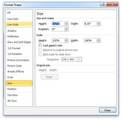
Right-click the rectangle and choose Size and Position. (The Format Shape dialog box will open with the Size category selected. Notice the Height and Width fields are pre-populated with the current size of the shape inches.)
Ensure Lock aspect ratio is deselected.
Highlight the measurement in the Height field and type 600px followed by the [tab] key. (The Height will automatically be converted to 6.25 inches.)
Highlight the measurement in Width field and type 800px followed by the [tab] key. (The Width will automatically be converted to 8.33 inches.)
The same method can be used for centimeters. In the Height and Width fields, type your desired size followed by cm and press the [tab] key. Presto! Automatic conversion to inches!
Icon Logic Blogs
.
Blog
.
<span class='date ' tip=''><i class='icon-time'></i> Jul 14, 2015 02:19pm</span>
|
|
Looking forward to co-facilitate with Fareeza Marican (Senior Learning Designer at IMU) a workshop on 2 July (2014), focusing on designing engaging presentations based on Gagne's nine events of instruction. It has been some time, since I facilitated a workshop that focuses on Instructional Design (ID), so it will be fun to rediscover my e-learning roots (started of as an Instructional Designer in 2001).Sadly, Fareeza Marican will be leaving IMU soon to explore a new world (not to be revealed...I seriously don't know either!), but Insya-Allah with her exceptional instructional and creative design abilities, she will do well wherever her destiny takes her. Wishing Fareeza the best of the best of the best in her future learning adventures!WORKSHOPIn this 2-hour workshop at the International Medical University (IMU), you will learn how to design engaging presentations for e-learning and flipped classroom sessions based on good instructional design practices. In the process, you will explore PowerPoint, Gagne’s 9 Events of instruction and other tools to engage students to learn. SLIDESThe presentation slides were co-created by Zaid Alsagoff and Fareeza Marican. However, having our own preferences and flavors, we decided in the end to go both our own ways and have published our own delicious versions on SlideShare, which you all are free to enjoy.Zaid's version: Designing Engaging Presentations from Zaid Alsagoff Fareeza's version: Designing Engaging Presentation for eLearning from Fareeza Marican Both have value added enriched and contextualized learning juice not mentioned in the other, so you are strongly recommended to explore both. Lucky you! I am again learning and rediscovering ID! In a way, I feel like a new born baby that needs to unlearn old habits, and rediscover new ones to keep up with new ID world :)
Zaid Ali Alsagoff
.
Blog
.
<span class='date ' tip=''><i class='icon-time'></i> Jul 14, 2015 02:19pm</span>
|
|
Written by Jessica Batz View and download the webinar slides. View the webinar recording. Sink or Swim? Supporting the Transition to New Manager - Webinar 04.24.14 from BizLibrary
Chris Osborn
.
Blog
.
<span class='date ' tip=''><i class='icon-time'></i> Jul 14, 2015 02:19pm</span>
|
|
I think it’s fascinating that Apple is bringing Mobile features such as notification and Dictation to the Mac. #MobileFirst
— RJ Jacquez (@rjacquez) June 11, 2012
Like millions of people around the world, I too was glued to my computer on June 11 2012, following closely every news announcement Apple shared at their annual WWDC event.
As always they unveiled a number of new and amazing things, like the new MacBook Pro, which now sports a Retina Display, similar to the new iPad. The next version of Apple’s iOS was also shown and it comes with some nice features, including Passbook and Maps, just to name a few.
All that is well and good, however what really caught my eye is what Apple is adding to their new version of the Mac OS X, Mountain Lion, which according to Apple’s site will be available next month.
I have been observing that Apple has slowly been borrowing features from the iPhone and iPad (i.e. iOS) and bringing them into their Mac operating system. It started with Lion last year when they included multi-touch gestures via their magic trackpad and this trend continues with Mountain Lion’s mobile-first features, such as the upcoming Notification Center, Dictation, AirPlay, and Game Center.
My key takeaway from this is that Apple is taking everything they have learned from creating a great mobile experience on the iPad and iPhone, and now leveraging that in order to achieve the same amazing experience on the desktop.
I’m not sure this was their original plan, but the reality is that by thinking mobile-first they now are able to make the desktop experience better. And that’s a lesson all of us can benefit from.
How can this be applied to designing learning experiences?
I think we should approach learning design in a very similar way, by thinking mobile-first and desktop second. Even if you are still not ready for mLearning, I feel you could still benefit from this approach.
I strongly believe that if we approach our learning design thinking mobile-first and then take what we learn back to our desktop, we will automatically and almost immediately make our eLearning better on the desktop.
In future posts (and at mLearnCon next week) I will be sharing more of my ideas on what I mean by thinking mobile-first but for now, I feel it’s about embracing simplicity in our mLearning design and sitting down and asking yourself what’s really important to the learner (e.g. are all those flying animations really necessary, what about all that text and buttons?), and then removing all the other extra fluff from the design. I believe this is an important exercise, that will result in better learning experiences across all devices, including the traditional desktop.
What do you think?
RJ Jacquez
.
Blog
.
<span class='date ' tip=''><i class='icon-time'></i> Jul 14, 2015 02:19pm</span>
|
|
by AJ Walther
If you are sending your PowerPoint presentation off to be viewed on another system that is not yours, you may be concerned that this other system won't have the same fonts. No need to lose any sleep over what your final design will look like. If you've used TrueType fonts, you can embed them into your presentation and send them along with it.
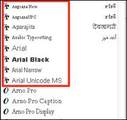
TrueType fonts can be identified by a TT next to the font name in the font drop-down menu of PowerPoint. The fonts outlined in red below are all TrueType fonts.
Here's how to embed TrueType fonts in a PowerPoint presentation:
From the PowerPoint ribbon, choose File > Options.
Select the Save category at the left.
From the Preserve fidelity when sharing this presentation: area, select (check) Embed fonts in the file.
Choose the option under Embed fonts in the file that applies best to your situation. The first option will help keep the file size small; but if the person you are sending the presentation to will be making edits, you may need to select the second option.
Click the OK button to close the PowerPoint Options dialog box.
Now you can rest assured that your fonts will survive the trip to another computer system.
See also:
PowerPoint: How to Instantly See a List of Fonts Used in a Presentation
Reusing PowerPoint Animations and Audio In a Captivate Project
PowerPoint 2007 & 2010: How to Extract Audio & Images from a Presentation
PowerPoint 2007 & 2010: How to Extract Audio & Images from a Presentation, Part II
Icon Logic Blogs
.
Blog
.
<span class='date ' tip=''><i class='icon-time'></i> Jul 14, 2015 02:19pm</span>
|
|
I had just finished posting about Networks and Topic Hubs when I saw the announcements around the launch of MyAllTop (1, 2, 3). The reviews are somewhat mixed, and I'm certainly sitting here scratching my head. I always perceived Alltop as a way to build Topic Hubs. This is a similar, but limited, form of what we are doing around sites like eLearning Learning, Mobile Learning, Informal Learning Flow, Communities and Networks Connection. The goal of a topic hub is to bring quality content together around particular topics to make it more accessible to people who are not familiar with the bloggers and other information sources in the space. If you look at AllTop itself, that's the value proposition they talk about as well - but using the magazine rack - casual browsing - metaphor. But why MyAlltop? What's confusing to me is the value of providing a means for person oriented topic hubs and the limitation to only feeds that already exist? Are people going to adopt this as their new start page? Doubtful - there are much better tools for this. And MyAlltop forces everything to be public. Instead, this is definitely a way for you to broadcast your interests. But, there are also lots of other ways to do this. I really don't get this. It must be on a trajectory towards something more like what's happening with Topic Hubs. Thoughts? eLearning Technology
Browse eLearning Content
Tony Karrer
.
Blog
.
<span class='date ' tip=''><i class='icon-time'></i> Jul 14, 2015 02:19pm</span>
|
|
Are you looking for an online platform to host and develop your MOOC or Massive Open Online Course(s)?MOOC DEVELOPMENT PLATFORMSBelow is a growing list of all online platforms that can be used to develop and host MOOCs. They have been divided into various categories to make your MOOCified choice easier:(E) = Elitist Only courses from 'World Class' Universities/Organizations. For these MOOC platforms, you need to be 'World Class' or associated with a top (top) University around the world that has signed an agreement to be partner with the non or for-profit organization running the MOOC platform (e.g. Coursera).(D) = Do-It-Yourself These MOOC platforms empowers anyone to develop MOOCs. But you are still required usually to fulfill their learning design requirements before your MOOC course can be published (to the public and be searchable in their course database).(U) = University/Organization CentricThese MOOC platforms are designed to host MOOCs offered by particular Universities/Organizations. Unless you are working for that University/organization or group of Universities/Organizations, you will not be able to use their platform. THE LIST MOOC Development PlatformsView more lists from Zaid Ali AlsagoffPlease vote up your favorites MOOC platforms. Also, please indicate whether you use them and whether you are an expert in using them (for MOOC or online course development).Looking for a comprehensive list of MOOC specific courses (to learn and explore)? CLICK HERE to access the MOOC list! Stay tuned for the ultimate (10 - 20 page) guidelines and tips to create sizzling MOOCs with flavor...Coming soon :)
Zaid Ali Alsagoff
.
Blog
.
<span class='date ' tip=''><i class='icon-time'></i> Jul 14, 2015 02:19pm</span>
|
|
Written by Chris Osborn Today's Q&A Thursday video discusses blending technology and learning content with mobile delivery platforms. Stay Up-to-Date on the Most Current Business Training Trends BizLibrary offers 6,000+ training videos in various business training topics, with new courses added every day. 7 HR Law Training Topics for New Managers (and Experienced Ones Too!) This complimentary eBook discusses 7 key employment laws that all managers should know in order to prevent inviting legal liability. BizLibrary's Mobile Learning App meets the needs of today's digital learners. Employees no longer wait for training departments to push learning content to them. Employees are used to pulling information to themselves, when they need it, on their own terms and conditions, and on their own devices. - See more at: /technology/bizmobile.aspx#sthash.umjsk4e5.dpuf Video Transcription Hi, Chris Osborn, VP of Marketing with BizLibrary with today's Q&A. It comes from Brian, he's the Vice President of Learning and Development for a large manufacturing organization and he has a question about our comment about learning content strategies. We talked about learning content strategies and mentioned that the third part of that had to do with blending the delivery methodology of your content with the platform. From our perspective, you can't separate the two. A lot of organizations in this market separate technology from content and we think that's a massive mistake. You have to make sure that your content strategy takes into account how you're going to get that content delivered to your employees. Well Brian's concern is, well, what would happen if we set a strategy that included a delivery platform that had the chance of leaving a lot of employees behind. For instance, mobile. We make sure that we can deliver content to mobile and we have a lot of employees that just aren't there yet. Would this create a problem for getting our content to our employees? And the answer is No, Brian, it will not. And here's why. First, your employees are already there. Most of us are already accessing video content away from work for a whole range of things. This is the way people are accessing content for a whole range of reasons to learn and acquire information already. There's no reason to expect that employees won't absorb content the same way at work. Mobile has to be the primary portal of entry for employee training going forward, so jump in. The water is fine, mobile learning is here, It's no longer a fad, it's no longer something in the future. Our employees are ready for us, we're the ones lagging behind, those of us in the profession. We're ready for it, you're employees are ready for it. Last but not least, and this is a real important concept. If you think about the way we're absorbing content away from work. we absorb content in short chunks. If you think about news sites or sports videos, everything is in short, two, two and half minute chunks. And that works really well for video. Same thing for learning. That's how it's going to work. And the best device to deliver that content is mobile, be it a smartphone or a tablet. So our employees are there, we have to get there to meet them on their terms, on their conditions in their space. And if we're going to have an up to date, current learning content strategy, we have to have learning content that is accessible on mobile devices.
Chris Osborn
.
Blog
.
<span class='date ' tip=''><i class='icon-time'></i> Jul 14, 2015 02:19pm</span>
|