Blogs
|
CLICK HEREThe webinar starts 10.30 am (Kuala Lumpur time) on November 4 (Tuesday), but if you are joining from North/South America it will take place interestingly on November 3 (Monday) during the evening. So, to avoid any hiccups, please use the time zone converter.CLICK HERE to check your time using the Time Zone Converter :) ONLINE TALKLooking forward to team up with 'Dr. Nellie Deutsch' again (3rd time!) to explore the wonders of 'Speed Reading' (and beyond) during the Moodle MOOC 5 (MM5) course. Please join this free webinar! No login required! DESCRIPTIONWouldn’t it be cool if you could read a 200-page book in 20 minutes? The presenter will explore the art of speed-reading and how it can be done in an online and offline reading environment using various tools. Speed reading (with comprehension) is increasingly becoming a vital skill to master in today’s disruptive world of information overload.SLIDESHere we go: Learning How to Speed Read in an Information Overloaded World from Zaid AlsagoffRECORDING Interestingly, if you learn how to speed read, you will have more time to do whatever you want :)
Zaid Ali Alsagoff
.
Blog
.
<span class='date ' tip=''><i class='icon-time'></i> Jul 14, 2015 02:16pm</span>
|
|
by Kevin Siegel
I'm continuing to enjoy developing eLearning using the new Adobe Captivate 8. And the more I use this updated version, the more I find subtle improvements and new features. Take video demos for instance. I use the video demo recording mode frequently (it's the mode I use for the videos I upload to YouTube).
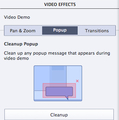
While recording a recent video, I noticed a new tab on the Video Effects Inspector: Popup.
It just so happened that I had recorded a video and had inadvertently captured a yellow tooltip (shown in the image below). I figured this would be the perfect opportunity to test the Cleanup button on the Popup tab.
On the Timeline, I positioned the playhead at the part of the video where the popup first appeared.
On the Video Effects Inspector, I selected the Popup taband clicked the Cleanup button.On the slide, I drew a rectangle around the popup.
Note: When you try this at home, don't worry if your rectangle doesn't completely cover the popup. If your rectangle is too large or small at first, you can resize it using the resizing handles at any time. You can also drag the rectangle via its borders to move it to a different location on the video.
Once I drew the popup area on the video, a Popup object was added to the Timeline. I stretched the right edge of the Popup object to the amount of time I wanted it to remain onscreen on the slide; then I clicked the word Cleanup on the video.
And just like that, the area within the popup rectangle I drew was removed from the video.
***
Looking for instructor-led training on Adobe Captivate? Check out our live, online, instructor-led Captivate classes.
Icon Logic Blogs
.
Blog
.
<span class='date ' tip=''><i class='icon-time'></i> Jul 14, 2015 02:16pm</span>
|
|
Ever-changing Landscape No matter what industry you’re in, things are changing fast. New technologies and products hit the market faster than ever before. With this shift towards rapid development and product introduction, the importance of developers and programmers is becoming increasingly clear. According to the Bureau of Labor Statistics, the demand for web developers will increase 20% by 2022. In today’s market, agile software development has become the new normal. Agile development is characterized by rapid delivery of useful software. Team members must be prepared to participate in every aspect of the software development life cycle, from gathering requirements to implementing features and delivering a fully functional product. While teams may benefit from high degrees of specialization, many developers find themselves becoming generalists, with the ability to move from back-end languages such as Java and C# to front-end development in HTML, CSS, and Javascript as well as User Interface (UI) and User Experience (UX) roles. With the advent of the internet age has come a plethora of different development ideologies, techniques, and languages. What is currently a hot trend could easily fall out of favor as end-users search for the fastest applications that deliver the best content. When the largest portion of internet users transitioned to mobile devices, multimedia heavy websites that were incompatible with Android and iOS were the first to fall by the wayside. Developers who had spent years honing their skills in Flash were suddenly left behind. The proprietary scripting language used for these websites, Actionscript, was no longer a highly desirable skill. Java-based applications that ran flawlessly on mobile devices soon found themselves to be the new king. HTML5 is quickly becoming the new contender for king of flexible content delivery. Ever Changing Opportunity Web development is a career path that will find a person constantly learning. If a developer does not keep up with the latest and greatest tools for content delivery, then they will quickly find their career options limited. Lifelong learning is the key to maintaining a staff of capable, flexible developers. Is your organization prepared to meet the demand for agile developers? Do you have a training program in place that will allow your development staff to grow to their full potential? Short form training video offers the opportunity for your developers to train at their own pace, with material that engages and demonstrates core concepts in easily digestible courses that are shown to improve learning retention over longer format courses.
Chris Osborn
.
Blog
.
<span class='date ' tip=''><i class='icon-time'></i> Jul 14, 2015 02:16pm</span>
|
|
This post is password protected. To view it please enter your password below:
Password:
RJ Jacquez
.
Blog
.
<span class='date ' tip=''><i class='icon-time'></i> Jul 14, 2015 02:16pm</span>
|
|
Do you want to know how Malaysian Higher Education Institutions (HEIs) are blending and Flipping learning?Here we go: Blended & Flipped Learning: Case Studies in Malaysian Higher Education Institutions from Mohamed Amin Embi The International Medical University (IMU) also contributed a Chapter (Chapter 15: Page 255 - 274) exploring how large lectures are being flipped.Have fun discovering how Malaysian HEIs are transforming their learning and teaching using various tools and methods to spice up students learning experiences :)
Zaid Ali Alsagoff
.
Blog
.
<span class='date ' tip=''><i class='icon-time'></i> Jul 14, 2015 02:15pm</span>
|
|
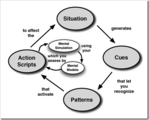
Interesting post by Jane Bozarth - The Myth of "Best Practices". A "best practice" is best only in the precise, specific context in which it exists. … What works in my marriage won't necessarily work in -- and may even damage -- yours. Even if moved from one situation to another very close one, the odds of transfer being made with practice intact is nil. How do we address those who pressure us to produce a list of, or abide by, "best" practices? The comments are also interesting but focus primarily on the word "best" vs. "leading" or "better" … overall the suggestion was to be very careful about assuming because something works in one situation it will work in others. So, the first thing I did was to quickly search my blog for any mention of "best practice" - whew, I don't use the term much. Dodged that bullet. :) Patterns and Knowledge Work I understand the concern that when you share best practices, you may come out with very different results. That said, I also understand exactly why people ask for "best practices" and why our organizations ask us to help "share best practices". In Rethinking Knowledge Work, Kirby Wright describes Gary Klein's model of decision making: Studies of health workers, executives, military, firefighters, pilots and others have found that sense making, pattern recognition and mental models are essential components of decision making. As an individual encounters a situation he/she makes sense of the issue. Making sense generates cues and allows one to recognize patterns, both in the nature of the problem and response. Through pattern recognition, the problem solver identifies actions to address the issue. As one begins to act, they are also assessing, in real time, the potential impact of their actions. In particular, highly skilled workers demonstrate the ability to reflect-inaction (Schön, 1987), to conduct mental simulations as a way of imagining possible outcomes. As problem solvers do this, they adjust their actions on-the-fly. This really rings true to me. And this suggests that there is big value in providing knowledge workers with ways to assess a situation, to find the cues which link to possible approaches and actions. I think that we all somewhat inherently know this. It's why it's so great to go to sessions where you hear what other people have done when faced with similar situations. Patterns Defined While Klein uses the term "pattern", there is another definition of Patterns (or Design Patterns) which is a great example of the kind of information that we can produce which is valuable and maybe is not a "best practice" but is close. From the above definition, a Design Pattern is defined by: Pattern Name and Classification: A descriptive and unique name that helps in identifying and referring to the pattern. Intent: A description of the goal behind the pattern and the reason for using it. Also Known As: Other names for the pattern. Motivation (Forces): A scenario consisting of a problem and a context in which this pattern can be used. Applicability: Situations in which this pattern is usable; the context for the pattern. Structure: A graphical representation of the pattern. Participants: A listing of the classes and objects used in the pattern and their roles in the design. Collaboration: A description of how classes and objects used in the pattern interact with each other. Consequences: A description of the results, side effects, and trade offs caused by using the pattern. Implementation: A description of an implementation of the pattern; the solution part of the pattern. Sample Code: An illustration of how the pattern can be used in a programming language Known Uses: Examples of real usages of the pattern. Related Patterns: Other patterns that have some relationship with the pattern; discussion of the differences between the pattern and similar patterns. I often use less formal patterns and you can see examples of patterns in Using SharePoint or at the WikiPatterns site. But the goal of these definitions is similar. Look across examples of practices and abstract out the common structure of solutions. Define where it might apply and what it is. Going back to the "myth of best practices" … yes you still need to evaluate if this pattern will work for you, figure out how you might need to modify it. But what's the alternative - start from scratch each time? I don't think that's what is really meant, but I would claim that: Patterns are extremely high value and we should look to produce patterns whenever we can. Better Patterns Taking this even further, in Data Driven (one of the few posts that uses the term "best practice") I talk about a model where we take data (e.g., customer satisfaction data) and provide knowledge workers (e.g., store managers) with specific possible actions that they can take to try to improve. We allow them to modify how they will apply these actions as we know that it often is best to have it modified to better fit the store. We also allow them to use alternatives. This is something that certainly would be called sharing best practices in many organizations. I guess we could also say that it is Patterns that we have identified and we have tied them to specific situations based on metrics. We have the added benefit in this case to measure the impact of applying these patterns to determine the impact. This means that we are able to determine better and worse performing patterns. While the organization involved used the term "best practice", I can understand an argument for not using that term. But, I do think that finding, distributing and helping to apply better patterns is an incredibly effective approach to performance improvement. eLearning Technology
Browse eLearning Content
Tony Karrer
.
Blog
.
<span class='date ' tip=''><i class='icon-time'></i> Jul 14, 2015 02:15pm</span>
|
|
by Jennie Ruby
You can interrupt a sentence four different ways--with dashes, parentheses, commas, or no punctuation at all.
Dashes actually emphasize the interruption, like this:
One of the best things about the previous two versions--the versions before the company was taken over by XYX, Inc.--was the user interface.
Parentheses de-emphasize the interruption:
The correspondence between the codes (see Table 2) is nearly one-to-one.
Commas indicate an interruption that is not essential to the meaning of the sentence:
The new interface, we all agree, is much easier to use.
Interruptions with no punctuation are essential to the meaning of the sentence:
The function that has been changed the most is the video editor.
Challenge
Give a try to punctuating the interruptions in the sentences below. When ready, post your answers as comments.
It is very tedious in my opinion to type on a flat screen.
The blog even after the extensive upgrade we purchased last quarter was still slow to load on mobile devices.
The most widely accessible option according to the magazine is still the print version.
The company that provides the fastest downloads is still XYZ.
Norman who arrived at the classroom before the computers were turned on noticed the change in temperature right away.
A more extended listing (see Appendix B) has been compiled by XYZ Press.
***
If you love Jennie's grammar articles, you'll love her classes. Check out some of Jennie's mini courses.
Icon Logic Blogs
.
Blog
.
<span class='date ' tip=''><i class='icon-time'></i> Jul 14, 2015 02:15pm</span>
|
|
Written by Jessica Batz View and download the webinar slides. View the webinar recording. 5 Ways to Build a Better Leadership Development Program - Webinar 05.14.14 from BizLibrary
Chris Osborn
.
Blog
.
<span class='date ' tip=''><i class='icon-time'></i> Jul 14, 2015 02:15pm</span>
|
|
While I was tracking the #mLearnCon hashtag on Twitter last week, I saw this tweet from Jay, whom I believe was attending Lasher’s session. I really liked the tweet and immediately ReTweeted it:
Ask how your audience is using mobile devices, then design for them ~ Lasher #mLearnCon — Jay Lambert (@LambertJay) June 21, 2012
I thought about it for some time and decided to write this blog post.
The thing is, most people are asking the wrong questions regarding what people really want out of mobile learning, including eLearning tools vendors.
I think the reason why eLearning tools vendors are rushing to market with a "one size fits all" solution for eLearning and mLearning, where the tools are simply converting existing desktop eLearning to HTML5, is because when they asked their customers what they wanted next in their software, for the most part what they heard was "I just want to have my learners access my stuff on the iPad."
There are many flaws with this approach, for one thing having an iPad-only strategy isn’t really having a mobile strategy, what about smaller screens such as the iPhone where invariably mobile users will end up doing a lot of pinching and zooming to find their way around the content, that is of course if they can even render the learning at all on the smallers screens.
In fact, I’m not even sure the customer even articulated the answer correctly when asked, and thus the way the so called "mLearning feature" is being implemented in the latest version of eLearning applications. Perhaps what the customer really meant to say was that yes, they want their learners on mobile to be able to access the learning, but in a way that makes sense on the iPad, and also in a way that makes sense on the iPhone, and on the Kindle Fire, and on the Motorola Xoom, Droid, etc.
In other words, One Size does Not Fit All.
My point is that all of us in Learning Design, who are starting to design for multiple screens, need to be asking the right questions and the one question in the tweet above is a great question to ask.
Other questions like what are you favorite mobile apps and why, are important too, because the answers will reveal so much about how mobile is different from desktop, and will provide us with lots of great information we can use in order to design for mobile.
Of course there’s nothing like being a mobile user yourself, and see what you like and dislike about the whole experience.
When asked what is the first thing I recommend eLearning Pros do, who are starting to look at mLearning, I always say get immersed in mobile yourself. Get a Tablet if you don’t have one, download apps and see what you like and dislike about them; don’t stop there, the Tablet is just one mobile device, get a smartphone, I say, and see what the experience is like on the much smaller screen.
Only by becoming a mobile user yourself can you truly understand what the experience is like and begin thinking about how to deliver powerful mobile learning experiences.
Oh and don’t forget to surprise your mobile learners, too.
One of my favorite lessons from Steve Jobs was that Apple didn’t do much in the way of Focus Groups in order to figure out what their next products would be.
Steve believed that most people didn’t even know they needed something until Apple invented it and then wondered how they ever got along without it.
That’s my story and I’m sticking to it. What are your thoughts? Chime in and ReTweet it so other can do the same.
RJ Jacquez
.
Blog
.
<span class='date ' tip=''><i class='icon-time'></i> Jul 14, 2015 02:15pm</span>
|
|
MISSIONLooking forward to visit Universiti Malaysia Sarawak (UNIMAS) for the first time. I will be giving a talk (25 Nov) and a workshop (26 Nov) during my visit, and Insya-Allah these events and other accidental connections/conversations with educators there will be beneficial for UNIMAS.Also, I am pretty sure I will learn a lot from UNIMAS as I discover it and its' people. For example, did you know that UNIMAS launched its first MOOC earlier this year entitled: ICT Competency. Now you do!HI!If you are attending my talk or workshop at UNIMAS, please add yourself to this Padlet Wall (direct link) by double tapping or clicking on it (no login required). If you could add your name, picture (optional) and what you think is the ingredients for empowering great student learning experiences (in a sentence or two), would simply be awesome. Thanks!Created with PadletTALK‘DNA of a 21st Century Educator’ (25 Nov)During your lifetime you have probably experienced inspirational educators, or witnessed inspiring lectures. But, what about you? Are you such an educator? If not, why not? In this interactive talk, we will explore some of the ingredients top educators in the 21st century have, and how we can learn from them to reinvent ourselves to reach our true potential as an educator. Are you up for the challenge? DNA of a 21st Century Educator at UNIMAS! from Zaid Alsagoff WORKSHOP‘Designing 21st Century Learning Experiences’ (26 Nov)In this 1-day hands-on workshop, we will explore how to design interactive and engaging student learning experiences using technology. We will actively look at how we can transform face-to-face (F2F) learning using the ‘Flipped Classroom’ and ‘Gamification’ methods. Then we will explore how we can use social media and web 2.0 to engage students, empower collaborative online learning spaces, and development interactive content. Participants will be engaged throughout the workshop with learning activities, including the gamified group challenge during the afternoon. It will be fun, engaging, and participants will get a taste of how they can use technology to transform the students’ learning process.After this workshop, you will be able to:Discuss how the brain learns.Apply Gagne’s 9 events of instruction to design more engaging learning content and environments.Use web 2.0 tools to design and publish interactive and engaging learning content.Apply Flipped Classroom and Gamification methods to your teaching and learning.Use interactive web tools to engage and assess students during face-to-face learning sessions.Use Social Media to interact and empower students to collaborate online.Key resources:150+ Awesome Learning ToolsBest Quick Reference Guides to Web 2.0Bloom’s Digital Taxonomies!Blended & Flipped Learning: Case Studies in Malaysian Higher Education Institutions Designing 21st Century Learning Experiences from Zaid Alsagoff ACTIVITYGroup Challenge:Interactive Web Tools (recommended):PadletPoll EverywhereKahootSocrativeContent Development Tools (recommended):PowToonGoAnimateExplain EverythingTouchCast VideoScribeScreenr Screencast-O-MaticEDPuzzleOffice Mix (for PowerPoint 2013)Social Learning (recommended):WhatsAppTelegramFacebookGoogle DocsBlendSpaceSchoologyTOOLSHere is a collection of 150+ awesome learning tools to spice up your learning and teaching. Please use the 'Filter (tags)' to narrow down on the type of tool you are looking for (authoring, quiz, lms, etc.). Top 100+ Learning Tools on Planet Earth!View more lists from Zaid Ali AlsagoffCan't wait!!! :)
Zaid Ali Alsagoff
.
Blog
.
<span class='date ' tip=''><i class='icon-time'></i> Jul 14, 2015 02:14pm</span>
|