Blogs
|
I'm hoping you can help a reader with thoughts and likely help others of us … A medium size nonprofit and lobbying organization is working on a designing and creating a social / work network for experts, students, volunteers who are willing to help through campaigning, lobby, sharing knowledge, working on solutions (writing documents). They currently don't have any kind of solution. Via the network people will be able to communicate with employees, organize activities, collaborate on documents, communicate with each other, etc. They are considering a variety of solutions but are willing to balance functionality vs. cost. In other words, they could live with a lesser solution if they can save a lot of money. Document sharing and collaborative editing Custom branding / image Ability to create groups and control access to those groups Shared calendars Invite other people into the network Moderation of content Exports (users, content) Some questions: What do you call this kind of solution? Given this high level description, what would some initial questions/criteria that might differentiate what solutions to consider? What do you think some of the safer choices would be in terms of solutions, i.e., who will have the biggest market share in the future? What tools might be on your short list for them to consider? eLearning Technology
Browse eLearning Content
Tony Karrer
.
Blog
.
<span class='date ' tip=''><i class='icon-time'></i> Jul 14, 2015 02:14pm</span>
|
|
by Kevin Siegel
As far as I'm concerned, the hottest new feature you'll find in Adobe Captivate 8 is the ability to create responsive eLearning. As I taught you a few weeks ago, by choosing File > New > Responsive Project, you can basically create and work on multiple screen sizes (called break points) in one project. When you publish the responsive project, the learner will automatically be served the break point appropriate for the device they're using.
If you've spent any time creating Responsive Projects, you've probably noticed that there are three breakpoints in the project by default: Primary (set to a width of 1024 pixels), Tablet (set to a width of 768 pixels), and Mobile (set to a width of 360 pixels). The default breakpoints are based on typical sizes of a laptop (Primary), iPad (Tablet), and iPhone (Mobile). However, you can easily adjust the size of the breakpoints.
To begin, open the CloudAir_SoftSkills Sample.cptx sample project that ships with Captivate 8. (On the right side of the Captivate 8 Welcome screen, click the Sample Projects/Tutorials icon.)
The project is responsive. Notice the colored ribbon at the top of the canvas; this is a breakpoint within Captivate (a breakpoint is the point at which the layout changes size to accommodate a different screen size).
To change the width of a layout, select one of the three breakpoints and drag either slide to change the width.
See, I told you it was easy. Now for the height.
The option to adjust a layout's height is disabled by default so that you don't accidentally change it. Each layout's default height provides space for Captivate's playbar. If you are not going to use a playbar in the published lesson, you should adjust the height accordingly.
To begin, it's a good idea to change your magnification to 75% (View > Magnification). If you are too close to the canvas, you will not be able to see the new height you are about to set. I've found that 75% is almost always the perfect magnification for me, but you may need to fiddle around a bit to find the prefect magnification for your display.
In the upper right of the canvas, select View Device Height.
From the bottom of the canvas, drag the Height Adjuster (the yellow rectangle in the image below) up or down to change the device Height.
Note: The shortest you can make any device is 100 pixels; the tallest you can make any device is 1,000 pixels.
***
Looking for instructor-led training on Adobe Captivate? Check out our live, online, instructor-led Captivate classes.
Icon Logic Blogs
.
Blog
.
<span class='date ' tip=''><i class='icon-time'></i> Jul 14, 2015 02:14pm</span>
|
|
View and download the webinar slides. View the webinar recording.
Chris Osborn
.
Blog
.
<span class='date ' tip=''><i class='icon-time'></i> Jul 14, 2015 02:14pm</span>
|
|
First, I would thank Mobile Learning Association of Malaysia (MLAM) and Prof Mohamed Amin Embi for inviting me to facilitate the 4th Specialized Workshop on Ubiquitous Learning entitled 'Designing 21st Century Learning Experiences' at Universiti Kebangsaan Malaysia (UKM) on 29th November 2014.Yes, I did facilitate a workshop with the same title at UNIMAS on 26th November. Flavor of the month :)HI!If you are attending this workshop, could you please add your name, picture (optional) and what you think is the ingredients for empowering engaging and effective student learning experiences (in a sentence or two) to the Padlet wall below (Direct link). That would simply be awesome! Thanks! Created with PadletWORKSHOPIn this 1-day hands-on workshop, we will explore how to design interactive and engaging student learning experiences using technology. We will actively look at how we can transform face-to-face (F2F) learning using the ‘Flipped Classroom’ and ‘Gamification’ methods. Then we will explore how we can use social media and web 2.0 to engage students, empower collaborative online learning spaces, and development interactive content. Participants will be engaged throughout the workshop with learning activities, including the gamified group challenge during the afternoon. It will be fun, engaging, and participants will get a taste of how they can use technology to transform the students’ learning process.After this workshop, you will be able to:Discuss how the brain learns.Apply Gagne’s 9 events of instruction to design more engaging learning content and environments.Use web 2.0 tools to design and publish interactive and engaging learning content.Apply Flipped Classroom and Gamification methods to your teaching and learning.Use interactive web tools to engage and assess students during face-to-face learning sessions.Use Social Media to interact and empower students to collaborate online.Key resources:150+ Awesome Learning ToolsBest Quick Reference Guides to Web 2.0Bloom’s Digital Taxonomies!Blended & Flipped Learning: Case Studies in Malaysian Higher Education InstitutionsSLIDESHere we go:re Designing 21st Century Learning Experiences from Zaid Alsagoff CHALLENGEInteractive Web Tools (recommended):PadletPoll EverywhereKahootSocrativeContent Development Tools (recommended):PowToonGoAnimateExplain EverythingTouchCast VideoScribeQuizletScreenr Screencast-O-MaticEDPuzzleOffice Mix (for PowerPoint 2013)Social Learning (recommended):WhatsAppTelegramFacebookGoogle DocsBlendSpaceSchoologyTOOLSHere is a collection of 150+ awesome learning tools to spice up your learning and teaching. Please use the 'Filter (tags)' to narrow down on the type of tool you are looking for (authoring, quiz, LMS, etc.). Top 100+ Learning Tools on Planet Earth!View more lists from Zaid Ali AlsagoffCan't wait!!! :)
Zaid Ali Alsagoff
.
Blog
.
<span class='date ' tip=''><i class='icon-time'></i> Jul 14, 2015 02:13pm</span>
|
|
1. Apple´s World Wide Developers Conference: MacBook Pro, iOS 6 and more on its approach to a single computing experience. RJ Jacquez wrote more about Apple´s mobile story here: http://bit.ly/M2Hr3s
2. Surface by Microsoft: a new tablet. Find RJ Jacquez´s impressions here: http://bit.ly/KMwny6
3. Google I/O 2012: Google Nexus 7, Google chrome for iOS, Google Drive on the Apple´s App Store, Google+ app
4. Adobe won’t support Flash in Jelly Bean (Android 4.1 devices)
5. Adobe Captivate version 6: disappointing. Find RJ Jacquez’s first impressions here http://bit.ly/MFWVep and here http://bit.ly/MzKhiL
6. Camtasia Studio 8 by TechSmith: a must-have tool. Stay tuned for RJ’s review on rjacquez.com
7. mLearnCon 2012 highlights: Tin Can Project, Reuben Tozman´s presentation and Tapestry by Float Mobile Learning
8. Apps of the Week: Tapestry, Reflection App, Paper by Fifty-three.
RJ Jacquez
.
Blog
.
<span class='date ' tip=''><i class='icon-time'></i> Jul 14, 2015 02:13pm</span>
|
|
by Kevin Siegel
You can create an eLearning lesson that changes dependent upon where your learners are physically located. For instance, you can create a Captivate project for learners who live in the United States or Australia. While much of the course content is relevant to both Americans and Australians, thanks to Captivate's geolocation feature, learners in both countries will see unique, location-specific, information while taking the same course.
The first step to adding geolocation features to a project is creating the project as you normally would. In the example that follows, I've created a project for learners in Asia and the United States. (I created the project as a branching scenario... the first half of the project was for learners in the United States, the second half was for learners in Asia.)
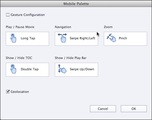
Once you've created the project for both audiences, adding the geolocation features is very easy. First, choose Window > Mobile Palette to open the Mobile Palette dialog box.
Select Geolocation and then click the OK button.
Next, you'll need the Latitude and Longitude of the locations you'll use in your project. As I mentioned above, my two locations are Asia and the US. While determining Latitude and Longitude might sound difficult, I simply asked Google the following: "what is the lat and long for the united states?" The answer, rounded to whole numbers, was 38 and 77.
I repeated the same question for Asia (and ended up with aLatitude and Longitude of 48 and 86).
Now that you've got the Latitudes and Longitudes figured out, you'll need to create one variable for each location (via Project > Variables). When creating each variable, select Geolocation and you'll have access to a Lat, Long, and Accfields. The Acc value is based on how close you want the learner to be to the latitude and longitude location; it is based on meters. Think about the meters surrounding the area like a large circle. When building your course, consider starting with 1,000,000 meters, which will allow anyone within range to still be able to access the course.
The final step (besides publishing) is to create an Advanced Action (via Project > Advanced Action) and attach it to a Filmstrip slide.
Set the Action Type to Conditional actions and name the action GeoLocation.
Double-click the first column under the IF Statement, click the word variable, and select cpInfoGeoLocation.
Note: The CpInfoGeoLocation variable ships with Adobe Captivate 8.
To the right of "is equal to," click the word variable from the drop-down, choose one of your location variables you created earlier.
Under Actions, double-click in the first column and chooseJump to Slide. From the next menu, select the slide in your project where you want your learner to end up. I selected the Asian branch in my project (I called it Asia Scenario).
At the bottom of the dialog box, click Else. Under Actions, double-click the first column and choose Jump to Slide. In the next column, choose your other location (in my case, it was the other branch I called US Scenario). Save the action (as an Action) and then close the dialog box.
Attach the GeoLocation Advanced Action to the first slide by selecting the slide on the Filmstrip. On the Properties Inspector, select the Actions tab. From the On Enter drop-down menu, choose Execute Advanced Actions and select the GeoLocation action as the Script.
Publish your lesson and post it to your web server or LMS like you would we any Captivate eLearning lesson. When users in Asia access the lesson, the GeoLocation script will automatically display the Asian content (and vice versa for US-based learners). In a word, that's awesome!
***
Looking for instructor-led training on Adobe Captivate? Check out our live, online, instructor-led Captivate classes.
Icon Logic Blogs
.
Blog
.
<span class='date ' tip=''><i class='icon-time'></i> Jul 14, 2015 02:13pm</span>
|
|
Written by Chris Osborn Today's Q&A Thursday discusses whether or not groups can serve in leadership roles. Stay Up-to-Date on the Most Current Business Training Trends BizLibrary offers 6,000+ training videos in various business training topics, with new courses added every day. How to Build a Business Case for Online Employee Training This complimentary eBook will help you get your online training proposal approved. It identifies the 5 key elements of a business case, discusses best practices, and includes examples to help you make your case solid. BizLibrary's Mobile Learning App meets the needs of today's digital learners. Employees no longer wait for training departments to push learning content to them. Employees are used to pulling information to themselves, when they need it, on their own terms and conditions, and on their own devices. - See more at: /technology/bizmobile.aspx#sthash.umjsk4e5.dpuf Video Transcription Hi, Chris Osborn, VP of Marketing with BizLibrary with today's Q&A. Today's question comes from Erin. She's an HR manager at a bank and she wants to know if groups can serve in leadership roles in small and mid-sized organizations, and the answer is yes! We see examples of groups serving in leadership roles in a variety of contexts and sometimes very clearly manifested in sports. I hate to use sports analogies when you talk about organizational leadership but in this circumstance I'm going to use a couple of examples. You'll frequently see really successful teams where you have older or veteran players take a group of younger players under their wing and really mentor them and tutor them and you see it in college sports and various levels of professional sports and in that circumstance rather than individuals stepping forward to lead, it truly is a group situation where they really model behavior and help impose a sense of discipline and really show the younger players how to succeed and what it takes to be successful. So yes! Absolutely! Groups can serve in leadership roles and that's true in organizations as well. And to be perfectly honest about it, I really believe we're going to see this type of leadership model emerge in more and more important ways for a whole range of reasons. If you think about what's happened in the workplace, we've seen organizations get leaner and leaner. We've seen entire layers of management eliminated from many organizations. And we're going to see flatter organizational structures, and we're going to see collaborative organizations. Not just in terms of competency, or skillset required, but collaboration in terms of an operational and team model. So collaboration skills are going to be extremely important. In other words, teams and groups, team and group dynamics, team and group leadership is going to become extremely important, meaning we're going to have to hone collaboration skills. We're going to have to teach people to work and function effectively in groups, both in terms of following and leading and teach people how to step up and contribute in a group leadership situation. And it's a great question! I think it's a leadership model that we're going to have to explore and develop in really important ways as we move forward but yes. Absolutely. Groups can step up and serve in leadership roles and it's going to be an important, and I think emerging, leadership model as we move forward.
Chris Osborn
.
Blog
.
<span class='date ' tip=''><i class='icon-time'></i> Jul 14, 2015 02:13pm</span>
|
|
One of the favorite quotes I used to use during presentations was Drucker - The most important contribution of management in the 21st century will be to increase knowledge-worker productivity. This is a big reason that I started Work Literacy. I firmly believe that all management and workplace learning professionals need to be constantly looking at how we can improve the performance of knowledge workers. This is probably THE challenge of the 21st century. But about six months ago, I started not to use this quote. When I look at concept workers and measuring their performance, I've come to realize that "workplace productivity" is not the right term and is not exactly where we should focus. Complexity of Productivity for Knowledge Work Productivity is defined as: the ratio of the quantity and quality of units produced to the labor per unit of time For some knowledge workers, we can reasonably define things this way. For example, in a call center environment, it is reasonable to look at handle time, customer satisfaction, total sales, etc. These numbers can be used with a Data Driven approach to supporting performance improvement. However, when we look at concept workers, workplace productivity seems to be a fairly limiting phrase. It seems to be equated with activity. And Ben Franklin tells us: Never confuse motion with action. A couple of recent posts reinforced the complexity for me. In Defining Productivity for the Knowledge Age, Jonathan Spira - The wide range of tasks that knowledge workers undertake, combined with the fact that there are different levels of knowledge workers, ranging from those with a single skill to highly skilled workers who exercise independent thought and action most of the time, makes both the task of defining productivity and developing a management science somewhat tricky, to say the least. In The Fun of Productivity Measures, Jack Vinson looks at the complexity of looking at knowledge worker productivity - It's still an open question for me as to how to turn these business-level measures into something useful for knowledge workers. There are obvious abuses you want to prevent, but beyond "don't be stupid" and "work as quickly as possible and pass it to the next person" how do you calculate how much someone has contributed to the successful completion of Project X? I'm not quite sure what the replacement term is for workplace productivity or knowledge work productivity, but I'm that the current implication is somewhat misleading. It also causes us to confuse activity and effectiveness. Confusing Activity and Effect One of my favorite examples of the challenge of activity and effect is from one of the people who I consider to be a guru on Knowledge Worker Effectiveness. See Tom Davenport and Blogging - He is Wrong! for some more details, but basically in his book Thinking for a Living, Tom Davenport tells us: Perhaps the biggest problem for blogging is the time it takes to read and write blogs. If anything this tool has detracted from productivity, not increased it. ... In his blog (I guess he doesn't care about his own loss of productivity) he tells us (details in Getting Value from LinkedIn) - I’ve been on LinkedIn for several years. I never initiate a connection. I can safely say that I have gotten nothing out of the site. It's easy to look at something like blogging and fail to see how it can increase quality / quantity of output in exchange for the time involved. Same thing is true for LinkedIn, especially if you don't know the right ways to use it. I discussed a room full of management consultants who had the same feeling as Tom around LinkedIn (see LinkedIn for Conversations). My guess is that someone like Tom is in a different league from most of us Knowledge Workers. When we need help with a question, using our network is very effective (see below). Having a well built network is very important to us. As a side note on this whole story, I had forgot that in my Thomas Davenport and Blogging from back in 2007, I mentioned meeting Bill Ives via blogging as part of that post. Coincidently, I recently engaged with him again because of some work I'm doing around social media for businesses. The fact that we had met through blogging and then reconnected through a LinkedIn search with virtually no activity (other than reading blog posts) in between, is a great example of what happens with these tools. I wonder if Tom has changed his opinion, but my guess is that lots of people will tell you that blogging and LinkedIn may seem like they take lots of time, but that they are critical for their workplace productivity. Workplace Effectiveness and Networks In Evaluating Performance of Concept Workers, I suggested that the way most concept workers are evaluated is by looking at signals such as: Process - They went through a reasonable process to arrive at their conclusions. Reasonable - Their conclusions are reasonable in your opinion (if you can formulate one). Compare - If you took what they did and compared it to what you would expect from other similar performers, would they have arrived at the same result. When you combine this with things like Alex Pentland - How Social Networks Work Best - A recent MIT study found that in one organization the employees with the most extensive personal digital networks were 7% more productive than their colleagues This actually does not come as much a surprise to me. Concept workers need to reach out to people for knowledge work tasks in order to ensure they they are arriving at answers that will pass the evaluation factors above. Thus, Leveraging Networks is Key Skill and likely is the most important Knowledge Worker Skill Gap. Knowing how to access Networks and Communities and tap into your Social Grid are keys. Concluding Thoughts It's a bit scary to me that while I consider our biggest challenges of the 21st century is improving the effectiveness of concept workers, I'm right now only able to say that there are meager methods of evaluating performance and a few (slim) known patterns for improving performance. Certainly, this is going to be something that we will all need to be studying. I look forward to some very interesting conversations and learning about all of this. eLearning Technology
Browse eLearning Content
Tony Karrer
.
Blog
.
<span class='date ' tip=''><i class='icon-time'></i> Jul 14, 2015 02:12pm</span>
|
|
Looking forward to Insya-Allah giving a 40 minute (interactive) talk at the Public Sector Trainers Meet Trainers (PSTMT) Seminar held at INTAN Bukit Kiara on the 9th December, 2014. TALKIn this interactive talk, we will explore how to design interactive and engaging blended learning experiences using various methods and online tools. We will actively look at how we can transform face-to-face (F2F) learning using the ‘Flipped Classroom’ and ‘Gamification’ methods. Then we will explore various interactive web tools to engage learners and develop interactive presentations.SLIDES Designing 21st Century Blended Learning Experiences from Zaid Alsagoff Insya-Allah, I will find enough time to engage the participants using various tools, including juggling. Strangely, I am most worried about not having enough time to achieve my mission to engage the mind. When I was young, giving a 40 minute talk would seem forever. Now, it's like swoosh! That happens, when you are used to giving 1 to 2 day workshops :)
Zaid Ali Alsagoff
.
Blog
.
<span class='date ' tip=''><i class='icon-time'></i> Jul 14, 2015 02:12pm</span>
|
|
by Tony Self
What is more effective, a print document or an online document? It wasn't all that long ago that print documents would definitely have been voted more effective, especially considering the poor quality of computer monitors and slow internet speeds. (Remember trying to pull up a document on a modem?)
Given the speed of today's internet and mobile device support, print documents are likely going the way of the dinosaur. Online documents have several advantages to their print counterparts. For instance, eBooks reflow to fit the user's device (think about how popular eBook readers such as the Amazon Kindle have become in just the past few years). Online documents are searchable, typically contain hyperlinks for easy navigation, often include videos and/or animations, and some even contain interactivity in the form of eLearning simulations created in Adobe Captivate or Articulate Storyline.
There are millions upon millions of print documents around the business world that would gain new life if they were online. The major challenge in moving from unstructured to structured documentation, or page layout to reflowing text, or paper to online, is the shift in mindset required. Simply put, many old design paradigms used for print documents don't fit in new media design.
There are many reasons for converting paper documents to online documents such as cost, efficiency of updating, document control, accessibility, and discoverability. Surprisingly, for the custodians of paper documents charged with managing the conversion, there is often a reluctance to embrace the migration from print to online. For those custodians, the paper version remains the primary document, and the online version is secondary.
Even if the paper custodians agree to take the paper documents online, much time and effort is spent trying to imitate the paper design in the online design. For example, the paper documents are scanned and converted to PDF. While aPDF will work in an online world, a PDF is really just a digital replica of the paper document. While a PDF may open on a tablet or smartphone, it won't re-flow to fit the user's screen like an eBook.
If you're trying to convince the "powers that be" to make the move from print documentation to an online document, consider the following:
The text used in the print document may require a specific font and font size. When online content is displayed for the user, the user's device may have limited font capabilities. Even if the device is capable of displaying the font, if the user doesn't have that specific font installed on the device, the font displayed will be the browser's default. For instance, you have used Futura as the font for your content. If the user accesses your content via a web browser and does not have the Futura font on their computer, the browser will likely display Times New Roman instead.
Paragraphs may need to be indented by a specific amount. While setting up a specific indentation is easy in a print layout tool such as Adobe InDesign, the user's device may have limits to how indentations are displayed.
Headings may have to be sequentially numbered. While many print layout tools allow you to easily number paragraphs, those automatic numbers may not display properly online.
You may be required to include footnotes. While footnotes are easy to add to print documents, they're a problem online. Since there really isn't an end to a page online, where would the footnotes go?
Page numbers may no longer be valid. If your print document includes cross references (such as, "For more information, see page 11"), you could end up with a mess. If your print content is displayed as an eBook, the content that was on page 11 could now be located on page 22. If the text on the page tells the user to reference page 11, but the text is actually on page 22, you can imagine the trouble you'll have.
The graphics could be huge. In the print document, high resolution photos were used. They look great on paper. However, they're so big (in megabytes, not width or height), they'll take forever to download over the Internet if you leave them as-is. To use the images, you'll need to allow time to save the images as online versions (in jpeg or png format). When you do, the images will likely lose quality. Will they still look good?
If you do decide to migrate your print documents to the online world, off-the-shelf authoring tools such as Adobe RoboHelp and MadCap Flare will help make the process easy. Both tools allow you to quickly convert printed documentation (especially Word documents) into online documents. Both tools support cascading style sheets that handle fonts, colors, paragraph numbering, and indentation. And both tools allow you to create master pages complete with headers and footers. Nevertheless, there are limits to what any authoring tool can do when it comes to recreating the look and feel of a print document, so look into the limitations of each tool prior to moving forward.
What's your take on print documents as compared to online documents? Is print doomed? Which medium do you think is more effective, print or online? What tool do you use to convert from print to online? Can you share instances/examples where you think print documents are more effective than online documents? Feel free to post your opinion as comments below.
Icon Logic Blogs
.
Blog
.
<span class='date ' tip=''><i class='icon-time'></i> Jul 14, 2015 02:12pm</span>
|