Blogs
|
There is so much that happens in a week in this great field of eLearning and mLearning, so today I’m launching a weekly newsletter in order to bring the very best eLearning and mLearning articles for a given week directly to your inbox.
I am working with my friend and business partner, Mayra Aixa Villar (@MayraAixaVillar), who curates arguably the best scoop.it page focused on eLearning and mLearning, and together we want to curate the very best the web has to offer and deliver it directly to you each week.
Our weekly newsletter will consist of hand-picked articles by us, but most importantly we will share WHY we picked each article and WHY we believe it’s important to you.
As an incentive and a small token of appreciation, once we reach our first 500 subscribers, we will select a winner, who will receive a free, full copy of the recently announced new version of TechSmith Camtasia Studio 8, which I reviewed here.
You can find the simple subscription form on the right panel of this blog, as well as below this post.
Thanks in advance for subscribing to our newsletter.
Subscribe to our newsletter
UPDATE: We have now launched our very first newsletter issue. Thanks to all who have subscribed!
RJ Jacquez
.
Blog
.
<span class='date ' tip=''><i class='icon-time'></i> Jul 14, 2015 02:08pm</span>
|
|
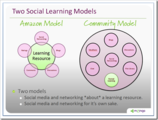
As a follow on to the discussion of social learning and formal learning in Long Live … great post by BJ Schone - Have LMSs Jumped The Shark? I constantly hear people (across many organizations) complain about their learning management system (LMS). They complain that their LMS has a terrible interface that is nearly unusable. Upgrades are difficult and cumbersome. Their employees’ data is locked in to a proprietary system. Users hate the system. It’s ugly. (Did I miss anything?) We’ve recently seen LMSs shift to include more functionality, such as wikis, blogs, social networking, etc. I think they’re heading in the wrong direction. I don’t really understand why LMS vendors are now thinking they need to build in every possible 2.0 tool. If I want a great blogging platform, I’m going to download WordPress (it’s free and has a huge support community). If I want a great wiki platform, I’m going to download MediaWiki or DokuWiki (also free and they have huge support communities). And when it comes to social networking, as a co-worker put it, "Do they really think I’m going to create a ‘friends’ list in the LMS? Seriously?" I've wondered the same thing. Mzinga seems to have jumped out early with a strong social platform that also has an LMS capability. But there does seem to be a difference between what you expect with an LMS and what you expect from your social learning / work platform. Dave Wilkins from Mzinga talks about the two models of social learning as depicted by the diagram on the right. There's social learning wrapped around the formal learning resources. He calls it the Amazon model with the learning being like a book. Lots of stuff wrapped around the book on Amazon. Then there's a model when the community is first and foremost and the formal learning is part of this overall model. BJ's point is that trying to get people to spend enough time in the LMS so that you have a vibrant social learning community is problematic. We will see some level of social interaction going along with a formal learning event. But you really are much more likely to success when the social tools are the same tools that will exist beyond the formal learning. And I don't think that many of us expect our LMS vendor to provide the solution that organizations will adopt more broadly. Thus, the question … Why aren't the LMS vendors looking at deeper integration with other offerings? In some ways they are. SharePoint and LMS seems to be a more common discussion: SharePoint and the LMS - Time to Converge? Increased Interest in SharePoint as a Learning Technology Extending elearning? Likely this is the beginning of a wave of this kind of approach. eLearning Technology
Browse eLearning Content
Tony Karrer
.
Blog
.
<span class='date ' tip=''><i class='icon-time'></i> Jul 14, 2015 02:08pm</span>
|
|
by Kevin Siegel
From a new user perspective, one of the major complaints about Adobe Captivate has always been its cluttered user interface. There are so many panels and toolbars in Captivate (and most are open and visible when the program starts), some people feel that the program is more difficult to learn than other tools like Articulate Storyline and TechSmith Camtasia Studio.
People using Captivate versions 5, 6, and 7 have the ability to undock most of Captivate's panels and move them around the screen. Users can also save the location of the panels as custom workspaces (via Window > Workspaces > New Workspace).
While being able to customize Captivate's workspace is great, if you aren't careful things can quickly become a hot mess. I can't tell you how many emails I get from developers who can't find this panel or that. In almost every instance it turns out they either closed the panel by mistake, or moved it to a second display and forgot.
You can easily reset a Workspace (Window > Workspace > Reset) and get every panel back to its default location. However, many developers (even some with plenty of experience using the tool), don't know about resetting a Captivate workspace.
When Adobe released Adobe Captivate 8, the interface was totally overhauled--and simplified. To prevent new users from getting overwhelmed by Captivate's many toolbars and panels, toolbars have been consolidated and most of the panels are closed by default. To keep the interface from getting cluttered, it's now impossible to undock the panels. And, for the ultimate in interface simplification, you can no longer create a custom workspace.
The simpler interface is great for new users. But what about veteran developers who are upgrading from a legacy version of Captivate? As a long-time Captivate developer, I'll admit that I had a hard time navigating the new workspace. And I was upset with Adobe for taking away my ability to create a custom workspace. I understand that a simpler workspace is easier for new users... but I want complex. Give me back my workspaces!
If you're like me and you're missing the ability to customize your workspace, you'll be happy to learn that the option is still available... you'll just have to activate it.
In the image below, you can see Captivate's Workspace menu. There's really only one menu item: Reset 'Classic.' If you choose the Reset 'Classic' menu item, the Timeline and the Properties panel will hide (which is the default).
If you'd like to create your own workspace, open Captivate's Preferences dialog box (Windows users, choose Edit > Preferences; Mac users, choose Adobe Captivate > Preferences.) Select Enable custom workspaces/panel undocking.
Restart Captivate and you'll find that you can now undock Captivate's panels and move them around your display (just like legacy versions of the program). And if you choose the Window > Workspace menu item, you'll see that you also have the ability to create a New Workspace.
If you tire of your custom workspace you can, at any time, return to Captivate's 'Classic' workspace (which will always be available in the Workspace menu).
***
Looking for instructor-led training on Adobe Captivate? Check out our live, online, instructor-led Captivate classes.
Icon Logic Blogs
.
Blog
.
<span class='date ' tip=''><i class='icon-time'></i> Jul 14, 2015 02:08pm</span>
|
|
CLICK HERE TO JOIN US!LEARNING INNOVATION CIRCLE (LIC) A passionate group of (top) educators from Malaysia and beyond, rethinking and transforming educational practices.The most notable contribution to be materialized up until today from LIC, is the ‘Learning Innovation Talks’ (LIT) series.LEARNING INNOVATION TALKS (LIT)The idea behind Learning Innovation Talks LIT is to organize 1-2 events per year, whereby educators can get together to share their learning and teaching innovations with one another in a more informal, relaxed, learning enriched, and innovative manner compared to traditional conferences and seminars. There is NO FIXED FORMAT, and it is up to the organizer to explore and innovate how sharing and learning should take place. LIT 01 - StoryUniversity of Malaya (7 March, 2012) LIT 02 - StoryTaylor's University (20 November, 2012) LIT 03 - Story (LIT 03 website)International Medical University (22 May, 2013)LIT 04 - StoryUNITAR International University (15 January, 2014)LIT 05 - 9 June (2015)CLICK HERE to register NOW!!!UNDER CONSTRUCTIONBesides LIT, LIC is becoming to life...LIC Website (Under construction)LIC Memberlist (Based on areas of expertise)LIC Introduction (Padlet)e-Book: Secrets Recipes to Engage (Learning)Can we inspire 10,000 passionate educators to join LIC by 31 December, 2016? Now that is a challenge worth pursuing :)
Zaid Ali Alsagoff
.
Blog
.
<span class='date ' tip=''><i class='icon-time'></i> Jul 14, 2015 02:08pm</span>
|
|
1- Impressions about Nexus 7, the new Android tablet by Google
2- Brief discussion about Android vs iOS
3- Google+ in the iPad
4- Apple iPad Mini 2012 rumours
5- Microsoft´s PC Plus era vs. Apple´s Post-PC
6- Thinking differently: the impact of the iPad
7- The mobile experience brought to the desktop
8- Nokia Lumia 900 is reduced 50%
9- Amazing Alex, the new game from Angry Birds creators, Rovio
10- Apps of the Week: SharePlus and Google+
Your browser does not support the audio element.
Podcast Powered By Podbean
RJ Jacquez
.
Blog
.
<span class='date ' tip=''><i class='icon-time'></i> Jul 14, 2015 02:08pm</span>
|
|
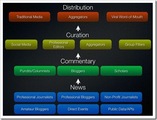
The post The Future of the News Ecosystem pointed me to the Stephen Johnson Picture shown above. While I don't necessarily believe that things are nearly so linear, it is a good picture of the kind of flow, enhancement, filtering that happens. This was great to see and think about with the launch of several new Topic Hubs: HR Tech Central Nonprofit Marketing Zone Green Life Buzz Southern California Tech Central Like earlier topic hubs, they rely on News from bloggers and web content from other sources as indicated by bloggers. The commentary layer is very light in that it only occurs as part of coming up with hot lists (Hot List) Curation is aggregation, group filter (social signals) and lightweight editing (selection). There's definitely an open question of what makes sense in what case as described in Aggregation Types. In these we consider some of the differentiation among the various forms of aggregation: Centralized content or distributed content. Do they pull all the content into the central site or leave it distributed on the original source? Organization and Access - how do they organize the content. Human tagging? Automated? How do you access it? Editorial Distribution - Single person, small group or widely distributed control of what comes in and what is best? In this case, it considers different forms of distribution separate from the forms of curation. I'm going to need to think through how to best categorize this, but I like the picture. While I'm on it, great post - Feed Standardization Will Commoditize Feed Aggregation, So Let’s Create The Semantic Web! by Nick O'Neill. While he's talking primarily about feeds of updates, e.g., facebook, twitter, friendfeed, etc., I think this applies pretty well to aggregation more generally: As we move toward a standardized way of presenting feed stories to aggregators, the value provided by the aggregators is essentially commoditized. At the end of the day, value is maximized through more efficient custom filtering services that the users can participate in creating. Participate is somewhat a loaded term. Really participation can be automatic or manual. But the point that part of filtering can be based on user activity is a good thing to consider. What's missing from the picture above is the consumption side of things. Part of consumption is likely personal filtering as well. eLearning Technology
Browse eLearning Content
Tony Karrer
.
Blog
.
<span class='date ' tip=''><i class='icon-time'></i> Jul 14, 2015 02:08pm</span>
|
|
CLICK HERE (to view webinar recordings and download presentation slides.)The first MOOLIT ever! Massive Open Online Learning Innovation Talks!LITThe idea behind Learning Innovation Talks (LIT), is to empower and organize F2F or online events, where educators get together to share their learning and teaching innovations with one another in a more informal, relaxed, learning enriched, and innovative manner compared to traditional conferences and seminars (F2F or Online). There is NO FIXED FORMAT, and it is up to the organizer to explore and innovate how sharing and learning should take place.Learning Innovation Talks (LIT) history:OriginLIT 01LIT 02LIT 03LIT 04WEBINAR RECORDINGSRefer to LIT05 programme below for details for each recorded webinar session (Click on each session to view):Session A (9:00 - 10:45) Session B (11:00 - 12:30)Session C (14:00 - 16:00)LIC The Learning Innovation Circle (LIC) is a passionate group of (top) educators from Malaysia and beyond, rethinking and transforming educational practices. Click here to join us... The latest updates regarding LIT05 can also be found on LIC!E-CERTIFICATE CLICK HERE If you want to download presentation slides from all the LIT05 speakers (login required), or want to complete the LIT05 (OpenLearning) course to achieve the e-Certificate (by doing the learning activities, too).LIT05 turned out to be enriching and inspiring online seminar with tons of tips and wisdom on how to design engaging and innovative learning experiences using various tools and methods :)
Zaid Ali Alsagoff
.
Blog
.
<span class='date ' tip=''><i class='icon-time'></i> Jul 14, 2015 02:08pm</span>
|
|
by Jen Weaver
Ah, Greece. Financial troubles aside, this country is known for fantastic food and beautiful Mediterranean beaches. Kick back at your desk with some fresh olives and feta as we explore common cultural facts about the Greeks and their expectations when it comes to training and development.
Test Your Knowledge of Greek Culture
What board game is considered a national pastime?
True or False. Aristotle was Plato's teacher.
Quick Tips for Training & Development in Greece1:
Greeks tend to be physically and emotionally demonstrative. It's customary to hug, kiss, or show other signs of physical affection to friends and loved ones in public. Don't be surprised if your Greek counterparts breech your personal space bubble.
Surprise, surprise, Greek is the official language in Greece and is written in the Greek alphabet. Romanian, not English, is the second most commonly spoken language, so be sure to come prepared with translated materials--and likely an interpreter--when training in this culture.
For business meetings, it's ideal to have your business card translated, English on the front, Greek on the back, and present it to your counterpart with the Greek side facing up.
Objective facts will not take precedence over subjective feelings or ideological beliefs. As such, it's important to establish relationships before attempting any negotiations or drastic changes within an organization. Group consensus is huge in this culture.
An individual's social position gives security and structure to the individual, so be mindful of social cues in public interactions or business meetings. For example, the senior members of a group are typically afforded higher levels of respect and are served first at meals.
It is not necessary to set an ending time for appointments as it's considered more important to complete the objective or build a good connection than to end the meeting promptly. Always arrive on time for meetings, but your Greek counterparts will likely have a more relaxed view of punctuality.
Older generations of Greeks signify "no" with an upward head nod. This can be confusing as many members of the younger generations have started using the American head movements to indicate "yes" and "no." When in doubt, clarify their response.
Answers to the Questions from Above:
Backgammon.
False. Plato was Aristotle's teacher.
References:
1Morrison, Terri, & Conaway, Wayne A. (2006). Kiss, bow, or shake hands (2nd ed.). Avon: Adams Media.
***
Developing international training and development materials? Contact Jen at Carmazzi Global Solutions.
Icon Logic Blogs
.
Blog
.
<span class='date ' tip=''><i class='icon-time'></i> Jul 14, 2015 02:08pm</span>
|
|
Is SILO the new four-letter word among struggling companies? Today's guest blog post is written by BizLibrary Learning Consultant Nathan Dampf. As a member of the Missouri Air National Guard, Nathan understands the importance of teamwork, collaboration, and breaking down communication barriers. When looking up the term silo in the dictionary, one may find a reference to the noun "a tower or pit" or "an underground chamber for a missile." However, also included is the verb, "to isolate." Many business leaders within the United States are commonly using the term silo to describe departments that operate within the organization. They are "pits" of knowledge, not letting that knowledge out. Some leaders comment that other departments are housing "missiles" to bring down other departments. In business, the term silo is used to describe the "isolation" of different departments within an organization that should be working toward a common goal. The business impact of silos can be disastrous. But, if leaders and trainers can drive teams, collaborate on projects and empower employees, organizations will reap great dividends. They will experience increased knowledge and camaraderie among the business entities. "As an executive or manager, if you micromanage and focus only on your specific tasks, your team will reflect and replicate that type of work environment, which can easily bore people," said Brad Smith, executive vice-president of business management firm Sage North America. "Keep people from falling into their own silos." To avoid such silos, Smith recommends holding regular meetings to keep teams up-to-date on activities and broad company goals. He also discusses the need for fun, engagement and empowering employees. He provides an example from his son’s work experience at Home Depot. "After cashiers worked at the store a certain period of time, managers gave them a $250 customer credit per shift to use at the cashier’s discretion," said Smith. "In empowering cashiers to make their own decisions about how to allocate the refunds to customers - to right wrongs or simply further delight a happy customer - Home Depot demonstrates their trust in their employees." Smith also discusses the importance of leaders who stress goals and the relevance of those business goals to the employee’s role in the organization. Other consultants agree. "A well-defined strategic plan outlining the purpose, values, goals and objectives of the team becomes the glue that binds the group together and helps transform them into a team," said Jim Sisson, principal of a management consulting firm. "Without purpose and goals, you cannot build a team. The purpose must be worthwhile and create a sense of doing something important together." Sisson states there is a big difference between leading groups (silos) and teams. "A group is a collection of individuals who coordinate their individual efforts," said Sisson. "On the other hand, a team is a group of people who share a common team purpose and a number of challenging goals. Members of the team are mutually committed to the goals and to each other." The communication of these goals is a vital component in establishing SMART goals. If a goal is relevant (R of SMART) to the mission of the organization and that relevance is explained to the employees, those employees will feel a sense of purpose that will result in more work getting done, says Smith. In addition to empowering employees and explaining relevance, businesses should also encourage collaboration among teams. Social collaboration technology revenues have increased 12 percent since 2013, writes Adrian Bridgwater, columnist for ComputerWeekly.com. "A few years ago firms were riding the social enterprise wave, says Huddle CEO, Alastair Mithcell. Standalone social tools promised to connect workers, enabling them to collaborate, unlock silos of knowledge, and by doing so, boost productivity and efficiency," Bridgwater writes. "By bringing together social interactions and business content, real work gets done faster." BizLibrary has a resource that encourages such behavior and collaboration. Community was never intended as a product, but as the leadership within BizLibrary witnessed collaboration and efficiencies internally, the product was enhanced and made available for clients. Such a tool can be helpful to any BizLibrary client working to "breakdown the silos" within their organization by encouraging communication, fun and effectiveness. In the end, the breaking down of silos can be done by implementing the "Three E Strategy:" Encourage Collaboration Explain the Purpose Empower Employees with Trust If you are experiencing these issues within your organization and would like to implement a strategy to "breakdown" your company’s silos, please click the link HERE and we can discuss a plan together.
Chris Osborn
.
Blog
.
<span class='date ' tip=''><i class='icon-time'></i> Jul 14, 2015 02:07pm</span>
|
|
I love Mobile and everything that it represents. I like the physicality of touch, the idea that nothing gets in the way of me and my content, no keyboard, no mouse, no stylus, no usb ports for a microphone or webcam to connect to, nothing but touch. I enjoy the simplicity of mobile. Some of my favorite apps, such as Clear, Snapguide and Snapseed have one thing in common, they are simple, innovative and yet they do amazing things without much effort from me.
The Mobile Effect
I was thinking about how my own experience with mobile since my first iPhone and later the iPad and all the other devices I’ve owned since, have impacted me in a big way. I no longer look at desktop computing experiences in the way I did before, my expectations for desktop software have completely changed, perhaps this is why I’m so critical in my reviews of software applications, maybe it is because as mobile users we are beginning to expect so much more from vendors of software apps we use every day.
I suppose you can say that I think "mobile-first" and everything else, including desktop-second. This is why I’m a big fan of Luke Wroblewski’s book entitled Mobile First. I have read this book several times and I highly recommend you do too, especially as you think about your own mobile and mobile learning strategy moving forward.
There’s so much to like about this book on the mobile-first movement, but here are 10 lessons I personally found applicable to all of us in mLearning:
Lesson 1: The Future is Mobile and Mobile Learning — Hopefully you aren’t too surprised by this truth but it’s worth mentioning it. We can argue when this whole mobile revolution started and while I realize that before the iPhone existed, there were certainly a kind of ‘smartphones’ available, I would argue that it wasn’t until 2007 when Apple announced the first iPhone and later the App Store, that we actually began to see the potential and impact mobile would have on our generation. Since then mobile devices and Apps have only gotten better, faster and more innovative, and if there’s something the App development community has shown us, time and time again, is that mobile offers new possibilities never possible on PCs. And this precisely how we should think about mLearning as compared to eLearning. When you read Luke’s book you will find lots of statistics that prove this fact.
Lesson 2: We are just getting started with mobile and mLearning — Despite all the advances we have already made in mobile in a fairly short period of time, ask anyone in the field and they will tell you we are just barely scratching the surface of what’s to come. Amazing right? This is why I’m so excited about what the next few years will bring us and you should be too. This is why if you are an Instructional Designer and you haven’t paid much attention to mLearning, you need to start now. Mobile is the future and we must to be part of it. For starters, you need to become a mobile user if you aren’t already, you need to understand the mobile experience before you can start thinking about delivering the next generation of learning experiences through mobile devices. Again Luke provides great examples of what we have today and other things we can expect in the near future especially around what mobile browsers need to support in comparison to native apps.
Lesson 3: It’s important not putting Limits on mLearning — I completely understand why it’s easy to look at mLearning today and want to assign specific learning tasks to it, such as performance support and job aids for example, but I think it’s too early to start limiting mLearning to just these obvious applications. Having said that, I agree with Luke’s view of what mobile devices capabilities allow you to do:
"reinvent ways to meet people’s needs using exciting new tools that are now at your disposal."
In other words, it is still early and the future of mLearning hasn’t been invented yet.
Lesson 4: mLearing has vastly more potential than eLearning — I am fully convinced that when you couple the mobility and physicality of mobile, with all the other sensor superpowers inherent in mobile devices (i.e. digital compass, gyroscope, audio, dual cameras, bluetooth, proximity, etc), we will actually create better learning experiences on mobile as compared to what we have today through desktop eLearning. I recommend you hold weekly brainstorming sessions with your teams, where you start to reimagine your learning on mobile devices.
Lesson 5: Thinking Mobile-first forces you to focus and prioritize — This is an important lesson for all of us transitioning from eLearning, where we have big desktop screens, over to designing for the smaller mobile screens, where screen real estate is at a premium. However as Luke says, this is a great challenge and something we need to build on. When you have a limited Canvas to work with, you prioritize and get down to what’s really important for your learners and there’s no room for all the extra fancy stuff you currently have in your eLearning courses today. I personally think that one of the biggest challenges we will have in this transition will be embracing simplicity, and letting go of all those bells and whistles we have in our eLearning courses today. As Luke says in his book, when designing for the small screen:
"there simply isn’t room for anything else."
Lesson 6: Thinking Mobile-First makes Desktop eLearning better — This is a continuation of the previous lesson. Thinking mobile-first makes you not only focus and prioritize in order to decide what’s important, but also gives us an opportunity to rethink what we are doing today and how we are delivering our eLearning experiences. I guarantee you that if you spend some time doing this exercise with your team you will start looking at eLearning design differently, and you will most likely find places where you can simplify things and your learners will love it for it. In his book, Luke has great examples of companies like Southwest, Flickr and ESPN that benefited from thinking mobile-first and desktop-second. I also agree with Luke, in that when designing for mobile we keep in mind that:
"users want immediate answers to their needs. Time is precious on mobile." He goes on to say that when we need to do everything possible in order to "speed things up and reduce people’s monthly carrier bills."
Lesson 7: Avoid thinking Desktop-first and Mobile-second — The problem I see with this backward way of thinking is that we will end up adopting HTML5 conversion tools, that promise to simply ’shrink‘ our eLearning in order to make it available on the iPad. This is simply wrong for so many reasons, which I previously blogged about. Mobile offers an opportunity for all of us to think different, to hit the reset-button if you will, and thus I strongly recommend you don’t buy into this conversion-to-HTML5 hype. Here’s what Luke says about this in his book about this:
"simply porting over what worked for you on the desktop to mobile often doesn’t make sense. Instead, you need to think about what mobile is uniquely good at and align it with the needs of your customers."
Lesson 8: Go small by going Big — This is a continuation from my last lesson learned, where I advice against shrinking your desktop content for the smaller screen via HTML5 conversion tools. In fact, I very much agree with Luke, who says that when thinking mobile, we should "go small by going big." I personally think that one of the biggest technical differences between eLearning and mLearning is that eLearning was created for that very tiny mouse pointer, while mLearning requires a much bigger touch target for our fingers. This minor, seemingly insignificant difference changes everything in terms of design, and it’s yet another reason why ‘one size does NOT fill all‘ in eLearning and mLearning. Take Microsoft’s design guidelines for their Windows Phone 7 platforms for example, which recommends that each touch target be at least 9mm in size and that there be at least a 2mm space between actions.
Lesson 9: Don’t wait until your ready for mLearning, think mobile-first now — Here’s what Luke says about thinking mobile-first now:
"In fact, there’s enough benefits to a mobile first design approach that it’s worth thinking about even if you don’t have immediate plans to ship a mobile experience."
I completely agree in that we need to start thinking mobile-first and everything else second now. I have been doing consulting with companies for a few months now, and my advice to every company is for them to start thinking mobile-first even if they don’t have immediate plans to deliver learning through mobile devices. Whenever possible the eLearning UIs I submit to these companies as prototypes have areas where I get my inspiration from mobile and I always get good feedback, mostly likely because just about every eLearner is familiar with mobile applications. I will share some of these in future posts. My point is that you shouldn’t wait until your boss comes to you and say we need a mobile learning strategy, start thinking mobile-first now and become a mobile user yourself now. By doing so, as I said above, you desktop eLearning will also improve.
Lesson 10: Embrace mobile constraints — And last but certainly not least, in my opinion, Mobile represents the biggest paradigm shift in the history of computing and as such, the transition is not going to be an easy one for any industry, including ours. There are lots of constraints we will need to deal with, but as I wrote in my previous post on Why the iPad and iPhone not supporting Adobe Flash is a Great thing for #mLearning, these shortcomings "force us to find new ways of developing learning experiences for mobile users, as well as to embrace new technologies, such as HTML5 and new principles, such as Responsive Web Design and thinking mobile-first." In other words, this change will get us out of our comfort zone and in a way force us to innovate, and that’s a great thing. In closing, here’s one of my favorite quotes from Luke’s book:
"Designing for mobile isn’t just about embracing limitations, it’s also about extending what you can do."
Final Thoughts
I highly recommend this book to anyone interested in mLearning and mobile in general. As always, thanks for reading and sharing this post, and please let me know what you think of my thoughts around this book and about thinking mobile first in mLearning. You can find this book, Mobile First, here.
RJ Jacquez
.
Blog
.
<span class='date ' tip=''><i class='icon-time'></i> Jul 14, 2015 02:07pm</span>
|