Blogs
|
There’s no other Industry in the world that was more affected by Apple refusing to embrace Adobe Flash in their iOS devices like the eLearning Industry.
I don’t have the exact numbers but I would venture to say that more than 98% of all eLearning was/is based on Adobe Flash (i.e. the learner needs to have the Flash Player installed) and thus making it an interesting challenge for our Industry to make the transition to mobile learning (mLearning), especially because of the market share that Apple commands with the iPad and the iPhone.
When I worked at Adobe, the question I most frequently heard from my customers was: how can we make our existing eLearning projects play on the iPad?
I have been and continue to be a big fan of Flash from my days when I worked at Macromedia and more recently at Adobe and was pretty ticked off when Apple posted Steve Job’s Thoughts on Flash.
However for a while now, I have been thinking that in some strange way this move by Apple turned out to be a great thing for all of us in eLearning and more specifically as we transition to mLearning.
Let me explain.
The way I see it, if Apple had embraced Flash on iOS devices, all of us in eLearning would have been in a very comfortable situation and would have simply kept doing what we were doing publishing to Flash and called it a day.
But what about the experience for mobile users?
By doing so, I believe we not only would have defeated the purpose and uniqueness of mobile but we would be doing a disservice to our learners on mobile, too.
Why? because the Mobile experience is drastically different in virtually every way to the Desktop experience and as such, learning on mobile should too be different from how we consume learning on the desktop.
This is why I strongly believe the lack of Flash on iOS devices is a blessing in disguise, because it forces us to find new ways of developing learning experiences for mobile users, as well as to embrace new technologies, such as HTML5 and new principles, such as Responsive Web Design and thinking mobile-first.
Can we make a successful transition from eLearning to mLearning without Adobe Flash? Absolutely we can.
We just need to think outside the eLearning box and embrace new ways of thinking about engaging mobile learners. We need to stop thinking that we all we need to do is convert our desktop eLearning to HTML5 and we are done. We need to get out of our comfort zone and explore mobile applications and learn about what these apps do well and apply these principles to our mLearning design. We need to explore other industries such as web design and new movements around it such as Responsive web design and learn how these principles are being used to develop once and deploy the same content across desktops, smartphone and Tablets without plug-ins.
So there you have it. I invite you to stop dwelling on whether or not Flash will ever work on iOS devices (in my opinion it never will) and start brainstorming on how we can deliver better learning experiences to our mobile learners. Because the mobile revolution is real and we are at a point of no return!
Do you agree?
RJ Jacquez
.
Blog
.
<span class='date ' tip=''><i class='icon-time'></i> Jul 14, 2015 02:27pm</span>
|
|
Written by Jessica Batz View and download the webinar slides. View the webinar recording. Compliance Training: Key Strategies to Get Your Employees More Engaged. Webinar 04.09.14 from BizLibrary
Chris Osborn
.
Blog
.
<span class='date ' tip=''><i class='icon-time'></i> Jul 14, 2015 02:27pm</span>
|
|
by Kevin Siegel
Adobe last week announced Adobe Captivate 8, a significant upgrade to one of the top eLearning development tools in the world.
Over the past few years I've repeatedly heard a couple of complaints about Captivate. First, it was perceived as difficult to use. There were so many panels, pods, and toolbars it didn't take too much effort for the Captivate workspace to get cluttered. Sure it was possible to create a custom workspace, but that didn't seem to matter. The fact that a panel could be accidentally moved from one part of the screen to another was causing all kinds of drama.
Another major complaint was Captivate's lack of support for mobile users. You could publish a Captivate lesson as HTML5, but the way a lesson looked when viewed on different screen sizes wasn't something a developer could control.
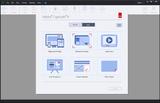
Captivate users will be happy to learn that both major pain points have been addressed with Captivate 8. Shown below is the Welcome screen you will see when you first start Captivate 8. There are two tabs, Recent and New. After selecting New, you'll find the usual suspects including Software Simulation, Video Demo, and From PowerPoint. You'll also see a brand new... and very awesome... option for creating Responsive Projects (something I'll cover in a future post).
If you're a veteran Captivate user, you'll notice right away that in addition to the Welcome screen getting a nice redesign, there is no longer a check box in the lower left to permanently hide the Welcome screen. This may not seem like a big deal, but I can't tell you how many times I've heard from people using Captivate 7 and older who tell me that the Welcome screen is missing. It turns out that they've accidentally hidden the Welcome screen. And while it's easy to bring it back, I'm delighted to see that since it cannot be hidden that issue is gone.
You'll be happy to learn that projects created in Captivate 6 and 7 will open in Captivate 8, and those projects willautomatically be upgraded to version 8. However, once upgraded, Captivate 8 projects will not open in older versions of Captivate. Prior to upgrading, I suggest that you make backups of your legacy projects just in case you need to open them in the older versions of the software.
After creating a new project or opening an old one, your next discovery will be the clean Captivate 8 interface.
At the left is the familiar Filmstrip; in the middle is the stage (or slide... call it what you like). There's no Timeline, no Properties Inspector, no Library. There's no clutter at all.
Of course, the missing panels are critical to your success in Captivate so you'll need to be able to open them. Take a look at the bottom of the Captivate window and you'll see the wordTimeline. One quick click on the word and the Timeline opens at the bottom of the Captivate window.
Look in the upper right of the Captivate window and you'll find buttons that will show or hide both the Library and Properties Inspector.
You'll notice that you can open the Library... you can open the Properties Inspector... but you can't open them both at the same time. And you cannot drag panels around your screen like you could in legacy versions of the software. If you're a workspaces junkie, you're also not going to like the fact that you cannot create workspaces. No kidding. Visit the Window menu and you'll find Workspace > Reset Classic, but that's it. There's no menu item for creating a new workspace. Okay, so losing the Workspace feature is a bummer. But if you're really missing this feature, I've got good news. Visit Captivate's Preferences (Edit menu for Windows users; Adobe Captivate menu for Mac users) and you'll find an option to Enable custom workspaces/panel undocking.
Turn that option on, restart Captivate 8, and you'll be able to both drag panels around your screen and create custom workspaces.
***
Looking for instructor-led training on the top eLearning tools? We offer live, online training on Adobe Captivate, Articulate Storyline, Adobe Presenter, and TechSmith Camtasia Studio.We can also bring the same great training onsite to your facility. Interested? Contact us for details.
Icon Logic Blogs
.
Blog
.
<span class='date ' tip=''><i class='icon-time'></i> Jul 14, 2015 02:27pm</span>
|
|
IMEC 2014The International Medical Education Conference (IMEC) held on 11-13 March (2014) is a forum for forging and renewing friendships between educators of healthcare professions from around the world; a platform to exchange ideas and experience and showcase innovations (IMEC history).Besides being part of the organizing committee, I will be facilitating one half-day workshop, too.Please, use the #IMEC14 Twitter hashtag to keep yourself updated about the conference as it unfolds from 11-13 March, 2014. WORKSHOPThe half-day workshop, I am facilitating with Hasnain Baloch is entitled 'Collaborative Web Tools to Empower IPE' (Inter-Professional Education). During the workshop, participants will explore various web tools to encourage IPE communication and collaboration with a focus on Google+ tools to empower collaborative learning environments, Facebook to create closed Groups, and use Twitter and Twitter #Hashtags to connect interest groups to share and discuss. PRESENTATION SLIDESHere we go: Collaborative Web Tools to Empower IPE at #IMEC14! from Zaid Alsagoff MORE?This post will be updated further during IMEC 2014. Can't wait to learn more :)
Zaid Ali Alsagoff
.
Blog
.
<span class='date ' tip=''><i class='icon-time'></i> Jul 14, 2015 02:27pm</span>
|
|
Great article in Wall Street Journal - Information Wants to Be Expensive (found via Big Dog Little Dog) suggests that more people should be charging for content online. There was definitely some good points about what people will pay for:People are happy to pay for news and information however it's delivered, but only if it has real, differentiated value. Traders must have their Bloomberg or Thomson Reuters terminal. Lawyers wouldn't go to court without accessing the Lexis or West online service....For years, publishers and editors have asked the wrong question: Will people pay to access my newspaper content on the Web? The right question is: What kind of journalism can my staff produce that is different and valuable enough that people will pay for it online?...American Lawyer founder Steven Brill argues that "local newspapers are the best brands, and people will pay a small amount to get information -- whether it be a zoning board or a Little League game -- that they can't get anywhere else."So people will pay for differentiated, quality content that they can't get anywhere else.Journalists as Human AggregatorsAs part of working on Topic Hubs, I've come to realize that there's a lot of very high quality content already out there. It's free. But there's friction finding it, organizing it and making sense of it.Many of the people who write the blogs who are included in Topic Hubs are the same people who are being interviewed by Journalists for articles. Take a look at the recent hub around Electric Vehicles. This includes folks like Chris Paine - Who Killed the Electric Car - who is regularly interviewed. In thinking about this, I realized that:Journalists are human aggregators.They go look at the information, often in areas they don't understand that deeply and pull it together into a meaningful piece. They are quite good at this aggregation role. And no current automation is able to produce as high a quality result as a good journalist. But ...The information behind the article that a journalist produces is already available for free somewhere.There are cases (the local little league game) where no one else has captured that information or where the journalist truly creates something new. But it's like the old adage ...In order to bake a cake from scratch, you first have to create the universe.It's pretty rare to be working on truly new, differentiated, high value content. Most of what we work with are derivatives. I think of everything I'm writing now as being new - because it's new to me - but I'm sure that there's discussion of all of these issues out there somewhere.AggregationIt's pretty rare when I disagree with Stephen Downes, see Stephen Downes is Wrong. But he left a comment on my Topic Hubs post:Topic hubs are not the way forward. Focus on being a network, not being spikey.I found this to be quite interesting. I think of Stephen as being one of the biggest topic hubs out there. His OLDaily is Stephen doing amazing things by finding interesting articles and tagging them; he also has technology that pulls it together and organizes it. This helps to make sense of a large network of bloggers and other information sources and organize it for consumption by folks like me who are not going to subscribe to all of those blogs individually. He also helps to organize the information for you via tags that allow you to find stuff on topics at a later time.I think that Stephen provides tremendous value on top of a network (and is part of the network himself). And I guess I think of him as a human-centric aggregator. Maybe a better term is provided by Robin Good - he calls this - NewsMastering.Newsmastering is the process by which a human being identifies, aggregates, hand-picks, edits and republishes a highly-focused, thematic news via RSS. It's interesting to see the term "human being" - both human and singular.I believe that Topic Hubs like eLearning Learning, Mobile Learning, Informal Learning Flow, Communities and Networks Connection provide a similar kind of value as Stephen and Robin - but attack it differently. In this case, social signals (human activity across the network) surface posts such as shown in eLearning Learning Hot List Feb 1-14, Work Literacy Hot List - Early February, Hot List from the Communities & Networks Connection, Mobile Learning Hot List.Each of them combines human decision making about what should be brought in (Thanks Judy, Nancy, Jay) and social signals, activities across the network - thanks everyone!, to determine what's likely good stuff. This relies much more on automation and doesn't have the editorial that Stephen or Robin provide. There certainly is a difference when you have a single individual (or small group) providing editorial control. Robin puts it this way:The real added value is specifically in the ability of the newsmaster to manually pick the very best and most relevant stories for its target audience.You can argue that none of the information provided by a Topic Hub is new. However, it is new in that it provides value on top of existing information much like Stephen's OL Daily and a journalists article. They use different methods to surface what's interesting or relevant. They create additional information and structure on top. And there's value in that additional information and structure.Aggregation TypesAs I'm thinking about this, there's likely a few different forms of aggregation implied by looking at systems like Social Media Today, OLDaily, Communities and Networks Connection, Techmeme, Sphinn and Digg.Centralized content or distributed content. Do they pull all the content into the central site or leave it distributed on the original source?Organization and Access - how do they organize the content. Human tagging? Automated? How do you access it?Editorial Distribution - Single person, small group or widely distributed control of what comes in and what is best?Each of the different approaches has a reason and rational. I look forward to trying to figure out what makes sense in what situations. eLearning Technology
Browse eLearning Content
Tony Karrer
.
Blog
.
<span class='date ' tip=''><i class='icon-time'></i> Jul 14, 2015 02:27pm</span>
|
|
Employee training is fluid, dynamic and complex - which is why competency-based training is a more important strategic component of today’s employee learning strategies. Written by Jessica BatzEmployee training is fluid, dynamic and complex - which is why competency-based training is a more important strategic component of today’s employee learning strategiesEmployee training is fluid, dynamic and complex - which is why competency-based training is a more important strategic component of today’s employee learning strategies View and download the webinar slides. View the webinar recording. TO DOWNLOAD THE SAMPLE COMPETENCY AND SUPPORTING BEHAVIORS JOB AID SHARED DURING THE WEBINAR, CLICK HERE (excel file). How to Create a Competency-Based Training Program. Webinar 04.09.14 from BizLibrary
Chris Osborn
.
Blog
.
<span class='date ' tip=''><i class='icon-time'></i> Jul 14, 2015 02:27pm</span>
|
|
There’s no denying there’s a revolution happening today in Education driven by important trends such as the Flipped Classroom, Bring Your Own Device (BYOD) and of course schools embracing mobile technologies creatively for learning.
These trends in Education are bringing about major innovation from many companies that are committed to revolutionize learning for our younger generations.
There are many great Apps out there from companies who are disrupting Learning and Education in a positive way through the use of Technology.
One such App is NearPod, from a company called Panarea Digital, and this week I had the opportunity to interview Guido Kovalskys (@GuidoNearpod) about it.
The company describes NearPod as "an all-in-one solution for the synchronized use of iPads in the Classroom," but in testing it myself and in talking to Guido about it, I actually think this definition does not do justice to all the great things NearPod enables Educators to accomplish in the classroom.
There are two free NearPod apps that you can download today from the Apple App store, one called NearPod Teacher for Educators and one for students, called NearPod Student.
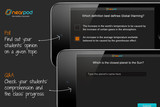
The Teacher uses a cloud service by login in to http://new.nearpod.com/ in order to create presentations loaded with interactive features, such as quizzes, polls, videos, sketching tools and more. Any of these presentations can be shared in the classroom with the students in real-time and this is where the fun begins.
The connection between the Teacher and the students is done via PIN number and once everyone has joined the NearPod experience, the Teacher begins to share content with the class in real-time. For example, the Teacher can share a quiz or a poll and receive immediate feedback as students submit their answers. Here’s a great video I found on Vimeo that explains this process well:
One thing I learned in talking to Guido is that NearPod isn’t limited to all students being on the same Wi-Fi network, so for example the Teacher can post the PIN number via an internal board and then students can enter the PIN number and download the presentation with all of its interactivity prior to the classroom in order to maximize the time in the classroom.
In fact, during our Interview you will notice that Guido shares a PIN number for me to enter as he guides me through it while we talk about what he sees as the Teacher and what I see using the NearPod Student app. The interesting thing is that Guido was in Brazil at the time of the interview and I was here in San Diego, CA, and as you can hear in the interview, there’s no delay whatsoever.
If you are in Education and are looking at a way to creatively leverage iPads and iPhones in your classroom, in order to engage your students, I highly recommend you take a look at NearPod.
Having said that, I started a new Podcast entitled ‘Learning Apps with RJ Jacquez‘ where I will interview pioneers in this space, who are disrupting Learning and Education in a positive way through the use of Technology.
You can subscribe to this Podcast on iTunes here and if you are a company that has an amazing Learning App I invite you to be part of this initiative by contacting me.
RJ Jacquez
.
Blog
.
<span class='date ' tip=''><i class='icon-time'></i> Jul 14, 2015 02:27pm</span>
|
|
by Jen Weaver
Many events in Egypt's history have had an impact on tourism, but your business needs may still require training and development in Egypt. Let's explore some common cultural facts about Egyptians and their expectations when it comes to training and development.
Test Your Knowledge of Egyptian Culture:
Is Arabic read from right to left or left to right?
True or False? Egypt is one of the most westernized countries in the Middle East.
The terms "Upper Egypt" and "Lower Egypt" are oriented to the flow of what famous river?
Quick Tips for Training & Development in Egypt1:
Never show the soles of your feet, as this is offensive to Arab culture. Be mindful of this when selecting images or when sitting in meetings. In westernized culture, sitting with your legs crossed is a casual and relaxed pose, but it's perceived as impolite in Egypt since the bottoms of your feet may show.
The left hand is considered unclean, so avoid gesturing with your left hand whenever possible, and always use your right hand when eating and handling "clean" objects such as offering gifts or exchanging business cards. The "thumbs up" gesture is also seen as rude.
The Islamic Sabbath is on Friday. The typical workweek runs Saturday through Wednesday. Be sure to clarify the class schedule when training in Egypt.
While Arabic is the official language, many executives speak English or French as well. Translation will likely be required for any in-country training materials.
The Islamic faith is the primary source of truth; then personal feelings or facts are considered. Be careful not to speak against the Islamic faith, as about 90% of the population is Muslim.
Family contributes to an individual's core identity, and Egyptians receive honor, dignity, and security through their family unit. These three values are highly respected in Egyptian culture, so be mindful of them to avoid embarrassing your contact and risking the relationship.
It's a common Arab business practice to keep foreigners waiting for meetings, especially since Egyptian culture does not value punctuality. It may be wise to either schedule only one meeting per day when first getting to know your Egyptian client or team, or allow a large buffer between meetings in case they are delayed. You will likely need an Egyptian agent to do business in Egypt who can also work as an advocate to help you navigate through your meetings.
Egyptian humor is often self-deprecating, but be careful not to join in. Only an Egyptian can make fun of Egypt.
Answers to Trivia:
Since Arabic is read from right to left, Arabic-language training materials start on the back page or back cover of the book unlike an English version. Make sure your handbooks or manuals have colorful illustrated back covers to engage readers.
True. Even so, business interactions with individual executives may range from westernized to traditional.
The Nile. Surprisingly enough, this puts Lower Egypt in the north of the country and Upper Egypt in the south on the Sudan border.
References:
1Morrison, Terri, & Conaway, Wayne A. (2006). Kiss, bow, or shake hands (2nd ed.). Avon: Adams Media.
***
Developing international training and development materials? Contact Jen at Carmazzi Global Solutions.
Icon Logic Blogs
.
Blog
.
<span class='date ' tip=''><i class='icon-time'></i> Jul 14, 2015 02:26pm</span>
|
|
TALK SHOWImagine if you could read a 200-page book in 20 minutes? In today’s information overloaded disruptive world driven increasingly by innovation, we are required more than ever to transform the way we learn and think in terms of speed and creativity. In this talk to IMU students (and anyone else interested), I will be exploring some of the things that we can do to stimulate and empower our brains and senses to be more focused, learn faster, and think more creatively.I will also be introducing a learning facilitation method called 'Talk Show' (New? Maybe, not sure!), which can make the learning process for especially large audiences more exciting and fun. This session won't be recorded, as this is the first time I am testing it out, and it might influence the students willingness to participate. Excited! More will be revealed in the coming days :)PRESENTATION SLIDESHere we go: Becoming Creative Super Learners at IMU! from Zaid Alsagoff This presentation only covers Level 1 of what a Creative Super Learner needs to master. Level 2 mastery skills are revealed here... Please, remember that these Creative Super Learning skills are chunked based on how I am planning to develop the program over the next months, and not based on difficulty level (e.g. Bloom's taxonomy) :)
Zaid Ali Alsagoff
.
Blog
.
<span class='date ' tip=''><i class='icon-time'></i> Jul 14, 2015 02:26pm</span>
|
|
A little more than a year ago, I published a post Touch Typing - Cursive Writing - Why? that asked why they would spend so much time teaching my kids cursive writing and not teaching them touch typing. The comment that I just received on this post was great and I couldn't let it be buried ...I am as perplexed as you why many schools do not see the need for students to learn how to touch-type. In my daughter's school, they spent time learning cursive and then were not required to use it except for limited projects. Are they expected to type their reports, though? YES...without learning how to type beforehand.I am a business teacher who has taught keyboarding in Grades 9-12 for many years and who taught keyboarding in Grades 3 & 4 for two years. Our school did not want to have to hire an extra teacher, so when a high school business teacher resigned, I was moved back to the high school and the keyboarding program was dissolved.My daughter is now in fifth grade in the same school district as I teach. It drives me crazy that the administration does not value proper keyboarding skills. In fact, our superintendent deleted keyboarding in Grades 9-12 WITHOUT placing it anywhere else in the district. He believes students do not need to spend a class period learning to "doink" on the keyboard.We teach students how to properly hold a golf club, football, tennis racquet and such...however, we do not teach them a skill that they use everyday of their life. It amazes me that more people are not outraged by this. However, many believe that people can learn to type their own way and that is sufficient.Within two years, none of my older kids are still using cursive writing. And now my youngest is about to go through learning cursive writing. I believe we have pretty good schools here, and I really like some of the things they do (writing starts immediately in elementary school). But this does make me wonder:Should I be outraged?And if I was outraged, is there actually anything that can be done if you believe things in schools should be changed? eLearning Technology
Browse eLearning Content
Tony Karrer
.
Blog
.
<span class='date ' tip=''><i class='icon-time'></i> Jul 14, 2015 02:26pm</span>
|