Blogs
|
View and download the webinar slides. View the webinar recording. Sink or Swim? Supporting the Transition to New Manager - Webinar 03.27.14 from BizLibrary
Chris Osborn
.
Blog
.
<span class='date ' tip=''><i class='icon-time'></i> Jul 14, 2015 02:29pm</span>
|
|
by Kiranmayee Pamarthy
Documentation projects are usually time limited, but the products they create need regular, ongoing attention to work correctly without becoming obsolete.
In many organizations, the project team, which has seen the project through to completion, may continue to have responsibility for the final product post delivery. What is the impact of such maintenance projects on planning documentation activities? And how should the project team approach such documentation maintenance projects?
We always get to hear or read about how to create documentation from scratch, where we have the freedom and capacity to change anything, and we have little dependency on the technical team. None of these perceptions are true when we deal with documentation maintenance projects. Many times, such projects need to be completed in a very short time. They generally need immediate action, quick revisions, and quality output that satisfies the customer.
We need to realize that documentation is an integral part of the post delivery phase of a project, and keep in mind that we must do the following:
Be aware that different types of documentation may need to be prepared for different customers of the same product.
Don't wait to create and maintain documents until after the lack of documentation has hurt the project.
Closely monitor the post-deliverable phase and plan for subsequent releases.
Use the IDEAL model: Identify, Diagnose, Establish, Act, and Leverage.
Maintenance projects can involve any or all of the following:
adding or removing functionality and content.
revising the layout, i.e., moving pages or whole sections to a different location in the document.
reconfiguring the whole product for a particular customer.
changing an existing functionality.
The documentation maintenance process should be viewed as iterations of any development effort.
Maintenance Release Types
Error correction: correct faults in a delivered system. Documents need to reflect change requests from customers or from the testing group.
Enhancement: improve performance or add new functionality. Document activity needs to begin very early in these types of changes since it will involve planning and deployment of additional resources. This includes roll-forwards from previous maintenance releases.
Mixture: a combination of error correction and enhancement.
Adaptation: adapt the system to a new environment.
The documentation may need to reflect error correction, enhancement, or a mixture of these. It is likely that more time will be spent on enhancement releases than on error corrections. It is always vital to plan the next documentation release so as to maximize the efficiency of resources and also improve quality of the document. Thus, it is very important that the documentation team is involved from the initial phase of maintenance releases.
Icon Logic Blogs
.
Blog
.
<span class='date ' tip=''><i class='icon-time'></i> Jul 14, 2015 02:29pm</span>
|
|
1- Highlights of the week
a- Facebook went public.
b- Some comments on #Talktech and its interesting approach to Twitter chats.
c- Next week, a team from Project Tin Can will be the first guests of "This Week in mLearning."
d- Comments and reactions after Articulate Storyline review.
2- BYOD or consumerization of IT: Origins.
3- Benefits and drawbacks of this trend.
4- BYOD and social media within organizations.
5- How BYOD world relates to native apps and mobile web apps.
6- Survey "Dispelling 6 Myths of Consumerization of IT"
7- Article The real costs associated with BYOD: Are enterprises prepared? : Tips for developing a BYOD strategy.
8- What does this mean to eLearning developers?
9- Webinar "Learning Interactions On Mobile Devices. What Works? What Doesn’t?" held on 15th May, 2012 and hosted by Robert Gadd.
10- Apps of the week: Prezi Viewer for iPad and Skitch for iPad.
Your browser does not support the audio element.
RJ Jacquez
.
Blog
.
<span class='date ' tip=''><i class='icon-time'></i> Jul 14, 2015 02:29pm</span>
|
|
LIT04Learning Innovation Talks 04 (LIT04) is organized by UNITAR International University on Wednesday, 15 January (2014).MY TALKMy talk is entitled: 'Becoming Creative Super Learners'. Imagine if you could read a 200-page book in 20 minutes? In today’s disruptive information overloaded world driven increasingly by innovation, we are required more than ever to transform the way we learn and think in terms of speed and creativity. In this talk, I will explore some of the things that we can do to stimulate and empower our brains and senses to be more focused, learn faster, and think more creatively. The most important message is that our brains can be rewired to become ‘Creative Super Learners’ at any age. PRESENTATION SLIDESAre you ready: Becoming Creative Super Learners at #LIT4UNITAR! from Zaid Alsagoff CLICK HERE to register for Episode II...10:00 PM (KL Time) 12 February, 2014!FEEDBACKHere is some feedback on my talk from participants (and speakers) attending LIT04 through tweets:Superb presentation by Zaid. The best presentation of the day!! #LIT4UNITAR— Karim (@biopolimer) January 15, 2014 @zaidlearn thanks for a great talk! We'll do the yoga with the centre every morning... #lit4unitar— sakinasofia (@sakinasofia) January 15, 2014 @zaidlearn A big WOW for u Prof Zaid!. Congrats! Very inspiring & educative info! Inform me when the Learning Pills are on sale #lit4unitar— Zuraida Zulkifli (@mamaaida47) January 15, 2014 "@biopolimer: Superb presentation by Zaid. The best presentation of the day!! #LIT4UNITAR" The best indeed & the rest was very good too.— Zuraida Zulkifli (@mamaaida47) January 15, 2014 Hoorah!!! RT @biopolimer: Mr Zaid Ali Alsagoff—Top 10 most influential e-learning expert in Asia now ready to rumble #LIT4UNITAR— Ijlal Nadzir 9W2RSH (@chiefjai) January 15, 2014 10 minutes rule. Read 'Brain Rules' by John Medina #LIT4UNITAR pic.twitter.com/2pdYJE4etI— Karim (@biopolimer) January 15, 2014 Massive Open Sleeping Courses? Good joke Zaid! #LIT4UNITAR— Karim (@biopolimer) January 15, 2014Al-Hamdulilla the response seemed positive, so I must have done something right! #LIT4UNITAR HASHTAGThe #LIT4UNITAR Twitter hashtag rocked during LIT04 and many of the participants were actively tweeting during the event. Everyone could follow the hashtag live, as the organizers had set up several flat-screens strategically around the seminar room. Thumbs up for that! Here are some stats to ponder:The #LIT4UNITAR twitter hashtag stats were generated using Tweet Archivist.MIND MAPSBelow are mind maps of each LIT04 talk created by a mind mapping expert from UNITAR International:Cool! Just hope they have or will create a mind map out of my talk, too. Still waiting, still learning!PICTURESSome cool pictures from LIT04:Image by Norhayati MaskatLIT04 at UNITAR International can be summed up with one word: AWESOME :)
Zaid Ali Alsagoff
.
Blog
.
<span class='date ' tip=''><i class='icon-time'></i> Jul 14, 2015 02:29pm</span>
|
|
Today's Q&A Thursday video discusses how to measure success of your training. Stay Up-to-Date on the Most Current Business Training Trends BizLibrary offers 5,000+ training videos in various business training topics, with new courses added every day. Employee Training and Development: How to Measure Effectiveness and Impact This complimentary eBook discusses training metrics including where we've been and where we're going, how to determine key goals and indicators, and how to create a measurement plan for your program. BizLibrary's Mobile Learning App meets the needs of today's digital learners. Employees no longer wait for training departments to push learning content to them. Employees are used to pulling information to themselves, when they need it, on their own terms and conditions, and on their own devices. - See more at: /technology/bizmobile.aspx#sthash.umjsk4e5.dpuf Video Transcription Hi, Chris Osborn, VP of Marketing with BizLibrary with today's Q&A. This comes from Erin, she's a vice president of HR at a large insurance company and she asks a very, very complex question. She wants to know, what are the key indicators to measure effectiveness of training. Well Erin, I wish I had a really simple answer for you. I don't. The key indicators are going to vary from organization to organization and be largely dependent upon the exact strategic initiatives you are trying to influence. But let me give you a little bit of help on how to get there. The basic methodology to measure the ROI of training or the impact of training realy has its roots in the work from the Kirkpatrick Institute which began in 1959 as admitted by Phillips in the 1970s. It hasn't really changed a whole lot since then. But there's a new emerging methodology that is really gaining some traction in the marketplace called the Success Case method. We'll get into that in jut a second. The ultimate challenge, however, with any attempt to figure this out, is called isolation. How do you isolate the effective training from all of the other influences that can impact improved performance? That's really the challenge that you have to get around and there's a few ways to get at this. So, one of the things that we recommend is to take an employee by employee approach. That's the Success Case Method. Measure your success one employee at a time. Did their performance improve? And one employee at a time, it's much, much easier to get a handle on whether the training that you're delivering is impacting performance and build your story in that direction. Again, the Success Case Method. It's actually pretty compelling and very interesting. To get a larger more strategic approach, use trend line analysis. Establish a bench line like along these strategic initiatives you're trying to work with and measure improved performance along a trend-line over a period of time. In order to attempt to isolate the impact of the training, interview key stakeholders, and try to figure out how much the training impacted the improved performance and that'll give you some sense of what that's going to look like. So in conclusion, there are a couple of important takeaways in this specific area. One, the Kirkpatrick and Phillips methodology still has a lot of validity. They can certainly help you get started and give you a good road map for a strategic perspective. Two, make sure that you are in fact using those organization strategic objectives as the foundation for the key performance indicators for impacting your training and figuring out where the training is impacting. Three, you have to work hard to isolate the impact of training and four, take a look at the individual improvement employee by employee and take a shot at using that Success Case Method.
Chris Osborn
.
Blog
.
<span class='date ' tip=''><i class='icon-time'></i> Jul 14, 2015 02:29pm</span>
|
|
by Kevin Siegel
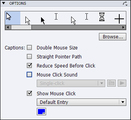
I received an email from a new Captivate developer who was having a hate-hate relationship with the click sounds he was hearing in his Adobe Captivate demonstrations and simulations. He told me that in his demonstrations, the mouse was making an obnoxious click sound when a click occurred. In his simulations, the same click sound was heard every time the learner clicked a click box.
The developer was desperate to disable the mouse-click sounds in his projects but was unable to find the option in Captivate's Preferences. While looking in Captivate's Preferences seems like a logical place to look for the click sound option, it's not there. Nevertheless, the solution is very simple. Here's how you disable the click sounds for the mouse, click boxes, and buttons.
To disable the mouse click sound in a software demonstration, select the mouse pointer on any slide. On the Properties panel,Options group, deselect Mouse Click Sound.
To remove the click sound from every mouse pointer in the project, click the drop-down menu in the upper right of the Options group and choose Apply to all items of this type.
If you've created a software simulation with click boxes, you can easily get rid of the click sound for a single click box, or all of the click boxes in the project. First, select a click box on any slide. Then, on the Properties panel, Options group, select Disable click sound.
If you'd like this change to affect every click box in the project, click the drop-down menu in the upper right of the Options group and choose Apply to all items of this type.
If you'd like to see a demonstration showing how to remove the mouse click sound from interactive objects and the mouse, check out the video I created on IconLogic's YouTube channel.
***
Looking for instructor-led training on the top eLearning tools? We offer live, online training on Adobe Captivate, Articulate Storyline, Adobe Presenter, and TechSmith Camtasia Studio. We can also bring the same great training onsite to your facility. Interested?Contact us for details.
Icon Logic Blogs
.
Blog
.
<span class='date ' tip=''><i class='icon-time'></i> Jul 14, 2015 02:29pm</span>
|
|
En nuestro sexto episodio, abordamos los siguientes temas:
1- Historias destacadas de la semana:
a- Facebook es ahora una empresa pública.
b- Google presentó Knowledge Graph, una nueva forma de búsqueda que ofrece resultados semánticos más inteligentes.
c- Algunos comentarios sobre los programas de Adobe Creative Cloud y diseño web receptivo.
d- Mozilla Webmaker: un nuevo programa para ayudar a millones de personas a comprender y crear la web.
e- #Talktech: una charla semanal a través de Twitter que propone un enfoque muy interesante.
f- La próxima semana, "This Week in mLearning" (versión del podcast en inglés) recibirá a sus primeros invitados: miembros del Proyecto Tin Can.
2- "Trae tu propio dispositivo" o consumerización de TI: Orígenes.
3- Ventajas y desventajas de esta tendencia.
4- Encuesta "Dispelling 6 Myths of Consumerization of IT" : Algunos mitos y estimaciones acerca del uso de los dispositivos móviles en el contexto corporativo.
5- Diseño de aplicaciones nativas o aplicaciones de la web móvil en este contexto de múltiples dispositivos y plataformas. The Financial Times cambia su aplicación nativa por HTML5 y LinkedIn desarrolla una aplicación híbrida.
6- Modalidad 1@1: la tecnología en el aula.
7- ¿Qué impacto tiene esta información para los desarrolladores de aprendizaje electrónico?
8- Aplicación de la semana: Skitch for iPad.
Your browser does not support the audio element.
RJ Jacquez
.
Blog
.
<span class='date ' tip=''><i class='icon-time'></i> Jul 14, 2015 02:29pm</span>
|
|
Top Secret Juice: Top 50 e-Learning Super Heroes on Planet Earth!CONGRATULATIONS!Congratulations to all 220 Nominees in #TEMS13, you are all e-Learning Super Heroes!Congratulations to all 1,861 from around the world who voted giving 6,680 'Votes Up' to their favorite e-Learning Super Heroes (generating 33,000+ views).Congratulations to all sponsors, which are the International Medical University (IMU), iBerry (The Academic Porthole), WizIQ and Listly.MISSIONThe mission of #TEMS13 was to:Challenge all those secret e-learning polls run by panels and algorithms that are annoying (to the least).Create a transparent and open poll that celebrates the World's top (e-)Learning professionals from all sectors, including primary, secondary, tertiary and corporate learning worlds.Connect all these amazing (e-)Learning professionals through a poll using Listly and applying a gamified algorithm to encourage them to explore, discover and connect with one another.Make all these (e-)Learning professionals more 'discoverable' to the world through a unified directory with filters based on the major continents (South America, North-America, Asia-Pacific, Europe and Africa). More details about the story behind #TEMS13:Vote for the Top e-Learning Movers & Shakers in 2013...Listly Style! (Part 1)#TEMS13 Gamified Scoring Algorithm to Decide the e-Learning Super Hero of 2013! (Part 2)The TOP E-LEARNING MOVER & SHAKER OF 2013 IS...WOW! But, aren't you the guy who is the _____? Yes, I know! But? Yes! But? Yes, I know!@ProfDrAmin I am disqualified from winning the awards, but not playing. If Brazil can host WC & play, why can't I host #TEMS13 & play? :)— Zaid Ali Alsagoff (@zaidlearn) January 27, 2014 I am still in shock! WOW! The last day of voting in #TEMS13 turned out to be a blockbuster thriller that even Holly or Bollywood would have been proud of. It was basically down to these fantastic four e-Learning Super Heroes to battle it out: Juan Domingo FarnósAlfredo Prieto Mohamed Amin EmbiZaid Ali AlsagoffI was last and needed a miracle to win! Interestingly, not many from IMU (where I work) had voted for me yet, but on that last voting day I got unbelievable and unstoppable support from IMU and IMC to make the difference that separates me from the other three e-Learning Super Heroes. It was so thrilling with tenacity that my three main rivals are probably still in shock! Here are some of their tweets during the last day of voting:Mohamed Amin Embi (Number 2): "@zaidlearn What 'Magic wand' are you using to make the votes at #TEMS13 for you to increase virtually every 10-15 minutes?" - Source "@zaidlearn I know. I am just joking. My support are mainly from M'sia. Your support are from M'sia as well as the whole world. Congrats Bro" - Source "@zaidlearn The fact that you can manage both, YOU are to me the REAL SUPERHERO. Well done Zaid. I am sure others will feel the same. " - Source"The fact that Zaid is managing & playing #TEMS13, He is the REAL SUPERHERO. I am sure others will feel the same. Pls vote @zaidlearn" - Source Juandoming (Number 3): "@zaidlearn @AlfredoPrietoMa @ProfDrAmin uiiiii cuantos votos habeis conseguido en poquitas horas? jejejej felicidades a todos." - Source Alfredo Prieto (Number 4):"@zaidlearn congratulations from learning gladiator (@AlfredoPrietoMa ) what a sprint!!" - Source"@zaidlearn 311 votes! Zaid you are the best sprinter, the Usain Bolt of learning! what a final sprint! great victory congratulations." - SourceIn short, WE MADE HISTORY in the most thrilling way I can imagine! Thank you everyone who voted, participated and/or promoted #TEMS13 from the bottom of my heart!TOP 10 LISTS*Zaid Ali Alsagoff is not eligible for any awards as he is the originator, organizer, promoter and Twitter MC for #TEMS13.Top 10 in the WorldZaid Ali AlsagoffMohamed Amin Embi (Award: £100 + 1 year commercial subscription to Listly)Juan Domingo Farnós (Award: 1 year commercial subscription to Listly)Alfredo Prieto (Award: 1 year commercial subscription to Listly)Nellie DeutschHasnain BalochAmit Garg Miguel ZapataPeter PhillipsJane HartTop 10 in Asia-PacificZaid Ali AlsagoffMohamed Amin EmbiHasnain BalochAmit GargAmmar MerhbiHyungyul KimAbd Karim AliasJoyce Seitzinger Ramesh Sharma Rozhan M. Idrus Top 10 in North-AmericaNellie DeutschGeorge SiemensStephen DownesCammy BeanTom KuhlmannCraig WeissJane BozarthJay Cross Harold Jarche Oliver Schinkten Top 10 in Europe 1. Juan Domingo Farnós 2. Alfredo Prieto 3. Miguel Zapata 4. Peter Phillips 5. Jane Hart 6. Martin Baker 7. Steve Rayson & Steve Wheeler 9. Paul McElvaney 10. Donald H TaylorTop 10 in Africa 1. Maggie Verster 2. Johannes Cronjé 3. Tony Carr 4. Vivienne Bozalek & Cheryl Brown 6. Karen Stadler, Ronald Arendse & Daniela Gachago 9. Michael Rowe 10. Arthur PrestonTop 5 in South-America 1. Raymond Marquina 2. Silvia Tolisano 3. Erika Paez 4. Sidiney Rodrigues 5. Thomas Jerome Baker, Gabriel Sanchez Zinny, José Carlos Bortoloti & Carlos Rodrigues E-LEARNING SUPER HERO OF 2013?1st Prize = £200 (British Pounds)Top 3 will get free (commercial) Listly accounts for a year.The nominee with the highest score (based on the gamified points system revealed below) wins this award, which is the most prestigious of the two awards, because it takes into account who is voting, besides the number of votes. Also, it requires the nominee to show pro-active professionalism and appreciation of the other participating nominees....Will be revealed 12 February (2014) during the #TEMS13 Online Award Ceremony (10:00 PM Kuala Lumpur time).ONLINE AWARD CEREMONYCLICK HERE to attend (and for details). The 2 award winners and all the e-Learning Super Heroes nominated will be celebrated before my MOOC talk exploring 'Creative Super Learners'.Congrats Everyone and looking forward to see you there :)ALL 'TEMS13' E-LEARNING SUPER HEROES!Top e-Learning Movers & Shakers in 2013View more lists from Zaid Ali Alsagoff
Zaid Ali Alsagoff
.
Blog
.
<span class='date ' tip=''><i class='icon-time'></i> Jul 14, 2015 02:28pm</span>
|
|
Written by Jessica Batz View and download the webinar slides. View the webinar recording. Onboard, Not Overboard. Accelerating New Hire Training. Webinar 04.02.14 from BizLibrary
Chris Osborn
.
Blog
.
<span class='date ' tip=''><i class='icon-time'></i> Jul 14, 2015 02:28pm</span>
|
|
by Anita Horsley
While I don't have a disability, I have experience, both personally and professionally, with people who have physical and learning disabilities. I have assisted people with developmental disabilities, and I volunteer for a Therapeutic Horseback riding program that helps children with disabilities ride horses.
When it comes to eLearning, I develop content for many government and education organizations where Section 508 Compliance is required. Section 508, the Rehabilitation Act of 1973, requires all Federal agencies to make electronic and information technology accessible to people with disabilities.
If you want to make your eLearning courses accessible for everyone, it's a good idea to think about people who are hearing, visually, and dexterity (motor skills) impaired. Additionally, it's important to consider the elderly population and people who speak English as a second language.
Assistive devices provide a way for people with disabilities to communicate and train using technology. People who are visually impaired or blind need devices such as:
Screen readers (Jaws, Window Eyes)
Screen magnification
Braille displays
People with hearing impairments need visual representation of auditory information such as:
Closed captions
Graphic displays
People who have mobility impairments may need:
Alternative keyboards
Keyboard shortcuts
Although creating accessible eLearning can feel like an additional task, the goal is to enhance your eLearning courses by ensuring that all learners can master the instructional material and meet the learning objectives. When learning is accessible to all types of learners, you are not only complying with regulations, but you are reaching a larger audience, upholding social responsibility, and increasing your effectiveness as an eLearning developer and instructor.
Note: This is the first in a series of articles covering accessible eLearning from Anita. Stay tuned for more! And if you'd like to take a 3-hour deep-dive into the best practices for creating accessible eLearning, check out Anita's live, online course.
Icon Logic Blogs
.
Blog
.
<span class='date ' tip=''><i class='icon-time'></i> Jul 14, 2015 02:28pm</span>
|