Blogs
|
Leading the Learning Revolution Infographic
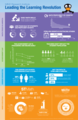
There is a Math Crisis in the United States. Early math skills are the number one predictor of later academic success, yet less than half of students are proficient in math. In addition, jobs in STEM (science, technology, engineering and math) fields are outpacing job growth in other fields. A solid foundation in math is the basis for success in science, technology and engineering. In order to fill these jobs with future Americans, the Leading the Learning Revolution Infographic highlights that we need to improve math education, starting with our youngest students.
MIND Research Institute is a neuroscience and education social benefit organization. Their mission is to ensure that all students are mathematically equipped to solve the world’s most challenging problems. Through the visual, non-language-based approach to teaching math — delivered through their ST Math instructional software — over 800,000 students across the country are deeply understanding math, developing perseverance and problem-solving skills, and becoming life-long learners prepared for success. MIND Research Institute also brings math to life for students, families and communities through innovative events and activities.
Via: blog.mindresearch.orgThe post Leading the Learning Revolution Infographic appeared first on e-Learning Infographics.
eLearning Infographics
.
Blog
.
<span class='date ' tip=''><i class='icon-time'></i> Jul 15, 2015 02:08pm</span>
|
|
Hey, you! Are you tired of typing on that screen of yours? Well, forget Bluetooth gadgets, use paper! Yes, paper. For real!
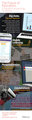
So, how does this nifty gimmick work? First of all, download a copy of the iOS Paper Keyboard app and let the virtual reality begin! Start by printing a PDF file on paper and use it as a keyboard to do one or more of the following: Practice typing skills, chat with friends, send an in-app email or use the paper keyboard to draft info that can be pasted into any text editor, formatted and utilized with other apps.
Wondering how the magic works? After placing your device in the correct placement on the paper, the built-in camera detects the user’s fingers with state of the art algorithms to map the taps to letters as if typing on physical keys was really taking place.
Yeah, seriously… Don’t believe me? Check it out for yourself. It’s really worth a look!
Below is picture of my Tech Kids Aubree, Kermit and I experimenting with the Paper Keyboard app. We were amazed at how cool—and accurate—it is!
The Paper Keyboard app requires iOS 6.0 or later and is compatible with the iPhone 4 (and later), iPad, and iPod touch devices.
Classroom Connection:
So, you want students to practice their typing skills, but they only have access to a mobile device… Or what about those students who have difficulties typing on screens? If you encounter any of these scenarios, then the Paper Keyboard app is an option for you!
On a less serious note, you could just fire up this app for the pure coolness factor!
Edutech for Teachers team
.
Blog
.
<span class='date ' tip=''><i class='icon-time'></i> Jul 15, 2015 02:07pm</span>
|
|
Because you dear readers must care that learning interventions are research-based, this job may be of interest:
JOB DESCRIPTION
Beth Israel Deaconess Medical Center
Position Title: Director of Learning Sciences Program in the Department of Surgery
Department/Section: Surgery
Reports To (Position Title): Vice Chair of Education and Chairman of the Department of Surgery
Expectations for All Employees: Supports the organization’s Code of Excellence and Values by exhibiting the following behaviors: Integrity, Respect, Compassion, Excellence, Stewardship and Community.
Age Specific Care Requirements: N/A
Position Summary:
The Department of Surgery at the Beth Israel Deaconess Medical Center has embraced a goal of international recognition for innovative learning strategies that foster the acquisition of skills and knowledge. Current initiatives include developing surgical residents as educators; improving the lecture experience through flipped classroom, simulation, and team based learning; and enhancing the intraoperative teaching experience.
We are seeking a Director of Learning Sciences to help develop and implement a strategy that creates and sustains a community of learners to meet this goal. A background in medical education is not essential. In the process of this endeavor, the Director would work with our clinical education faculty and students to foster and promote opportunities for interactive learning, including networked learning and team-based learning, as well as to support active learning by providing multi-modal learning opportunities. It is anticipated that Director would provide guidance on effective teaching and learning strategies, particularly with regard to educational technologies. We seek a leader who can develop relationships across Harvard University (Harvard Graduate School of Education, Harvard Business School, as well as Harvard Medical School’s Office of Global Programs, Center for Educational Technology, and Department of Continuing Education).
Reporting directly to the Vice Chair of Education and Chairman of the Department of Surgery, the Director or Learning Sciences is responsible to assess needs, plan, develop, implement, and evaluate educational activities, including those directed at Harvard medical students, surgical residents, and postgraduate continuing medical education. The position will focus on the application of state of the art and emerging instructional technology related to online and classroom learning, intraoperative learning, including both instructional design and assessment.. This position will work closely with faculty from different divisions and will also work collaboratively with a range of departmental offices focused on research programs and faculty development and promotion. The position may also interact with faculty in the Learning Technologies Center at the Harvard Graduate School of Education and across the University as needed.
Primary Duties and Responsibilities
Resident and Medical Student Education:
Implement and evaluate rotation specific (synchronous) educational activities and instructional technology to improve learning outcomes related to acquisition of technical skills and enhanced clinical decision making.
Apply state of the art and emerging instructional technology to improve quality and content of asynchronous didactic lectures and assess impact of these initiatives. Research and test instructional technologies.
Guide the usage synchronous and asynchronous delivery technologies.
Create / assist in the creation of course-related digital content
Advise faculty on technology components of multimedia assignments and provide troubleshooting to students on multimedia projects.
Assist faculty in design and deliver highest quality education, including use of instructional technology and coaching sessions on teaching and learning, as needed.
Contribute to consultations with community regarding meeting pedagogical challenges through the thoughtful and appropriate use of technology.
Collaborate with faculty to improve intraoperative teaching experience and assess impact of these initiatives with and without the application of instructional technology in the operating room setting.
Initiate a program to enhance the capacity of surgical residents to serve as educators for fellow residents and medical students through curriculum design directed at small group discussion and case method teaching. In the process, it is anticipated that resident presentation skills will be enhanced and residents will acquire skills in teaching through application of simulation and educational technology.
Postgraduate Continuing Medical Education (CME)
Collaborate with faculty to develop innovative CME offerings, such as traditional courses, online programs, and other postgraduate education that generates income for the department
Other
1. Consult on preparation of grant proposals and manuscripts in surgical education.
2. Assist in the design and evaluation of resident, fellow, and faculty education research projects.
Qualifications/Skills & Knowledge Requirements:
The appropriate candidate for this position will have 5+ years of experience in education with a minimum of a MA degree. A Masters in Educational Technology is strongly preferred. The ideal candidate should have excellent computer, writing, communication, and organizational skills, and be able to manage a multitude of tasks and meet deadlines. Candidate needs to be proficient with MS Word, Excel, and Powerpoint and needs to be adept using web-based applications.
Supervisory/Management Responsibility:
Responsibilities may include managing Harvard Presidential Instructional Technology Fellows, as well as an administrative assistant who will also be responsible for supporting the surgical faculty Harvard Medical School promotions process and other faculty professional development initiatives.
Will Thalheimer
.
Blog
.
<span class='date ' tip=''><i class='icon-time'></i> Jul 15, 2015 02:07pm</span>
|
|
In Thiagi's Newsletter this month, he has a wild stream of reflections about SMART goals.
Kind of funny. Nice to have the broad perspective.
Check it out here...
Will Thalheimer
.
Blog
.
<span class='date ' tip=''><i class='icon-time'></i> Jul 15, 2015 02:06pm</span>
|
|
Pros and Cons of Open Source LMSs Infographic
Open source software is disrupting the world of enterprise software. The Pros and Cons of Open Source LMSs Infographic explores the advantages and disadvantages of open source learning management systems compared to commercial systems.
There are a few open source LMSs addressed in this infographic:
Moodle- a widely-used open source learning management system that was originally designed for educational use
Totara LMS- a version of Moodle with added features to support enterprise and workplace learning
Canvas LMS - a relatively new LMS that was designed for educational use. Instructure also has released Bridge, which is designed for enterprise and workplace learning but is not open source.
The Pros and Cons of Open Source LMSs Infographic covers sections such as:
Suitability for a workplace learning
Support
Complexity
Customisations
Support for blended integrated learning e.g. the 70:20:10 learning model
Price
Suitability for Workplace Learning
Open source: Open source LMSs such as Moodle and Canvas were originally designed for the educational market and they lacked some of the key features needed for workplace learning .e.g. organizational hierarchies. Totara LMS is designed to solve these problems. It is basically Moodle but with added features that support organizations’ hierarchical and performance management.
Enterprise: Workplace learning is what most commercial LMSs were designed for. Their weakness is that they focus on self-paced learning and are often just a database of modules.
Support
Open source: The powerful thing about Moodle is that you can download and install it yourself, but what you don’t have is any support. Most support is forum based and if someone in the community is not interested in your problem it‘s often hard to find a solution. The Moodle partner network is designed to provide a better level of support. Totara LMS also has a partner network that provides the type of support that commercial LMS providers offer.
Enterprise: A high level of support is one of the services that LMS providers do really well.
Complexity
Open source: An LMS is a complex piece of software. Often, open source projects pay less attention to interface and usability. One of the great things about Canvas LMS is that it is easy to use.
Enterprise: Commercial LMSs often have fewer features than open source LMSs, which helps to reduce their complexity. Also, their user interfaces are often easier to use.
Customizations
Open Source: Most LMSs require extensive configuration to suit a given organization. Commercial providers will say that the need for extensive customization is the weakest part of an open source LMS. One of the powerful features of open source software is the ecosystem of plug-ins that already exists.
Enterprise: In reality, both commercial and open source LMS providers make most of their profit from customizations and integration.
Support for Blended Intergrated Learning
e.g.the 70:20:10 learning model
Open Source: Totara/Moodle’s roots are in the educational area, where the approach to blended learning has matured. Support for blended integrated learning is one of the strengths of open source software.
Enterprise: Commercial LMS’ roots are in the delivery of self-paced modules. If they do have features like discussion forums, they often work in a way where they are tacked on and not truly integrated.
Price
Open Source: Open source LMSs are cheaper.
Enterprise: Commercial providers will say that open source systems are more expensive because of the customization costs. However, in the long term commercial LMSs are more expensive than the open source LMSs.
Via: sproutlabs.com.auThe post Pros and Cons of Open Source LMSs Infographic appeared first on e-Learning Infographics.
eLearning Infographics
.
Blog
.
<span class='date ' tip=''><i class='icon-time'></i> Jul 15, 2015 02:06pm</span>
|
|
Too many organizations insist on using slide templates (slide decorations) in their training slides and presentations. This is a bad idea, and I've created the following narrated slide deck to make a research-based case against these bedeviling adornments:
On YouTube
On Vimeo
Will Thalheimer
.
Blog
.
<span class='date ' tip=''><i class='icon-time'></i> Jul 15, 2015 02:05pm</span>
|
|
4 eLearning Trends To Watch Infographic
Online options are growing, and the classroom format is changing to incorporate the technology. The 4 eLearning Trends To Watch Infographic presents a few trends on the cusp of explosive growth this year, including big data, mobile learning, personalization and edutainment.
1. Big Data
Big Data = Big Results
By tracking where students struggle, excel, spend the most time, and individual learner and group patterns, eLearning professionals can understand how learners are digesting the information and pinpoint areas that may need to be fine-tuned within a course.
2. Mobile Learning
Learn anywhere at any time.
With mobile use continually on the rise, it’s becoming an increasingly dominate medium for learning material. Little screens means delivering content in smaller, more digestible, easily-sharable chunks in the form of photos, infographics, short sentences, and quotes.
3. Personalization
Mass Customization
Mass Production
Student-centered courses are moving from an option to a must-have feature. The more customization available for students the better. With data telling eLearning professionals and educators how students are performing in real time, and what concepts they are struggling or excelling with, no two eLearning experiences should be the same.
4. Edutainment
Less lecturing, more doing.
Edutainment (educational entertainment) and gamification engage and motivate students to achieve goals through active learning. Based on Edgar Dale’s Cone of Experience, only 10% of learners remember what they read, 20% remember what they hear, 30% will remember what they see and hear, but a whopping 90% will remember a task they do themselves, even if it’s only in simulation.
Via: www.wherelearningclicks.comThe post 4 eLearning Trends To Watch Infographic appeared first on e-Learning Infographics.
eLearning Infographics
.
Blog
.
<span class='date ' tip=''><i class='icon-time'></i> Jul 15, 2015 02:04pm</span>
|
|
You have successfully signed up for my newsletter.
Thanks for your interest!
--Will
Will Thalheimer, PhDPresidentWork-Learning Research, Inc.
P.S. Feel free to look around the Work-Learning Research website (links above), or my blog, my book website, or my website on audience-response technology (links top of rightmost column).
Will Thalheimer
.
Blog
.
<span class='date ' tip=''><i class='icon-time'></i> Jul 15, 2015 02:04pm</span>
|
|
It’s not the first time, and it certainly won’t be the last, but check out the latest video my Tech Club students created using one our all-time favorite tools—Animoto.
For those of you not familiar with this digital storytelling gem, Animoto is an online and mobile video creation service that makes it both easy and fun for anyone to create and share extraordinary videos using their own pictures, video clips, words and music.
Here’s how it works: After choosing a theme (this will determine the look and feel of the video), simply upload pictures and video clips to the video editor. Next, personalize your movie with text and music—either select a tune from the music library or upload your very own. Once you’re satisfied with the layout of your media, then click the produce button for the magic to begin. Animoto‘s cinematic technology brings your media to life with a pretty amazing orchestrated production that can be shared with teachers, classmates, colleagues, family and friends.
With that said, when the folks at Mending Hearts Animal Rescue requested that my students create a slideshow highlighting adopted animals for an annual fundraiser, is it any wonder that we looked no further than this super cool tool?
Check out the "Who Rescued Who?" video below—one that has been a huge hit!
Pretty swanky, eh? Yeah, with Animoto—your finished products look like they’re ready for the big screen!
A special shout out to Aubree and Maggie for all of their efforts in creating this pretty nifty masterpiece!
Classroom Connection:
Because there are countless ways in which Animoto can integrated across the K-12 curriculum, it is the perfect digital storytelling tool for the classroom. For example, biographies, field trips, book report projects, movie trailers and more can all be captured with this quick and easy slideshow tool.
So, what are you waiting for? Inspire creativity in your students by giving them the opportunity to showcase knowledge in a fun, innovative and educational way using a really nifty resource!
Oh, and did I mention that Animoto provides educators with free classroom accounts for use with up to 50 students? Yep, all for free! Sign up for yours today right here!
For additional info, examples and resources regarding the use of Animoto in the classroom, check out the Teach Web 2.0 wikispace.
Edutech for Teachers team
.
Blog
.
<span class='date ' tip=''><i class='icon-time'></i> Jul 15, 2015 02:04pm</span>
|
|
Subscription Learning is one way to implement the spacing effect--one of the best ways to help people learn so they don't forget, so that they can actually remember what to do on the job.
The best way to experience subscription learning is to sign up for a subscription learning thread. With this in mind, I've created a free subscription-learning thread on how to give learners feedback.
You can check it out by clicking here.
Will Thalheimer
.
Blog
.
<span class='date ' tip=''><i class='icon-time'></i> Jul 15, 2015 02:03pm</span>
|