Blogs
|
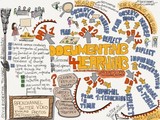
I am on a quest to make documenting FOR learning a topic to think about in all educational conversations. How do we document our own learning? How do we make learning visible to others, so we can share, collaborate and improving how we teach and learn? What role does documenting play in the process of learning?
Documenting is more than staying organized or writing down what will be or was taught. Documenting is part of the learning process!
Finding and sharing tools to help create these documentations and make it easier and more time efficient to do so is important too. This is the first post in a series to showcase such tools.
As part of the 5 day bootcamp with a cohort of teachers from the Goethe Schule, in Buenos Aires, Argentina, participants experienced the learning routine, LEARN-REFLECT-SHARE.
One of the first activities of the week together was to draw an illustration to make their view of themselves as teachers visible to others. Directly afterwards, I asked them to use Post it notes to reflect on their thinking as they were drawing their illustration. Throughout the 5 days the teachers had many different opportunities of experiencing the power of metacognition (thinking about their thinking) and to use different kinds of media to make that thinking visible in order to document it and share it.
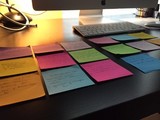
I chose for the first time to use the app Post-it Plus to document the activity.
I collected the sticky notes and scanned them in via the app.
Post-it Plus:
allowed me to annotate each note
organize all notes on a board
re-arrange the notes as I pleased
gave me various options to export the notes.
It was super easy and convenient to export the sticky notes as images and upload to the cohort blog to give participants the opportunity to download their written reflection as a file in order to use it on their blog and reflection of learning.
Silvia Rosenthal Tolisano
.
Blog
.
<span class='date ' tip=''><i class='icon-time'></i> Jul 16, 2015 06:37am</span>
|
|
As part of C.M Rubin’s monthly series in the Huffington post: The Global Search for Education: Our Top 12 Global Teacher Blogs, this is the second post. This month we are answering the following prompt:
What are the Biggest Mistakes Teachers Make When Integrating Technology into the Classroom?
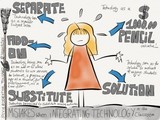
The word "mistake" is a harsh word. It implies flaws, pointing fingers, errors in judgement, something wrong and possibly even a dead end. I would rather think or connect the word "mistake" to first steps, stepping stones, experimentation and exploration. With that being said, those "first steps" or that exploration cannot become a routine cemented in stone how technology is being used in the classroom. Stepping stones are meant to lead to something else. For the sake of the prompt given, here are my top 5 "Mistakes" (in no particular order) which I see, read and hear about as I travel the world to learn and work with schools, teachers and students:
Technology being used to substitute an analog activity
Technology use being seen as an add-on to allow students to use devices, the Internet, a program or an app as a reward, for entertainment, as a time filler for students who finish early
Technology use as a separate subject area
Technology as a $1000 pencil initiative
Technology seen as the solution to motivate and engage students
Technology being used to substitute an analog activity
The philosophy behind Ruben Puentedura‘s SAMR model provides an explanation of teachers integrating technology that is used as a tool substitute without functional improvement of the task at hand. Instead of requiring their students to hand in a handwritten report, they allow students to type up their report and print it out to then be handed in. Teachers seem to stay "stuck" on that level. In their mind they are integrating technology, but in reality the technology is not being used as a tool to facilitate learning or amplify learning.
Technology use being seen as an add-on
Teachers allow students to use devices, the Internet, a program or an app as a reward, for entertainment or as a time filler for students who finish early. Technology is being used as an add-on if there is time and in addition to the "regular" school work. Students might be asked to create a multimedia poster on a topic after they have written a report.
Technology use as a separate subject area
Technology is not being used as a way through which we teach and learn, but is being seen as a separate computer class, "iPad time" or keyboarding practice. Students have to wait until they assigned rotation time in a computer lab until they are able to work on a digital project or wait until their teacher includes use of technology in their weekly schedule.
Technology as a $1000 pencil initiative
Alan November in the book Curriculum21 (p.189) by Heidi Hayes Jacobs says: "The real problem is not adding technology to the current organization of the classroom, but changing the culture of teaching and learning". November also talks about these "initiatives as "$1,000 pencil" programs". Technology is meant to aid teachers in redefining and transforming teaching and learning. Good teaching will be amplified, while not so good teaching, even with technology, will be not be so good, expensive teaching. There might be visible technology in the classroom (tablets, interactive whiteboards, smartphones, 1:1 laptop programs), but does not guarantee the use of such as a technique or strategy to facilitate learning for our students.
Technology seen as the solution to motivate and engage students
It is a reality that more and more students seem unmotivated and disengaged in our schools. Assuming that the use of technology is the solution to this phenomenon is a mistake. While students might initially be motivated by the use of shiny devices, this quickly dissipates. Engagement does not equal learning when the use of technology is not supported by strong objectives and goals as the foundation of its use. Many students would be engaged by being allowed to use their smart phones in class. However, without a strategic pedagogical plan how to connect such use to learning goals, students might just go through the motions without ever making connections to these goals.
Silvia Rosenthal Tolisano
.
Blog
.
<span class='date ' tip=''><i class='icon-time'></i> Jul 16, 2015 06:37am</span>
|
|
Edna Sackson, Teaching and Learning Co-ordinator from Mount Scopus Memorial College in Melbourne, Australia, documented a model lesson I was teaching at my recent visit to their school. Edna graciously agreed to allow me to cross post her documentation and reflection of that lesson below from her blog What Ed Said. Edna is an model example of beautifully and fluently combining documentation, reflection and sharing FOR learning.
Does ‘the research’ know best?
"I think that enough research has been done on the delusion of multi-tasking to say, yes, do all the back channel stuff, but perhaps leave it to afterwards?" … This is part of a comment left on my previous post, in which I introduced the notion of back channeling as a form of documenting for learning.
Perhaps it’s a skill one can develop with practice, since many are able to do it successfully.
Or perhaps it’s best seen as part of a collaborative exercise. Different people capture different elements in the back channel and the combined results are greater than what you could have achieved on your own.
Or perhaps it’s simply not for everyone.
One size does not fit all
The comment writer says "I take copious notes during presentations and then go back to blog on them, however I’ve tried at times to do the twitter backchat thing and find I can either listen properly or tweet, but not both."
It’s the opposite for me. Personally, taking copious notes is what distracts me from the content. Distilling the essence in tweets works better for me. One size does not fit all… nor should it. Not in life and not in the classroom.
Which is why @langwitches introduces teachers to a range of different options in her presentation. And it’s why she introduces the students to a range of options in the lessons she models throughout the week.
Back Channel in the classroom
‘The back channel is the conversation that happens behind the real life front conversation," says Silvia [Tolisano] by way of introduction to Today’s Meet, which the students will use to document their thinking during this particular lesson. ‘You’re going to have your own chat room.’ The students are instantly engaged!
It takes a bit of time for them to get used to watching a video and expressing their thoughts in the back channel simultaneously. Some find it easier than others, but that’s ok. They are all learning to use the tool today. Once mastered, it can be just another option in their tool boxes (and that of their teacher) to add a layer to the learning, used by those for whom it’s useful at appropriate times.
After a while, Silvia switches to the ‘front channel’ to discuss what’s going on in the back channel. When a student writes something inappropriate, it’s a ‘teachable moment’ and she happily takes the opportunity to talk about audience and purpose. Hopefully, lessons are learned. She skims through the comments with the students, highlighting valuable contributions, listening to their observations and pointing out good techniques, like inserting an @ when replying to an individual. Silvia points out that the teachers observing in the room are learning too.
The learners are practising a range of transferable skills - reading, writing, speaking, listening, thinking, analysing, applying, interpreting data, decision making, evaluating…
Students comment ON the back channel IN the back channel:
How might you use the back channel in future?And some other ideas…How about sharing a back channel with another class in our school for a discussion? Or a class in another country - synchronously or asynchronously? What if teachers shared their learning with their class while they are out at professional development? As Silvia says ‘It starts with imagination… ‘
The back channel as a source of data
Silvia meets with the teachers later to unpack the back channel. The process involves pasting the transcript into a google doc and ‘cleaning it up’. Any irrelevant comments (lots of ‘hi’s’ and ‘sups’ to begin with) are removed. Misconceptions are noted for addressing. She shows the teachers how to use Skitch to annotate a screenshot of the remaining conversation with different colours representing different kinds of observations.Some students were able to repeat points they heard in the video, some asked and responded to questions, some connected ideas and demonstrated original thinking. It’s a rich source of data to inform teaching and learning and a way to assess a range of skills.
Documenting OF and FOR learning
And all the while, we are documenting the learning, that of the students and that of the teachers, through photos, video, annotations and notes…and via ‘that’ Twitter back channel…What are your thoughts on back channelling?
Silvia Rosenthal Tolisano
.
Blog
.
<span class='date ' tip=''><i class='icon-time'></i> Jul 16, 2015 06:37am</span>
|
|
I just returned from a consulting/coaching visit to Mount Scopus Memorial College, a K-12 Jewish Day School, in Melbourne, Australia. It was a one day full faculty (K-6) keynote style workshop to set the tone for a four day intense follow up work with the upper primary school teachers and students. Together with Edna Sackson, the Teaching and Learning Co-ordinator of the school, we planned the overall theme, Documenting FOR Learning, of the intense week to connect with the whole school goal of using data to inform learning.
I wanted to "document" the Professional Development model of a keynote presentation, coupled with "experiencing" the topic of PD in teachers’ own learning in follow up small group pre-planning, model lessons, observations, debrief sessions, reflective time as well as 1:1 coaching.
Follow along my documentation and judge for yourself, if this type of PD offers a more customized, personalized and a better chance of sustainable growth, connected and collaborative learning in terms of transformative pedagogy in our world of rapid, exponential change.
The week started out with a keynote presentation to set the tone by looking at the "Now" Literacies through the Lens of Sharing.
The NOW Literacies Through the Lens of Sharing from Silvia Rosenthal Tolisano
A colleague joining the day of learning via Facetime from home.
The keynote was meant:
to establish a common vocabulary
ignite imagination of possibilities
lay the foundation of the upcoming week’s work
ground the work through the "now" literacies and the imperative of sharing, reflective practice and documentation as part of the learning process
as a wake up call and to instill a sense of urgency (Are baby steps ok? Is it ok to still " start to think" of "preparing" students for the 21st century?)
to make some teachers feel "uncomfortable" in their daily and up-to-now-proven pedagogy
to shake "the way we have always done things" up
to make teachers feel overwhelmed and be re-assured that that is the way that ALL OF US FEEL. That it was about knowing how to handle that feeling and how to filter all the information that was constantly being thrown at us.
to help teachers learn how to use the power of the crowd, a community to collaboratively deal with too much information, too much work and too many new things to adapt and learn at a faster speed
In order to give teachers a taste of what documenting and sharing meant, I asked participants to write down what they were hearing, what they were thinking that was worth sharing. I offered them three different backchannels to be able to experiment if they preferred one over the other for their own learning. Throughout the presentation there were built in Visible Thinking Routines to facilitate the documentation process.
We created a Google Document with three moderators to summarize and extract resources, links and ideas from the presentation in order to share with all.
We used Twitter as a backchannel tool with the hashtag #msmcpd for the participants who already had a Twitter account and were willing and comfortable to share with the world.
We created a chat room on Today’s Meet for anyone to add their voice to the collaborative documentation process
Monday afternoon was spent diving deeper into Documenting FOR Learning. From looking at the What? Why and How? of Documenting4Learning, recognizing that documenting is PART of the learning process to looking at documentation techniques, examples and ways to collaboratively document learning as a classroom community.
After this intense introduction to documenting and sharing for learning, we were ready for the next four days which Edna and I planned to offer her teachers:
a way to experience the learning, pedagogy and activities they had heard about on Monday
go through the learning cycle of Watching, Doing and then Teaching
a dedicated time to learn, reflect and share
We divided the coaching cycle into different sections:
Planning (as a grade level): What resonated with teachers from Monday’s presentation ? What topic/theme emerged out of Monday’s presentation ("now literacies", documentation, sharing etc.) that teachers would like to observe me model in one of their classrooms?
Modeling / Observation: Teachers were charged to document the lesson, student learning and to be prepared to reflect and share as a group in a blog post to the school’s teaching and learning blog. These model sessions in the classroom were not planned, but connected to a lesson, inquiry, big idea or essential questions the class was or have been working on.
Image by Michele
Image by Michelle Max
observing and documenting the lesson in the classroom in order to share and reflect
observing the introduction to a backchannel
documenting learning with images, videos and student quotes
The following model lessons emerged (which I will be documenting and sharing in follow up posts). See hyperlinks to already published posts:
Sketchnoting & Backchanneling with Year 5 & Year 6
Backchanneling with Silvia Tolisano and Year 5 (by Michelle M)
Backchanneling in the Jewish Studies Classroom with Year 5 (Guest Post by Edna Sackson)
Tweeting as a Classroom with Year 4
KWHLAQ as a way of documenting that turned into Tweeting as a Classroom lesson with Year 5
Tweeting in order to build a Learning Network and Connect Around the World with Year 5
Copyright & Backchanneling in the Music Classroom
Debriefing: A time after the model lesson to debrief as a group, unpack the lesson, the observations, connect to further resources and plan for the reflection session
Image by Edna
unpacking the backchannel from the model lesson
Reflection: Dedicated time for the team to reflect on their learning, the model lesson and what does it mean in terms of transfer to the classroom.
Teacher Reflections:
What does "documenting4learning" mean to you?
Learning with Silvia Tolisano by jbelnick
Learning with @Langwitches by Edna Sackson
Curveballs by Year 6 teachers
Learning with Langwitches by Year 4 teachers
Capturing the Moment by Claire
Backchanneling in the Classroom by Edna Sackson
Finding my Blogging Voice again by Hailey Joubert
Only time will tell if this Professional Development Framework will aid teachers in the transfer from their own learning experience into their classroom and connect to the learning of their students. Good indicators seem to be continued blogging, showcasing, reflecting and sharing student work on the school’s teaching and learning blog and connecting via Twitter ( MSMCYear5 ) as well as enthusiasm by individual teachers to try the modeled lesson (sketchnoting, backchannel and Twitter) observed in another classroom with their own students.
image by Fiona
Edna had also scheduled time for me to meet with single subject area teachers, a group of student support services as well as drop-in time to simply chat, imagine possibilities and answer follow up questions from the main keynote or model lessons.
What are your thoughts on this professional development framework? Have you experienced learning this way to improve your teaching practice and repertoire? What have you gained from experiencing the learning before "translating" it into your classroom? What are some other PD framework models that have worked particularly well for you to go beyond the "drive by shooting" types of one hour conference workshops or one day keynote speakers? Please share…
Silvia Rosenthal Tolisano
.
Blog
.
<span class='date ' tip=''><i class='icon-time'></i> Jul 16, 2015 06:37am</span>
|
|
Twitter can be overwhelming, even for a seasoned Twitterer.
We use tools, such as Tweetdeck, to help us organize the tweets coming in
we use #hashtags to filter and connect our conversations
we @mention, we RT, we DM, we #FF
we participate in #edchats
we give credit where credit is due
we take notes
we disseminate interesting information to our network
we amplify our voices to engage in conversation with people from around the world
Yes, it can be overwhelming to follow a conference Twitter hashtag such as #AASSA15 (Association of American Schools in South America Annual Educators Conference . (Day 1, Day 2, Day 3).
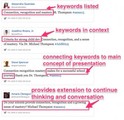
Below you will find a few sample sreenshots of Tweets from the AASSA conference in Curaçao. Unpacked and annotexted to make the value of Twitter as a Professional Development tool, a learning tool visible to the untrained eye.
As you are looking at the tweets below ask yourself:
How could you use Twitter as a backchannel tool for assessment (at your faculty meeting)
How could you use Twitter as part of your faculty sharing PD learning (accountability) with colleagues who did not travel or participate physically in PD opportunity (amplify and stretch PD money)
How well was the conference objective/theme (Making Connections- No Teacher is an Island) represented?
How could teachers and students use Twitter as a new form of assessment to demonstrate evidence of modern skills and literacies?
Documenting and showing process
Different additions and purpose of tweeting a single quote by the keynote speaker
Note taking strengthened by multiple people (compared to traditional solitary/individual note taking)
Visual note taking, giving followers a glimpse into multiple classrooms/presentations. Impossible to do physically (being in multiple places at the same time)
Using photos or visuals to personalize a Twitter message
Twitter is not only a platform to create and store your own notes in 140 characters or less. It is meant for connecting, sharing, communicating by participating in a conversation.
140 characters not enough? Link to a blog post, share your reflections, learning and further resources.
Twitter is about connecting and learning together when you can’t be in the same physical space.
Using Twitter as a reflective tool, exit ticket or as a Visible Thinking Routine
Twitter is real. Twitter "can" go beyond banal sharing of what you consumed for dinner or how your dog feels on any particular day. It is up to you HOW you use the platform.
Twitter is real. The connections that are forged by communicating, sharing and learning together as teachers are real.
Twitter is real. Twitter as a platform to bring educators from around the world together to string their learning and conversations together.
How do you unpack our Twitter feed and make learning and connections visible to others?
crossposted to AASSA Blog
Silvia Rosenthal Tolisano
.
Blog
.
<span class='date ' tip=''><i class='icon-time'></i> Jul 16, 2015 06:37am</span>
|
|
This post is another one in the series of posts originating from Professional Development Framework: Documenting for Learning
Dani Aisen, a music teacher, at Mount Scopus Memorial College, was part of a small group session with Specialists (Resource teachers) during my visit at the school in Melbourne, Australia. It was an opportunity for these teachers to question and talk more in detail about the keynote presentation (Documenting FOR Learning & The Now Literacies Through the Lens of Sharing) and for me to share examples of how to support modern literacies in their specific subject areas.
Dani and I started talking about the role of the Music teachers to raise awareness of music piracy and the possibilities of authentic work as students fulfill the need of a school community to create their own music library, licensed under Creative Commons, to be used as background music for school projects (videos, podcasts, presentations, etc.). I shared the following blog post: 3 Scenarios to Engage Students in Authentic Tasks with her and Dani asked me to visit one of her Year 4 classes to get a conversation started about copyright and music.
Below is a short summary (documentation) by Dani of the conversation in class:
I’m a music teacher in Melbourne, Australia and the use of copyright has been an issue for a very, long time. It was wonderful to have Silvia visit us with all her knowledge in so many areas and especially in the use of copyright. Silvia joined me to talk to a year 4 class as we have a few more years with them in the primary school and hopefully make then more aware of the legalities of the digital age in the ‘music world’. The needed to know that they can listen to music, they can own music, they can share music that they have bought (only by allowing someone to listen) but they can’t use songs from youtube or other sources without permission or purchase, because it is actually the same as walking into a shop and stealing.
Silvia used the example of Christina Perri’s song ‘A thousand years’. The children were told that radios stations cannot play this song unless they have paid the companies that own the rights to it every time it’s played. The lyricists should be getting royalties. Dj’s make a living out of other peoples music, they are responsible for paying royalties.
The whole idea was to impress on children that because children couldn’t use other peoples music as it is actually stealing she wanted the children to know that they can easily become creators and sharers in music. We spoke about Creative Commons and the ability to be able to share music we have found but in saying that, to be one of those that are proud to share what they have composed and always get permission in writing to use someone else’s material and acknowledge your source.
Dani was also able to observe me modeling the use of a backchannel in another class. She was immediately excited to try it out in one of her own music classes. Below, you can read Dani’s documentation of her use of a backchannel as an assessment tool, observation of the class and comparison between classes. One, without the use of backchannel and another using a backchannel as a way to document, analyze, make connections and hold a conversation as they were watching a music video.
Here is a little background of how I used my first experience in ‘Backchannel’ and the difference it made in two classes the same topic but no backchannel first session.
The year sixes went to Canberra to look at Governance. When they returned I made connections with what they were inquiring into through lyrics in songs. The first class arrived and we chatted about their trip away and eventually I then told them we would be listening to the song ‘Dear Mr President’ by Pink. The song played and the only visual they had were the words on the smart board. At the end of the song I asked what they thought the song was about, why it might be written, what did they think? We needed to hear it again. As it was the first time to hear a song, like most people you need to hear it a few times to start to understand. It also tends to be the same children who participate in the discussion.
After viewing Silvia in front of a class (sadly I could only stay ten minutes) I was already excited to try ‘backchannel with my next year six)
I set up todaysmeet.com and asked the children to log on before we started the lesson. They had a session using this the day before so I didn’t have to say too much. The same conversation took place re the trip to Canberra, but this time when I started the song ‘Dear Mr President’, even though there was silent through the song, the conversation happening on today’smeet seriously blew me away. The higher lever of chat, questions, comments from all children, including the ones that don’t often put their hand up amazed me. Even when the song had finished and we were having a discussion the backchannel was still going on.
Two different classes covering the same material with a totally different outcome. Not because the classes are different but because the means to talk had opened up creating more conversation and comments that would not have even been brought up.
As you can see, it was an amazing thing for me to actually observe happening in my own classroom after so many years of teaching.
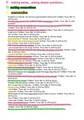
Below you will see excerpts of the backchannel (as the transcript was saved in a Google Doc to be unpacked at a later time). I used Skitch, as a screenshooting tool, to be able to highlight, blur out specific student names and annotext the document. As Dani reflected above:
The higher lever of chat, questions, comments from all children, including the ones that don’t often put their hand up amazed me.
Going through the backchannel, a teacher with a strategic mission of finding the following within the backchannel is able to unpack the quality of the backchannel use and make it visible for themselves, their students and when shared with colleagues openly for and with the world. Take a look at the unpacking of a backchannel as a tool FOR assessment:
evidence of understanding
(different levels, connections being made)
communication skills
(written and "learning community awareness"(engaging in conversation, asking & answering questions) ,
digital citizenship skills
(appropriate use of the backchannel as an academic platform for learning)
visible thinking
I think…I see… I wonder… (make use of Visible Thinking Routines to share thinking)
contributions
(added value beyond "parroting", repetition of what was heard in the frontchannel
How could YOU imagine using such a tool in your classroom? How could you use such a tool for assessment to REPLACE other forms of assessment you currently use?
Silvia Rosenthal Tolisano
.
Blog
.
<span class='date ' tip=''><i class='icon-time'></i> Jul 16, 2015 06:36am</span>
|
|
I was part of the AASSA Educators’ Conference in Curaçao.
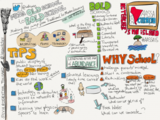
Below are my notes from Will Richardson’s session From Old School to Bold School: Making the Jump from Traditional to Modern Learning.
Silvia Rosenthal Tolisano
.
Blog
.
<span class='date ' tip=''><i class='icon-time'></i> Jul 16, 2015 06:36am</span>
|
|
Being truly global does not mean to only be able to connected within a monolingual world. We can’t truly speak about global communication and collaboration, if indeed we mean talking to other educators who only speak the same language as we do. We have to figure out a bridge to connect to and learn with colleagues who speak in other tongues. We could start by making resources available in other languages (and vice-versa) to give non-English speakers better access.
iPad App Evaluation in Dutch
iPad App Evaluation in Chinese
RU Ready 4 Twitter in French
Blogging in the Classroom in Italian
Blogging with Elementary School Students in Russian
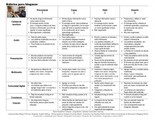
Marisa Gonzalez, a teacher from the Goethe Schule in Buenos Aires, Argentina, based her rubric in Spanish on the blogging rubric, I created (which in turn was based on Andrew Churches Bloom’ Taxonomy Commenting Rubric & Kim Cofino’s & University of Wisconsin’s Blogging Rubric).
Marisa is one of the 7 cohort members, I am coaching this year in modern skills & literacies and documenting4learning.
Download the Blogging and Commenting Rubric in Spanish as a PDF file.
Silvia Rosenthal Tolisano
.
Blog
.
<span class='date ' tip=''><i class='icon-time'></i> Jul 16, 2015 06:35am</span>
|
|
We are in the middle of a enormous change of the culture of teaching and learning. The teacher must see himself/herself as a learner, since he/she is on uncharted territory as well in our ever changing (digital) world. Key competencies and literacies, such as global, media, network, information literacy and digital citizenship amplify our traditional notion and expectation of basic literacy in education. In addition to the traditional content knowledge we are expected to teach/learn in schools, we must include learning how to learn.
How do we achieve this in a culture of "drive by"workshops, once a year conferences, fly in/fly out consultants?
The new literacies and new media require of each one of us the capacity to stay constantly up to date. Teachers must learn for themselves what this means for their own professional growth in order to transfer these experiences and emerging pedagogies into their classrooms.
I am working with a cohort of teachers from the Goethe Schule in Buenos Aires, Argentina in a Blended Coaching Model.
Our work consists of onsite consulting, job embedded instructional coaching and workshops, blended with online coaching, workshops and feedback in the areas of modern learning skills and literacies. I spent five days in an intensive bootcamp with the participants in Buenos Aires, laying the foundation of the paradigm shift in education, establishing a common vocabulary and background information as well as equip participants with the technology know-how-skills to continue our coaching and learning relationship virtually for the rest of the school year (March-December 2015).
The goals of our work together included:
self-awareness and experience in online social media and as a collaborative learner
pedagogical documenting as learning on a variety of levels and for reflection through a variety of techniques including visible thinking.
support in self-directed and self-motivated learning as a member of the cohort
cohort participants as models for the rest of the faculty. Through public sharing of their experiences, participants become passive teachers which, with time, could transform into an active peer-coaching
the school develops a public digital portfolio of their professional development initiatives, as well a show-and-tell of best practices and pedagogies. The portfolio serves as a parent-school communication as well as a resource for other schools.
Pedagogy is defined as the methods, techniques and strategies of teachers to facilitate learning. As teachers we are charged to prepare our students for THEIR future as active members of society and for the challenges the 21st century and beyond bring with them.
The central hub of our work together can be found on the Goethe Cohort Blog.
Cohort participants document their general learning as well a more specific area of interest to them on their GloballyConnectedLearning blog.
Gabriela B
Cristina M
Andrea B
Marisa G
Gaby H
María C
Melina S
Cameron Paterson on his blog It is About Learning writes in a post titled: How do we learn in teams? about the benefits of documentation and sharing:
deeper thinking, starting conversations, sharing between departments and building on each other’s efforts, sharing/reflecting on the process/progression/learning and where that might lead to next, valuing more than the finished product, encouraging team collaboration to inform and improve. ‘Share-worthy’ material does not have to be perfect and packaged, it can be a work-in-progress rather than ready to use. Reflection and improvement, and growth mindset are needed to keep it moving forward, to not just avoid failure, but avoid plateauing or sticking to the status quo. It should be seen as a comment/feedback space, not show and tell. We need to learn from mistakes and share what didn’t work so others can learn from it, and celebrate our mistakes.
As the first month (March) of school in the Southern Hemisphere came to an end, I am in turn documenting the incredible variety of documentation style, reflection and learning growth that is occurring via the blogs of the cohort participants.
Initially looking at the blog posts, the untrained eye might not notice the learning that is taking place as participants are:
jumping over their own shadows and sharing their learning with their world (transparently)
taking first steps in using technology in their classrooms (and sharing these steps…)
making their own and students’ learning and thinking visible for their own reflection and assessment (and sharing them publicly for others to learn from their experiences….)
using a variety of documentation techniques (and making these techniques visible for others to emulate…)
Did I mention that SHARING is a huge component of the work?
Let me unpack a variety of their recent blog posts for you…. [ in return take a moment, click yourself through to the blog posts (use Google Translate if necessary, read the blog posts and leave their authors a comment in your native language. Let’s model that language abilities are no longer barriers…]
Andrea B reflects on her time invested in teaching her students certain technology skills and routines, saves her time in the end:
confirmation of previous intuition regarding time invested in teaching tech skills to students
using links to refer back to a previous blog post
comparing her students’ skills to previous performance/knowledge
embedded reflection piece into blog
showcasing student work as evidence of learning
Cristina M, a Kindergarten teacher, shares her journey of learning by:
documenting from the beginning her comfort and knowledge level
embedding reflection by sharing her perspective and most important aspects of her learning
showing evidence of writing for an audience, by acknowledging her reasons for sharing
use of different media (text & image) to document her learning journey.
Gabi B, a Kindergarten teacher, shares a lesson about trash and recycling by:
using a variety of media to document the lesson (text, images, video)
narrating the lesson step by step
using supportive images to make the lesson more visual for the reader
including student work samples
annotating images for clarifications
linking to a video taken during the lesson to give readers/viewers a glimpse into the classroom
clearly writing for an audience by
Maria, a High School History teacher, documents her own learning and students’ learning during a research project by :
sharing tools used
comparing different stages of the research, initial visualization of brainstorm, connections and relationships to be researched
reflecting on the process, her students’ learning process as well as her process of re-directing her own teaching strategy
using the documentation of student work as part of the process (analysis and evaluation)
demonstrating transfer of her own experience with making learning and thinking visible to her classroom
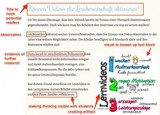
Melina S, a High School Math teacher, is sharing her research and investigation into the flipped classroom and specifically documenting if using videos in lessons, will activate a higher motivation for learning in students. Her blog posts includes:
a title that hooks potential readers
observations from the classroom
evidence of further research she has done and is connecting to her own investigation
an illustration, serving as a visual, to loosen up the text blocks
a demonstration of her digital design skills of creating an artifact of her class’ reflection regarding using videos for learning
evidence of her modeling how to make thinking visible for her students
Marisa G, an elementary school teacher, documents a lesson about Memory, Truth and Justice. Her documentation is supported by:
variety of media: text, images, video
annotated images for clarification
connections made to previous learning
chronological documentation of several learning activities in different learning spaces
samples of student work
Gaby H, an elementary school Social Studies teacher, starts her documentation of her action research project about student learning with the essential questions: What is important in Social Studies? She includes:
documentation from the beginning of the school year to be able to compare understanding at later points in time
images that support the investigation of the essential question, showcasing the learning environment
evidence of metacognition as part of the process
embedded videos as another summary of student understanding at this moment in time
a commitment of continuing to document throughout the school year students’ understanding and knowledge about Social Studies
a documentation of strategic reflection opportunities made available to student and displayed in the classroom
Silvia Rosenthal Tolisano
.
Blog
.
<span class='date ' tip=''><i class='icon-time'></i> Jul 16, 2015 06:35am</span>
|
|
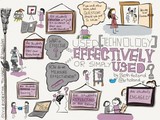
Beth Holland shared her presentation "Used Effectively or Simply Used" from the ASCD conference 2015 as a slide deck via Twitter.
The message from her slides caught my attention… I kept thinking about the questions Beth proposes we ask when we walk into a classroom:
Are students engaged?
Are students creating artifacts as evidence of their own understanding?
Are students constructing their own knowledge?
Are students sharing their learning?
Are student reflecting on their learning?
I have noticed that sketching a message (spending time thinking more intensely about it)
helps me think about the topic on a different level
I am making different types of connections
I seem to remember the message better, based on the fact, that I sketched, colored, arranged and doodled around it
doodling seems to activate a different area in my brain than reading alone or writing text with bullets on a paper or typing them up
choosing font styles or filling in letter outlines with colors gives me extra time to think about hierarchy and keyword importance
makes me concentrate on the message I want to convey
focuses me on the most important part of the presentation and how I could represent it
Have I used technology effectively, when I created the above sketchnote?
Did I create an artifact to show my understanding of learning from Beth’s slide deck?… Yes, the sketchnote was created
Did I share my learning? Yes, I shared by writing this blog post and by sharing the image via Twitter
Did I reflect on my learning? Yes, creating the sketchnote was NOT an artistic exercise, but a tool for my reflection process.
Was I engaged? Yes, I was self-motivated and focused on doodling the message I extracted as valuable from Beth’s presentation
Did I construct my own knowledge? I maybe could have done a better job in ADDING additional questions or connect to other ideas. I was able to connect learning from/with Beth’s presentation to my sketchnoting exploration.
Could I have used a piece of paper, instead of the iPad app (the technology involved here)? I could have… some people can… I am completely inapt to draw or write legibly on a piece of paper…
Silvia Rosenthal Tolisano
.
Blog
.
<span class='date ' tip=''><i class='icon-time'></i> Jul 16, 2015 06:34am</span>
|