Blogs
|
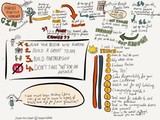
I continue to practice my note taking skills when listening to a live keynote presentation at a conference. I am currently at the GIN conference, a student led conference for students and by students, centered around solving global issues.
To read more about the presenters or to watch their recorded keynote presentations, please visit the GIN conference website
Marina Mansilla Hermann- @marinamansillah
John D Liu- @johndliu
Sarah Dupont- @saradupont3
Silvia Rosenthal Tolisano
.
Blog
.
<span class='date ' tip=''><i class='icon-time'></i> Jul 16, 2015 06:43am</span>
|
|
More and more people have asked about the sketchnotes you see sprinkled throughout the Langwitches blog. I was thrilled when Felix Jacomino, organizer of Miami Device, asked me to do a Sketchnoting 101 workshop at the conference this upcoming Friday.
Here is the slidedeck, I have been working on and a few resources that have helped me wrap my mind around Sketchnoting FOR learning and develop a few skills and strategies along the way.
In a nutshell, I have learned 3 things, since I started dabbling with doodling
You don’t have to be an artist ( I am not…)
The process of thinking involved AS you are creating the sketchnote about a topic is "mindblowing".
Sketchnoting helps me process and digest a talk, wrap my mind around a large amount of information and organize my thoughts better. I am using sketchnoting as part of my learning process.
Sketchnoting FOR Learning from Silvia Rosenthal Tolisano
Links & Resources:
Mix FiftyThree
Paper App by Fifty Three
Sunni Brown: TED Talk: Doodlers Unite
Sunni Brown on Twitter
Langwitches’ Sketchnoting Pinterest Board
Sketchnote Scribes Google+ Community
A Sketchnote Primer by Brad Ovenell-Carter
Langwitches’ Diigo Social Bookmarks about Sketchnoting
Books:
The Doodle Revolution: Unlock the Power to Think Differently by Sunni Brown
The Sketchnote Handbook: the illustrated guide to visual note taking by Mike Rohde
Silvia Rosenthal Tolisano
.
Blog
.
<span class='date ' tip=''><i class='icon-time'></i> Jul 16, 2015 06:42am</span>
|
|
I speak at a lot of conferences. It is a rare opportunity when I am able to attend a conference without the responsibility of a keynote or facilitating several sessions. Last week, I was able to attend MiamiDevice, a first year conference put on by Felix and his Saint Stephens Episcopal School team in Coconut Grove, Florida.
There were many fantastic breakout sessions, but the unconference opportunities (as most of the time) made the experience fantastic!
Below are my "notes". Yes, not on a traditional yellow notepad, that I will never look at again or am unlikely to share with anyone else. I enjoy taking notes in a variety of ways, making sure that they are SHAREABLE. My notes come in form of tweets, which I chose to curate from my and other attendees Twitter feed (#miamidevice hashtag) and connect with each other via Storify. My Notes can be in form of sketchnotes from sessions or photos shot to freeze a moment in time to remind me of the relationships started or strengthened.
Wesley’ Fryer‘s session Help Students Show What They Know with Media
Tablets, smartphones and computers should not be used by students just to CONSUME media: Students should regularly use digital devices to "show what they know" with media." In this session we will view and discuss different examples of student multimedia projects created by students including narrated art/photo projects, narrated slideshow/screencasts, Quick-edit videos, visual notes, and GeoMap projects. Link to examples and available tools to create each media product on the Mapping Media website: http://maps.playingwithmedia.com
Holly Clark and Tanya Avrith session: The Power of Crowdsourced Learning
Looking for ideas you can use in your classroom tomorrow? Time to learn how to crowdsource innovative teaching ideas in this hands-on, participant driven workshop. In this session, you will learn how to use the crowd to curate professional development and game-changing lessons that you can use in your classroom right away. For even more fun, we will ask the best ideas of the day to be on an EduSlam episode.
Here are my tweets from the session Culture of Selfies with Jeremy Macdonald strung together via Storify.
Say cheese! Today’s over-saturation of mobile technology has created a culture of selfies. Though common (yet sometimes annoying), the selfie demonstrates the amplifying power of technology in today’s world. While the word "selfie" is fairly new, the idea and its implications are centuries old. Come explore the world of selfies, learn the history, the implications, and how we can leverage this new(ish) cultural phenomenon to create more meaningful learning in our classrooms and encourage more profound sharing of our ideas and ourselves.
I also got to meet Anibal Pacheco in person. It was especially sweet, since Anibal is puertoriqueño (the language of our heart is Spanish, so our conversation was flowing in and out from Spanish and English) and he had lived many years in Germany… enough said.
Anibal was recording many short interviews, which you can view on his YouTube Channel.
with Jenny Ashby and Nerissa Raschelle photobombing us
[View the story "The Culture of Selfies" on Storify]
with Susan Bearden
with Wes Fryer
and having fun with documenting our culture of selfies
I presented a session on Sketchnoting and was thrilled to see participants be so excited and eager to try
Thank you Craig Badura @mrbadura for the audience perspective of the room…
Thank you Greg Kulowiec @gregkulowiec for the "artistic" perspective and angle
Thank you Tony Vincent @tonyvincent for and appsmashing Infopic.
Here are a few of my images, documenting the session.
I was especially thrilled to see that sketchnoting practice was not over after the session ended, nor limited to the physical attendees.
It looks like MiamiDevice will return in 2016. You might want to start planning [View the story "Miami Device 2014″ on Storify]
Silvia Rosenthal Tolisano
.
Blog
.
<span class='date ' tip=''><i class='icon-time'></i> Jul 16, 2015 06:41am</span>
|
|
After my sketchnoting workshop at Miami Device, I was asked to record my process of CREATING the sketchnotes.
I used Airserver to mirror my iPad display to my laptop
Used Screenflow to record myself sketching the main points of the presentation
Used Screenflow to speed up the recorded footage from 30+ minutes to 2.5 minutes
Exported, then imported into iMovie to add credtits and music
This was the first time doing a screencast this way for me…there are a few kinks that I still need to work out (how to NOT record the screenflow toolbar).
[The sketchnotes created in the video below were NOT created live, but AFTER, I had created the slide deck already}
Here is the slide deck for the presentation
The 5 Cs in Education… What if… from Silvia Rosenthal Tolisano
Silvia Rosenthal Tolisano
.
Blog
.
<span class='date ' tip=''><i class='icon-time'></i> Jul 16, 2015 06:40am</span>
|
|
I am excited to share with you a guest post by Mark Engstrom, head of school at PACE. PACE is a new school planning on opening its doors in 2015.
I am super excited to follow the school’s journey in terms of personalized and networked learning.
At PACE, we have reimagined and redesigned student learning experiences so that students experience their world in a way that makes sense to them. Students and families have choices regarding what content they want to learn, the modality which they want to learn in or the pace at which they learn for each learning experience. They will also operate within a new workflow that includes autonomy with regards to when to be assessed and reflection/documentation at the end of each learning experience.
Take a look below and ask yourself: Who owns the learning (HT to Alan November) ? What are the skills involved in this learning experience? (graphic and presentation design, typography, communication , network, collaboration, reflective skills, etc.)
Guest post by Mark Engstrom:
An excellent example of student learning at PACE is the development of the logo. We connected Alex E., a PACE student, with Mariela, a professional graphic designer in Buenos Aires to embark on the project. To start, Alex sent three ideas to her with the reasons that he liked each one (he mentioned colors that were easily visible, a variety of fonts and in the case of the middle one, a space theme since PACE will be located in the same city as NASA).
The next step was for Mariela to send in her first round of logo suggestions, including some that were strongly influenced by Alex’s initial ideas. What she sent to him was the following. Upon receiving this, Alex let Mariela know how he felt about the logos and was ready to collaborate so they could get to the next step in the process. Their e-mail exchange is below:
They agreed on skipping the underline idea and at that point Mariela thought about the specific hues that would represent the forward thinking model of PACE (she also noted that Alex subconsciously chose the colors of kung fu belts). She decided on a variety of hues and the following suggestions were sent to Alex: Alex wrote that he liked Droid Serif and Sanchez Italic and we ended up with proposal number three from above which gave us the logo we have today (Sanchez Italic): In his reflection about the experience of collaborating on the design of the logo, Alex said,
"It was fun working with a professional designer and an experience that most kids don’t normally get. I have the feeling that I’m actually making a change and not just making myself smarter."
Mariela thought the experience was a good one as well and stated,
"In over 10 years of experience as a graphic designer, this is the first time I shared a project with a child. I would say that the idea arose in his little head, I just contributed with my experience and knowledge to adjust and add meaning to what he proposed. Children have skills that adults have lost over the years due to the amount of information they accumulate. We have much to learn from them! Thanks for making me part of this project!"
This is a great example of how we intend to give students Purposeful (the logo is being used), Authentic (he went through a genuine collaborative process), Connected (he worked with a professional graphic designer) and Experiential (he didn’t read about someone else’s experience, but rather went through it himself) learning experiences every chance that we can. We will embed as many of the four components that make up the acronym PACE as possible in our Passion Based Learning projects and other areas of student growth.
Silvia Rosenthal Tolisano
.
Blog
.
<span class='date ' tip=''><i class='icon-time'></i> Jul 16, 2015 06:40am</span>
|
|
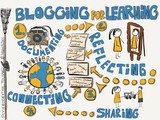
I am mulling Blogging FOR Learning over and over. It seems to be the glue that holds the puzzle pieces together in terms of contemporary learning and teaching.
From 1. Documenting (video, audio, text, images, embedded content,manage online work, curated content) to
2. Reflecting (meta-cognitive, connected, goal oriented, as an assessment) to
3. Sharing (published, transparent, making learning/ thinking visible, to teach others and contribute to a network) on to
4. Connecting (for authentic feedback, collaboration purposes, finding mentors and to gain perspective)
Help me re-sketch Blogging FOR Learning. How would you create a learnflow? What would you add? What are your puzzle pieces? How would you visualize for others the flow and benefits of blogging for learning?
Silvia Rosenthal Tolisano
.
Blog
.
<span class='date ' tip=''><i class='icon-time'></i> Jul 16, 2015 06:39am</span>
|
|
Funny how a Learning Network trail can lead one to unexpected destinations Follow along the bread crumbs to see where the trail came from and what it led to…
1. I shared a presentation on Sketchnoting For Learning
2. Sharon Bowman, left a comment on slideshare and tweeted the link
3. I followed the link to Sharon’s website, and purchased one of her books titled: The Ten Minute Trainer: 150 Ways to Teach it Quick & Make it Stick.
As a professional development provider, I enjoyed her suggestions of 1-minute activities with the objectives of:
understanding
reflecting
reviewing
focusing
articulating one’s own thinking
making thinking visible
creating connections
sharing
Sharon used analog material, such as paper, pencil, index cards, sticky notes and face to face dialogue and conversation in her workshops. There is NOTHING wrong with that and EVERYTHING right with her approach to take lecture type presentations and divide them into small easier digestible chunks, then give the attendees time to review, reflect, discuss and share what they learned.
"shorter segments of instruction are better than long ones, and learners remember more when they are involved in the learning"
4. My thoughts turned to ideas how we could amplify these short activities beyond the attendees of the workshop and at the same time include an activity that:
exposes participants to network literacy
helps them contribute to and build a Personal Learning Network
collaborates and connects with a larger number of other workshop attendees, as well as a potential global audience
documents their learning beyond the physical time of the workshop
supports reviewing, reflecting, discussing and sharing their learning
5. Many of Sharon’s activities seemed to be a natural fit for amplifying them into Twitter activities, embedding the SAME learning objectives she has for her analog activities.
6. I sketched the following notes
7. I look forward to sharing the following 1-minute activities at my next workshop as an option for attendees in addition to some of the analog ones.
Connections
Share something you already know about the workshop topic
use the #workshop hashtag
follow someone who is also using the #workshop hashtag
Pair Share
share the most important fact or concept you just learning in the last 10 minutes
tweet it out and specifically @mention someone else
Shout Out
shout out a number between 1-10
tweet (that amount) of ways that can impact your practice
use #workshop hashtag
Doodles
Make up a metaphor of the most important concept you learned
sketch the metaphor
take a photo and tweet it using #workshop hashtag
Signal
make a noise signal, if you have a "tweetable moment"
articulate and share your tweetable moment
tweet it out
use the #workshop hashtag
Time Sponges
tweet out two things you want to learn at the workshop
reply to someone else’s tweet by answering their question
Think & Write
tweet one sentence that summarized the information you heard about
use #workshop hashtag
Exit Ticket
Tweet 1 opinion about an issue related to what you learned
tweet a question you sill have. "How about…"
use @workshop hashtag
Action Plan
tweet out a sentence starting with "I plan to…" with what you learned
share how you will hold yourself accountable
Silvia Rosenthal Tolisano
.
Blog
.
<span class='date ' tip=''><i class='icon-time'></i> Jul 16, 2015 06:39am</span>
|
|
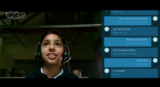
Microsoft launched a preview of its Skype Translator service, a real time translation service supporting over 40 languages. The preview was filmed at Colegios Peterson in Mexico City, an AASSA member school, and at Stafford Elementary School in Tacaoma, Washington.
Interested in learning more about using Skype in the Classroom or about Mystery Skypes? Take a look at the following resources:
Mystery Skype:
Be the Fly on the Wall: Mystery Skype
Digital Learning Farm in Action: Mystery Skype
Mystery Skype: The Excitement of Learning
Skype in the Classroom:
Assessment in the Modern Classroom: Part Two- Taxonomy of a Skype Conversation
Framing a Skype Learning Experience
Behind the Curtains of a Skype Call
Skype Jobs for Students
Silvia Rosenthal Tolisano
.
Blog
.
<span class='date ' tip=''><i class='icon-time'></i> Jul 16, 2015 06:39am</span>
|
|
I am back on my soapbox…
…because I continue to see great things happening in classrooms, but get blank stares, when I ask, if these things are being shared beyond the school building.
…because I watch as administrators feel the need to "protect" their faculty from "one more thing to do".
…because I continue to hear fear of transparency, competition, privacy and technology skills and tech phobia.
Setting up my soapbox to raise awareness of the "moral imperative of sharing" for teachers (Dean Shareski) goes back to his keynote in 2010 at the K-12 Online Conference. Since then I have stepped on that soapbox via my blog and at conferences advocating for the IMPORTANCE and NECESSITY of sharing.
What is your Reason for not sharing?
The Now Literacies through the Lens of Sharing
It’s All About Sharing & Collaborating
There is a responsibility of sharing among Educators
Sharing in Education- Is it Changing?
What Do You Have to Lose?
George Couros, recently published 4 Reasons People Don’t Blog, which are in essence the same reasons why people don’t share (just substitute "blogging" for "sharing")
Blogging is useless
I have no time
I’m a private person
No one cares what I have to say
He closes his blog post by pointing out the importance of sharing as an integral component of learning as well as underline "the willingness of others"
I have learned a ton not only from my own blog, but from benefitting from others that have been willing to share their teaching and learning with me, and because of that, as Dean Shareski stated, I am better off for the willingness of others to share.
I DO want to understand WHY it seems so hard for some many educators to share…but only in order to build an airtight argument that SHARING best practices, reflections and documentation of learning is the essential fabric of education and the building block of networking, growing and moving forward.
We need to stop looking at all the reasons why educators DON’T SHARE and start looking at and DOING all the things WHY we NEED TO SHARE.
So here is my list: 3 Things Why You (as an Educator) Should Share
1. The shift of a culture of consumers to producers is built on sharing and disseminating.
Our world, and in particular the world of our students, is build on the culture of sharing. Ex. Sharing your status on facebook, adding a book review on Amazon, leaving a comment on a product you purchased online, photos on Instagram and videos on Snapchat and YouTube. Educators need to acknowledge the shift outside of the classroom and take advantage of the shift for learning with our students.
2. Painting the picture of teaching and learning in your school
Too many other people (non-educators, policy makers, politicians, media, etc.) are painting a grim picture of the teaching profession, teaching in general, schools and student learning. It is time to become our own storytellers. Sharing student successes and teachers’ professional and continuous learning MUST overshadow and outnumber the negative press and reputation that has been building up.
3. The future of learning is social and build on and around Professional Learning Networks.
Networking is built on a concept of sharing. Networking is defined by the Merriam_Webster dictionary as "the exchange of information or services among individuals, groups, or institutions". In order for an exchange to take place, someone has to step up to SHARE. Without sharing there is no network. Someone has to give and someone has to take, without giving the machinery of how a network works will not function. In our Information Age, where information is being generated at exponential speed, we need to rely on a network to filter quality and relevant information for us. It is our responsibility to be the filter and curator for others as well.
So from 3 reasons WHY you should share… on to 3 Things you can do to start sharing…
3 Things What You (as an Educator) Can Do to Start Sharing
1. Stop resisting change
We need educators, in particular administrators, to stop resisting change, take a deeper look at the world around them and LEAD by modeling! Sharing is and needs to be a method, a strategy and a technique to improve teaching and learning practices, benefiting an entire school learning community.
2. Create a workflow to document teaching and learning
Great things are happening in your classroom and in your schools. Learn to embed documenting best practices, student learning and action research in a digital form to be able to easily disseminate via a blog, twitter, photo or video sharing site.
3. Start small.
Add a comment on a blog you read, share a resource, a link, a book or an article you have learned from on Twitter. Let students take over in documenting learning in their classroom. Use your cell phone to take photos of learning in action, write a descriptive comment under the photo and share on a blog, Instagram, a classroom site, blog, Twitter or Facebook account.
You can start sharing right here by adding your reasons WHY educators should share and WHAT you can DO to start sharing?
Silvia Rosenthal Tolisano
.
Blog
.
<span class='date ' tip=''><i class='icon-time'></i> Jul 16, 2015 06:39am</span>
|
|
Over the past few years, I had many conversations with colleagues and teacher friends what it would be like to start, build, run and work at our own school.
What would we do different in "our" school?
Who "all star" faculty team from our PLN would we recruit to develop a school that would give our future students an incredible learning experience.
What types of teachers would we hire?
How would we assemble a collaborative team, eager to work with each other, share their work with a global audience and bring these experiences to their students?
What curriculum would we adopt, adapt and develop?
What kind of administrators would we be?
What types of parents would be sending their children to learn with us?
How would Professional Development look like for our faculty and students?
Have you ever dreamed of opening your own school? What would you do? How would you promote your school? What would be the key characteristics of your own school? What would you do differently?
Mark Engstrom, a former vice principal of mine, is doing exactly that. He dreamed and is making his dream a reality when PACE, his new school that is planning on opening its doors in August of 2015.
Even before these doors open, Mark has started blogging to share his school’s philosophy, have potential parents and students get to know him and to start making connections. Langwitches recently cross-posted an article about one PACE Student’s Learning Experiences- Collaborating on a PACE logo.
I am especially excited about following PACE’s journey as they :
* are looking to hire teachers who can demonstrate skills (not just talk about them) and are experiencing a connected learning network as they are building their own digital presence (not just having heard about it).
A video/film which includes the candidate him/herself- no more than 3 minutes- describing why you would like to work/be a good fit at PACE
or
An example of the candidates digital footprint and an explanation of how that online presence indicates why they would like to work/be a good fit at PACE
* will be supporting networked students
At PACE we want our students to realize that they are part of a larger web of people out there learning about the world.
*are including documenting and reflecting as an integral part of the student work flow /learning process
To learn more about the school, or if you live in the Houston, Texas/USA area and
are interested in sending your child to a school who is re-imagining education or
are interested in becoming part of the founding faculty
take a look at the following videos to learn about PACE or like them on Facebook.
Pace Philosophy
What Will Learning Look Like at PACE?
Have you ever thought of building your own school? What would be key characteristics you would showcase or market for your dream school, if you could build one from scratch?
Silvia Rosenthal Tolisano
.
Blog
.
<span class='date ' tip=''><i class='icon-time'></i> Jul 16, 2015 06:39am</span>
|