Blogs
|
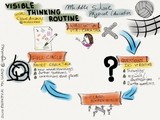
We are fortunate to have a Visible Thinking Routine (VTR) expert at our school. Claire Arcenas, our MS/HS Physical Education teacher, previously a third grade classroom teacher who has done extensive readings and research in experiencing, implementing, embedding VTR in teaching and learning. Recently, she started sharing her experience and reflection on her professional learning blog: Visible Thinking Across Subject Areas.
Claire invited me to an 8th grade PE class before a unit on Volleyball skills and allowed me to film her facilitating the VTR called Chalk Talk. She explains the overview of her volleyball unit on her classroom blog post Setting Goals for Player’s Success
Grade 7 and 8: Exploring our Enduring Understanding and Essential Questions for Volleyball…
Enduring Understanding:
Volleyball requires the application and coordination of skills necessary to contribute collaboratively in achieving a common goal
Essential Questions:
What is volleyball?
What movement skills are needed to play volleyball successfully?
What are players’ responsibilities?
How is organization needed in playing volleyball?
How can the skills and attitudes learned in volleyball be used in other sports and activities?
In the movie clip, you will see Claire giving an introduction to the Visible Thinking Routine, get kids in groups to rotate around posters with an Essential Question on each. Silently, students added their thoughts, drew visuals or documented questions that they had. After all students had the opportunity to add to each poster, Claire collected all the posters and saved them for the second part of the thinking routine after the actual volleyball playing experience in the gym.
At the end of the unit, students met in the same groups to come full circle with the chalk talk routine. Claire distributed the posters, gave students time to re-read their original ideas and thoughts. They then turned the poster over to add new understanding, any connections or new questions.
The final part of the process and to conclude the learning process is for students to reflect on the classroom blog using the VTR: I used to think… but now I think…
Silvia Rosenthal Tolisano
.
Blog
.
<span class='date ' tip=''><i class='icon-time'></i> Jul 16, 2015 06:54am</span>
|
|
Another glimpse into the classroom!
Previous video clips: Socratic Seminar & Backchanneling, Visible Thinking Routine: Chalk Talk, Mystery Skype Call, Collaborate & Curate
In the spirit of opening up classroom walls and creating a ripple effect of teaching and learning by sharing ideas, methods, action research and modern literacy upgrades, here is another video clip. You are watching a 7th grade Humanities classroom, led by their teacher David Jorgensen at Graded-The American School of São Paulo.
The students are reading The Giver, by Lois Lowry and have been annotating their thoughts as they are reading individual chapters in a Google Doc chart/table, labeled:
Observations
Inferences
Rituals
Questions/ Predictions
David uses a circle share out technique to have students articulate out load their thinking and annotations of their reading. It is a faced paced method to allow kids to contribute and listen in a short amount of time. A follow up that David practices is then for the students to get in smaller discussion groups to talk in more in detail or get clarification about what they heard.
Silvia Rosenthal Tolisano
.
Blog
.
<span class='date ' tip=''><i class='icon-time'></i> Jul 16, 2015 06:54am</span>
|
|
A short video with Heidi Hayes Jacobs talking about the necessity of being globally literate.
Links she mentions:
Curriculum21 Hub
Global Partnership Hub
Mastering Global Literacy Book
Pulitzer Center Projects
Out of Eden
Silvia Rosenthal Tolisano
.
Blog
.
<span class='date ' tip=''><i class='icon-time'></i> Jul 16, 2015 06:54am</span>
|
|
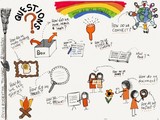
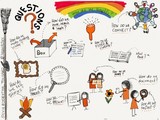
I have so many questions!
I am wondering about the puzzle pieces that I need to think about and understand to push forward towards transforming teaching and learning?
How do I bring these questions and puzzle pieces to the surface and make them visible to coach others?
How do I make my own thinking visible?
I am finding visual note taking an intriguing part of the thinking process that I just recently started exploring. Since I am not a natural artist, I am nevertheless finding the process of drawing itself and thinking about how to represent an idea super valuable.
What are some of YOUR questions?
Silvia Rosenthal Tolisano
.
Blog
.
<span class='date ' tip=''><i class='icon-time'></i> Jul 16, 2015 06:54am</span>
|
|
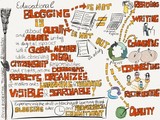
Blogging in education is about quality and authentic writing in digital spaces with a global audience, while observing digital citizenship responsibilities and rights, as on documents, reflects, organizes and makes one’s learning and thinking visible and searchable!
Blogging is not analog writing in digital spaces.
Blogging is not an activity, but a process. The process includes reading, writing, commenting and connecting. It is about reciprocating and an emphasis on quality, not just publishing.
Silvia Rosenthal Tolisano
.
Blog
.
<span class='date ' tip=''><i class='icon-time'></i> Jul 16, 2015 06:53am</span>
|
|
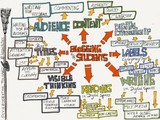
On the heels of Blogging is NOT Analog Writing in Digital Spaces, I decided to re-create the sketchnote of There is More to Blogging with Your Students. I added Reading in Digital Spaces to the Mix.
Silvia Rosenthal Tolisano
.
Blog
.
<span class='date ' tip=''><i class='icon-time'></i> Jul 16, 2015 06:52am</span>
|
|
Blogging is about reading and about writing in digital spaces. We want students to make their learning and thinking visible. We are developing a platform and a blogging pedagogy for students to document, reflect, organize, manage their online learning records and using student work on blogs as a source for formative assessment. Timely feedback from their teachers, peers and a global audience is critical to the process.
Once the "Blogging Kraken" has been released and the process is on its way, keeping up with:
reading all of students’ posts
giving timely feedback
using student work on blog posts as formative assessment
holding students accountable for observing copyright
connecting and disseminating your students work to a global audience
continually developing a workflow
can quickly turn into a nightmare for a teacher if they are not prepared and organized.
Below you will find one strategy to help with developing a workflow.
Since Google Reader was discontinued, I have been using Feedly as my RSS Reader. I keep two separate Feedly accounts, one for my own professional readings and one specifically for student blogs.
The initial set-up is tedious (if you have a lot of students to follow), but well worthwhile the effort. Each individual student’s blog URL needs to be added manually to Feedly.
It is a good idea to create separate folders/categories to house the blog feeds of individual classes, blocks or entire grade levels. Once a URL is added, Feedly will give you a choice to add it to an already existing category or to create a new one on the spot.
Once the categories are created and blog feeds are added it becomes much simpler to:
have an overview of students’ work
have one-stop access to their posts (no need to visit each student blog URL individually)
keep up with when students are posting or if they have posted
keep track of the posts you have already read and still need to read
search ALL blog posts in ALL your feeds (not just within one particular blog)
see any overall trend (How often students post- timely, quantity? Use of keywords and "quality" blog titles)
Feedly allows you with the use of categories/groups to take a look at a list of latest blog post by looking at the entire category or by choosing individual student blogs.
Feedly also supports the teacher’s workflow to:
save specific posts to be responded to later or saved to other platforms (Ex. Evernote, Pocket, Instapaper, etc.)
disseminate via email and several social network platforms (ex. Google+, Twitter, Facebook, Linked in, etc.)
An important feature of Feedly is to be able to export and import all the categories and the feeds you added. Once you have created a school or grade level wide Feedly account, you can:
export all by creating an OMPL file of your account (make sure you are logged into the account to export before you click on the link) or click on your account name in the bottom left sidebar, then scroll down to the "Save as OPML" button to export your feeds and categories.
The file that you are downloading, can now be shared with a colleague with the same students or an administrator.
Go to your Feedly account (again be logged in)
Click on your name in the bottom left sidebar
Then click on the Import OPML botton
Browse for the OPML file that was previously shared
Import the feeds
How are you organizing you workflow of keeping up with student blogs?
Silvia Rosenthal Tolisano
.
Blog
.
<span class='date ' tip=''><i class='icon-time'></i> Jul 16, 2015 06:51am</span>
|
|
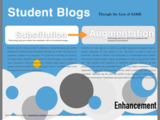
The step from using a static website or emails as a mean to share announcements or calendar items to sharing the same type of items on a blogging platform is not far nor a steep step. My ultimate goal for using a classroom blog or student blogfolios though, is that of creating transformative teaching and learning opportunities, not to have a platform that substitutes a composition book or paper journal. To make the difference visible and clearer, I am looking through the lens of the SAMR model.
First, a Classroom Blog seen through the lens of SAMR
What about Student Blogs?
Substitution- technology acts as a direct substitute for the task
A student uses the blog as a tool to substitute a handwritten/typed and printed assignment. The student copies and pastes a Google Doc or other file from a word processing program into a blog post. The comments on the blog are closed or not being utilized. Students might upload a scanned image of an analog test score, worksheet or other analog artifact. Students might answer a prompt or question posed by teacher to the entire class. There is no added value to the learning process versus the analog task.
Augmentation- technology acts as a direct tool substitution with functional improvement
Students use their blog as a platform to publish assignments (research papers, essays, responses) for their teacher to see. The blog is a place to push out information, possibly for Student Led Conferences or a showcase/process portfolio. They insert or embed images, videos, presentations or audio to support their written text. They possibly insert hyperlinks to additional resources. Students tag and categorize their posts with searchable labels. The blog platform becomes a digital organization of students’ online learning records, which is centralized, archived and searchable. Teachers use the comment section to give feedback to their students about their performance. Classmates read each other’s papers and leave comments.
Modification- technology allows for significant task redesign
Students use hyperlinked writing as part of digital writing process to show and connect their thinking to topics, influences, relationships and process between previously published content and external resources. Students communicate beyond the written word, in multimedia and transmedia ways. It is evident in their work that they are writing with a global audience in mind and their work encourages conversation, invites multiple perspectives to add and influence their work. Students receive constructive feedback from peers as part of the writing process. Comments inform students’ writing and original task of "paper" extends and "spills over" into the comment section, altering form of writing piece as well notion of "completion" of paper.Students are demonstrating writing skills for digital spaces, by observing digital citizenship, hyperlinked, networked, peer- connected and non- linear writing.
Redefinition- technology allows for the creation of new tasks previously inconceivable
The student blog becomes an embedded part of the process and a natural extension of communication and learning cycle by documenting evidence of learning, reflecting, sharing and receiving feedback in order to consider revision. Teachers and students actively and strategically disseminate and connect the blogs to a learning network for feedback and resources. The blog archives artifacts, reflections and connects learning over time. The blog becomes a natural extension beyond assigned academic work and is being used as a hub to document students’ learning, demonstrating self-directed and self-motivated lifelong learning habits as they are organizing, building and maintaining their own online learning records, a growing academic digital footprint and develop their personal brand as well as personal learning networks.
Silvia Rosenthal Tolisano
.
Blog
.
<span class='date ' tip=''><i class='icon-time'></i> Jul 16, 2015 06:50am</span>
|
|
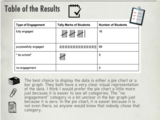
6th graders, under the facilitation of their Math teacher, Laurel Janewicz, have learned to take data, analyze the data and tell a story with it. They are demonstrating their understanding of Math concepts, data graphs, misleading graphs and communication skills.
Laurel chose to give authentic, relevant and meaningful data (not invented data) to her students to analyze from the results of a Challenge Success survey taken the previous school year at the school. The survey compiled data about the school’s extra curricular activities, homework habits, parent involvement, student engagement, sleep patterns etc.
Laurel’s plan was to have students analyze the data and then create different types of graphs to be able to communicate their findings in a presentation. Students were to tell a story of the data. The rubric below showed students Laurel’s expectations in terms of content, communication/presentation and a blog post.
Laurel also made connections to standards clear:
The bottom of my rubric has the content standards for statistics and data, but Common Core also has 8 Mathematical Process standards and this project hits on a lot of them:
3. Construct viable arguments and critique the reasoning of others.
Make conjectures, justify conclusions, communicate them to others
4. Model with mathematics
Identify important quantities in a practical situation and map their relationships using diagrams, graphs,etc.
Analyze those relationships mathematically to draw conclusions
5. Use appropriate tools strategically
Be sufficiently familiar with tools appropriate to make sound decisions about whether these tools might be helpful, recognizing both the insight to be gained and their limitations.
Identify relevant external mathematical resources, such as digital content on a website, and use them to pose or solve problems.
Use technological tools to explore and deepen understanding of concepts.
Laurel, in her own words, lists some of the observations and comparison from teaching the same unit in previous years.
What is different this year?
I used real data that is relevant to them because I created a survey which they responded to and shared the results with the students and assigned each student a question/results to analyze.
I pulled all the parts of this unit into one project. Instead of making and analyzing graphs for one set of data (real or fake), finding and analyzing measures of central tendency for another (real or fake), creating and analyzing misleading graphs for another (real or fake), they do all of it for one real, relevant set of data.
I added the element of making the data tell a story- using it to communicate or persuade. Data and a narrative go best together.
I incorporated use of technology so they could share this on their blog not just with their classmates and the Graded community, but with a global community.
I dedicated a lot of class time for working on this and shared student work along the way so students could see exemplars and offer and receive feedback.
I designed specific questions for students to offer feedback on the projects on the blog posts.
From the perspective of modern skills and literacies upgrades:
Good teaching is good teaching. Adding technology to bad teaching still will not increase student learning. Adding technology to good teaching can add new layers and open up new dimensions of connections and learning. Laurel’s lesson on data analysis and graphing (including misleading graphs) was well planned, developed and executed to begin with. The lesson could have stood on its own and would have addressed the Math standards.
By tweaking the lesson, as Laurel described above, so many more instructional methods, skills, literacies and standards were addressed:
making thinking visible
being able to visually tell a story with data
communicating that story via an electronic media for a larger audience (potential global connections)
communicating math concepts
going through creation cycle: data analysis, creation, sharing, publishing, feedback, revision
differentiated
personalized
student choice
media literacy: choose appropriate media, possibly "media/app smashing", by mixing several tools/media to create one project
network literacy: writing for an audience, receiving feedback, responding to feedback
information literacy: analyzing data, recognizing misleading data, visualizing data, interpreting data from multiple perspectives
digital citizenship: be aware of copyright of digital images (Creative Commons, proper citation)
Natasha, one of the sixth grade students summed up her experience in her blog post:
In math, we have been working on a project with data from the responses we got from the Challenge Success Survey. I thought that this project was extremely interesting because we got to incorporate our knowledge of most of the things we had learned about in that math unit. I really liked taking on my project from a different perspective. I also got to experiment with different websites that were really cool. I got to learn all about misleading graphs, graphs and so many other things that I hope you find as cool as I did.
Student examples (created in Wideo, Google Presentation, PowToon, Piktochart, Prezi) of presentations:
How Much Time are Graded 6th Graders Spending on Homework? by Maya W.
Come to Graded by Jack
Is it Fake or just Misleading? By Yael
Let’s Get into This by Rens
You Can Never Get Too Deep When it Comes to Data! by Tashi
Homework? Time? What’s Going on? by Laura
Do you do as much Homework as I do? by Alyssa
The Challenge is Complete by Felipe
Interested how this story continued to unfold? Watch for an upcoming blog post of Blogging in Math class, with student samples and model lesson video of Laurel introducing her expectations for quality blog commenting in Math.
Silvia Rosenthal Tolisano
.
Blog
.
<span class='date ' tip=''><i class='icon-time'></i> Jul 16, 2015 06:49am</span>
|
|
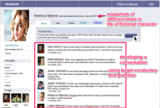
Ana Paula Cortez, a Portuguese teacher at Graded, The American School of São Paulo, got her 7th and 8th Grade students excited about practicing the target language during a Life Cycle unit. Students were learning vocabulary words and traditions around the birth of a child, their school and college years, work life and retirement. Ana Paula designed a project titled: "De volta para o futuro" (Back to the Future). She asked her students to create a character and fake Facebook pages to accompany the character throughout his/her life.
Objectives (Objetivos)
Describe past and future events (Descrever atividades passadas e futuras)
Speculate about destiny, professional and personal future (Especular sobre destino, futuro profissional e pessoal.)
Enduring Understandings (Conhecimento Duradouro)
Values (A criação de valores)
How does the present establish the basis of the future? (Como o presente estabelece as bases do futuro)
The importance of planning for a successful future (A importância do planejamento para o sucesso futuro)
Essential Questions: (Perguntas Essenciais)
What values ??today will I take into my future life? (Quais valores de hoje levarei para minha vida futura?)
How will my actions in the present create my future? (Como minhas ações presentes vão criar o meu futuro?)
How to plan for success? (Como planejar para o sucesso?)
Content (Conteúdos)
Review of the Present Perfect Subjunctive (Revisão do Pretérito Perfeito do Subjuntivo)
Vocabulary related to adulthood (ex. getting married, student exchange, gap year, etc.) (Vocabulário relativo à vida adulta (ex.: casar, formar-se, fazer intercâmbio, ter um ano sabático etc.)
Conjugations (Conjunções)
General Instructions (Orientações Gerais)
Create a page on Fakebook (fictional character - from birth to retirement) (Criar uma página no Fakebook (personagem fictícia - do nascimento até a aposentadoria)
4 snapshots: before birth, childhood and adolescence, adulthood, retirement; (4 snapshots: antes do nascimento, infância e adolescência, vida adulta, aposentadoria)
Include all basic elements: profile, photos, videos etc; use Facebook Template (Incluir todos os elementos básicos: perfil, fotos, vídeos etc; Usar template do Fakebook)
Use Creative Commons images. (Usar imagens do Creative Commons)
We found a Google Apps Presentation Template to start,
Ana Paula Cortez translated the template into Portuguese and shared the file via Google Drive with her students. They each made their own copy and shared it back with their teacher.
Student examples:
Students created a page announcing the birth of the "person", during the infancy/childhood, High School time,adulthood and retirement age.
Student comment about the project (Hint, use Google Translate to copy and paste the comments and translate into English)
By Andrew:
Este projeto foi muito divertido. Foi muito legal como criamos uma pessoa e seus amigos e familiares. Foi como fazer uma história. Eu aprendi muito e espero que possamos fazer outros projetos como este.
Silvia Rosenthal Tolisano
.
Blog
.
<span class='date ' tip=''><i class='icon-time'></i> Jul 16, 2015 06:49am</span>
|