Blogs
|
cross posted with permission from Dr. Silvana Meneghini,’s On The Edge Blog.
Silvana, the High School Technology Coordinator at Graded, The American School of São Paulo, shared a How-To post to connect augmented reality to student reflection by adding a layer of learning (not technology for technology sake). I highly recommend adding her blog to your RSS reader and following her on Twitter to connect with her learning and teaching journey.
Enjoy Silvana’s post below:
Augmented Reality allows you to expand the experience of the real world with information, video, sound, GPS data, and so on. If well utilized, it can be much more than just another cool tech thing… You will see below an example of how Augmented Reality was used to expand the experience of visitors to our school’s Art Exhibit. As students had to reflect on and verbalize their artistic choices, an augmented reality layer was created for viewers of the exhibit. In the process, students were excited about sharing with an authentic audience and had to really recall and reflect. It created a hyperlinked reality that enabled amplification of the viewers’ learning experience that was much more engaging than text.
By pointing a tablet or smartphone at a painting, through the viewing lens of Aurasma App, visitors could learn about the artist that influenced the work and techniques that were applied. Through Aurasma, an "overlay" video appears to be coming directly out of the painting and the student starts talking to you.
But wait… this engaging effect of merging the video with the real object does not happen automatically in Aurasma Studio. It was consciously created to provide the "real" augmented reality experience, through the use of green screen effects. In order to do that, the overlay video had to be superimposed on the image of the real object, which is easily done with the GreenScreen by Do Ink App on iPad . So we first took a picture of the painting that was then inserted as a background at the Green Screen App. As we hold the iPad to record the student, we would already see the painting image on the background, allowing the correct positioning of the iPad camera to give the desired illusion. This is a very easy and quick process if you have a green screen already setup in your school and the students were able to do the recording by themselves.
Below you can watch the overlay video for the Horsehead painting created with Green Screen by Do Ink, and check the type of content on artistic choices and technique. Aurasma was used only to create an "Aura", which is a combination of the "trigger" image (picture of the real object, in this case the painting) and the "overlay".
How to:
Step 1: Take a picture of the real object for your Trigger Image
Tip:
If the trigger image is not detailed enough it will generate an error.
Crop the image on its more detailed parts.
The resulting Aura will be focused around the cropped part, but at least it will show.
Step 2: Use a Green Screen App to create an Overlay Video
Install Green Screen by Do Ink from Apple Store on iPad or Cell Phone (Tutorial)
Add the Camera to record over green screen
Add the Trigger Image (the same as the real object - will show on the background)
Place camera so actor appears in the right position over background image
Record
Step 3: Use Aurasma Studio to create an Aura
Prefer the online Aurasma Studio to the App
Add a Channel
Add your Trigger image
Add your Overlay video
Create / Add an Aura:
Select Trigger image
Select Overlay
Choose Channel
Step 4: Provide instructions for Viewers
Install the Aurasma App
Search for your Channel
Follow the Channel
Then point to the real object and see the Aura come to life!
Silvia Rosenthal Tolisano
.
Blog
.
<span class='date ' tip=''><i class='icon-time'></i> Jul 16, 2015 06:58am</span>
|
|
The conversation about visible thinking in Math started with one of our teachers at Graded, The American School of São Paulo, Adam Hancock, wanting to know how he could incorporate having students’ use their blogfolios in Math class. It seemed natural to have students write for Humanities (Language Arts and Social Studies), but writing did not seem part of what Middle School Math was about.
How could "blogging" go beyond taking a digital image of a Math problem on paper or a quiz and writing about "how the student felt about solving the problem or passing the test?"or ask themselves what they could have done better?
One of the first steps was to bring more "language" into the Math classroom. In a Skype call with Heidi Hayes Jacobs, she said that Math should be taught more like a foreign language.
Students need to know vocabulary words and become fluent in "speaking Math", in order to be able to communicate their thoughts and ideas.
Videos and screencasts are great tools to articulate, visualize and then share ones’ thinking when working to solve a Math problem. Below is a video of Adam, modeling solving a mathematical equation.
Google Glass- Math Equation from langwitches on Vimeo.
Making Mathematical Thinking visible had the following purpose for Adam in his classes:
1. give students a truly differentiated math experience and expose them to a wide variety of math concepts.
2. encourage self directed learning and allow them to demonstrate their understanding in a way of their choosing.
3. make their learning process visible and allow students to reflect on their growth and learning in the process of solving the problem, by using the KWHL routine (What do I know? What do I want to know? How will I find out? What have I learned?)
KWHL by Mary
Prezi by Isabella
More student blog posts:
Nico’s KWHL Chart and Problem (chart, video, text)
David’s Math KWHL (Chart & video)
Andre’s KWHL Chart ( video, text)
Lucas’ KWHL Problem (image, video, text)
Alexandre’s KWHL Problem: Quadratic Equation (graph, audio)
The process of making mathematical thinking visible, as well as the artifacts’ quality, was hopeful, awkward, "messy" and challenging…
Adam and my observations:
Students were working in different areas of math, and most of them had to learn something new, and tie it to what they already know in order to explain their problem.
It is not a natural skill for students to be able to "speak" Math. There is a need to expose and encourage students to use mathematical language to communicate.
The ability of being able to articulate and make a thinking process visible is a skill we need to support our students in becoming fluent in. It was challenging for students to think about and articulate their learning value instead the production value of their artifact.
Some students focused in their reflection on documenting the steps of what they did as they were solving the problem, not on the necessary thinking that was involved. Some students don’t/didn’t see the reason why they should be reflecting on their learning in Math.
It seemed unnatural to ask students to write a reflective blog post tagged on the end. It seems artificial and one more thing to do as an add-on, versus reflection as part of the learning process. Option of breaking the reflection process into different blog posts along the way, which later on can be linked to each other to demonstrate the process path.
When students are given a lot of freedom to demonstrate their understanding, a lot of them need structure and some clear guidelines or else the product does not turn out very well. This may improve with practice and more opportunities for them to work independently.
Many students didn’t fully follow the KWHL routine, and only posted an explanation to their problem. In some cases the explanations were wrong. In many cases, they didn’t actually post the KWHL page, and so they lost sight of "the point". Maybe because this was a new process, a lot of students produced "the bare minimum ". Generally speaking, students who are conscientious and engaged did well and produced meaningful blog posts. If they did the KWHL process correctly, they documented what they didn’t know before they began researching their problem, and then demonstrated what they learned in the process.
There is a sense among many students that this is actually ‘more work’ than just taking a test, and therefore it is harder.
These observations are helping us continue to strive for meaningful activities and strategies that support student learning. I am often reminded of Vicki Davis’ blog post, Fail Foward, Move Foward. The word "fail" has a connotation in education, that has to change, along the paradigm shift of how we learn best and differently. In the spirit of Failure is Mandatory in the Culture of Innovation, we are celebrating these "failures" and seeing them as challenges to continue to talk, think, rethink, repeat, throw out, tweak and re-imagine…
Quote seen in Tweet during #asbunplugged
I am excited to see how we will continue to make thinking visible in Math and help students write /blog about their thinking strategies in order to become fluent in the language of Math. A big thank you goes out to Adam for learning along side!
Stay tuned for Part 2 in Visible Thinking in Math…
Silvia Rosenthal Tolisano
.
Blog
.
<span class='date ' tip=''><i class='icon-time'></i> Jul 16, 2015 06:58am</span>
|
|
Holly Epstein Ojalvo and Shannon Doyne define the flipped classroom in a post titled 5 Ways to Flip Your Classroom :
It’s an "inverted" teaching structure in which instructional content is delivered outside class, and engagement with the content - skill development and practice, projects and the like - is done in class, under teacher guidance and in collaboration with peers.
The flipped classroom has become quite a buzz word in the last few years.
There are many teachers who swear by it, there are just as many teachers who don’t see the value in the classroom.
There are many teachers who believe the flipped classroom has transformed their teaching and their students’ learning, while other teachers believe the flipped classroom is a waste of time
There are many teachers who believe the flipped classroom is nothing more than creating a bunch of videos (or tapping into already created videos by others) and assigning to watch them to their students at home. No additional value to learning for their students.
Needless to point out, many educators are torn when it comes to the flipped classroom trend. One survey results reveals though that flipped learning is on the rise.
Emily Vallillo, sixth grade Humanities teacher at Graded, The American School of São Paulo is exploring what a flipped classroom might mean for her and her ten/eleven year old writing students.
Leaving the debate of "best thing ever" ored "it just gives students more work to do at home" aside, I want to look at the production technique of her videos as well as the advantages of using these videos as one more teaching structure or strategy to support student learning.
I was impressed with Emily’s creative approach of creating the video (reminded me of the "In plain English" series by Common Craft). She used for the first time the Explain Everything app on the iPad and was able to use quite a few techniques to make the video appealing for sixth graders (and others) to watch.
She wrapped the mini lessons in a little story of "Carol" who received a writing assignment and was having trouble knowing where to go from there.
The story structure (or sequence) is represented visually by image objects that are zoomed in and placed at the center or minimized and placed on a timeline at the top of the screen. When reviewing or repeating an element, it is visually pulled up again.
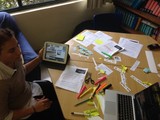
These image objects were created with paper strips, sticky notes, pens and markers, digitized by taking an image on the iPad and then imported into the app (or directly taken from within the app)
The clever use of additional videos clips within the main video. These video clips are modeling explanations, orally annotating, making them visible for viewers. Again, the app allows to record the videos within the app or import them from the photo gallery.
What are some other production techniques that you have seen and/or used that have been successful in the flipped writing class? Please share a link, so we can all be inspired and learn from each other to improve production techniques.
Production table for the video lesson
Emily also used EdPuzzle , a platform that allows teachers to create a class, invite their students, add chosen videos to an assignment, embed additional audio comments as well as quizzes to check for comprehension.
Students are able to work at their own pace. They are able to "rewind" and review . They can start writing their paper and go back to explanations and modeling whenever needed (It is not that easy to "rewind"your teacher, especially when 20+ students are all are trying).
Watch more videos from Emily’s Writer’s Corner
Silvia Rosenthal Tolisano
.
Blog
.
<span class='date ' tip=''><i class='icon-time'></i> Jul 16, 2015 06:58am</span>
|
|
Graded, the American School of São Paulo, was fortunate to have Taylor Mali, a performance poet and teacher, come all the way to Brazil to engage and get our students and teachers excited about poetry and performing the spoken word.
Below is a Storify of his visit via Twitter.
I am wondering how our school can not let the enthusiasm and engagement of Mali’s visit die down, but use it as a springboard to add another layer of writing and presentation skills for an audience. Along came a tweet linking to poetry examples created by Haiku Deck.
I have always been a fan of Haiku Deck as a tool to embed more visual teaching and learning into the classroom. Haiku Deck has added in recent months the ability to use their presentation/slides/ design tool on a web based platform in addition to the iPad app. The easy step by step flow of creating visually appealing and text-light slides that search Creative Commons images on Flickr (what an amazing concept to then AUTOMATICALLY cite the images appropriately and include the citation on the created slides make the tool my number one choice.
During Taylor Mali’s workshop with students, I jotted down bits of writing, according to the exercise he was working through with us. Although I am a writer who enjoys the written word (I can get goosebumps when I read or write a good sentence :), adding visuals added another layer of intensity to my writing process. The writing "felt deeper" and more thoughts and connections went into my writing after using visuals as part of my process.
Together with our Library Coordinator, Meryl Zeidenberg, we kept brainstorming how to amplify the Taylor Mali experience even further.
What if we were to contact other school’s and classes who participated in workshops facilitated by Taylor Mali?
What if we collaborated with them in creating a poetry book, visually enriched with photographs or students’ own illustrations?
What if we tweaked Taylor’s exercise adding a component to include the geographic location, cultural characteristics or traditions?
[View the story "Taylor Mali Getting Students & Teachers Excited About Poetry" on Storify]
Silvia Rosenthal Tolisano
.
Blog
.
<span class='date ' tip=''><i class='icon-time'></i> Jul 16, 2015 06:58am</span>
|
|
On the heels of The Cultural Phenomena of Selfies and iPhoneography: Photo Challenges, Ideas & Literacy, students from the American School of São Paulo, Brazil want to know more about Selfies around the world.
If you and your students would like to CONTRIBUTE with actual images for an in- school and online exhibition (part of a slide deck presentation). Please make sure you receive permission to share the images.
Please send the image file to silvia.tolisano@graded.br and make sure to include the following information in the email : First name and country you live in. By sending the image, you allow us to use them in the exhibition and share a slide deck presentation online along the results of our survey.
Please consider filling out the following short survey. If you are a teacher, ask your students to fill it out to help us analyze Selfie behavior according to gender, age and geographic location.
Silvia Rosenthal Tolisano
.
Blog
.
<span class='date ' tip=''><i class='icon-time'></i> Jul 16, 2015 06:58am</span>
|
|
This is the second part of the blog post : Visible Thinking in Math
Another Math teacher (sixth grade) at Graded, The American School of São Paulo , Laurel Janewicz, has been passionately piloting metacognitive thinking and reflection in her own Math classes.
She started out with laying a foundation from the start of the school year.
Listen to her students explain the why, how and what next of metacognition in Math class.
Why?
How?
What Now?
How could she give her students practice in articulating their mathematical thinking? We chose to use iPads and Explain Everything app.
Process:
Students took an image of the Math problem
Students recorded themselves solving the Math problem. Emphasis was placed on articulating their thought process, including when they thought "I really don’t know where to start". Helping making their "fluency" of following thinking like that with strategies to continue audible.
Once the video of them writing and talking themselves through solving the problem (correctly or incorrectly solved), the project file was saved as a video clip and exported to the camera role.
Another student was then charged in starting a new Explain Everything project on the same iPad and importing the previously saved video clip from the Photo Gallery.
It was the new student’s job to watch and listen to the thought process and annotate mathematical thinking and strategies observed.
The new video (original video clip plus annotations, written and oral) was saved as a new video clip and uploaded to Google Drive to be able to be embedded into a blog post
Examples of one of the final video clips (make sure you listen to oral annotations by student #2… about 3:13 minutes into the recording).
Laurel presented at the AASSA (Association of American Schools in South America) conference this past month with an elementary school colleague, Kelli Meeker, about her findings and experience of Redefining Reflection
Laurel also developed a few questions as follow up to help her students reflect on their blogfolio on the metacognition "project"
What does metacognition, thinking about your thinking, mean to you and how has it helped you in math?
Metacognition, thinking about my thinking, ……
What does your "inner voice" say to you or what questions does it ask you as you solve a problem?
I have an inner voice that …..
How has reflecting on your thinking while solving a problem helped your mathematical thinking?
Reflecting on my thinking/listening to my inner voice while doing math ….
What have you learned about yourself as a mathematician from this project and from this whole year?
This project/This year I ….
Below are a few excerpts of student responses. Click on the students’ name to see their entire blog post and embedded video.
Brenna
Thinking about my thinking is reflecting in my own words. It is thinking about how your thinking can improve and what your thinking has mastered. When I am thinking about my math thinking like when I am screen casting a video on Explain Everything, my inner voice tells me to break up the problem and then read the specific part and work on that part. Afterwards, I think about if this is a good strategy or not. I think that this Explain Everything project has helped me a lot because I solved a problem and then I listened to my thinking while solving the problem
Pedro
In math, Ms. J taught us to kind of talk to our "inner voice." I only talk to my inner voice in difficult problems, I sort of ask for help. When I’m with my inner voice, I try to think differently, and usually can get a way for my answer, but I need to concentrate a lot. While I reflect on my thinking I always think in a better way. This helps because I always question myself and see if I’m really correct. I get to a more profound way of thinking.
Jack
We have been focusing on metacognition while doing math. This means thinking about our thinking, and asking our selves, "What am I doing, and why?"Using metacognition has really helped me analyze my results in math and it has also made my work a lot more error-free. Whenever I do questions now, and I am not sure how I got my answer, or if it is right, than I always think back to what I did to find out the answer, and if I could do anything better. This is also a habit of mathematical thinking that I find that I am very good at, and I use a alot.
Fiona
Metacognition, thinking about thinking. When Ms.J first introduced this to us I was like, What The heck! What does she expect us to do? But now I see that it’s a useful skill that has improved not only my math skills but my other classes as well. Very early on i realized that I loved to talk. Ever since i was little i knew this. So it’s one of the reasons why sometimes I think I get bad grades in math. I hate being alone, and in fact am afraid of being alone, so not talking is a symptom. I usually struggle in silence because I like to work through my thinking aloud. Which was why I benefited from this project so much.
Alyssa
I think that I can apply metacognition to lots of different things, like sports that I play, like basketball. During a game, I can ask myself: "Why isn’t this working? What can I do to improve?" The next quarter, I can work on improving in those aspects to help the team win the game.
Maya
I realized while doing the project that in my head I am thinking about more than one aspect of the problem at a time, as we call it in math class, my inner voice. It was constantly checking if what I was doing made sense and figuring out other efficient and coherent ways to solve it, so if I had any difficulties or needed to revise my work I could use them. By, also, hearing my second voice I was able to understand the problem on another level, meaning I could draw the right visuals, analyze it, and do it with a different method.
Nana
When I first came here from 5th grade, I soon realized that I was not really listening to my thinking, actually not at all. I still did not know what metacognition actually meant and could not define it in first quarter. Now I can define it, and know what it is. So then, I started to think more deeply what I am doing and why I am doing this while doing these problems in my head. This has really helped me because it can not only help you to see the reasonableness of the answer but also to read more carefully.
Yael
Metacognition helped me, because, when I make a mistake in the problem, I don’t really notice it, unless someone else shows me what the mistake was, or where it was. After hearing myself in the problem, I can tell if I made a mistake. For example, if I misread the problem and didn’t notice, then heard what my thinking was, I would’ve noticed the mistake I had made. Metacognition, to me, means understanding what works, and what doesn’t work in your head.
Lara
When I would reflect my thinking on the iPad, it helped me by looking over my homework’s, my tests and etc. It would help me now and then. My inner voice would ask me "Does this answer make sense?" "How did you get this answer?" When my father would ask me "How did you do this problem?" I would say "I don’t know?" That when I realized that I need to ask myself these things. Now metacognition helps me a lot, like when I am asking my dad for some help and when I am doing a problem by myself
Roseanne
I have an inner voice. I think that the whole purpose of the iPad projects, was to find my math inner voice, and use it. I think I found that inner voice. I’m pretty proud of myself for that because it was with my first projects, it was pretty hard, though now, for sure I found it. It helps me wonder, and think: Should I use this chart or this chart? Which method works best?
Diego
While doing these problems, I have sort of an "inner voice." Not in the crazy, psychopathic way, but the thinking way. I tell myself to do this or do that, or check my work. I say hundreds of things to myself in my head. And I always ask myself how I did this. I explain to myself, and try to find mistakes. Mistakes teach you that to become great at math, you need to make mistakes. Albert Einstein once said,"A person that never made a mistake never tried anything." I know I’ve made mistakes that that inner voice saved me from.
We are having conversations, looking at student samples, tweaking how reflection and thinking about their thinking impacts student understanding and learning as well as create peer-created resources for future students (think Alan November’s thoughts about leaving a legacy).
A million thanks go to Laurel and Adam for sharing their thoughts, questions, trials, failures and success in the process and most importantly their willingness to make it transparent for others to learn with and from their process.
Do you have student samples of making mathematical thinking visible? Please share the link for all of us to learn from and have quality examples to model after.
More examples of students "writing" in Math:
Debora’s Blog ( 9th Grade)
Natalie’s Blog (9th Grade)
Silvia Rosenthal Tolisano
.
Blog
.
<span class='date ' tip=''><i class='icon-time'></i> Jul 16, 2015 06:58am</span>
|
|
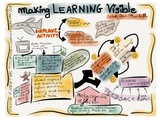
I spent the day yesterday at St. Paul’s Education Conference here in São Paulo yesterday and attended Ben Mardell‘s session Making Learning Visible: Children and Adults as Individual and Group Learners
Over the past few decades, much attention has been devoted to developing learning communities in schools. Yet the attainment of knowledge and understanding is still primarily viewed as an individual process. In and outside the classroom, thinking and learning are generally considered individual rather than social and communicative acts. This course is for educators who want to explore the power of the group as a learning environment. Participants will learn about documentation as a central component of learning groups, enabling group members to see how and what they are learning. Group learning practices and examples of learning groups from early childhood, elementary and high school classrooms from new book Visible Learners: Promoting Reggio-Inspired Approaches in All Schools will be explored. Participants will take part in an activity that helps them consider such questions as (1) What is the relationship between individual and group learning?; (2)How can teachers support the creation of learning groups?; and (3) How might the process of observing and documenting children’s learning shape that learning?
I did not tweet the session very much, since I am trying to improve my sketchnoting (visual note taking) skills. I am pleased (not necessarily with the artistic rendition, handwriting skills, etc.), but with the process of note taking. When I look at my image:
I am able to recall details that were discussed
I am able to quickly see the main points I got out of the session
I am able to re- follow the flow of points made
Silvia Rosenthal Tolisano
.
Blog
.
<span class='date ' tip=''><i class='icon-time'></i> Jul 16, 2015 06:58am</span>
|
|
This screencast below will show you how to use Google Docs as a backchannel or exit ticket during a presentation, lesson or workshop.
Creating a BackChannel or Exit Ticket on Google Docs from langwitches on Vimeo.
Silvia Rosenthal Tolisano
.
Blog
.
<span class='date ' tip=''><i class='icon-time'></i> Jul 16, 2015 06:57am</span>
|
|
Our students just finished a second round of Student Led Conferences (SLC) this school year (one in Semester 1 and another in Semester 2).
SLCs are a formal opportunity for students to present to their parents about the state of their learning. The students’ advisor (a teacher responsible for a specific group of students during the school year) serves as a facilitator to prompt and guide the students if needed, but is a silent presence as the students share their learning with their parents. SLCs are not a time to talk about grades, student behavior, but about learning habits, process, improvements and goals.
Although there was emphasis placed on an ongoing documentation of each subject area as learning and reflection happened throughout the school year, a significant amount of time was dedicated to prepare for the SLCs
Preparation for Student Led Conferences
Each subject area had to be represented with at least one blog post. Each SLC blog post was to contain a title, an artifact, a reflection and be properly labeled.
Min Kyung’s Blog
Karin’s Blog
Juan Carlos’Blog
Ji Won’s Blog
Using the documentation posted to their blogfolios (process and showcase items), they select posts and artifacts that best demonstrated improvement or mastery of a learning target. Students connected their learning to specific school identified Core Values.
The slides below were shared with students to guide them through the process of preparing for the SLC. (Thank you Claire Arcenas for written directions as well as Visible Thinking Routines)
Student Led Conference
Students and parents gathered with the advisor for up to 30 minutes in a classroom setting. The student’s blog site was projected to the screen and students used the artifacts as a trigger to talk about their learning. They spoke about their challenges, successes and areas of growth in relationship to the Core Values. Parents were encouraged to ask clarifying questions at any time. To wrap the SLC up, students spoke about the learning that occurred by going though the process of preparing for the conference and their learning goals for the last quarter.
Notes and Reflections
There was a loud rumbling noise among students in the days that lead up to the SLC.
Comments such as the ones below were expressed by many:
"We are tired of writing reflections"
"I am sick of having to write a blog post in EVERY SINGLE CLASS!"
"Why do I have to do this?"
"I am writing what my teachers want to hear, but not really what I think."
I seriously started to doubt the approach to support Blogging Beyond One Classroom. Was it inevitable, if students were expected to "learn, reflect, share"for all their classes (from Math, Humanities, Science to Orchestra to Physical Education), that they were going to burn out? Could the "exponential explosion" of reflective blog posts clumped together in the immediate days before the SLC be blamed for it?
Was "too much of a good thing"…. well simply too much?
Did we need to be more selective with WHAT types of reflections we asked students to make their learning visible? (Not every assignment, project or activity needs to be documented and reflected on?)
Did we need to adjust our language to not bunch everything under an umbrella of "Please write a reflection on your blog".
I am reminded that "It’s one thing for us as teachers to articulate the kinds of thinking we are seeking to promote; it is another for students to develop a greater awareness of the significant role that thinking plays in cultivating their own understanding." ( Making Thinking Visible by Ron Ritchhard, Mark Curch and Karen Morrison). Do we need to double our efforts in helping students develop that awareness and continue to give them the why behind maintaining a blog (learning, reflecting and sharing as part of an overall process)?
Did we need to change/alter/modify the routine of adding the reflection as a separate piece, tagged on the end of a assignment, project or activity?
Despite the fact that students openly did not seem to "enjoy" the process of blogging and reflecting as it was happening in the days before the SLC (among my advisory students), it was unanimous (again informal survey from among my advisory students) that the process of reflecting, thinking about one’s learning and going back to re-read/watch/look at previous posts and artifacts to identify areas of growth HAS helped and they are glad to have gone through the process. Students also recognized and articulated in their SLC specific learning opportunities and teaching methods from many of their classes that inspired and supported them in their learning process.
SLCs are an opportunity for:
Authentic opportunity to showcase skills in information literacy (organizing, categorizing and archiving of information created and published)
Building blocks of a positive digital footprint (How do we support and guide our students to positive online publishing? What does it mean to be "googlable?" How do we not only build, but also maintain a positive digital footprint?)
Digital citizen issues come to surface (What is shared? Why should we share? Observance of copyright. How do we keep ourselves safe? )
Evidence of using technology to demonstrate learning (Technology is not only about Facebook, Instagram, Snapchat, or video games. "Digital natives might be wizards in using technology in other domains, but need guidance for using it for learning)
Resource or non-academic subjects are given time in conference and equally contribute to the students’ learning profile
Advisors have a chance to step outside of their own classrooms and learn about their colleagues’ work
As compared to first semester’s SLC:
Overall blog quality has improved (communication through a variety of media forms, logistics of inserting & embedding different media, beginning of hyperlinked writing, advantages of writing in digital spaces became evident)
As blogfolios are continued being maintained, it is possible to track learning over time
The connections to the Core Values seemed much more natural and not an add-on
Student (oral and visual) presentation skills were practiced in a supportive environment
Students and parents focused less on academic grades and more on learning habits and process
SLC served and supported parent education in terms of modern skills, literacies and learning pedagogies
Juan Carlos‘ Blog:
"I used to think my learning was accomplished by simple things such as paying attention , doing my work and taking it seriously but now I know that learning has more than those things , you need to be reflective , critical thinker and also a communicator. You need to apply all the core values to able to learn in an effective way."
Kari’s Blog
"In which of the core values did you show the most progress or growth? What makes you say that?
I am getting better at communication. I am learning more Portuguese and improving with my blog and other technologies. This is very important in terms of communication. Balanced says that you can communicate in multiple languages. Improving in Portuguese means that I can communicate more to people who do not speak English. Also, I am getting better at using my blog which is another form of communication. People can come on and see my work and how I use my Blog."
"I used to think my learning was mostly about critical thinking, but now I think my learning is more about being reflective. Sometimes you cannot really grasp what you have learned unless you reflect on what you have done. This is an important part of learning and changing your learning habits and becoming better at something. If you just do something once and then never again, you don’t really learn anything . Reflection makes you rethink again and understand better. "
Now what?
Where do we go from here? My hope is to continue:
supporting blogs as a global communication hub. A hub to receive feedback from an audience beyond one teacher (Learning About Blogs FOR your Students- Part IV: Connecting )
helping students build a Personal Learning Network
strengthening the blog as a platform for learning documentation and student reflection ( Making Blogging Visible )
becoming a culture of making thinking and learning visible (embed visible thinking routines in an organic way, not as an add-on)
showcasing blogfolios as a valuable source to help teachers assess for learning as well as support their efforts in differentiating their students’ learning (Assessment in the Modern Classroom: Part Three- Blog Writing )
expanding the use of the blogfolios to include "out of school learning"
embedding presentation skills to support the use of visuals to "tell the story of learning" (Embedding Visuals Into Teaching and Learning)
paying close attention and coaching teachers and students in hyperlinked writing (Wondering about Hyperlinked Writing, Hyperlinked Writing in the Classroom- From Theory to Practice, Anatomy, Grammar, Syntax & Taxonomy of a Hyperlink )
Where are you in your journey of student digital portfolios/blogfolios? How do you prepare, run and learn from Student Led Conferences? Contribute to the exchange of ideas, thoughts, experiences, doubts, failures and successes? We are all pioneers. No one has done this for years and is an expert. We are all learning along the way. Let’s help each other. Leave a comment or connect on Twitter, but don’t keep your observations and perspectives on the topic to yourself.
Silvia Rosenthal Tolisano
.
Blog
.
<span class='date ' tip=''><i class='icon-time'></i> Jul 16, 2015 06:57am</span>
|
|
Inspired by Poetry, Performance & Taylor Mali and Beyond…, 8th grade Humanities teacher Shannon Hancock coached her students to create their own original "Mali Poem"and record a visual and vocal performance.
I joined the class to give a brief overview of presentation design. I used selected slides from my slidedeck below to talk about image quality, typography, white spaces, metaphors, rules of third, etc.
Presentation makeover from Silvia Rosenthal Tolisano
What type of tools could students choose from to heighten the message of their original writing with sound effects, vocal effects, music and images?
Movie Editor & Presentation Tool Combination
First start out by creating slides in a presentation tool, such as Haiku Deck (web based or on the iPad), keynote or PowerPoint. Add relevant images that represent and support your poem mood, text and message. Haiku Deck will automatically search within the Creative Commons domain for images and add the proper attribution citations on each slide for you. If you are using another program, search for Creative Commons, Public Domain images and give proper attribution for each image used. As always, you are encouraged to take your own images to use.
Keep presentation design principles in mind: more image, less text, rules of third, quality images (high resolution photographs)
Export the slides as individual images. When in Haiku Deck, export as a PowerPoint File, then save as jpegs (all slides). You can also take screenshots of each individual slide and save as images.
Drag and drop exported images into movie editor software (iMovie or Movie Maker) timeline
Add transitions, sound effects, voice recording, music
Export movie project as a movie file
In HaikuDeckEnter text, Search and choose images, Select a layout for your text
In PowerPoint or KeynoteExport individual slides as images
Under option, choose "Save Every Slide"
If I am everything that I ever touched…. from langwitches on Vimeo.
Animoto, Voice Recording & Presentation Tool Combination ( Animoto is limited to a 30 second video as part of the free version)
First start out by creating slides in a presentation tool, such as Haiku Deck (web based or on the iPad), keynote or PowerPoint. Add relevant images that represent and support your poem mood, text and message.
Keep presentation design principles in mind: more image, less text, rules of third, quality images (high resolution photographs)
Export the slides as individual images.
Upload images to Animoto (note how long the video clip ended up being)
Record an MP3 file (ex. Audacity, Garageband, etc.) of you reading your poem (make sure the length of your recording is the same length as the video clip)
Before you produce Video, click on pre-chosen song and then choose to upload your own "song"(audio file)
Produce video
I am from
In the end, all students chose not to use Animoto due to the length of video limitation. Haiku Deck was a big success, since looking for quality images and the citation was made easy ( I wish many more web 2.0 tools, would make it as easy as Haiku Deck to observe copyright while not sacrificing the quality of the images)
Silvia Rosenthal Tolisano
.
Blog
.
<span class='date ' tip=''><i class='icon-time'></i> Jul 16, 2015 06:57am</span>
|