Blogs
|
My colleague, Silvana Meneghini, and I have been working on developing a Professional Development framework for embedding technology use and modern learning litercies based on Ruben Puentedura‘s SAMR model.
The template consists of 4 Focus Areas. Each stage of the SAMR model consists of 4 focus areas in the template, that support vision, planning, and evaluation in activity and task design as well as a professional development framework.
Goal Rationale:
Start with your goal in mind. What are your objectives? What do you want to accomplish? What learning do you envision? What literacies are being addressed?
Process Rationale:
Knowing all the answers is not important anymore. Learning how to ask questions and be open to reflect and receive feedback. are the skills to develop. How do we make the process of learning visible? How do we create a "learnflow" within and between tasks and activities? The process will inform your actions.
Technology Rationale:
Content knowledge becomes less important. Technology pushes pedagogy into center stage. As technology becomes further ubiquitous in our lives, a degree of fluency will be necessary to allow pedagogy to fully absorb technology. The tool will no longer be the objective.
Communication Rationale:
Traditionally, communication happened synchronously and face to face or asynchronously in written text form. Due to technology, the concept of communication and the types of media that help us communicate with an audience larger than 1 has changed and grown exponentially.
Communication no longer assumes the position of a finite, one way communication, but is transformed in the possibility of a two-way, crowdsourced or feedback process.
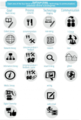
Each one of the four focus areas possesses several subcategories.
In a SAMR exercise, technology (learning) coaches support educators in identifying the placement of their lesson or project within the framework. The exercise can tag accomplishments, potential gaps and facilitate pinpointing next steps.
The initial ideas is to take a look at a lesson and identify the ENTRY POINT of the SAMR stage (substitution, augmentation, modeification, redefinition).
Concentrate on identifying the 4 FOCUS AREAS (goal, process, technology and communication).
By using the subcategories, the coach/teacher work through areas addressed and possible gaps and potential areas of upward MOVEMENT movement towards redefinition.
Example:
Name of Activity: Middle School- Official Scribe
Activity Description: Students take individual classroom notes with paper/pen to study from for upcoming quiz, test or exam.
Students use computer to type up notes.
Goals
Process
Technology
Communication
Basic Literacy
Consume>Produce
Note Taking
1: 1
Students use formatting options to organize, highlight, edit, rearrange their notes.
Students are printing out or emailing their notes to share with their classmates.
Goals
Process
Technology
Communication
Basic Literacy
Consume>Produce
Note Taking
1: Group
Students are creating their own blog post, using a variety of technology tools and methods to create annotated screenshots, videos, images to bring in different perspectives and address various learning styles.
Students are creating collaborative notes via a Google Document, which is shared with the entire class. Everyone can contribute, add information, edit incorrect information,etc.
Note taking is not confined to remembering and regurgitating information heard in class, but (hyper)linked to further reading of text, images, audio and video. Students are labeling/categorizing their blog post and information to
make organization and information search easier. Students are solving problems of how to handle information overload and filter relevant information.
Goals
Process
Technology
Communication
Basic Literacy
Consume>Produce> Feedback
Note Taking
1: Group
Network Literacy
Information Literacy
Students are contributors to a collaborative blog site, alternating being the Official Scribe of day. Collaboratively they "write"their own online textbook. Students express their understanding through a variety of media. Students use the blog as a learning hub to communicate and connect beyond their classroom walls, connecting with peers and experts from around the world.
Goals
Process
Technology
Communication
Basic Literacy
Consume>Produce>
Feedback
Note Taking
Global Communication
Network Literacy
Blogging
Information Literacy
Silvana and I will be presenting our framework and the SAMR exercise at the ASB Unplugged conference at the end of next month in Mumbai, India.
Presentation Description:
Let’s take a closer look at Ruben Puentedura’s technology integration SAMR model and how it can be applied as a Professional Development framework in education. How can educators use the model to inspire upward movement from using technology to substitute traditionally taught lessons towards transforming teaching and our own professional learning. Bringing together the SAMR framework with TPACK (Technological Pedagogical Content Knowledge) allows teachers and technology coaches to visualize the interconnectedness of the models, making gaps more evident and point to "support opportunities" to move toward transformation.
Presenters will share scenarios and examples from different levels and subject areas. Participants will go through the exercise and will collaboratively brainstorm further scenarios to "practice" SAMR upward movement towards transformative teaching and learning.
Interested in this type of SAMR template and framework? Shortly, we will be looking for participants in crowdsourcing more examples from the classroom. Stay tuned…
Download the SAMR Template as a pdf
Silvia Rosenthal Tolisano
.
Blog
.
<span class='date ' tip=''><i class='icon-time'></i> Jul 16, 2015 07:07am</span>
|
|
Part of learning in 2014 is NOT to just CONSUME information, but to also contribute and create information.
If you enjoy reading the information and resources shared here on the Langwitches blog or via my Twitter feed, consider taking the time to contribute. There is no grade assigned to your contribution, there is no certificate attached and there is no one waving their finger at you, if you don’t turn your homework in.
This is about self-motivation and self-directed learning in professional development. This is about being part of learning through the power of the crowd versus alone.
This is your chance to collaborate , contribute and pushing forward in education (and LEARN along the way)! Read on…
Using the SAMR template (based on Ruben Puentedura), Silvana Meneghini and I have developed and described in my previous blog post, here is an your chance to participate in a crowdsourced opportunity! (It will only work if the crowd gets motivated)
How to participate:
Read through the SAMR Template Framework for Professional Development, if you have not done so.
Think of a traditionally taught lesson/activity. What is the entry point on the SAMR model for your lesson/activity.
Take a look a another example (High School History Essay) described below the survey.
Fill out the survey below to contribute examples of activities and their movement from substitution to redefinition.
If you would like us to share the results (examples shared by others) with you, please make sure you enter your email in the form below.
Here is an exercise example from Silvana Meneghini for you to follow:
Name of Activity: History Essay
Grade Level: High School (Grade 9-12)
Activity Description: Essay writing is a very traditional form of assessment in HS History.
As a formative assessment for the "Ideas that Shaped the Modern World", students were asked to write 5 essays following chosen prompts covering all the different topics learned throughout the year. Traditionally, the essays were just handed in to the teacher.
Students use computer to type up essay, then print it to hand in to the teacher.
Goals
Process
Technology
Communication
Basic Literacy
Consume>Produce>Feedback
Writing
1:1
Students develop a design that is inviting to a broader audience and also translates the spirit of the eMagazine. The design follows a magazine style with columns and illustrations searched mainly under Creative Commons.
Students research information using Internet, Databases and Books.
Students use a shared Google Presentation to get organized in the creation of the eMagazine sections, cover, table of contents and Editor Notes.
Students cooperate to create an eMagazines organized by topic sections. Each section shows individual student author interpretations of the prompt for the topic. An Editor’s Note is added to explain the tone of the eMagazine. The eMagazines are published online on Calameo with the open possibility for Comments. (Example http://www.calameo.com/books/00242383955b5bde7fdba)eMags:
Goals
Process
Technology
Communication
Basic Literacy
Consume>Produce>Feedback
Writing
1: Small Group
Media Literacy
Information
Literacy
Students collaborate in the writing and thinking process by developing a Section Editor’s Note that analyzes common ideas and disagreements and also a "Bio" of student authors focused on individual political perspectives. Students argue and defend ideas through the eMag comment section.
Students follow twitter hashtags that may lead to interesting information and organizations that will help connect to modern day history.
Goals
Process
Technology
Communication
Network Literacy
Consume>
Produce>
Feedback>
Revise
Writing
1: Small Group
Information
Literacy
Media Literacy
Students collaborate with classes from other countries to create an eMag with a global perspective analysis.
Students invite Historian experts to contribute to information gathering and analysis.
Students manage collaborative platforms to interact with other classes and experts around the world, generating an eMag with a global approach and reach.
Goals
Process
Technology
Communication
Network Literacy
Consume>
Produce>
Feedback>
Revise
Writing
Global Communication
Information
Literacy
Media Literacy
Global Literacy
Silvia Rosenthal Tolisano
.
Blog
.
<span class='date ' tip=''><i class='icon-time'></i> Jul 16, 2015 07:07am</span>
|
|
Silvana Meneghini and I have created a template for technology, learning and literacy coaches.
In an effort to create a depository of examples and scenarios for lessons and activities and how an upgrade movement through the stages of the SAMR model actually looks like in the classroom, we are shared the template and infographic of the model.
http://langwitches.org/blog/2014/01/28/framework-for-professional-development-samr-template-infographic/
We are looking for teachers and coaches to contribute examples to that depository by going through the exercise via this form-
http://langwitches.org/blog/2014/01/30/putting-activities-through-the-samr-exercise/
We will also be holding a Google Hangout on Air to discuss framework and walk participants through the exercise on
Wednesday, February 12th at 6 pm EST.
Would you mind strategically sharing this information with administrators, curriculum coordinators and learning coaches in your network?
Silvia Rosenthal Tolisano
.
Blog
.
<span class='date ' tip=''><i class='icon-time'></i> Jul 16, 2015 07:07am</span>
|
|
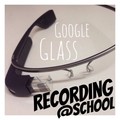
Google Glass Reflection:
In the first few days, I made it a point to wear Google Glass all day at school (…well as much as the battery life permitted). My main point was to get used to the feel of them on my head, to increase my fluency. (Happy to report that my initial complaint of this lack of fluency after the first week with Google Glass is dissipating. As with most technology devices and apps, it just takes time to get used to tapping instead of clicking, winking instead of pushing the button… speaking a new language to have my voice recognized…. swiping next to my temple instead of a mouse pad…:)
Wearing Google Glass all day, also allowed me to consciously make decisions on the fly, if I could use the device in certain situations (teachable moment, planning with a colleague, interesting discussion, worthwhile visual, googlable moment etc.).
As I am walking into more and more classrooms with Google Glass on (with permission from the teacher), I make sure that I spend a few minutes in the beginning to TALK to students about
what Google Glass is?…wearable technology, a mini- internet enabled device on my head… it is a device still in beta TESTING, which means that it is not perfect…does not work all the time the way I want it to work.
where did I get it… I received a beta-invite to the Google Explorer program from Google… it is not available to be purchased by the public yet.
why me?… I believe (maybe wishful thinking?), I was chosen for the program as an educator and due to my philosophy of sharing my learning process.
what is an explorer?…An explorer is a person who explores unfamiliar territory; someone with imagination, a mindset of an adventurer. According to Google: " The Explorer Program is designed for people who want to get involved early and help shape the future of Glass." I want to be a model for our learning community to be an explorer, an innovator and a shaper of how we can use technology to transform learning.
what are my goals and intentions?… my goals are to test Google Glass in school for education to improve teaching and learning. I want to find ways to use new technologies to find ways to transform our teaching and learning experiences. (Watch for an upcoming blog post about using Google Glass for filming at school). I want to make students and teachers aware of the implication of "disruptive technology" and spark conversation…
what I will NOT use Google Glass for?… I am not "policing" anyone… I am not taking videos in class to "catch" students anyone doing something wrong. I am not taking pictures in order to embarrass anyone…
my promise to observe digital citizenship… I will always ask permission to record or take an image… I will not share potentially embarrassing captured moments. I will observe a "no questions asked" policy of someone not feeling comfortable being recorded or photographed and I will take of my Google Glass if a teacher or student is uncomfortable around them.
I found it awkward in certain situations to continue having Google Glass on my head as I was continuing my field test.
Cafeteria- I was there to eat… some colleagues at the table felt uncomfortable (unspoken feeling)… There was no need to wear Google Glass for the remote possibility of stopping a conversation and saying "Hey let me google that on my Glass"… It would not have felt fluid, but disruptive to the conversation (maybe just as disruptive, if I pulled out my iPhone to google something)… so as I have not found a need to use Glass during lunch, I make it a point to not even bring it into the cafeteria.
Rest room- Yes, you read correctly… There comes a time during the day, ( even) if you are wearing Google Glass, that you will need to go to the rest room. I was not even thinking about the Google Glass on my head, when I entered. As soon as I saw that others were in the restroom , I felt that it was completely inappropriate for me to be wearing Google Glass (even in the turned off stage). I immediately disappeared in one of the stalls and closed the door (I don’t think anyone had noticed them on my head). Then the feeling of " privacy invasion" increased when I thought of the possibility of Glass taking an accidental image and sharing it with my Google Plus circle. Not a good feeling… Where was I supposed to place my Google Glass when I "have to go". I am making it a point to go to my office and dropping them off before heading to the "little girls’ room"
1:1 Teacher planning- as teachers and I meet and plan together, I NEED a device to write notes, search, demonstrate, share resources and examples on the spot. My iPad is the first choice of device to take to those meetings. I am able to listen to a teacher and multitask by looking up examples or resources of interets at the same time to be able to share or project. It seemed awkward to use Google Glass to look up any links. There was no way for me to instantly show the teacher (I am still not fluent enough to set up the scree share through my iPhone. Even then the iPad’s bigger screen seems to be a preferred solution. The lack of being able to take "silent" notes (to be shared later) in order to not interrupt the flow of the conversation also makes it impossible to rely on Google Glass to be the only device to bring to the planning meeting. It seemed silly and awkward to have both devices with me when the iPad was able to do the job for all my needs.
Looking for more reflection and perspective on Google Glass in schools? Head on over to our school‘s High School principal, Blair Peterson ‘s blog as he also reflects in a recent blog post titled How is your school handling Google Glass?
Google Glass Reactions:
Student Reactions
I spoke about the overwhelming range of reactions of colleagues during the first week with Google Glass in school. The images below will speak for themselves of students’ reactions when trying on Google Glass. They continue to line up when they see me roam the hallways during their breaks. I have to chase them away so, they won’t be late for their next classes. Some of them had heard about Google Glass and were very knowledgeable about specific capabilities that the wanted to test out. Most of them were simply in awe of seeing the screen and being able to give voice commands and scroll though the timeline. Most heard comments were "Wow", "This is awesome", "Where can I get one", "I will save money", "This is incredible"…
Other Reactions:
Teachers and parents have voiced their concerns about privacy issue with Google Glass on campus. We need to have an open conversation, we need transparency in the intended use of Google Glass in educational spaces.
We need to balance fears with the desire to MODEL AND BE INNOVATIVE, to "boldly go where no one has gone before"…
We need to balance fears fueled by main stream media about the negative reactions. (Traffic Ticket for driving with Google Glass , Facial Recognition via Google Glass, Going to the Movies. Interrogated by FBI for Wearing Google Glass.)
We need to balance fears with positive reports and documentation of how these technologies are making our lives better and can improve learning and innovation. (Google tests Smart Contact Lenses for Diabetics, The Future of Education Seen Through Google Glass, 365 Days with Glass )
Take a look at the article "New Privacy Menace? Cell Phones?" from Wired Magazine from 2003 (yes 11 years ago). The article was shared via my PLN on Twitter and we were asked to simply substitute the word "cell phone" with Google Glass. It looks like we had the SAME concerns about cell phones and their potential to invade our privacy as we do now with wearable technology such as Google Glass
Silvia Rosenthal Tolisano
.
Blog
.
<span class='date ' tip=''><i class='icon-time'></i> Jul 16, 2015 07:07am</span>
|
|
The impact of the SELFIE on our culture has started to intrigue me. As I see my little granddaughter love looking at (and taking) pictures and videos of herself on the iPhone and iPad… I wonder what the long term impact will be. There are very few images of me, due to the fact that taking and developing images was expensive and I was a second child. The culture of taking photos back then (beyond for special occasions) was not common.
In wonder about the impact of selfies on our culture? I wonder if there is a difference in views on selfies, what types of selfies and meaning of them in different cultures around the world?
For now I am consciously aware of, documenting and follow the evolution of the selfie in my own family, at school, in different countries I visit and in the media.
Image credit Elena- 22 months (picked her own filters too)
Image (taking with Laptop webcam) by Elena- 7 months old
My iPhoneography class at school collaborated on a list of TYPES OF SELFIES, and came up with the following
outstretched arm
duckface
mirror
"tongue"
smile/pout
tilted head
peace sign
sign language for "I love you"
rapper fingers
eyes squinting
winking
funny face
shadow
Here are their RECOMMENDATIONS AND TIPS for taking selfies:
don’t take it from below (your chin will look disproportionate)
don’t take it from above (your nose will look disproportionate)
have good light (don’t be in poorly lit environments)
be appropriate (keep LARK in mind)
When I started using Google Glass in school, it was one of the most common reactions for students to immediately grab their phone to order to take a selfie.
Selfie- Photo Credit (used with permission) Marina D.
Image used with permission by Jack
Looks like I am not the only one wondering about selfie and what does it mean for us as a culture?
"ordinary people doing ordinary things"
Selfie Culture (Graham Brown mobileYouth) from Graham Brown (mobileYouth)
Analyzing Selfies from Tim Stock
Dove, the creator of the Photoshop Transformation video, created another important video. This time about girls and their power to create their own image of beauty and redefine the view of society on beauty.
In partnership with the Sundance Institute, directed by Academy Award-winning documentary filmmaker Cynthia Wade and produced by Sharon Liese, Sefie reveals how we have the power to redefine what is beautiful in all of us. Selfie captures the digital journey of a group of high school girls and their mothers, as they create a new type of selfie - one that celebrates their unique beauty. Dove wants to inspire all women to redefine beauty
Interested in reading more about the phenomena of selfies?
Extreme Selfies- This Selfie Is Pretty Much the Epitome of ‘Pics or Didn’t Happen’
Obama takes a selfie at Nelson Mandela’s funeral- The Obama-Selfie-Face-Gate
First selfie for Hillary and Chelsey Clinton
The first Papal Selfie
The Selfie Olympics: A new trend of teenagers taking images of themselves in the bathroom
The Meaning of the Selfies (New York Times)
Investigating the style of self-portraits (selfies) in five cities across the world. (SelfiCity)
Silvia Rosenthal Tolisano
.
Blog
.
<span class='date ' tip=''><i class='icon-time'></i> Jul 16, 2015 07:06am</span>
|
|
I have a new favorite designer tool : Canva
Key Features:
A simple new way to design. Easily turn your ideas into designs for Web and print.
Search and drag simplicity. Search Canva’s integrated library of stock photographs, graphic elements and cut-out images then drag-and-drop to create your design.
It’s online and free to use. Canva is entirely online so there’s no expensive software to install.
Choose from one million images and hundreds of fonts. Design with 1 million photos, graphics and fonts, or upload your own.
Collaborate with anyone, anywhere. Canva lets you share and edit your designs with friends, clients and coworkers.
Canva has a very informative blog, if you are interested in blogging, visuals, designing and using design for your brand.
I have been using the tool for the last few months to create slides for presentations, posters to hang around school or for illustration purposes on my blog.
Canva has beautiful layout templates but still allows you to start from scratch, customize and design with your own creativity.
There are plenty of images for you to use for free ( I have not felt the need to purchase any stock images).
The easy drag and drop features make it very intuitive.
I believe, you currently still need an invite to be able to use Canva. Just sign up via their site and activate account after receiving email.
One feature I am desperately missing is a collaboration feature. For now, I am exporting the slides as images and inserting them into Google Presentations.
I was really excited to be able to use the tool with students. It would be a fantastic support tool when talking with students about the importance of visuals while blogging, help in their presentation and visual design skills.
Unfortunately, I read in their Terms of Services:
"Canva is a great service to use for creating your designs, but you have to be at least 18 years of age and fully able to form binding contracts in order to use it. You may not use the Service in violation of these terms or any laws or regulations."
That puts a damper on being able to use the service with our K-12 students.
I wonder if the canva team is thinking of allowing educational accounts for students under the age of 18 or allow schools to act as guardians in order for students to create accounts.
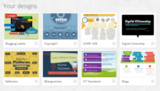
Here is an overview:
Silvia Rosenthal Tolisano
.
Blog
.
<span class='date ' tip=''><i class='icon-time'></i> Jul 16, 2015 07:06am</span>
|
|
I am continuing to document using Google Glass at Schools.
What are some ways we can use Google Glass in schools to document learning, reflections, practices and just life at schools?
I brainstormed a few scenarios, I wanted to try out:
teacher planning
professional development highlights
student perspective
self-evaluation/reflection
interviews
conferencing
PE skill practice
on the spot reflection
tutorials
videos for flipped classroom
Share your school with others (Admission, Recruiting, Marketing)
First of all, let me thank all the "brave" teachers at Graded, The American School of São Paulo, who trusted me, were adventurous and jumped in with both feet when I approached them about testing Google Glass.
They brainstormed with me potential uses to benefit their teaching and learning.
They were gracious about being recorded.
They were natural and professionals in using Google Glass on their own with little more than the instructions of: Put them on your nose, say "OK, Glass" when you see the time on the screen and then say "Record a Video".
Below you will see snippets of different scenarios. Some of the snippets make it obvious that Google Glass was acting as a substitute for any other device with camera possibilities,. Some of the snippets though show:
a unique perspective from the videographer’s point of view.
the videographer has two free hands to demonstrate, work, drive, show action.
show that the people being filmed were more at ease (instead of a camera obviously pointing at them) and "almost forgot" that I was recording them. This lessened anxiety in some.
the potential of the easy access through voice activation of the camera. No interruption of having to pull out the cellphone or grab a camera device.
the spontaneity of being able to record a moment in time.
Thank you to Rens (6th grade Graded student) for creating the music used in the above video clip.
Are there any scenarios that you could think of where a device, such as Google Glass could help to enhance and contribute to experience transformational learning and teaching. Share your thoughts… I am ready to explore further.
Silvia Rosenthal Tolisano
.
Blog
.
<span class='date ' tip=''><i class='icon-time'></i> Jul 16, 2015 07:05am</span>
|
|
Silvana Meneghini and I work as Academic Technology Coordinators at Graded, the American School of São Paulo. " A flashlight in the fog of technology integration", initially the title of a conference workshop proposal, quickly developed into the desire of creating a framework to guide and coach teachers based on Ruben Puentedura‘s SAMR model. The framework does not place emphasis on technology devices (or technology integration) in itself, but on the process of upward movement from substitution to redefinition of tasks and learning activities.
Our collaboration in developing said framework became a prime example it itself, demonstrating the power of a metacognitive approach to redefining the creation of a professional development framework. In an attempt to motivate educators to take another look around and evaluate the relevance in our modern world of traditionally taught lessons and activities, skills and curriculum, we encourage educators to continue learning how to learn.
This past week, Silvana and I hosted our first Google Hangout on Air . The hangout was the next natural step in transforming our own growth as learners. We wanted to share our framework, solicit feedback, gain perspective from the various experiences from other professionals and be open to revisions to our thoughts and framework.
The short story of our transformative learning experience is as follows. Silvana used to have her own office. Isolated from daily informal interaction with a colleague to spontaneously chat, talk, request feedback, question, challenge or agree with. We share an office since I moved to São Paulo at the end of last July.
REACHING OUT- Local, face2face
We talked, we pushed each other’s thinking on our thoughts, points of view, practices and visions of educational technology and modern teaching and learning. There were some extremely good conversations going on in our little office. The big huge whiteboard which takes up one entire wall in the office, was being put to good use as we brainstormed, wrote, erased, doodled, starred, circled and started over again several times. Our essential question: How could we best support our teachers in going beyond adding technology to their existing lessons and units?
Silvana marveled at the relationship of the SAMR model, technology and pedagogy and reflected in her fascinating blog post titled Technology shoving Pedagogy to the center stage? TPACK Reviewed.
From our brainstorming thoughts and attempts in articulating our idea of helping teachers think deeply about the difference of using technology to substitute a traditionally taught lesson and what redefining relevant LEARNING means, we started reaching out.
REACHING OUT - Global, Small group
We enlisted the help of 3 trusted colleagues of our PLN, who we knew would support us in starting to create a depository of classroom activities that were put through the different stages of the SAMR model (developed by Ruben Puentedura.
Andrea Hernandez (USA), Allanah King (New Zealand) and Maggie Hos-McGrane (Mumbai) contributed the first three examples and in the process helped us see the value of creating the SAMR framework and exercise to support teachers in working through the relationship of technology, pedagogy and relevant teaching and learning.
REACHING OUT- Global, Crowodsouring, open group
In our belief that a myriad of examples of different grade levels, subject areas and activities would support and benefit our teachers and in turn other educators as well. We reached out further to ask members of our PLN to contribute to a Google Form, that guided them through the SAMR exercise. The feedback was positive, that going through the exercise proved to be "incredibly helpful" and "forced me to think about tech integration".
REACHING OUT- Global, for feedback, amplification, deep discussion and conversation
Blogging is part of my reflection and learning process. It was natural to share and solicit feedback via Langwitches. My readers did not disappoint by leaving thought provoking comments. Dissemination via Twitter is another unconscious part of my learnflow. Monitoring responses, questions and RT (retweets) allows me to gauge the interest, feasibility and helpfulness of an idea, template or resource that I am sharing with my network.
Challenging ourselves to take it beyond the comfort zone of our blogs and Twitter, we invited Cathy Beach (educator from Canada) and Laurel Jankewitz (Math teacher at Graded, The American School of São Paulo) to be part of our first attempt in using Google Hangout on Air. We created an event and disseminated the day and time via our PLN.
At one point there were 20+ viewers of the live stream. We truly learned as a group across timezones and continents. Canada, USA, Mexico, Brazil, UK, India, and Australia were viewers who identified themselves during the event. The active participation of the following educators truly lifted our understanding and learning to new levels. Thank you for staying / getting up at all hours of the night/ morning to be part of the learning. Thank you Dana Watts, Karin Hallett, Josh Mika, Joe Dale, Becky Fisher, and Chrissy Hellyer!
Below are some of my notes as I was going over the questions submitted during the Hangout. At one point the question was raised, if the Google Hangout in itself
Karin Hallett, a friend and former colleague (we happen to speak German/English with each other) gave me feedback via email after reading my blog posts about the framework. She questions the last step of the process being revision and suggests the addition to evaluation/reflection as an integral part of the PROCESS subfocus area.
Of course! How could we forget the reflection as part of the process. Back to the drawing board.
credit for the "reflection icon"that is part of the one above goes to Kevin S. (a Graded student)
Next week, Silvana and I are on our way to ASB Unplugged to present in person our framework and ask our workshop participants to put their activities through the exercise, pick it apart, judge it for usability to think deeper about pedagogy and modern teaching and learning.
Looking back on the process of my learning that I have described above, I truly believe it has been redefined. My LEARNING has been redefined, not because I was able to have a Hangout or blog or tweet, but because of the ability to receive feedback, talk to colleagues and learn with people who believe just as passionately about the value in sharing and contributing to other people’s learning than I do. The biggest take away for me is Becky Fisher’s comment about the IMPACT, not the ACTION that defines the redefinition stage. So… how do we translate that into our schools to give our students the IMPACT, not just the ACTION?
Silvia Rosenthal Tolisano
.
Blog
.
<span class='date ' tip=''><i class='icon-time'></i> Jul 16, 2015 07:04am</span>
|
|
My Middle School is using blogger (part of Google) as a platform for our students’ blogfolios. The blogfolio (term coined by Andrea Hernandez) is part blog and part digital portfolio. Students not only showcase their best work, but document their learning journey. A blogfolio shows student work at a particular moment in time (due to its chronological nature) with a reflective component to show evidence of growth and learning over time.
Using a blog as a platform amplifies the opportunities for:
social learning
for writing with a global audience in mind
for receiving feedback, new perspectives and becoming a link in the chain of learning of oneself and others
archiving information over time: organizing, linking, connecting, categorizing
One component of the blogging platform, that supports a strategic and pedagogical redefinition and transformation of learning are labels (as used in Blogger) or categories and tags (as in WordPress).
Blogs and labels are also about INFORMATION LITERACY. We are in the age of information overload. Our students will amass more and more digital information at a faster and faster rate. We have to prepare them to not only create it, but also to organize that information.
Labels/categories function as a tool:
for searching
for filtering
for curating
for organization
of assessment over time.
Our students use the blogging platform as their hub for documenting and reflecting on their learning. It means that they do NOT have a separate blog for Math, another one for Humanities or P.E. All there work is on one blog. With time that means hundreds of blog posts in one school year and potentially thousands of posts over several years. When not organized well, this can become… well… a mess…
Students won’t be able to find a particular post or another , when selecting blog posts for their Student Led Conference. It will make it impossible to search for specific posts, when not choosing blog post titles containing specific, related keywords.
Teachers will spend more and more time having to look through hundreds of student blogs to find a post, created for their subject area. Instead they could have been subscribed (via RSS feed) to their subject specific category or tag, filtering like this other student blog posts irrelevant to their feedback or assessment.
Labeling becomes indispensable for bloggers. Being able to organize your work, tag it, categorize, group them and later on find them again IS PART OF INFORMATION LITERACY!
As our school (K-12) is slowly spreading blogfolios across all grade levels, we have to look a labeling as part of the "big picture". How will we use the blog for growth over time? How do we facilitate connections and the learning process for specific skills?A reader of a blog, should be able to tell, by simply looking at the list of labels/categories what types of blog posts the author likes to write about.
When labeling, keep the following in mind:
Universal: It is important to keep labels/categories broad. When choosing a label/category, ask yourself if you will be blogging about this type of content again?… frequently?…. Think of your readers. Would a potential reader be interested in finding more blog posts like the one you just labeled with that category?
Less is more: The broader your labels, the less labels you will need in the future. The less labels, the easier for your reader to find items of interests.
Pre-set Labels: As a school community, we have pre-set labels, that we ask every students to choose from for EVERY blog post they publish. Grade Level and subject area labels are a must and the label "SLC" will be used, if a student chooses to highlight a particular post to present during their Student Led Conference. We are also asking students to label blog posts with the identified core values by the school.
Personalized Labels: Learning does not only happen in school during the pre-set hours of the school schedule. We are encouraging our students to document and reflect on the learning and the growth outside of the curriculum areas. Students will create (universal) labels for their out of school interests and learning that they choose to share on their blogs.
When left to their own devices, some label/category lists on student blogs have gone a little out of control. Hundreds of labels, when there are only 10 blog posts to date, do not help but hinder the information flow. I am recommending to be extra careful to not create the following labels/categories:
Two versions of the same label. Ex. reflective and reflection. Try to stay consistent.
Specific technology tools. Unless you are a pro at a specific tool and you envision to be writing regular posts about the mechanics, examples and tutorials about Photoshop, for example, do not label your posts with the tool you happened to use to create an image inserted into your post.
No need to label your post with your name…. this is your blog… supposedly all posts are by you…unless you invite a guest blogger
A specific book title. Although you might write two or three posts about a specific book, most likely you will move on to other books and never use the same book title label again. Better to use a label called "books" or "reading" in order to tie and connect with other posts about books you have read.
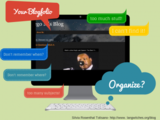
Examples of current label lists of our student blogfolios
I am looking to learn with all of you. How can we support our student blogs with a labeling system that guides students in learning to work, organize and curate their own digital information? The digital information created by our studnets (inside and outside of school) will jut keep growing exponentially! How are you teaching students to label their work on their individual blogs? Have you created a system for your class or your entire school to facilitate multi-year blogging? How are your librarians and media specialists getting involved?
Further resources about labeling
Tips for using labels on your blog
Using Categories and Tags Effectively on Your Blog
Putting some thoughts into categories and tags
Silvia Rosenthal Tolisano
.
Blog
.
<span class='date ' tip=''><i class='icon-time'></i> Jul 16, 2015 07:04am</span>
|
|
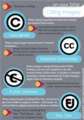
When using Copyrighted work with written permission from owner…
Used with permission from "name" , URL link to original source and or owner online presence.
Ex. Used with permission from Silvia Tolisano http://langwitches.org/blog/wp-content/uploads/2014/02/google-glass-recording-225×225.jpg
When using images licensed under Creative Commons…
Image licensed under Creative Commons by "name or username ". Link to original source.
Ex. Image licensed under Creative Commons by langwitches- http://langwitches.org/blog/2014/02/13/google-glass-recording-at-schools/
When using an image falling under Public Domain, you are not required to cite the creator/owner of the work. A teacher or student wanting to model awareness for Public Domain might want to choose to include.
Image from Public Domain by "name". Link to original source.
When using images claiming Fair Use, you have to give full credit to original creator , with name as well as link to original source (ex. Book or website)
Image used, claiming Fair Use. "Full Name"- and source of original work.
Click to enlarge poster.
Silvia Rosenthal Tolisano
.
Blog
.
<span class='date ' tip=''><i class='icon-time'></i> Jul 16, 2015 07:04am</span>
|