Blogs
|
As part of Curriculum21 Social Learning Institute and in collaboration with Eduplanet21, I have authored a Learning Path for the Globally Connected Educator. Take a look at the modules offered. If you are interested, Eduplanet is giving away 5 free access codes to the learning path. Continue reading to find out how to claim one of these free access passes.
Heidi Hayes Jacobs, author of Curriculum21 and the upcoming book series on Contemporary Perspectives on Literacy, created the introduction to my Learning Path.
I started my educational career as a World Language teacher. From the beginning, I tried to instill in my students the awareness that we are NOT alone in this world. Since the 1990s, I created websites to share lessons, ideas and ways to connect my students to the world. Social networking platforms, like blogs, video conferencing and micro-blogging came as the perfect solution to not only share OUT , but to bring IN the world.
As Vicki Davis, co-founder of the Flat Classroom Project expressed before, I wanted to not only talk to my students about the world, but support them in talking TO the world.
The world around us, the way we learn, my role as an educator has changed. I have become the facilitator to help students create content, find opportunities for authentic learning experiences that are relevant and meaningful.
Through strategically designed readings and activities, you will take steps from a traditionally local isolated educator to a globally connected learner.
Module 1
We are going to RAISE AWARENESS by Defining Global Literacy, Global Learning and Global Competence. I will give you tips and suggestions how to become more globally aware.
Module 2
We are asking you to make a COMMITMENT to Global Learning. Do you recognize the urgency of global education? Can you articulate and advocate for your students to become globally literate?
Module 3
We will introduce you to four selected tools and highlight their built in ability to support you in learning , collaborating and connecting globally. The activities will give you a sandbox to try out and play with features and through carefully selected videos and articles show you real examples from the classroom as these tools are used to connect to the curriculum.
Module 4
will help you start building a Personal Learning Network. We will look at establishing yourself as a "brand". How do you get started in selecting, following and learning from other committed educators?
Module 5
we will take a look at amplifying your curriculum. We will help you define amplification and create a ripple effect of a lesson of your own choosing.
If you would like to receive 1 of 5 free access passes to the Globally Connected Educator Learning Path, send me an email, explaining the reason why you believe becoming a globally connected educator will help make a difference to you and your students.
If you are interested in taking a peek at the course on Eduplanet21, click here to log in and you will be taken to the Globally Connected Learning Path
Silvia Rosenthal Tolisano
.
Blog
.
<span class='date ' tip=''><i class='icon-time'></i> Jul 16, 2015 07:17am</span>
|
|
Alan November elevated the "Official Scribe" as one of the roles that empower student learners.
I see the role of the scribe as follows:
The official scribe plays an important role in the classroom community. Their work is essential for students who were absent from
class or need a review on a specific topic previously discussed. The official scribe also takes pressure off other students from having to
take notes, but invites them in to contribute with corrections, additional information or resources.
Several teachers at my new school are taking the leap of creating a classroom blog as their central hub for classroom communication. There are using blogger (integrated with our Google Apps for Education account) as the platform.
Their blogs are becoming a space to give students the opportunity to create the "perfect notes"to share with the classroom, parent and global community. How can we support students in documenting learning and to add value by adding extra research, resources or experiences that contribute to deepening of the topics discussed in class?
Justin Prophet, our school’s 7th Grade Science teacher has developed the following
Scribe Purpose and Description
To write what you learned.
Contribute and collaborate to make a set of class notes (textbook). People from around the world may look at these as well!
Take an opportunity to learn and to practice writing useful notes supported by media (images, video and other)
Sometimes we just do things in class without taking the time to think about what we learned. When you think about what you did and what you learned from what you did, and write down what you learned, you will be much more likely to remember what you learned.
Taking notes is a skill you will need for high-school and university.
Students that miss class can have a quick summary of what they missed.
Scribe Procedure During Class
Start to create your post right away. Open your computer at the start of class.
Do not do the tasks and activities.
Take photos/video of the tasks and your classmates learning. Try to take photos that relate to the content or skills.
If you find anything interesting related to the class, add them! Add youtube videos and images that are NOT copyrighted.
You must choose the next class scribe.
In collaboration with Emily Vallillo, our school’s 6th Grade Humanities teacher, we are developing a rubric to support students in aiming for higher level note taking.
Download Official Scribe Rubric as pdf
Development of a Rubric
different types of media included (images, video, audio, screenshots, etc.)
clear and logical timeline and progression evident in notes
reiterate what was covered in class (no added value) - word for word? /summarized?/ gaps?
documentation of further questions to research
added value (commentary, annotations, links to further resources)-
The Official Scribes in action:
Mr. Prophet’s Science Blog- It’s a balloon, it’s an airplane, no it’s a water rocket
Ms. Vallillo’s Humanities Blog- Literature Circle Discussion Preparation and Recording, Learning About the Soweto Uprising
Further blog posts & resources
The Official Scribe: It’s All About Learning Styles & Collaboration
Taking Notes- Summarizing Information- 2nd Grade Style
Backchanneling-Movie Watching-Note Taking-Information Scribes
Distributed Teaching & Learning by Darren Kuropatwa
When looking at implementing an "Official Scribe in the classroom" role, put on the lens of the SAMR model.
Substitution:
Students use computer to type up notes.
Augmentation
Students are printing out or emailing their notes to share with their classmates.
Students use formatting options to organize, highlight, edit, rearrange their notes.
Modification
Students are creating their own blog post, using a variety of technology tools and methods to create anotated screenshots, videos, images to bring in different perspectives and address various learning styles
Students are creating collaborative notes via a Google Document, which is shared with the entire class. Everyone can contribute, add information, edit incorrect information,etc.
Note taking is not confined to remembering and regurgitating information heard in class, but (hyper)linked to further reading of text, images, audio and video. Students are labeling/categorizing their blog post and information to make organization and information search easier. Students are solving problems of how to handle information overload and filter relevant information.
Redefinition
Students are contributors to a collaborative blog site, alternating being the Official Scribe of day.Collaboratively they "write"their own online textbook.
Students express their understanding through a variety of media.
Students use the blog as a learning hub to communicate and connect beyond their classroom walls, connecting with peers and experts from around the world
Silvia Rosenthal Tolisano
.
Blog
.
<span class='date ' tip=''><i class='icon-time'></i> Jul 16, 2015 07:16am</span>
|
|
I am thrilled to see so many students creating blog posts and going BEYOND "writing" text made up letters, words, sentences and paragraphs. Being able to "read" and "write" in other media is part of becoming fluent in media literacy. In addition to media literacy, knowing your rights and responsibilities as an ethical digital citizen is a vital part of participating in our digital world.
My frustration with educators not knowing about observing copyright when producing content online was expressed in a previous post titled No! You Can’t Just Take It!. I see sprinkled attempts of students trying to "do the right thing", but coming up short many times. This is all part of the process for students, but frustrating when they do not receive any feedback from a teacher of how to correct the behavior.
Would it be helpful to create "What if scenarios" for teachers and students to follow? Could we crowdsource a few more examples? Leave another scenario (also student using, inserting or embedding different media) in the comment section or by writing your own blog post and then leaving the link in the comment.
Take a look at the example below:
A student used an image for his blog post. He/She links to the source of the image.
When we follow the link, we are taken to Flickr, an image sharing platform. Flickr hosts many Creative Commons images, but NOT all are licensed under Creative Commons. By scrolling down, we find out that the image is indeed COPYRIGHT protected.
The student does not have permission by the owner to copy the image and place it on his/her blog. It does not make it "right" by simply linking to the copyrighted image.
What should the student do to practice and act like a responsible and ethical digital citizen?
First thing to do is to remove the image that is infringing on the owner’s copyright.The students has several choices. They could try to contact the owner of the image and ask for permission to use it on their blogfolio or… if he/she does not have enough time to wait to for a response…
Continue to search for an appropriate image that is indeed licensed under Creative Commons.
The student could find a similar image on Flickr…
Check that it is indeed licensed under Creative Commons… and then attribute it properly
"Image licensed under Creative Commons by tq2cute - http://www.flickr.com/photos/tq2cute/6384672459 "
Silvia Rosenthal Tolisano
.
Blog
.
<span class='date ' tip=''><i class='icon-time'></i> Jul 16, 2015 07:16am</span>
|
|
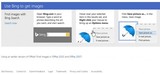
Every once in a while I visit the Microsoft Office Clipart Gallery. I just realized that they have redesigned the page. It is suddenly titled "Find Images Where you Need Them" and is divided into three sections:
Using the Newest Office on Your Desktop
Using Office Web App
Using Bing to get Images.
It is the last section that caught my attention. Bing is a search engine, just like Google . You can read the following step-by-step directions to find images with Bing Search
Open Bing.com in your browser, type a word or phrase describing the art you want, and start the search
Hover over your selected item in the result set and right click you mouse to bring up an Options menu
Click Save picture as… in the menu. Save image
What is WRONG with these instructions? From my perspective Microsoft, so keen in protecting their own copyright on their products, feels that it is irrelevant to even bring it to the attention of their users that the images showing up in their Bing search results might be copyright protected and it is not as as simple as right clicking and saving them. From my perspective, these kind of instructions even ENDORSE copyright infringement!
For the fun of it, I typed in "langwitches" on Bing and saw the following results. According to Microsoft, just right click away and save this images to your computer!
Oddly enough, Microsoft explains copyright on another page by stating explicitly:
If you use someone else’s copyrighted materials without permission, that use generally violates the copyright owner’s exclusive rights, and is copyright infringement. So if you create a new work and include parts of other people’s works in it (such as an existing photo, lengthy quotes from a book or a loop from a song), you must own or have permission to use the elements you borrow.
There are other companies, like Soundcloud, a community of music and audio creators, on the other hand seems to be much more proactive in helping raise awareness and educate their users about copyright. They even have prepared and included a very useful Copyright Checklist.
SoundCloud is a platform for creators and we expect all SoundCloud users to respect other people’s copyright.
What is copyright?
What is copyright infringement and how can I avoid it?
Copyright Checklist
Further resources
Copyright is complicated. If you have any doubt regarding the extent of your rights in any sounds, you should consult with a suitably qualified lawyer before uploading anything to SoundCloud or making any claims or counter-claims regarding your rights. However, as a general guide, here are some of the issues you might want to consider before uploading anything to SoundCloud.
I applaud companies, like Soundcloud in their effort to bring copyright awareness to the surface and am very disappointing in companies like Microsoft who even seem to encourage copyright infringement!
Silvia Rosenthal Tolisano
.
Blog
.
<span class='date ' tip=''><i class='icon-time'></i> Jul 16, 2015 07:15am</span>
|
|
After teaching a 1:1 Toolkit class for incoming Middle Schoolers tothe 1:1 laptop environment this past quarter, I am currently teaching a Media Basics course for sixth graders. I am using a school blog to document the class (among others), showcase student work, share resources and give written step-by-step directions for projects we are currently working on.
My colleague Jennifer Kagohara, who is also teaching a section of the same Media Basics course, and I have narrowed the course down to an introduction to the following three tools (Photoshop, Garageband and iMovie) in order to prepare students to create different media for future projects. We are paying special attention to media literacy, digital citizenship as well as communication and collaboration. We want students to see themselves as ethical creators and members to a larger community by contributing media under Creative Commons.
In addition, students are practicing the following workflow and learnflow:
Search for background and already existing resources (look at tutorials created by others)
Experiment (time for sandbox activities)
Share process publicly (upload blog post, including step-by-step guide of creation)
Look at and read classmates’ guide and product (on each other’s blog)
Receive feedback from peers (via comments on blog)
Remix and build on other work, create something new (observe copyright and proper citation)
Receive feedback (teacher, peers)
Share final product
Receive feedback (global audience)
As an example, I wanted to share the following Photoshop projects with Langwitches’ readers. Students were experimenting and working with animation in Photoshop. Once they created the animations and exported them as .gif files, they inserted them in their blogs with a step-by-step guide answering potential readers’ question "How did you do that?"
Pedro’s Animation post
Felipe’s Animation post
Maya’s Animation post
Once the animation posts were uploaded, students received the following instructions below:
Image licensed under Creative Commons by Enokson-
Start out by taking a look at your classmate’s animations on their blogs today. Leave them a comment.
You are to write an original story using the animations from your classmates and your own.
Choose at least 3 different animations and save the .gif file to your computer (for a total of 4 including your own).
Upload all the animations to a new blog post.
DON’T forget to give credit to the creators of the animation. "Image used with permission by Silvia T" (do not use last names). Please link the name to the owner’s blog post where he/she uploaded the original animation image.
Write an original short story.
Think of a title for your story that will hook the reader.
Use the animations to support your story.
It is my pleasure to share two stories, as examples, from my students.
By Maya W.: Belen and the Billion Drops of Rain
Image by Jessica S
Image by Maya
Image by Amanda R
Image by Noah R
In a very rainy gray day, a girl stood under the rain. Everyone that passed by running in such a horrible weather wondered why the girl didn’t move. Some said, "I think she is crazy?"While other argued, "No, no, no, she must be waiting." "Under the rain?!" Each curious traveler that passed by had a different hypothesis, however they all were wrong. It was her birthday and her best friend hadn’t sent her anything! She, Belen, was depressed. Days and nights passed, and the girl stood completely still under the rain. After many sunrises and sunsets, the rain stopped, so the girl decided to head home. She walked what felt like a century, but step by step she got home. The first thing she did was sit on her desk by her computer and check her email. Her mouth dropped in disbelief, her best-friend, Noah, had actually sent her a happy birthday email. Belen never stood in the rain ever again!
Animation Story by Pedro C.: Rodrigo, the Hunter
Animation by: Rodrigo M.
Animation by Pedro
Animation by: Felipe M.
Animation by: Felipe L.
Once there was this hunter called Rodrigo and he was looking for a bird to hunt. When he found this majestic blue bird he wanted him. So he looked down his aim, and… POW! He got an excellent shot! He went there to pick the loot and he found an egg. He went to his house and made an egg, it was DELICIOUS! After this Rodrigo wanted to go surfing, so he got in his car and was going to the beach. Suddenly, his car crashed right in the middle of a forest! In the forest he found this mysterious monkey. This monkey loved to swing on branches. From that moment on the monkey and Rodrigo
Silvia Rosenthal Tolisano
.
Blog
.
<span class='date ' tip=''><i class='icon-time'></i> Jul 16, 2015 07:15am</span>
|
|
In Part 1 of Literature Circle Discussions, I shared 6th Grade Humanities teacher, Emily Vallillo‘s well structured and organized Literature Circle lesson. In Part 2, I shared the upgrade of traditional lit circles to a new learnflow which included filming the discussion to annotexting the film with behavior’s observed and metacognitive reflections on student blogfolios.
DUE to the sharing of their work on their blogfolios and the dissemination on Langwitches blog as well as via my network on Twitter the learnflow did not stop, a new learning opportunity arose, when Author, founder and co-director of Habits of Mind, Bena Kallick made contact.
Students and teachers are getting a taste of and are being reminded that learning in a connected world is never over… The simple fact of documenting and taking the time to publish "what we are doing in class"… is connecting us to a world of learning opportunities.
We arranged a Skype visit. In order to prepare for the call, students learned about the author by researching the Internet and set up different jobs they were responsible for during the video conference.
Videographer (recording Skype call)
photographer (taking visual notes with images)
Official Scribe (official note taker of Skype conversation)
Speakers (introduction, keep the flow of conversation going)
Note Takers (taking individual notes for themselves)
Live Blogger (create a post for the classroom blog)
We looked at our objectives for the Skype call
Awareness that sharing with a global audience amplifies learning opportunities
Learning and information do not only come from texts and books
Metacognition of learning habits
Connections to own work
Communication skills
Collaboration skills
Note taking skills
Awareness and modeling of network, media, global and information literacy
Agenda for Skype Call
Introduction
Students explain their work in literacy circles, process of creating the video and annotexting.
Bena talks about how she found out about students’ work about Literacy Circles. How she made connections to her own work
What are habits of Minds? How are they related to learning targets?
Q & A
While the different stages of the Literature circle work were part of the learnflow,
lit circle discussion>
filming >
annotexting>
reflecting >
sharing >
disseminating>
receiving feedback >
making connections>
Skype call
I observed the students’ workflow in the classroom:
Speakers were in charge of introducing our school and talking with our expert. They had been prepared with the agenda of the skype call
A collaborative Google Doc had been shared with all the students to add questions that they had for the expert. One student, sitting next to the speakers was in charge of keeping up with the incoming questions and speaking to the expert during Q& A time. He marked already asked questions and selected best suited questions from the growing list on the document.
A Live Blogger was in charge of preparing a post on the classroom blog. He was to incorporate images from the photographer and video segments, once the video was edited.
After the call was over, we realized that we had much information about the call "stored"in different places as well as as different media. Our job was to figure out HOW to CONNECT the different types of information.
in our brains
on the Flip camera
images on our phones and iPads
on a Google Doc (Official Scribe)
on the classroom blog (Live Blogger)
on individual notes (note takers)
on a collaborative Google Doc
The Official Scribe documented the Skype call. See a sample below:
Bena - "What kind of questions do you ask at the circles?
Brenna - "Clarifying questions and Deep Discussion
Bena - How does that extra person help? The person taking notes in the discussion.
Maya - At the end of the discussion, they tell us what we do well on, what we should improve, what they liked about the discussion.
Bena - Are you using Habits of Mind? I think it would help sort of, help you guys to discover new things.
No, but I think we might start to.
Where did you get the idea of habits of mind? And When did you make it?
Bena - "I had the idea since I worked with my partner, and we started looking at all those different ways to think like in those literature circles. All of those skills like comparing and contrasting. Disposition for thinking - not only do you know how to compare + contrast but you dare to do so disposition attitude are called habits of mind. Listening is a habit of mind and empathy, because you are not just going to say something, but you ask questions and try to understand the points of view." "When I hear another person’s perspective, you try to understand - Helping your mind be as flexible as possible"
Why did you choose us?
Bena - "You are special. I was interested in what you guys were doing. Since I was following Mrs. Tolisano, I saw it. I wanted to bring Habits of Mind to your work, so you don’t just use ordinary skills, but you understand them. I skyped with other classes. What makes you special, is that you guys brought in technology."
Can we have this for other subjects?
Bena - "Habits of mind are beyond any of the areas. You can use it for any area and even outside school. I worked with students working with habits of mind, some people started getting bored at a party, and they thought flexibly and used skills. I hope you can bring them everywhere. Where would you get it? Bring it to some of your classes and show them about it."
Have all your books been about habits of mind?
Bena - "They have been about educational things. Not all habits of mind, but all about how to think and ways of thinking. Higher level thinking is how the world is right now. You are asking good questions which is a habit of mind. Communication, which you guys are doing. From Mrs. Tolisano, I noticed you guys work hard, and maybe you can start mapping things out. I have co authored all my books 16! Thinking collaboratively, is also a habit which is why I worked with a partner."
As part of the debriefing, students contributed a short "One Thing I Remember…" ( here is a selection of their answers)
I remember that she said "Habits of mind are everywhere"that affected me because it made me think that we think all the time and we don’t even notice it -Jess-
What I remember the most is the I remember the most from the conference was how she talked about how you should be flexible, so that creativity will come to you, also, you will learn more. -Maya-
I remember that she said that habits of mind can be used outside of school. - Jack
I remember when she said that she made the museum for teachers and students who is going to learn about habits of thinking. -Nana-
I remember how she said that it [HOM] wasn’t only for humanities or english but it is for everything.-Martin-
One thing I remember is how Bena said that people need to learn how to use more exquisite language in our everyday talking instead of saying "that was awesome" but saying why it was "awesome" and making our conversations meaningful-Claudia
I remember when she mentioned that she made a museum for a good reason that really was an inspiring thing to help kids understand about how important habits of mind.. -Juan Pablo
Something I remember Is that she said habit’s of mind can be used anywhere.- Camila
One thing I remember is that she said that she created the museum for students and teachers that were going to about the habits of thinking and I thought that was really cool. - Gabe
André - One thing that I remember she said was that she said that two people are better than one, so she likes to write books with other people.
One thing that I remember is that she said that not all [her] books are about habits of mind but all of them have a connection to education. Juan
Yael - I remember is that she said she worked with partners because of the habit of Thinking Interdependently. Also, how she worked with a partner for all of the books because it is better to work with two minds that have two perspectives, than one mind that thinks on its own.
I remember that she said how people at a pajama party decided to use the habits of mind and think flexible. - Brenna
Habits of Minds from langwitches on Vimeo.
Silvia Rosenthal Tolisano
.
Blog
.
<span class='date ' tip=''><i class='icon-time'></i> Jul 16, 2015 07:14am</span>
|
|
Another mind shift that is taking place around us and that we need to be aware of in education: the MIDDLE MAN is gone!
The middle man between me and:
a global audience
information
an author
an expert
eye witnesses and current events
the customer service of a company
the research and development department
software developers
is gone!
This morning, I was working on an infographic in Piktochart. I really wanted a puzzle piece icon to use as part of my infographic. Piktochart has the icons arranged in categories (entertainment, people, shapes, etc.) It was not very efficient to go through each one of the categories to see if a puzzle piece was present.
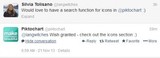
A quick tweet went out to see if I could catch @piktochart’s attention. Not even 3 hours (!!) later, I received a response…
My wish was granted and magically the search box for icons appeared! Thank you Piktochart!
It could not have come at a better moment, as I was working with a 7th grade Geography class, who had been working on creating their own infographics in Piktochart. They were in awe to see that Piktochart had responded and they were eager to continue creating their data stories to then share them on their blogfolios, write a reflection and review of the creation process, knowing that there was an audience.
I felt that the time spent to make this process (workflow) of writing, tweeting, documenting, strategically disseminating was valuable for students. They learned:
about Twitter grammar (mention @username to catch someone’s attention)
they have a DIRECT VOICE (that understanding is part of network literacy for our students)
about the importance of a company’s social network presence (and response)
their role in research and development (and marketing) for a web based company
Our generation did NOT grow up with the notion, that we can directly be in contact. There was always a middle man. A newspaper editor, a publishing company, an agent, a representative… That middle man is no longer….Let’s teach our students be aware of and USE their direct voice for action!
Silvia Rosenthal Tolisano
.
Blog
.
<span class='date ' tip=''><i class='icon-time'></i> Jul 16, 2015 07:14am</span>
|
|
Our school‘s fabulous PE teacher, Claire Arcenas, is bringing blogging to her PE classes. She is incorporating Visual Thinking Routines to help her students become reflective commenters.
In a recent planning session, she reminded me of the book Making Thinking Visible by Ron Ritchard, Mark Church, and Karin Morrison, that I had download but not read yet. We then started diving into the core routines outlined on Visible Thinking from Harvard University.
The core routines are a set of seven or so routines that target different types of thinking from across the modules. These routines are easy to get started with and are commonly found in Visible Thinking teachers’ toolkits. Try getting started with with one of these routines.
What Makes You Say That? Interpretation with justification routine
Think Puzzle Explore A routine that sets the stage for deeper inquiry
Think Pair Share A routine for active reasoning and explanation
Circle of Viewpoints A routine for exploring diverse perspectives
I used to Think… Now I think… A routine for reflecting on how and why our thinking has changed
See Think Wonder A routine for exploring works of art and other interesting things
Compass Points A routine for examining propositions
3-2-1-Bridge A routine for activating prior knowledge and making connections
Each one of these routines seemed well suited to help guide students in quality blog post writing as well as commenting. We couldn’t help but expand the notion of the above by developing specific ROUTINES, to define thinking moves, support and make thinking visible as students were blogging.
Here is our first attempt:
Blogging as Information/Research
Research- What have you read that has informed your position?
Remix- What are you modeling after and how can you re-purpose it?
Add- What new perspectives, value and resources have been added to original research?
Purpose- What kind of thinking is involved-
To make sense of a concept that I am trying to understand or wrapping my mind around. Drive for further inquiry.
Application- When and where can it be used?
To help learner document and carefully think about, analyze and amplify information that has influenced their thinking.
Launch- Learner looks at topic, concept, image, video, art work, etc.Follow thinking thinking routine, in order to represent train of thought.
Blogging as Reflection
artifact
choose a variety of media platforms beyond text to display many different forms of creativity and communication.
reflection
(you can use any of the Visible Thinking Routines above)
Blogging as Documentation
summarize
Review, recap, give the main points or the run down of what occurred.
add
Add images, videos or other media, that enhance, support and bring perspective to documented content.
label
Make your documentation searchable. Label, categorize and/or tag your blog post, to strategically link to other written posts with the same thoughts, ideas or topics.
Blog Commenting- Feedback- through strategic and thoughtful commenting routine.
read
Read the blog post, read other blog posts, articles and books on the topic.
connect
Make connections to your own experience, knowledge and related information. Link these connections to original source.
add
Don’t just agree or disagree or compliment the author of the post. Add value to their writing.
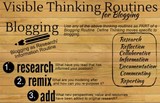
Click on infographic below to enlarge
What are some thinking routines you use with your students to support them in making their THINKING visible as they are blogging or commenting? Please add your thoughts and ideas as a comment (maybe even be inspired to use one of the above routine ex. commenting : read-connect-add
Silvia Rosenthal Tolisano
.
Blog
.
<span class='date ' tip=''><i class='icon-time'></i> Jul 16, 2015 07:13am</span>
|
|
As I am speaking of the benefits of blogging as a professional and student, I sometimes wonder if the word "blogging" is not a word we speak as we talk at cross-purposes with other educators.
When I use the word "blogging", I am NOT seeing :
technology
a project
an add-on to the curriculum content.
When I use the word "blogging", I am seeing:
learning how to read and write in digital spaces
the possibility of writing for an authentic global audience
a platform for reflection, investigation, documentation and curation
a platform that supports and amplifies modern skills and literacies
On the tails of Visible Thinking Routines for Blogging, comes this new blog post that wants to make Blogging VISIBLE!
A few days Blake Wile tweeted "Actual screenshots of blogs are so useful"
So, I am continuing to highlight, screenshoot and annotate to make it VISIBLE what I think, when I say "blogging". There is value in auditing blog posts and comments transparently in order to help other educators in the process of understanding the value of blogging in all area of learning. I am not adding assessment for traditional writing skills (grammar, vocabulary, genres, etc. )to the scenarios below, trusting that teachers will see and find ways to use blog posts/comments for formative assessment of these traditional skills and objectives. I am placing emphasis on modern skills and literacies as well as the goal of transformational use of blogging as a platform to support these objectives in ways that traditional paper and pencil could can’t do.
Scenario 1: Connections (to other people as well as resources)
A sixth grade Humanities student, writes a blog post during the study of Apartheid in South Africa. His post shows evidence of connecting his thinking to other learning experiences and to further resources, by hyperlinking (one instance, moving up along the Taxonomy of hyperlinks)
He receives a comment from a classmate, that alters his thinking. She not only points out the parts of his post, that she agrees/disagrees with, but she ADDS to his thoughts. The commenter is actively looking to continue a conversation with the author of the post. It will become part of the learnflow (in time…) Although he does not respond to the commenter directly as a reply to her comment, he shows evidence of reading and embedding her thoughts into his own thinking by leaving a comment on another classmate’s post.
He refers back to the comment that was left for him. [In time...] he will also leave a (hyper)link to the original comment that was left, to follow his train of thought.
Scenario 2: Process
In another 6th grade class, the teacher asked students to take notes on a Popplet, document their understanding of a topic at different points of the unit.They visually mark their notes by color coding bubbles, changing the colors after another learning activity or resource explored on the topic.
Using the popplet as their notes, students write a blog post reflection/summary of their understanding at different points in time.
The first summary being written after a "visual gallery walk", where student were exposed to images about the topic
The second summary after a text source
Third summary after further reading of different perspectives on the topic
The image below models the next step of asking students to make their learning process and (potential) growth VISIBLE.
Students were asked to create their own annotated screenshot of the 3 summaries from their blog and color code facts, insecurities in their knowledge, incorrect facts that they believed to be true and cause and effect of events. The screenshot image below was created with Skitch
Scenario 3: Process
In a Media Basics’ class, students document and reflect on the process of creating and learning, not just a final product. In addition, giving and receiving feedback becomes part of the workflow and learnflow. Not only does the feedback come from more than one person (traditionally a teacher), but it also allows the person who GIVES the feedback to see that it he/she had an impact on the work.
In time, the posts will include content specific vocabulary, with evidence of using them in appropriate context as well as explanations. The posts will CONNECT with (hyper)links to previously written posts and reflections, showing evidence of growth in skills.
Scenario 4: Commenting (beyond isolated opinions and non-value added compliments)
Another example from my Media Basic class. I made commenting part of our classroom routine. Students READ and LEAVE QUALITY FEEDBACK for their classmates. This could become part of warm-up work, an exit ticket, review or homework.
As I leave feedback for individual students, I model commenting for my students at the same time. Emphasis is placed on connecting to the conversation that is going on in the comment sections and adding value to the original post for the author (and other readers) by giving constructive feedback supported by examples. In time… as receiving and leaving comments becomes ingrained, so will writing with an audience in mind.
The sample scenarios above are from Middle school classrooms. Take a look at a previous blog post, titled Assessment in the Modern Classroom: Part Three- Blog Writing or Quality Blogging and Commenting Audit meme solicited further links to blog writing and commenting audit as a form of assessment in an elementary school classroom. ( by Stef Galvin, Andrea Hernandez, Sheri Edwards, Tracy Watanabe, Kathryn Trask, Shauna Hamman)
Do you have samples, screenshots and annotations for High School? Why not share and link to them in the comment section?
Silvia Rosenthal Tolisano
.
Blog
.
<span class='date ' tip=''><i class='icon-time'></i> Jul 16, 2015 07:12am</span>
|
|
Part of my work, at my school, is to create a framework for our Middle School that will take (already) blogging students from Elementary School and prepare a smooth transition for them, as they move on to High School.
I am looking BEYOND the one classroom or one specific teacher blogging with their students.
As you might have been able to tell due to the increasing blog posts about blogging, my mind is swirling around:
making the difference evident for faculty to see blogging as MORE than a technology integration project but a platform for learning
making Blogging Visible to educators who are not familiar with blogging for their own learning
share best practices and going Beyond Pockets of Excellence in Blogging
putting support structures into place for teachers to start their individual learning journeys. From creating infographics of Visible Thinking Routines for Blogging to Workshops offered to 1:1 coaching sessions
seeing and documenting pockets of blogging here and there, demonstrating different layers and stages in a blogging journey: Blogging as the Official Scribe of the Classroom
Currently, we are in year 1 of implementing blogging across 6th, 7th and 8th grade. All students have their own blogfolios, these portfolios started out with being used to house artifacts and reflections to be shared with their parents during student led conferences (SLC). The idea though was/is to make blogging a platform for writing (in digital spaces) , feedback, conversation, (global) connections and a hub for personal learning. How do we accomplish that not only in individual classrooms or for one individual teacher, but division and eventually school wide?
Below are some doodle notes (testing out… practicing sketchnoting…having trouble with illustrations)
When several grade levels are moving towards a blogging platform (at the same time), it is hard to develop a scope and sequence for blogging as a tool. I might have the same expectations for 6th graders in their first year of blogging as I would have for the 8th graders. They are writing, commenting, connecting, communication in different media forms and exhibiting the same rules of digital citizenship. Will they all work on the same kinds of "blogging" skills at the same time? How will addressing these skills shift, as we enter year 2, year 3 of implementation? What will happen to new students who come to your school from a non-blogging school? How will we support them?
Here are a few more questions and thoughts I have about STRATEGICALLY implementing a division (school wide) blogging platform:
I am trying to making the connections between blogging and pedagogy, modern literacies and standards and core values (character traits, etc.) evident.
I am trying to adapt the SAMR model to take blogs as a technology tool that substitutes traditional tasks to a platform that transforms teaching and learning (watch for future blog posts about examples of blogging at different stages of the SAMR mode)
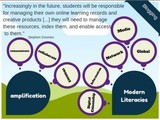
Another aspect of using blogs with students is being addressed by Stephen Downes , who articulates the need to teach students the skills to store, manage and enable access to their work online. How can we best support students to NOT SIMPLY create a digital footprint, but do so strategically and know how to manage their work.
What will be the best way to create a consistent label/category system? One that will facilitate evidence of growth/learning over an extended period of time and FOR assessment?
For the ones that need reassurance, that they meet standards (in whatever subject area), it might be a good idea to make an upgrade by blogging visible. Are the standards addressed and can be assessed via blogging?
Below you will find a sample of ICT standards addressed by upgrading a traditional book report beyond using substitution of merely copying/pasting text onto a blog.
I have laid out my thoughts, ideas, and question of HOW to go BEYOND pockets of individual classrooms and students with one particular teacher or grade level blogging.
How can we create a framework that is sustainable across a division or entire school (K-12)?
What are expectations of students in different age groups?
What are expectations of teachers to make this a COLLABORATIVE way of learning through blogging at a school or district?
How do we connect divisions, subject areas and grade levels to make LONG TERM benefits evident?
Who is willing to connect with me, as they are working on the same kinds of implementation questions beyond one classroom?
Silvia Rosenthal Tolisano
.
Blog
.
<span class='date ' tip=''><i class='icon-time'></i> Jul 16, 2015 07:11am</span>
|