Blogs
|
During my visit this past January to the Graded School, in São Paulo, Brazil, I met Jamie Tuttle Middle School Guidance Counselor. He told me about an incident at their International School and the response as a community:
We found our world map defaced with several derogatory and racist remarks. The following words and statements were written on the map:
It shocked our international school and we knew that something needed to be done. An 8th grade student brought up the idea of working together as a school to create a new world map. As the conversations about this idea grew, we felt that we needed to confront the issue of bullying and how racist and derogatory words can be very damaging to an individual and a community. We decided to confront these issues by creating a Wall of Intolerance.
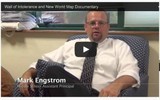
Jamie also shared with me their idea of documenting and sharing the occurrence and the process of "doing something about it" in order to not let a problem being hushed up. The Graded community produced a documentary and I am thrilled to be able to share it with Langwitches’ readers.
In addition, Jeff Lippman, the Middle School principal of the Graded School also created a flipped lesson on Ted Ed for the Wall of Intolerance documentary.
This documentary shows the process that our Middle School went through when we discovered that our world map had been defaced with racist, xenophobic and classist graffiti. In a truly collaborative effort between students, teachers and administration, we confronted issues of discrimination and bullying and moved forward together as a community by tearing down hatred and building a new world map
I am wondering how other schools could benefit beyond just taking the idea of the "Wall of Intolerance" as a resource or model for their own schools? I am thinking… what if….
What if… we create a collaborative Wall of Intolerance?
What if … we connect students across geography and tear down their Wall of Intolerance (via Skype or Google Hangout)?
What if … we crowdsourced testimonials/how to guides on how to grow from being a (passive) bystander to a(n) (active) ally.
What if… we create a meme, a chain that is being passed on to other schools to add their perspectives, stories, solutions, actions, thoughts.
Silvia Rosenthal Tolisano
.
Blog
.
<span class='date ' tip=''><i class='icon-time'></i> Jul 16, 2015 07:28am</span>
|
|
In a unit on Transportation, our Kindergarteners read a large picture book "On the Move!" by Donna Latham
Students got so interested into learning about different ways people around the globe got around. They were even ready to take a trip to Venice, Italy to ride in a Vaporetto.
Since our 5 & 6 year olds have gotten pretty good at using PicCollage on the iPads, their teacher Arlene Yegelwel, wanted to personalize another collaborative classroom eBook.
She took the time to find over 20 public domain images of transportation methods they had discussed in class on Wikimedia Commons and sent them in one email to each iPad.
Student’s workflow fluency looked like this:
opened the PicCollage app
chose one image of the different transportation methods
decided how they could best place an image of themselves onto the picture
asked a buddy to take an image of them acting out a particular position on the iPad
edited the image by clipping the background
resized the image to make it fit the ration of the transportation image
rotated the image
saved the image
emailed the image to their teacher
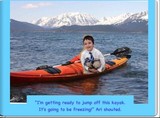
Mrs. Yegelwel, downloaded the images from the e-mail and then imported them into the BookCreator App. She sat with each students to document their comment for the image.
As a class, they also reviewed all the different parts of a book, such as title page, dedication page and credit page. We also had a short, age appropriate discussion about copyright and how we cannot just TAKE (steal) any images we find on the web. We talked to them about some photographers who release their images into public domain, which meant we could use them. So there was a special Thank You crafted to thank these photographers
We could have stopped here, but the global component (transportation AROUND THE WORLD) begged to amplify what had largely taken place in the classroom only.
We decided to involve students in crafting their own survey. Below you will find our collaborative efforts in formulating the title, description, questions and different checkboxes.
Please take a moment to fill out the form for them. We will continue to accept responses until next Friday (May 24, 2013) to then tabulate and interpret the results.
We also discussed how would we let people know about our survey? What if we stood in our school’s parking lot and shouted it out? How many people would hear us? Where would these people be geographically be from?
I showed them my Twitter account and demonstrated how I was going to give a "shout out" for our survey.
We then sat back and literally watched the first responses to our survey "fall into" the spread sheet. Please imagine the wows, the oohs and the aahhs for each one, especially when the first ones from Europe started falling in. Mrs. Yegelwel pulled in the globe and showed location. We also explained why most of our responses seemed to come from the US and Canada. We quickly looked up what time it was in Australia and they "shockingly" realized that Australians were deep asleep while they were in school.
I am asking myself the following questions.
What are students learning BEYOND the reading of the original book in their classroom? How did we amplify skills and literacies, because we took "the extra step" of connecting the students to a global network? What transformative (not possible without the amplification) teaching & learning took place?
Geography skills (We are looking up each location on a globe. We are learning about states, countries, continents, urban, suburban, etc.)
Math skills (We are using real authentic data. The results will be counted, sorted, organized and graphed)
Thinking skills (Why are most people in the US using a car/van to get to work? Why do most people in Japan use scooters?)
Global skills (They realize that we can talk TO the world, not just ABOUT the world)
Network skills (What are networks? How does Twitter work?)
Silvia Rosenthal Tolisano
.
Blog
.
<span class='date ' tip=''><i class='icon-time'></i> Jul 16, 2015 07:27am</span>
|
|
Writing appropriate emails is part of being a good digital citizen! Students (even digital natives) are not born with knowing the rules and responsibilities. Just as they need to learn to answer and talk on the phone, they need to learn about e-mail writing in an academic setting (to their teachers, Skype partners, project collaborators, administration or their classmates regarding school business).
Our third graders have been given access to their school email addresses.
My colleague, Andrea Hernandez (@edtechworkshop) was working with students on formulating a Responsible Use Policy.
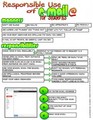
From their discussion the following guide emerged.
In the spirit of sharing and calling attention to ongoing, embedded digital citizenship exposure, opportunities and discussions (rules, rights, privileges and responsibilities), take a moment to review these guidelines as an example and create you own guide with your students for their use of their SCHOOL email addresses.
Download the guide as a pdf file
Silvia Rosenthal Tolisano
.
Blog
.
<span class='date ' tip=''><i class='icon-time'></i> Jul 16, 2015 07:27am</span>
|
|
Will Richardson said:
If you are not feeling a little bit uncomfortable about being a teacher or being in education right now, then you are not paying attention
Working in schools and in education tends to put us in a "bubble" sometimes. We have our own micro-organisms of the way things work. The way our school world works has not changed as fast as the world around us. We still hold on to models that are outdated outside the world of education.
I am asking every teacher to TAKE ANOTHER LOOK AROUND.
The sense of urgency is real and PERSONAL to me (as it should be to most of you!).
You will mostly see my own granddaughter as the model in the presentation slides below! She is just a little over a year old and has all of her "formal" schooling ahead of her. She will go through pre-school, elementary, middle and high school and hopefully, possibly, maybe to (a traditional) university (???). She will have good teachers and not so good teachers along the way. Teachers, who will care about her and her learning and teachers who will only care about test scores.
Will they prepare her for the year 2030 and the way the world beyond will look like?
Will she be learning from textbooks only?
Will her learning inside the physical classroom be unrecognizably different from her learning outside of school?
Will her teachers allow her to use devices/tools to demonstrate evidence of learning instead of traditional methods of assessment?
It is PERSONAL… when I look at my own three children. Below is a picture of my youngest daughter on her first day of school (with a traditional German school cone in her arms) and then again on her LAST day of high school. Notice the big, heavy textbook in her arms on the last day. Time past in a blink of an eye..
She went to a so called all "A" schools (Schools in our State are classified with a grade according to the results of the standardized tests). Her classes sported Smartboards in the rooms and her teachers were given iPads to use for their teaching. It did not change how she was prepared for life outside of school. It did not change how she was taught in order to pass tests, instead of learning how to learn in HER world. There was no collaboration beyond working with her classmates. There was never an authentic task beyond "getting the grade". There was no strategic intent to embed skills to expose, support and strength literacies beyond traditional reading and writing (One of the teachers tried "blogging" with her English class once, but abandoned it quickly, since it was too much work to monitor all the students’ writing).
If you have children in school…blink once and they will too graduate in no time. There is no time for baby steps in order to think about trying this or that. There is an urgency to take a good hard look around and take action.
Take Another Look Around from Silvia Rosenthal Tolisano
Silvia Rosenthal Tolisano
.
Blog
.
<span class='date ' tip=''><i class='icon-time'></i> Jul 16, 2015 07:27am</span>
|
|
We have heard plenty from teachers. We have heard plenty from educational "gurus" and theorists what students should/shouldn’t be learning and how we should/shouldn’t be teaching.
I have written and talked plenty about the need for globally connected educators. I have even written a chapter in Heidi Hayes Jacobs‘ upcoming book about Global Literacies.
It is time to hear from students!
Ann Michaelsen, a High School English teacher from Oslo, Norway did precisely that. She gave her students a voice, the time to research, write and platform to share THEIR perspective. What does it mean to be a connected learner as a student?
Ann shares in the book’s introduction
As a classroom teacher, you cannot create your own educational system. however, you can change what is going on in your classroom. This book will show you how to help your students become connected learners. Our hope is that teachers and students will be able to model a true learner centered environment!
The secret seems to lie in giving students a voice, letting them take ownership and asking them to learn skills that help them perform a "just in time" not a "just in case" authentic task.
The chapter on motivation is especially interesting. Marie and Silje relate their motivation in school to the ever important question: WHY DO I HAVE TO DO THIS? The two young authors conclude that it is not just about finding ONE answer to that questions. HOW many answers one can come up with is directly related to the degree of motivation you will experience.
We, as educators (in the classroom, but also as curriculum writers and decision makers) need to truly start making MOTIVATION part of our priorities. How can we help students come up with more and more answers to this eternal question…beyond "because you might need it in the future", "because I said so"… or "you want to get a good grade".
Let’s make learning authentic and real! Let’s make knowing "why they are learning about something" a priority for our students. Let’s help students answer the question "Why do I have to learn this?" in a variety and in many creative ways.
Interested in the book? Take a look at their website and a reflection on the process of the work.
Connected Learners
What My Connected Students Taught Me about Motivation
The Powerful Learning Practice Press made the book available as a PDF file.
Written by a team of 27 students at Sandvika High School (Oslo, Norway), Connected Learners: A Step-by-Step Guide to Creating a Global Classroom is a unique compendium of stories, advice and how-to articles designed to help high school teachers and their students around the globe shift from classrooms that are isolated and teacher-centered to digitally rich environments where learning is student-driven and constantly connected to the global internet.
The 220-page collaborative book takes the reader through all the steps to create a digital classroom, says a spokesman for the team of Grade 9 students, "ranging from setting up Twitter and blog accounts, to finding educators and students online for global learning activities, to how to optimize the use of search engines and teach the key elements of digital literacy."
The book represents the culmination of a student learning project supported by English teacher and international blogger Ann Michaelsen, recognized by Microsoft Partners in Learning as a "Global Hero in Education" in 2012.
"This book offers a unique insight into what students and teachers need to know in the 21st century classroom," says Michaelsen. "I’m extremely proud of what my English learners have accomplished and shared in this remarkable example of project learning."
Entirely written, edited and designed by the students themselves, the 10-chapter interactive digital book is designed to be useful for teachers and students in both high and middle school.
"PLPress is helping with the promotion and distribution of this unique book as a public service," said Sheryl Nussbaum-Beach, CEO of Powerful Learning Practice LLC, "and in recognition of all the educators and students around the world who are leading the shift to connected learning."
All profits will go into a fund for the Sandvika High students to support physical field trips to schools they collaborate with online.
Silvia Rosenthal Tolisano
.
Blog
.
<span class='date ' tip=''><i class='icon-time'></i> Jul 16, 2015 07:27am</span>
|
|
There are, no doubt, many technophobes (among educators and in general) out there. Technophobia is defined by The Free Dictionary as:
Fear of or aversion to technology, especially computers and high technology.
Over the years, I have seen "the fear" many times. A popular idiom used here in the USA is to compare the signs of that fear to "deer in headlights" The eyes of the technophobe are widened and a form of paralysis sets in as soon as I approach. Although, I emphasize modern teaching, learning and pedagogy, I am perceived as a "technology guru", justifying the terrified look (How could an educator have fear of teaching, learning or pedagogy?)
I try to downplay the part technology plays… (No mention of the word "technology" in my job title, emphasizing of the skills, not tools)
I try to convince that students will be able to take the "technology" part into their hands, that the teacher did not have to worry about it …
I offer to "hold hands" during lessons, in case the feared technology failed, and paralysis sets in…
I write step by step tutorials to allow practicing of skills, introducing new tools, planning lessons together
I showcase the potential of amplification, engagement, motivation and learning potential technology can bring… (hoping that the results would "convince" and surpass the fear)
In Changing- Shifting a School Culture (May 2009…yes almost 4 years ago…), I wrote about my train of thought regarding
shifting from figuring out how to get educators familiar and comfortable enough to use technology as just another teaching tool to how to change or facilitate a shift of a school’s culture into a learning community.
[4 years is a long time in terms of technology change... think ... 4 years ago, there were no iPads...]
4 years ago, I believed, that we might be ok, if a teacher continued to fear technology as a tool for themselves, and trust their students to take the reins.
2 years ago, I wrote in a post titled Enhancement-Automating-Transforming-Informating (May 2011)
Long ago, I have resolved that teaching and learning DO NOT depend on technology nor are "not real", good or effective without it (see Changing-Shifting a School Culture, Bringing in Experts. Transformative Teaching and Learning? and It’s not about the Tools, it is about the Skills ). The best "tool" for good teaching and learning…is… a good teacher! That teacher can be a professional educator…it can be "yourself"… it can be a group of your peers… it can be a book, film, audio…(insert whatever media) or it can be… (insert whatever suits you, your learning or teaching style).
[Even then still believing that it is NOT about the technology ...]
My thinking is shifting again. The sneaky feeling is creeping up over and over again that educators MUST experience the world of technology and modern learning (aka 21st century learning) for themselves in order to understand the transformative learning process the tools can enable ."Good teachers" will still teach (without technology tools)… their students will still learn… up to a certain degree… and not being able to move beyond a certain point.
Previously, I thought that as long as the technophobe allows students to use "their" technology and he/she takes care of the academic/pedagogical part, we would be alright, BUT…
Pedagogy has shifted… Modern skills and literacies have emerged…
Only with that new kind of experience in learning, collaborating, communicating, thinking… can we not only understand but also adapt and tweak the technology tools to serve as tools FOR modern literacies, student learning and amplification.
Just as our students… we are experiencing for the first time collaborative, across time (synchronous and asynchronous) and space (we don’t have to all be in the same geographic place), amplified (beyond our local audience, beyond our own perspective, beyond our own language) learning.
Just as our students… we are pioneers and explorers. We are testing the waters, we are giving ourselves permission to "fail forward". There is no road map. Our only directions are: Learn- Reflect- Share
Just as our students… we are learning to learn from and express ourselves beyond text printed on a paper. We are learning from experts around the world (via Skype, Twitter and Blogs), we are learning new writing genres (hyperlinked, writing in digital spaces), exploring and discovering new research methods
Just as our students… we are surviving information overload and re-learning how to focus, find, filter, remix and create new information. We are learning how to curate information , look at and create information visually.
Just as our students… we are acquiring digital fluency and critical literacies, which takes us beyond basic literacy of traditional reading and writing.
Just as our students… the most important skill we can learn, support, develop and prioritize is Learning How to Learn
Schools need to have/put platforms into place, that support their educators in developing, exploring and experiences new kids of learning that they will then be able to take beyond their own professional development and learning into the classrooms.
You need to EXPERIENCE through technology in order to see HOW you can translate that into your teaching!
For the technophobe amongst educators, it is time to GET OVER IT!
It is time. Take a look around you. The world has changed and it is not changing back. Technology devices, such as smartphones, tablets and laptops connect us instantly to tools, services and platforms such as Twitter, blogs, wikis, Facebook, Instagram, Pinterest or Snapchat (among thousands of others).
Dr. Gil Perl recently wrote in a blog post Curriulum21 Initiative: Reflections from the Side of the Road that educators need to be at the forefront of understanding a changing world and get outside their own comfort zone. I could not agree more with him.
So what does a great 21st Century teacher look like? First of all, we learned that it’s not necessarily the teacher who tweets the pics uploaded to her Instagram account from her iPhone and remixes 3D animation with Khan Academy videos and soundtracks ripped from YouTube, then Snapchats herself doing it. It’s the teacher - whether new to the profession or seasoned veteran - who recognizes that the world is changing and that teachers ought to be on the forefront of understanding that change. It’s the teacher who has a burning desire to learn more and do more, while being open to reflection and redirection. It’s the teacher who encourages his students to take intellectual and emotional risks and models such by extending himself beyond his own comfort zone. It’s the educator who embraces the idea that her job is not to teach, but to help students learn.
Silvia Rosenthal Tolisano
.
Blog
.
<span class='date ' tip=''><i class='icon-time'></i> Jul 16, 2015 07:27am</span>
|
|
For me, iPad workflow has to do with fluency. It is:
the fluid movement between apps
the unconscious decision what app to use in order to accomplish any given task
The workflow is almost like Grammar in a language. Grammar helps you put components of a language in the proper order, grammar rules help you use the right tense, remix word to create new meaning, the correct vocabulary words attached in combination with pronouns and conjugation help you communicate exactly what you had intended.
Workflow= Fluency of iPad Grammar
Using iPads in the classroom with your students is more than choosing and letting them use Apps.
I have written several posts about how I envisioned and then observed our students develop iPad Fluency (Fluency of iPad workflow takes time to develop!).
Working on iPad Fluency with Lower Elementary Students
First Grade Workflow Fluency
How Does iPad Workflow Fluency Look Like in Kindergarten
We are starting to see more and more examples of students developing iPad fluency, as they
take a photo of a mindmap that was written on a dry-erase board and ,without being asked, email them to all their classmates…
ask for a mindmap that I started of a discussion held in class and created on the iPad to be emailed to them. Not having the app (in which I had originally created the mindmap) on their own iPad, without missing a beat, substituting the app with Skitch to continue to add to the notes…
create a collage of images, saving the file to upload to their blogfolios without painfully getting hung up technical issues of how to import, rotate, crop, save, open in new app, edit, save and publish…
quickly looking up a quote or reference of a person in the middle of a conversation/discussion to validate someone’s point of view/perspective. The conversation continues without interruption and research is embedded smoothly…
collaboratively take notes, peer edit drafts of writing samples and not even think twice about the transformative nature of this new writing process…
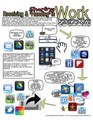
I created the following iPad Workflow chart below for receiving and handing in sharing work. Breaking the process apart should help students visualize each step, remind them of "what comes next?" and support them on their way to develop their own fluency.
[ The chart was created in ComicLife app, icons saved and imported from the web to the Photo Gallery as I was browsing Safari. The final chart was then saved in Comic Life, exported as a jpg image and as a pdf file to be then uploaded to this blog post to be shared. ]
Download iPad Workflow: Receiving and Sharing (pdf)
Silvia Rosenthal Tolisano
.
Blog
.
<span class='date ' tip=''><i class='icon-time'></i> Jul 16, 2015 07:26am</span>
|
|
The following is a wonderful description, step by step, how one librarian upgraded traditional "animal reports" with a first grade class (six year olds).
from handing in paper reports to sharing eBook/pdf files with the world
from consuming information to creating and remixing their own information
from using and printing out photos and illustrations to properly citing digital and analog sources and creating their own illustrations
from working in one medium (paper/markers/pencils) to building fluency between media and apps.
from "handing" in an animal report to a teacher to uploading and embedding their creation to their blogfolio as an artifact of their learning in this particular moment in time
Upgrades such as the one described below support and promote information, network and media literacy as well as continue to expose and teach basic traditional skills.
Guest Post by Karin Hallett. Originally posted on Liquid Literacy Blog.
Young readers typically focus on fiction books. Since a couple of my first graders were showing interest in nonfiction books, however, I thought it would be a good idea to introduce the whole class to this genre and take the opportunity to also teach them about nonfiction text features and some basic research steps along the way.
To jump start, I randomly distributed a number of nonfiction books (emergent and fluent reader texts, 0.8 to 4.5 AR book levels) on each of our four group tables and asked students to look through the books, noting any differences to fiction books. I then showed them on the projector screen Big Cats (by DK Publishers) from the wegivebooks.org website. We looked through selected pages and identified various text features, including the table of contents, headings, captions, diagram, and labels, discussing the purpose of each.
Since one of my goals was to introduce very basic research skills to this class, we discussed what research is and established that good research starts with a "Wonder" question. We brainstormed a list of questions students may wonder about an animal.
Each student chose a book about an animal on their reading level. They then thought of a question they were wondering about their animal and wrote it in the organizer I had created.
We spent the next two sessions gathering information from the texts to complete the multi-page organizers. Students drew the animal and labeled it. They drew a picture of its habitat and another of its diet. Then they noted at least four facts about their animal. By far the hardest part was for students to compile a five-word glossary. I decided to model this process by reading a section in a book (projected on the screen) and identifying words that provide information about the animal. This process forced students to read their texts closely to not only identify words (or phrases) but also to figure out their meaning.
I deliberately approached this project step-by-step rather than let each student work at their own speed. So for each section of the organizer, we discussed the type of information to complete and I either modeled or showed examples. Then it was the students’ turn before we moved on to the next part of the organizer. Those students who completed their sections first worked with classmates who benefited from some help or simply encouragement.
It’s never too early to introduce students to the concept of ethical use of information. So one section of the organizer required the "Source of Information". We discussed plagiarism and the importance of citing information sources. For our purposes, students noted author names and book titles on their organizers.
My 1st graders have experience using various iPad apps, including BookCreator, which they’ve used to create fiction books in the Fall. For this project, I wanted students to again use BookCreator to show their learning. Since it is impossible to create drawings in BookCreator, I decided to introduce the class to ExplainEverything, an app my daughter’s been using for her school work. Its a versatile tool for creating and can also be used for screencasting.
In all, each student created four images: An image for their cover page, a diagram of their animal complete with labels and a picture each of the animal’s habitat and diet. Once finished, the drawings were saved as image files to the iPad’s Camera Roll.
The next step was to import the images into BookCreator app for iPad and transfer the text from the graphic organizer to BookCreator. We spent several sessions on this. Each time, I emphasized the need to make sure all required elements are included and sentences have proper punctuation and capitalization. Invented spelling was just fine.
Our last session was a "quality check": going through the book to check for all required elements (cover page, table of contents, wonder question and answer, diet, habitat, diagram with labels, facts, glossary, source, headings) as well as punctuation and capitalization.
I was a bit worried that this project would drag on too long for the students to remain engaged, but they displayed an incredible work ethic throughout. They loved to learn about the animals and at all times lots of verbal sharing of information was going on. Also, I do believe that the use of iPads helped to keep them motivated. While I required that students included certain text features and information elements), it also was important for me to allow students to exhibit their creative sides. So even though I mentioned that dark text on light background is easier on the eyes, some students just "really liked" the very light turquoise colored letters on white background, or the rather swirly fonts. Not easy on my much older eyes, but the products are definitely the students’! I believe if we want students to take ownership of their learning and products, they must be allowed such simple freedoms.
The outcome of the digital nonfiction books is incredible! I am so impressed with my 1st graders’ skills. I feel very lucky to be working with such a creative group of kids. Each of them worked hard on their projects (a total of 13 45-minute sessions) to produce quality books about their research. Their books speak for themselves!
Tree Frogs from Martin J. Gottlieb Day School
Polar Bears from Martin J. Gottlieb Day School
Sharks from Martin J. Gottlieb Day School
Silvia Rosenthal Tolisano
.
Blog
.
<span class='date ' tip=''><i class='icon-time'></i> Jul 16, 2015 07:25am</span>
|
|
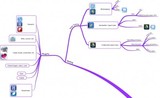
I brainstormed a few more workflow possibilities with a basic app toolkit.
The Basic App Toolkit contains app that I consider helpful/useful for creating workflows for teachers and students in the learnflow of LEARN-> CREATE-> SHARE
Screencasting
Explain Everything or ShowMe
Skitch
Mindmapping
iThoughts
Popplet
Reading
Flipboard
Feedly
Kindle
iBooks
Researching
Safari (comes pre-installed on the iPad)
Google Earth
Movie
iMovie
Images
PicCollage
Presentation
Haiku Deck
ComicLife
Productivity
Email (comes pre-installed on the iPad)
Evernote
Drawing
Doodle Buddy
Social Bookmarking
Pinterest
Diigo
Writing
WordPress
Google Drive
Notability
Reading Workflow
Download the Workflow for iPads as a PDF file
Silvia Rosenthal Tolisano
.
Blog
.
<span class='date ' tip=''><i class='icon-time'></i> Jul 16, 2015 07:25am</span>
|
|
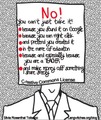
No! You can’t just take it!
No! You can’t take it, because you found it on Google!
No! You can’t just right click>save>use, just because you can!
No! You can’t just pretend that you created it!
No! You can’t make money off my work that I shared FREELY under certain conditions!
No! You can’t just take it…even in the name of education!
No! You can’t just take it… even if AND ESPECIALLY BECAUSE you are a teacher!
By "it", I mean my work, which includes images, visuals, infographics, infoflyers, blog posts, how to guides, text, jpgs, videos, pdfs, etc. Just because I love my work, spend HOURS writing, designing and creating does not mean I want someone else to take credit for it. Just because I share my work for free online DOES NOT mean that I give away ALL my rights. I have chose a special kind of copyright license to encourage others to (hopefully) learn from my work.
My work is licensed under Creative Commons license.
On every page on Langwitches (in the footer), you will see the above icon stating
Licensed under a Creative Commons Attribution-NonCommercial-ShareAlike 3.0 Unported License.
This means, I support collaboration, remixing, building upon and sharing my work AS LONG AS the following restrictions
ATTRIBUTION
give attribution to me as the original creator (and if I used and credited other work licensed under CC, please give these creators credit to)
NON-COMMERCIAL
do not use my work in any shape or form to make money, include in a website, book or other form where you receive monetary contributions/reimbursements/etc.
SHARE ALIKE
if you use my work, you agree to also share your work under the same Creative Commons license terms. In other words… if you choose to include any work or part of my work in your work, do not slap a copyright symbol on your site/book/app/etc. preventing others from continuing to build upon it.
As an educator you NEED to know and understand copyright and Creative Commons licenses! It is our responsibility to not only teach copyright as part of digital citizenship to our students, but also to MODEL it anytime AND everytime to our students.
I often wonder WHY educators (among many others) just take it, simply because they can.
Is it:
Ignorance?… "I did not know"
Laziness?… "I don’t have time to deal with that" …to learn about Copyright law and to take the the extra time to find out who this image originally came from…
On purpose? … ex. taking the time to crop out the attribution included on an infographic or image
Anonymity?… What are the chances that someone will actually find out that I used their work… and then bother to take the time to take action against me?
Truly believe they are doing the right and ethical thing?
I have chosen various paths to deal with DAILY violations of the CC copyright license that I have chosen for my work:
Ignore it
It is turning into a full time job to find violations, contact information, write an email, follow up, etc. I am a one woman operation, who does NOT charge for anything on my blog, nor supplement with ads and commercials…
Contact the author of the violation
by writing a canned response letter such as:
In your recent blog post you used one of my images without giving proper credit.
[insert URL of violation]
My work is licensed under Creative Commons , attribution, share alike, non commercial.
As an educator, I believe in sharing freely under these conditions to build collaboration and encourage added value, remixing and creation.
I see a copyright symbol on your own blog, which violates the "share alike" part of my license.
I am asking you to please add attribution to the image, remove your own copyright of your work or remove my image.
Please make yourself familiar with copyright and Creative Commons licenses if you use material beyond the ones you have created yourself.
Thank you in advance
I make contact to only
receive no response
Receive a rude response
Receive a one liner such as: "Sorry, I did not know…", "Will take it off my site" or "I am in my right to do what I want under Fair Use"
Share my frustration on Twitter, Facebook page and now on my blog
I have received comments such as the one below on my Facebook Page
"I agree in principle but Langwitches has to make a decision to share the free content with and without attributions…or remove the resources and charge membership to get access. The choice is always yours (Langwitches) …just stop whining and complaining.
Darrell Garrison takes it a step further by asking the question "Who is to Blame for Wrongful Attributions for Educational Blogs and How Do We Fix it?
I was frustrated yesterday as I was reading an article from one of the educational sites that I enjoy called Edudemic. I usually read what they’ve posted once a day and I almost always read articles involving ideas of how to create PLNs or guides for social media and educators no matter what the source. Yesterday I got to the bottom of the article and saw a graphic by Silvia Tolisano that I have shared many times and itself is based on an original graphic by Alex Couros as Silvia points out on her Flickr page.
What can we do to raise awareness of Copyright law and the ethical importance for teachers to be knowledgeable and models in adhering to licenses and ethical behavior when it comes to digital citizenship?
What have you done, when you realized that other educators take your own work or someone you know and "pretend" they created it?
Silvia Rosenthal Tolisano
.
Blog
.
<span class='date ' tip=''><i class='icon-time'></i> Jul 16, 2015 07:24am</span>
|