Blogs
|
If you are using different methods of choosing students names in class, here are some techie and fun ways to do it in the classroom.
You can use this Dart Board Selector to choose your students. Simply copy and paste your students names and throw the virtual arrow. You need to sign up to the website to be able to use it.
Here is another colorful dart students’ name picker that you can use. You can edit and save your class list, you can even embed it to your blog so that it will be ready to use anytime.
Here, copy and paste your class list, set the timer and click on ‘go’ to choose a student. You can remove the name once that student is selected. This is actually my favorite one.
Random Name Generator will help you to create a class with a password and add your class list. Then you can see the names of the students one by on a blackboard screen. This tool also lets you create a seating chart or it will automatically group the students for you.
Fruit Machine is another student picker tool. It turns your class list into kind of a gambling machine where you can choose a student by moving the lever. It’s fun too!
How to use in class:
Instead of writing names on the student selector tools, you can write numbers and each student can be responsible for one number. Like that we can use it in all classes without changing the names each time.
Instead of writing the names of the students, we can write some questions. In pairs, the students ask each other the questions.
Also, we can write words instead of students names and play Hot Seat. To play this, choose a student, s/he sits with his/her back turned to the screen. As the words appear on the screen, the rest of the class try to describe that word.
Hope you enjoy!
Ozge Karaoglu
.
Blog
.
<span class='date ' tip=''><i class='icon-time'></i> Jul 16, 2015 07:38am</span>
|
|
It is no secret that I am a fan of the iPad app BookCreator since its release in 2011. Our students have created several eBooks with the app.
You can read about the creation, its process and even download the final eBooks on the following blog posts:
Finally! A Book Creator App
The Making of a Story in Kindergarten and Amplification Thoughts
Step-by-Step: How to Create a Collaborative Class eBook
First Graders- First iPad Encounters
One of the most important features of the app is the openness and responsiveness of the developer Dan Amos. He truly is interested and flexible to accommodate educators and their special needs in the classroom.
Our wonderful librarian Karin Hallett, who blogs on Liquid Literacy (a must subscribe blog) published a step by step recount of her process of creating a classroom eBook with current first graders. (Tip: the student reflection video is especially interesting and the "Book Author Checklist" (see below), Karin created for first graders, is useful:)
Each student worked on their own iPad to create their eBook. We are working on stacking our eBook library with student created books, that will allow students to "leave a legacy" by making their books available for future students of their grade level. The challenge for us teachers was to combine each individual student book into one classbook. Each student book was to be a separate chapter.
Dan Amos had extended the new beta version of the new BookCreator to me and we were in luck that the ability to combine more than one book together was already included in the update.
Each student emailed me their eBook file, which I opened in BookCreator on my iPad. Once I had all eBooks in my BookCreator app, I simply chose to combine the books.
Again, Dan Amos was open to my suggestions to making the app even more intuitive and better for teachers wanting to create classroom eBooks. I had the following suggestions for him:
copy title page when combining books
being able select more than one book at the time to combine
being able to insert pages at specific points in the book, not just the end.
being able to duplicate pages
The app update is coming out of beta today and ready to be downloaded by everyone. I encourage you to upgrade quickly and start creating your own combined classroom eBooks!
Silvia Rosenthal Tolisano
.
Blog
.
<span class='date ' tip=''><i class='icon-time'></i> Jul 16, 2015 07:38am</span>
|
|
On 21 February, at TELT Forum and Career Day, there will be a Coordinators’ Panel where you will have the chance to meet with the leading schools’ FLD Coordinators. Don’t miss that chance!
About the conference:
The 2014 Terakki Language Teaching (TELT) Forum and Career Day once again brings together our community of K-12 Foreign Language Teachers in Turkey , to explore how we can best prepare our students to be successful global communicators in what is a rapidly changing world. The theme "Blurred Lines: Teaching becomes Learning" reflects the main focus of our forum, which is ‘the changing role of the language teacher’. We will explore this theme in a variety of plenary sessions, workshops, roundtable and panel discussions, and much more. As part of the Career Day component of the conference, participants will also have the opportunity to meet our Terakki teachers and leaders, and to interview for positions on our foreign languages teaching team for the 2015-2016 school year.
Ozge Karaoglu
.
Blog
.
<span class='date ' tip=''><i class='icon-time'></i> Jul 16, 2015 07:38am</span>
|
|
You have all been there… Professional Development days at your school…
Administration usually choose a topic, design the activities and/or bring in a speaker. Most likely, they will be slides with bullet points…listening…turn to your partners…learning about a new initiative your school will take part in…etc.
As more and more educators are building PLNs (Personal Learning Networks) and taking their Professional Development into their own hands, they realize that their in house, school based PD needs to take on new forms as well.
The EDCAMP style PD is sweeping the USA and the world in order to honor the "experts" among ourselves versus bringing in "outside experts". Conferences, like educon, edJEWcon or Innovate steer aware from the sage on stage lectures towards conversation style sessions. They aim to move from an exclusive "you physically have to be there" to inclusive virtual connections as an integral part of the learning experience. These conferences seek to blur the notion of a PD event as one moment in time and space to becoming the hub for growing one’s learning network and conversations for "just in time" learning beyond "just in case" tools or skills.
There has also been a wave of new styles of presentations beyond the traditional style lecture typically supported by bullet heavy PowerPoint sides. Take a look at TED style presentations or Pecha Kucha types (see Chris Lehmann‘s example at Ignite Philly above) to spicen up presentations.
At a recent Professional Development day at our school, a "Hatzatah Presentation"style contest was held, open to our faculty. "Hatzatah"= Ignition in Hebrew, is our Jewish Day School’s adaptation of Pecha Kucha and Ignite. Each presenter had 5 minutes to share their idea, broken down into 20 slides which automatically advanced every 15 seconds. The winning prize was an iPad.
We gave them a wide open topic of "How has/have iPad(s) impacted your teaching practice?" and shared with them a checklist outlining Presentation Logistics, Content, Presentation and Resources.
We asked three judges to take a look at the recorded Hatzatah presentations and choose a winneri. Mike Fisher from Digigogy, Lisa Johnson from TechChef4U and Richard Byrne from FreeTechnology4Teachers & iPad Apps for School, graciously agreed to be our judges.
Each of our "contestants" shared with me, that the process of creating these types of presentations (condensed to five minutes) have been an incredible source of learning for them.
In the spirit of sharing, allowing others to learn form our process, maybe even inspire the possibility of a new form of professional development at your school, here are the filmed Hatzatah presentations. What are some new forms of Professional Development you are experiencing or experimenting at your school?
Karin Hallett (Liquid Literacy Blog)
Stephanie Teitelbaum (Teach Blog & Tweet )
Shana Gutterman (ShoshyArt Pinterest Board)
Seth Carpenter
Shelly Zavon (Teacher-Twenty-One)
Silvia Rosenthal Tolisano
.
Blog
.
<span class='date ' tip=''><i class='icon-time'></i> Jul 16, 2015 07:38am</span>
|
|
Youtube Kids App is released both on Appstore and Google Play for free! This app helps us to remove advertisement, side bars and unwanted/not appropriate videos for kids as well. The app is clean with big buttons and it has very easy scrolling to use with all age appropriate channels and playlists. The playlists include great channels such as Sesame Street, Thomas & Friends, and Dreamworks, online hits like Mother Goose Club, TuTiTu, and Super Simple Songs. Parents can also turn off search for an even more contained experience and they can set the built-in timer to let your kids know when it’s time to stop watching. The app puts these settings behind a grown-ups-only lock, out of kids’ reach as well.
I think this app will be a great resource for teachers, content creators and parents as well! This is certainly the app that I would recommend my parents who want to find kid friendly and kid related videos! Thank you Youtube!
Picture Source: ShutterStock
Ozge Karaoglu
.
Blog
.
<span class='date ' tip=''><i class='icon-time'></i> Jul 16, 2015 07:38am</span>
|
|
I can die happy now I have seen learning in the 21st Century modern classroom!
The learning just oozes through the cracks of the physical classroom walls.
Learning is amplified by the amount of people who are collaborating, participating, communicating and creating. The learning is NOT about the technology tools, but what students can DO with them to learn in new ways. The learning is about an authentic tasks, that allows students to contribute in a individualized and personalized manner to make them realize that their work matters in the real world.
It all started out with a conversation between Mike Fisher and me. He had written over 40 children poems and was in the process of wondering what to do with them? I was looking for an authentic task for 9-11 year old students. We felt we had a perfect match! How about getting the students Language Arts and Art teacher involved? The initial idea was to make a unit of poetry come alive, study Mike’s poems and visualize the poems by creating illustrations.
Great plan… it snowballed from there…
A quick Skype call between Mike and the teachers, helped flesh out each of our expectations and a timeline for the "project". A critical component was the participants’ willingness to be flexible and see where the students would take "the project".
What if…
…Mike allowed students to alter his original poems if they felt inspired to remix them, making the creation process fluid and embedding new ways of looking at forms of copyright?
… Mike offered to write a new poem to additionally created illustrations by students, flipping the collaboration roles?
…we published a poetry book on various platforms? (hard cover/eBook)
…we had student run a marketing and advertisement campaign?
…we involved the Math teacher to support students in calculating how much the book should cost, what would the profit be, how would a profit be split?
…allowed the class to handle the entire business venture?
…we incorporated Alan November’s concept of the Digital Learning Farm and leaving a legacy?
Each student was "given" a poem from Mike to be responsible for. We set up a first Skype call with Mike, the author, for students to meet him, ask questions about "their" poem.
Part of our job as teachers was to observe students as they were taking on the roles outlined in the Digital Learning Farm. We were/are looking to identify NEW FORMS of assessment, since our "project" was not to be an add-on to traditional assessment tools.
As I was watching students talk to Mike Fisher via Skype, Will Richardson’s call for Thinking Differently About Learning, which includes Learning to Talk to Strangers came to mind. As students interacted, I was watching their body language, paying attention to their vocabulary, ability to articulate an idea, their conversation etiquette and ability to follow a conversation and interaction. Stay tuned for the publication of a Taxonomy of Skype Conversation to facilitate assessment of video conferencing.
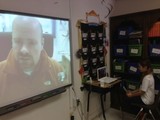
As the Skype conversation was happening in the foreground, other students were busy documenting and collaborating in backchannels. A Google Doc was opened and shared among all students, teachers and Mike Fisher. The multi-tasker Mike is, allowed students to Google Chat at the same time as he was talking to students via Skype.
Other students had taken on the task to tweet the Skype call
Take a look at the 4th and 5th grade Twitter feed, documenting the skype call. Students are exhibiting understanding of Twitter grammar, syntax and etiquette. They are showing progression by starting to add value, links, citations and they own thoughts. They are summarizing and articulating thoughts in 140 characters or less. They are directly communicating, disseminating, collaborating and connecting via social networking. We are using Twitter and HOTS as a way to assess these skills.
We had other students use different tools to take notes too. The notes app on their iPad or traditional paper and pen
One student chose to summarize what he heard during the Skype call by mindmap doodling. He was able to re-tell the different poems that were discussed between his classmates and the author.
Take a few minutes to peek into the classroom as students were debriefing from the Skype experience.
Poetry Book Skype from langwitches on Vimeo.
So, where do we go from here? The students are very excited and are taking ownership. There is no talk about what kind of grade they will be receiving for their work. An authentic audience will decide if they were successful. Students will volunteer to take on different roles in the publishing, marketing, finance, communication department. We will allow them to take the lead, consulting, coaching and modeling if needed.
Stay tuned as this "school project" unfolds.
.
Silvia Rosenthal Tolisano
.
Blog
.
<span class='date ' tip=''><i class='icon-time'></i> Jul 16, 2015 07:38am</span>
|
|
An essay is the most popular assignment for every high school and college student, because it trains his creativity, critical thinking and analytical thinking skills. Although students should learn to write essays correctly, especially if they want to prepare solid research papers in the future; most of them feel intimidated and get stressed when they hear about writing an essay. And of course, there are moments when students do not have the time and nerves to complete their essays without a delay; or they cannot find enough materials to complete their papers and then it may be the right time to ask a professional writer from a custom writing service online for help.
So if you are looking for a great, reliable professional writing service that you can trust, PapersMart.net can be a great choice as it is one of the best ultimate essay writing service that you can find in the market when you consider the level of writing, ingenuity and uniqueness of each paper that are submitted as well as rapid and secure delivery.
Using PapersMart service, you not only find essays but you can also get help to find term papers, research papers, book, movie reports or films reviews on any topic or any complexity that you need. You can also get customized paper on any topic such as business, communication and media, computer technologies, culture and art, economics, finance, government, history, literature, management, marketing, philosophy, politics, psychology, case studies on different topics and many more.
The process of writing is fast and effective as experienced and creative writers will help you to organize your thoughts and decisions for your paper following the structure and format of your text citing everything according to the requirements of the format. Like that they will do their best to make your essay look and sound personal, informative and non-plagiarized with a good quality. By receiving a professionally written essay, you will also be able to see and learn how a good essay should be.
Beside all these things, the price will be lower and completely affordable. So if you looking for a 100% non-plagiarized written papers from experienced and multitasking writers who are experts in dealing with any kinds of papers and with attentive and helpful administrators, use PapersMart.net to make your college and university life easier today.
Ozge Karaoglu
.
Blog
.
<span class='date ' tip=''><i class='icon-time'></i> Jul 16, 2015 07:38am</span>
|
|
As first graders are learning about the butterfly life cycle, we wanted to stay away from usual activities such as coloring in a pre-printed coloring page. INSTEAD of such an activity (created by others) and a quiz about recalling the different stages of the life cycle as assessment, we decided to have students built on their knowledge and fluency of creating a collage and CREATING a visual of their learning. The digital visual was to become an artifact for their student portfolio.
Our first graders are working weekly on a Hebrew visual dictionary on the iPad PicCollage app. They are very comfortable with the app itself. We were ready to spill over from Jewish studies into their General Studies class and push them on their workflow (fluency) with the iPad.
we reviewed the stages of a butterfly
showed students a National Geographic video of the life cycle
modeled the creation of a PicCollage Butterfly poster by breaking down each step
embedded digital citizenship (images copyright issues)
emphasized the workflow of :
choosing appropriate tools/apps (critical thinking)
navigating to website ( workflow, information literacy)
searching for images (information literacy, critical thinking, creativity)
saving images (workflow)
switching apps (workflow)
browsing for images> importing images > editing images > adding text (workflow)
designing (creativity)
saving (workflow)
emailing final product (workflow, communication)
I was impressed by our 6 & 7 years olds to get to work, able to follow along the workflow path, some having a little trouble with spelling some of the words, but ALL comfortable with tapping, swiping, switching between apps, pinching in and out, editing, saving images and simply knowing that these images will be waiting for them in their Photo Album to be used in another app.
This activity was NOT about using the iPad app, it was about creating a visual of their learning. It was about workflow, skills and creativity.
The emailed collages, will be placed on student blogfolis with a written or audio reflection of their creation or learning process.
Interested in other "upgraded" activities for first graders and a butterfly unit? Take a look how last’s year first grade students created an ePub iPad book for the world as the culmination of their unit of study of butterflies.
Silvia Rosenthal Tolisano
.
Blog
.
<span class='date ' tip=''><i class='icon-time'></i> Jul 16, 2015 07:37am</span>
|
|
Vocaroo has always been my favorite online voice recording tool! It is easy to use and the best part is that you and your students don’t need to sign up to use it.
Other than recording your voice, Vocaroo also lets you upload your audio files and get a link for that. And it supports many of the most common audio formats to upload. When you upload, you can share your audio online through many social media tools, get an embed code to embed it on your blog or your website and you can get a ready qr code to share it.
Picture Source: ShutterStock
Ozge Karaoglu
.
Blog
.
<span class='date ' tip=''><i class='icon-time'></i> Jul 16, 2015 07:37am</span>
|
|
Recently, I tried to explain to a teacher from another school how we are trying to use iPads BEYOND apps. We have over 100 apps on our school iPads and introduce our students according to age level to a variety of them, but the focus of the use of the devices NEEDS to remain primarily as a tool for:
exposing students to skills, characteristic of a "modern learner"
critical thinking
personal learning
transformative learning
workflow fluency
anytime/anywhere/anyhow
creating
There is nothing wrong with using apps for isolated skills practice, such as multiplication, spelling, memorization, taking digitized quizzes or substituting otherwise traditional analog activities. These purposes should not be the only reasons of using iPads though. As students are being exposed to different apps, the focus needs to remain on the purpose, creation, workflow and sharing of what they can "do"with the iPads. They should "do" what they could not conceive or accomplish without them before.
I have shared last week, how our first graders are showing first signs of fluency when working with the tools at their disposal. How do we approach the workflow fluency with Kindergarten students?
We chose four apps (Doodle Buddy, Skitch, iMovie, ExplainEverything) to introduce our 5 and 6 year olds to the workflow:
import>create>save>share
Students listened to a story (about dinosaurs and Hanukkah) without seeing the illustrations in the book
in Doodle Buddy, they visualized the story by drawing the imaginary images in their heads.
they saved the images in the photo album
emailed the images to their teacher (to be inserted into student blogfolio under categories: Art, Writing)
We started out by having students use Skitch to take a picture of themselves (some of them asked a buddy to take it for them, which they then reciprocated)
by using the pen tool, they chose a color and then wrote their name on the image
from Skitch, their "annotated" images were emailed to the teacher (to be inserted into student blogfolio- Category: Kindergarten, Me, writing samples)
Using iMovie students created a new project
recorded a buddy telling them about their "favorite part of Kindergarten".
they played the movie back, re0recording if necessary until the movie clip was to their satisfaction
students saved and named their project
the movie was sent to a school vimeo account (to be embedded into student blogfolio- Category: Kindergarten, Me, Oral Language)
The Kindergarten teacher set up scenarios and took photos in the classroom, demonstrating the Math concept of "fewer, more, equal".
the images ( different scenarios with different groups of children) were emailed to each iPad and saved in the Photo Album
students looked at each image and chose the scenario, they wanted to "explain" (all students chose an image they were part of!)
using Explain Everything, they then imported the image
chose the pen tool and color
recorded, paused, and drew their explanation
the project was saved and mailed to teacher to be uploaded to classroom vimeo account (to be included in student blogfolio under Categories: Kindergarten, Math, Oral Language)
As we were using the above apps, we continue to ask and reflect:
How is the app used to directly support curriculum content?
How are we allowing students to demonstrate evidence of their learning in this moment in time?
How are we/they documenting their learning process?
How do we provide opportunities for students to think about and reflect on their own learning?
What skills of a "modern learner" are we exposing our students to and how are we supporting the development of new literacies?
What are some of the workflows your students are becoming fluent in? How are you connecting skills and literacies of a modern learner to transforming activities in the classroom?
Silvia Rosenthal Tolisano
.
Blog
.
<span class='date ' tip=''><i class='icon-time'></i> Jul 16, 2015 07:37am</span>
|