Blogs
|
Helping students become quality Tutorial Designers has been on my mind and agenda lately. The reasons are plentiful, from the train of thought "if you can teach it, you know it", being a vital skill in the 21st century, Alan November’s work "Who owns the Learning?"/ "Digital Learning Farm" to tutorials being an important piece in the self-motivated and self-directed learning of our times.
Teaching, nor creating (digital) tutorials, may come natural to everyone. There are are several skills involved. which are valuable for our students to learn.
communication
not only understanding content and process, but being able to express and communicate them to someone else. The communication can be accomplished in a variety of media.
collaboration
curating all student created tutorials in one place (ex. wiki) will create a hub, where students can search for tutorials of content, that they need a refresher on and it creates a depository for students in future years to come.
writing
writing a script is an essential part of tutorial design. Tutorial writing could be considered part of the expository writing and technical writing genre
vocabulary
using specific vocabulary related to the content explained
storyboarding
"Storyboards are graphic organizers in the form of illustrations or images displayed in sequence for the purpose of pre-visualizing"~ Wikipedia
digital storytelling
a tutorial is a special type of story. It requires the "teller" of the story to engage the "listener" via different digital media
networking
tutorials are meant for others to learn from us
digital media
creating, editing, and mixing of a variety of media forms (text, images, audio, video, etc.) and the fluency to work with a variety of media and switch effortless between them
empathy
the ability to understand and share the feelings (ex. not know how to do something or understand) of another
In addition to supporting students in gaining competency and fluency in the above mentioned skills, we also need to emphasize QUALITY work. Too many student-created tutorials, lack depth of content knowledge and more emphasis seemed to have been placed on using a specific tool rather than showing evidence of learning.
In an effort to support teachers and have a handy list for students when creating tutorials, I created the following checklist. The checklist is divided into three parts:
Steps
Technique
Quality Considerations
Each part is divided further into different sections
Steps:
storyboarding
creation
dissemniation
Technique:
screencasting
audio
movie
images
text
comics
miscellaneous
Quality Considerations:
audio
video
images
text
content
strategy & procedures
Download the Tutorial Design Checklist as a pdf file.
Interested in reading more about my thoughts on Tutorial Designers?
A Vital Skill? Look For, Find and Learn from Online Guides & Tutorials
Tutorial Designers, Guides, Step-by-Step Instructions: Amplification & Imagination
Is It Worth It? Student Created Tutorials
Becoming good Tutorial Designers
Tutorial Designers- Empowered Learners- Contributors
Teaching is the Highest Form of Understanding
Silvia Rosenthal Tolisano
.
Blog
.
<span class='date ' tip=''><i class='icon-time'></i> Jul 16, 2015 07:47am</span>
|
|
Here is a cool tool for sending virtual postcards. It is Postcard FM.
Without signing up, upload a photo and then upload a mp3 song file. You can record your voice and use that sound file too. When you are done, preview and send the link via email.
Students can be asked to celebrate important dates, tell the story of a picture or sing a song or read a poem that they have created.
Simple yet a powerful tool for learners.
Image Sourse: Shutter Stock
Ozge Karaoglu
.
Blog
.
<span class='date ' tip=''><i class='icon-time'></i> Jul 16, 2015 07:46am</span>
|
|
As I am wrapping my mind around the whole concept of "Learning How to Learn", I am also thinking about the infrastructure of the school landscape that needs to be in place to make learning in new forms possible. Steve Hargadon, with his "You First- You be the lead learner"call for action, Will Richardson’s 3 Starting Points for Thinking Differently About Learning and Alec Couros’ slidedeck Taking on the Challenge of 21st Century Teaching and Learning are the core of my "Thinking Differently About Learning- Next Steps" Checklist
Once a school landscape/infrastructure/platforms and [educator's] Learning "You First" are in place, new forms of student learning will happen organically.
I understand that changing a school culture, starting to think differently about learning and education is very complex. It often seems an insurmountable task to fight for these changes to occur. With every step, there are many variables to consider and new obstacles to overcome. A one-page checklist seems too simplistic… but it is a starting place… and might make the initial task clearer.
The checklist below is by no means exclusive nor "how it HAS to happen", but just my thoughts of (hopefully) helpful steps to get a conversation going at your school or your classroom, an idea of how to begin or possible next steps to continue.
Please add comments with a step, that seems to be indispensable in your infrastructure, Learning "You First" or Student Learning section.
You Can Also download the checklist as a pdf file.
Silvia Rosenthal Tolisano
.
Blog
.
<span class='date ' tip=''><i class='icon-time'></i> Jul 16, 2015 07:46am</span>
|
|
If you would like to calm your students in class with a background noise, here is Noisli web tool for you.
Noisli is a web tool where you can use it as a background-noise generator or as a color background creator that "brings you the healthy benefits of the chromotherapy." You can listen to the rain, wind, a camp fire, thunder storms, water streams. The web tools also lets you mix and match different kinds of background noise at once. You can also set the time to fade out the audio.
The concept is simple yet brilliant. You can use this web tool to create a relaxing atmosphere during writing activities, role playing or you can use this tool as a settle down activity. You can make children listen to the sounds and write the story behind it.
Image Source:ShutterStock
Ozge Karaoglu
.
Blog
.
<span class='date ' tip=''><i class='icon-time'></i> Jul 16, 2015 07:46am</span>
|
|
I recently wrote about Thinking About Learning Differently- Talking to Strangers, where I mentioned our third graders journey of skyping around the world to learn about different communities.
They have spoken via Skype with classes from a suburb of Los Angeles, CA , an rural community in Missouri and a city, Weatherford, TX. The latest connection was with Anna Faridaku, a teacher and children’s book author from Indonesia. Students took turns speaking with Anna, who was just amazing in connecting (via the screen) to the kids, answering and asking questions. She engaged them and pushed them to deeper thinking about similarities and differences about our communities.
They have now also spoken to a class from Prague, Czech Republic and we are working on our next connections with Argentina and New Zealand. Please contact me via Twitter (@langwitches), if you are interested in being part of the 3rd grade learning journey.
The goal is not to only collect cold data, but to:
make connections between the different locations and communities
learn about geography
talk "to strangers", practicing speaking skills and conversation skills, be aware of body language…
reflect on how and what we are learning
invite a global audience (including parents and grandparents) to continue a conversation via the classroom blog
continuously becoming better at asking questions and learning that questions don’t stop at the end of a lesson, day, Skype call
Overcoming geographic boundaries
Conversations about Alligators in Florida and Prague
Two native Hebrew speakers meet across the Ocean
Documenting through various lenses
Documenting
Using tools for synchronous and asynchronous collaboration
Formulating questions and collecting data
The comments on the classroom blog below came from family and friends of our students who continued to contribute to students learning after the call ended.
Family continues a conversation after the call ended
Skyping with Indonesia
It is time to THINK DIFFERENTLY about learning!
Silvia Rosenthal Tolisano
.
Blog
.
<span class='date ' tip=''><i class='icon-time'></i> Jul 16, 2015 07:46am</span>
|
|
Do you remember what happened a year ago today? With Little Memory web tool, now it is easy to know!
Little Memory is a web tool like a diary. After signing up, you simply write today’s memory. If you want, you can upload a picture, tag where you are, tag your friends and surprise them by sharing your memories of the day with them. You can keep your memories private or share them via different social media tools. The tool also sends you a notification during the day to remind you to write.
You can also download it to your iOS or Chrome devices.
With this tool, students can keep their memories of each day or a period of time. When they are done, they can print out all their memories and compare their progress with their friends. It is great to promote metaskills as the kids can follow their progress as they keep their memories. Also, it is a cool way to improve writing skills of the students and write reflections on what they have learnt in class.
Image Source: Shutterstock
Ozge Karaoglu
.
Blog
.
<span class='date ' tip=''><i class='icon-time'></i> Jul 16, 2015 07:45am</span>
|
|
Kindergarten time is storytelling time: Listening to stories, telling stories, acting stories out, learning how to read your own stories and creating your own stories!
Learning about a holiday, like Thanksgiving in the USA, is the perfect time to cloak the historical origin into a fascinating story for five and six year olds. Who is not excited about a story with Indians, interesting people named "Pilgrims", a ship named Mayflower and a huge feast with "yummy" food? (Can you tell I am in the "little people" mode)
Our Kindergarten teacher upgraded a traditionally created paper bound class booklet of the students illustrations and text of a Thanksgiving story to creating a TechnoTale. What is a techno-tale? A techno-tale is a digitally told story
By creating a movie, the teacher AMPLIFIED
the original reach her students’ work had
…by embedding the video on the classroom blog, allowing family and friends to watch the movie, regardless of their geographic location and the amount of physical booklets that were available.
the learning style
…by allowing students to learn through and express themselves in a variety of forms.
using different communication media
…by giving students the opportunity, not only draw illustrations and add text, but by recording their voices over the illustrations.
home-school connection
…by allowing students to share something created in the classroom with their families at home, opening doors to further conversation about school and classroom happenings.
repetition
…The video is personalized (student’s voice, student’s illustrations) and motivates students to watch over and over again.
dissemination
…by using different strategies, we actively and strategically share and disseminate our students’ work. We blog, tweet, promote and talk about their work with others.
If interested, take a look at my How-To Guide of How to Create a TechnoTale in iMovie
In addition to the TechnoTale video you see above, the Kindergarten class also created a bilingual iPad eBook (Hebrew/English) of their book ( with the BookCreator iPad app)
By creating an eBook version, we further AMPLIFIED the original paper booklet and technotale movie by:
adding language tracks
…by adding a second voice recording in the target language.
classroom learning time
…by giving students the opportunity to read and practice the target language (Hebrew) beyond the contact time in the classroom.
parent-school connection
…parents or grandparents, who are native target language speakers are included and encouraged to read the eBook with their children.
accessibility
….by making the eBook available to download on the classroom blog, we allowed more family and friends to read and listen to the story.
distribution
…duplication of the book does not cost anything extra, distribution is easy and instant.
reach a global audience
…by making the file available for download and sharing the created eBook freely, we are encouraging a greater world wide audience for our students.
students’ legacy (definition of legacy: Something handed down from an ancestor or a predecessor or from the past)
…by creating an eBook, which is saved in the school’s iTunes account and available on all school iPad iBook shelves for years to come, students in subsequent years, can read, listen and learn from this year’s Kindergarten class.
If you own an iPad or iPhone, you can download the ePub file and directly drop it into your iTunes library. Once you sync your device with iTunes, you are able to read our ebook.
If you are reading this post on your iPad or iPhone, simply click on the ePub file and choose to open in iBook.
The above can give you a pretty good idea of the amplification possibilities, a "traditional" analog project, "upgraded" to a digital version can bring. I do want to close, not with more transformative skills or goals for further amplification, but with the LEARNING behind the scenes that went into the production of the TechnoTale and eBook. Take a look…
K-Thanksgiving-technotale from langwitches on Vimeo.
Silvia Rosenthal Tolisano
.
Blog
.
<span class='date ' tip=''><i class='icon-time'></i> Jul 16, 2015 07:45am</span>
|
|
I love storytelling and all the other tools and apps that will help our children to improve their creativity! And here is a brand new tool that we can bring to our classes: Write About
Write About includes many picture writing prompts for all level of students. After choosing your picture prompt, you can write your story or record your voice telling the story. Then you can share it or keep it private or save it as a draft to work on it later. You can also check what others have done by checking the gallery. Great for inspiring students and helping them to build their stories as well as improving their writing in English.
As a teacher, you can also create an account and give your students your teacher codes. Like that, you can give them assignments and check what they have done. You can also download the apps on your Android or your IOS devices.
Love this tool to pieces.
Ozge Karaoglu
.
Blog
.
<span class='date ' tip=''><i class='icon-time'></i> Jul 16, 2015 07:45am</span>
|
|
Student blogging is not a project, but a process. We are continuously striving to refine, improve and re-evaluate.
As I am meeting with teachers individually, I can’t stress enough the importance of READING other blogs (professional, student, blogs about your hobby, blogs about other interests you have etc.). I am trying to filter and funnel quality blogs in education, their grade level and areas of interest to them as I come across them, so they can build a quality RSS Reader. BUT.. we need their help in having a basic understanding of blogs, its pedagogical uses, as a platform of a new writing genre (digital writing) and how our blogfolios fit into your curriculum and the BIG PICTURE of LEARNING. The blogfolios are not a platform to use only for a particular subject, but should give evidence of learning for each student.
Andrea Hernandez and I are working on a "spiraling" blogging skills guide for each grade level in order to facilitate skill building connections from one year to the next.
Creating the platform and the username and password and teaching the kids to log in is the EASY part.
The focus needs to be in using the platform to guide students to :
GROW as writers
create QUALITY content
write with a GLOBAL audience in mind
learn the infrastructure and grammar of digital wriring
use the amplified possibilities that the digital platform offers to not only practice basic writing skills, but REDEFINE and TRANSFORM the writing process
NOT only TRANSLATE traditional writing (that can be done with a paper and pencil) to an online space
personalize their writing
create a hub for their own personal learning experience
By "translating", I mean…
take a traditionally written five paragraph essay, type it and publish it on the blog
convert a research paper into digital text and publish without adding links for references, nor connections for further research possibilities.
take a linear writing process and try to make it fit into a multimedia, multi-dimensional writing platform
By "transforming", I mean…being able to do something that was impossible to do before:
write for a global audience. Hundreds or thousands of people reading, learning from and possibly responding to student work.
linking to other resources, other writers, writing on different levels (foreground (author’s voice) and backchannel (linked content)
embedding of multimedia (images, audio, video, etc.)
While I understand that "translating" and "substituting" (take a look at the SAMR model) analog, traditional tasks with online digital tasks is part of the process, it is only a step.
There has to be an understanding that the goal is to keeping moving, tweaking, growing, amplifying.
We are all pioneers in exploring:
What writing in digital spaces mean?
How do we use it for learning?
How do we prepare our students for the digital environments, that most likely will be the majority (if not only) platform that they will be working in and with.
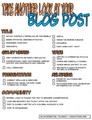
In an effort to move forward with our student blogs, take a look at the following checklist for students to Take Another Look at Their Blog Posts.
This checklist below focuses on the "Quality of Writing", with an emphasis on building community through links and conversations. I have follow up checklists in mind, that will address hyperlinked writing, multimedia writing, connected and collaborative writing.
Download the Checklist as a pdf file.
Silvia Rosenthal Tolisano
.
Blog
.
<span class='date ' tip=''><i class='icon-time'></i> Jul 16, 2015 07:45am</span>
|
|
There are many student response systems that you can use in the classroom with your students. And here is a new and a great one for me that I have learnt from great educators Yaz Bayraktar and Berna Aslan.
Plickers is a kind of clickers that you can poll or quiz your students online. The best part is that your students don’t need to have any devices or connect to the internet. After signing up, you create your class online and create a list of questions or your students. You download the app to your phone. Then, print out the plickers code cards (that looks like a QR code) and hand them to your students. You can use the same printed cards in all your classes. The code cards are four sided and on each side A, B, C or D letter is written. As you show the questions and the possible answers to your students on the screen, they rotate their cards to give the right answer and hold it up. (The right answer should be on the top) Then with the app, you can scan the codes and see who has got it right or wrong immediately!
I think this is one of the most creative web tools I’ve ever seen! You can use this tool as an exit card, to get feedback or to create class polls. Please, check this tool and download it!
Hats off for the creator of this tool!
Ozge Karaoglu
.
Blog
.
<span class='date ' tip=''><i class='icon-time'></i> Jul 16, 2015 07:44am</span>
|