Blogs
|
This summer, I facilitated quite a few workshops about iPads in the classroom. I wanted to make sure that the sessions went BEYOND using apps to play games, replace worksheets and kill & drill activities, but that the focus was transformative and pedagogical use.
I am especially thrilled with the slides from the following slide deck… I took my own advice from Presentation Makeover and took all the images used myself…no stock images…the model guiding us through the presentation is my 8 year old niece, Sophia, who was so patient with me as I asked her to model with the iPad. Many times she became engrossed in playing on the iPad that she even forgot that I was taking photos of her.
Transformative iPad Use in Early Elementary School from Silvia Rosenthal Tolisano
The App Evaluation Guide broken down
iPad App Evaluation Guide from Silvia Rosenthal Tolisano
Emphasis on iPads and Pedagogy
iPads in Education- Transformative Use and Pedagogy from Silvia Rosenthal Tolisano
Skip ahead to slide 39 to see examples from the classroom.
iPads in Education- Examples from the Classroom from Silvia Rosenthal Tolisano
Silvia Rosenthal Tolisano
.
Blog
.
<span class='date ' tip=''><i class='icon-time'></i> Jul 16, 2015 07:54am</span>
|
|
MyStoryBook is another web tool to create stories and publish them.
MyStoryBook gives you blank pages that you can create your story on. For each page, you can write your text, add pictures from your computer or from the tool’s gallery. You can also draw and add items on your pages. You can add as many pages as you like or delete them. When you are done, you can share the link with others.
Our students can create their stories on different topics, teachers can create the stories that students can read and answer some questions or do some role-play activities. Students can create a traditional story using the pictures that they have drawn or with the pictures from the gallery. We can use this tool as a story starter and we can build a story together with our students.
Enjoy!
Ozge Karaoglu
.
Blog
.
<span class='date ' tip=''><i class='icon-time'></i> Jul 16, 2015 07:54am</span>
|
|
integratED- Improving eduction with technology will be held next month, October 14-15, 2012, in San Francisco, CA.
Registration is open with a 10% & 20% discounts for teams.
I will be facilitating two hands-on workshop sessions. See the two session trailers below.
Silvia Rosenthal Tolisano
.
Blog
.
<span class='date ' tip=''><i class='icon-time'></i> Jul 16, 2015 07:53am</span>
|
|
Spell Up is a cool voice-activated spelling game that is powered by Google.
After choosing your level, you start spelling the words that you hear by telling it correctly using your microphone. Each time you correctly spell a world, the words will visually stack on top of each other to form a word tower, and you will try to build a higher stack at each time you play the game. If you can not hear a word, you can listen to it again, listen to the translation of the word in different languages, hear the pronunciation of the letters or hear the meaning of the word that you are spelling.
With each correct spelling, the difficulty level will ramp up. With each level, you will be able to unlock different achievement and earn bonuses and coins to level up faster. If you fail at any of the challenges, your tower will crash down. You can view all your achievements by clicking the trophy icon in the top right corner. You can also download the app from Google Store to play on your smart phones.
This game is so much fun to play in the classroom and a great way to practice spelling! Do give it a try with your students!
Ozge Karaoglu
.
Blog
.
<span class='date ' tip=''><i class='icon-time'></i> Jul 16, 2015 07:53am</span>
|
|
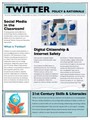
After receiving so many positive comments and Re-Tweets of my previous Twitter Policy & Rationale, I am making a more visual pdf file available for download.
Twitter Policy & Rationale
Silvia Rosenthal Tolisano
.
Blog
.
<span class='date ' tip=''><i class='icon-time'></i> Jul 16, 2015 07:52am</span>
|
|
If you are interested in digital storytelling, here is a web tool that you can give a try with your students this year.
Story Wars gives you the chance to start writing a story and then share it with others to collaborate on writing it. After signing up, you simply click to start writing your story, when you finish, you can invite your others to contribute to your story. If you want, you can invite people from Facebook and Twitter too. Once another person has added to your story, it has to be approved by you or the others who has contributes to the story before it is added to the story.
With this tool, students can start writing their stories and adding chapters to each others stories as well. Or we can start the story and ask students to add onto it. We can also ask students to contribute to the stories that has been started. Like that, we will make them read and then write on the stories. Great way to practice reading and writing, also a great way to facilitate creativity of our students.
Ozge Karaoglu
.
Blog
.
<span class='date ' tip=''><i class='icon-time'></i> Jul 16, 2015 07:52am</span>
|
|
Most teachers at our school assign summer reading to their incoming students. It is a way to remind students of learning, avoid students experiencing the summer slide, prepare them and give background knowledge for a unit of study or let them use the "not so hectic" summer time to read.
Our Middle School Language Arts teacher, Deb Kuhr, reflected on our Faculty Ning about the benefits of summer reading. She lists the following as the objectives:
What Are the Objectives of Summer Reading?
To aid your child in becoming a lifelong reader.
To provide the opportunity to expand and enrich your child’s reading repertoire.
To develop the habit of reading.
To challenge students to explore ideas outside their usual experiences.
To foster a love for reading.
We are walking the walk at the Martin J. Gottlieb Day School. We will not ask our students to do something as learners, that we are not willing to do ourselves. Summer reading is one of those thing. We gave our teachers the choice to select one of the following books.
21st Century Skills: Rethinking How Students Learn by James Bellanca
The Outliers by Malcolm Gladwell
Who Owns the Learning by Alan November
Daily5 by Gail Boushey and Joan Moser
The assignment was to create a "product" in any shape or form that will demonstrate "evidence of learning". What were the take-aways from the book? How would you implement what you learned from the reading in the classroom this upcoming year? During post-planning we brainstormed a few "products" teacher usually assigned students to create after having read the summer book(s) and added a few more ideas.
Reflection/ Book Review
VoiceThread
PowerPoint
Trailers
Poster
Trading Cards
Book Covers
Compare Contrast/ Graphic Organizers
Chronicle
Chapter Challenges (Check out Susan B.’s Blog) Techtastic/etc.
Prezi
MindMap
Shelfari Review
Newspaper article
Timeline
Comic Strip
Teachers were absolutely free to pick ANY form to demonstrate their learning from summer reading. The only requirement was that they needed to be able to share it.
Summer is over…we are all settling into our school routines, and I wanted to share, in one place, all the different creative ways our teachers chose to give evidence of their learning. What makes it so remarkable is very few chose to create the same type of product.
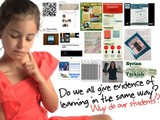
It makes me think, why do we then ask a one-size-fits-all assignment of our students to demonstrate that they read the book(?) or what they learned from the book? Don’t believe me? Just google the term "Summer Reading Assignment".
Students will complete a poster of their book read…
Students wlll make a video trailer as a book recommendation…
Students will write a book review…
"In September, all English teachers will assign an essential question essay which will ask you to
write about your chosen summer reading texts."
" Students are expected to complete assigned summer reading for their English class and level. These books will be discussed and tested in the opening days of the new school year."
"Students will choose one of the following books, and write 3 blog entries over the summer."
Our teachers created QR codes, SmartBoard files, Wordles, PowerPoint presentations, they wrote blog posts, created a Flickr slideshow, created infographics and info-flyers, they prepared student activities, launched their own professional learning blog, reflected via blog posts, shared a movie and created a prezi, etc…
Take a look how our faculty shared their learning over the summer… and remember them as you are making a commitment to upgrade one of your own assignments by giving students the freedom of creating their own evidence of learning…you will be surprised by the creativity and the array of products, styles and colors
Who owns the Learning? by Alan November
Shelly created a book cover with QR Codes pointing to an audio file of her thoughts…
Deb wrote a reflective blog post…
Who Owns the Learning?
Reflections
When teaching characterization as an element of literature, a good deal of class discussion focuses on motivation. It is, after all, what drives a character’s actions. Rarely explicit, motivation is inferred by studying a character’s actions and reactions. Based on conflicts, needs, or possible fears, motivation reveals a character’s personality.
So it is with our students. In today’s session with Dr. Mae Barker, we learned that when addressing the barriers to successful inclusion we must consider motivation. I consciously recalled the many times I have referred to a student’s lack of motivation as an explanation for problem behaviors. Upon reflection, I realize that there is no such thing as a lack of motivation. Motivation exists; it is the nature of the motivation that causes less than desirable results. And the correlation between my epiphany and Alan November’s book is …?
Just as pedagogy evolves and paradigms shift, the climate of learning changes. Today, our students approach learning as task specific and assessment driven; knowledge for knowledge’s sake is no more. Once an assignment is completed and a grade earned, it is dismissed. How can there be enlightenment without reflection? Substance without cultivation? Quality without caring? It is time to transform the climate, and Alan November proffers a plan in Who Owns the Learning?. [...]
Silvia shared an info-flyer summarizing the six roles to empower student learners.
21st Century Learning by James Bellanca
Karin wrote a a reflection and created an infographic:
For my summer reading assignment, I decided to focus on "The Role of Professional Learning Communities in Advancing 21st Century Skills" by Dufour and Dufour. It nicely continues where I left off during my post-planning presentation on my vision for our library (library-classroom collaboration on lessons/units). However, in their chapter, the authors take the collaboration idea even further by calling for the implementation of permanent/ongoing Professional Learning Communities (PLCs).
The authors argue that the "most appropriate environment for teaching 21st century skills" are PLCs as they allow us to model those skills (inquiry, critical thinking, problem solving) for our students. PLC implementation requires a change in school culture. Yes, school culture can only change if educator behavior changes. Key phrases mentioned throughout the chapter are common goals, working interdependently, and mutual accountability — all indicators of behavior change.
Please see my infographic to find out about the concept, necessary environment, and benefits of PLCs as stated by Dufour and Dufour.
Arlene created a slideshow on Flickr , titled "Then and Now" with images she took.
Susan created a "TechTastic" activity for her students to complete.
I used the chapter "Teach Less, Learn More", added some of another text I read, "Reforming Secondary Science Instruction", and a bit of Bloom’s Taxonomy to inspire me to create new Chapter Challenges for the year. My newest creation, "Appsolutely Techifying" involves the student creating 3 new apps to solve problems related to the particular chapter we’re studying. The text simply reinforced the idea that students who create (and extend) from the original information benefit in long term and more in-depth ways. The technological requirements involved in completing the project occur on an individual level and remain open to be tailored to each student’s needs and choices. To me, this reflects the perfect marriage of technology use AND a number of diverse other skills!
Judy chose to test Alan November’s web literacy strategies
As a social studies teacher I was especially impacted by a section in Alan November’s book Who Owns the Learning? and how it could directly be applied to our study of current events/history. Even in past years when our students searched news stories using international new sources like BBC and Al-Jazeera, we still always found the information to be fairly Americanized-in one November chapter I learned why! First, google uses our own laptops and their previous searches-even buying habits!- to inform our searches. My search and your search will elicit a different order of responses based on our previous search history! Second, if you want to gain a real non-American perspective on a news story…one can enter the prefix of the root zone data base and it will tell you how a country or area reacts to an issue. To test that hypothesis I researched the subject of the events in Syria-bringing up the top news story on that topic in Syria itself, the U. S., and in Israel. To create a common context on actually different stories, I then created a wordle for each of the top Syria stories of Israel, the U. S., and Syria on that day. By examining the emphasized words of each story, it was extremely interesting to note the differing perspective of each country on the topic of Syria for that day. I plan to make regular use of this type of search in all types of current and historical research in all my classes to enhance our global perspective in all we do.
Russian Newspaper
Israeli Newspaper
USA Newspaper
Edith created a PowerPoint summarizing and reflecting on what she learned from the book:
While many ideas in the book 21st Century Learning were relevant and interesting to me two concepts that really resonated with me were actually in the introduction.
"A 21st century education must be tied to outcomes, in terms of proficiency in core subject knowledge and 21st century skills that are expected and highly valued in school, work, and community settings.’
21st century skills can not and should no replace core subject knowledge, rather they expand and enhance students knowledge of these core concepts. Without basic writing skills, a student can not express themselves on a blog. Without basic math skills, a student can not create a graph.
21st Century learning skills involve critical thinking, problem solving, and creativity. These skills may be 21st century but they are also rooted in the most basic Jewish learning. Torah study is based on the ability to question and problem solve. [...]
Pamela and Jeanine created a Prezi with their main take-aways from the book
Copy of 21st Century Skills on Prezi
Robin created her first PowerPoint Presentation
Lauren created
a Wordle for my book club project. I did the Alan November chapter about Technology Rich, Information Poor. This was all about how to use the technology that we have in an authentic, self-directed way that makes the users responsible for the learning. We want to make the assignments worthwhile and try to have global communication. It is a different way to start thinking. The quote that stood out to me was teach less, learn more. Technology should be redefining the learner and the teacher. Don’t be afraid of change.
Daily 5 by Gail Boushey and Joan Moser
Andrea blogged on her professional blog, created a visual below, summarizing the Foundations of the Daily 5 and created a Pinterest Board to curate Daily 5 resources visually.
I think that what I most appreciate about the Daily 5 is summarized in this image. I look at those children, so engaged and content to be sharing a book. This is what I most hope to create and encourage for and in each of our students- a deep, personal love of all that is literacy- reading, writing, learning, sharing ideas, enjoying words and languages.
To my way of thinking, this also embodies the best of what we have been calling "21st century learning." We repeat the phrase "it’s not about the tool, it’s about the learning" in some form or another, again and again. But I think the Daily 5 provides a great breaking-off point. You could easily do the Daily 5 without using any tech tools or you could use lots of tech tools to provide great enhancements. The foundations of the Daily 5, are the same as the best examples of tech-infused learning: simply "purpose + choice = motivation." [...]
Liat created a SmartBoard Notebook for her Hebrew class , so they can keep track of each student.
After reading the Daily 5, I decided to create (with the help of Silvia) a chart to keep up with each student’s progress. This chart will help me assess at any time which activity of the Daily 5 were completed by the student. I plan to duplicate this chart for each week so there is a record of their activities. This is a Notebook file in which each student clicks on each cell (going across) as they complete each activity.
Stephanie took the plunge and started her on professional learning blog, Teach, Blog and Tweet, where she intends to document the process, trials and errors of implementing what she has learned from the Daily5.
Amy reflected on her blog and added visuals to illustrate the point.
The authors of The Daily Five, Gail and Joan, feel that it’s essential to spend focused classroom time teaching kids how to choose books that are a "good fit" for them. They realized that a good-fit book meant more than the student simply being able to read most of the words correctly. So they created the "I PICK" strategy. To teach this strategy, Gail and Joan developed the following demonstration:
Choosing the right book is like choosing the right pair of shoes. "Each pair of shoes has its purpose." This is where they show and discuss different types of shoes (high heels, winter boots, flip flops, etc). The purpose for choosing a book could be to learn about a certain topic or just to read for fun. [...]
Stephanie wrote a series of blog posts,
Outliers by Malcolm Gladwell
Jo-Ann blogged extensively on the Ning:
In chapter one, Gladwell states that Outliers are defined by the values of the world they inhabit and the people that surround them. This will profoundly determine their future sense of self and identity. He ends the book by simplifying this idea into the fact that Outliers are products of history and community, combined with opportunity and legacy. Some of his ideas are easy and clear-cut to understand (chapters 1 through 3). I found chapter 4 intriguing, chapters 5 and 6 not very relevant to "cultural legacy" and chapters 7 through 9 were great. The epilogue explores his ancestry and ties all his ideas together by examining five generations of his family and how external situations provided positive opportunities for personal growth through higher education. [...]
Seth created a video reflection
Outliers- 21st Century Book Club Presentation from MJGDS Classrooms on Vimeo.
Silvia Rosenthal Tolisano
.
Blog
.
<span class='date ' tip=''><i class='icon-time'></i> Jul 16, 2015 07:51am</span>
|
|
There are many apps and web tools that you can share your voice with. I like using Vocaroo web tool, it’s pretty easy to record and share your voice with a link, you can also use your smart phone to record and share it via mail.
And Clyp is another web tool and app that you can share your voice with others. After signing up using your Facebook account which I think is the only drawback of this tool, you can record your voice as long as you like and then share it with others with a link. You can also download it as well.
Clyp is also offering free app on Google Play and AppStore.
This tool can be used for getting feedback from the students or for evaluating speaking. We can ask students to interview their parents on certain topics, retell a story or answer certain questions that we have asked.
There are so many other possibilities to use this tool. Just give it a try.
Ozge Karaoglu
.
Blog
.
<span class='date ' tip=''><i class='icon-time'></i> Jul 16, 2015 07:51am</span>
|
|
Why and how to use Twitter in the Classroom has been occupying me for a while now.
I have written about my thoughts in Twitter Policy and Rational and Guide to Twitter in the K-8 Classroom. A post for Twitter in K-2 is also in the making (stay tuned).
As I am on a Twitter adventure with our 4th and 5th graders and their teachers @teitelbaumsteph & @shellyzavon, I am breaking down steps to tweeting and the process of learning during Tweeting as a classroom. Ryan Bretag’s post Twitter for Thinking Publicly echoed beautifully my thoughts about the "use of Twitter beyond the usual lower level posting assignments, message blasting, or basic discussion forum-like uses."
Terry Heick came up with a fabulous Twitter Spectrum on Edudemic to include Higher Order Thinking Skills. He divided tweets up into three sections:
watch
talk
produce
While many of his 25 ways to use Twitter in the classroom in the Talk and Produce section are geared towards Middle and High School, I believe that all the "Watch" examples are stepping stones for our younger students who are tweeting as a class. In the "Talk" and "Produce" sections, I can also see ways that the examples can be tweaked and adapted for elementary grades.
Mark Sample published in 2009 (!) a Twitter Adoption Matrix from the use of Twitter by his University students.
What I like about the matrix is the process students go through, as they move from passive tweeting to active tweeting and from monologic to dialogic tweeting. Mark gives examples of each stage, that I can see also adaptable to tweeting with K-8 Classrooms.
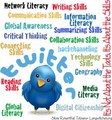
For my own understanding of the Tweeting process for Elementary & Middle School students, I created another image in the series "It’s NOT About the Tools. It’s About the Skills. What are the skills and literacies, I want my students to be exposed to and develop?
From this graphic, my mind wandered to breaking the steps down even further. Below you can see me visualization of a Twitter routine we are trying to establish in our elementary and Middle School classrooms (a time when our students are too young to have their own Twitter accounts).
By tweeting with our students, we expose them to:
social networking strategies
support their growth as global digital citizens
model focused, clear writing
What routines have you established if you are tweeting with your students as a class? What are some of your tweetable moments that go beyond a "We went to Art today and drew a picture" tweet?
Silvia Rosenthal Tolisano
.
Blog
.
<span class='date ' tip=''><i class='icon-time'></i> Jul 16, 2015 07:50am</span>
|
|
If you are looking for a web tool that will help you to summarize what is on a website or on an article, here is Skim.it.
After signing up, Skim.it will hep you to get a 100 word of summary of the website. You simply copy and paste the link on the web tool and the tool creates the summary for you and pastes on your canvas. You can create different canvas to save your summaries to read them later or share them with others. You can also download the Chrome extension and use it on your browser.
I like this tool as it is very user friendly and a great way to skim websites for a better view. This tool can be suggested students to get an idea of a website before spending too much on if it is useful or not. Also great way to summarize articles online.
Ozge Karaoglu
.
Blog
.
<span class='date ' tip=''><i class='icon-time'></i> Jul 16, 2015 07:50am</span>
|