Blogs
|
TinyTap is a new app that caught my eye for its potential to make students creators and designers of games on the iPad. The app’s description says it is geared towards the"little ones" and lists the following as features and its educational use:
Add your own photos, take a picture, or search the web to add photos to your game
Record your own voice over photos so your little ones can always hear a familiar voice
Record a question, answer and a hint for a rich experience
Personalize your game with a soundtrack with over 20 great selections to choose from
Track your child’s progress with TinyTap’s in-game scoring system
Super duper simple interface, easy for anyone to play and create
Easily share the games you create with friends and family
EDUCATIONAL USETinyTap isn’t just for families! This user-friendly platform also makes converting and creating activity books and classroom activities a breeze. Children with special needs also benefit from the simple interface and personalized game play.
Geared towards the "little ones" from the description is a little vague. I think this app can be successfully used to various degrees from babyhood to upper elementary school students. I give this age range due to the opportunities of personalization and the skills needed to "use" the game, versus the sills it takes to customize and/or design original games of various degrees of difficulty and creativity for other (younger) users.
My first impulse to test this app out was to create a babybook. I speak German to my little grandaughter, so I took a picture of her and recorded questions like
Wo ist deine Nase? (Where is your nose?)
Wo ist dein Mund? (Where is your mouth?) etc.
I traced the acceptable response areas on the image for each question, then recorded the response if the user tapped the correct area and one for the option that the user did not tap the correct area. My idea is to expand the book with pictures of family members who live far away, places she is used to visiting, rooms in the house,
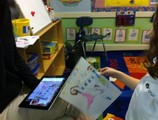
The next step was to take the app into the classroom. I showed the game, I had created in German for my granddaughter to one of our Hebrew teachers, Morah Liat. She was excited to test it out with her 5th graders and create a "Review Book" for younger students for the upcoming school year. Our elementary school Hebrew teachers use the TalAm Curriculum. She divided students into groups of two and gave them vocabulary review units, such as parts of the face, body, classroom, school supplies and characters used in the curriculum book.
Students had to take their own images and then trace the correct answers, record a positive response as well as a negative response.
Sarah S, one of the 5th graders, blogged about her experience
I used the app Tiny Tap to create a Hebrew vocabulary game for the First, Second, and Third graders at my school. Everyone got partners to do the project with. I was partners with Barbie. I think I worked well with Barbie and we agreed on almost everything. Barbie and I made the app about the face. For example, Barbie recorded herself asking a question in Hebrew such as: Where is the nose? Then if the student knew what the question was asking, they would touch the nose on the photo of a face. If they touched the nose and got it correct the iPad would say in Hebrew: Yes, that is the nose. Good job! If they touched the wrong thing the iPad would say in Hebrew: Please try again.
5th graders were also asked to review the app and to give some suggestions how they would improve it:
I didn’t like this app because it did not have some things that I wanted my game to have, like to be able to circle two things for the answer (Casey)
I think tiny Tap should allow text boxes so the kids can see and hear the words. If I was the App creator I would put stickers and better music for older kids. (Cayla)
To improve the app, I wish that there was extra additions that you could put on the game. I felt like the app was good but a little thin on what you could do. (Jake)
I didn’t like how simple and basic the app was. I would improve the app by being able to draw a picture on it and by having different options of how to make the game. (Sarah)
The app could be improved by allowing people to change the balloon, make it do something different other than flipping the page.(Shoshana)
Although students felt overall that they were too old for the app (have to remind them that they were designing for younger students), I was thrilled to see the app allow them to:
be creative
"think" about design thinking
create with younger students (school mates) in mind
work collaboratively
practice their speaking and listening skills (in target language)
personalize content (images and voice recording)
easily share their games/interactive books with other iPad users
Here is my app evaluation according to the checklist of Evaluating Apps with Transformative Use of the iPad in Mind
Click on image to enlarge
How do you envision using TinyTap app to transform learning in your class? Let’s brainstorm…
Silvia Rosenthal Tolisano
.
Blog
.
<span class='date ' tip=''><i class='icon-time'></i> Jul 16, 2015 08:00am</span>
|
|
Lily’s Adventures With Colors is an interactive app that aims at teaching young learners to teach and practice colors with a fun story and three different interactive games.
It’s available on Appstore and it will be online on Play Store soon.
Ozge Karaoglu
.
Blog
.
<span class='date ' tip=''><i class='icon-time'></i> Jul 16, 2015 08:00am</span>
|
|
Computers are a fantastic tool for teaching children; completely dominating the current educational sphere and threatening to replace teachers entirely by 2016!
Most schools use teaching software wherever possible but what they may not realise is that the use of software represents a potential risk - if necessary protection is not put in place.
If it doesn’t work, what will you do without it? While a back-up plan and textbooks are always useful, it helps to take a look at what the main risk with relying on software is, as well as a potential solution.
A question of ownership
The main issue with software is that you do not own it. What you most likely have is a license. If you agree to an end user agreement while installing the software, you or the school has entered into a Software as a Service or SaaS contract.
As you don’t own the product, your staff can’t use the source code. Instead the software provider promises to give you a working product. If they fail, you can obtain the code to ensure your service is not disrupted.
In theory, this is meant to act as motivation for your software provider to maintain their programmes but there are reports of companies abandoning their legal duties. This can often involve lengthy legal processes which waste time and money … all while you have children to teach and software that isn’t up to the task.
Utilising escrow
Escrow is often used for finances but the likes of Ncc group.com often have specialised versions for digital products, including software escrow. This puts the source code in escrow and can speed up the process should the SaaS contract be broken.
The escrow agency has the power to give you the code, instead of going through lengthy court processes. As a result, you can quickly get the code to your IT experts who can fix the software and provide ongoing support rather than relying on the provider.
In other cases, entering into an escrow acts as further motivation for the software’s owner and ensures they take their legal duties as seriously as possible.
In short, if you have software you rely on for work, such as learning programmes or even simple office processors that get used on a daily basis, a little extra insurance can help protect against the worst and keep your school running smoothly.
Ozge Karaoglu
.
Blog
.
<span class='date ' tip=''><i class='icon-time'></i> Jul 16, 2015 07:59am</span>
|
|
It all started with a weekly reflection our teachers leave on our school’s closed Professional Development Ning. Mrs. Y, our Kindergarten teacher pondered how her five and six year olds were learning and practicing subtraction:
We blew up balloons last week to demonstrate subtraction! Then popped them one by one - our way of subtracting! The kids enjoyed it but now it’s a little more difficult transferring that idea to the paper. Though we have used cubes, counters, bears etc. and taken some away…
My first suggestion was:
How about using the "ShowMe" app on the iPad to have your students record themselves writing AND narrating a subtraction problem. They could then switch iPads and listen to a classmate explain.
You could also share these screencast videos on your classroom blog and parents and students can review together at home.
Mrs. Y. was game to use the ShowMe app with her Kindergarteners and learn right along with them to use it. She immediately knew that it would be too much to ask for her little ones to draw AND speak at the same time as the app was recording them. We came up with the alternative of students drawing their math story on a piece of paper, taking a photo with the iPad and inserting it into Showme app to record their voices over the image.
Note: We could have done the same in iMovie app, but then would have lost the ability of directly uploading the movie clip with one tap to get an embed code for the classroom blog.
They drew the illustration and then were called up, one by one, to the front of the class to take the picture, insert into ShowMe and record their voices.
Note!: We used the Reflection app to wirelessly project the iPad screen to the SmartBoard for the other kids to see and follow along. The bigger screen for all to see also helped with taking "just the right" picture of their illustration.
Note2: With a little more time available to us to practice, kindergartners are perfectly capable of going through this process (take picture>insert>record>save) by themselves.
Below you can see a few examples of their work.
As you are watching, ask yourself:
What changed by using, in this case, the iPad and ShowMe app?
Could the same [learning] have been accomplished by keeping students’ illustrations analog?
Was there differentiation potential?
Can this type of "activity" be used as an assessment to replace/upgrade traditional assessment?
Are the movie clips potential artifacts for digital portfolios?
Could these movie clips be part of a variety of student work at a parent-teacher conference?
Was any learning amplified by placing it on the classroom blog to share with families?
What skills were practiced?
What literacies were supported?
Was it worth the extra time investment, the learning curve?
I believe that teachers need to be AWARE OF, SEE and UNDERSTAND the difference an upgrade could make (or not!) to their traditional methods.
Silvia Rosenthal Tolisano
.
Blog
.
<span class='date ' tip=''><i class='icon-time'></i> Jul 16, 2015 07:59am</span>
|
|
Reform Symposium which is a free online three-day event that brings together educators from all over the world, has started today. RSCON5 features50+presentations/open talk discussions, 11 keynote speakers from across the globe, panel discussions, tech/app/lesson swaps, and plenaries. You can join the Future of Education community to keep updated with these events and connect with over 10,000 educators worldwide. You can also collect badges for each session you have attended.
I and Jennifer Verschoor who is my co-author and a great educator from Argentina, will be giving a keynote on Sun. July 13th, 12pm ET. Our title is "My First Digital Journey: Children and Technology", so if you are interested in learning some tips and tricks in integrating technology in young learners’ classes with a few free web tools that you can use immediately in your classes, please join us!
Our room link is here: https://sas.elluminate.com/d.jnlp?sid=2008350&password=RSCON5Part19
Please be there to share our ideas, grow and learn together.
Ozge Karaoglu
.
Blog
.
<span class='date ' tip=''><i class='icon-time'></i> Jul 16, 2015 07:59am</span>
|
|
Our second grade teacher, Ms.S., was ready to "upgrade" a traditionally taught unit on reptiles. We met to discuss how she could incorporate the 5 C’s of 21st century skills as well as support new emerging literacies. The basic idea was to upgrade a typical report, using books from the library to research and fill out a "research" template on a piece of paper.
"Upgrading" meant to find ways to go beyond the traditional text based resources and local classroom community and AMPLIFY…
the skills being introduced or supported…
the reach students’ voices (in a myriad of media) have…
teaching as a skill of learning…
the audience they are writing, talking or presenting to…
With that in mind, we came up with VoiceThread, as a tool to allow for this amplification to happen. We wanted students to become "docents", responsible to research, learn about and teach others about a specific reptile.
A docent is defined as
1. A teacher or lecturer at some universities who is not a regular faculty member.
2. A lecturer or tour guide in a museum or cathedral.
The classroom teacher set up a visit from our local Reptile Store, who came to school with live animals. Each student had an "assigned" reptile they were researching. We took pictures of each student with "their animal" (to be inserted as the main page of the VoiceThread. Students were able to ask specific questions of the reptile expert during the visit as well.
Two students were assigned the role of photographer and videographer to document the visit and question and answer session with the expert.
Our first lesson back in the classroom, in preparation of using VoiceThread, was about Avatars. Since we were going to use VoiceThread under a school account, each students received their own identity complete with an avatar.
We talked about the movie Avatar, which most of the second graders were familiar with and how the "alien body" was a representation of the humans and allowed them to breath on planet Pandora. Since we are not able to "physically" move on the Internet, we also need to use an avatar to represent us in the virtual world. We talked about how our avatar should mean something to us and be a representation of how we want to be "known" online. Students had a choice of taking a photo of themselves (not the entire face, but a non-identifying body part, ex. eye, ear, elbow, hand…) or take a picture of a drawn self-portrait. They could also take a picture of their pet or favorite animal at home and send the image file via email to me to be uploaded to the VoiceThread account.
Here are the logistics of how I set up the VoiceThread to be used with the iPads.
Create the VoiceThread "Blazin Reptiles" under teacher’s own VoiceThread account.
Create a separate VoiceThread account for students (with individual identities for each student).
Invite the student account to view and be able to add comments on the VT from my account.
The idea was to be able to log into the student account on each student iPad without them having the ability to delete the the VoiceThread project. The student account houses all the student identities.
Side Note: Although this sounded good in theory and USED TO work in practice (!!!), we found out that VoiceThread no longer allows multiple logins from multiple devices After logging into the student VoiceThread account on each iPad, in order to save time and problems with students trying to log in themselves during class, we received multiple "Session Expired" warning windows pop up. We tried to sign the iPads in as quickly as possible, so students could continue recording their prepared voice comments.
After tweeting about the problem, VoiceThread replied on Twitter:
Once students had created their avatars and they had been loaded under one account as different identities, we brought the iPads for each individual student to the classroom.
I connected one iPad wirelessly to the projector via the Reflection app and walked through the steps of
Finding the VoiceThread app
Changing the Identity in the Account setting
Opening up the Blazin’Reptile VoiceThread
Navigating to the specific image with the picture of their reptile
Choosing between text, audio or video comment
Recording their voice comment
Reviewing the audio (discarding or saving the comment)
One student volunteered to demonstrate the steps as an example in front of the entire class.
After we ran into the problems of students being logged out continuously, we reduced the amount of iPads connected to the student VoiceThread account and grouped students around one iPad to take turns.
We are envisioning:
First round of audio comments: Students create audio recordings from their research notes.
Second round of comments: Students listen to each other’s comments and leave questions for their peers about reptile, that was not covered in the first round comments.
Third round of comments: Student docents listen to their classmates’ comments left on their reptile’s page and answer by elaborating and digging deeper into research if necessary.
Fourth round of comments: VoiceThread being embedded on classroom blog (and Langwitches Blog). Comments with questions or facts about the reptiles being sought from outside "experts", possibly another second grade class who studied reptiles.
Note: Time ran away from us…summer break arrived …The VoiceThread did not make it past round one
Silvia Rosenthal Tolisano
.
Blog
.
<span class='date ' tip=''><i class='icon-time'></i> Jul 16, 2015 07:59am</span>
|
|
The unstoppable rise in online shopping has undoubtedly been the retail story of the 21st century. As more and more people became internet savvy, the more they found buying goods from the comfort of the armchair a preferable option to trekking down to the shops.
The popularity of online shopping has threatened the traditional high street as boarded up shop fronts have become a symbol of Britain’s love affair with internet shopping. Many analysts believe that our shopping habits have now changed forever and that the function of the high street will have to change significantly if it is going to survive in the future.
Online shopping has brought down physical barriers and opened up a world-wide market for retailers. Put simply, if you have a business selling goods or services then developing an ecommerce strategy is essential in order to boost sales and grow the business.
One of the biggest problems online retailers and technology companies faced in the early days of the internet was convincing consumers that it was safe to make a purchase online. Customers soon began to realise however that while shopping online does carry some risk, so does shopping at a traditional bricks and mortar store.
Security responsibilities for business
Security should be a priority for any online entrepreneur with a shopping cart or ecommerce ambition. After all, if customers aren’t confident that their credit card details are safe in your hands they won’t make a purchase.
On top of this if a customer’s account or credit card details are hacked and you are found to be at fault an expensive court appearance is likely. It may even result in credit card companies barring you from accepting plastic in the future.
To avoid such a data breach investing in a security system that includes AES Encryption and a locked down shopping cart system. Using an established and reputable third party security system will allow you to accept payments without any risk to either you or the customer, and enable you to accept payment from most of the big credit card providers.
You should also tell customers how you will protect their details, publish your privacy policy on your site and register with the data protection authorities. By taking the appropriate steps to ensure that your website is secure you will gain the trust of your customers and increase your sales revenue considerably. Failure to do so could be costly for your business.
Sources
http://www.theguardian.com/business/2013/dec/17/online-internet-shopping-high-street-record
http://www.shopsafe.co.uk/shopping/
Ozge Karaoglu
.
Blog
.
<span class='date ' tip=''><i class='icon-time'></i> Jul 16, 2015 07:59am</span>
|
|
I am proud, so very proud of my mother…
Let me explain…
As a child growing up, I was not surprised to have my mother bring strangers to our house… Strangers she "picked" up at train stations or airports, like the two young American girls who were stranded in Heidelberg and did not speak German, nor had a hotel to go to…or the young Israeli who was backpacking through Europe and also had no place for the night. They all ended up spending a few nights and days with us.
All of them left behind something more than a letter of thank you or a souvenir, like the Star of David (made out of nails, that I still have today).
Later on in life, as my mother frequently traveled to visit me in the US, she seemed to develop an affinity for meeting and picking up fellow travelers on airplanes too. Last year, a young girl from the US, traveling to study for a semester in Argentina, got stranded at the airport in Buenos Aires after a delayed arrival only to find out that her reservations had been cancelled. She ended up staying at my mother’s apartment for several weeks.
Now, some of you having grown up in a different era (The "Don’t talk to Strangers! era) or maybe from a different cultural background, might think how brave or how risky to pick up a stranger. Isn’t the young girl who is "going home" with this strange "grandmother" type woman in a foreign country playing with fire? Didn’t her parents teach her better not to talk to strangers?
If I wanted to trace the reason for her ability to find, pick up or rescue strangers in these situation, I would probably think of her own history of being a refugee during WWII. As a five year old, she was strapped on a sled and fled with her mother and brother from East Prussia towards the West. Along the way, they relied on the kindness and "humanity" of others to get them through and survive. Once in the West, my mother grew up feeling a harsh distinction between the refugees from the East, who lost their homes, their sense of belonging and possessions and the ones who didn’t.
My mother, as a child, played the leading role of a theater production of "Sterntaler" (The Star Talers) at her school, a fairy tale from the Brother’s Grimm.The short fairy tale always symbolized my mother’s personality for me.
An orphan girl was so poor as to have no home; she had only her clothing and some bread. She gave a hungry man the bread, three cold children her cap, her jacket, and her dress, and in a forest where it was dark and she would not be seen, another begging child her shift. Then stars fell to earth before her. They became talers, and she found herself wearing a fine linen shift. She was rich thereafter.
Two days ago, my mother returned from yet another visit to the US back to Argentina. She was routed from Florida via Illinois to Newark, NJ, where her flight to Argentina was cancelled with the explanation of "weather". She endured hours of waiting to speak to "customer service" until way into the morning of the next day. Fellow travelers in line lost their patience, got frustrated…"customer service" agents were rude, impatient and not caring.
Note: I know…since I was stranded at the same airport, not three days prior to her being there, with 3 cancelled flights and the same service and chaos erupting everywhere around me with frustrated tired travelers left to fend for themselves.
My mother took the time in line to befriend a young girl ( the same age as one of my daughters) from India. Due to lucky circumstances ( or pity from the agent), my mother was the only one from the line to receive a voucher for a hotel to spend the rest of the night.
I was not surprised to hear when I called my mother the following morning, that she had the young Indian girl with her. That she had shared her room and had taken her under her wings. They returned to the airport a little while later and my mother made sure she got on her flight to India. A few hours later, my mother was also able to leave too with a rebooked flight for South America.
When she arrived the following email was waiting for her:
Dear Ms. Rosenthal,
Humanity is intact indeed! It’s about an incident that will stay in my memory forever.
I am Kanika’s mother, the girl you shared your room and support with, at Newark. She hasn’t arrived in India yet but allow me to pen down my thoughts. Am overwhelmed and wish to express how grateful I feel right now;I wonder how to convey that to you without being a verbose. A mere ‘thanks’ seems limp.
Apart from bailing out Kanika during a crisis, you have left a lasting impression of humane quality on her, which I hope she would emulate in future if circumstances demand.
With respect and gratitude
I am so very proud of my mother and with respect and gratitude I would like to say:
Thank you for having been and being such an amazing example!
Silvia Rosenthal Tolisano
.
Blog
.
<span class='date ' tip=''><i class='icon-time'></i> Jul 16, 2015 07:59am</span>
|
|
I was really sad when Google had stopped Google Search Stories, but Google has a much better tool than this: Google Story Builder
It’s actually a fun tool that your students from all levels can use to improve their writing skills as they are creating their own stories in a unique way. Google Story Builder doesn’t ask you to have an account, you simply start writing the names of the characters in your story and writing what they are saying or editing lines of dialogues in a word document style. When you are done, write the title and choose your music. You can watch and listen your story and share it with others.
How to use it:
You can use this tool with whole class to write a story together.
Use the characters in a story that you have just read to write the dialogue between them.
Use famous characters as you create your story.
Teachers can create their own stories and ask students some questions about it.
An easy and fun tool to give it a try.
Ozge Karaoglu
.
Blog
.
<span class='date ' tip=''><i class='icon-time'></i> Jul 16, 2015 07:59am</span>
|
|
Our wonderful Art teacher, Shana Gutterman, has been a wonderful supporter
to collaboratively work with classroom teachers (I wrote about her collaboration with the Language Arts teacher in a previous post - Transliteracy- QR Codes and Art)
to test out iPads
to not only have students create analog artwork (water-colors, ceramics, etc.), but also to create a digital image to be able to share and disseminate her work on her Art Blog with the parent community and other Art teachers from around the world.
She is becoming (or maybe already is) fluent in "upgrading" traditionally taught Art lessons to include much needed skill practice (communicate, collaborate, connect, create) with transliteracy methods. Shana is also growing as a reflective professional and blogger. It is a pleasure to read and follow along as she is expanding her curation, reflection and social networking arena to amplify her connections and learning.
If you are interested in Arts, check out shoshyart on her
Blog
Twitter
Pinterest Boards
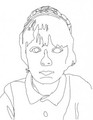
Take a look at Shana’s first attempts in incorporating iPads, as she was expanding and upgrading a traditional lesson on contour lines with fourth graders.
Students started out with drawing their hands with a pencil and moved on to using the app "Brushes" for their self-portraits.
Shana’s reflection below:
I had my second lesson teaching iPads in art. Its so easy for me to teach an old fashioned art lesson, with paints. Teaching on the iPad will require some more practice.
We used an app called Brushes. The students learned about contour lines and created a self portrait.
I am still trying to figure out the best way to demonstrate the app- do I do it before the project or demonstrate as we do the project?
The first group of fifth graders got a demonstration before and during the project- it seemed too lengthy.
The second group of fifth graders just got the step by step demonstration and that seemed to go better.
When they are drawing on paper its easier for me to scan to see if they need assistance. The iPads are harder to tell where everyone is at.
The students liked it and we will try it again next week now that they mastered Brushes.
Silvia Rosenthal Tolisano
.
Blog
.
<span class='date ' tip=''><i class='icon-time'></i> Jul 16, 2015 07:59am</span>
|