Blogs
|
Here is a cool tool that I have learnt from my dear friend, Berna.
If you are looking for an app that will help you to learn and practice vocabulary, Biscuit can be a great tool for that and it’s free, at least for now!
With this app, you can create your own vocabulary list and it will give you the definitions immediately. You can keep that list and you can get notifications on your smart phones that will remind you the word and show you the definition.
You can also take a picture and Biscuit app will list all the words on that picture. You can save this list, also you can delete the words that you don’t want from the same list.
You can also use this app as a dictionary, simply write the word and it will give you the definition.
Biscuit has been designed as an extension of Evernote. So it’s not a surprise that Biscuit app is great!!
This app is available both on AppStore and Google Play. It is just very useful and fun for our learners and this is something that we can suggest actually anyone who is learning a new language.
Ozge Karaoglu
.
Blog
.
<span class='date ' tip=''><i class='icon-time'></i> Jul 16, 2015 07:48am</span>
|
|
Our third graders are learning about different communities.They have spoken via Skype with classes from a suburb of Los Angeles, CA , an rural community in Missouri and a city, Weatherford, TX. The latest connection was with Anna Faridaku, a teacher and children’s book author from Indonesia. Students took turns speaking with Anna, who was just amazing in connecting (via the screen) to the kids, answering and asking questions. She engaged them and pushed them to deeper thinking about similarities and differences about our communities.
Will Richardson talks about Three starting points to think differently about "Learning. In addition to "Thinning the Classroom Wall" and "Being Transparent", he lists "Talking to Strangers" as one of the starting point!
Being able to connect and learn with strangers is an important skill for all of us, and especially for a generation that will be learning online for the rest of their lives.
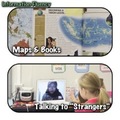
The above image visualizes how we are taking learning about a country from only looking at a map and reading about it in a book to talking to a "stranger "who lives in that country. We still used the map and books for background knowledge and preparation, but information is amplified:
Information comes from a primary source
Information is fluid, not rigid, it will adjust to the questions the students have (a book will only hold the information that editors have decided on including and will not magically switch in front of your eyes )
Information can take on directions, tailored to your students’ interests
Information can
"Talking to Strangers" is a critical skill to possess. It contributes to information fluency. It so dramatically contrasts the drill we heard over and over again from our parents. We used to be taught "DON’T talk to strangers" and now need the skills to do precisely that.
Disclaimer: I am not talking about talking to a stranger in a dark alley at night!
Silvia Rosenthal Tolisano
.
Blog
.
<span class='date ' tip=''><i class='icon-time'></i> Jul 16, 2015 07:48am</span>
|
|
Today’s kids can go online from so many different tools, and they are increasingly living their lives online. Although there are wonderful resources for our students online, these resources can pose problems as well.
And here is a cool online game that we can use to train young learners on how to be more safe as they are using their emails: Safety Land
Safety Land is online game making kids more aware about e-mail safety. The game is featuring two characters, Captain Broadband and another character who is sending unsolicited emails to kids. In the game, you visit different buildings in the town to catch the nasty character and answer questions about what to do on receiving unwanted emails. When you answer all the questions, you can send the nasty character into the jail. Also, on finishing the game, the children can download a Hero certificate and as teachers, we can even download the game as a PDF file to use it in our classes as paper based resource.
Ozge Karaoglu
.
Blog
.
<span class='date ' tip=''><i class='icon-time'></i> Jul 16, 2015 07:48am</span>
|
|
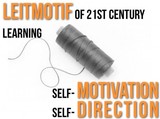
I am borrowing the notion of the Leitmotif, a recurring theme, and applying it to learning in the 21st century. For me it always seems to come back to a red thread of self-motivated and self-directed learning that connects all.
Anyone with an internet connection has the capability of accessing courses and lectures from Ivy League universities. Times Magazine published an article titled, Logging on to the Ivy League already in 2009.
Diamond is an esteemed neuroanatomist and one of the most admired professors at the University of California, Berkeley. It would be a privilege for anyone to sit in on her lectures. And, in fact, anyone can. Videos of her popular course are available free online, part of a growing movement by academic institutions worldwide to open their once exclusive halls to all who want to peek inside. Whether you’d like to learn algebra from a mathematician at MIT, watch how to make crawfish étouffée from an instructor at the Culinary Institute of America or study blues guitar with a professor at Berklee College of Music, you can do it all in front of your computer, courtesy of other people’s money. Read more: http://www.time.com/time/magazine/article/0,9171,1891740,00.html#ixzz2Avj9XAHx
Simply google Yale iTunes University or Harvard iTunes University and you are in business to potentially LEARN from the same professors that teach the students who are attending these "very expensive"higher education institutions.
Will you earn a degree from these universities?…No…
Will you receive one on one attention from the professors if you have questions about their lecture?… No…
Will you meet the right people or be roommates with the children of the right people?…. No….
Do you have access to listening and learning from some brilliant minds?.. on your choice of topics?… without having to spend a dime?… Yes!
Can you become part of an online learning community, with members watching the same lectures, discussing and learning with and from each other?…Yes
The "education" is there… there for the taking… only the self-directed and self-motivated… will and can take advantage of the offerings and LEARN from it.
I recently published a blog post inspired by Will Richardson’s article "Three starting points to think differently about "Learning. I believe we have hit on another point, illustrating how we NEED to think about learning in a different light:
Being able to look for, find, watch, "re-wind" and learn from online lectures, guides and tutorials?
How do we transfer this skill and break it down into different benchmarks for the younger students not ready for Yale or Harvard yet? Thinking of :
the highest level of thinking skills (Bloom’s Taxonomy) of creating
the disputed Learning Pyramid, which claims that learners retain about 90% of what we teach others (Take a look at Darren Kurpatwa’s Academe’s Dirty Little Secret)
Alan November’s Digital Learning Farm with Tutorial Designers as one of the roles to empower learners. Give students authentic job responsibility to empower them and become part of a learning community (see Langwitches Posts about The Digital Learning Farm). Alan November recently published a book called "Who owns the Learning", where he goes further into the concept of students leaving a legacy, including creating tutorials for a global audience.
I am taking the route of having our students learn to create quality tutorials for each other or for their younger schoolmates. There is something about kids and wanting to teach what they know to others. Our kids are not only flocking as their first choice for learning to online tutorials, they are also becoming the creators of many (without adult intervention!)
Just ask a teenage daughter what she does in order to get make-up instructions if she has a "challenged mother" in that department? What about detailed directions for a complicated French braid?
How do you learn to pick a lock, after your niece locks the basement door from the wrong side?
What about help in order to upgrade your laptop’s memory or install a new hard drive?
Online tutorials to the rescue! Take a look at the thousands of tutorials on youTube, websites, or snapguide, with "instructors" half or more the age of "traditional teachers".
I have written many tutorial posts on Langwitches. They come in forms of info-flyers to help guide teachers step by step in implementing a process or a tool, screenshots (image of my screen), screencasts (video recordings of my screen), infographics, podcasts (audio file), plain texts in blog posts, Word documents or shared with Google Docs.
The above mentioned book Who owns the Learning by Alan November was one of the Summer Reading choices for our faculty. Our 4th and 5th grade teachers have been taken on the task to expose students to the importance of digital tutorials and encourage the to produce their own tutorials.
In Language Arts, students worked on "how to" posts for their blogfolios. They were encouraged to add hyperlinks, video, and/or images to their post to enhance their writing.
Making a Hyperlink! (by Evie M.)
Hyperlinking With Thinking (by Itamar)
Adding an Image to a Blog Post (by Benjamin)
How To Draw A Dragon Head (video) by Julia
5th grade students had a first go at storyboarding and filming a tutorial of "How to create a QR code?". As a class, each video clip /tutorial was critiqued. Students came up with a list of suggestions to make tutorials better. Everyone went back to the drawing board to edit and make the tutorials better according to their list.
See a few video samples from students of "How to Create a QR Code":
What are your thoughts on the skill of learning with and from online tutorials? Important for the present and future of learning? Do you have your students create tutorials? How do you break the process down for them?
Silvia Rosenthal Tolisano
.
Blog
.
<span class='date ' tip=''><i class='icon-time'></i> Jul 16, 2015 07:48am</span>
|
|
Here is a cool tool for creating online sketches: SKetch Toy
Without signing up, you can start drawing on a blank page. You can choose different colors to draw on the page. When you are done, it gives you a link that you can share with others. The link shows the actual drawing of your sketch on the canvas.
Students can draw their live cards for birthdays, mother’s or father’s days, xmas … They can send students a greeting card for special days or different occasions. Students can also create their own mini animations using this tool and share them with others.
Ozge Karaoglu
.
Blog
.
<span class='date ' tip=''><i class='icon-time'></i> Jul 16, 2015 07:48am</span>
|
|
Halloween is just round the corner and the preparations are in full swing! If you want to do some online activities with your kids at school before the night, here are some spooky, scary, creepy web tools for you.
Children can tell their spooky stories with Storyjumper or a collaborative story using Storybird. Choose your storyline, write your text and boo others! Children can also try some spooky poems using Poem Creator tool of Storybird.
Children can create and adopt their cute monsters on Moshimonsters. They can write or talk about their animals’ Halloween plans.
What about creating Halloween e-cards with your own pictures? Choose your e-card, upload your pictures, add your message and scare others.
You can carve your own pumpkin here or here.
Would you like to create your own spooky pumpkin, here you go!
Children can create their own Halloween avatars using Voki, and record their voices telling their jokes or stories.
Here and here, you can create an interactive e-card, use text-to-speech and share it with others.
You can play this Halloween Escape game and ask kids to write the directions for each other.
You can create your own funky card here by uploading your face pictures.
Here is a nice game where you write the words and make the ghosts disappear.
You can attach different animal parts to a human body to build your wild safe and share it with others.
If you are working with young learners, PBS Kids is also celebrating Halloween with many interactive activities.
You can try this comic creator that includes characters and setting that would go well with the Halloween spirit.
Here is Scholastic’s fantasy story starters. Choose one and let children write their own stories.
Choose from many different activities that you can do in class from this collection of ideas.
Have a spooky time on Halloween. Don’t get too scared though…
Image source: Shutterstock
Ozge Karaoglu
.
Blog
.
<span class='date ' tip=''><i class='icon-time'></i> Jul 16, 2015 07:48am</span>
|
|
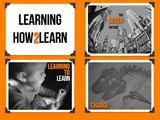
Let’s talk about LEARNING, not technology! What are some cultural shifts in our fast changing world, that have an impact on our own learning as educators? How can we start thinking differently about learning?
Thank you to Will Richardson for his thought provoking "3 Steps to Start Thinking Differently About Learning" , Alec Couros for his "Taking on the Challenge of Teaching & Learning in the 21st Century" and Steve Hargadon for his thoughts of "You First", which makes so much sense.
The video is also available as a slidedeck
Learning2learn from Silvia Rosenthal Tolisano
Silvia Rosenthal Tolisano
.
Blog
.
<span class='date ' tip=''><i class='icon-time'></i> Jul 16, 2015 07:47am</span>
|
|
Here are some spooky apps to celebrate Halloween with your kids!
With Free Halloween Sounds app or iHalloween App, listen to many creepy sounds on your tablet. You can ask students to guess what the sound is or set the timer to scare someone. Or add scary noises to your stories as you tell them.
Happy Halloween Pumpkin app helps you to carve a virtual pumpkin with a mess and lets you decorate your pumpkin. After creating their pumpkins, children can describe theirs to each other.
Halloween Jokes app includes many fun and interactive jokes about ghosts, skeletons, pumpkins, witches, vampires, wizards, and many more, for kids to have fun.
Halloween Card Creator App lets you create spooky Halloween cards that you can share with others.
Carve-a-Pumpkin App is another app that will help you to carve your pumpkin and decorate. When you are done, you can share your pumpkin via mail or social media tools.
Make a Zombie App allows you to choose from the included backgrounds, bodies, clothes, eyes, hairstyles, heads, pair of legs and mouths to create your very own zombie and then share it. Let children create their zombies and tell their spooky stories with them.
With this Monster Maker App, let the children create monsters and tell their stories.
Mask Jumble App allows your students to make virtual masks on their faces.
Enjoy Halloween with these free apps!
Image Source: ShutterStock
Ozge Karaoglu
.
Blog
.
<span class='date ' tip=''><i class='icon-time'></i> Jul 16, 2015 07:47am</span>
|
|
After planning with our first grade Hebrew teacher a year long project of Creating a Visual Dictionary on the iPad, it was time to put theory in practice.
Kitah Alef, our first graders, received an introductory lesson on properly handling our iPads in the classroom. We created a short video of our rules and tips. Students were excited to be sharing the video with Kindergarten and Pre-schoolers in the future, so they could learn from them.
On the first day, we learned common vocabulary we will be using when working with the iPads
screen
apps
icons
swiping
tapping
Home button
open/close
save
e-mail
send
To practice following directions according to this new vocabulary, students opened the Skitch app, drew an Aleph (first letter of the Hebrew Alphabet) and sent/e-mailed that image to their teacher. Being able to create>save>send is an important fluency skill for students to learn and practice.
The second day we talked about the camera:
practiced taking pictures without covering the camera up with a hand or finger
switch back between front and back camera
pay attention to make sure that the camera is not set to video recording
hold the iPad steady while taking the picture
using the thumb to take the picture
going to the Photo Album to verify that image was taken and they are satisfied with the image.
Another stop to getting to know our iPads was the keyboard.
we have the English and the Hebrew keyboard installed on each iPad
tapping the "world" key to switch between keyboards
Students took pictures of "Ariot", a cartoon character of their Hebrew book to be saved into the Photo Album
The next day,
we reviewed the previous steps and found the picture they took of Ariot in their Photos.
we opened PicCollage app
added the "Ariot" image to the canvas
resized the image
cut around the image
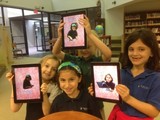
The first image, they had taken a picture with the words, written in Hebrew, typed already underneath it. Our next step was to have them use the Hebrew keyboard in order to add the corresponding words to the image. They then changed color and size of the text too. Changing the background was not something we taught the students, but one or two "discovered" on their own and showed the rest of the class.
We created an album for each student on their assigned iPad. After a dictionary page was created and saved to the photo album, it was also placed into the student’s album, so all dictionary pages would be housed together and easily accessible.
Students were so excited that they found a classmate who started with the Hebrew letter of the week
After 4 weeks, students were "fluent" in creating their dictionary page for their Hebrew letter of the week. Being fluent meant:
find and open Pic Collage
take an image of something that starts with the Hebrew letter of the week
re-size the image
trace the image to cut around the object
Change the background
change the keyboard to Hebrew letters
add text (name of object)
save image to library
add image to Album (specifically created to house students’ dictionary pages)
The workflow, that took 30+ minutes in the beginning is accomplished by most students in a few minutes now. Some of the students have become helpers on their own… walking around the room to help their classmates who are having trouble with a step.
Silvia Rosenthal Tolisano
.
Blog
.
<span class='date ' tip=''><i class='icon-time'></i> Jul 16, 2015 07:47am</span>
|
|
If you and your students like reading books, here is a very cool website where you can find many books to read online.
We Give Books has a great collection of books that you can choose from the library to read online. You can search the books by name, age range, genre, and author or most read. Simply click on the book and start reading it. The website has also reading extension activities for teachers to do with the students in class here.
The best part of this organization is that, as you read a book, the website gives real books to the charities around the world and you will help the children who cannot afford to have a book, have a real book in their hands!!
I loved the website, the quality of the books and hats off for what they are doing!
Please spread the word!
Picture Source: ShutterStock
Ozge Karaoglu
.
Blog
.
<span class='date ' tip=''><i class='icon-time'></i> Jul 16, 2015 07:47am</span>
|