Blogs
|
In another post, Embedding Visuals Into Teaching and Learning, I looked at ways to support our students’ ability to navigate a media rich world and "read and write" in that world. I shared how teachers could easily and quickly create visuals, that supported a question they wanted students to explore, break up long and monotone passages of text, review a concept discussed abstractly or make a real life connection.
Wonderopolis is a fascinating site with great visual prompts for you to "hook" students into inquiry and further research.
There are over 800 visual prompts from many many categories to choose from and even the option to submit your own "wonder to be included". (This could be a great activity for your students to prepare submissions)
Each prompt has a video, vocabulary words, further resources and a Did you Know section. Try it out… this is a great way (something for all grade levels) to promote visual literacy, reflective writing and inquiry.
The second site, I wanted to recommend is Visual Writing Prompts, which have been categorized by subjects:
Arts and Humanities
English / Language Arts
Math
Science
Social Studies
Technology
and by type:
Creative Writing
Descriptive / Expository Writing
Dialogue
Fictional Narrative / Short Story
Functional Writing
Personal Narrative
Personal Reflection
Persuasive Writing
Poetry
Quote Reflection
The site is a wonderful inspiration of how to bring in visuals to "spicen" up or jump start students’ interest.
Jon Spencer, one of the creators shares important considerations in a post Ten Thoughts About Photo Prompts.
Don’t stop by just reading about these two sites, take the next step and include visual prompts in your class… or if you already have.. take the next step and SHARE and REFLECT transparently. We need more examples from the classroom!
Silvia Rosenthal Tolisano
.
Blog
.
<span class='date ' tip=''><i class='icon-time'></i> Jul 16, 2015 07:31am</span>
|
|
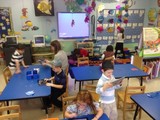
The picture above makes me smile… I see a group of Kindergarteners thinking, wondering, discussing, testing things out, collaborating, being proud of their independence as they are working with iPads.
It was the first time, we "let go" with the iPads. Previously, we had iPad Centers, working with 3-4 students at a time or we took two buddies out of the class to record each other in a separate room.
This time, we decided students were ready (I was not so sure, if I was ready) to give each 5/6 year old their own iPad in hand. My eyes were constantly darting across the room, trying to foresee any potential disasters or accidents about to happen in regards to the physical well being of the devices (I am happy to report that there was not one incident!)
Mrs.Y.’s , the Kindergarten teacher, goal was to work on NOUNS. Building on the iPad skills they had developed in the previous weeks. We modeled for the entire group how to:
find "nouns" in the classroom
frame a picture so several nouns would be captured
open up Skitch app
using arrows to point to the nouns
use type or handwrite the name of the object
email their picture to their teacher to be included in their blogfolio
Some students tentatively starting with one noun and then worked their way up to more than one in a second (or third, or fourth) image. They became more creative as they were wandering around the classroom to take "just the right" image. Mrs. Y. projected her email program to the board and as a class they went through each screenshot that had been taken and mailed.
You could really see the pride these students were displaying in their work.
Silvia Rosenthal Tolisano
.
Blog
.
<span class='date ' tip=''><i class='icon-time'></i> Jul 16, 2015 07:30am</span>
|
|
Fifth grade students are getting ready to read the book "Jamestown" by Gail Garwoski.
A stirring story of survival set against the backdrop of the founding of the first permanent English settlement in the New World.
In 1606, King James I granted a charter to a group of London businessmen known as the Virginia Company to establish an English settlement in North America. In 1607, 104 men set sail aboard three tiny ships on a voyage to a new land. What they found became the first permanent English settlement in the New World-Jamestown.
Among the brave adventurers who made the journey was a young boy named Samuel Collier, the page of famed Captain John Smith.
How could we move away from assigning the traditional reading of the book (chapter by chapter), then writing a book report and possibly give an oral presentation in front of the class? How could we tie the lessons, delivery, supported skills and objectives NOT only to curriculum, but also to our Learning Target (based on and adapted from www.galileo.org )
We are looking to move towards competency in five categories:
Learning Environment
Learning is engaging
Students are self-directed
physical environment conducive to learning
resources meet learning needs
learning is social and interconnected
Assessment
comprehensive
using a variety of techniques and resources
authentic learning experience designed, developed and evaluated
criteria are established for assessment
Role of Teacher
teacher as a learner
teachers as a cognitive coach and guide
teacher has strong instructional repertoire
Amplification
classroom is open & public
Teacher actively connects to larger global audience
Task
authentic
produces deep meaning
With that in mind, we had a brainstorming session with our 10 year olds. What did they know about the early settlers? What did they want to know?
What do we know?
We started with the traditional KWL concept and upgraded to KWHLAQ.
Could we compare pioneers and explorers who came to the Americas, the "New World" (with respect to the population who called these lands home and "their world" for thousands of years before the European came to "discover" it) and the "Digital World". What were dangers for the early settlers? What are dangers for cyber citizens? Were there double standards for the old and new world? Are there double standards for the analog vs digital world?
By now, students are pretty independent in creating collaborative Google Docs to share with teachers and their classmates to take notes. The concept of the Official Scribe from Alan November’s Digital Learning Farm is embedded and works naturally for our students.
Below is the screenshot of the initial brainstorming session.
In our shared Google Doc, we gave students a prompt to expressed their initial thoughts about being an explorer in the Digital World and how it compared to being one in 1600s in Jamestown.
We were not sure, if all student understood. 5th grade teacher, Shelly Zavon, wrote a reflection after our first meeting with the students. I especially like her blunt honesty, that NOT EVERYTHING, not every class or lesson goes as planned nor well. We had to go back to the drawing board, we need to keep meeting every week to debrief after a lesson and tweak for future ones
I am hoping that the Jamestown project will come together soon. The idea is good; I just need to find a way to help the students dig deeper and start thinking on a higher level. For some reason, the students don’t like to be challenged to go to the next level. They want to do everything quickly and get to the fun part, which hopefully in this case will result in a music video.
With both of these projects, the students have had to move to a more advanced level of critical thinking (and accountability). I know this has been good for them, but is has been a grueling process for us teachers. I keep thinking, "learning is messy" and as Dory said in Finding Nemo, "Keep on swimming, swimming, swimming."
How can we make the learning about Jamestown authentic? How do we connect the learning of the past and make it relevant to their present and future?
It just happened that Google Glass shared a new video with the request for applications to becoming a GOOGLE EXPLORER!
Two ideas came to mind:
What if we were to ask our students to create a video with the same requirements as above (minus the last three points) to apply to become an Explorer , not for Google Glass, but for Jamestown. What would you do to become an explorer and leave for Jamestown?
What if we were to ask our students to time travel with a device like Google Glass and take a video or pictures and they narrate/document what they are witnessing.
It really is about imagination. Can we crowdsource imagination? Did this topic spark an idea for you? How could we help our students dig deeper? How do we make it authentic for them? Please take a moment to not only read this post, but to contribute to all of our learning. Thank you in advance.
Silvia Rosenthal Tolisano
.
Blog
.
<span class='date ' tip=''><i class='icon-time'></i> Jul 16, 2015 07:29am</span>
|
|
Hyperlinks make the World Wide Web what it is. If links did not exist, EVERY web page would be a stand alone. Let’s take a close look at these "clickable thingies"
I like the metaphor of thinking of hyperlinks as the "wormholes", that transport us from one section of the universe to another, which is being mentioned on the Web Writing Style Guide 1.0 on the WritingSpaces.org site:
While U. S. Senator Ted Stevens’ metaphor of the Internet as a series of tubes (2006) is inaccurate, we can reasonably think of hyperlinks as the paths (or if you want to get sci-fi geeky: wormholes) through which we travel across the World Wide Web. Click a link and almost instantaneously you will move to a new page within a web site or—seemingly magically—to some new website hosted half way around the globe. In fact, the importance of hyperlinks cannot be overstated; there is no web without hyperlinks connecting one text to another (or more often, one text to many).
Hyperlinks make a word or a series of words "clickable". Traditionally they underline the chosen word or phrase and are recognized by changing the font color to blue. Themes and other formatting of website can change the appearance of links. [Langwitches blog currently uses a theme that turns the "clickable" word or phrase to a bold format (not blue nor underlined).]
Many educators struggle to make the transition from writing on paper, traditional student journals or worksheets to an online platform (ex. blogs or wikis) for themselves and for their students. Ann Davis’ says "It is not just a matter of transferring classroom writing into digital spaces". I wholeheartedly agree with her.
They struggle because writing in digital spaces is a different than writing on a physical piece of paper. Most of them struggle, due to the lack of knowledge and practice of reading and writing in digital spaces on their own part. Let’s become aware of the use AND quality of hyperlinks as we read and surf the web.
Tip: Take a closer look at this blog post you are reading right now on Langwitches. You will see hyperlinks sprinkled across the post. I have included different levels of links from the Hyperlink Taxonomy. Are you aware of the hyperlinks? Can you find and classify the different ones?
There are three aspects of a hyperlink that I want to pay close attention to:
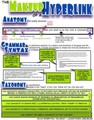
the anatomy (the bodily structure) of a hyperlink
the grammar & syntax (a particular analysis of a system and structure of language and the arrangement of words and phrases to create well-formed sentences in a language)
the taxonomy (the classification) of a hyperlink
One of the faux pas, I often see in hyperlinked writing, are "grammatical and syntax" errors in expressing a well formed sentence while including hyperlinks.
links are not integrated into the flow of the sentence (Ex. Click here, here, and here…)
link text is not descriptive (Ex. Click here to see , Check out my latest blog post, Take a look at…)
links do not clearly indicate what the reader can expect to find if they were to click on the link
links are the URL (link address) spelled out, instead of embedded into the flow of the text sentence. (Ex. Take a look at http://langwitches.org/blog/2012/04/03/hyperlinked-writing-in-the-classroom/)
Hyperlinking goes well beyond simply adding "clickable words" to an otherwise static, unilateral, linear, one dimensional and disconnected text. Critical thinking and strategy skills are needed to include "higher order hyperlinks. A digital writer can
emphasize (point their readers) to a virtual place or connect them to a specific idea and concept by choosing what kind of link to place in their hyperlinked text.
mix form and content to open up different dimensions, making their writing non-linear, multi-layered and connected.
use the hyperlink as a medium to convey her/his own train of thought
Download the Makeup of a Hyperlink as a pdf file.
I am open to changes, additions to this first attempt to create a Taxonomy of Hyperlinked Writing. Please help continue to develop it by adding, questioning or tweaking.
Silvia Rosenthal Tolisano
.
Blog
.
<span class='date ' tip=''><i class='icon-time'></i> Jul 16, 2015 07:29am</span>
|
|
I just returned from visiting my mother in Buenos Aires. I spent beautiful days of late summer in my favorite city. The city of my growing up… the city that continues to tug at strings to bring me back as often as I am able to visit.
Below you will see images I took along my brief passing-through in order to capture the sights, smells, tastes and memories of the town I love…
The Colon theatre…
The Plaza San Martin…
Dancing Tango en Recoleta…
Empanadas…
Riding the colectivo…
On my last day, before riding back to the airport, I took a picture (below) of my mother’s street in one of the neighborhoods of the capital. Little did I know that the same street was going to be fully inundated by torrential rain within the next 24 hours…
As I was flying back to the USA, rain was falling in record amount. According to the Buenos Aires Herald:
The rain had started on Monday night, but it reached its maximum peak at dawn yesterday, with various sources reporting that between 140-190 millimetres of rain fell in only two hours, a record rainfall not seen in the month of April in at least 100 years.
Once, I arrived, I heard my mother’s voice mail on my cell phone, that water had flooded her building and had entered her ground floor apartment. The water rose to 1 meter high and as she descended from her second floor bedroom area in the early morning hours was greeted by floating chairs and other belongings. The power had gone out sometime during the night. Armed with a flashlight, she was able to signal one of her neighbors (and her young son) with only a ground floor apartment to come and join her on the second floor. The neighborhood’s stores, including the grocery stores, butcher, fruit stands, etc were all flooded. The cars parked on the streets were all flooded and some were floating.
It is impossible to send household goods or clothing to help the people affected due to shipping costs as well as post office (non-)reliance. I am planning on sending my mother money to help people most in need from her neighborhood.
I know that Argentina and Buenos Aires, might just be names on a map for you, but the city and its people are close to my heart. If you enjoy(ed) the free content, I provide(d) on Langwitches, a donation (any amount) would surely be appreciated.
Thank you so much in advance!
The following video (found on YouTube) was filmed in my mother’s neighborhood of Nunez.
Update April 8, 2013:
Thank you to all who have contributed to the fund. I will be sending over $800 to Argentina into my mother’s care to distribute to neighbors in need due to the flood. It will directly help in paying for cleaning up, disinfecting walls, floors and furniture that is savable or go towards the purchase of beds, appliances and/or food. Thank you again for your generosity. Muchas gracias!
Silvia Rosenthal Tolisano
.
Blog
.
<span class='date ' tip=''><i class='icon-time'></i> Jul 16, 2015 07:29am</span>
|
|
Kathy Cassidy was so kind to extend a copy of her new book Connect from the Start: Global Learning in Primary Grades to me. Globally connected learning is a passion of mine, as regular readers of Langwitches can attest to. I was eager to read Kathy’s book, which is grounded in authentic experiences from her 1st grade classroom.
From the first chapter on, the voice of "having been there herself", guides the reader through the worries of "How am I going to have the time?" and "I don’t know anything about technology" to the reassuring "I can do this!". I have met Kathy in person, as both of us presented at Alan November’s Building Learning Communities Conference in Boston. The same quiet, reassuring, "speaking from experience" voice comes through in her book. You will not find her ranting and raving to teachers about how they are not doing this, nor doing that, but instead shares:
Why Connect
Connecting with Skype
Why we Use Blogs to Connect
How to Blog with Primary Students
Using Blogs as Digital Portfolios
Connecting with Twitter
Other Ways to Connect
Open Your Classroom to the World
Each chapter will not only give you the pedagogical reasoning behind using the selected tools, building of skills and literacies, but includes short tech explanations, embedded video examples and links to more in depth blog posts and articles.
The first person, I thought of immediately who NEEDED to read this book was my daughter, who recently graduated with a degree in elementary education. Connected from the Start should be required reading for all new teachers, better yet, for all pre-service teachers. The book inspires, guides and gives practical how to get started advice. Although Kathy is a first grade teacher, I believe the book is relevant for all grade levels. Yes… including middle and high school. Teachers who have imagination and the desire to perfect their teaching craft will be able to tweak lessons learned to connect to their own curriculum, subject area and grade level.
I also wholeheartedly agree with Dean Shareski, who in the foreword points out the best part of the book is yet to come:
After you finish reading it, unlike many authors, you’ll not be finished learning with Kathy. As I mentioned before, she’s very gracious and willing to help. Yes, she’s a full time classroom teacher, but it doesn’t stop her from reaching out and sharing with whomever reaches out to her. She continues to blog, tweet and post questions and ideas that engage her and other in her learning network.
This book is not just talking about WHAT teachers could be doing with their students (even the younger ones), but Kathy models every day how to work, learn and expand her own learning network, which in return will benefit and connect her students.
Press Release:
Help Primary Students Connect with the World and Share Their Learning Using Blogs, Twitter, Skype and More!
April 10, 2013
"Kathy Cassidy (is) a shining example of what one teacher with some grit, curiosity and passion can do to realize the powerful potential of computing and technology in the classroom. And she does it with 6 and 7 year olds." -Dean Shareski, Community Manager, Discovery Educa- tion Canada
In her new book Connected from the Start: Global Learning in the Primary Grades, primary teacher Kathy Cassidy makes a compelling case for connecting our youngest students to
the world, using the transformative power of Internet tools and technologies.
The 120-page eBook is the first in a series of solo-author works published by Powerful Learning Press to support teachers and school leaders as they make the shift to digitally infused, inquiry-driven teaching and learning, fueled by students’ own passions and creative interests.
Cassidy’s well-balanced text presents both the rationale for connecting stu- dents "from the start" and the how-to details and examples teachers need to involve children in grades K-3 in using blogs, Twitter, Skype and other social media to become true global learners.
This highly interactive digital book - featuring dozens of color photos, 10
short videos, and hundreds of live links to helpful downloads and outside resources - invites the reader right into Kathy’s cozy and connected classroom, where kids are talking live with students "down under," swapping video with peers in Greece, and using personal blogs, apps and iPads to create digital portfoli- os that document their growth and achievement for parents, families and a worldwide audience.
Connected from the Start is available from the PLPress bookstore for $16.95 in a PDF format suitable for desktop, laptop and tablet computers.
To celebrate the release of our first fully interactive professional book for educators, Powerful Learning Press is offering a $2 discount thru April 17. Use our coupon code CONNECTEDKIDS to purchase Kathy Cassidy’s helpful book for $14.95. One week only, beginning April 10! Go to shop.plpnetwork.com/ connectedkids
Tweet about Connected From the Start! Join Kathy and Powerful Learning Practice CEO Sheryl Nuss- baum-Beach for a one-hour Twitter chat on Sunday, April 14 at 7pm EDT. Use the hashtag #plpnetwork to follow along and participate!
Silvia Rosenthal Tolisano
.
Blog
.
<span class='date ' tip=''><i class='icon-time'></i> Jul 16, 2015 07:29am</span>
|
|
During last year’s edJEWcon conference (a Teaching & Learning Institute for Jewish Educators, which I help organize with Andrea Hernandez and Jon Mitzmacher), we invited our Middle School students to attend our keynote session with Heidi Hayes Jacobs. We all watched magic happen, when students (without being asked) created their own backchannel and added their perspective to the conversation about THEIR learning.
When it came time to plan for this year’s edJEWcon, I wanted to make sure we involved our students not just by accident, but strategically and purposefully.
I originally read about the idea of Speed Geeking for Professional Development from Kim Cofino on her blog Always Learning. She described the process in the post Take Your Faculty Speed Geeking. The idea is based on Speed Dating, where people get to "know/learn about" many different people in a short amount of time. (We talk a lot about motivating students, giving students a voice, engaging students in their learning. We need to talk less and act more.). The idea of Speed Geeking seemed to be the perfect opportunity and platform.
I enlisted the help of our 4th & 5th grade Language Arts teacher, Stephanie Teitelbaum. We presented the idea of participating and becoming teachers to teachers during edJEWcon to students.
Anyone interested in being part of the Geek team, was asked to submit a proposal/outline to demonstrate knowledge and teaching skills of a tool, app, program or device.
Once a proposal was accepted, the students needed to get permission from their parents, since the session would take place during a non-school day and we needed a commitment that they would be brought to school at a given time.
The "geek" was asked to prepare a flyer and guide (tutorial) to support their presentation during the speed geeking session.
With the flyer/guide created, students were asked to present live to each other and us, demonstrating that they had thought through and practiced their geek session.
We met two times during school hours to discuss, prepare and rehearse. Students brought their own ideas (ex. dressing up with nerd classes, wearing suspenders, creating nametags, etc.)
Seven students were accepted into our Speed Geeking team for edJEWcon.
Benjamin taught how to create a QR code with Goo.gl and what he uses QR codes for
Samantha shared her favorite tool Frames for storytelling and tutorial design
Eliana surprised everyone with Skitch and all its uses
Rebecca (5th grade) mesmerized attendees with her wisdom of blogging and commenting
Jamie was a hit by showcasing her expertise with iMovie on her iPad and by making entertaining everyone with her funny and witty personality
Ariella took even experienced PowerPoint users by surprise as she shared advanced tips
Rebecca (4th grade) shared her favorite program Pixie and in addition left everyone in awe with her ability of using a computer keyboard and trackpad up side down
They had 5 minutes to share their chosen tool, program or framework that they, as students, use at school to create and demonstrate evidence of their learning. Attendees were encouraged to ask any questions they had.
Each "Geek" sat around a table, ready to demonstrate and Q&A, before attendees moved on to the next Geek station.
Take a look at his short VIDEO to get a feel for the session.
Below is a "paper tweet", as overheard from one of the session attendees.
Take a look at the Twitter stream with commentary from other participants of the Speed Geeking session.
A wonderful blogging conversation ensued on Ken Gordon’s blog, All the Rest Is Commentary: Getting Schooled by a Day Schooler, as he reflected on the Speed Geeking session, specifically on the "blogging table" with Rebecca:
My wooziness owes itself chiefly to a child named Rebecca… who spoke to me, and a sizable number of JDS professionals, of her lucid, reasonable, and ethically minded philosophy on blog commentary.
Rebecca knows things about blogging etiquette some people three and four times and five times her age don’t know.
How does she manage this?
Not only was Rebecca able to articulate, present, interact and amaze her audience, but she also practiced what she preached by leaving a quality, thoughtful comment for Ken Gordon (on HIS blog) to continue the conversation in digital spaces.
My take-away from our Geek Session
I felt extremely proud of each one of our students. I was able to stand back and enjoy watching them (not take a test, not perform) but just be. They were relaxed (with a little touch of nervousness during the first round) and OVERSTEPPED any expectations we had… and they knew it. We gave them space, an authentic audience, real world work and responsibility. Students were true and valued contributors to our conference (à la Digital Learning Farm). They was never the question "Why do we have to learn this?" The learning was embedded into the desire for a positive outcome. As teachers, we did not have to lament disengagement and lack of motivation. Students were on target, did not forget deadlines, demanded quality content of themselves (up until the morning of the session, I continued to receive updated and "better" versions of their flyers and resources) and continued to practice and rehearse on their own. They showed ownership and demonstrated what I have been narrowing down as one of the most important skills of our times (aka 21st century): self-directed and self- motivated learning.
Does this mean that every one of our classrooms look like this? Do all of our lessons, units, assignments, projects, assessments, etc. demonstrate student voice, involvement and authentic work? Not yet… but we (and most importantly the students) have tasted the honey.
I am thinking of speed geeking opportunities for my students:
to parents
at a retirement home
to pre-service teachers from the local university
feeder schools
What do you think?
Silvia Rosenthal Tolisano
.
Blog
.
<span class='date ' tip=''><i class='icon-time'></i> Jul 16, 2015 07:29am</span>
|
|
Our 4th and 5th grade students(9-10 year olds) have been working with Mike Fisher, co-author of Upgrading your Curriculum and author of children’s poems. The goal of their collaboration is to create an eBook of Mike’s poems with students’ illustrations. Once produced, students will work on marketing, advertising and disseminating the eBook. Over the course of the last few months, they:
emailed
skyped
tweeted
blogged
worked on shared Google Docs
in order to:
introduce themselves to each other
hold a conversation about their ideas and upcoming work
document their work
disseminate their work
give and receive feedback
Mike wrote about his experience up until now in detail on his blog post Contextual and Authentic
Then, we discovered something. Something big.
Because of the depth of instruction and the built in time to negotiate new roles for the students and the upgrade of seeing themselves as collaborators rather than passive learners, we struck oil! Silver! Gold! Students began to self identify interests that were related to their planned learning and lead us down paths of unplanned learning that enriched the designed project.
I have been using the experience to take a closer look at upgrading assessment in modern learning environments.
Learning is amplified by the amount of people who are collaborating, participating, communicating and creating. The learning is NOT about the technology tools, but what students can DO with them to learn in new ways. The learning is about an authentic tasks, that allows students to contribute in a individualized and personalized manner to make them realize that their work matters in the real world.
Blog Writing
Tweeting in the Classroom
Taxonomy of a Skype Conversation
In my recent post of Students Are Speed Geeking at edJEWcon, I highlighted the need and an example of exposing and involving our students in authentic learning experiences. There was another opportunity for our students to participate and share their learning with conference attendees, when Mike Fisher and our students were able to meet in person for the first time, as he was traveling as a presenter to Jacksonville.
The session "Modern Learning", facilitated by Mike himself and Stephanie Teitelbaum, their language Arts teacher, focused, not necessarily on the students as teachers of teachers (as did the SpeedGeeking), but on the collaboration journey between adults and students, the authentic learning that has unfolded and will continue to develop for the rest of the school year and into next year.
Session Description: Modern Learning
Come and see what students learn
When we change the roles and rules.
Come and see what students do
With modern learning tools.
See the process and the product,
The depth and the extension,
The whole collaborative way we worked,
And our new inventions.
Prepare to be amazed and awed
By our globally connected team.
Join us as we launch the next phase
Of our collaborative dream.
Six students were selected to be part of a panel to explain the different jobs they held during Skype calls and to talk about the process of developing the idea of the eBook.
Each student created a few slides in a collaborative Google Presentations to be able to visually share with the attendees the poem, their corresponding illustration and any artifact that showed their role in the collaboration process.
At the end of the session, attendees were treated to a sneak preview of the eBook.
All students were eloquent in sharing their learning, but one in particular surprised us with her statement of "It’s not one and done" when referring to the importance, care and quality of the work they are doing. She pointed out that the work is not done until it is done, which most likely will continue next school year.
Take a "read" at the tweets below coming from the audience during the session:
WE are on a path to experiencing authentic learning. I say WE on purpose, since teachers are experiencing this kind of learning alongside with our students. I don’t know about your experiences, but I don’t remember learning in this shape or form when I was going to school. I don’t remember authentic learning EVER coming up in my educational classes at the University.
Steve Hargadon, our closing keynote speaker at edJEWcon, was talking about the need for preparing our students for entrepreneurialism.
commonly used to describe an individual who organizes and operates a business
Better yet, think John Dewey ("Education is not a preparation for life; education is life itself.") when we not only prepare students for entrepreneurialism, but letting them live and experience it in school.
Our students are excited and ready to be in business. In the Book Publishing business! Now that the content is created, they are working on writing their resumes in order to apply for different positions that will put them in charge of leading or being hired to work under the
Publishing Department
How do we prepare/format the eBook or a Hard Copy? What are the terms of self-publishing services (Lulu.com/iTunes/Amazon, etc.)
Financial Department
How much will it cost to produce and publish the book?How much is feasible to charge for the eBook/hard copy? What will be cut for the author? The School? What are some projections?
Marketing Department
How will the product be marketed? Disseminated? Who is a potential audience? Should we organize a local book tour to promote the book?
Graphic Designers
How will we produce flyers to be physically distributed to our local bookstore, among the school community?
Writers
How will we write press-releases to be placed on classroom blogs, the school website? How can we promote the book through strategically written Tweets? What are other venues/platforms to contribute in writing? Guest blogging?
Multimedia Team
How will we produce multimedia (book trailers, commercials, etc.) to help advertise the product?
If you have made it this far in reading the blog post. Ask yourself, HOW could you amplify these young entrepreneurs to LEARN through real life experiences?
Would you be willing to consult with them, if you have any life experience in any of the departments mentioned above?
Would you skype in for a few minutes to give them advice?
Could you help the financial department in figuring out how much would you be willing to pay for their poetry book?
Could you imagine a potential audience our marketing department could target?
Are we forgetting a vital part of our business structure?
Do you have any other thoughts or tips for us? (Please leave a comment)
By the way… anyone still think this is about technology or learning specific tools, platforms or apps (Google Docs, Skype, Twitter, Blogging, Comic Life, Pixie, iMovie, Skitch, etc.)
Silvia Rosenthal Tolisano
.
Blog
.
<span class='date ' tip=''><i class='icon-time'></i> Jul 16, 2015 07:28am</span>
|
|
As the school year is ending, more and more educators are making decisions regarding their path for the upcoming scholastic year. Should they switch schools? Should they move into a different position? Should they leave the classroom and join an administrative team?
Slowly, via social media, teachers are sharing their news of their upcoming changes. Some are excited, some are nervous, some are devastated (if it was a non-voluntary change or cut).
I am excited to be able to broaden my horizon and move on to a new country, culture, school and challenge. I accepted the position of Academic Technology Coordinator at the Graded School, the American school of São Paulo, Brazil. My role will be similar to my current one, focusing on Graded’s Middle School . I was fortunate to have visited the school, when they hosted the Innovate Conference in January, and have met many of my new colleagues and administrators.
So, if you are reading this and your mind is already turning regarding the global connections, collaboration and possibilities with a school in South America….keep the Graded school and me in mind for your upcoming global collaboration plans.
The move to Brazil will take place in July…two months from now… The school is doing an excellent job for incoming faculty, by providing information about Brazil, the city, help with Visa procedures and a platform to connect (a Ning) with administration and faculty already at the school.
On a personal level, I have started:
reading as many books about São Paulo and Brazil as I can get my hands on.
using apps (Duolingo, Accela Study) to help me learn Portuguese (Having the app readily available on my phone and iPad allows me to practice regularly and frequently and in small chunks).
listening to vidcast and podcasts to learn about language and culture
pinning to my new Pinterest Board about Brazil
making a bucket list of new places to see
making a list of essentials we will need to bring on our move
taking inventory of the [American] things we can live without
Two months will go by in a flash. Many of my current colleagues at the Martin J. Gottlieb Day School, have told me, they will miss working with me (and I will miss working with them). I remind them though that our collaboration and being colleagues does not have to end with my move. It will be an authentic assessment if my work with them over the past few years has been successful. If we indeed will be able to fluently "code switch" between being physical colleagues, who see each other daily face2face, to becoming virtual colleagues, dependent on our digital literacy to work with tools at our disposal that enable learning and collaboration across time and geographic distances.
Silvia Rosenthal Tolisano
.
Blog
.
<span class='date ' tip=''><i class='icon-time'></i> Jul 16, 2015 07:28am</span>
|
|
Students need our guidance to use virtual platforms for ACADEMIC purposes. We can’t rely on their "so called" native status to know how and what to do. Just a few years ago, no one had heard of "backchanneling", nowadays, it has become main stream (although most people might not associate the term "backchannel" and "backchanneling" with something they might be familiar with.
when you watch one of your favorite TV shows and are asked to use a twitter hashtag to interact with other viewers or the actors/participants…. you are participating in a backchannel
when you are listening to a live political speech and are updating your Facebook status, "liking" of commenting on someone else’s status… you are in a backchannel
when you are passing a note (in the same room) or texting a colleague or classmate during a meeting or lecture… YOU are in a backchannel
Definitions:
Wikipedia
Backchannel is the practice of using networked computers to maintain a real-time online conversation alongside the primary group activity or live spoken remarks. The term was coined in the field of Linguistics to describe listeners’ behaviours during verbal communication,
Think Eric Think
It’s a kind of parallel discussion, a collectively shaped comment on some ongoing conversation. An alternative channel, often with a different conversational modus.
Lee Lefever
It’s a little like passing notes in class- except via the Internet. Wireless Internet connections at conferences and lectures are allowing people to use laptops and other tools to communicate in real time during presentations. These communications occur in what is called the "backchannel"
The more ubiquitous mobile devices, among the general population and in our schools are becoming, the more we need to be exposing, preparing, supporting and teaching our students to be able to use them:
for academic purposes
collaboratively
with integrity and as a good digital citizen
focused (but at the same time multitasking)
"Backchanneling" academically is one of the skills that no one is born with. I have been thinking about, testing out and reflecting on backchanneling in the classroom for a few years now.
Backchanneling with Elementary School Students
Backchanneling-Movie Watching-Note Taking- Information Scribes
Using a Chat Room in the Classroom
At last year’s edJEWcon conference, quiet by surprise, our Middle School students, who were invited to listen in to Heidi Hayes Jacob‘s keynote, created their own backchannel to document and discuss what they were hearing and understanding.Everyone was surprised and impressed, as Mike Fisher wrote in his ASCD post titled "Strategic and Capable".
At this year’s conference, we asked attending students to participate in a backchannel again. Part of the process of backchanneling with students includes the debriefing and reflection by going over the saved backchannel log. We used the Notability app on the iPad to color code some of our observations and bring attention to skills practiced, chat-iquette, grammar, understanding, connections made, value added, quality content and depth.
What I learned:
just because students backchanneled one year, did not mean they could transfer the skills nor step up the quality of contributions. (… we need to practice backchanneling more… not a one time event…give them a guide to support their growth in using a backchannel tool)
some students didn’t understand WHY we asked them to backchannel. They could not articulate the purpose for the activity, nor pinpoint skills that were related to backchanneling. (… we need to do a better job at explaining to our students the WHY of an activity, the skills we want to them to develop and the real world application)
students shared with us, that they were not able to focus, in their opinion, they would have taken "better notes" by themselves without the distractions of the other students. (…we need to make it clearer for our students, that the value of a backchannel is the collaboration, the added perspective, the sum of different voices versus their thoughts and understanding in isolation)
some students admitted that they were not happy with their keyboarding abilities. They could not type fast enough. Someone else posted "the exact same thing" they wanted to say. (…we need to encourage them to practice their typing/thumbing skills in their own free time)
David Kelly, on his blog, underlines that
the value of the backchannel is in the sharing, not in the technology. In much the same way that a person can not really appreciate the joy of riding a bicycle until they can do so without consciously focusing on balance and pedaling, getting the full value of a backchannel requires an understanding of what the backchannel is and how you use tools to participate in it.
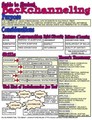
I went back to the drawing board to create a framework, a guide to help teachers AND students understand the value, purpose, skills and steps of growth.
Purpose:
The purpose of using a Backchannel with students is multifold. From collaborative note taking, to curating information, capturing quotes, gathering and Linking resources, sharing notes and adding one’s own perspective to others.
Considerations:
Presence:
Active
Substantive
Timely
Conversation:
Respond to questions
Initiate questions
Make connections
Digital Citizenship:
Leadership
Respect
Network
Evidence of Learning:
Connections made
Development of skills
Quality of Content:
Relevance
Depth
Added Value
Skills:
Language
Clarity
Spelling
Full sentences
In context
Grammar & Syntax
Multitasking
Listening
Thinking
Writing
Multimodal
Curating
Note-Taking
Conversation
Recall
Remembering
Restate
Summarize
Logistics
Typing
Backchannel Syntax/Format
What Kind of Backchanneler Are You?
Listener:
I have a hard time multitasking and can only concentrate on listening to the conversation.
Parrot:
I recall and reproduce exact words that I hear
Curator:
I only restate relevant information and bring in selected resources
Contributor:
I question content, respond to and initiate conversation. I add my own thoughts and perspective.
Download the Backchannel Guide as pdf file.
Further resources:
Backchanneling in Education
Langwitches Diigo Bookmarks; Backchanneling
A Teachers’s Guide to Classroom Backchannels
Silvia Rosenthal Tolisano
.
Blog
.
<span class='date ' tip=''><i class='icon-time'></i> Jul 16, 2015 07:28am</span>
|