Blogs
|
In its 10th year, the Edublog Awards are open for voting.
Thank you to all the the loyal readers of Langwitches who have nominated my blog for Best Resource Sharing Ed Tech Blog for 2013. You can directly cast your vote from this page.
Best Resource Sharing / Ed Tech Blog 2013 - Edublog Awards
View more lists from Edublogs
Voting will close at 11:59pm EST on Wednesday, December 18th.
As always, the entire list of finalists are a treasure trove of links to wonderful examples of classroom and student blogs, as well as jewels to add to your PLN, blog reading list and future collaboration and learning buddies. Dive in… read… learn…comment… connect… vote to give recognition to your favorites!
Here are all the categories:
Best individual blog
Best group blog
Best new blog
Best class blog
Best student blog
Best ed tech / resource sharing blog
Best teacher blog
Best library / librarian blog
Best administrator blog
Most influential blog post of the year
Best individual tweeter
Best twitter hashtag
Best free web tool
Best podcasts or google hangouts
Best Use of Videos and Media in Education
Best educational wiki
Best open PD / unconference / webinar series
Best educational use of a social network
Best mobile app
Lifetime achievement
Silvia Rosenthal Tolisano
.
Blog
.
<span class='date ' tip=''><i class='icon-time'></i> Jul 16, 2015 07:09am</span>
|
|
Alan November’s concept of the Digital Learning Farm, asks schools and teachers to empower students by giving them relevant responsibilities that allow them to contribute in meaningful ways to their learning community (class/school/etc.). How can we give students the opportunity to CONTRIBUTE versus completing projects that end up in the trash, bottom of their backpack or at best on the refrigerator door for display in their house.
I understand that it is unreasonable to make EVERY assignment, EVERY project a relevant and meaningful contribution
Need 1: I am in need for icons to use as I create infographics of the school’s core values . The school’s core values are: Balanced, Communicators, Critical thinkers, Curious, Inclusive, Innovative, Reflective, Responsible, Risk-takers. Why not ask students (7th graders) in one of our computer graphics classes (Thank you Jennifer Kagohara!) to create them?
The benefits are mutual:
I receive custom designed icons
Students are given an authentic task versus a made up activity which might elicit the traditional question of "Why do I have to do this?"
They will see their work being used for additional purposes
Students will see and feel first hand what it means to create with remixing in mind
They will be part of the cycle of creating, licensing, using and attributing under the Creative Commons license.
by Giulia
by Tibet
by Mathaus and Ji Won
Need 2: We are in need of music under the Creative Commons license to allow and promote sharing of original music (with attribution of course). Students are creating more and more videos as evidence of their learning. The issue of using copyrighted songs as background music has become a problem. Our Media Basics class (6th graders) decided that we would contribute original music for other students in our school community to use, but also to make them available to a global audience. We are hoping to continue to grow a music library for students to use in their projects and at the same time teach and experience the effects of Creative Commons.
Feel free to share and use the sound file, created by Graded School students and made available under Creative Commons. (If you use them, leave our students a comment (here on Langwitches) so they can track their impact.
You are free to use them under the following conditions:
Attribution- please give proper credit (ex. Music licensed under Creative Commons by Simon)
Non-Commercial- you are not to gain financial benefit from using these files
Share Alike- you must share the work created with the above files under the same Creative Commons license
Music by Maya- https://soundcloud.com/mrstolisano/maya-happy-song
Music by Pedro & Rafa - https://soundcloud.com/mrstolisano/pedro-rafa-happy-song
Music by Noah- https://soundcloud.com/mrstolisano/happy-song-noah-1
Music by Amanda- https://soundcloud.com/mrstolisano/happy-song-amanda
Music by Felipe M- https://soundcloud.com/mrstolisano/happy-song-1
Music by Anna Clara- https://soundcloud.com/mrstolisano/happy-song
Music by Toribio- https://soundcloud.com/mrstolisano/happy-song-toribio
Music by Belen- https://soundcloud.com/mrstolisano/happy-song-by-belen
Music by Rens- https://soundcloud.com/mrstolisano/rens
Music by Rodrigo- https://soundcloud.com/mrstolisano/rodrigo-happy-song/s-oH6Qe
Music by Simon- https://soundcloud.com/mrstolisano/happy-song-by-simon
Music by Jessica- https://soundcloud.com/mrstolisano/happy-song-by-jessica
Music by Felipe L-
Need 3: I was in need of posters to display around school to promote PD opportunities for our teachers.
Again, an authentic need in the school, required students to learn specific tasks (In this case 6th graders had to figure out how to use the tool (Photoshop), about QR codes, typography and color schemes). They saw their final products displayed around the school, fulfilling the intended need.
by Belen
by Maya
by Rens
What are some needs at your school or in your community to connect your students with an authentic task? How can you connect these needs with your curriculum content? How can you help your students see that the skills and learning objectives are valuable in the real world? Please share your ideas and scenarios for all of us to learn from.
Silvia Rosenthal Tolisano
.
Blog
.
<span class='date ' tip=''><i class='icon-time'></i> Jul 16, 2015 07:09am</span>
|
|
There are a lot of thoughts and ideas about what learning in the 21st century is supposed to look like. Most likely you are constantly bombarded with books, workshops, keynote presentations, webinars and good old lectures (yes, even on the topic of modern learning…) that remind you that it is time to upgrade traditional teaching and learning.
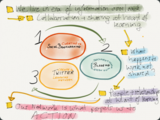
It is NOT about technology, but about thinking > We live in an era of information overload. We need help in filtering and managing it > Collaboration and sharing is at the heart of learning > What happens to the work that is not shared? > People and relationships are at the heart of learning > Our network is what propels us to action!
The following six quotes from Judy O’Connell, Alan November, Mitchel Kapor, Clay Shirkey, Heidi Hayes Jacobs and Chris Lehman exemplify the backdrop for taking action as a learner in 2013 and beyond…They plant the seeds and layout the path to not just LISTEN TO and TALK about what should/needs to be done, but also set the stage for 3 Steps to START learning how to learn.
Some will continue to listen to and read about these visionary ideas, but when Monday morning (or the next week, next quarter, next semester or next school year) rolls around, the routine sets in and everything is back to business… to normal…to last century…
I am more convinced than ever ( and will keep saying) that NOTHING will change in teaching UNLESS, educators have an opportunity and the motivation to EXPERIENCE new ways of learning for THEMSELVES!
I have a suggestion for the ones that have heard, have listened, but do not know where to start.
3 Steps to get started in managing their information overload, starting to document their work with an audience in mind and share their work, becoming part of the conversation and the mechanism of connected learning.
Curating via Social Bookmarking
Using a blogging platform to document work, learn with and through media, create with an audience in mind (read, write and comments on blogs)
Create a learning network via Twitter to build relationships, participate in conversations and contribute to the learning of others by filtering through your lens (perspective/area of expertise) and by adding value
It is about telling your story. As you are telling it, you are teaching and modeling for others. You are engaging in a metacognitive process to help make sense of learning today (so different than when we grew up). Over time, telling your story, will create your unique brand of learning.
Silvia Rosenthal Tolisano
.
Blog
.
<span class='date ' tip=''><i class='icon-time'></i> Jul 16, 2015 07:09am</span>
|
|
Guest post by Silvana Meneghini, Academic Technology Coordinator, Graded- American School of São Paulo. Originally posted on her blog On the Edge.
Pedagogical ideas like student centered learning, collaboration, and critical thinking have been around for a long time and are slowly making the way into the classroom. When technology came into play in schools, there was a big focus on technology tools and acquiring tech skills. Nowadays, there is a perception that technology has to be seamless and the main focus is on pedagogy. I couldn’t agree more. But is that happening because technology is actually shoving pedagogy to the center stage? If yes, what are the implications for teacher professional development in the age of fast technological changes?
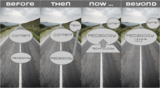
Image: Road by Rick Harrison. 2005. Creative Commons Attribution on Flickr. http://bit.ly/1iPTw2E
So let’s have a quick look at TPACK. If you haven’t seen TPACK yet, it is a model created by Mishara & Koehler to describe the types of knowledge a teacher needs to have in order to integrate technology in their teaching. So this model states that content, pedagogical and technological knowledge are all equally necessary.
Image reproduced by permission of the publisher, © 2012 by tpack.org.
But as I was reading a blog post by Krista Moroder on "Why I Don’t Use TPACK or SAMR with my Teachers" I also realized that the representation of each component of the TPACK model has indeed changed. Krista argues that pedagogical knowledge is the most important element in TPACK , while the need for content knowledge is being reduced and the role of technological knowledge is to support pedagogy.
I will take one step further to say that technology is no longer the focus because pedagogy and technology are actually merging… More and more we see how fast changing technology is part of the world and how that impacts the ways people learn. My perception is that the supporting role of technology in learning will only grow and tend to becomes seamless. But in order for technology to be seamless, teachers need to understand the impact of technology in learning. This is what Silvia Tolisano calls learning how to learn in this 21st century world. But teachers will only reach that level of "learning how to learn" by immersing in technologies that foster sharing, collaboration, innovation. That says something about the ubiquitous role of technology if you think about learning …
At the same time, pedagogy is growing in importance because of technology. Not only because technology has shoved student centered learning to the core of teaching, but also because pedagogical theories that were initially called upon to interpret the use of technology for learning are now being pushed by new boundaries created through technology itself. I believe that with global learning possibilities, big data, manufacturing & design crowd sourcing (see 3D printers), Google glass and augmented reality, just to mention a few, pedagogical theories of how we learn will have to be revised.
All that has to impact teacher training. Teachers need to be immersed and fluent in different digital tools, to be able to use those seamlessly in a flow while also assessing the impact of new technological developments that do not stop coming. At the same time, pedagogy has to be the central focus of training, as opposed to content knowledge. That is particularly true for Brazilian "licenciatura", where a graduate from a specialist subject area needs to take only a few extra credits to become a school teacher. Only a minority will take a full "Pedagogy" undergraduate course. So content has traditionally been the focus of teacher training. But now, content is indeed extremely accessible because of technology, and the learning how to learn has become imperative. The push of technology has forced all of us to look closer to pedagogy and make it a priority. But as pedagogical ideas may change as well, we can no longer afford to imagine learning theories without considering an immersion in the digital world.
Credits:
Thank you to Silvia Tolisano @langwitches for being a great thinking partner and helping review this post.
Image: Road by Rick Harrison. 2005. Creative Commons Attribution on Flickr. http://bit.ly/1iPTw2E
Silvia Rosenthal Tolisano
.
Blog
.
<span class='date ' tip=''><i class='icon-time'></i> Jul 16, 2015 07:09am</span>
|
|
7th grade Geography teacher, David J. at Graded-The American School of Sao Paulo, was planning an in-depth country data study and interpretation. He decided to allow his students to explore the use of infographics to visually represent the data and compare their findings. He explained to his students:
Instead of a focused, issue-based case study, the major project of the quarter will be a comparison of three countries (one from Europe, one from North or South America, and one from Africa or Asia). You will research many categories (citing sources correctly), represent the data using infographics (group collaborative component), and then provide reflection (annotations) on how and why the countries are similar or different on these topics. Additionally, students will write comments comparing their own researched countries’ information to the data of other students.
Some of the students had seen infographics, no one had created one. In an introductory lesson, we introduced infographics with the following resources.
What are infographics?
Wikipedia defines infographics:
Information graphics or infographics are graphic visual representations of information, data or knowledge intended to present complex information quickly and clearly. They can improve cognition by utilizing graphics to enhance the human visual system’s ability to see patterns and trends
by Hot Butter Studio.
Explore more infographics like this one on the web’s largest information design community - Visually.
The Anatomy of an infographic according to Spyrestudio
The core infographic is composed of 3 very important parts.
Visual
-Color Coding
-Graphics
-Reference Icons
Content
-Time Frames
-Statistics
-References
Knowledge
-Facts
-Deductions
Questions to ask yourself as you are "telling the story" of your data
WHAT is the story?
WHO is your audience?
WHY are your telling the story?
How will you COMMUNICATE the story about your data?
How will I show RELATIONSHIPS between the data?
Does my story make the viewer want to ask MORE QUESTIONS?
(Possible) Annotations to include in your infographic
draw conclusions
Based on the data, what are some trends and patterns you see?
Can you make predictions?
The Value of Visualization from Column Five on Vimeo.
Keep in mind…as you design
color (correlation)
size (quantity)
orientation (trends)
Don’t forget to cite your sources
Where did you get your data from?
Don’t infringe on copyright. You can’t just google an image and use in your infographic. Are you using public domain or Creative Commons images or clipart? If CC, make sure you are citing them properly in a Credit section at the end of the infographic. If you are using clipart/graphics from one of the infographic tools listed below, you have automatic permission to use them for our purpose.
Example: Image credits: Teddy Bear image licensed under CC by langwitches- http://www.langwitches.org/blog/travel/teddybearsaroundtheworld/wp-content/uploads/2011/09/jose-60×60.jpg (Stated that it was indeed licensed under Creative Commons, followed by attribution and a link to the original file or page)
Infographic Examples
The Water Rich vs. The Water Poor
Education by Country
Cellphone Use Around the World
Life Expectancy by Country
If Facebook were a country
Where can you create your own Infographics?
Easel.ly
Piktochart
Further resources about using Infographics with students:
Infographics- What? Why? How?
Creating Infographics with Students
Have you used infographics with your students? What are some resources /tools you have used? What about "the critical thinking part", beyond showing capability of visualizing data, but also articulating conclusions, making connections evident? How do you assess infographics? Have you created rubrics? Let’s pool our resources and experiences together.
Here are selected student examples from the country study:
by Ale
by Kari
by Sydney
by Stephanie
by Stephanie
by Stephanie
Silvia Rosenthal Tolisano
.
Blog
.
<span class='date ' tip=''><i class='icon-time'></i> Jul 16, 2015 07:09am</span>
|
|
In an attempt to bring new additions to your Blog reader, I am starting to feature guest posts on Langwitches. Be assured that these guest posts are from educational bloggers, I highly value and their voices contribute significantly to my own learning.
Today I am sharing a blog post and a newly published book by my friend, colleague and co-author Mike Fisher. Follow him on Twitter and add his blog to your RSS reader.
By Mike Fisher
Originally blogged on MiddleWeb.com on December 8, 2013
Back in the early 90’s, my grandmother taught me how to bake biscotti in a traditional way. She was a baker by trade and taught me about the precision of measuring ingredients to get a perfect dough consistency, how to lay out the initial loaf, cut on the diagonal and re-bake until the cookies reached their optimum crunch.
Over the years, I’ve experimented with the basic recipe, adding additional ingredients, replacing others, trying different thicknesses of the cookie, dipping the cookies in chocolate, etc. My ultimate goal is to get to the cookie, even though my path to get there changes every year.
Around this time of year, I start thinking about the biscotti (and Grandma!), and what I will modify, replace, upgrade, or delete for this year’s batch. Sometimes that decision is based on new ingredients, sometimes on the audience for whom I’m baking the cookies, or the event(s) where the cookies will be shared. There is always a modification to the previous year’s process though the goal is always to get to the cookie.
I’m using Grandma’s cookie procedure as a metaphor for instructional actions. The end result is always extremely important. The task, the assessment, the demonstration of learning, the product-all of these are the goals of instruction. In this day and age, though, with our new digital landscapes, we have opportunities for replacing pieces of the instructional sequence, invigorating the learning, and producing a better product—a better cookie.
The things we need to do with students, the tasks that we challenge them with, are the important factors here. It doesn’t matter that you don’t know Wordle or Socrative or Wikis or Storybird. It doesn’t matter that Padlet or Today’s Meet or Notepad is part of your everyday practice. It matters that you understand and design instruction around the outcome. The path to that outcome is what we will replace, not necessarily the outcome itself.
Digital Learning Perspectives
In workshops with teachers, I often try to paint a mental picture of the modern student. I talk about the differences between the world this kid lives in outside of school and the one he or she inhabits in school. There should not be such a wide chasm in decades between the two. I realize that there is at least one, maybe two generations separating students from their teachers, but everyone in the classroom is in the present time. Right?
I discuss how students are used to working and interacting digitally. Sometimes school is a potential impediment to learning when traditional instructional methods are primarily favored. These modern students don’t separate technology from other activities — they don’t think about it because it’s always been there for them, always been available. Except, many times, in school.
These students can find all kinds of information but don’t necessarily know what information is important, why or how they should prioritize it, or how to make connections or creations from it. They are not discerners; they are gatherers. These modern students are not interested, necessarily, in current school constructs for separating Reading, ‘Riting, and ‘Rithmetic. They are looking for integrated and authentic opportunities.
I do realize that in the wake of new standards, new devices, and new ways to interact, teachers are becoming increasingly overwhelmed. So much newness is bogging them down and actually decreasing the professional actions they might ultimately take to improve their practice and work within a modern educational mindset.
That modern mindset is really about willingness, not digital knowledge. It’s about trying new things and exploring new tools and avenues for instruction. It’s about exploring WITH the students rather than FOR the students. The end result is still a cookie, but over time, that cookie gets better and better.
Let’s Take a Bite
When teachers decide to start replacing instructional actions with digital tools, they should do so with the task in mind, not the tool. Let’s take the analysis of text, for example. What does this look like in your class right now? (Aligned to CCSS Reading Standards 7.1, 7.2, and 7.3)
In a 7th grade ELA classroom, a teacher I work with in Lockport, New York wanted her students to consider how Stanley Yelnats and the other characters in Louis Sachar’sHoles deal with justice as a thematic element in the book.
She talked with them about fairness and her ultimate goal: to get them to be able to use textual evidence to write about justice as it relates to the arc of the multiple storylines in the novel. She was really excited about using a collaborative note-taking tool, Padlet, in her classroom, and we had a discussion about HOW she might go about using it.
Initially, she wanted to spend a couple of days teaching the students how to use Padlet and hold the students accountable for the depth of information they shared. She was very concerned that students might share non-instructive comments like, "That was cool," or "OMG. LOL." She wanted to use a rubric I had shared with her called Notice, Think, and Wonder (which I recently blogged about HERE) to enable students to think critically about the comments they were making.
I asked her what this activity had looked like in the past. She said that students, individually, would locate moments in the book where they saw incidents of justice in any form: Stanley’s day in court, Kissin’ Kate’s reputation and actions, the Warden’s losses at the end of the novel, and (spoiler alert!) the fact that Stanley is cleared of his crimes in the end.
I reminded her of her ultimate objective, the writing about justice and the connections between the types of justice described in the book. I reminded her that she can’t favor the tool over the task. The kids still had to write about justice and its interconnections and/or its relationship to advancing the plot of the novel.
She decided that short mini-lessons on using Padlet and the rubric for Notice, Think, and Wonder, were better than spending days on either of those things. Students could still collaborate using the online tools, and she would shift her expectations for their writing to include the collective thinking of all of the students and what they assembled on the Padlet Wall as a component of their end product.
In sum, she re-focused on the end-result but replaced some of the instructional sequence with a digital tool that moved what was once an individual exploration or small group discussion to a "group think" model where everyone participates in the collection of textual evidence. This, in turn, gives the students opportunities to understand what their peers believe to be important and offers them the chance to collaborate and communicate around deeper text analysis and negotiate deeper interactions than what she’s done before. She amped up the level of engagement while still holding students accountable for evidence of why they were thinking what they were thinking.
The tool, Padlet, was a new vehicle for better connections and interactions and thinking, but her lesson wasn’t a "Padlet Lesson." It was still focused on justice as a theme in the novel. The students, in general, provided a more in-depth analysis because they were allowed to see their peers’ thinking in a way they had never seen it before. This led to deeper discussions, deeper connections, and better writing. This teacher changed the recipe and got a better cookie.
The big takeaway here is that the task, the objective, the demonstration of learning remain the priority and focal point of instruction. The strategy, however, can be variable while the end point remains fixed. Vary the recipe but still work toward the cookie!
Teachers need a treasure trove of strategies, a virtual toolbox of opportunities, to meet today’s student where they need to be met. These digital learning strategies don’t require the teacher to be an expert in their function; they only require a willingness to let the students try some new ways of doing things. This is an opportunity to utilize digital tools for the sake of differentiated instruction and divergent thinking, where students construct their own versions of learning and critique the work of their peers.
By the way, you can read my grandmother’s basic biscotti recipe HERE (and download here). I encourage you to try out your own recipe replacements, deviations, and subversions, in the classroom and in the kitchen. This year, as a sneak peek to the reader, I can share that I’m considering some new ingredients including lime juice, cream cheese, and a blueberry/pecan trail mix that I enjoy.
If you’re interested in learning more about Digital Learning Strategies and instructional replacement ideas, my new book will be available from ASCD on December 13th. It will be available in both print and digital editions and is part of ASCD’s new short form texts called ARIAS, meaning that the book is meant to be read in one sitting, perhaps while you’re waiting on that first batch of biscotti to come out of the oven.
Digital tools bring an entirely new menu of tasks into the classroom. Students can now demonstrate their learning by using apps and online resources to conduct research, solicit feedback, and collaborate with others more effectively than ever before. Digital tools also provide teachers with effective ways to assess student work. Michael Fisher outfits you for this new world by opening your thinking to new possibilities for teaching and engaging 21st century students. Along the way, he provides
Six steps for evaluating when it’s appropriate to assign digital work.
Ten examples of how digital tools can improve instructional practice.
The primary factors to consider for the assessment of digital work.
Silvia Rosenthal Tolisano
.
Blog
.
<span class='date ' tip=''><i class='icon-time'></i> Jul 16, 2015 07:08am</span>
|
|
In the spirit of looking back to 2013, here is a short compilation of posts, you might want to take a second (or first) look.
The following are the most read posts on Langwitches in 2013
Bloom’s Taxonomy and iPad Apps
iPad Apps and Bloom’s Taxonomy
Upgrade your KWL Chart to the 21st Century
The following are the posts that received the most comments (according to WordPress stats) in 2013
Get Over It!
Thoughts on iPad Fluency and Workflows
What the iPad Is and What it Isn’t
Citing an Image is Not Enough!
I have iPads in the Classroom! Now What?
No! You Can’t Just Take It!
Silvia Rosenthal Tolisano
.
Blog
.
<span class='date ' tip=''><i class='icon-time'></i> Jul 16, 2015 07:08am</span>
|
|
Our 7th grade students are exploring the concept of digital citizenship in their advisory classes (unfortunately only three- 30 minute classes). Below you will find the slide deck with lesson progression, chosen videos, resources and visible thinking routines chosen for the time frame
Using the Think-Puzzle- Explore Visible Thinking routine from Project Zero, students will use their blogs to document their prior knowledge, any questions as well as their thoughts on how they will explore the topic further.
After class writes and reads each other’s blog posts, spark a discussion abou the following terms. Did they come up in students’ blog posts? What other ones were mentioned? What further terms are associated with the ones already mentioned?
As a class watch the following videos dealing with cyberbullying, online/offline identity, sharing and digital footprint.
Allow students time to explore further resources (searching on their own) or get started with the following sites. Remind them to search a variety of media platforms (infographics, videos, web sites, slide decks, etc.)
Common Sense Media- http://www.commonsensemedia.org/video/educators/student-videos
NetSmartz Teens- http://www.nsteens.org/
Discuss the following infographic by Mia MacMeekin .
Ask students to use the following visible thinking routine, I used to think… but now I think...
Here is the slide deck shared with students after their initial blog post.
Silvia Rosenthal Tolisano
.
Blog
.
<span class='date ' tip=''><i class='icon-time'></i> Jul 16, 2015 07:08am</span>
|
|
Is it personality? Are some people born with it? Can it be learned?
I am talking about REFLECTION.
At the beginning of the week, I had the opportunity to be part of a workshop during our pre-service ( we just returned from our summer break here in the Southern Hemisphere) with our ES Principal, MS Principal and HS Assistant Principal. The topic was student reflection.
The following ESSENTIAL QUESTIONS emerged out of the planning for this workshop
How does student reflection impact student learning?
How can we embed reflection into assessment practices so that it is not seen as an add-on?
How can we make the reflection visible and sustainable?
According to Carol Rodgers in Defining Reflection :Another Look at John Dewey and Reflective Thinking, four criteria emerge from Dewey’s work that characterize reflection.
Reflection is a meaning making process that moves a learner from one experience into the next with deeper understanding of its relationships with and its connections to other experiences and ideas.
Reflection is a systematic, rigorous way of thinking, with its roots in scientific inquiry.
Reflection needs to happen in community, in interaction with others
Reflection requires attitudes that value the personal and intellectual growth of oneself and others.
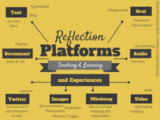
I know that most teachers acknowledge the role of reflection in learning. I see reflective practice when I visit classrooms, but I also acknowledge that most of that reflection seems to be in oral form. A form that allows the reflection to disappear, to evaporate after the moment has passed. We wanted to make teachers aware of platforms and experiences that supported reflection in teaching and learning. After orally reflecting with students during a classroom conversation or possible silent ( intrapersonal ) reflection taking place by individual students, the next most used media and platform seemed to be text. Since we have a 1:1 laptop in High School and Middle School, most these types of reflective texts are written on Google Docs, Blogs or digital online sites. I wanted to move teachers’ focus beyond using text as the medium for reflection.
We notice when working with students that simply asking them to go ahead and write a reflection, might not be the best approach to be able to expect quality work. We initially introduced our workshop attendees to four frameworks for reflection.
KWHLAQ chart
See- Think- Wonder
Think-Puzzle-Explore
3-2-1 Bridge
See a 5th grade sample of using the KWHLAQ reflection routine on a blog. The student’s teacher Paul Solarz is doing fantastic work on reflective eportfolios.
Leika Prokopiak’s 6th grade Science students, here are Graded, are also experimenting with the KWHLAQ reflection routine on their student portfolios.
\
After a visit from Libby Stephens, a speaker about the Third Culture Kid experiences, Ms Arcenas, had her 7th grade advisory students reflect, in writing on index cards. They used the See- Think- Wonder routine about their take away from the session with the speaker.
Claire Arcenas reflection on using 3-2-1- Bridge in her 10th grade PE class
After introducing the four above mentioned frameworks, we asked teachers to choose one article from five pre-selected ones and use one of the four thinking routine methods to guide their reflection of their chosen article.
35 Questions for Student Reflection by Mark Clements
Creating a Culture of Student Reflection by Clyde Yoshida
Four Levels of Student Reflection by Maryellen Weimer
Reflect, Reflective, Reflection by Silvia Tolisano
High Tech Reflection Strategies Making Learning Stick by Suzie Boss
We briefly shared further visible thinking routines with the attendees and made the application visible by sharing examples from the classroom with them.
Blog commenting as reflection.
Video as a media for capturing reflection
Around the World With 80 Schools- Helsinki from langwitches on Vimeo.
Kindergarten using Explain Everything app to explain Math Scenarios from langwitches on Vimeo.
Reflection via Infographics.
Collaborative reflection via Twitter Hashtag (Teacher Reflection)
Mindmapping as a platform for reflection (organization, grouping, color coding…)
Maps as a platform for raising awareness through visualization. Start tracking a the geographic setting of books read to see patterns and gaps emerge that were previously not noticed.
How do you reflect with your students? What are your thoughts on using visible thinking routines to give students a strategy? What platforms are you exploring? What types of reflective experiences are you facilitating for your students?
Silvia Rosenthal Tolisano
.
Blog
.
<span class='date ' tip=''><i class='icon-time'></i> Jul 16, 2015 07:08am</span>
|
|
In December, I received a Google Invite to become a Google Glass Explorer. I was not given much time to accept the hefty price tag or let the Google invite expire. In the name of education and my passion for thinking and exploring new ways to transform teaching and learning, I accepted…. (still not sure how I feel about …)
On Monday, I took my Google Glass for the first time to school. We had a pre-service workshop planned (we just returned to school after the summer break here in the Southern Hemisphere) and I wanted to test if I could use the device to document the workshop to
capture moments of discussion
record what the presenters shared
share what participants contributed to the conversation
Google Glass- Reflection Workshop from langwitches on Vimeo.
Here are a few thoughts after the first week:
I am overwhelmed ( …too much stimuli)
Not as intuitive as I thought it would be… (I feel like a student driver having to pause, before I step on the clutch>shift into gear>push the gas pedal> slowly let go of the clutch… while at the same time look in all the mirrors and forward to steer where I need to go)
My fluency is missing. (…yes… that one… the one that I am so used to having with my smartphone, iPad and laptop…so used to it in fact that I usually don’t think about it anymore… I feel illiterate…)
Tickling behind the ear from speaker that vibrates the bone behind my ear… (…It is a weird feeling…)
battery life…(…used to battery lasting all day+ with my other devices…) need to build in breaks during the day to recharge..
Unit gets hot when using too much (especially recording video and googling)
Long, curly and unruly hair that constantly tangles in front of the camera is a problem in terms of recording, tapping and swiping. (… not cutting my hair or wearing a pony tail is not an option…)
I was not prepared for the attention and the varied reactions the device evoked in people. (… I am admitting that the varied emotions from colleagues and students have hit me almost like a brick… from super excited to curious, not interested to (not openly) negative and almost hostile emotions. Again, NOT all of the reactions were verbal or bodily clues, but more (strong) waves of emotions directed in my direction… Never quite experienced or was aware of something similar…
Feeling on the spot when recording… self conscious… what do I say? How does my voice sound?
I am definitely in the Substitution stage, when looking at using Google Glass through the lens of the SAMR model.
Many colleagues wanted to see what I was seeing and were eager to try the Google Glass on. The easiest instruction, I was able to give, as I could not see what they were seeing on the screen was:
When you see the time… say "OK Glass", then "take a picture".
Swipe down… then tap on Glass again and swipe forward to see the last images taken.
So far, I was not able to screencast from Google Glass to my iPhone via wifi (it continuous to show me the black screen with the instructions, even though glass and iPhone are on the same network. It is simply too much multitasking to handle Glass, turn off wifi, then turn on bluetooth, then connect iPhone and Glass to be able to demonstrate screencast on the spot…)
It was interesting (also for me) to later see the images the testers had taken..
(tall perspective… this is how I look to a tall person…I was not aware that the ceiling could look so threatening… :)
(test shot from someone that is more of my height)
Curious colleagues having a go at wearing Google Glass.
Here is a selfie to show how I am managing using my reading glasses at the same time as Google Glass. Not the best solution, but it seems to work for now….
Students were lining up after class asking to wear Google Glass in order to give it a try. Most of them had heard of Google Glass. It spread like wild fire throughout our Middle School. There were a lot of "cool" and "wow". It wasn’t long before Paparazzi also arrived wanting to take a picture of Google Glass as evidence of having seen one.
Students asked to try them on and immediately chose to take selfies. What does that say about the social impact and culture of picture taking?
Do you remember the first email you sent? The first email you received? Remember having to dial in to check your email and not being able to use the phone line while you were online?
Above is a vignette image taken with Google Glass. I was sitting with a new students, helping set up her school laptop. I received a vibration sound behind my ear and looked up from the computer screen at the Glass screen to see that my mother had emailed me an article from the La Nación (Argentinean Newspaper) about how wearing Google Glass could get me into legal problems. The irony of the moment was not lost on me.
I am not the only explorer at our school. A High School student, Bruno, is also a committed user. I felt a sort of camaraderie, as both of us are on the forefront by experimenting and walking a fine line. What is acceptable in a school environment regarding wearable technology and what is not? Bruno has been wearing Glass routinely during the day, showing a much higher fluency and adaptation. He inspired me to make sure that I was only going to find out how Glass was going to transform my work, if I wore it consistently. It reminded me of " The best camera you will ever have, is the one that you have with you" that pushed my iPhone into the number one position to be followed by my SLR camera.
While my focus of using Google Glass to "explore new worlds" in terms of teaching and learning, Bruno is focused of finding innovative ways to transform and "make his life easier". His point of view is that of an app developer.
Just as I experienced a myriad of reactions when wearing Glass, a student wearing Google Glass, a technology that all of us (administrators, teachers and peers) are not familiar with, inevitably will bring up anxieties, disruption and fear.
Bruno is dealing with setting the example at our school. What will this mean when more and more students start having these powerful devices and will that mean in terms of teacher/student relationship, student learning, curriculum, assessment practices, what do we consider cheating, how do we deal with multitasking, distractions, inappropriate use of the technology, etc.?
I believe Bruno is aware that he is setting the example and is taking on the responsibility. Our school administrators and teachers are recognizing the need to start the conversation now! WHAT DOES THIS TECHNOLOGY MEAN IN OUR EDUCATIONAL SPACES? They are also recognizing that Bruno is an integral part of that conversation to craft a policy that does not BAN and BLOCK, but encourages exploration and innovation.
I am looking forward to being part of that conversation…
School policy regarding wearable technology were not the only discussion that were sparked by the simple appearance of Google Glass on campus. I have had super interesting conversation about
the meaning of wearable technology and what does that mean for our future?
did we not "just" have the same discussion about10 years ago regarding cellphones being disruptive and an invasion of our privacy ? (…I remember the note coming home from my daughter’s school, that it was absolutely prohibited to bring a cellphone to school that had picture taking capabilities…)
we wondered if in 10 years, we will laugh about how "silly" we/I looked with such a "big" device on our/my head (same type of feeling when we think of the size of our first cell phones or the big air conditioned rooms that held a computer…)
Image in Public Domain
Freely giving away our private data (GPS location? What do we see at the moment? What words are we googling? etc.) I am not saying that we are not already doing this with other devices, but wearable devices have the purpose of making it even more "natural" and instantaneous to do all these tasks and transmitting and sending them. (… I have to admit I am increasingly more uncomfortable when Google ( or other companies), by default, takes the choice of NOT wanting to share or collect data away from me…
What about Google Glass etiquette? When is it appropriate? When is it inappropriate? What about in an educational environment? What about in public spaces? (… I am very conscious of etiquette… I know I am walking a fine line as soon as I wear Google Glass… I want to be able to gain the trust of colleagues and students… that I will not take images nor film without making sure that they are aware of the device being on and a "no questions asked" policy if someone feels uncomfortable…)
How can we use such a "disruptive" device to transform (re-define) what we teach and learn?
I was able to take Google glass into a Science classroom (with permission from the teacher ,of course) and take photos and videos of the students conducting a lab. Google Glass is such a novelty though that students were interested in Glass rather than their lab… most of them begging to wear them…I was very conscious of NOT wanting to disrupt the class (…. will need to make sure that students have a chance to look at them, ask questions and wear them… before I go into the next classroom)
Google Glass- Science from langwitches on Vimeo.
I also wanted to test out wearing Google Glass while driving… yes, I can hear all of you yelling at me from afar. I literally have a 2 minute drive to school… I left a little extra early for even less traffic… and as you will be able to tell from the video, I am a VERY safe driver… looking several times right/left/right/left and one more time, before turning at an intersection…
Google Glass- Way to Work from langwitches on Vimeo.
Silvia Rosenthal Tolisano
.
Blog
.
<span class='date ' tip=''><i class='icon-time'></i> Jul 16, 2015 07:08am</span>
|