Blogs
|
I'm here at the Annual SHRM Conference - we're in Vegas! As always, I'm having fun reconnecting with colleagues I haven't seen in a while and connecting with brand new ones. But alas, it's not all about socializing; I need to attend the concurrent sessions too! I attended a session today on workplace bullying and was thrilled to hear, within the first ten minutes, the two presenters validate what I have been telling my clients for two years now: we are close, very close, to having bullying be "prohibited by law" and, therefore, the time has come to start preparing...
SHRM
.
Blog
.
<span class='date ' tip=''><i class='icon-time'></i> Jul 27, 2015 12:25pm</span>
|
|
AEA365 Valuing Voices impact vs self-sustainability trade off submission -
Hi, I am Jindra Cekan, PhD of Valuing Voices at Cekan Consulting LLC. I have been roaming around international development projects since 1988.
Lesson Learned: What’s likely to ‘stand’ after we go? A new consideration in project design and evaluation
Last spring I had the opportunity to not only evaluate a food security project but also to use the knowledge gleaned for the follow-on project design. This Ethiopian Red Cross (ERCS) project "Building Resilient Community: Integrated Food Security Project to Build the Capacity of Dedba, Dergajen & Shibta Vulnerable People to Food Insecurity" over 2,000 households with credit for crossbreed cows, ox fattening, sheep/goats, beehives and poultry as well as other inputs. We met with 168 respondents (8% of total participants) and had in-depth interviews with 52.
My evaluation team and I asked in-depth questions on income and self-sustainability preferences. We used participatory methods to learn what they felt they could most sustain themselves after they repaid the credit and the project moved on to new communities.
We also asked the to rank what input provided the greatest source of income. The largest income ($1,500) was earned from dairy and oxen fattening, other activities garnered between $50 to $500.
And even while 87% of total loans were for ox fattening, dairy cows which brought in farm more income, and only 11% of loans were sheep/goats (shoats) and 2% for poultry, the self-sustainability feedback was clear. Poultry and sheep/goats (and to a lesser degree, ox fattening) were what men and women felt they could self-sustain.
So how can such a listening and learning approach feed program success and sustainability?
Hot Tips: We need to sit with communities to discuss the project’s objectives during design plus manage our/ our donors’ impact expectations:
1) If raising income in the short-term is the goal, the project could only have offered dairy and ox fattening to the communities as their incomes gained the most.
2) If they took a longer view, investing in what communities felt they could self-sustain, then poultry and sheep/goats were the activities to promote.
3) In order to learn about true impacts we must return post-project close to confirm the extent to which income increases continued, as well as the degree to which communities were truly able to self-sustain the activities the project enabled them to launch. How do our goals fit with the communities’?
What is important is seeing community actors, our participants as the experts. It is their lives and livelihoods, and not one of us in international development is living there except them…
What are your questions and thoughts? Have you seen such tradeoffs? We long to know at www.ValuingVoices.com
Do you have questions, concerns, kudos, or content to extend this aea365 contribution? Please add them in the comments section for this post on the aea365 webpage so that we may enrich our community of practice. Would you like to submit an aea365 Tip? Please send a note of interest to aea365@eval.org . aea365 is sponsored by the American Evaluation Association and provides a Tip-a-Day by and for evaluators.
Related posts:
Jindra Cekan on Furthering Community Self-sustainability of Our Projects
Bloggers Series: Eric Sarriot on the Sustainable Human and Social Development Blog
Annaliese Calhoun on Measuring Sustainability Capacity and Planning for Long Term Success
AEA365
.
Blog
.
<span class='date ' tip=''><i class='icon-time'></i> Jul 27, 2015 12:25pm</span>
|
|
Overview
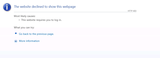
You are browsing a SharePoint site and you receive following error message.
Diagnosis
The web apps are not opening from IE/Chrome/Firefox outside of SharePoint Server. Tried to open the web app from each WFE server but the web app are opening fine from WFE1 server but not from WFE2. The below error found in ULS Log on WFE1.
UnauthorizedAccessException for the request. 403 Forbidden will be returned. Error=Exception of type ‘System.Web.HttpUnhandledException’ was thrown.
at System.Web.UI.Page.HandleError(Exception e)
at System.Web.UI.Page.ProcessRequestMain(Boolean includeStagesBeforeAsyncPoint, Boolean includeStagesAfterAsyncPoint)
at System.Web.UI.Page.ProcessRequest(Boolean includeStagesBeforeAsyncPoint, Boolean includeStagesAfterAsyncPoint)
at System.Web.UI.Page.ProcessRequest()
at System.Web.UI.Page.ProcessRequest(HttpContext context)
at System.Web.HttpApplication.CallHandlerExecutionStep.System.Web.HttpApplication.IExecutionStep.Execute()
at System.Web.HttpApplication.ExecuteStep(IExecutionStep step, Boolean& completedSynchronously)
Cause
The "Everyone’s" Read permission removed from bin directory for the web apps which is not opening.
Solution
Go to each web app’s Bin directory Properties. Add"Everyone" and provide read access. Do IISRESET. Everything will open fine.
Netwoven
.
Blog
.
<span class='date ' tip=''><i class='icon-time'></i> Jul 27, 2015 12:25pm</span>
|
|
This week, I’m at the SHRM Conference in Las Vegas with 15,000 of my HR brethren, and there is definite excitement in the air. Marcus Buckingham started off Monday’s general session by talking about strengths, leadership, and performance. One of the specific areas he focused on was the importance of a good team leader for the performance of the organization. Many of the processes companies put in place are focused on improving the organization or supporting the employee populace, but there is a dearth of support for the team leaders. Even a traditional engagement survey doesn’t necessarily serve the needs of...
SHRM
.
Blog
.
<span class='date ' tip=''><i class='icon-time'></i> Jul 27, 2015 12:25pm</span>
|
|
Overview
PerformancePoint Services in SharePoint 2013 is a service that provides flexible tools to help us to create rich dashboards, scorecards, and key performance indicators in web browsers. PerformancePoint Service helps management users to analyse data for better business decisions.
Steps to Create Performance Point Service
First, we have to create a Business intelligence site as shown below:
Once the site gets created, go to "Site Contents"
For designing a dashboard, click on the "Dashboards" library.
Go to ribbon "PERFORMANCE POINT" and click on "Dashboard Designer" as shown below
Launch the Dashboard Designer as shown below
So the first step is to "create a Data Connection". Right click "Data Connection" and click on "New Data Source"
Various Types of Data Connection available in listed above. Choose "Multidimensional" and "Analysis Services". Click the OK button as shown in figure below:
Create a connection string by specifying Server Name, Database Name and Cube name. Then Click on Test Data Source. Rename Data Connections as "PPSSSASCon" and Save this. Right click "PerformancePoint Contents", New and select Report as shown below:
Select Analytic Chart and Click on Ok
Choose Data Source you would like to use. Choose "PPSSSASCon".
Click finish button. Rename the report as "PPS Chart"
From the Details pane which is on our right side, drag and drop measures and dimensions depends on the requirement.
Right click "PerformancePoint Contents", New and select Dashboard as shown below:
Click on Dashboard to Create a New Dashboard Page Template as shown below:
Select One Zone Report and Click on Ok
Rename it as PPS Dashboard
Drag and Drop the PPSChart from the Right pane details of the Performance Point Content as shown below:
Save the Dashboard and Deploy the SharePoint site, Right click the "PPS Dashboard" and click on "Deploy to SharePoint"
Create a filter for filtrations of Dashboard
Select members sections and Click Ok
Select Analysis Service Connection "PPSSSASCon" and Next
Select "Select dimendion" button from right side and choose "Calendar Year Desc" as filters and Click on Ok.
Then Select all filters members
After the two steps is done then select "filters measures" Sales Amount
Click Next and "Choose Multi Select Tree"-> Click Finish and Rename Filters as "PPSFilters"
Again Go to "PPSDashboard" and drag and drop the PPS Filters to Dash board section
Now the following PPS Dashboard is ready to use after the deployment
Netwoven
.
Blog
.
<span class='date ' tip=''><i class='icon-time'></i> Jul 27, 2015 12:24pm</span>
|
|
I’m John Cosgrove, an evaluator who is committed to utilization-focused evaluation. I am currently working with community colleges around the country to improve evaluation efforts and the use of data for continuous improvement. Clients indicate they want evaluation and data to drive continuous improvement and decision-making. Although a good place to start, data collection alone won’t get the job done. In her excellent article, Data Don’t’ Drive, Alicia Dowd reminds us that data alone won’t lead to continuous improvement.
I remember sitting in a faculty session at the University of Michigan Assessment Institute and listening to Richard Alford discuss the Craft of Inquiry. It was the end of the day and with all apologies to Dr. Alfred, I must admit I was thinking more about crafting dinner plans than inquiry, but then he made a very simple, yet powerful statement: "You don’t make the pig fatter by simply weighing it every day".
Assessment, evaluation, data collection—whatever you want to call it—must be more than keeping score. If we don’t learn something and then take action from what we learn, we are simply recording data for the sake of recording data. As colleges are further inundated with the call for evaluation data from stakeholders, including legislators and funding agencies, they would do well to remember to structure such efforts with a meaningful culture of inquiry.
People engaged in the development of public questions and the thoughtful interpretation of data will drive continuous improvement. We should expand evaluation efforts to determine not only what works, but why it works. We offer the following framework help link questions, data collection, interpretation and action.
INQUIRE—What Do We Want To Know? Define the specific evaluation questions.
DISCOVER—What Do We Know? Identify data sources and methods of data collection.?
INTERPRET—What Does the Data Tell Us? Work with stakeholders to analyze and interpret results/data.
DEVELOP—What Actions Need To Occur? Use results to develop strategies for continuous improvement and further evaluation.
Rad Resources:
Data Don’t Drive: Building A Practitioner-Driven Culture of Inquiry To Address Community College Performance. A Lumina Foundation for Education Research Report, 2005.
Specify The Key Evaluation Questions. Better Evaluation: Sharing Information To Improve Evaluation, 2014
Do you have questions, concerns, kudos, or content to extend this aea365 contribution? Please add them in the comments section for this post on the aea365 webpage so that we may enrich our community of practice. Would you like to submit an aea365 Tip? Please send a note of interest to aea365@eval.org . aea365 is sponsored by the American Evaluation Association and provides a Tip-a-Day by and for evaluators.
Related posts:
Judy Savageau and Laura Sefton on Creating Standard Operating Procedures for Evaluation Projects
QUAL Eval Week: Eric Barela on providing a detailed description of qualitative inquiry choices and processes to clients
Cassandra O’Neill on a Flexible Thinking and Action Planning Tool
AEA365
.
Blog
.
<span class='date ' tip=''><i class='icon-time'></i> Jul 27, 2015 12:24pm</span>
|
|
Background
You are using O365 for your SharePoint. You have created several Sub Sites in the process. Now you would like to delete these sub sites. But would like if these sub site deletion can be automated.
This below code snippet will delete all sub-sites in a SharePoint Online site collection. The code base is based on SharePoint Client object-model. For On-Prem you can use PowerShell, but for O365 below code is a better approach.
Details
Open Visual Studio, start a new console application with name "CA_deleteSubSites". Paste the below code and change the variable wherever required.
using System;
using System.Text;
using System.Threading.Tasks;
using System.Diagnostics;
using System.Configuration;
using System.Collections.Generic;
using Microsoft.Online.SharePoint.TenantAdministration;
using Microsoft.SharePoint.Client;
using Microsoft.SharePoint.Client.Utilities;
using System.Security;
using System.IO;
using System.Linq;
namespace CA_deleteSubSites
{
classProgram
{
staticstring trgsiteuser = ConfigurationManager.AppSettings["trgsiteuser"]; //xxx.onmicrosoft.com user
staticstring mainpath = "https://xxxx.sharepoint.com";
staticvoid Main(string[] args)
{
string trgsiteuserpass = ConfigurationManager.AppSettings["trgsiteuserpass"];
string path = "https://xxxx.sharepoint.com/sites/demo"; // site to be deleted
SecureString passWord = newSecureString();
foreach (char c in trgsiteuserpass.ToCharArray()) passWord.AppendChar(c);
deleteallSubWebs(path, passWord );
}
publicstaticvoid deleteallSubWebs(string path, SecureString passWord)
{
try
{
//connect to the root site
using (ClientContext clientContext = newClientContext(path))
{
clientContext.Credentials = newSharePointOnlineCredentials(trgsiteuser, passWord);
if (clientContext != null)
{
Web oWebsite = clientContext.Web;
clientContext.Load(oWebsite, website => website.Webs, website => website.Title);
clientContext.ExecuteQuery();
if (oWebsite.Webs.Count == 0)
{
Console.WriteLine(path);
oWebsite.DeleteObject();
clientContext.ExecuteQuery();
Console.WriteLine("deleted.." + oWebsite.Title);
}
else
{
foreach (Web orWebsite in oWebsite.Webs)
{
string newpath = mainpath + orWebsite.ServerRelativeUrl;
deleteallSubWebs(newpath, passWord);
}
Console.WriteLine(path);
oWebsite.DeleteObject();
clientContext.ExecuteQuery();
Console.WriteLine("deleted.." );
}
}
}
}
catch (Exception ex)
{
Console.WriteLine(ex.Message);
}
}
}
}
Conclusion
Hope this will help you to delete all sub site in a site but use it with caution to ensure you know what you are about to delete!
Netwoven
.
Blog
.
<span class='date ' tip=''><i class='icon-time'></i> Jul 27, 2015 12:23pm</span>
|
|
Hi, I’m Lisa Melchior, President of The Measurement Group LLC, a consulting firm focused on the evaluation of health and social services for at-risk and vulnerable populations. In response to Sheila B. Robinson’s recent post that reported what AEA 365 readers said they want to see in 2015, I’m writing about developing, sharing, and storing lessons learned from evaluation. Although this is written from the perspective of evaluation at the initiative level, it could also apply to lessons learned by an individual program.
The United Nations Environment Programme gives a useful definition of lessons learned as "knowledge or understanding gained from experience." In a grant initiative, lessons learned might address ways to implement the projects supported through that initiative; strategies for overcoming implementation problems; best practices for conducting services (whether or not the projects employed all of them); strategies for involving key stakeholders to optimize the outcomes of the projects and their sustainability; and ideas for future directions. Statements of lessons learned are an important outcome of any grants initiative; the richness and complexity of those statements can be, in part, an indicator of the overall success of the initiative. Funders often utilize the lessons learned by their grantees to inform the development of future investments.
Hot Tips:
Developing lessons learned. If possible, work with the funder to collect examples of lessons learned using the funder’s progress reporting mechanism. When the evaluator has access to such reports, qualitative approaches can be used to catalog and identify themes among the lessons learned. Another benefit of integrating the documentation of lessons learned into ongoing programmatic reporting is that trends over the life of a project or initiative can emerge, since many initiatives request this type of information from grantees on a semi-annual or quarterly basis. Active collaboration between funder and evaluator is key to this approach.
Sharing lessons learned. Don’t wait until the end of a project to share lessons learned! Stakeholders can benefit from lessons learned in early implementation. For example, my colleagues and I highlighted interim outcomes and lessons learned during the first three years of the Archstone Foundation’s five-year Elder Abuse and Neglect Initiative in an article in the Journal of Elder Abuse and Neglect.
In a more summative mode, toolkits are a useful vehicle for sharing lessons learned with those interested in possible replication of a particular program, model, or initiative. Social media and blogs are great for more informal sharing.
Storing lessons learned. Qualitative data tools such as NVivo are invaluable to organizing lessons learned.
Do you have questions, concerns, kudos, or content to extend this aea365 contribution? Please add them in the comments section for this post on the aea365 webpage so that we may enrich our community of practice. Would you like to submit an aea365 Tip? Please send a note of interest to aea365@eval.org . aea365 is sponsored by the American Evaluation Association and provides a Tip-a-Day by and for evaluators.
Related posts:
Tania Jarosewich and Linda Simkin on Using the College Access Network Survey
Catherine Jahnes on Learning Communities
Michael Duttweiler on Talking Your Way Into a Logic Model
AEA365
.
Blog
.
<span class='date ' tip=''><i class='icon-time'></i> Jul 27, 2015 12:23pm</span>
|
|
My phone awakens me that it is 4:45 am. Time to shake off a weekend worth of Dead Shows and head to Sin City to hang out with my Sisters & Brothers in the Human Resources profession. What could possibly go wrong? Having been to the SHRM Annual Conference nearly 10 times, my event navigation is far more streamlined than a first time attendee. I head to the Dice Bloggers lounge to pick up my badge. Reframing EngagementFor decades, Gallup has been the default source of employee information gathering. Their survey questions written in 1993 remain the benchmark for workforce engagement in...
SHRM
.
Blog
.
<span class='date ' tip=''><i class='icon-time'></i> Jul 27, 2015 12:23pm</span>
|
|
Objective
This blog is created to help people who want to learn OLAP (Online analytical processing) Cube in SSAS. It also helps to analyze data in multi-dimensional format for smarter business decisions.
This blog solutions has been created using Adventure Works DW 2012 database.
Create Data Sources
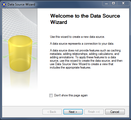
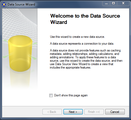
Select Data sources in Solution Explorer and right click on data sources -> New Data Sources.
The following screen appears…
Then Click Next…
There is no existing connection. So click on New button
The following connection manager screen appears. Enter the Server Name Where SQL Server is Installed and Choose Database name and Click Ok.
Now we can see a connection string created in left side of the Data Source Wizard, Click Next..
Click on "Use the service account" Radio button and Click Next
Enter a Data Source Name and Click on Finish Button.
Create Data Sources View
Select Data source View in Solution Explorer and right click on data source view -> New Data Sources view. The following screen appears…
We can see a data sources is present in the left section of the Data source view wizard.
Click Next…
The following screen appears with all the tables that exists in the adventure works database.
Select "DimDate", "DimProduct", "DimCustomer" and "FactInternetSales" from the Available objects.
Click the ">" button to move those objects to Included objects.
Click Next…
Click on finish button to create data source view.
The following screen appears after creation of Data source view.
Create New Named Calculation
Select and right click "DimDate" to create New Named Calculation.
The Year format will look like CY2012, CY2013
Click Ok and the following Screen appears. The "CalendarYearDesc" named calculation is created in "DimDate" Dimension.
Now to create three dimension like Date, Product and Customer (Create Data Dimension)
Select to create New Dimension. Click Next
Select "Use an existing table" radio button and click Next
Select "DimDate" in Main Table.
Select "DateKey" as Key column and "FullDateAlternetKey" as Name column. Click Next
Select the column name which will appear in the cube dimension
Change the attribute for Year, Semester, Quarter and Month from regular to specific.
Click on Attribute Type to get the list of all attribute under the calendar
Type a name of the New Dimension and Click on Finish Button to Create the Date Dimension
Next is to create the Product and Customer dimension with the above mentioned steps.
Create Hierarchies
In Dimension structure Tab sequentially drag and drop "CalendarYear, CalendarSemester, CalendarQuarter, Month and Date" to Hierarchies.
Create Attribute Relationships
Go to attribute relationship tab. Select and right click on "Date -> CalendarQuarter". Change the Name to Month in Source Attribute and Change the Relationship Type to Rigid and Click on Ok button.
Again follow the abovementioned steps for CalendarSemester and CalendarYear as mentioned below:
Select and right click on "Date -> CalendarSemester". Change the Name to CalendarQuarter in Source Attribute and Change the Relationship Type to Rigid and Click on Ok button.
Select and right click on "Date -> CalendarYear". Change the Name to CalendarSemester in Source Attribute and Change the Relationship Type to Rigid and Click on Ok button.
The final hierarchy will look like the following…
View Data in Browser
Go to Browser Tab and Click on Process. The following screen will appear. Click the Run button to process dimension data.
Create Cube
Select and right click on cube to create New Cube. Click Next…
Click on "Use existing tables" radio button and Click Next
Select the check box where fact tables appear and uncheck all the dimension check box and Click Next
Select the measure field of the fact table and Click next…
Uncheck the Dimension and click Next
Type a name of the Cube and Click on Finish button
The cube structure will look like this..
Cube Deployment
Go to Analysis Service project and go to properties. Type the server name cube deployment and Type the name of the SSAS database. Click Ok.
Right click on Analysis Services project and deploy the cube
Netwoven
.
Blog
.
<span class='date ' tip=''><i class='icon-time'></i> Jul 27, 2015 12:22pm</span>
|