Blogs
|
Yesterday, we kicked off our 2015 Annual Conference and Exposition. More than 15,000 HR professionals are in Las Vegas this week to focus on how our careers, our organizations and our profession can thrive. I shared my belief that we are in the decade of human capital, a time when talent is seen as the real power behind business and organizations draw clear, straighter lines between the success of their people strategies and their business success. Many...
SHRM
.
Blog
.
<span class='date ' tip=''><i class='icon-time'></i> Jul 27, 2015 12:35pm</span>
|
|
Overview
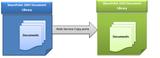
In this blog I wanted to describe how documents can be migrated from MOSS 2007 to SharePoint 2010 environment by building a custom utility. I have used Web Services provided by SharePoint to copy number of documents from MOSS 2007 Document Library to SharePoint 2010 Document Library using SharePoint web services.
SharePoint web services
SharePoint provides us a list of web services for individual operations, we are going to use only two of them:
1. Lists.asmx(Web service reference: http://<site>/_vti_bin/Lists.asmx)
2. Copy.asmx (Web service reference: http://<site>/_vti_bin /Copy.asmx)
Let’s take a deeper look into these web methods of these web services:
From Lists.asmx web service we will use two web methods:
• Lists.GetList () web method:
Method Signature:
public XmlNode GetList (string listName): Returns a schema for the specified list.
• Lists.GetListItems () web method:
Method Signature:
public XmlNode GetListItems ( string listName, string viewName, XmlNode query, XmlNode viewFields,string rowLimit, XmlNode queryOptions, string webID) : Returns information about items in the list based on the specified CAML query.
From Copy.asmx web service we will also use two web methods:
• Copy.GetItem() web method:
Method Signature:
public uint GetItem(string Url, out FieldInformation[] Fields,
out byte[] Stream) : Returns a Byte array representation of a document that can be passed to the CopyIntoItems method to copy the document to a different server.
• Copy.CopyIntoItems() web method:
Method Signature:
public uint CopyIntoItems( string SourceUrl, string[] DestinationUrls, FieldInformation[] Fields, byte[] Stream,
out CopyResult[] Results): Copies a document represented by a Byte array to one or more locations on a server.
Programming
We can achieve our goal using any of the project types (Console Application, Windows Application, Web Application, Web services etc.). A Windows application has been created into SharePoint 2010 Development Environment, two web references (Lists.asmx & Copy.asmx) of MOSS 2007 has been added into my project. Finally our programming part given below:
1. An object of each of the proxy classes which were generated after adding the web references has been created.
2. Next the Lists.GetList() web method has been called to get the listId from SP2007 Doc Lib
o Input Parameter: Name of the List (For e.g. "Shared Documents")
o Output: A xml node from which we can get the ListId and WebId
3. Then the Lists.GetListItem() web method has been called to get the Url of Individual documents from SP2007 List.
o Input Parameters:
- listName: Pass the ListId we got from Lists .GetList() web method.
- viewName: If you want to use any view of SP2007 Doc Lib then specify the view name or pass NULL.
- Query: CAML query that determines which records are returned and in what order.
- viewFields: Specifies which fields to return in the query and in what order (eg. <FieldRef Name=’EncodedAbsUrl’ />).
- rowLimit: specifies the number of items, or rows, to display on a page before paging begins (eg. 50 or 500).
- queryOptions: An XML fragment in the following form that contains separate nodes for the various properties of the SPQuery object.
- webID: Pass the webID we got from Lists .GetList() web method.
o Output: A XML node from which we can get the list of URLs of each documents of SP2007 doc lib.
4. Then the Copy.GetItem() web method has been called to get the individual document from SP2007 Doc lib
o Input Parameters:
- Url : Pass the individual document URL from a list of URLs that we got from Lists .GetListItem() web method
o Output:
- FieldInformation Array: which contains the metadata information of the document that we get from SP2007 doc lib.
- Byte Array : Which contains the entire document as an array of bytes (that is a base-64 representation of the retrieved document’s binary data)
5. Next the web reference URL of the object of Copy.asmx web service has been replaced from Sp2007 to SP2010. Because we are pulling the documents from SP2007 document Library but copying into SP2010 doc lib.
6. Then the Copy.CopyIntoItems() web method has been called to copy the items that we got into byte array into SP2010 document library.
o Input Parameters:
- SourceUrl: Pass the individual document URL from a list of URLs that we got from Lists .GetListItem() web method
- DestinationUrls: Pass the destination URL of SP2010 document library.
- Fields: Pass the FieldInformationArray that we got from Copy.GetItem() web method.
- Stream: Pass the byte array that we got from Copy.GetItem() web method.
o Output:
- Results: Finally we will get a <Success> message if the document moved successfully.
The following Configuration used:
<appSettings>
<add key="DestUrl" value="http://xyz-abcd:11111/Shared Documents/Test"/>
<add key="DestWebservcUrl" value="http:// xyz-abcd:11111/"/>
<add key="SrcWebservcUrl" value="http://xyz-sharepoint/sites/abstract/"/>
<add key="ListRowLimit" value="1000″/>
<add key="SrcRootFolder" value="XYZ Document Library"/>
<add key="SP2007user" value="admin"/>
<add key="SP2007pwd" value="admin123#"/>
<add key="SP2007domain" value="XYZ-Domain"/>
<add key="SP2010user" value="xyzuser"/>
<add key="SP2010pwd" value="user456$"/>
<add key="SP2010domain" value="ABC-Domain"/>
<add key="DestRootFolder" value="Shared Documents"/>
<add key="DestSubfolder" value="Test2010″/>
</appSettings>
C# Code snippet Used:
To get the list of URLs from MOSS 2007 Document Library :
public List<string> GetListofUrl()
{
List<string> SiteUrlList = new List<string>();
NetworkCredential custCred = new NetworkCredential(ConfigurationManager.AppSettings["SP2007user"],
ConfigurationManager.AppSettings["SP2007pwd"], ConfigurationManager.AppSettings["SP2007domain"]);
SPListServices2010.Lists listService = new SPListServices2010.Lists();
listService.PreAuthenticate = true;
listService.Credentials = custCred;
listService.Url = ConfigurationManager.AppSettings["SrcWebservcUrl"] + "_vti_bin/Lists.asmx";
XmlNode list = listService.GetList(ConfigurationManager.AppSettings["SrcRootFolder"]);
System.Xml.XmlDocument xmlDoc = new System.Xml.XmlDocument();
string listName = list.Attributes["ID"].Value;
string webID = list.Attributes["WebId"].Value;
string rowLimit = ConfigurationManager.AppSettings["ListRowLimit"];
XmlDocument doc = new XmlDocument();
XmlElement query = doc.CreateElement("Query");
XmlElement viewFields = xmlDoc.CreateElement("ViewFields");
query.InnerXml =
@"<OrderBy><FieldRef Name=’Title’ Ascending=’False’/></OrderBy> ";
viewFields.InnerXml = "<FieldRef Name=’EncodedAbsUrl’ />";
XmlNode positionNext = null;
XmlNode queryOptions = doc.CreateElement("QueryOptions");
queryOptions.InnerXml = "<IncludeMandatoryColumns>False</IncludeMandatoryColumns>";
int count = 0;
while (true)
{
count++;
XmlNode results = null;
try
{
results = listService.GetListItems(listName, null, query, viewFields, rowLimit, queryOptions, webID);
}
catch (Exception ex)
{
}
try
{
foreach (System.Xml.XmlNode listItem in results)
{
XmlNodeReader objReader = new System.Xml.XmlNodeReader(listItem);
while (objReader.Read())
{
if (objReader["ows_EncodedAbsUrl"] != null)
{
SiteUrlList.Add(objReader["ows_EncodedAbsUrl"].ToString());
}
}
}
}
catch (Exception ex)
{
}
positionNext = results.SelectSingleNode("//@ListItemCollectionPositionNext");
if (positionNext == null)
break;
else
queryOptions.InnerXml = "<Paging ListItemCollectionPositionNext=’" + positionNext.InnerXml + "‘ /><IncludeMandatoryColumns>False</IncludeMandatoryColumns>";
}
return SiteUrlList;
}
To Copy the documents from MOSS 2007 document library to SharePoint 2010 document library.
public void UploadDoc(string SourceUrl, string DestUrl, string DestFolderName, string DestFileName)
{
NetworkCredential custCred2007 = new NetworkCredential(ConfigurationManager.AppSettings["SP2007user"],
ConfigurationManager.AppSettings["SP2007pwd"]); NetworkCredential custCred2010 = new NetworkCredential(ConfigurationManager.AppSettings["SP2010user"],
ConfigurationManager.AppSettings["SP2010pwd"],ConfigurationManager.AppSettings["SP2010domain"] );
try
{
SPcopyservices2007.Copy WebSvc2007 = new SPcopyservices2007.Copy();
SPcopyservices2010.Copy WebSvc2010 = new SPcopyservices2010.Copy();
WebSvc2007.Credentials =custCred2007;
WebSvc2010.Credentials = System.Net.CredentialCache.DefaultCredentials;
string copySource =HttpUtility.UrlDecode( SourceUrl);
string[] copyDest = {HttpUtility.UrlDecode(string.Format("{0}/{1}/{2}", DestUrl,DestFolderName, DestFileName))};
SPcopyservices2010.FieldInformation myfldinfo2010 = new SPcopyservices2010.FieldInformation();
SPcopyservices2010.FieldInformation[] myFieldInfoArray2010 = { myfldinfo2010 };
byte[] myByteArray;
WebSvc2010.Url = ConfigurationManager.AppSettings["SrcWebservcUrl"].ToString() + "_vti_bin/Copy.asmx";
WebSvc2010.Credentials = custCred2007;
uint myGetUint = WebSvc2010.GetItem(copySource, out myFieldInfoArray2010, out myByteArray);
WebSvc2007.Dispose();
WebSvc2010.Dispose();
SPcopyservices2010.CopyResult myCopyResult1 = new SPcopyservices2010.CopyResult();
SPcopyservices2010.CopyResult myCopyResult2 = new SPcopyservices2010.CopyResult();
SPcopyservices2010.CopyResult[] myCopyResultArray = { myCopyResult1, myCopyResult2 };
try
{
WebSvc2010 = new SPcopyservices2010.Copy();
WebSvc2010.Url = ConfigurationManager.AppSettings["DestWebservcUrl"].ToString() + "_vti_bin/Copy.asmx";
WebSvc2010.Credentials = custCred2010;
uint myCopyUint = WebSvc2010.CopyIntoItems(copySource, copyDest, myFieldInfoArray2010, myByteArray, out myCopyResultArray);
if (myCopyUint == 0)
{
int idx = 0;
foreach (SPcopyservices2010.CopyResult myCopyResult in myCopyResultArray)
{
string opString = (idx + 1).ToString();
if (myCopyResultArray[idx].ErrorMessage == null)
{
//Successfully moved
}
else
{
//Error occured
}
idx++;
}
}
}
catch (Exception exc)
{
int idx = 0;
foreach (SPcopyservices2010.CopyResult myCopyResult in myCopyResultArray)
{
idx++;
if (myCopyResult.DestinationUrl == null)
{
}
}
}
finally
{
if (WebSvc2010 != null)
WebSvc2010.Dispose();
}
}
catch (Exception ex)
{
}
}
Conclusion:
We can use the above steps, configurations and codes to copy the document to a different server (or from a different server) with the document metadata information. During Migration of documents from an old SharePoint environment to a new SharePoint environment this technique is very helpful. We can also recursively get all the documents from all folders and subfolders of source environment using the appropriate CAML query.
Netwoven
.
Blog
.
<span class='date ' tip=''><i class='icon-time'></i> Jul 27, 2015 12:34pm</span>
|
|
I’m Charmagne Campbell-Patton, Director of Organizational Learning and Evaluation for Utilization-Focused Evaluation based in Minnesota, and Evaluation & Assessment Specialist for World Savvy, a national education nonprofit that works with educators, schools, and districts to integrate global competence teaching and learning into K-12 classrooms.
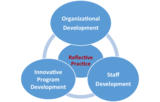
World Savvy has staff in Minneapolis, San Francisco, and New York City. We have found reflective practice to be useful in integrating innovative program development, organizational development, and staff development. These three areas of development need to be aligned, occur simultaneously, and be mutually reinforcing. Developmental evaluation both tracks and supports that alignment.
Rad Resource: Model of integrated development using reflective practice.
Hot Tip: Focus the reflective practice on issues that cut across areas of development. Collaboration is a core value of World Savvy in everything we do, so we began by sharing and analyzing positive and negative experiences with collaboration. Other core values that served as the focus for reflective practice included integrity, inclusivity, excellence and (appropriately) learning & reflection.
Hot Tip: Make reflection together a regular practice. Of course, everyone is busy and it is easy to let reflective practice slide. World Savvy has committed to doing it quarterly and making time to do it well.
Hot Tip: Reflective practice involves staff learning and using skills in recounting an incident descriptively, listening attentively, identifying patterns across stories, generating insights and lessons, and identifying actions to take from what is learned. All of this is enhanced with regular practice. It is also an effective way to intergate new staff into the organization’s culture and the meaning of core values.
Hot Tip: Ask staff to identify what they will share in advance so they come prepared. Even better, have them bring the experiences they will share in writing to contribute to the documentation of reflective practice engagement and learning.
Cool Trick: Begin each session with a review of what emerged in prior sessions to provide a sense of what has been developing.
Cool Trick: Use small groups. If facilitating the session remotely or with more than 10-15 participants, use breakout rooms or small groups as a way to create an environment more conducive to sharing.
Hot Tip: Follow through with action. Reflective practice typically yields insights with actionable implications. Failure of the program or organization to follow through can undermine interest in future reflectice practice sessions.
Rad Resources:
Patton, M.Q. (2015) "Reflective practive guidelines" in Qualitative Research and Evaluation Methods, 4th ed. (Sage), pp. 213-216.
Patton, M.Q. (2011). "Reflective practice for developmental evaluation," in Developmental Evalkatiion: Applying Complexity Concepts to Enhnace Innovation and Use (Guildfiord Press), pp. 265-270.
The American Evaluation Association is celebrating Developmental Evaluation Week. The contributions all this week to aea365 come from evaluators who do developmental evaluation. Do you have questions, concerns, kudos, or content to extend this aea365 contribution? Please add them in the comments section for this post on the aea365 webpage so that we may enrich our community of practice. Would you like to submit an aea365 Tip? Please send a note of interest to aea365@eval.org. aea365 is sponsored by the American Evaluation Association and provides a Tip-a-Day by and for evaluators.
Related posts:
DE Week: Nora F. Murphy on What’s Different in Developmental Evaluation?
DE Week: Michael Quinn Patton on Developmental Evaluation
DE Week: Wade Fauth and Allison Ahcan on the Mountain of Accountability
AEA365
.
Blog
.
<span class='date ' tip=''><i class='icon-time'></i> Jul 27, 2015 12:34pm</span>
|
|
It is appropriate that as I finish this series, a pot of my coveted sauce is actually simmering on my stove. Over these musings, I covered the posting and the story behind the role, moved forward to the research and networking, then the important vetting process in preparations for "game day" and actually meeting the candidates. In keeping with my cooking analogy, the final chapter is equivalent to the taste-testing and re-seasoning of the sauce. My goal is for no surprises at the end. I am...
SHRM
.
Blog
.
<span class='date ' tip=''><i class='icon-time'></i> Jul 27, 2015 12:33pm</span>
|
|
Overview
While you are opening Newsfeed and clicking on the following items you will face the below error/warning.
Everyone:
SharePoint returned the following error: The operation failed because the server could not access the distributed cache. Internal type name: Microsoft.Office.Server.Microfeed.MicrofeedException. Internal error code: 55. Contact your system administrator for help in resolving this problem.
Following:
It’s pretty quiet here. Follow more people to see activity in your newsfeed, or see what everyone is talking about.
Everyone:
We’re still collecting the latest news. You may see more if you try again a little later.
Scenario
Each services are using separate service accounts to configure SharePoint 2013.
Diagnosis
Check the distributed cache service is running on target server and cache cluster is up. Use the following PowerShell command to check the distributed cache host
Use-CacheCluster
Get-CacheHost
Cause:
1. The user profile service account does not have Full Control permission on User Profile service.
2. The distributed cache service account does not have Full Control permission on User Profile service.
3. The user profile service account does not have Full Control permission on my site web application.
Solution:
To correct this issue, complete the following steps:
1. Log onto the SharePoint 2013 Central Administration site as a farm administrator
2. Navigate to ‘Manage Service Applications’
3. Highlight the User Profile Service Application
4. Click the ‘Permissions’ ribbon toolbar button:
5. Add the account that is used to run the User Profile Service Application and give it full control
6. Add the account that is used to run the Distributed cache Service and give it full control:
7. Click OK
At this point it is usual to see the following displayed in the ‘Everyone’ tab of the user’s MySite:
8. Open the SharePoint 2013 Management Shell by right-clicking and choosing ‘run as administrator’
Issue the following PowerShell commands:
$wa = Get-SPWebApplication http://<MySiteURL>
$wa.GrantAccessToProcessIdentity("domainUPSApp")
At this point, the newsfeed should be up and running successfully:
Now everything will be shown as expected.
Netwoven
.
Blog
.
<span class='date ' tip=''><i class='icon-time'></i> Jul 27, 2015 12:33pm</span>
|
|
I am Ricardo Wilson-Grau, an evaluator based in Rio de Janeiro but working internationally. Increasingly, I am called upon to serve as a developmental evaluator, I have found the concept of "inquiry framework" (Chapter 8 in Developmental Evaluation[1]) to be invaluable for co-creating developmental evaluation questions and agreeing how they will be answered. As Michael Quinn Patton says: "Matching evaluation questions to particular situations is the central challenge in developmental evaluation’s situational responsiveness and adaptability…".[2]
DE does not rely on any particular inquiry framework, just as its toolbox is open to a diversity of designs, methods and tools. What is appropriate depends on the innovation challenges a project, program or organization faces at a given point in time. For example, with one client I used a complexity inquiry framework to support the two-month design of a regional peace-building initiative in a continent with a track record of failures in similar attempts. Then, we considered these potential frameworks to support the first stage of implementation: a) Driving innovation with principles, b) Focusing on systems change, c) Fomenting collaboration for innovation, d) Confronting wicked problems and e) Outcome Harvesting.
In the light of the nature of the developmental challenge this emerging initiative faced, there were sound reasons for using one or more or a combination of these frameworks. The client’s most pressing immediate need, however, was to know in as real time as possible what observable and verifiable changes it was influencing in actors who could not be predetermined. Thus, they choose Outcome Harvesting.
Hot Tip: Are you are in a situation of social innovation that aims to influence changes in behavior writ large — from change in individual actions to organizational or institutional changes of policies or practices? Do you need concrete evidence of those achievements as they happen, along with an understanding of whether and how the innovative efforts contributed to those changes? If yes and yes, Outcome Harvesting may be a useful inquiry framework for you.
Rad Resources: In this video I explain in less than three minutes the Outcome Harvesting tool. There you will also find further information.
You can obtain more information about Outcome Harvesting at Better Evaluation.
To explore using the tool with a client, consider this animated PowerPoint slide to support you in operationalizing the iterative six Outcome Harvesting steps.
[1] For more on developmental inquiry frameworks, see Michael Quinn Patton, Developmental Evaluation: Applying Complexity Concepts to Enhance Innovation and Use, Guilford, 2011, Chapter 8.
[2] Ibid, pages 227-228.
The American Evaluation Association is celebrating Developmental Evaluation Week. The contributions all this week to aea365 come from evaluators who do developmental evaluation. Do you have questions, concerns, kudos, or content to extend this aea365 contribution? Please add them in the comments section for this post on the aea365 webpage so that we may enrich our community of practice. Would you like to submit an aea365 Tip? Please send a note of interest to aea365@eval.org. aea365 is sponsored by the American Evaluation Association and provides a Tip-a-Day by and for evaluators.
Related posts:
Ricardo Wilson-Grau on Outcome Harvesting
DE Week: Nora F. Murphy on What’s Different in Developmental Evaluation?
DE Week: Michael Quinn Patton on Developmental Evaluation
AEA365
.
Blog
.
<span class='date ' tip=''><i class='icon-time'></i> Jul 27, 2015 12:33pm</span>
|
|
Overview
You are using SharePoint 2007, 2010, 2013 as On Prem. You are implementing Site Columns and Content Types to support your desired Taxonomy and document object models within your organization.
Either in a near future or you are in the process of moving to the cloud with O365, completely or partially for collaboration workloads.
Beware of your implementation choices for Site Columns and Content Types and what is upcoming!
Background
Currently you have following options to implement the Site Columns and Content Type structures within the SharePoint platform and what it means to you.
Options for implementing Site Columns and Content Types and the impact:
Deploying over the browser from Site Settings>Galleries>Site Columns or Content Types
SharePoint determines the GUID assigned for ID
Site Columns and Content Types are coded in to the content database
Deploying Declaratively:
By XML Site Column and Content Type Definitions in the form of Elements.xml
Baking the above XML definitions in to the Feature Solution
You determine the GUID assigned for the ID
Eventually deploying the solution to run as Full Trust Code (FTC)
Site Columns and Content Types are coded in to the content database
Impact of GUIDs
Impact of the Site Columns and Content Type IDs which are in the form of GUIDs
When you upgrade this site collection to next available version, the GUIDs are maintained.
When you are migrating to O365, you will need a tool to migrate the content.
You will need a commercial migration tool or custom code written tool by yourself.
You should ensure to retain the GUIDs of your Site Columns.
You want to retain the GUIDs so that the Site Column referencing libraries and lists data are intact.
Issue
Like we all know there is no support for Farm Solutions with O365, we have no option to deploy our Site Columns and Content Types with our desired GUIDs.
Content Type Hub
If you have deployed a Content Type Hub configuration to consolidate your enterprise Site Columns and Content Types, with migration to O365, you are still stuck with the above issue. (Also please read below how the migration products behave)
Migration products behavior with the GUIDs
The major migration product vendors I had spoken to, comment that they cannot retain the Site Column and Content Type GUIDs while their tools copy over for obvious reason. However, post the copy process the tools will reset such GUIDs to be all in synch.
Alternative Coding/Scripting Options
For those who have to opt for custom development option, beware of below aspects:
You can implement Site Column with a specific GUID via the AddasXMLSchema method on the SPWeb.Fields object.
However ContentType does not have similar AddAsXMLSchema support API.
However you can implement Content Type with your specific GUID via new SPContentType object and assign the GUID to the myContentType.ID field
Update with SP1
With the recent release of SP 2013 SP1, CSOM APIs has been now revised to support the assignment of specific ID for the content type creation.
From KB2817429 Developers are unable to specify a Content Type ID when creating Content Types in the client object model.
For example see http://blogs.msdn.com/b/vesku/archive/2014/02/28/ftc-to-cam-create-content-types-with-specific-ids-using-csom.aspx
Netwoven
.
Blog
.
<span class='date ' tip=''><i class='icon-time'></i> Jul 27, 2015 12:32pm</span>
|
|
How do we teach the people we hire? Generally, businesses look for people who can already do most of the tasks required of them for a job, then teach them the rest as they work. This is often known as the 70:20:10 rule in learning management, where 70% of employee training comes from simply doing their job, 20% from speaking with their coworkers, and 10% from formal training. But as time goes on, employees often need targeted professional development in order to proceed to the next phase of their careers (and...
SHRM
.
Blog
.
<span class='date ' tip=''><i class='icon-time'></i> Jul 27, 2015 12:32pm</span>
|
|
Hello evaluators and blog enthusiasts! I’m Sheila B Robinson, aea365’s Lead Curator and sometimes Saturday contributor. As you may realize, curating a daily blog is a big job! I owe a lot to the many sponsored week volunteer curators who take on the task of shepherding authors and conducting first round checks and edits of a whole week’s worth of blog posts.
Lesson Learned: Sponsored or themed weeks are curated by a volunteer who gathers posts from a group - an AEA Topical Interest Group or Affiliate, or other group of evaluators with some common interest. Sponsored weeks include six posts (Sunday-Friday), as the Saturday spot is reserved for our aea365 staff contributors.
Sponsored week curators have three key tasks to complete:
1.) Recruit and invite authors ensuring the group has six confirmed posts (and ideally an emergency backup) on topics of interest to evaluators.
Many groups start this process by sending an open call to their membership to ask for authors and then supplementing those who volunteer with invited posts or posts from group leaders. Ensure that all contributors (a) commit to the timeline, and (b) receive a link to the contribution guidelines and instructions to follow them. Send reminders at appropriate times before the deadline.
2.) Identify the general topics of the contributions and coach to minimize overlap.
Cool Trick: Your posts do not need to follow a theme! If you are curating for a TIG, for example, the posts would naturally be about the larger topic (e.g. PK-12 Educational Evaluation) but do not need to relate to each other with any additional subtopic or theme. That said, people have proposed themed weeks in which the posts do indeed share a common thread, and this is OK too!
We recommend that the sponsored week curator have posts due the 10th of the month prior to publication, as the batch of six is due to an aea365 curator on the 20th of the month prior to publication. This timeline allows for final reminders and editing as needed.
3.) Edit posts (if needed) and determine the order in which they should be published.
Ensure that the first post introduces the week:
Identify a Sunday contributor to introduce the week’s general topic, noting that the Sunday post:
Should NOT introduce the week’s presenters or their individual topics - this post is NOT an index.
Should offer content (tips, resources, lessons learned) beyond the introduction.
Hot Tip: Email aea365@eval.org to reserve a week for your group! I will send you a worksheet with all this information and more to make the job easy!
Do you have questions, concerns, kudos, or content to extend this aea365 contribution? Please add them in the comments section for this post on the aea365 webpage so that we may enrich our community of practice. Would you like to submit an aea365 Tip? Please send a note of interest to aea365@eval.org . aea365 is sponsored by the American Evaluation Association and provides a Tip-a-Day by and for evaluators.
Related posts:
Sheila B. Robinson on Being an AEA365 Sponsored Weeks Archaeologist!
Best of aea365: Sheila B Robinson on Being an AEA365 Sponsored Weeks Archaeologist!
Sheila B Robinson on A Call for Blog Posts!
AEA365
.
Blog
.
<span class='date ' tip=''><i class='icon-time'></i> Jul 27, 2015 12:31pm</span>
|
|
This blog is part of the following series:
Installing and configuring the Lotus Domino Server - Part 1
Search Lotus Notes Documents from SharePoint 2013 - Part 2
Search Lotus Notes Documents from SharePoint 2013 - Part 3
Overview
In the Part 1 of this series I have covered how to install the Lotus Notes Domino Server. In the Part 2 of the series I will discuss how to crawl a Notes database with SharePoint 2013 Search. As part of this effort, we will also need to install the Lotus Notes client and connector on the SharePoint 2013 Server. This blog includes detailed steps of installing Lotus notes connector for SharePoint 2013.
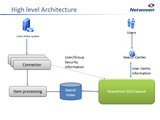
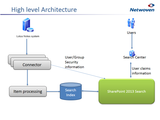
In this blog we’ll install Lotus notes Client with Designer & Administrator. This is the high level architecture of how search works.
Server Details:
Start by logging in to your SP2013 server with Setup account where the SharePoint 2013 is already installed, we will install Lotus Notes client here.
Task 1: Installing Lotus Notes Admin/Designer Client:
Login to SharePoint 2013 Server with the SP_Install user account. The SP_Install user account is a member of the Administrators group on this server. We are now going to install the 32-bit version of Lotus Notes R8.5 on my SharePoint 2013 server. We will install the client and the Designer or Administrator software here.
Step 1: Download the lotus designer & double click.
Step 2: Start Installation. The files are extracted and the installation process begins. The Install Wizard screen appears. Click Next to continue.
Accept the terms in the License Agreement screen and click Next to continue.
Modify the settings in the Custom Setup screen as shown below. Select the Domino Designer and the Administrator Client to be installed since we are going to install all this machine. You can install the Designer & Administrator on another virtual machine (recommended). But in this server we need to install Lotus notes client. Click Next to continue.
Now we can see these icons in the desktop
Step 3: Configure Lotus Notes Client
Let us now configure the Lotus notes client. Double click the Lotus Notes 8.5 icon on the Desktop. Enter your domino server details here. Click Next.
Now we are installing the client in different machine and not in the server. We have entered here the server IP or host name.
Step 5: Continue Installation
Now map the network drive where the domino server stores ID files, generally it is in "Data" folder. Right click the "computer" icon from your desktop and map the network drive. While installation it will ask you for the User ID file, just locate it.
It will prompt for userid/password. Type your Administrator user id & password.
First screen appears
Task 2: Create the Mappings database
Now we will create the Mappings database, which will map the lotus user ID with windows Domain account. For this we have to open the Lotus Notes Designer client.
Open the Lotus Notes Designer client and create a Notes database.
Step 1: Open the Domino Designer client
Step 2:
I have opened the Lotus Notes Designer client and created a Notes database and named it "NWMappng".
Created a new form with same name "NWMappng".
Now we need to add two fields with proper labels.
Changing the Window Title of the form to "NWMappng".
Then created a view named "NWMappng"
The View Selection formula is: SELECT Form="NWMappng".
Add a column for each field and sort the first column in ascending order.
The view design appears like this:
Remove the default view. So only NWMappng view is there in view.
Task 3: Create a Discussion Database
Lotus Note connector service started, now we will crawl our Lotus Notes Database from SharePoint.
Step 1:
Open the Lotus Notes
Click on Files->Application->New
Create a new Discussion Database ,based on the template
Task 4: Add a user account mapping to the Mappings database
We have created the Mappings database named "NWMappng" with Domino designer. Now we will enter data in this Database.
Step 1: Open the Lotus Notes Client
Click on File -> Open Application ->select "NWMappng"
Then click Create->"NWMappng"
Enter the user ID you want to map
Here I am adding my user ID and mapping with my windows User ID
Conclusion
We have covered detailed installation of Lotus notes in a SharePoint Server. In my next article, I will discuss installing lotus notes connector from SharePoint. At this point you can create different types of databases in your Lotus notes, which you search from SharePoint.
Netwoven
.
Blog
.
<span class='date ' tip=''><i class='icon-time'></i> Jul 27, 2015 12:31pm</span>
|