Blogs
|
On June 24, @SHRMNextchat chatted with Aliah Wright (@1SHRMScribe) about HR and Cybersecurity. In case you missed this important chat filled with tips and advice for protecting your organization's most sensitive information, you can read all the tweets below: [View the story "#Nextchat RECAP: HR and Cybersecurity " on Storify] ...
SHRM
.
Blog
.
<span class='date ' tip=''><i class='icon-time'></i> Jul 27, 2015 12:39pm</span>
|
|
Introduction
Variations is a SharePoint feature that permits you to synchronize content between different multi-lingual sites in SharePoint by translating the content from the source site to target. It’s a mechanism that can be used to serve the same content to multiple audiences. This feature is available in SharePoint 2013 as well as SharePoint Online.
In SharePoint 2010, variations were also used to provide content specifically targeted towards audiences that used different devices (such as phones) or that required different branding. In SharePoint 2013, you can achieve those results using Device Channels.
Implementing Variations
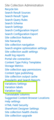
Variations are enabled and set at the site collection level and hence the settings for variations can be found on the Site Settings for the root site. If your site is a sub-site, you will need to click the Go to top level site settings link under Site Collection Administration group in the Site Settings page.
There are 3 variation related links available under the Site Collection Administration settings - Variations Settings, Variation Labels and Variation logs
Variations Settings - The Variations Settings page lets you configure variations setup in your site such as - setting variations selectively or across the site collection, recreating deleted target pages, updating target page web parts and sending out notifications once the translation is complete and target pages are updated.
Variation Labels - The Variation Labels page lets you create labels for the different languages that you want to support in your site(s) and the hierarchies between them.
Variation Logs - As the name suggests, the Variation Logs page lets you view the logs of the content that was translated.
Broadly, the steps required to setup and configure Variations are -
Plan and create a variations hierarchy to synchronize the content from the source site to destination site(s)
Create a site that supports variations
Setup appropriate variation labels
Configure the variation hierarchy between the required variation labels
To be able to create variations in a SharePoint site, the site either Needs to be created using one of the Publishing Site templates or should have the Publishing Infrastructure feature activated
Following section talks about how to create a label and walk you through the translation process using Microsoft Translation service that comes out of box.
Create Target Label
Edit / Add content in Source Label
Content updates should appear in Target Label
Translate content in Target label using Microsoft Translation Service
Step by Step walkthrough:
1. Create Target label (French in this case):
a) Go to Site Settings -> Variation Labels and click on "New Label" link.
b) Select Site Template Language and Locale
c) Click Next to enter Label Name and Display Name
d) Select Translation Options, In this case French:
e) I would like the target to be updated as soon as the source is updated:
f) Review page. Click Finish:
g) You should see the new label. And Hierarchy column should be "Yes". If it says "No", click on "Create Hierarchies" link
2. Add / Edit Content in source Label
For demo purpose, I added content to default.aspx page of the site then checked-in, published and approved (typical content authoring workflow process) the page. This is how the page looks after approval.
Got to pages library and select the default.aspx page and click on "update all targets" link in ribbon.
Give it few minutes for system to sync the changes to all target labels. There we have it!
Once the content reflects in Target Label, You can use the Microsoft Translation service to translate the content for you. Or you can do the translation manually. (Manual translation workflow is not the scope of this article). Click the button highlighted below to use Microsoft Translation service.
Translation is an asynchronous operation. You will get an email notification as soon as translation is complete.
Finally, we see the content translated to French. You can publish the page to show that for your site users.
Hope this helps and Thank you.
Netwoven
.
Blog
.
<span class='date ' tip=''><i class='icon-time'></i> Jul 27, 2015 12:39pm</span>
|
|
Identifying top performing teams and individuals is critical to building a culture of accountability and high employee engagement. Real-time desktop analytics provides the operational intelligence necessary to evaluate true staffing needs, reduce outsourcing, and lower the overall costs of operations. By providing dashboards with insights into the actual performance your managers will be empowered to make "in the moment" coaching and guidance for optimal performance.
Using your own data learn how your operations will save. Try our new online Savings Calculator.
Three areas you can find savings.
Productive Hours
On average US employees waste 2 hours a day beyond breaks and lunch hour. If your organization can re-capture part or all of this "empty labor" productivity will increase and your organization can do more work with the same staff. WorkiQ provides real-time data showing the amount of time spent on productive and non-productive activities and categorizing the type of work that consumes the most labor hours.
Reducing overtime
According to a recent survey, Americans work an average of one hour of overtime each week. Sometimes your the business may need overtime to get through peak periods but how do you truly know without accurate data? WorkiQ provides real-time data showing where you may need more, or less, of the (work being done).
Eliminating self-reporting
Many companies only have self-reporting methods or use disparate data from multiple core systems to track the amount of work and time spent on various tasks. These self-reporting methods rob your employees of time that could be spent doing real work.
Try our ROI tool and let us know what you think.
WorkiQ Savings Calculator
The post ROI from Real-Time Desktop Analytics appeared first on WorkiQ Blog.
WORKIQ
.
Blog
.
<span class='date ' tip=''><i class='icon-time'></i> Jul 27, 2015 12:39pm</span>
|
|
As the Community Manager for AEA, I am the voice behind our twitter page. Joining Twitter and interacting on the site can sometimes be a daunting task. I am here to show you that it is easy to join twitter and actively engage other users.
So, why join Twitter?. The site is a great resource for both your professional and personal life. Your colleagues and friends are on Twitter and you don’t want to miss out on the conversations.
Rad Resource: Here are the top five reasons to join Twitter
You control the content
Unlike Facebook, where you can’t always control the posts that you want to see in your newsfeed, Twitter is more of a one-way street -if someone follows you, you’re not automatically obligated to read about his or her life. You can choose who you want to follow and what you want your twitter feed to focus on. For example, if you want your twitter feed to focus on evaluation, then follow other evaluation professionals who tweet about topics that resonate with your interests. Click here to see a past blog post with a list of evaluators you can follow.
A common misconception: Just because you are on Twitter, does not mean you have to see what Kim Kardashian is eating for breakfast—you have to choose to follow her to get this exclusive scoop.
It’s a news source
Twitter can help you stay up-to-date on evaluation trends and the latest evaluation news. Twitter members post articles, interesting facts, and tips and tricks focused on creating better evaluations. You can use a hashtag to follow certain trends. Popular hashtags that we follow are: #eval, #YearofEval, #dataviz.
Twitter is a great resource for Networking
Twitter is a great place to find other professionals who share your interests. A big draw for the site is that it connects everyone from CEOs to comedians with everyday people. Follow people that you find interesting and start a conversation with them. Bounce evaluation techniques and ideas off each other. Before you know it, you have created a strong network of evaluation supporters, professionals, and leaders.
Stay connected at conferences
Twitter is a great resource when you are attending a conference. Most conferences have a hashtag for their event (ie: #Eval15 for Evaluation 2015) which you can follow on Twitter and stay up-to-date on conference news and announcements.
Tweeting can be a great way to reflect on your learning while attending a conference and can provide a useful record of key points. Tweet good sound bites, bits of new knowledge, quotes from presenters, your own opinions or connections you are making, or interesting facts or statistics. This provides a great summary of the event and helps others gain more out of the conference—especially if they were not able to attend or missed a session.
Click here to see a past AEA365 post about the success of last year’s event hashtag (#Eval14)
Its only 140 characters!
If you’re anything like me, you can read novels, in-depth features, and articles several thousand words long, but there are times when you’d rather not have to. Twitter is short, sweet, and straight to the point! It also presents a fun challenge—express yourself in 140 characters or less.
Be sure to follow AEA on Twitter(@aeaweb) . If you’re already connected, please feel free to print this out and give it to a colleague of yours. They just might be interested in joining the conversation.
Do you have questions, concerns, kudos, or content to extend this aea365 contribution? Please add them in the comments section for this post on the aea365 webpage so that we may enrich our community of practice. Would you like to submit an aea365 Tip? Please send a note of interest to aea365@eval.org . aea365 is sponsored by the American Evaluation Association and provides a Tip-a-Day by and for evaluators.
Related posts:
Dan McDonnell on Making New Friends and Mastering Lesser-Known Twitter Features Without Third Party Apps
Dan McDonnell on Using Twitter to Enhance Your Conference Experience
Dan McDonnell on Getting More Out of Twitter Hashtags
AEA365
.
Blog
.
<span class='date ' tip=''><i class='icon-time'></i> Jul 27, 2015 12:39pm</span>
|
|
Anonymity Goes from Bullying to Hiring? Why It Can Work for Passive Tech Talent and Startups Hiring Anonymity is big business in the Internet. Or so it seemed. The PEW Research Center found in 2013 that 25% of all adult Internet users have posted a comment anonymously on the Web before. However, the same year the backlash against anonymity began. The Huffington Post got rid of anonymous profiles to "promote civil discourse, citing the maturing of the Web. Other Websites such as ESPN, Popular Science and USA Today followed by either banning anonymous posts or eliminating their comments sections altogether....
SHRM
.
Blog
.
<span class='date ' tip=''><i class='icon-time'></i> Jul 27, 2015 12:39pm</span>
|
|
Overview
In this blog, I will show how to display one or many SharePoint lists in SharePoint web page using REST services and out of the box features. The source lists can be anywhere in a site collection. At minimum the user is required to have read permission for all those lists you intent to display. I will use knockout.js and jQuery to implement this. There will be no server side code and hence with the deployment is just very simple. You can utilize this method both in On-Prem and office 365 environments.
Background
With SharePoint 2003, 2007 and 2010 we have been using Server Site Object model to develop our SharePoint web parts. Start with SharePoint 2010, Client Side Object Model was introduced. Based on the fit for purpose we have utilized CSCOM to develop our Web parts. With the simplicity of CSCOM and combined with the new REST Services you can write an effective web part.
Microsoft continuous to invest heavily on "Client side object model". Starting from SharePoint 2010 several REST services were developed corresponding to server side "SharePoint object model" or web Services. Microsoft continued this approach in SharePoint 2013. There is now REST service available for most function available through server side object model. There are over 2000 REST based services available in SharePoint 2013 out of the box. I will show in this blog how easy it is to use REST services in SharePoint 2013 along with HTML5 Knockout.js templates.
Implementation
Site Structure Preparations
Create a sub site in the root site collection. I gave it a name "NWSush"
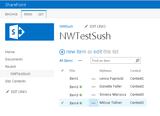
Create a list in the site "NWSush". I created the custom list by name "NWTestSush". The list has 3 fields 1) Title, 2) MyName, 3) context. I added four items in that list. Our code will show these four list items in the root site
Deployment Preparation
I will keep all HTML, JavaScript files and style sheets (CSS) in site collection’s "Site Assets" library. This library is provided out of the box in SharePoint site / site collection
HTML code will refer to style sheets and JavaScript files in the same folder (folder of the library)
Code Development
1. Provide the CSS and .js files in "Site Assets" library
2. Do following changes in HTML file
Change the file extension from .htm to .txt
Get the url’s of css and .js file stored in the "Site Assets" library and provide these url’s in the html file
3. Upload the text file created (in step 2 above) to "Site Assets" library
4. Drag /drop content editor web part in SharePoint root site in a "web part zone" wherein we want to display the SharePoint list items. "Content Editor Web Part" is available in "Media and Content" category of Web Part selection
5. Edit "Content Editor Web part" and in "Content Link" provide the url of uploaded text file. In my case it was "/NWSush/SiteAssets/NWProjects.txt". NWProjects.htm was my original html file
6. If everything is done correctly the contents of SharePoint list will appear correctly in the web page
Code
1. HTML: NWProjects.htm
Here is my html code. See how I used "Knockout.js" from aspnetcdn site. If you are using "https://" then remember to replace "http://" with https:// in the url for download of knockout-2.2.1.js and jQuery-1.7.1.js. Please note that jQuery version 2.2 didn’t work with SharePoint 2013
I have provided Knockout template with the <script> tag within the HTML itself
<!DOCTYPE html>
<html xmlns="http://www.w3.org/1999/xhtml">
<head>
<title>Netwoven Project Pages</title>
</head>
<body>
<link rel="stylesheet" href="/NWSush/SiteAssets/StyleSheet1.css" type="text/css" />
<script type="text/javascript" src="http://ajax.aspnetcdn.com/ajax/jQuery/jQuery-1.7.1.js"></script>
<script src="http://ajax.aspnetcdn.com/ajax/knockout/knockout-2.2.1.js"></script>
<script src="/NWSush/SiteAssets/NWProjects.js"></script>
<!-<input id="Button1″ type="button" value="button" onclick="LoadNWData(0)" />->
<div id="KO1″>
<div data-bind="template:{name:’KOListTemplate’, foreach:results, as:’listRow’}"></div>
<script type="text/html" id="KOListTemplate">
<table class="imagetable">
<tr>
<td data-bind="text:Title"></td>
<td data-bind="text:MyName"></td>
<td data-bind="text:Context"></td>
</tr>
</table>
</script>
</div>
</body>
</html>
2. JavaScript: NWSush.js
Here is the javascript file. Check How I used recursion. I have provided the values "NWSush" twice in the var subsites. This is to mimic multiple lists. See how the SharePoint REST call to provide all list items is called in $.ajax.
var results = [];
var rootSite = "http://srv-symmat-113/”;
var subSites = ["NWSush", "NWSush"];
var length = subSites.length;
function LoadNWData(index) {
$.ajax(
{
url: rootSite + subSites[index] + "/_api/web/lists/GetByTitle(‘NWTestSush’)/items",
success: function (data) {
results.push.apply(results, data.d.results);
if (index == (length - 1)) {
ko.applyBindings(results);
return;
}
else {
index++;
LoadNWData(index);
}
},
error: function (fn, status, error) {
alert(‘There was error:’ + error);
},
method: "GET",
headers: {
"ACCEPT": "application/json;odata=verbose"
}
}
);
}
$(function () { LoadNWData(0); })
3. Stylesheets:stylesheet1.css
I have used following very simple stylesheet to display html table. You can create your own stylesheet or download one from the internet
table.imagetable {
font-family: verdana,arial,sans-serif;
font-size:11px;
color:#333333;
border-width: 1px;
border-color: #999999;
border-collapse: collapse;
}
table.imagetable th {
background:#b5cfd2 url(‘cell-blue.jpg’);
border-width: 1px;
padding: 8px;
border-style: solid;
border-color: #999999;
}
table.imagetable td {
background:#dcddc0 url(‘cell-grey.jpg’);
border-width: 1px;
padding: 8px;
border-style: solid;
border-color: #999999;
width:200px;
}
button.buttonClass {
padding:8px;
}
4. Here is the display of list contents in the Content Editor web part.
Netwoven
.
Blog
.
<span class='date ' tip=''><i class='icon-time'></i> Jul 27, 2015 12:39pm</span>
|
|
OpenConnect’s Michael Cupps to Discuss the Future of Technology
and Data Capture at the Analytics for Insurance Conference
Mr. Cupps will be a featured speaker at the Analytics for Insurance Conference session titled "Improve claims processing by identifying & understanding ‘dark events’"
Dallas, TX, May 4, 2015 - OC WorkiQ, a leader in workforce intelligence and business process analytics software and services, today announced that Senior Vice President Michael Cupps will be a featured speaker and panelist at the Analytics for Insurance Conference, May 11 - 12 in Toronto, Canada. Mr. Cupps will focus on how analytics can make the claims process more efficient and transparent.
The claims handling process involves large amounts of data, but unfortunately much of this data has historically not been tracked and measured in a meaningful way. Emerging technologies and the use of analytics that are capable of tracking this data are crucial to the future of the claims handling process.
Prior to the panel discussion, Mr. Cupps will deliver a presentation on understanding Dark Events, which are discrete actions that occur in the processing of a claim. The panel discussion will cover a number of key areas related to the role of analytics in the claims process. The additional capabilities that analytics enables - from developing new predictive models, to providing more insight into previously opaque aspects of the claims process - will be crucial to the evolution of the industry. Mr. Cupps will focus specifically on how to track and utilize previously unusable data in ways the industry has not seen before.
"As with any production process, the efficiency of the claims process solely depends on the knowledge of the best path to completion. In reality, that knowledge or visibility is not always clear," said Michael Cupps, Senior Vice President, OC WorkiQ. "The only way to improve that process is to remove ‘Dark Events’. These are discrete actions that affect the state of claims, and normally go unrecorded by most claims processing and analysis systems. Being armed with the ability to capture this data creates valuable and actionable analysis that can lead to greater efficiencies."
The Analytics for Insurance Conference takes place May 11 - 12 at the Westin Prince Toronto. Mr. Cupps will give his presentation on May 11 from 2:50 p.m. - 3:10 p.m., and the subsequent panel discussion will take place from 3:30 p.m. - 4:00 p.m.
The post Analytics for Insurance Conference - Canada appeared first on WorkiQ Blog.
WORKIQ
.
Blog
.
<span class='date ' tip=''><i class='icon-time'></i> Jul 27, 2015 12:39pm</span>
|
|
My name is Michael Quinn Patton and I am an independent evaluation consultant based in Minnesota but working worldwide. In the last few months I have been editing a book on Developmental Evaluation Exemplars with Kate McKegg and Nan Wehipeihana. (The book will be out in September.) Tomorrow Kate will share what the Developmental Evaluation (DE) cases we’ve reviewed and analyzed reveal about readiness for DE. The following day Nan will share what we’ve learned about developmental evaluator roles and responsibilities. The rest of the week will include reflections from three more developmental evaluators. Today I’m going to introduce the principles of DE that have emerged from this collaborative work with DE practitioners. .
Hot Tip: Understand the specific niche of DE. DE provides evaluative information and feedback to social innovators, and their funders and supporters, to inform adaptive development of change initiatives in complex dynamic environments.
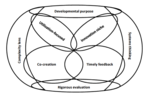
Rad Resource: Eight Essential Principles of Developmental Evaluation
Developmental purpose
Evaluation rigor
Utilization focus
Innovation niche
Complexity perspective
Systems thinking
Co-creation
Timely feedback
Hot Tip: The principles are inter-related and mutually reinforcing. The developmental purpose (#1) frames and focuses evaluation rigor (#2), just as rigor informs and sharpens understanding of what’s being developed. Being utilization-focused (#3) requires actively engaging with social innovators as primary intended users and staying attuned to the developmental purpose of the evaluation as the priority. The innovation niche of DE (#4) necessitates understanding the situation and what is developed through the lens of complexity (#5) which further requires understanding and applying systems thinking (#6) with timely feedback (#8). Utilization-focused engagement involves collaborative co-creation (#7) of both the innovation and the empirically-based evaluation, making the developmental evaluation part of the intervention.
Cool Trick: Work with social innovators, funders, and others involved in social innovation and DE to determine how the principles apply to a particular developmental evaluation. This increases their relevance based on contextual sensitivity and adaptation, while illuminating the practical implications of applying guiding DE principles to all aspects of the evaluation.
Rad Resources:
Developmental evaluation: Applying complexity concepts to enhance innovation and use by Michael Quinn Patton (Guilford Press, 2011).
A developmental evaluation primer. Jamie Gamble. (2008). Montréal: The J.W. McConnell Family Foundation.
The American Evaluation Association is celebrating Developmental Evaluation Week. The contributions all this week to aea365 come from evaluators who do developmental evaluation. Do you have questions, concerns, kudos, or content to extend this aea365 contribution? Please add them in the comments section for this post on the aea365 webpage so that we may enrich our community of practice. Would you like to submit an aea365 Tip? Please send a note of interest to aea365@eval.org. aea365 is sponsored by the American Evaluation Association and provides a Tip-a-Day by and for evaluators.
Related posts:
Michael Quinn Patton on Developmental Evaluation
DE Week: Michael Quinn Patton on Developmental Evaluation
MNEA Week: Pat Seppanen on Evaluating Complex Adaptive Systems
AEA365
.
Blog
.
<span class='date ' tip=''><i class='icon-time'></i> Jul 27, 2015 12:39pm</span>
|
|
Overview
You have already deployed SharePoint Product technology for your organization as Content Management platform. More recently you may have deployed Office 365 or plan to. You may have both on-prep and O365. In addition you may have deployed or plan to deploy an Enterprise Search with MS Fast Search product technology.
With above scenario which is not very uncommon to come across nowadays since the adaption of SharePoint, Office 365 and the Fast Search. You are challenged with being able to successfully play out your business use cases along with underlying technical integration’s.
You are not alone!
Register for our upcoming Webinar where in collaboration with BA Insight our team of Netwoven experts will discuss and shed some light on these very same use cases and options to consider.
Learn about the industry trends and some market data
Review Microsoft and IDC statistics
Why people are adopting more cautiously
Learn the patterns of adoption and the search strategy
Use Cases
How the uses cases are influencing the search strategy. We will discuss below use cases that are foundational to think through for your hybrid search strategy:
What if my content is all in cloud?
What about my different content sources?
How does content migration impact?
What is the scope of built in search ?
In a hybrid scenario could we split the search workload?
What about technical layer with Exchange, Lync and Yammer?
What about my content access scopes such as extranet, public site, intranet?
What about search driven navigation?
How about setting up extranet search with permissions?
Can we see our extranet from intranet?
What about index vs federate?
What is Hybrid Cloud - Hybrid Workload?
See you at the Webinar!
Netwoven
.
Blog
.
<span class='date ' tip=''><i class='icon-time'></i> Jul 27, 2015 12:38pm</span>
|
|
OpenConnect is excited to sponsor and exhibit at AHIP Institute 2015 ! There is an impressive line up of excellent speakers and topics. We look forward to spending time with our customers and potential customers in these sessions and throughout the exhibit hall.
We will be at booth #1149 on Wednesday 6/3 Noon to 7pm and all day on Thursday 6/4. Stop by for a demonstration of desktop analytics and ask about automation solutions. We can share how our Health Insurance customers are seeing significant payback and benefits using these tools.
Join us for southern hospitality and country music with the great Martina Mcbride on Wednesday evening! See you in Nashville!
The post OpenConnect at AHIP Institute 2015 appeared first on WorkiQ Blog.
WORKIQ
.
Blog
.
<span class='date ' tip=''><i class='icon-time'></i> Jul 27, 2015 12:38pm</span>
|