Blogs
|
In this article, we will briefly look at the capabilities of HBase, compare it against technologies that we are already familiar with and look at the underlying architecture. In the upcoming parts, we will explore the core data model and features that enable it to store and manage semi-structured data.
Introduction
HBase is a column-oriented database that’s an open-source implementation of Google’s Big Table storage architecture. It can manage structured and semi-structured data and has some built-in features such as scalability, versioning, compression and garbage collection. Since its uses write-ahead logging and distributed configuration, it can provide fault-tolerance and quick recovery from individual server failures. HBase built on top of Hadoop / HDFS and the data stored in HBase can be manipulated using Hadoop’s MapReduce capabilities.
Let’s now take a look at how HBase (a column-oriented database) is different from some other data structures and concepts that we are familiar with Row-Oriented vs. Column-Oriented data stores. As shown below, in a row-oriented data store, a row is a unit of data that is read or written together. In a column-oriented data store, the data in a column is stored together and hence quickly retrieved.
Row-oriented data stores -
Data is stored and retrieved one row at a time and hence could read unnecessary data if only some of the data in a row is required.
Easy to read and write records
Well suited for OLTP systems
Not efficient in performing operations applicable to the entire dataset and hence aggregation is an expensive operation
Typical compression mechanisms provide less effective results than those on column-oriented data stores
Column-oriented data stores -
Data is stored and retrieved in columns and hence can read only relevant data if only some data is required
Read and Write are typically slower operations
Well suited for OLAP systems
Can efficiently perform operations applicable to the entire dataset and hence enables aggregation over many rows and columns
Permits high compression rates due to few distinct values in columns
Introduction Relational Databases vs. HBase
When talking of data stores, we first think of Relational Databases with structured data storage and a sophisticated query engine. However, a Relational Database incurs a big penalty to improve performance as the data size increases. HBase, on the other hand, is designed from the ground up to provide scalability and partitioning to enable efficient data structure serialization, storage and retrieval. Broadly, the differences between a Relational Database and HBase are:
Relational Database -
Is Based on a Fixed Schema
Is a Row-oriented datastore
Is designed to store Normalized Data
Contains thin tables
Has no built-in support for partitioning.
HBase -
Is Schema-less
Is a Column-oriented datastore
Is designed to store Denormalized Data
Contains wide and sparsely populated tables
Supports Automatic Partitioning
HDFS vs. HBase
HDFS is a distributed file system that is well suited for storing large files. It’s designed to support batch processing of data but doesn’t provide fast individual record lookups. HBase is built on top of HDFS and is designed to provide access to single rows of data in large tables. Overall, the differences between HDFS and HBase are
HDFS -
Is suited for High Latency operations batch processing
Data is primarily accessed through MapReduce
Is designed for batch processing and hence doesn’t have a concept of random reads/writes
HBase -
Is built for Low Latency operations
Provides access to single rows from billions of records
Data is accessed through shell commands, Client APIs in Java, REST, Avro or Thrift
HBase Architecture
The HBase Physical Architecture consists of servers in a Master-Slave relationship as shown below. Typically, the HBase cluster has one Master node, called HMaster and multiple Region Servers called HRegionServer. Each Region Server contains multiple Regions - HRegions.
Just like in a Relational Database, data in HBase is stored in Tables and these Tables are stored in Regions. When a Table becomes too big, the Table is partitioned into multiple Regions. These Regions are assigned to Region Servers across the cluster. Each Region Server hosts roughly the same number of Regions.
The HMaster in the HBase is responsible for
Performing Administration
Managing and Monitoring the Cluster
Assigning Regions to the Region Servers
Controlling the Load Balancing and Failover
On the other hand, the HRegionServer perform the following work
Hosting and managing Regions
Splitting the Regions automatically
Handling the read/write requests
Communicating with the Clients directly
Each Region Server contains a Write-Ahead Log (called HLog) and multiple Regions. Each Region in turn is made up of a MemStore and multiple StoreFiles (HFile). The data lives in these StoreFiles in the form of Column Families (explained below). The MemStore holds in-memory modifications to the Store (data).
The mapping of Regions to Region Server is kept in a system table called .META. When trying to read or write data from HBase, the clients read the required Region information from the .META table and directly communicate with the appropriate Region Server. Each Region is identified by the start key (inclusive) and the end key (exclusive)
HBase Data Model
The Data Model in HBase is designed to accommodate semi-structured data that could vary in field size, data type and columns. Additionally, the layout of the data model makes it easier to partition the data and distribute it across the cluster. The Data Model in HBase is made of different logical components such as Tables, Rows, Column Families, Columns, Cells and Versions.
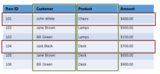
Tables - The HBase Tables are more like logical collection of rows stored in separate partitions called Regions. As shown above, every Region is then served by exactly one Region Server. The figure above shows a representation of a Table.
Rows - A row is one instance of data in a table and is identified by a rowkey. Rowkeys are unique in a Table and are always treated as a byte[].
Column Families - Data in a row are grouped together as Column Families. Each Column Family has one more Columns and these Columns in a family are stored together in a low level storage file known as HFile. Column Families form the basic unit of physical storage to which certain HBase features like compression are applied. Hence it’s important that proper care be taken when designing Column Families in table. The table above shows Customer and Sales Column Families. The Customer Column Family is made up 2 columns - Name and City, whereas the Sales Column Families is made up to 2 columns - Product and Amount.
Columns - A Column Family is made of one or more columns. A Column is identified by a Column Qualifier that consists of the Column Family name concatenated with the Column name using a colon - example: columnfamily:columnname. There can be multiple Columns within a Column Family and Rows within a table can have varied number of Columns.
Cell - A Cell stores data and is essentially a unique combination of rowkey, Column Family and the Column (Column Qualifier). The data stored in a Cell is called its value and the data type is always treated as byte[].
Version - The data stored in a cell is versioned and versions of data are identified by the timestamp. The number of versions of data retained in a column family is configurable and this value by default is 3.
Conclusion
In this article we looked at the major differences between HBase and other commonly used relational data stores and concepts. We also reviewed the HBase Physical Architecture and Logical Data Model. In the next article, we will cover the different ways in which clients can communicate with HBase and some of the other features that make HBase unique and well-suited for distributed data processing. Look forward to your questions and comments!
Netwoven
.
Blog
.
<span class='date ' tip=''><i class='icon-time'></i> Jul 27, 2015 12:48pm</span>
|
|
We know many of you are concerned, confused and maybe even going crazy trying to stay in compliance with all the government regulations. Don’t worry - TriNet is here to help. EEO-1 Report? Do I...
Visit site for full story...
TriNet
.
Blog
.
<span class='date ' tip=''><i class='icon-time'></i> Jul 27, 2015 12:48pm</span>
|
|
Issue
SharePoint 2013 installation went well without any errors, however, I was not able to get to Central Admin. It consistently gave me access denied error message and login prompt.
Solution
After a great deal of troubleshooting, it turned out that there was a setting in IIS that needed to be corrected. This setting is easy to overlook. There could be other settings that could lead to similar behavior, But this one worked for me.
Here is the entry I needed to create.
Here is how I created it:
Go to IIS Manager (inetmgr.exe)
Select Server name from left pane, go to Authorization Rules
Right click anywhere on the body section and add
Select "All Anonymous Users" section and click ok
This loaded the Central Admin for me.
Netwoven
.
Blog
.
<span class='date ' tip=''><i class='icon-time'></i> Jul 27, 2015 12:48pm</span>
|
|
This post was originally published on the TriNet Cloud blog. If there’s one thing that many of us in the HR space are getting tired of, it is the painfully egregious articles that insinuate...
Visit site for full story...
TriNet
.
Blog
.
<span class='date ' tip=''><i class='icon-time'></i> Jul 27, 2015 12:48pm</span>
|
|
The recent data breach of the U.S. Office of Personnel Management (OPM), which exposed the Social Security numbers, job assignments, performance ratings, and other personal identifying information of millions of present and former government employees, has major implications for HR departments worldwide. The hack has left many questioning whether or not their own systems are strong enough to prevent a future breach. In the SHRM Online article "What are the Lessons for HR in Government Hacking?" by Aliah Wright, data security expert Nigel...
SHRM
.
Blog
.
<span class='date ' tip=''><i class='icon-time'></i> Jul 27, 2015 12:48pm</span>
|
|
In an Office 365 Tenant, you must be careful with External Sharing in a few different scenarios:
1) If your organization has migrated from an existing on premise Farm in which you used "NT Authority\Authenticated Users" to grant permissions
2) If your organization is making use of External sharing via "Everyone" (including external users) in Office 365
If your organization’s Office 365 Admin has allowed External Sharing for Authenticated Users:
And has also enabled External Sharing on 1 or more External Site Collections:
If a Site user shares anything (a document, folder, library, site etc.) with an external user:
That user become part your Organization’s Office 365 Tenant Directory.
Once part of this Directory, Any Site Collection that is configured for External Sharing and has permissions granted to securables via "NT Authority\Authenticated Users" or "Everyone" will now be available to all External Users (as well as organization users) with whom anyone at your company has shared anything with
Be extremely careful to review your permissions before opening up external sharing!
Netwoven
.
Blog
.
<span class='date ' tip=''><i class='icon-time'></i> Jul 27, 2015 12:48pm</span>
|
|
On June 26, 2015, the Supreme Court of the United States (SCOTUS) issued a ruling in the Obergefell v. Hodges case, requiring that all states must recognize marriages between same-sex couples. For...
Visit site for full story...
TriNet
.
Blog
.
<span class='date ' tip=''><i class='icon-time'></i> Jul 27, 2015 12:48pm</span>
|
|
The SHRM Annual Conference and Exposition starts in one week in Las Vegas !! This venue seems to scream "extrovert" with all of it’s bright lights, shows and casinos. With over 15,000 people, expected the Conference can be overwhelming for everyone. We don’t write about extroverts much because we assume they’re going to fill the space with their outward thoughts anyway !! I have to be honest, most of my friends are not extroverts. I assumed because they were active socially, they’d be extroverted. I am, so why wouldn’t they be? (1st fault of the extrovert . . . ) Being...
SHRM
.
Blog
.
<span class='date ' tip=''><i class='icon-time'></i> Jul 27, 2015 12:47pm</span>
|
|
In this blog article, I will discuss about how we can easily integrate a WordPress blog with your SharePoint site with the help of SharePoint 2013 designer Work Flow.
Introduction
Using SharePoint 2013 REST API and building SPD based simple Workflow, we will fetch most recent 2 or more post from the blog site and add those in a SharePoint list.
If you are more interested about the advantages and disadvantages of the REST API, and for a comparison with other API’s, please refer the MSDN site here.
REST API Reference
Firstly, we will try to get the REST API provided by WordPress. Let’s go to WordPress developer’s resources site.
http://developer.wordpress.com/docs/api/
Here, you can get the list of REST API, from which you can choose as per your requirement.
In order to retrieve most recent 2 blogs we will be specifying the number=2 in the parameter such as below:
https://public-api.wordpress.com/rest/v1/sites/yourwordpressblog.com/posts/?number=2
Building SP2013 SPD Workflow
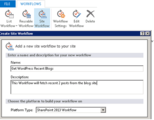
Open the SharePoint Designer and click on site work flow.
As you can see in the image, we will build a site workflow named "Get WordPress Recent Blogs", which will read the information from WordPress Blog, create list items in a SharePoint list for further use.
Once the site workflow is created, you simply add stages, loops and name them properly, and then link them actions.
Name Stage 1 "Get Myblog Recent Items" and then add five actions and one Loop block, as shown in Figure 1.
Figure 1. Workflow Stage 1
Action 1 is not really required, but it will add one item to the history list, which can be used for debugging.
Action 2 is added to Call HTTP Web Service action. The HTTP URL is set to https://public-api.wordpress.com/rest/v1/sites/yourwordpressblog.com/posts/?number=2 and the HTTP method is set to "GET".
Action 3 is again logging to history, the response should be "OK". This means the WF is calling API perfectly.
Now we are creating a variable "itemcount "as Integer and setting the value to 2, since we require only 2 blogs.
Last action is to create another variable "Index" and set the value to 0.
In the "Call HTTP Web Service" action statement we do not set RequestContent or RequestHeaders parameter because we do not need to. We are only interested in the output of that web service. By simply setting the response parameter to a variable ResponseContent, the output of this web service call will get stored in the variable ResponseContent, which is a dictionary type variable.
The output of the web service looks like the following:
{"found":5,"posts":[{"ID":124,"author":{"ID":7899331,"email":false,"name"
……………..
To handle each blog item we could use the "responsecontent" variable so that we can put our action statement like "Get ([%Variable: Index%])/Title from Variable: responsecontent" to get Post’s property.
From the web service output we can see the ID, title. These are within "posts{".
Just to make things simple and to show a clear structure of post inside web service output, the full path to access post’s properties, the statement like "Get posts[%Variable: Index%])/ID from Variable: ResponseContent" will retrieve ID property of an item.
These are the workflow variable details:
Figure 2 shows all the different action items.
Firstly, pick the ID
Next, delete the same ID if the item exits in the SP list
Next four action is updating the variables with posts’ value
Last item in the loop is to add an item in the SharePoint List
Now increase the counter by 1 and the same actions are for the 2nd Item.
This is it! You are now you are ready to publish and start this workflow.
If you want to run the workflow daily, then add another action item after the loop end such as below:
Now your SharePoint List will have the blog content . That’s it
Conclusion
Lastly, adding a delay for 24 hours every day will enable the list to update with 2 recent blogs. This is a very simple yet very powerful example of REST API and SPD workflow.
Netwoven
.
Blog
.
<span class='date ' tip=''><i class='icon-time'></i> Jul 27, 2015 12:47pm</span>
|
|
I am grateful to have been chosen as a member of the #SHRM15 bloggers for the 3rd consecutive year. Unfortunately, I will not be able to make it due to family and work commitments. Although I cannot attend this year, I have attended several national conferences and each one has been memorable. The national conference provides yet another opportunity for HR professionals to learn new things, meet new people, and connect with friends....
SHRM
.
Blog
.
<span class='date ' tip=''><i class='icon-time'></i> Jul 27, 2015 12:46pm</span>
|