Blogs
|
Overview
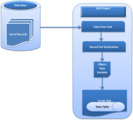
You are developing an SSIS package. You want to work with a record in a Script Task. This blog discusses how you can get access to the Records in the Script task using the Object Type variable.
Steps
1. Go to Start >>All Programs>> Microsoft SQL Server 2012>>
Click on SQL Server Data Tools
2. Visual Studio >> File >>New >>
Click on Project
3. Select Business Intelligence Under Installed Templates >>Integration Service Project
Click Ok Button
4. Now you can see inside Visual studio >> solution Explorer >> Package.dtsx
5. Double click on Package.dtsx file and you can see the design editor of that package
6. Now go to the SSIS tool box and add (either drag and drop or double click) a Data flow task controls inside the control Flow Tab
7. Add another control script Task from SSIS toolbox to Control flow tab
8. Create a connection between Data Flow Task and Script Task using the down side arrow of Data Flow Task
9. Now we need to add an object type variable, so go to the right most side of the Package Design Editor and click on Variables
10. It will open a Window, Bottom side of your visual studio
11. Click on Add Variable
12. Give a Name to the variable and Select Data type as Object
13. Double click on Data Flow Task this will bring you data flow tab
14. We can use any kind of data source like Flat File Source, Excel Source, OleDb Source etc. I have Used OleDB Source, as per project requirement.
So just drag and drop the OleDB source control from SSIS tool box to Data Flow Tab
15. Double Click on OleDB Source control and we will get the oleDB Source editor.
Inside the Connection Manager we have to set the OleDB connection Manager.
16. Click on the New button and we will get the Configuration ole DB Connection Manager Window
17. Again, Click New button, put the server Name and Select the database Name in the Connection manager window and click ok.
18. Now select the Table Name
19. We can choose selected columns from the selected table, just go to the columns tab and unselect the checkbox beside the column and click ok.
20. Add another control into the Data Flow Tab called Record set destination
21. Connect the Ole DB source with Record set Destination using the bottom side of Ole Db source control.
22. Double click on the Record set Destination , we’ll get the Advance editor for record set destination, inside the component properties tab there is a custom property called Variable Name. Select the object type variable (that we have previously created).
23. Go to the next tab called Input columns and choose the columns as per your requirement, also we can set the usage type whether the columns are read only or read write type. After all required settings click OK.
24. Go to the control flow tab back and double click on the Script Task control. And set the Object type variable that we had created as Read Write variables.
25. Click on the Edit Script Button , this will open another project called Vista Project, Inside that project ScriptMain.cs is the class file, where we have to add some codes to access the Object type variable that we have passed from our SSIS package.
26. We’ll add a namespace for ole DB data adapter using System.Data.OleDb;
And add some lines of code inside the main method or any other sub method
OleDbDataAdapter da = new OleDbDataAdapter();
DataTable dt = new DataTable();
da.Fill(dt, Dts.Variables[0].Value);
27. Finally we can get all the records passed from our SSIS package inside the data table object.
Output
Netwoven
.
Blog
.
<span class='date ' tip=''><i class='icon-time'></i> Jul 27, 2015 12:43pm</span>
|
|
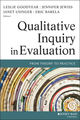
Hello from snowy Boston! I’m Leslie Goodyear, one of the co-leaders of the Qualitative Methods TIG, and a co-editor, with Jennifer Jewiss, Janet Usinger and Eric Barela, of a new book about qualitative evaluation called Qualitative Inquiry in Evaluation: From Theory to Practice (2014, Jossey-Bass).
When I was a new evaluator, I had a major "a-ha experience" while interviewing a group of women who participated in an HIV/AIDS training for parents. They were bilingual Spanish-English speakers, and I was definitely the least fluent in Spanish in the room. As they discussed ways in which HIV could be transmitted, one woman referred to a specific sexual activity in Spanish, and all the others laughed and laughed. But I didn’t know for sure what they meant; I had an idea, but I wasn’t sure. Of course, I laughed along with them, but wondered what to do: Ask for them to define the term (and break the momentum)? Go with the flow and not be sure what they were talking about? Well, I decided I’d better ask. When I did, and the woman said what she meant, another woman said, "Oh, no! That’s not what it means!" She went on to explain, and the next woman said she thought it meant something else. And on and on with each woman! It turns out that none of them agreed on the term, but they all thought they knew what it was.
Lesson Learned: Ask stupid questions! I was worried I would look stupid when I asked them to explain. But in fact, we all learned something important in discussing the term, but also in talking about how we can think we all agree on something, but if it’s not clarified, we can’t know for sure.
Lesson Learned: Putting aside ego and fear are critical to getting good information in qualitative evaluation. Often, stupid questions open up dialogue and understanding. Sometimes they just clarify what’s being discussed. Other times, even though you might already know the answer, they give participants an important opportunity to share their perspectives in greater depth.
Rad Resource: More stories about being in the trenches of qualitative inquiry in evaluation, and asking stupid questions, can be found in the final chapter of our new book, Qualitative Inquiry in Evaluation: From Theory to Practice (2014, Jossey-Bass).
The American Evaluation Association is celebrating Qualitative Evaluation Week. The contributions all this week to aea365 come from evaluators who do qualitative evaluation. Do you have questions, concerns, kudos, or content to extend this aea365 contribution? Please add them in the comments section for this post on the aea365 webpage so that we may enrich our community of practice. Would you like to submit an aea365 Tip? Please send a note of interest to aea365@eval.org. aea365 is sponsored by the American Evaluation Association and provides a Tip-a-Day by and for evaluators.
Related posts:
QUAL Eval Week: Leslie Goodyear, Jennifer Jewiss, Janet Usinger, and Eric Barela on The Role of Context in Qualitative Evaluation
QUAL Eval Week: Leslie Goodyear, Jennifer Jewiss, Janet Usinger and Eric Barela on Qualitative Inquiry in Evaluation
QUAL Eval Week: Michael Quinn Patton on Purposeful Qualitative Sampling
AEA365
.
Blog
.
<span class='date ' tip=''><i class='icon-time'></i> Jul 27, 2015 12:42pm</span>
|
|
Dark Events, or work steps that normally go uncaptured, can dramatically change critical business decisions or cause a security risk. The discovery, collection, and analysis of Dark Events is necessary for reliable process analytics and operational intelligence.
In this presentation delivered at Analytics for Insurance, USA, Edward M.L. Peters, CEO at OpenConnect, explains how uncovering Dark Events has helped insurance companies recover millions in lost business value. Although examples are based on insurance claims, this presentation provides actionable insight to anyone with a focus on business process improvement, six sigma, and business intelligence.
Request WorkiQ Demo
The post CEO Talk : Are Dark Events Distorting Your Business Analytics? appeared first on WorkiQ Blog.
WORKIQ
.
Blog
.
<span class='date ' tip=''><i class='icon-time'></i> Jul 27, 2015 12:42pm</span>
|
|
It is starting to feel like we are truly lying to rest #HRYesterday. The paper pushing, request based, reactive and anti-tech savvy form of operating is our past. Rejuvenating! Last week, I had the pleasure of getting coffee with Chris Rutter, 33, CHRO of Matrix Systems Holding, LLC. in Columbus, OH. Impressed yet?! Please let me continue! We discussed everything from being a young leader to workplace equality. Chris was dressed in denim shorts cuffed at the knee, thong sandals, backpack and a tattoo gracing his right forearm that read "familie" in a thick brush script. More casual than...
SHRM
.
Blog
.
<span class='date ' tip=''><i class='icon-time'></i> Jul 27, 2015 12:41pm</span>
|
|
Overview
In SharePoint the chrome is defined by the master page which in turn defines the overall layout, core styling, page behavior, location and size of the content area and includes any common controls shared across pages. The content area is defined by the content page which in turn inherits style and behavior from the master page and interacts with controls on the chrome. Minimal Download Strategy is a new feature in SharePoint 2013 that improves client rendering performance and fluidity when navigating from page to page by download only the changes between two compatible pages. Fewer bytes will be downloaded and the page will appear more quickly. It reduces the amount of markup, CSS, scripts, etc. that the browser needs to parse and render improving overall performance and provides smoother transitions.
Despite the MDS, a change as simple as a custom color applies differently to the three types of sites - Project, Publishing and Team.
Issue
While on one hand, applying custom colors to theme for sites is not an available option, the other issue is to modify theme color for all subsites of a site or all sites within a site collection.
Solution
The following processes sequentially walk through modifying the theme color to a custom color using Microsoft SharePoint Color Palette Tool and then modifying site or site collection settings to apply the custom color throughout.
Modifying Theme Color
1. It is of foremost importance to identify the theme so that changes can be made only at the required place. The first step is to check access to Site Settings >> Composed Looks.
Look for the Current item name in the Name column. The .spcolor file can be downloaded by clicking on its name (in the Theme URL column of the corresponding item). Note this file path as it will be handy later.
Note: To go to Composed Looks, if the site is at the root site collection, modify URL as http://domain/_catalogs/design/AllItems.aspx, else, http://domain/sites/<site-collection>/<site-name>/_catalogs/design/AllItems.aspx where, domain is your domain; replace <site-collection> and <site-name> accordingly.
2. Open the downloaded .spcolor file in the tool as in the below screen shot to display the color palettes specified in the existing file.
3. Click on the color picker (as highlighted in the below image) and fill in the R, G, B and Opacity with the desired values.
Once filled, the color picker gets modified to the desired color as shown below.
4. For applying the effect, click on Recolor beside the color picker and the master page is modified with tones of the desired color as shown below.
5. Save the changes in the .spcolor file with another name. The new name should be carefully chosen as to not overwrite any of the available files.
6. To put the new .spcolor file into effect, the new file has to be first uploaded to the Theme Gallary >> 15.
Note: While Composed Looks exists individually for each site, Theme Gallary is unique to a site collection. If you can’t find ‘Themes’ from the site settings, you could use this URL http://domain/sites/<site-collection>/_catalogs/theme/15/ to directly get to the library.
While modifying at the root site collection, the Theme Gallary is accessible directly at the root like - http://domain/ _catalogs/theme/15/
Click on new document and upload the file as shown below.
7. Once uploaded, copy the file URL from the menu options by click on ‘…’
8. Now that the modified file exists in the library, note the Master Page URL of the Current item to add a new item to Composed Looks for the desired theme color.
Add the new theme color as a New Item in the Composed Looks. Fill in the required fields. Enter the Master Page URL pointing to that of the Current item and the Theme URL points to the newly added .spcolor file.
Upon saving the custom theme color becomes available as an item in the Composed Looks, which in turn is an option in Change The Look.
9. The final step is to select and apply the modified theme from the Change The Look option.
Click on Try it out and then opt for either Yes, keep it to apply or No, not quite there to exit.
Branding of Sites with Custom Color
Nature of Sites
Inheritance exists differently is the Publishing, Team and Project Site type site collections. To apply branding, it is required that inheritance is tweaked through workarounds.
Publishing Site
By virtue of its configuration, subsites of the type Publishing Site inherit theme of the parent site of the same type. The theme applied to the site collection root site descends to all the existing subsites and also to the new subsites created after the theme is applied. This phenomenon ceases to exist beyond the node (site) where inheritance is broken, thereafter which all subsites inherit from their immediate parent.
Team Site
Any subsite on a team site type site collection assumes the default color. Changing the theme color is local for a particular site and does not impact existing or new subsites within it. The same pattern is observed on theme color change on the site collection root site.
However, if the theme color characteristics of a publishing site is required along with the characteristics of a team site, this can be easily done on the root site of the Team Site type site collection by activating the SharePoint Server Publishing Infrastructure from Site Settings >> Site Collection Administration >> Site collection features
Project Site
A Project Site behaves similar to a Team Site, wherein a theme color changes is only local to a site. Similarly, SharePoint Server Publishing Infrastructure should be activated at the site collection level to achieve inheritance.
Workaround for Inheritance
This workaround is intended for Project and Team sites type site collections where Master page will not be still a direct option under Site Settings >> Look and Feel as in the Publishing Site.
To the site collection URL in the address bar, append _layouts/15/ChangeSiteMasterPage.aspx to reach to Site Master Page Settings
At the root site of the site collection, the Inherit the theme from the parent of this site option remains disabled. However, once the feature is activated, Reset all subsites to inherit the theme of this site option is available under Theme
Before
After
To apply theme color of the root to all sub sites, select Reset all subsites to inherit the theme of this site. This will ensure that all existing subsites are overridden to the root theme color.
Limitation
This workaround however does not apply to new sites created at any level underneath the site collection. Hence, any newly created site will not assume the custom color of the site collection. This can be checked on the Site Master Page Settings for subsites (by appending _layouts/15/ChangeSiteMasterPage.aspx to the site URL in the address bar)
Existing Subsites
New Subsites
Workaround
A manual selection of Inherit the theme from the parent of this site paints the newly created subsite with the site collection theme color.
This manual process has to be meticulously performed on all new subsites, unless inheritance is broken thereby creating a node below which the subsites inherit from their immediate parent site, until the node is reached.
Netwoven
.
Blog
.
<span class='date ' tip=''><i class='icon-time'></i> Jul 27, 2015 12:41pm</span>
|
|
My name is Michael Quinn Patton. I train evaluators in qualitative evaluation methods and analysis. Qualitative interviews, open-ended survey questions, and social media entries can yield massive amounts of raw data. Course participants ask: "How can qualitative data be analyzed quickly, efficiently, and credibly to provide timely feedback to stakeholders? How do every day program evaluators engaged in ongoing monitoring handle analyzing lots of qualitative responses?"
Hot Tip: Focus on priority evaluation questions. Don’t think of qualitative analysis as including every single response. Many responses aren’t relevant to priority evaluation questions. Like email you delete immediately, skip irrelevant responses.
Hot Tip: Group participants’ responses together that answer the same evaluation question even if the responses come from different items in the interview or survey. Evaluation isn’t item by item analysis for the sake of analysis. It’s analysis to provide answers to important evaluation questions. Analyze and report accordingly.
Hot Tip: Judge substantive significance. Qualitative analysis has no statistical significance test equivalent. You, the evaluation analyst, must determine what is substantively significant. That’s your job. Make judgments about merit, worth, and significance of qualitative responses. Own your judgments.
Hot Tip: Keep qualitative analysis first and foremost qualitative. Ironically, the adjectives "most," "many," "some," or "a few" can be more accurate than a precise number. It’s common to have responses that could be included or omitted, thus changing the number. Don’t add a quote to a category just to increase the number. Add it because it fits. When I code 12 of 20 saying something, I’m confident reporting that "many" said that. Could have been 10, or could have been 14, depending on the coding. But it definitely was many.
Cool trick: Watch for interoccular findings — the comments, feedback, and recommendations that hit us between the eyes. The "how many said that" question can distract from prioritizing substantive significance. One particularly insightful response may prove more valuable than lots of general comments. If 2 of 15 participants said they were dropping out because of sexual harassment, that’s "only" 13%. But any sexual harassment is unacceptable. The program has a problem.
Lesson Learned: Avoid laundry list reporting. Substantive significance is not about how many bulleted items you report. It’s about the quality, substantive significance, and utility of findings,
Lesson Learned: Practice analysis with colleagues. Like anything, you can up your game with practice and feedback, increasing speed, quality, and confidence.
Rad Resources:
Goodyear, L., Jewiss, J., Usinger, J., & Barela, E. (Eds.), Qualitative inquiry in evaluation: From theory to practice.Jossey-Bass.
Patton, M.Q. (2015) Qualitative Research and Evaluation methods, 4thSage Publications.
The American Evaluation Association is celebrating Qualitative Evaluation Week. The contributions all this week to aea365 come from evaluators who do qualitative evaluation. Do you have questions, concerns, kudos, or content to extend this aea365 contribution? Please add them in the comments section for this post on the aea365 webpage so that we may enrich our community of practice. Would you like to submit an aea365 Tip? Please send a note of interest to aea365@eval.org. aea365 is sponsored by the American Evaluation Association and provides a Tip-a-Day by and for evaluators.
Related posts:
Cultural Competence Week: Osman Ozturgut, Tamara Bertrand Jones, and Cindy Crusto on Cultural Competence in Evaluation Dissemination Working Group: Teaching in the 21st Century
Jacquelyn Christensen on Wordle and Survey Anchors
Heather Bennett on Before the coding begins…
AEA365
.
Blog
.
<span class='date ' tip=''><i class='icon-time'></i> Jul 27, 2015 12:41pm</span>
|
|
5 reasons HR is interested in desktop analytics
Accurate and real-time performance measurement
Identifying top performing teams and individuals is critical to building a culture of accountability and high employee engagement. WorkiQ provides the operational intelligence necessary to evaluate true staffing needs, reduce outsourcing, and lower the overall costs of operations. By providing real-time dashboards with insights into the actual performance at any given moment your managers will be empowered to provide guidance for optimal performance.
Increase employee engagement
Companies with "Highly Engaged" employees outperform other companies by 23%. Identifying areas based on true performance measurement to reward top employees is difficult for most companies. Real-time workforce analytics provides the ability to see in real-time top performers. With this info companies can introduce gamification, leader boards, and rewards systems to encourage new levels of engagement.
Identifying hidden potential
Analytics can be used to identify high-performing teams and individual team members. Analyzing patterns of successful work results enables companies to spot individuals who outperform their peers, utilize their time efficiently, and analyze the best use of business applications to complete the job at hand.
Identify coaching opportunities
On average US employees waste 2 hours a day beyond breaks and lunch hour. However, most companies only have self-reporting methods to track the amount of work and time spent on various tasks. Real-time collection and reporting reveals instant performance measurement of both in-house and remote employees it allows for "in the moment coaching" opportunities and significantly recaptures empty labor hours.
Sourcing Big Data for workforce analysis
Do you have the right amount of people assigned to the appropriate inventory of work? How many people do you need to handle open enrollment this year? Take the guessing out of staffing; WorkiQ provides data on actual activity and work productivity providing true FTE analysis insuring your company has the right size team for the workload.
The post Desktop Analytics for HR appeared first on WorkiQ Blog.
WORKIQ
.
Blog
.
<span class='date ' tip=''><i class='icon-time'></i> Jul 27, 2015 12:41pm</span>
|
|
Overview
You have SharePoint 2010 or 2013 environment. You have also deployed My Sites and your users have been consuming the My Site Feature.
You had an old Users OU in your AD and now you decided to create a new OU for whatever reason. Then gradually you have been moving the users from old OU to the new OU.
While this moving users has been occurring for period of time, now few end users are receiving a warning email message that one of their reporting employee my site will be deleted.
This issue is around the below described specific scenario and the suggested resolution could be reviewed in your specific scenario based.
Issue Diagnosis
Let’s say you have following below OUs for in your AD.
OldUsers is the old OU
New Users is the new OU
In the last one month your IT has been gradually moving users from OldUsers to New Users OU. In the SharePoint, the User Profile Synchronization is pointed only to the OldUsers OU. As the users were moved to the new OU New Users, following is been happening:
The moved User Profile was deleted from SharePoint.
If that user had a mysite and if the user had an assigned Manager in AD,
Then the MySite secondary administrator was changed to the Manager
The My Site was queued for Deletion in 14 Days.
An email was sent to the Manager (This is first warning)
After 12 days a second email was sent with notification that after 3 days the site will be deleted.
If that user had a mysite and if the user had no Manager in AD,
No email sent to any body
No change in user administrator
The site is queued for deletion in 14 days
The entire process is managed by a timer job called "MySite Cleanup job". This timer job runs every day from 1AM-6AM (Default setting).
Resolution
First and foremost disabled this timer job "MySite Cleanup job" to avoid any accidental My Site Deletion. The resolution is to gracefully recover from this issue and not directly edit the database table content which is not supported by Microsoft. So proceed with your own caution.
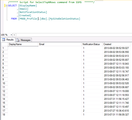
You will first need to determine the current state of User Profiles in the SharePoint Profile Database. Run the following simple Select query against your SharePoint Profile database
SELECT [DisplayName]
,[Email]
,[NotificationStatus]
,[Created]
FROM [PROD_Profile].[dbo].[MySiteDeletionStatus]
(For privacy reasons, the names and emails have been removed from the below screenshot)
For each user, against the Created Date, calculate the 14 days date.
In the SharePoint farm, under UPS revise the Connection to ensure to include the New User and OldUsers are also included
Run full profile synchronization
Ensure that now you can find all the users (or whatever the latest number from the above SQL query run) under the User Profiles
Under the Monitoring, ensure the MySite Cleanup job is now active and is scheduled to run daily (Default)
Ensure that the daily database backups are done
Next step is to watch out for each of the marked user site collections to be deleted (The Site Collection does not get permanently deleted, with SP 2010 SP1 changes, the site collection now stays in the Site Collection Recycle bin at the Farm level) by the MySite Cleanup job, on the dates that you calculated by adding the 14 days.
After a site is deleted by the MySite Cleanup job, next day, re-run the SQL Query to ensure that the user name is not listed in the SQL Query.
Now run the following PowerShell command to check and restore the deleted site collection from the internal site collection recycle bin.
On any server in the farm, run the Powershell, and run Get-SPDeletedSite, example below, Jane Smith site was deleted.
Now run the Restore-SPDeletedSite as below"
At this stage the user site is back as is and there is no entry for this site in the database table MySiteDeletionStatus
If a manager was assigned as secondary site contact, then from the Central Administration, remove the manager as the Secondary Site Contact.
This should get the User Site Collection re-instated as is.
Netwoven
.
Blog
.
<span class='date ' tip=''><i class='icon-time'></i> Jul 27, 2015 12:40pm</span>
|
|
5 reasons Back Office Operations are interested in workforce analytics & automation
Measure in Real-Time
On average US employees waste 2 hours a day beyond breaks and lunch hour. Real-time workforce analytics will capture activity in real-time of all associates, even those at-home, to identify productive and unproductive practices. WorkiQ captures all counts, time, and outcomes of activity so work can be categorized and managed.
Manage in Real-Time
Employees perform at varying levels of productivity and efficiency based on training, engagement, experience, and even acute situations in their personal life. Effective managers need reliable operational intelligence to identify if workers need training or if they are not optimizing work hours. WorkiQ provides the operational intelligence needed to identify, improve, and reward employees through real-time management dashboards.
Improve in Real-Time
Dramatic productivity improvements start with increased engagement. Through awareness, scorecards and gamification; WorkiQ workforce analytics delivers a wide range of reports that empower people at every level of the company to compete and engage. Through real-time metrics, as opposed to infrequent performance reviews, associates know how they are performing in comparison to their peers, where they excel, and where they can improve. Managers can compare employees with accurate standards, reward superstar performers, and see where their team ranks against other groups or departments.
Optimizing labor costs
Companies using data-driven decision-making were, on average, 5% more productive and 6% more profitable than their competitors. Back office operations largest cost is labor. By using WorkiQ, you are able to identify empty labor and recapture productive hours, identify the true need for overtime costs, and utilize real-time data to measure the ability to work the inventory.
Robotic Process Automation
A natural utilization of operational intelligence is identifying opportunities for robotic process automation (RPA). Identifying and replacing routine or repetitive back office work with software robots enables companies to save considerable expense. Insurance companies, for example, use robots for their claims / auto-adjudication improvement. With a complete solution to identify, configure and execute WorkiQ RPA provides a complete solution providing significant savings back to your company.
The post Analytics and Automation for the Back Office appeared first on WorkiQ Blog.
WORKIQ
.
Blog
.
<span class='date ' tip=''><i class='icon-time'></i> Jul 27, 2015 12:39pm</span>
|
|
Hello, I’m Eric Barela, another of the co-leaders of the Qualitative Methods TIG, and a co-editor with Leslie Goodyear, Jennifer Jewiss, and Janet Usinger of a new book about qualitative evaluation called Qualitative Inquiry in Evaluation: From Theory to Practice (2014, Jossey-Bass).
In my time as an evaluator, I have noticed that discussions of methodology with clients can take on several forms. Most often, clients are genuinely interested in knowing how I collected and analyzed my data and why I made the methodological choices I did. However, clients have occasionally tried to use what I like to call "methodological red herrings" to dispute less-than-positive findings. I once worked with a client who disagreed with my findings because they were not uniformly positive. She accused me of analyzing only the data that would show the negative aspects of her program. I was able to show the codebook I had developed and how I went about developing the thematic content of the report based on my data analysis, which she was not prepared for me to do. I was able to defend my analytic process and get the bigwigs in the room to understand that, while there were some aspects of the program that could be improved, there were also many positive things happening. The happy ending is that the program continued to be funded, in part because of my client’s efforts to discredit my methodological choices!
Lesson Learned: Include a detailed description of your qualitative inquiry process in evaluation reports. I include it as an appendix so it’s there for clients who really want to see it. It can take time to write a detailed account of your qualitative data collection and analysis processes, but it will be time well spent!
Rad Resource: More stories about being in the trenches of qualitative inquiry in evaluation, and using detailed descriptions of qualitative inquiry choices and processes, can be found in the final chapter of our new book, Qualitative Inquiry in Evaluation: From Theory to Practice (2014, Jossey-Bass).
The American Evaluation Association is celebrating Qualitative Evaluation Week. The contributions all this week to aea365 come from evaluators who do qualitative evaluation. Do you have questions, concerns, kudos, or content to extend this aea365 contribution? Please add them in the comments section for this post on the aea365 webpage so that we may enrich our community of practice. Would you like to submit an aea365 Tip? Please send a note of interest to aea365@eval.org. aea365 is sponsored by the American Evaluation Association and provides a Tip-a-Day by and for evaluators.
Related posts:
QUAL Eval Week: Michael Quinn Patton on Qualitative Inquiry in Utilization-Focused Evaluation
Michelle Searle on the Role of Arts in Evaluation
CAP Week: Sandra Eames on Utilization Focused Evaluation
AEA365
.
Blog
.
<span class='date ' tip=''><i class='icon-time'></i> Jul 27, 2015 12:39pm</span>
|