Blogs
|
I am Humberto Reynoso-Vallejo, Director of Research and Policy for the Office of the State Auditor in Massachusetts. This week the research team will share a series of useful tips for evaluating large and complex projects using our work evaluating the Health Care Cost Containment Law in Massachusetts known as Chapter 224.
Chapter 224 is a large and comprehensive health care initiative with the primary purpose of containing the growth of health care expenditures. The law also supports strategies for payment reform, for integrated health care delivery systems to increase access and quality of services for diverse population groups in different regions and for specific services such as primary care and behavioral health, promoting workplace wellness, for reducing the prevalence of preventable health conditions, and for reducing racial/ethnic disparities in health outcomes.
Conducting such a large and complex evaluation required the development of a comprehensive evaluation plan capturing all essential pieces of the law. The evaluation design needed to structure all the different topic areas into a logical and concise plan that guides all activities performed by a multidisciplinary team of researchers and data analytic experts. We proposed a longitudinal mixed-methods quasi-experimental design for the evaluation, aiming to determine the law’s impact on health care costs, access to health care services and quality of care, the health care workforce, and the impact on public health. Another important task to address in the evaluation plan is collecting and securing relevant data that will allow the team to perform both quantitative and qualitative analysis.
Hot Tips:
Be specific when indicating the purpose of the evaluation. Include a brief but comprehensive overview and indicate who the target audience is.
Divide the evaluation plan into manageable units, including high level evaluation questions that correspond to the overall topic areas, followed by principal evaluation questions on specific aspects of each topic area.
After describing the purpose of the evaluation and stating the evaluation questions, write an introductory section that provides an overview of the project and any relevant information that allows the reader to understand more about the background of what you are evaluating.
Develop a research design for the evaluation that includes methodology, data sources, sampling, and analysis strategy.
Create a table with a set of measures for each principal evaluation question including their respective data sources. Also, indicate the analytical procedures for either quantitative or qualitative data.
Create a timeline for evaluation activities, including research undertakings (collecting and analyzing data), engaging key stakeholders (as members of an Advisory Committee and/or research participants), creating interim reports, white papers, blogs, drafts, and other pertinent documentation for the evaluation process.
The American Evaluation Association is celebrating Large Scale Evaluation Week. The contributions all this week to aea365 come from evaluators who have worked on the evaluation of the Health Care Cost Containment Law in Massachusetts. Do you have questions, concerns, kudos, or content to extend this aea365 contribution? Please add them in the comments section for this post on the aea365 webpage so that we may enrich our community of practice. Would you like to submit an aea365 Tip? Please send a note of interest to aea365@eval.org. aea365 is sponsored by the American Evaluation Association and provides a Tip-a-Day by and for evaluators.
Related posts:
MA PCMH Eval Week: Ann Lawthers on Triangulation Using Mixed Methods Appeals to Diverse Stakeholder Interests
DOVP Week: JS Sulewski on Using Universal Design to Make Evaluations Inclusive
Linda Cabral and Laura Sefton on So many to choose from: How to Select Organizations for a Site Visit
AEA365
.
Blog
.
<span class='date ' tip=''><i class='icon-time'></i> Jul 27, 2015 12:30pm</span>
|
|
I’m busy. You’re busy. You are probably sitting in the airport on your way to #SHRM15 going what.the.hell. I’m not ready. Where do I go? I just sat at gate C3 and recognized 20 others from my small town going to the conference. Multiply that times a jillion other cities. Crap. It’s a big conference. DON’T SWEAT. You’ll be fine. If you are late on the upswing prepping for the conference, here are a few things that will ease your mind. The App is where it’s at. Download the SHRM15 app. It really will walk you through a bunch of...
SHRM
.
Blog
.
<span class='date ' tip=''><i class='icon-time'></i> Jul 27, 2015 12:29pm</span>
|
|
This blog is part of the following series:
Installing and configuring the Lotus Domino Server - Part 1
Search Lotus Notes Documents from SharePoint 2013 - Part 2
Search Lotus Notes Documents from SharePoint 2013 - Part 3
Overview
In this series of blogs I will be discussing how to crawl a Lotus Notes database from SharePoint 2013 environment. In the Part 1 series I have covered how to Install Lotus Notes Domino Server, in the Part 2 I have covered how to install the Lotus Notes client and connector on the SharePoint 2013 Server.
With the above two blogs we had already installed Domino Server and then Lotus notes Client with Designer & Administrator in SharePoint App server.
In this blog we will register and configure Lotus Notes Connector and crawl from SharePoint 2013 search.
Task 1: Register Lotus Notes with the Service
We have already created the Mappings database named "NWMappng" with Domino designer and entered the UserID through which we want to make the connection between Lotus note & SharePoint.
Now we will register the service.
Step 1:
Run the NotesSetup.exe.
Open the C:Program FilesMicrosoft Office Servers15.0Bin1033 folder.
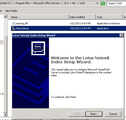
Double-click on the NotesSetup file. The Index Setup Wizard screen appears. Click Next to continue.
Step 2: Registration
The Register Lotus Notes screen appears.
Enter the Location of the ini file and the password for the Notes ID to run the Lotus Notes client software.
Leave the checkbox un checked.
In my installation:
Location of notes.ini file
D:IBMDominonotes.ini
Location of Lotus Notes install directory
D:IBMDomino
Step 3: Enter Mapping details
The Specify Lotus Notes Owner Field screen appears. Enter details and click Next to continue.
Lotus Notes server name
192.168.20.xxx
Lotus Notes database file name
NWMappng.nsf
View name
NWMappng
Lotus Notes field name column title
UserID
Windows user name column title
DomainAccount
Step 4:
Complete the Lotus Notes Index Setup.
Click Finish to continue.
Task 2: Start the Lotus Notes Connector service
Congratulations! Lotus notes is now registered. Next we will start the connector service from SharePoint 2013
Step 1: Open Central Admin , click on Manage services
Step 2: Start the Lotus Notes Connector Service
Step 3:
Start the connector
Create a new App pool
Select the account
Click Provision
Service started.
Task 3: Setup & Start the Crawler
Lotus Note connector service started, now we will crawl our Lotus Notes Database from SharePoint.
Step 1: Open Central Admin , click on Manage services applications
Step 2: Click on the search service Application
Step 3: Click on the "Content Source" from the left Navigation
Step 4: Create New Content source
Step 5:
Enter the name "Lotus Notes Application"
Select the Lotus Notes radio button
Step 6:
Set the Start Addresses to point to the Notes database that we created earlier
Also set the craw setting, schedule…
Click OK to accept the settings and continue.
The new content source appears in the Manage Content Sources screen.
Start Full Crawl
Task 4: Setup, Start and configure the metadata service
Check the metadata service, if not started then create & start.
Step 1: Goto Central Administration and click on Manage service applications.
Step 2: In my server Metadata service is already started.
If not then
Click on "New" from the left icon of the ribbon>Create new>Managed Metadata Service
Check the services
Task 5: Create a Search Center Site
Create a new sub site or site collection with "Enterprise search" template. Here I am creating a new sub site.
Step 1: Go to Site content , click on "new subsite"
Search for "lotus"
Expected Result!
Click on the Link
Conclusion
This concludes the series and wow you should be able to search your Domino contents from SP2013. I hope this blog series was helpful.
Netwoven
.
Blog
.
<span class='date ' tip=''><i class='icon-time'></i> Jul 27, 2015 12:29pm</span>
|
|
Hello, I am Humberto Reynoso-Vallejo principal investigator evaluating the Health Care Cost Containment Law (Chapter 224 of the Acts of 2012) from the Office of the State Auditor in Massachusetts.
In order to capture the broad perspectives of key stakeholders and integrate them with the quantitative analysis, we developed a longitudinal mixed-methods quasi-experimental design for our work in this complex evaluation. This mixed-methods approach is designed to answer the following Chapter 224 high-level evaluation questions:
1) What is the impact on health care costs, including the extent to which savings have reduced out-of-pocket costs to individuals and families, health insurance premium costs, and health care costs borne by the Commonwealth?
2) What is the impact on access to health care services and quality of care in different regions of the state and for different populations, particularly for children, the elderly, low-income individuals, individuals with disabilities, and other vulnerable populations?
3) What is the impact on access and quality of care for specific services, particularly primary care, and behavioral health which includes both substance use and mental health services?
4) What is the impact on the health care workforce, including, but not limited to, health care worker recruitment and retention, health care worker shortages, training and education requirements and job satisfaction?; and,
5) What is the impact on public health, including, but not limited to, reducing the prevalence of preventable health conditions, improving employee wellness, and reducing racial and ethnic disparities in health outcomes?
Hot Tips:
Considering that this is a longitudinal study, we will conduct open-ended semi-structured interviews through an online survey with key stakeholders at the early stages of the evaluation and integrate their responses into the quantitative baseline.
We will conduct in-depth semi-structured interviews as follow-up with selected key stakeholders based on their responses to the online survey. During these interviews, we will share the preliminary findings from the quantitative baseline and ask stakeholders for their insights in explaining them.
Once the longitudinal quantitative analysis is complete, we will share the findings with a small group of selected stakeholders, and schedule face-to-face in-depth semi-structured interviews to explore their interpretation of the quantitative analysis results. It will also be important to consider contextual factors that may explain the research outcomes.
Integrate all the research pieces into the final report. Structure the report it in a conducive way to maximize understanding of diverse group of readers -policy makers, agency executives, program managers, other oversight agencies, and the general public.
The American Evaluation Association is celebrating Large Scale Evaluation Week. The contributions all this week to aea365 come from evaluators who have worked on the evaluation of the Health Care Cost Containment Law in Massachusetts. Do you have questions, concerns, kudos, or content to extend this aea365 contribution? Please add them in the comments section for this post on the aea365 webpage so that we may enrich our community of practice. Would you like to submit an aea365 Tip? Please send a note of interest to aea365@eval.org. aea365 is sponsored by the American Evaluation Association and provides a Tip-a-Day by and for evaluators.
Related posts:
Large Scale Eval Week: Humberto Reynoso-Vallejo on Developing an Evaluation Plan for Large and Complex Projects
Large Scale Eval Week: Qiong Louie-Gao and Humberto Reynoso-Vallejo on the Use of Predictive Modeling in Creating Baseline for Longitudinal Projects with Large Amounts of Data
MME Week: Terri Anderson on Using Best Practices for Mixed Methods Research in Evaluation
AEA365
.
Blog
.
<span class='date ' tip=''><i class='icon-time'></i> Jul 27, 2015 12:29pm</span>
|
|
Overview
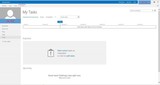
You are using SharePoint 2013, you have deployed My Sites. You or your users have tasks assigned. But when you or your users visit their MySite, they see below screen. Despite the users having assigned tasks elsewhere in the system, MySite still shows no tasks which is incorrect.
What is My Task List in SharePoint 2013?
By architecture of the Newsfeed site on SharePoint 2013, My Tasks list puts together and shows all the SharePoint and Project Server (if installed) task assignment right into the users My Site page. The tasks can be either private tasks or public tasks.
Pre-requisites for proper sync of My Task?
Search Service Application - very important to have this service enabled and running. Aggregator checks every 3 hours for any new "Tasks Lists". Though the aggregator would look for SharePoint events / hints, they are known to have not activated an aggregation and hence the importance given to the indexer. Very important to have an Incremental / Continuous Crawl running.
Work Management Service Application (WMA) and the service running on the server.
User Profile Synchronization Service
Refreshing the My Tasks Page
The code behind aggregator is triggered by simply visiting the page within Newsfeed Site as long as the last trigger was older than 5 minutes. This delay is to preserve the performance of the SharePoint farm. This can be changed using PowerShell but highly recommend against the same for large farm deployments.
Possible problems causing sync not work?
Work Management Service wasn’t running
Search wasn’t indexing anything yet. No indexer meant aggregator could potentially be not performing any aggregation as well.
Solution
Work management Service should run on App Server. If required create one from Central Admin
Work management service application should be created with an app pool which must run with profile app pool account
Create/ensure Incremental Crawls to happen across all the content sources, setup people search, my sites search.
Ensure that continuous crawl is running
Wait till the crawl completes
Review the permission of profile app pool and portal app pool account on the specific databases with dbowner permissions
social db
sync db
profile db
state service db
manage metadata db
my site db
portal content db
projects content db
teams content db
communities content db
Search db.
7. User profile synchronization service should be running.
8. Run IIS reset on all app and WFE servers at the same time.
Netwoven
.
Blog
.
<span class='date ' tip=''><i class='icon-time'></i> Jul 27, 2015 12:29pm</span>
|
|
Like many of the nearly 16,000 people attending this year’s SHRM Annual Conference in Las Vegas, I have received my fair share of pre-conference mailings from vendors. The pile is impressive, colorful, full of enticements to visit booths, and mostly useless! While some have made efforts to stand out from the crowd and engage on a deeper level, many of the postcards and fliers simply feel like they have been recycled from previous events with updated dates, location, and logo. Look at this pile of #SHRM15 vendor brochures! One major vendor (who...
SHRM
.
Blog
.
<span class='date ' tip=''><i class='icon-time'></i> Jul 27, 2015 12:29pm</span>
|
|
Hello - Erin M. Liang and Mark M. Holske here, members of the research team evaluating the Health Care Cost Containment Law (Chapter 224) from the Office of the State Auditor in Massachusetts.
Large evaluation projects dealing with complex research questions may require several sources of data. Securing data becomes one of the most important and ongoing tasks for the successful completion of the project.
For our Chapter 224 work, we are in various stages of accessing and securing data. These data sets include administrative data (e.g. the All Payer Claims Database (APCD) from the state’s Center for Health Information and Analysis (CHIA) and survey data such as the Behavioral Risk Factor Surveillance Survey (BRFSS) from the MA Department of Public Health. We would like to share with you some lessons we have learned thus far.
Lessons Learned:
It can be a long process for an agency to prepare and disseminate data, so be flexible on your timeline to account for this. For example, the APCD contains confidential health information at the patient level and CHIA must de-identify the data and only extract the necessary fields.
Be specific about data requests. Standard application forms cannot cover all research situations, and often more information is needed by those preparing the data extract. Be prepared for follow-up questions about your application.
Think about future partnerships and endeavor to make the data request process mutually beneficial. For example, the APCD is a relatively new dataset and agencies across the Commonwealth are working with this data for the first time. Sharing experiences and providing feedback will enable each agency to learn faster together.
Don’t overreach in your data request. As data geeks, we want to know everything, so we ask for everything. However, keep your request to what is necessary depending on your research questions. Asking for data that is not directly related to your research can delay the receipt of data and possibly strain your relationship with those who own the data.
Hot Tips:
Don’t be afraid to touch base with the data owners often to make sure all application material was received and no additional information is necessary.
Make your data security expert available to address any concerns regarding data transmission and storage.
Once you receive the data requested, make sure all files are included. Large data transfers are complicated, so it’s important to make sure you received everything you requested.
Form a working group with members from both agencies to share information in order to improve the process.
The American Evaluation Association is celebrating Large Scale Evaluation Week. The contributions all this week to aea365 come from evaluators who have worked on the evaluation of the Health Care Cost Containment Law in Massachusetts. Do you have questions, concerns, kudos, or content to extend this aea365 contribution? Please add them in the comments section for this post on the aea365 webpage so that we may enrich our community of practice. Would you like to submit an aea365 Tip? Please send a note of interest to aea365@eval.org. aea365 is sponsored by the American Evaluation Association and provides a Tip-a-Day by and for evaluators.
Related posts:
Large Scale Eval Week: Humberto Reynoso-Vallejo on Developing an Evaluation Plan for Large and Complex Projects
Brad Coverdale on Using the National Educational Longitudinal Survey of 1988-2000
Sheila Matano and Dani O’Neill on Alternative Methods for Qualitative Data Collection: Community Survey Day
AEA365
.
Blog
.
<span class='date ' tip=''><i class='icon-time'></i> Jul 27, 2015 12:29pm</span>
|
|
Background
Suppose you are a Database developer. You have created lot of tables, views, SP etc. for your development. You have also put the required indexes on the tables for query optimizing etc. Now your database is deployed to production environment and you found that everything is running properly.
Now after long period of time of performance the data volume will be increased and you found that your database performance has been degraded as compared to the previous while there was a small volume of data. Now once again going through the database design, putting the new indexes is not an easy task to do, it may take huge effort and at last it may not be fruitful at all.
SQL-SERVER has SQL Server-Profiler tool to help us optimize our database.
Steps
It’s basically a four steps process:
Step 1: Generate a TRACE/LOAD file for selected database.
Open SQL Server Profiler
Click Connect to the server
Select ‘Tuning’ template of ‘General’ tab.
Select ‘Column Filters’ of ‘Events Selection’ tab.
Choose the filter options. E.g. Database name ‘ABC’ in this case on which the trace/load file for query optimization will be generated.
Click ‘Run’ button.
Click ‘Stop Selected Trace’.
Save the Trace file.
Step 2: Put that LOAD file to Database Tuning Wizard.
Open ‘Database Engine Tuning Wizard’
Select ‘File’ and Database Name of ‘General’ tab and then ‘Start Analysis’.
Step 3: Check the suggestions/definition made by Tuning wizard.
Step 4: Implement those in the Database tables.
As per the definition implement the suggested indexing into the table/s.
Conclusion:
In this blog I have described how we can use the inbuilt SQL Server tool SQL Server-Profiler for query optimization.
Netwoven
.
Blog
.
<span class='date ' tip=''><i class='icon-time'></i> Jul 27, 2015 12:29pm</span>
|
|
Hello, Erin M. Liang, Mark M. Holske, and Humberto Reynoso-Vallejo here, members of the research team evaluating the Health Care Cost Containment law (Chapter 224) from the Office of the State Auditor.
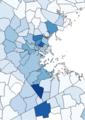
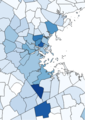
Using administrative data with a significant number of missing key variables (e.g. race/ethnicity) can be challenging in trying to answer specific evaluation questions. One of our research questions seeks to evaluate the impact of Chapter 224 on racial/ethnic disparities in health outcomes. Both administrative data sets available to us (the Massachusetts Medicaid Program (MassHealth) and the All Payer Claims Database (APCD)) have sparsely populated information about race and/or ethnicity. Since we were not able to apply imputation techniques due to the large number of missing values, we have to use alternative methods. As a proxy for race/ethnicity data, we used US Census Bureau Data and GIS mapping software.
Hot Tip: Use state level census data to account for missing racial/ethnic values. The US Census collects detailed race/ethnicity data at the state level every 10 years. Census data is publicly available on the American Fact Finder website. There are several data sets available, and this tool can aid in determining which data set best suits the needs of your project.
In this project, census data from 2010 will be applied to collected data spanning years 2006 to present, segmented by ZCTA (zip code tabulation area). Researchers should be aware that a zip code can be in more than one ZCTA. To learn about how zip codes are translated to ZCTAs, consult this census demonstration.
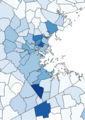
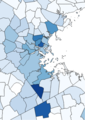
This map was made using QGIS and census data. The map is segmented by cities/towns with the darker areas representing populations with a higher percentage of diverse residents.
Rad Resource:
The Census Bureau Help Line is 1-800-923-8282. A census representative can help to download the correct data.
The American Community Survey provides annual demographic information at the state and county level.
In addition to QGIS, a large project with sufficient funding could utilize Tableau, an easy to use data analysis tool that allows users to visualize data with graphs, cross-tabs, and maps. While these functions can be done in other tools like Excel or ArcMap, Tableau allows a user to create a dashboard containing all visualizations on the same page.
The American Evaluation Association is celebrating Large Scale Evaluation Week. The contributions all this week to aea365 come from evaluators who have worked on the evaluation of the Health Care Cost Containment Law in Massachusetts. Do you have questions, concerns, kudos, or content to extend this aea365 contribution? Please add them in the comments section for this post on the aea365 webpage so that we may enrich our community of practice. Would you like to submit an aea365 Tip? Please send a note of interest to aea365@eval.org. aea365 is sponsored by the American Evaluation Association and provides a Tip-a-Day by and for evaluators.
Related posts:
DOVP Week: Jennifer Sullivan Sulewski on Data Sources for Tracking Outcomes of People with and without Disabilities
DVR Week: Chris Lysy on Data Sources that Embrace Data Visualization
Melissa Biel on the Uniform Data System (UDS) Mapper
AEA365
.
Blog
.
<span class='date ' tip=''><i class='icon-time'></i> Jul 27, 2015 12:28pm</span>
|
|
I still remember the first SHRM event I attended in my first days as an H.R. professional. I walked in the meeting room feeling a bit anxious. Would I fit in? Would I have anything in common with the H.R. people in the room? We all seek connections. We all want to belong. But we are also prone to look for our differences rather than the commonalities we share. That’s what I did that day. I went into that SHRM event expecting to see how I was different. Truthfully, I got what I expected. ...
SHRM
.
Blog
.
<span class='date ' tip=''><i class='icon-time'></i> Jul 27, 2015 12:28pm</span>
|