Blogs
|
Overview
When you are involved in an SSIS project, you have to collect data from various data sources like from databases, flat files, excel files etc. Generally when you find that the data is not well formed, it’s of very poor quality for analyzing, lots of data are missing etc. etc. So before starting the project and designing a database structure if we can analyze the data properly it will be helpful for us to design our data ware house properly.
SSIS provides a wonderful control ‘Data Profiling Task’ to accomplish this task that helps us to provide the Meta information of how the data is organized.
Scenario:
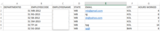
Suppose you have received data in excel format as follows:
Now we need to analyze this data to get the insight and Meta information to design our data warehouse.
Firstly we need to import this excel data into Sql Server. The reason for this is currently ‘Data Profiling Task’ control only supports SQL Server ADO.NET connection type to import data. Hopefully in future Microsoft will give more option to connect excel file, text file etc. for profiling directly.
Steps:
It’s basically a three steps process:
Step 1: Drag the control ‘Data Profiling Task’ in ‘Control Flow’ tab.
Step 2: Select the path where the profiling information should be stored.
E.g. ‘ProfileInfo’ is the file name in this case.
Step 3: Select the Server and Database name on which the profiling will be performed.
3.1 Click ‘Quick Profile’ in ‘General’ tab.
3.2 Select Server and Database
3.3 Select the table name and check all the ‘Compute’ options.
3.4 Run the Package.
Now the profile data has been stored in the file ‘ProfileInfo’ in this case, which is basically a XML file and looks like as follows if you open in web explorer:
But, the above file is not in a readable format. To read this file Microsoft has provide us a DataProfile Viewer that is stored in the path ‘C:\Program Files (x86)\Microsoft SQL Server\110\DTS\Binn’
Open the DataProfile Viewer and open the file ‘ProfileInfo’(in this case) in it that looks like as follows:
In the above snap if you unfold the ‘Tables’ and then [dbo].[Sheet 1$], you will find seven profile that I will discuss one by one in coming Blogs elaborately.
Candidate Key Profiles : Suggest which column has the unique values.
Column Length Distribution Profiles : Suggest the minimum and maximum length of column.
Column Null Ratio Profiles : Suggest the null percentage of each column value.
Column Pattern Profiles : Suggest the pattern of column value.
Column Statistics Profiles : Statistic for numeric field such as Minimum value, Maximum Value, Mean, Standard Deviation.
Column Value Distribution Profiles : Give a repetition percentage of a column value.
Functional Dependency Profiles : Imply if any column value is dependent on another column value.
Conclusion:
In this blog I basically tried to explain how you can use the SSIS Data Profiling Task Control to get the insight of the received data. I hope this is helpful.
Netwoven
.
Blog
.
<span class='date ' tip=''><i class='icon-time'></i> Jul 27, 2015 12:28pm</span>
|
|
The SHRM Foundation sponsored an informational and fun orientation event for YPs and students attending this year’s SHRM Conference. This was the first event of this type and it seemed to be a big hit! Jeff Pon, SHRM’s Chief HR & Strategy Officer, started off the event by recognizing the 2015 Graduate and Undergraduate Case Competition Winners. Temple University, East Undergraduate Division winner, was in attendance and received a large round of applause. Jeff also recognized the Outstanding Merit Award winning chapters of which there were 28 this year! Tom Darrow, SHRM Foundation Chair, was up next to introduce this...
SHRM
.
Blog
.
<span class='date ' tip=''><i class='icon-time'></i> Jul 27, 2015 12:28pm</span>
|
|
Hello, we are Qiong Louie-Gao and Humberto Reynoso-Vallejo, members of the research team evaluating Chapter 224, the Health Care Cost Containment Law, from the Office of the State Auditor in Massachusetts.
In order to implement a comprehensive evaluation on the impact of Chapter 224, our research team is committed to find the most effective statistical procedures to use in order to create a solid baseline that can lead to a sound quantitative analysis of the entire longitudinal project. One of the procedures we found useful is predictive modeling.
Predictive modeling is a process of fitting a statistical model based on existing relationships among variables and making an informed prediction for future behavior(s). In our study, a primary goal is to find the trend or pattern of our variables using a number of data points before the implementation of Chapter 224 (prior to implementation in 2012) as a baseline. We then use the parameter estimates of the baseline to predict the values after 2013. A solid baseline with predicted values will be compared with the actual data once we conclude the longitudinal quantitative analysis.
Hot Tip: This method can be used for both individual data and aggregate data. For individual data, each individual may have repeated measures that may produce a correlation. Generalized Estimating Equations (see Zeger & Liang, 1986) and Linear Mixed-Effect Models (see Cnaan, Laird, & Slasor, 2005) are the two general statistical methods for the longitudinal data analysis. Note that General Estimating Equations represent the effects on the population average, whereas Linear Mixed-Effect Models aims to estimate the effects on a subject-specific basis. For aggregate data, a linear regression model can be used to estimate the slope of the time series.
Hot Tip: Data fluctuation or outliers will compromise the results. To account for this, some statistical techniques such as "moving average" may be used to smooth out the data.
Hot Tip: Carefully select covariates to control confounding and avoid multicollinearity (see Steen, et al, 2002) based on background information. Some variable-selection approaches can be used, e.g. step-wise, forward, and backward selection procedures.
The American Evaluation Association is celebrating Large Scale Evaluation Week. The contributions all this week to aea365 come from evaluators who have worked on the evaluation of the Health Care Cost Containment Law in Massachusetts. Do you have questions, concerns, kudos, or content to extend this aea365 contribution? Please add them in the comments section for this post on the aea365 webpage so that we may enrich our community of practice. Would you like to submit an aea365 Tip? Please send a note of interest to aea365@eval.org. aea365 is sponsored by the American Evaluation Association and provides a Tip-a-Day by and for evaluators.
Related posts:
Guili Zhang on Longitudinal Data Management and Analysis
Large Scale Eval Week: Humberto Reynoso-Vallejo on Using Mixed-Methods for Complex Evaluations of State Law Initiatives
Ed Eval TIG Week: Kelly Murphy and Michelle Sloper on Innovative Statistical Solutions for Evaluation Data: Latent Growth Curve Modeling to Examine Change Over Time
AEA365
.
Blog
.
<span class='date ' tip=''><i class='icon-time'></i> Jul 27, 2015 12:27pm</span>
|
|
Many organizations have developed forms based applications using InfoPath and SharePoint on-premise during the last few years. With the advent of cloud technologies and the movement of on-premise SharePoint to Office 365 along with InfoPath retirement, many organizations are looking forward to developing the future roadmap.
Netwoven has worked with many organizations to help define their cloud based application integration and workflow strategy.
On Wednesday, June 11th, 2014, join us at 10:00 A.M. (PST) for a fast-paced, 60-minute Webinar presented by the experts at Netwoven and Nintex where we will discuss how Nintex’s Office 365 forms and workflows can help you create cloud based applications.
Register today by clicking here.
These cloud based applications can span across various applications such as Salesforce, Microsoft Dynamics, Drop Box, Box.NET, Social Networks and other applications.
Key Takeaways:
Learn how to mobilize your workforce
Incorporate external stakeholders into your business processes
Better integration with external data sources
Offline support
Mobile Forms
Branding your Forms
Speakers
Rajesh Agadi: ECM and SharePoint Lead - Netwoven Inc. Rajesh has over 20 years of consulting experience mainly focused on Microsoft Stack of ECM. He has architected and built large scale Organizational Portals, Extranets, Public Sites, Migration, Branding, Enterprise Workflows. As SME Rajesh provides architecture solutions for Infrastructure, Information and Technical Design. As hardcore developer Rajesh has deployed solutions across all versions of SharePoint. Rajesh held Consulting and Organizational Leadership roles.
Brad Orluk: Brad is a Nintex Technical Evangelist with over 10 years of IT architecture, administration and sales experience. As an Information Architect at a Fortune 500, he has worked on business and IT process improvement and automation on a variety of real world global projects and productivity initiatives. Brad’s unique, technical yet business focused, background gives him the ability to help users leverage technology to drive value to their businesses.
Attention early registrants: If you register by May 16th, 2014, you will also be entered to win a Fitbit Flex Wristband of retail value $99.
Webinar Prize Giveaway: All participants of the Webinar will be entered into our drawing for Nest Learning Thermostat - 2nd Generation of retail value $249.
See you at the webinar
Netwoven
.
Blog
.
<span class='date ' tip=''><i class='icon-time'></i> Jul 27, 2015 12:27pm</span>
|
|
It’s exciting to hear that #SHRM15 was one of the top trending hashtags yesterday. The SHRM conference in Las Vegas is hosting 15k+ HR professionals, from early career to senior level roles. Yesterday, these professionals were posting, liking, re-tweeting and blogging their personal opinions and content of interest. Any concerns? While some posts may have been questionable, all interaction was welcomed and embraced in this "professional community". Does your company offer a platform for your employees to engage in the social media realm to post blogs, share inspiration or leadership points? I would like to hear why/why...
SHRM
.
Blog
.
<span class='date ' tip=''><i class='icon-time'></i> Jul 27, 2015 12:27pm</span>
|
|
Happy Pi Day! I’m Sheila B Robinson, aea365’s Lead Curator and sometimes Saturday contributor. If you had an internet browser open to this site today, 3.14.15 at precisely 9:26:53 am (EST) looking for today’s post to be about Pi Day, then you probably know that today is a particularly prodigious Pi Day as we have a date and time that represent the first 10 digits of pi, something that will not occur for another 100 years (OK, to be fair, another 12 hours, then another 100 years!).
Lesson Learned: Pi Day is celebrated internationally each year with deference to every mathematician’s favorite constant - the ratio of the circumference of a circle to its diameter —which is approximately 3.141592653… and has now been calculated to over 1 trillion digits! (Back in my school days, we only had to memorize 3.14.) Pi enjoys an illustrious history and you can read more about it and actually see one million of those daunting digits on www.piday.org.
Apple Pi by Alex Cockroach via Flickr
Now, as we slickly segue from the consistently celebrated constant to the perpetually plagued pie chart, let’s take a moment for a 360 degree look at pie chart perspectives from around the blogosphere:
We can only surmise how Cole Nussbaumer, of storytelling with data, feels about pie charts with her evocatively titled 2011 post, death to pie charts. Perhaps not surprisingly, it opens with, "I hate pie charts. I mean, really hate them." Nussbaumer explains, "My main beef with pie charts … is this: our eyes aren’t good at attributing quantitative value to two dimensional spaces. In English: pie charts are really hard for people to read!"
Pie charts receive a bare modicum of redemption from Slate in a 2013 article, In Defense of Pie Charts wherein author Matthew Yglesias declares (somewhat not-so-convincingly, as it’s by way of a double negative), "it’s by no means true that pies are never the right way to go."
Back in our own evaluator neighborhood, Kim Firth Leonard, of actionable data blog stands boldly on the fence declaring, "I’m not entirely ready to abandon using pie charts in my own practice" in her 2012 post, My love hate relationship with pie charts. And pie.
And evaluation’s dataviz darlings Stephanie Evergreen and Ann K Emery have allowed pie in moderation with only the simplest of ingredients, of course, as elucidated in their recipe card for gorgeous graphs, the Data Visualization Checklist (downloadable from either of their sites).
Coming full circle (seriously, how could we not?) with a return to Pi, we can perhaps see some esoteric connections to evaluation in this fact, courtesy of www.piday.org: "As an irrational and transcendental number, [pi] will continue infinitely without repetition or pattern."
Do you have questions, concerns, kudos, or content to extend this aea365 contribution? Please add them in the comments section for this post on the aea365 webpage so that we may enrich our community of practice. Would you like to submit an aea365 Tip? Please send a note of interest to aea365@eval.org . aea365 is sponsored by the American Evaluation Association and provides a Tip-a-Day by and for evaluators.
Related posts:
Angie Ficek on Using the Framing Function in Word to Wrap Text Around Charts
APC TIG Week: Kat Athanasiades and Veena Pankaj on Small Picture, Big Picture: Using the Framework for Public Policy Advocacy in a Large-Scale Advocacy Campaign
DVR Week: Jennifer Bain on Creating Attractive Charts in Excel Every Time With Chart Templates
AEA365
.
Blog
.
<span class='date ' tip=''><i class='icon-time'></i> Jul 27, 2015 12:27pm</span>
|
|
Introduction
In this blog I will cover on how to install and use the Selenium Test Automation Tool to create automated test cases for your projects.
Steps to Install Selenium
1. Preconditions
Firefox browser should be installed in the system where the user wants to install selenium.
Note: Selenium IDE is a web application testing tool. It supports only Mozilla Firefox browser. If users want to run their test cases of Selenium IDE they should have the Mozilla Firefox browser opened. Now let us see how to download Selenium IDE.
2. Steps:
The following steps will explain how to download Selenium IDE Add-on:
1. First download Mozilla Firefox browser.
Note: User should download the latest version of Firefox (or update the existing one).
2. Click on the Firefox tab present at the top the browser window.
3. Click on Add-on in drop down menu.
4. Go to add on page of Mozilla Firefox browser
5. In the search box of Add on page search the term "Selenium IDE" and press enter
6. A page will open which displays Selenium IDE add-on.
7. Click on install next to the Selenium IDE add-on
8. Once installation is done the Mozilla Firefox browser will ask you to restart the browser.
The User should restart the browser.
9. Open the Selenium IDE under the tools tabs after the browser gets restarted.
10. The Selenium IDE will open for the user to start recording of the test cases.
3. Post Condition
The user should be able to see all the following IDE features required for creatring automated test cases:
1. Menu Bar
The File menu has options for Test Case and Test Suite (suite of Test Cases). Using these you can add a new Test Case, open a Test Case, save a Test Case and export Test Case in a language of your choice. You can also open the recent Test Case. All these options are also available for Test Suite.
The Edit menu allows copy, paste, delete, undo, and select all operations for editing the commands in your test case. The Options menu allows the changing of settings. You can set the timeout value for certain commands, add user-defined user extensions to the base set of Selenium commands, and specify the format (language) used when saving your test cases. The Help menu is the standard Firefox Help menu; only one item on this menu-UI-Element Documentation-pertains to Selenium-IDE.
2. Toolbar
The toolbar contains buttons for controlling the execution of your test cases, including a step feature for debugging your test cases. The right-most button, the one with the red-dot, is the record button.
Speed Control: controls how fast your test case runs.
Run All: Runs the entire test suite when a test suite with multiple test cases is loaded.
Run: Runs the currently selected test. When only a single test is loaded this button and the Run All button have the same effect.
Pause/Resume: Allows stopping and re-starting of a running test case.
Step: Allows you to "step" through a test case by running it one command at a time. Use for debugging test cases.
TestRunner Mode: Allows you to run the test case in a browser loaded with the Selenium-Core TestRunner. The TestRunner is not commonly used now and is likely to be deprecated. This button is for evaluating test cases for backwards compatibility with the TestRunner. Most users will probably not need this button.
Apply Rollup Rules: This advanced feature allows repetitive sequences of Selenium commands to be grouped into a single action. Detailed documentation on rollup rules can be found in the UI-Element Documentation on the Help menu.
Record: Records the user’s browser actions.
3. Test Case Pane
Your script is displayed in the test case pane. It has two tabs, one for displaying the command and their parameters in a readable "table" format.
The other tab - Source displays the test case in the native format in which the file will be stored. By default, this is HTML although it can be changed to a programming language such as Java or C#, or a scripting language like Python. See the Options menu for details. The Source view also allows one to edit the test case in its raw form, including copy, cut and paste operations.
The Command, Target, and Value entry fields display the currently selected command along with its parameters. These are entry fields where you can modify the currently selected command. The first parameter specified for a command in the Reference tab of the bottom pane always goes in the Target field. If a second parameter is specified by the Reference tab, it always goes in the Value field.
If you start typing in the Command field, a drop-down list will be populated based on the first characters you type; you can then select your desired command from the drop-down.
4. Log/Reference/UI-Element/Rollup Pane
The bottom pane is used for four different functions-Log, Reference, UI-Element, and Rollup-depending on which tab is selected.
Log
When you run your test case, error messages and information messages showing the progress are displayed in this pane automatically, even if you do not first select the Log tab. These messages are often useful for test case debugging. Notice the Clear button for clearing the Log. Also notice the Info button is a drop-down allowing selection of different levels of information to log.
Reference
The Reference tab is the default selection whenever you are entering or modifying Selenese commands (commands that we use in Selenium IDE are called "Selenese commands") and parameters in Table mode. In Table mode, the Reference pane will display documentation on the current command. When entering or modifying commands, whether from Table or Source mode, it is critically important to ensure that the parameters specified in the Target and Value fields match those specified in the parameter list in the Reference pane. The number of parameters provided must match the number specified, the order of parameters provided must match the order specified, and the type of parameters provided must match the type specified. If there is a mismatch in any of these three areas, the command will not run correctly.
UI-Element and Rollup
UI-Element is a Selenium feature that makes it possible to define a mapping between semantically meaningful names of elements on webpages, and the elements themselves. The mapping is defined using JavaScript Object Notation, and may be shared both by the IDE and tests run via Selenium RC. It also offers a single point of update should the user interface of the application under test change.
Note:
Detailed information on these two panes (which cover advanced features) can be found in the UI-Element Documentation on the Help menu of Selenium-IDE.
Netwoven
.
Blog
.
<span class='date ' tip=''><i class='icon-time'></i> Jul 27, 2015 12:27pm</span>
|
|
Greetings! I’m Sara Vaca, independent consultant at EvalQuality.com and Creative Advisor of this blog. I started with this post (link) observing where and how evaluation can use a dash of creativity, and now I’m going to share my experience using creativity to better understand evaluation.
After my first AEA conference in Washington D.C. (October 2013), during my daily stroll, all the words and concepts I had been hearing during that week -mixed methods, rubrics, approaches, participation, values, dashboards, etc.- were flying around in my head. I was wondering: there are so many different possibilities (stance, paradigm, approach, methods) to design an evaluation, and yet they are not clearly visible in evaluation reports…
Suddenly, it all clicked in my mind and I thought: What if you could see many of these evaluator’s decisions in just one page? I know! I will create a "meta-evaluation" dashboard!
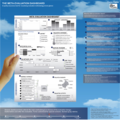
Some months later, after much reading and research and many sketches and drafts, I came up with this dashboard, where you can see reflected in a very visual way 10 (for me) major issues of an evaluation:
Complexity
Purpose ranking
Evaluative synthesis thermometer
Participation scan
Sampling decisions
Mix-methods scan
Core tools
Credible evidence
Evaluation standards and
Evaluation outputs.
Initially, the Dashboard can be used to visualize the evaluation methodology of an evaluation report after its completion. Or it can be used by evaluators to explain the methodology they have followed.
Also it is a tool for meta-evaluating and quality assurance. But, it can also be used to visualize an evaluation design prior to its realization. Finally, it can be useful in discussing evaluation design with evaluation commissioners, to explore various options. And, it could be used to show the evaluation design proposed by the commissioner in the Terms of Reference. Or, even to teach evalution.
I presented it as a poster in both European Evaluation Society and Evaluation 2014 conferences (Dublin and Denver) and I would like to thank all the comments and feedback received, from the people who didn’t understand it at first, to those who told me that it was inspiring. Special thanks to Michael, Scriven, Jennifer Greene, Patricia Rogers, Jane Davidson, Beverly Parsons, Ian Davies and many others who took the time to take a look at it and comment on it.
For more information: http://www.evalquality.com/the-meta-evaluative-dashboard/
For reactions and comments: Sara.vaca@EvalQuality.com
Do you have questions, concerns, kudos, or content to extend this aea365 contribution? Please add them in the comments section for this post on the aea365 webpage so that we may enrich our community of practice. Would you like to submit an aea365 Tip? Please send a note of interest to aea365@eval.org . aea365 is sponsored by the American Evaluation Association and provides a Tip-a-Day by and for evaluators.
Related posts:
Sara Vaca on Creativity and Evaluation Part I
Sara Vaca on Creativity and Evaluation Part II
Veronica Smith on Data Dashboard Design
AEA365
.
Blog
.
<span class='date ' tip=''><i class='icon-time'></i> Jul 27, 2015 12:27pm</span>
|
|
SHRM15 has begun, and the latest numbers puts attendees just shy of 15,500. Whether you're an introvert or extrovert, the sheer number of attendees at this year's conference suggests you may meet lots of meet new people. Let me rephrase that, you SHOULD meet LOTS of new people. If you look up from your phone, you will meet new people. If you split up from...
SHRM
.
Blog
.
<span class='date ' tip=''><i class='icon-time'></i> Jul 27, 2015 12:27pm</span>
|
|
Overview
SharePoint (all versions) currently do not have a way to lookup lists other than lists and libraries within the same site (SPWeb) context. In this blog we will discuss how to look up for example a master contract list which is residing in one of the sub site and the list being looked up from another sub site under the same site collection.
Solution Steps
From your Site Collection follow below steps:
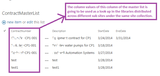
1. Create a Master List at one of the sub sites with the column that is going to be looked up in the libraries residing at different sibling sub sites under the same site collection.
Important:
Please note that the users uploading documents in the lookup libraries should have reader permission in the Master List to look up the corresponding column values for the look up column in the libraries.
2. Created a doc library (in the same sub site where the master list resides) with a look up column referring to the desired column of the Master List.
3. Created a list template of the library containing the look up column.
Navigate to the corresponding library->Click on Library tab->Click on Library Settings->click on "Save document library as template" under the "Permissions and Management" section.
4. Template got uploaded at the list template in the site collection level.
Navigate to the top level site collection->click Site Settings->Click "List template" link under "Web Designer Galleries".
5. Created doc libraries at the sibling sub sites (under the same site collection) using the template.
Go to site contents of the corresponding sub site->Click on "add an app"->Click on the library template created for the look up library.
6. Referred the look up column of the created libraries to the corresponding column of the "Master List in another sub site.
(New entries in the Master List also got reflected in the look up column of the created libraries under different sub sites).
Go to site contents of the corresponding sub site à Click on the library created from the template.
Netwoven
.
Blog
.
<span class='date ' tip=''><i class='icon-time'></i> Jul 27, 2015 12:26pm</span>
|