Blogs
|
I’m Ian David Moss, and I use logic models and theories of change to help people make more strategic decisions. Recently, some smart voices in evaluation and philanthropy have argued that logic models are outdated, as implementation in a complex world too often makes a mockery of those neat and tidy diagrams that supposedly make sense of everything.
Call me stubborn, but I’m not ready to give up on logic models. After nearly a decade of working with them, I remain convinced of their value as tools for program design, strategic clarification, defining a measurement regimen, and yes, evaluation. The (cool) trick is to make sure that logic models don’t suck. Here are some ways I’ve found to improve the odds:
Lesson Learned: Combine a logic model with a theory of change
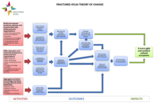
Logic models and theories of change (here’s a primer on the difference between the two) developed from entirely separate schools of thought. Like Debra Smith and Galen Ellis, however, I’ve found that each of these tools is strengthened by the presence of the other. These days, to ensure a tight integration between the logic model and theory of change, I develop both in a single PowerPoint document. In it, the theory of change (activities, outcomes, and impacts) stands alone on the first slide, then on subsequent slides it appears grayed out with elements of the logic model (inputs, values, environmental factors, target population, assumptions, and measures) superimposed on top.
Fractured Atlas theory of change and logic model detail
Lesson Learned: Embrace the flywheel
A common knock against logic models is that they are too linear. I agree - but that doesn’t mean we have to give up on them! A common situation I run into is when a program is intended to facilitate a virtuous cycle that has self-reinforcing impacts. I depict these dynamics with a "flywheel" to denote the iterative nature of the intended effects.
Detail: ArtsWave theory of change
Lesson Learned: Different audiences need different things
One client I worked with recently, the Santa Cruz Museum of Art and History (MAH), found its logic model invaluable for developing a suite of performance indicators to track on an ongoing basis, but worried that its presentation didn’t reflect the museum’s fun, accessible brand. Solution: commission a graphic artist to make an illustrated version of the theory of change. Voilà - boredom be gone!
Santa Cruz MAH theory of change: "artist version"
Hot Tip: It doesn’t have to end here
There’s plenty of room to innovate beyond what I’ve described above. Wouldn’t it be awesome to have an interactive version that could zoom in or out to the appropriate level of detail? Or a way to reflect levels of confidence in the connections between different elements? Here’s my hypothesis: there’s nothing wrong with logic models that can’t be solved by better design.
The American Evaluation Association is celebrating Logic Model Week. The contributions all this week to aea365 come from evaluators who have used logic models in their practice. Do you have questions, concerns, kudos, or content to extend this aea365 contribution? Please add them in the comments section for this post on the aea365 webpage so that we may enrich our community of practice. Would you like to submit an aea365 Tip? Please send a note of interest to aea365@eval.org. aea365 is sponsored by the American Evaluation Association and provides a Tip-a-Day by and for evaluators.
Related posts:
Logic Models Week: Debra Smith and Galen Ellis on How Logic Models Can Be Used to Develop Evaluation Systems
Jonny Morell on Logic Models and Unintended Consequences
Logic Models Week: Michele Tarsilla on Beyond an Acritical use of Logic Models in International and cross-cultural context: The "Translation" role of facilitators and capacity development specialists
AEA365
.
Blog
.
<span class='date ' tip=''><i class='icon-time'></i> Jul 27, 2015 12:17pm</span>
|
|
Introduction
Some people in the IT world use the terms Adaptive and Responsive interchangeably. True, both follow the progressive enhancement strategy and have a lot of similarities, but are definitely not the same when it comes to their implementation. Let start with the characteristics of Responsive Web Design.
Responsive
Uses client scripts or media queries to control the design of the page
Relies on a fluid grid to shrink and expand to the screen size
Examples:
TechCrunch
Boston Globe
Adaptive
Can use server or client scripts to determine the design of the page
Distinct templates geared for each device
Examples
Amazon
Yahoo
Here is a great infographic of some more similarities and differences
Conclusion
In summary, even though both designs will make your web site look sharp on multiple form factors, they do have differences that make them unique. Knowing those differences will help when planning out your next design.
Netwoven
.
Blog
.
<span class='date ' tip=''><i class='icon-time'></i> Jul 27, 2015 12:17pm</span>
|
|
I’m Gretchen Jordan. I’ve been doing logic modeling and writing and teaching about how to develop them for more than 20 years. I find the process stimulating and fun, and have noticed that the more I do logic models, and the more I learn about the subject matter, the easier it is and the better the model. However, most people do not do multiple logic models in one subject area.
Lessons Learned:
1. Generic logic models can be a huge help in evaluation. Evaluation frameworks with a well explained generic logic model and accompanying indicators, building on deep subject matter expertise, can be a huge help to evaluators or program staff. With this as a guide, they can work through a logic model and evaluation plan tailored to their specific program. These generic guides save resources and improve the quality of evaluation studies. If used for a group of related programs the common framework for collecting and analyzing data sets up the possibility of synthesis of findings across those programs. This can point to features of an intervention that matter most and that are not otherwise visible.
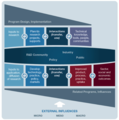
Example. The Research, Technology and Development (RTD) Topical Interest Group of the AEA has written a paper "Evaluating Outcomes of Publicly Funded Research, Technology and Development (RTD) Programs: Recommendations for Improving Current Practice." Central to the paper is a generic logic model and table of indicators that could guide evaluation planning for many different types of RTD programs.
2. A generic logic model reflects knowledge of the big picture. Logic modeling is a management and evaluation tool to develop a succinct picture of a program’s goals and the strategies for achieving these within a broader context. It requires a real understanding of the program and its context. This knowledge can come partially from documents (including assessments of similar programs) but ultimately the best information comes from program managers and staff sharing different perspectives and perceptions.
Example. The generic logic model in the RTD TIG paper builds on existing theories, evaluation studies, and other generic logic models. The diagram shows two major areas of RTD, research and application of research, to reflect the reality that these are often done by different organizations and evolve over a considerable length of time. The interactions between the two streams occur with four main areas: RTD community, government/policy entities, industry, and public groups. At the top left of this model is the essential step of program design and implementation. At the bottom, related programs and influences are called out in addition to three levels of other external influences (micro, meso/sector, and macro).
AEA365
.
Blog
.
<span class='date ' tip=''><i class='icon-time'></i> Jul 27, 2015 12:15pm</span>
|
|
The SHRM Young Professional Advisory Council (YPAC) successfully hosted over 200 HR YP’s for a networking party at Luxor Hotel & Casino Las Vegas. It was a blast! Jeromy Manke (@JeromyManke) kicked off the evening with a welcome to our esteemed guests. The greeting included an introduction of the YPAC, Nevada State SHRM Council, and an honored acknowledgement from Elissa O’Brien, VP, SHRM Membership (@obrien_elissa). An evening filled with music, drinks, hors d’oeuvres and making connections (and memories) that will last a lifetime. I was personally blown away by the amount of experience and exposure that my HR counterparts have had. I will never forget one female that...
SHRM
.
Blog
.
<span class='date ' tip=''><i class='icon-time'></i> Jul 27, 2015 12:15pm</span>
|
|
‘On-Premise IT has no future’ - This may sound little loud but it’s a true fact that with the invent of virtualization, a daily debate on operating expense (OPEX) vs capital expense (CAPEX) is a regular occurrences for all IT Companies. In order to cut down on both expenses, there are many many long term benefits of cloud services. IT Infrastructure has already taken the first step of moving to the cloud. Though on-premise infrastructure will never be redundant, but people like me would always try out products bottom up with an on-premise instance before thinking of the cloud. This is not the right forum to talk about pros and cons of cloud but rather get into the details of how an organization’s infrastructure can be moved to cloud.
Here, I am going to post a series of blogs, helping an organization to harness the richness and ease of Microsoft’s offering of its cloud services - Office 365 and Windows Azure. Moving to Office 365/Windows Azure is well documented by Microsoft, but as always, there are pitfalls for which we need to find solutions and that what I have to share with you all.
What is Windows Azure?
When thinking about a corporate network infrastructure, what comes to our mind is desktops, servers, network switches, Active Directory and so on. Server virtualization has taken these a step forward in enhancing the physical infrastructure and using them optimally. Microsoft has come up with virtual corporate infrastructure including all of the above at just a simple pay as you use philosophy. Hence Windows Azure becomes the backbone of Office 365 that also hosts the cloud version of Active Directory apart from other services.
What is Office 365?
A Web-based version of Microsoft’s Office suite of enterprise-grade applications is what we know office 365 as. Office 365 is delivered to users through the cloud and includes Exchange Online for email, SharePoint Online for collaboration, Lync Online for unified communications, and a suite of Office Web Apps, web-based versions of the traditional Microsoft Office suite of applications, OneDrive for business for cloud storage and Yammer for social corporate networking. Office 365 users also have the option of accessing the applications in Microsoft Office 2010, 2013 Professional via a monthly subscription. However, Microsoft’s Office 365 business is doing pretty well. It has 5.6 million subscribers, and 1 million of those were added last quarter alone. These figures themselves shows how enterprise has started liberating the fizz out of the cloud services, not compromising what they have on-premise. Yes that’s what I wanted to emphasize, you don’t need to compromise your existing infrastructure, be it Active Directory, SharePoint, Lync or even desktop office applications. However one need to carefully plan before moving into cloud services and in the rest of my blog posts, I will be discussing step-by-step how?
I’ll be posting all the blogs in this series here:
1. Installing Windows Azure Directory Sync (dirsync) Tool
2. Error Re-installing AZURE Directory Sync tool
3. Moving Windows Azure / Office 365 Directory Sync to a different Office 365 Subscription for the same domain
4. Create Active Directory OU Filter for Office 365 dirsync tool
5. Exchange Cut-Over Migration to Office 365
6. Errors in Cut-Over Batch execution
7. Post Cut-Over Batch execution configuration
Also do not forget to watch out on forth coming series on how to migrate your on-premise SharePoint to SharePoint Online.
Netwoven
.
Blog
.
<span class='date ' tip=''><i class='icon-time'></i> Jul 27, 2015 12:15pm</span>
|
|
Hi my name is Jayne Corso and I am the Community Manager for AEA. As part of my routine, I use a lot of the typical social media platforms such as Facebook, twitter, LinkedIn and Pinterest, but many tools often get overlooked. SlideShare is a great example of a tool that can help you gain longevity out of your slides and share your content with a larger audience.
In this post, I will introduce SlideShare and share a few best practices for using the tool.
Rad Resource: Introduction to SlideShare
SlideShare was formed in 2006 as a place for people to upload PowerPoint presentations that were presented at a conference or an event. Since then, the tool has evolved into a content marketing platform for any form of digital content. The tool allows users to easily upload and share presentations, infographics, documents, videos, PDFs, and webinars. SlideShare is among the top 120 most-visited websites in the world. In 2013, the site averaged 60 million unique visitors a month.
Hot Tip: Create Attractive Slides
Don’t underestimate the power of your title slide. This image will appear everywhere, even as a thumbnail on other social media channels if the presentation is shared. Pick a design that is eye catching. When you search for a termsuch as evaluation in SlideShare, you will get many presentations to choose from. Make your first impression count. Try using Canva to create a design. View recent post about this tool.
Hot Tip: Use Keywords
Use keywords in your presentation description. This will allow your presentation to show up when the term is searched. These keywords can be specific to your topic, but you can also throw in few general keywords such as evaluation, research, or data.
Hot Tip: Utilize Links!
Include links in your presentations to add value to your content. This can include links to websites, videos, articles, or documents. This is a great opportunity to share your content and improve web traffic at the same time.
Rad Resource: Use the Analytics
SlideShare allows you to see the effectiveness of your content through analytics. Their analytics can help you better understand the demographics of the people viewing your content, where they are coming from, and when is the best time to post your information. All of these details can help you identify trends that allow you to increase the popularity of your presentations on the site.
Do you have questions, concerns, kudos, or content to extend this aea365 contribution? Please add them in the comments section for this post on the aea365 webpage so that we may enrich our community of practice. Would you like to submit an aea365 Tip? Please send a note of interest to aea365@eval.org. aea365 is sponsored by the American Evaluation Association and provides a Tip-a-Day by and for evaluators.
Related posts:
Chris Lysy on Slideshare and Slidecasting
DVR Week: Juan Paulo Ramirez on Using Google Analytics
June Gothberg on How Potent Presentations Changed my Presentation Worldview
AEA365
.
Blog
.
<span class='date ' tip=''><i class='icon-time'></i> Jul 27, 2015 12:15pm</span>
|
|
Installing Windows Azure Directory Sync (dirsync) Tool
Overview
Office 365 depends on Azure Active Directory for authentication to all its clouds offering. Hence it is absolutely mandatory to prepare your users in the cloud before you start using any of their cloud services. Though Microsoft offers a free domain for each subscription, but they are actually child domain of onmicrosoft.com. Hence in most cases, we need to keep our owned domain associated to Office 365 services and therefore the directory synchronization is the first step in achieving this. Every existing on-premise infrastructure will have a deployment of Active Directory to which all network objects depends. It’s not easy to give up such setup and adopt cloud Active Directory. Hence Microsoft has neatly provided tools to sync up the users to cloud along with their passwords and other attributes.
Directory Synchronization Road Map
By using the Microsoft Azure Active Directory Sync tool, your company’s administrators can keep your on-premises Active Directory continuously synchronized with Azure AD. Directory synchronization is intended as an ongoing relationship between your on-premises environment and Azure AD. Active Directory synchronization should be considered a long-term commitment to coexistence scenarios between your on-premises Active Directory and cloud. After you have activated directory synchronization, you can only edit synchronized objects in your on-premises environment.
1. Preparation Work
a) Permission required
You need a domain admin account to your on-premise Active Directory
You need a tenant admin account to your office 365 subscription
b) Download DirSync
Log into the Office 365 Admin Portal
Navigate to Users & Groups > Manage>Active Directory synchronization Set Up
Click the download button in step 4
c) Activate Directory Synchronization - you must activate Directory synchronization before running dirsync tool.
For Office 365 customer:
Log into the Office 365 Admin Portal
Navigate to Users & Groups > Active Directory synchronization Set Up
Click the "Activate" button in step 3
If you are an Azure customer:
Log into the Azure portal
Navigate to Active Directory > Directory Integration
Click "Activate" in step 2
d) Hardware Software requirements for dirsync tool installation
It must be installed on a 64-bit Windows Server OS (Windows 2008 and higher)
It must be joined to Active Directory
It can now be a domain controller, but if it is then you need to follow the additional instructions in the Best Practices for Deploying and Managing the Windows Azure Active Directory Sync Tool.
It can be a virtual machine
The full list of requirements/details can be found in Prepare for directory synchronization
e) Before you begin you need the following information Ready
A Windows Azure Active Directory/Office 365 user account that is a member of the Company Administrator group
An Active Directory user account that is a member of the Enterprise Administrators group in all domains in your on-premises Active Directory Forest
2. Setting up DirSync
a) Extract the installation binaries
Unpack the DirSync installation binaries
Run DirSync.exeusing elevated administrative permission.
Click Next to move on.
Accept the EULA
Specify the install path
Install the components
This will also install SQL Server 2012 Express SP1, the FIM Sync Engine.
3. Configuring DirSync
Once installation is completed, it will prompt to start the configuration wizard.
If you are installing the Directory Sync tool on a Domain Controller (supported from Directory Sync tool build 6567.0018), follow these steps:
De-select the "Start Configuration Wizard Now" checkbox
Log-off (not restart) from your current session and re-login
Launch the "Directory Sync Configuration" by running as administrator
Click Next to proceed.
Provide Windows Azure Active Directory/Office 365 global admin credentials. Before the Sync to is configured, you need an office 365 account with global admin permission to allow the sync tool to authenticate with Azure
Provide on-premises Active Directory credentials. The Active Directory credential must be Enterprise admins which will create the necessary service account in the local AD.
Hybrid Deployment - There are various features throughout Office 365 and Azure AD that depends on Hybrid Deployment being enabled. You need to decide if you want those features.
Password Sync- You can choose to enable Password Sync for your tenant.
This lets your users sign into Azure Active Directory (and associated services like Office 365, CRM Online and InTune) with the same password as they use on-premises.
If you want to enable this, select the "Enable Password Sync" checkbox.
startsynchronizing
If you want to start sync’ing now, select the "Synchronize your directories now" checkbox, and then click "Finish".
Netwoven
.
Blog
.
<span class='date ' tip=''><i class='icon-time'></i> Jul 27, 2015 12:14pm</span>
|
|
Today is the first full day of #SHRM15 and we bloggers have been busy bees! I’m pretty proud of myself for getting up before the sun over here and cranking out a run AND getting back to the room and ready in time for a 7 am session! By the way, it’s really, really hot here. As our friend Penn Jillette says, "Its 100 and hell out here." This morning’s session is the one I have been looking forward to the most, even more so than the general sessions lined up this week. The session, "The Black Guy in the...
SHRM
.
Blog
.
<span class='date ' tip=''><i class='icon-time'></i> Jul 27, 2015 12:14pm</span>
|
|
My name is Ann Price and I am the President of Community Evaluation Solutions, Inc.(CES), a consulting firm based just outside Atlanta, Georgia. I am a community psychologist and work to infuse environmental approaches into my work developing and evaluating community prevention programs. Much of my work involves working with community coalitions.
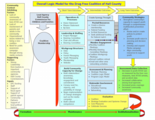
Hot Tip: Appreciate how long it takes for community coalitions to mature. Often, community members want to jump in and get right to work. However, the first thing community coalitions need to do is develop structures and processes that will help ensure their long-term success. It may be helpful for you to work with your coalition to develop a logic model that details what steps the coalition needs to take in order to be successful. Here is one example from our work with the Drug-free coalition of Hall County, based on a model by Fran Butterfoss and Michelle Kegler’s Community Coalition Action Theory (2002). Having this Logic Model helped coalition members focus on establishing a good foundation and to recognize the importance of planning and evaluation.
Rad Resource: Fran Butterfoss’s book, Coalitions and Partnerships in Community Health (2007), is a great reference book for coalition leaders, researchers and evaluators. It includes surveys that coalition leaders can use to assess the health of their coalition.
Rad Resource: Fran Butterfoss has a new book, Ignite! Getting Your Community Fired Up for Change, an excellent and accessible resource for coalition leaders and members filled with tips to inspire coalitions to action.
Hot Tip: Community Anti-Drug Coalitions of America (CADCA) is another good resource for both coalitions and evaluators. They host The National Leadership Forum each December in Washington, D.C. and the Mid-year Training Institute held at various locations around the country. Both meetings include one-to one coaching for coalition leaders and a separate tract for youth, the National Youth Leadership Initiative.
Lesson Learned: "Evaluation as intervention" is a concept I have been pondering lately. When you find your coalition is stuck in a "meet and talk" rut, think about redesigning the evaluation to focus on the environmental change strategies the coalition has implemented and the community reach of each strategy. Work on documenting the link between their chosen strategies and community outcomes. Then, use evaluation data to provide more timely feedback to the coalition. This would be a great opportunity to involve coalition members in discussions about where they are, where they would like to be and how, working together, they can get there.
The American Evaluation Association is celebrating CP TIG Week with our colleagues in the Community Psychology Topical Interest Group. The contributions all week come from CP TIG members. Do you have questions, concerns, kudos, or content to extend this aea365 contribution? Please add them in the comments section for this post on the aea365 webpage so that we may enrich our community of practice. Would you like to submit an aea365 Tip? Please send a note of interest to aea365@eval.org. aea365 is sponsored by the American Evaluation Association and provides a Tip-a-Day by and for evaluators.
Related posts:
Fran Butterfoss on Evaluating Community Coalitions
Veena Pankaj and Kat Athanasiades on Coalition Assessment: Approaches for Measuring Capacity and Impact
SIOP Week: Dale S. Rose on Organization Development: A Program Worth Evaluating (Logically)
AEA365
.
Blog
.
<span class='date ' tip=''><i class='icon-time'></i> Jul 27, 2015 12:14pm</span>
|
|
Overview
Content Type Hub is a central location where you can manage and publish your content types.
Content type publishing is a feature that will allow you to publish content type to other site collections in SharePoint Online. So you need to create the content type just once and then just publish it so that rest of the site collections can make use of it.
As we are familiar with SharePoint 2010/2013, the content type hub is nothing new in O365. Configuration and functionalities are same in O365, however getting access to the Content Type Hub is an issue. In this blog I cover the configuration details and how to solve access resolve.
The first thing to know is that a content type hub has been set up automatically for us. We just have to know where to find it. We can’t get to it from Tenant Administration like we might expect. Instead, we can find the location by going to the Site Settings page of any site collection and then the Content Type Publishing link. But getting access to the Content Type Hub page is an issue in O365.
OOTB SharePoint Configuration of Content Type HUB
Content type hub has been set up automatically.
To Find the URL for a hub site
Select the Options button and then select Site Settings.
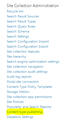
Under Site Collection Administration, click Content type publishing.
In the Hubs section, you can see the names of any Managed Metadata Service applications that publish content types to this site collection listed in bold text. After the service application names, you can see the URLs for the hub sites. You can also see a list of the subscribed content types.
Subscribed content types are read-only on subscriber sites. If you want to change a content type that was published to your site, select the URL for the hub site.
In Content type publishing error log section
Summarizes issues with propagating Content Types and Site Columns.
Access to this site collection
Only the original Office 365 account creator has access to the site collection. The only user that has access to this auto-generated site collection by default is the account that originally provisioned Office 365. This normally wouldn’t be a problem if you could go to your SharePoint admin center and modify the site collection administrators. However, the Content Type Hub is a hidden site collection. Accessing it with another user will get you an access denied error message even if you are a global administrator.
Solution for content type hub access denied issue
There is a page called TA_SiteCollectionOwnersDialog.aspx that handles the management of Site Collection Administrators. And this page takes a single simple parameter called "site". So if we want to access your Content Type Hub without contacting your original administrator (and you’re a Global Administrator within Office 365) just go to the following URL.
https://tenantname-admin.sharepoint.com/_layouts/15/online/TA_SiteCollectionOwnersDialog.aspx?site=https://tenantname.sharepoint.com/sites/contentTypeHub
Netwoven
.
Blog
.
<span class='date ' tip=''><i class='icon-time'></i> Jul 27, 2015 12:13pm</span>
|