Blogs
|
So much information comes from a conference of this size. It is clearly impossible to attend every session and soak up all of the great content shared. That’s why Twitter is amazing. I spent much of yesterday and last evening scrolling through the tweets from day 3 of the conference. I am listing what I think are the best below. Obviously I couldn’t have read through every tweet so this isn’t to slight anyone else’s brilliance, but these are the best of what I read through. I won’t be adding any commentary...
SHRM
.
Blog
.
<span class='date ' tip=''><i class='icon-time'></i> Jul 27, 2015 12:13pm</span>
|
|
My name is Susan Wolfe and I am the owner of Susan Wolfe and Associates, LLC, a consulting firm that applies Community Psychology principles to strengthening organizations and communities. A lot of my work involves helping to develop and evaluate community coalitions.
Because of the dynamic nature of coalitions facilitating their development and providing evaluative feedback can require a range of approaches and tools. It requires looking inside the group to assess the dynamics and whether the members are working well together, and outside of the group to continuously scan the context for changing political, economic, and cultural factors and to determine whether the coalition is having impact or fulfilling its purpose.
Hot Tip: Before you begin to evaluate a coalition, spend time attending meetings and getting to know its membership. Find out as much as possible about the politics, member organizations, community, and its purpose. Determine whether there are hierarchies among organizations and groups and uncover agendas and interests.
Rad Resource: One of my favorite coalition-related books is The Power of Collaborative Solutions by Tom Wolff. In addition to Wolff’s six principles for creating collaborative solutions for healthy communities, the book includes an Appendix on Evaluation with tools and access to a website with even more tools for developing and evaluating coalitions. Also check out Tom’s web site at www.tomwolff.com for more resources and sign up for his Collaborative Solutions newsletter.
Hot Tip: Use a range of methods to provide feedback to coalition leadership and members. For example, combine results of a SWOT (Strengths, Weaknesses, Opportunities, Threats) analysis with those from a member survey.
Lesson Learned: When you present the results of a survey use an interactive approach to encourage dialogue about the findings. Include time for members to talk about what they liked and did not like about the survey instrument itself and whether there are unanswered questions.
Rad Resource: Attend the Society for Community Research and Action’s (SCRA) Summer Institute workshop on Developing and Evaluating Coalitions which will be facilitated by Tom Wolff and Susan Wolfe on June 24th in Lowell, MA at the UMass Lowell Inn and Conference Center. Stay around for the SCRA 2015 Biennial Conference from June 25th through 28th. More information can be found at www.scra27.org.
The American Evaluation Association is celebrating CP TIG Week with our colleagues in the Community Psychology Topical Interest Group. The contributions all week come from CP TIG members. Do you have questions, concerns, kudos, or content to extend this aea365 contribution? Please add them in the comments section for this post on the aea365 webpage so that we may enrich our community of practice. Would you like to submit an aea365 Tip? Please send a note of interest to aea365@eval.org. aea365 is sponsored by the American Evaluation Association and provides a Tip-a-Day by and for evaluators.
Related posts:
CP TIG Week: Ann Price on (Re)Invigorating community coalition evaluation efforts
Fran Butterfoss on Evaluating Community Coalitions
Veena Pankaj and Kat Athanasiades on Coalition Assessment: Approaches for Measuring Capacity and Impact
AEA365
.
Blog
.
<span class='date ' tip=''><i class='icon-time'></i> Jul 27, 2015 12:12pm</span>
|
|
Introduction
Installing windows server and .NET Framework has always been a kids stuff till we realized that Server 2012 R2 release onwards, it is not available by default to be added from ‘Add Remove Windows Server Role Features’. Hence like all, I was stumped at installation of SQL server 2012 which requires Netfx3 and so will the problem appear for any application that depends on .Net Framework 3.5
Problem Description
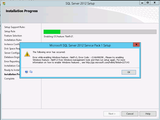
I was installing SQL Server 2012 on a Windows Server 2012 R2 Standard virtual machine, and the installation was already in progress when I received the following error:
Error while enabling Windows feature: NetFx3, Error Code: -2146498298, Please try enabling
Windows feature: NetFx3 from Windows management tools and then run setup again. For more
information on how to enable Windows features, see http://go.microsoft.com/fwlink/?linkid=227143
Since I did not enable .NET Framework 3.5 before installing SQL Server 2012, setup tried to enable it but failed.
I then tried to enable .NET Framework 3.5 on Windows Server 2012 using the "Add Roles and Features Wizard" of Windows Serve 2012 and to my surprise it failed again.
Solution
On the new Server Manager of Windows Server 2012, we made a click on the Manage menu, and selected the option "Add Roles and Features".
On the first page of Add Roles and Features Wizard, click on the Next button.
On the installation type page, we chose "Role-based or feature-based installation".
On the Server Selection page of the wizard, we selected the actual server where we were installing SQL Server 2012
On the "Server Roles" page of the wizard, we just clicked on the Next button.
On the "Features" page of the Wizard, we clicked on the checkbox next to ".NET Framework 3.5 Features", and then clicked on the Next button.
On the confirmation page, we just clicked on the Install button.
The installation using the "Add Roles and Features Wizard" failed with an error
It turns out that Windows Server 2012 does not include NetFx3 when it is installed as .Net Framework 4.5 is provided by default. It doesn’t mean that it is gone, but it has to be installed separately.
Hence the fundamental problem here is that you need to tell windows where to find the NetFX installation files -simple.
Insert the Windows installation media.
Start the Add Roles and Features Wizard again.
On the Select features page, select the .Net Framework 3.5 Features check box, and then click Next.
On the Confirm installation selections page, click the Specify an alternate source path link.
On the Specify Alternate Source Path page, type the path of the SxS folder as a local path or as a network share path. The screen shot for this step is listed below.
Click OK.
Click Install to finish the wizard
Conclusion
By default, on Windows Server 2012 (R2) the NetFx3 (.Net Framework 3.5) feature is not installed because it has already installed the .Net Framework 4.5; however some applications may require the NetFx3 feature and in this post we have seen how to make server 2012 work backward.
Netwoven
.
Blog
.
<span class='date ' tip=''><i class='icon-time'></i> Jul 27, 2015 12:12pm</span>
|
|
I had no expectations when I walked into SHRM15 this year. There were a few realities I knew would happen. I knew it would be hot in Vegas. I knew it would be cold inside the conference center. I knew it would be a crazy, busy place with over 15,000 attendees. I knew I would see social friends who I have been fortunate enough to meet online and move those relationships into a real life connection that I am deeply grateful for. We talk every day on social media...
SHRM
.
Blog
.
<span class='date ' tip=''><i class='icon-time'></i> Jul 27, 2015 12:11pm</span>
|
|
Error Re-installing AZURE Directory Sync Tool
Overview
By using the Microsoft Azure Active Directory Sync tool, your company’s administrators can keep your on-premises Active Directory continuously synchronized with Azure AD. Directory synchronization is intended as an ongoing relationship between your on-premises environment and Azure AD. Active Directory synchronization should be considered a long-term commitment to coexistence scenarios between your on-premises Active Directory and cloud. However in case if you have directory sync tool setup in a system that for any undefined reason cease to work, you need to get the tool up and running quickly in another server - to be more precise, we need to know how we can move the dirsync to another server. Here are the steps to be followed.
Clean up dir sync tool uninstallation
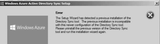
The Setup Wizard has detected a previous installation of the Directory Sync tool. The previous installation is incompatible with this newer configuration of the Directory Sync tool. Please uninstall the previous version of the Directory Sync tool and run this installation wizard again.
After removing dirsync tool from Windows Add Remove Programs, the uninstallation process does not clean up all the necessary files. Hence we need to manually remove them before we can re-install the dirsync tool.
Remove the local service account created by dirsync tool, with username starting with AAD_…….
Delete the local user groups created by dirsync tool that starts with FIM……
Remove the directory C:\Program Files\Windows Azure Active Directory Sync
Delete dirsync database files located at C:\Program Files\Microsoft SQL Server\MSSQL11.MSONLINE\MSSQL\DATA
Restart your computer and run the dirsyn tool using alleviated administrative permission and you should be good to start now
Conclusion
In a nut-shell, we all must have backup plan and dirsync is a mission critical application that we all must ensure running 24×7. Hope the above steps would save our day.
Netwoven
.
Blog
.
<span class='date ' tip=''><i class='icon-time'></i> Jul 27, 2015 12:11pm</span>
|
|
Hi, my name is Courtney Barnard and I am a social worker at a children’s health care system in north Texas. I spend half my time out in the community coordinating a coalition and the other half evaluating seven other community-based coalitions and programs.
You can use evaluation to help plan for the sustained impact of a coalition’s efforts. The long-term goal is not always to sustain the coalition itself, or even its main activities, but to sustain the change in knowledge, attitudes, skills, and behaviors that have occurred because of the community’s work.
Our sustainability plans are based on three core concepts of sustainability, as outlined by Monte Roulier with Community Initiatives Network.
Hot Tip: Begin the sustainability conversation with a visioning activity, using this prompt: "Imagine that it is [three years in the future] and your coalition has been extraordinarily effective for the past three years. Write a letter to a colleague describing what’s now going on as a result of a fruitful past 3 years."
Building an effective coalition and "backbone" support - Successful coalitions share a common vision based on mutual benefits and prioritized strategies and outcomes aimed at shared goals. A strong backbone is needed to guide the group in articulating their goals and in planning how they will get there.
Lessons Learned: Backbone supports are able to offer structure (e.g. bylaws, coordinators), lead strategic planning processes, and engage others in the community. Although this structure takes time to develop, it is essential for long-term functioning.
Employing the right mix of strategies - Use easily-achievable actions to engage members and build momentum. These quick wins will help the coalition spring board into longer-term, more complex actions.
Rad Resource: Use the Spectrum of Prevention from the Prevention Institute to assess where your strategies fit. If your coalition chooses not to take action at one of the levels, make sure someone else in the community is acting on that level.
Hot Tip: Use this "formula" for Impact when prioritizing strategies/action steps to see how you can get the biggest bang for your buck.
Securing diverse resources - Braid and pool separate sources of funding when possible and leverage non-financial resources (communication, staff, volunteers, office space, food, research, fiscal management, etc.).
Lessons Learned: Make your propositions compelling so no one can say "no". Be clear and specific about real needs. Demonstrate results and your plan for future outcomes. And frequently praise contributors, no matter how small the contribution.
The American Evaluation Association is celebrating CP TIG Week with our colleagues in the Community Psychology Topical Interest Group. The contributions all week come from CP TIG members. Do you have questions, concerns, kudos, or content to extend this aea365 contribution? Please add them in the comments section for this post on the aea365 webpage so that we may enrich our community of practice. Would you like to submit an aea365 Tip? Please send a note of interest to aea365@eval.org. aea365 is sponsored by the American Evaluation Association and provides a Tip-a-Day by and for evaluators.
Related posts:
CP TIG Week: Ann Price on (Re)Invigorating community coalition evaluation efforts
Fran Butterfoss on Evaluating Community Coalitions
Veena Pankaj and Kat Athanasiades on Coalition Assessment: Approaches for Measuring Capacity and Impact
AEA365
.
Blog
.
<span class='date ' tip=''><i class='icon-time'></i> Jul 27, 2015 12:10pm</span>
|
|
Moving to Windows Azure / Office 365 Directory Sync to a different Office 365 Subscription for the same domain
Overview:
In my endeavor of setting up / planning office 365 migration, we always start with a trial subscription and finally when the preparation goes as planned, we realize that the trial setup is not good enough to be a production. Hence with the same setup we must migrate the dirsync to a different subscription to start all over again. Here are some steps that can be followed to achieve this.
A. Prepare existing subscription.
1. Deactivate Directory Sync to stop user from On-Premise Active Directory to be synced to Office 365
Goto Admin Centre Users and Groups
Select Deactivate option against Active Directory Synchronization
Confirm Deactivation. This is to stop further synchronization of users to Windows Azure
2. Remove User UPN suffix from office 365 for the deactivated domain. The domain that will be removed needs to be de-associated from all the existing users. This is done by changing all the user’s UPN suffix and change to the default office 365 domain (i.e.yourdomain@onmicrosoft.com)
Goto Admin Centre - Users and Groups
Select user by check box
Click on Edit button on right option panel
If there are multiple users, you can select all users and bulk edit them
Select the domain drop down box and changed the domain to yourdomain@onmicrosoft.com
Choose not to change any license assignment or plan
3. Delete the verified domain from the current subscription.
Goto Admin Centre - Domains
B. Prepare new subscription
The new subscription should have already come with a free domain like yourdomain@onmicrosoft.com. However you need to add the domain that you have removed from your old subscription into the new subscription. However, before you do that you have to add the necessary dns record with your domain registrant so that office 365 can verify your domain ownership.
Add the new domain in your Office 365 subscription
After you add the new domain, office 365 auto detects the domain registrant and will prompt you for confirming ownership. If you have admin access to c-panel of your domain registrant, you can simply click on confirm ownership in the screen shot below and office 365 will automatically add all the necessary dns record to point the domain to Office 365.
However, in case you do not happen to have domain registrant admin credentials, then you can fetch the manual dns records and pass it on to the admin who can add the dns record in their domain registrant and you can simply confirm the domain from the office 365 admin centre.
Following are the manual dns records that needs to be added in the domain registrant c-panel.
The list will give step by step details of all the dns records required. You can also choose your domain registrar from the drop down list.
Once the dns records are added, you can select confirm ownership.
On successfully verifying your domain, you should now see your domain active in office 365 admin centre
Now you are ready to download, install and configure the dirsync tool.
C. Prepare Directory Synchronization for the New Subscription.
Activate Directory Synchronization in office 365
Goto to users and groups and select Active Directory synchronization setup and choose ACTIVATE
Directory synchronization is activated, it should reflect Deactivate
Conclusion
As we delve further into this series, I will be coming up with few articles that we all need sooner or later to tackle office 365 through script. You guessed it right, Windows Azure PowerShell and some quick command reference to perform the most common tasks.
Netwoven
.
Blog
.
<span class='date ' tip=''><i class='icon-time'></i> Jul 27, 2015 12:10pm</span>
|
|
The wonderful thing about SHRM’s Annual Conference is that there is "something" for everyone. The networking opportunities are endless; the speakers’ topics have a wide reach; and the Tuesday night concert always brings energy. This year, my "something" came from a concurrent speaker on Tuesday morning by the name of Jeff Goins. Jeff’s session was titled "The Art of Work: Discovering What You Were Meant To Do." Now, I didn’t attend this session because I am unsure that I am meant to be in HR. I chose Jeff’s session because I want to help others find where they are meant...
SHRM
.
Blog
.
<span class='date ' tip=''><i class='icon-time'></i> Jul 27, 2015 12:09pm</span>
|
|
Hello! We are Natalie Wilkins and Courtney Barnard, and we are members of the Community Psychology TIG leadership team. Community and stakeholder engagement is a core principle of both evaluation and community psychology. As evaluators and community psychologists, it is not surprising that we are very interested in learning about how stakeholder engagement strengthens our work and how we can continuously improve the ways we include communities in our work.
We have compiled some of our favorite resources for evaluating community collaborations and coalitions. We hope they will be helpful in your work too!
Rad Resources:
The National Cancer Institute has developed the Level of Collaboration Scale. This scale is a composite of other existing models and instruments and its purpose is to assess collaboration among partners.
Check out these great tools from Fran Butterfoss and Coalitions Work
Are You Ready to Evaluate Your Coalition?
15 questions can help you decide whether your coalition is ready to evaluate itself and its work!
Coalition Initial Needs Assessment
A form for assessing coalition resources, structures and functions.
Coalition Member Survey
A 49-item survey for members to rate the coalition on aspects related to planning, implementation, leadership, local and statewide involvement, communication, participation, progress and outcomes.
Coalition Effectiveness Inventory (CEI)
A diagnostic checklist for coalition staff and key leaders to assess coalition effectiveness.
Meeting Effectiveness Inventory (MEI)
A tool for evaluating work group and coalition meeting effectiveness and productivity.
Is This Group Really A Coalition?
10 questions that can clarify whether an existing community group is a coalition.
Granner and Sharpe have developed An Inventory of Measurement Tools for Evaluating Community Coalition Characteristics and Functioning. This inventory provides a list of assessment tools to assess characteristics and functioning of a community coalition.
The American Evaluation Association is celebrating CP TIG Week with our colleagues in the Community Psychology Topical Interest Group. The contributions all week come from CP TIG members. Do you have questions, concerns, kudos, or content to extend this aea365 contribution? Please add them in the comments section for this post on the aea365 webpage so that we may enrich our community of practice. Would you like to submit an aea365 Tip? Please send a note of interest to aea365@eval.org. aea365 is sponsored by the American Evaluation Association and provides a Tip-a-Day by and for evaluators.
Related posts:
CP TIG Week: Susan Wolfe on Engaging community coalition members in evaluation
CP TIG Week: Ann Price on (Re)Invigorating community coalition evaluation efforts
EPE Week: Tina Phillips on Developing Validated Scales
AEA365
.
Blog
.
<span class='date ' tip=''><i class='icon-time'></i> Jul 27, 2015 12:09pm</span>
|
|
Why these companies need to collaborate?
With the world moving to the cloud, wouldn’t it be nice to have the two biggest cloud companies collaborate? Microsoft and Salesforce have finally announced a partnership and are looking to integrate their products closely. Microsoft is also a guest speaker at the 2014 Dreamforce conference to be held from Oct 13th in San Francisco. I would not be surprised if Microsoft shares several interesting integration scenarios at the conference.
I have worked with many organizations that use SharePoint On-Premise, Office 365, Salesforce Sales Cloud, Salesforce Marketing Cloud, and many other Microsoft products. Many have approached us for integration. Below is a list of some of the integration scenarios that we have identified:
Linking a site collection or site in Office 365 SharePoint to an opportunity in Salesforce Sales Cloud
Linking One Drive documents in Office 365 to Salesforce Sales Cloud
Integrating a workflow that spans across Salesforce Sales Cloud and Office 365
Sales Cloud reporting using Power BI for Office 365
Synchronize Microsoft outlook contacts to Salesforce Sales Cloud or Marketing Cloud
Ability to search content from both SharePoint and Salesforce
Integrating Yammer to Salesforce Sales Cloud opportunities
These integration scenarios provide immense benefit to end users who use both Microsoft and Salesforce products. Both companies have significant presence in the small to medium size businesses who could benefit from better integration.
Please find my subsequent posts below where I will be discussing each of these scenarios in greater detail.
Microsoft and Salesforce - Part 2 - Notes from the Dreamforce Conference
Microsoft and Salesforce - Part 3 - Analytics Cloud from Salesforce
Netwoven
.
Blog
.
<span class='date ' tip=''><i class='icon-time'></i> Jul 27, 2015 12:09pm</span>
|