Blogs
|
Developing relationships is a career-saving move. I have written a number of times that the future of HR is to keep the "human" in human resources. As technology advances and jobs consisting of tasks become increasingly automated the one area that will not be automated is that of "relationships." People connections Steve Browne, the Executive Director of HR for LaRosa, Inc., is acknowledged by many to be...
SHRM
.
Blog
.
<span class='date ' tip=''><i class='icon-time'></i> Jul 27, 2015 12:07pm</span>
|
|
Overview
You have SharePoint 2013 On Premises Deployment. When you try to open the files from your SharePoint sites, with file extension .MHT or .MHTML, the files get opened via Microsoft Word.
You want these files to be opened by your Browser instead.
Cause
The file open behavior is driven by DOCICON.xml file under the SharePoint configuration file. This file is located under - C:\Program Files\Common Files\microsoft shared\Web Server Extensions\15\TEMPLATE\XML folder.
In this case, MS Word in configured as the file open application DOCICON.xml file like below.
Resolution
You will need to update this setting like below in the DOCICON.XML on all the SharePoint Application and Web Front End server of the Farm. Perform the following changes on each server such that the Edittext/OpenControl/OpenApp is not set in which case the browser end user client File Association settings will take precedence. Where by default the file extension association is Browse for .MHT and .MHTML on the user client desktops.
Before:
After:
After saving the above settings, restart your IIS server to re-cache the new settings to take effect.
Netwoven
.
Blog
.
<span class='date ' tip=''><i class='icon-time'></i> Jul 27, 2015 12:07pm</span>
|
|
Recently released, Dice’s campaign to find the best tech talent has taken a creative turn. Actual tech candidates are seen posed in their latest #HottestTalent campaign. In an effort to take the stereotyped "old IT" to a revamped, modernized version of the tech department. The platform is to help companies who struggle in finding qualified talent and guide them towards the candidates that are the best fit. Game Changer Find the hottest talent. The billboards are featured in some of the most densely populated tech areas...
SHRM
.
Blog
.
<span class='date ' tip=''><i class='icon-time'></i> Jul 27, 2015 12:06pm</span>
|
|
My name is Josh Twomey, Assistant Professor of Family Medicine & Community Health, at UMass Medical School’s Center for Health Policy and Research. Perhaps you have noticed the term ‘Bayesian’ popping up now and then in the evaluators’ break room. I certainly have, and in recent months, set out on a statistical journey to find out why. In this two-part entry, I would like to share some discoveries of this journey. Part 1 includes a basic overview of Bayesian analysis. Part 2 (coming tomorrow) gives an example of how this may benefit our work as evaluators. One note of caution: This may seem less relevant to those doing strictly qualitative data collection and reporting!
Most of us are trained in Null Hypothesis Significance Testing (NHST) whereby we reject a null hypothesis (p < .05) or fail to reject the null (p > .05). This decision is justified by the data we collect, but does not take into account past research findings or expert opinion. Bayesian analysis differs from NHST in that past knowledge is included in our analysis, thereby having a direct influence on our conclusions.
The first step of Bayesian analysis is to quantify this past knowledge via a prior distribution or prior for short. Using priors we are able to specify distribution(s) of parameters (e.g., means, standard deviations) we are interested in. In cases where we have a lot of prior information, we may set up narrow distributions (informative priors). When we do not have a lot of prior information, we may set up very wide distributions (noninformative priors). Priors are used to weight the likelihood of our collected data to produce the posterior distribution. Thus, the posterior is a result of past knowledge updated by our collected data. It is from this posterior where samples can be drawn and conclusions about our evaluations are made.
Hot Tips: In addition to allowing for the use of past knowledge, advantages of Bayesian statistics include:
Decision-making tools such as Bayes Factors and Highest Density Intervals (HDIs), which can be easier for stakeholders to understand compared to p values and confidence intervals.
No need to limit the number of hypotheses you wish to test with your data for fear of inflated Type I error (which in my experience can frustrate stakeholders).
Better capacity to work with Ns that are small, limiting our ability to detect differences/trends, or large where differences may be detected due to large samples, not meaningful differences.
Rad Resources:
Bayesian Statistics for the Social Sciences by David Kaplan
Doing Bayesian Data Analysis by John Kruschke
For quick reference/definitions of NHST, p-values, and Bayesian inference click HERE.
Do you have questions, concerns, kudos, or content to extend this aea365 contribution? Please add them in the comments section for this post on the aea365 webpage so that we may enrich our community of practice. Would you like to submit an aea365 Tip? Please send a note of interest to aea365@eval.org . aea365 is sponsored by the American Evaluation Association and provides a Tip-a-Day by and for evaluators.
AEA365
.
Blog
.
<span class='date ' tip=''><i class='icon-time'></i> Jul 27, 2015 12:06pm</span>
|
|
Overview
You are using SharePoint 2013 with SSRS 2012 in the SharePoint Integrated mode. In the SharePoint Reporting Libraries, you will see below error when you try access the ECB menus related Reporting Services caching and subscriptions options.
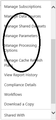
Manage Processing Options
Manage Cache Refresh Plans
Sorry, something went wrong
An error occurred within the report server database. This may be due to a connection failure, timeout or low disk condition within the database. —> Microsoft.ReportingServices.Diagnostics.Utilities.ReportServerStorageException: An error occurred within the report server database. This may be due to a connection failure, timeout or low disk condition within the database. —> System.Exception: For more information about this error navigate to the report server on the local server machine, or enable remote errors
Cause
Due to lack of complete configuration steps in the SSRS Service Application, you will experience these errors.
Resolution:
Method - 1 (Recommended)
Select ‘SQL Reporting Services Service Application’ from Manage service applications page, under Central Administration.
Click ‘Provision Subscriptions and Alerts’
Click ‘Download Script’
Run these scripts on SQL Server
Method - 2 (Manual)
First you need to verify ‘SQL Service’, ‘SQL Agent Service’ services account are added to RSExecRole role on Reporting Service, Reporting Services Temp, master, msdb databases.
Secondly and foremost, SQL Reporting Services Service Application Pool account is also added in RSExecRole. For instance, when user clicks ‘Manage Processing Options’ from report properties, behind the scene database connection is made using ‘Integrated Security = true’.
Netwoven
.
Blog
.
<span class='date ' tip=''><i class='icon-time'></i> Jul 27, 2015 12:06pm</span>
|
|
This is Josh Twomey again from UMass Medical School’s Center for Health Policy and Research. As promised in yesterday’s Part 1 posting, I wanted to walk through an example demonstrating aspects of Bayesian analysis that evaluators might find advantageous.
Part 1 mentioned the use of the Bayes Factor (BF) as a decision-making tool. BFs tell us the degree one hypothesis is supported by the data in relation to how much another hypothesis is supported by the data. Thus, a BF is an odds ratio showing us which hypothesis is more likely. Now, let’s look at that example.
Suppose you are evaluating the effectiveness of a health psychology program in helping patients manage chronic disease. As part of the evaluation, you measure the self-efficacy of 200 patients managing their diabetes before and after working with a health psychologist. Traditionally, you could do this with a paired t-test of patients’ pre and post self-efficacy scores. As good evaluators, we would begin this analysis with some idea (based on review of similar evaluations or literature) as to the effectiveness of our program. However, in a traditional test, this prior knowledge cannot be factored into our analysis. Our test would produce t and p values such as t = - 3.19, p < .05. With this result we can state post scores are significantly higher than pre scores, but we cannot state the extent to which this conclusion is more likely than our null hypothesis.
With Bayesian analysis, we conduct this paired sample t-test but weight our data by our prior knowledge. For example, if past evaluations tell us that we should expect small effect sizes, we can specify a prior whereby small effect sizes are more likely than larger ones. In this Bayesian framework, a t = -3.19 corresponds to a BF of 10.1. This means that our hypothesis that post scores are different than pre scores is 10.1 times more likely than a hypothesis of no difference.
Hot Tips: The example above highlights 3 advantages of Bayesian analysis:
Prior knowledge is incorporated into the analysis as our data is weighted by this knowledge;
We are given direct odds associated with our conclusion; and
The interpretation of the BF is a clear, intuitive interpretation of our results for stakeholders to understand.
Lessons Learned: Over the course of my journey, which is far from over, I have learned that Bayesian analysis is complex - full of intimidating terms such as conjugate priors and Markov Chains. But considering its advantages, as well as growing demand in our field, I have found the journey to be well worth it.
Rad Resources: Bayesian Factor calculators and literature can be found at: pcl.missouri.edu.
Do you have questions, concerns, kudos, or content to extend this aea365 contribution? Please add them in the comments section for this post on the aea365 webpage so that we may enrich our community of practice. Would you like to submit an aea365 Tip? Please send a note of interest to aea365@eval.org . aea365 is sponsored by the American Evaluation Association and provides a Tip-a-Day by and for evaluators.
AEA365
.
Blog
.
<span class='date ' tip=''><i class='icon-time'></i> Jul 27, 2015 12:05pm</span>
|
|
Culture is more than just a hot topic, it’s not just a buzzword, it’s a requirement. It’s a hard business principle that drives your employees. In the increasingly competitive market (and talent market), it has never been more important to evaluate what kind of culture you need your organization to be. The malleability of this internal society has to be relevant to those on the front line of your organization - your team. Understand the significance of the buy-in, the intangible nature, the dominos of change and you can effectively alter your culture… after all - it is yours...
SHRM
.
Blog
.
<span class='date ' tip=''><i class='icon-time'></i> Jul 27, 2015 12:05pm</span>
|
|
Hello Evaluation Learners! I’m Sheila B. Robinson, aea365’s Lead Curator and sometimes Saturday contributor. Today, I’m writing about AEA’s Summer Evaluation Institute, a fabulous learning opportunity coming up soon. Anyone who knows me knows that two things I love are learning, and meeting with evaluation colleagues, and this is the perfect opportunity to do both.
Registration is now open for the 2015 AEA Summer Evaluation Institute - May 31 - June 3 in Atlanta, GA. Here’s a quick preview of just a few of the high quality courses offered. Note: Descriptions are truncated, so please visit the site for complete descriptions:
Rad Resources:
An Executive Summary is Not Enough: Effective Evaluation Reporting Techniques with Kylie Hutchinson
Reporting is an important skill for evaluators who care about seeing their results disseminated widely and recommendations actually implemented, but there are alternatives to the traditional lengthy report. This interactive workshop will present an overview of four key principles for effective reporting and engage participants in a discussion of its role in effective evaluation.
Culturally Responsive Evaluation (CRE): Theory to Practice and Back Again with Rodney K. Hopson and Karen E. Kirkhart
This workshop addresses the theory that grounds Culturally Responsive Evaluation (CRE) and the strategies that bring it to life in evaluation practice. Presenters set the context with a brief discussion of the centrality of culture in evaluation and the history of how the evaluation profession is coming to a clearer appreciation of culture. Against this backdrop, CRE’s development is highlighted and key elements of the CRE framework are identified. The workshop then transitions from theory to practice.
Qualitative Approaches to Evaluation: Core Concepts for Defensible Practice with Jennifer C. Greene
This workshop offers an introduction to the core stances and principles of qualitative approaches to evaluation, with a focus on overall design and the collection, analysis, and reporting of interview and observation data.
Needs Assessment - Basic Ideas, a Guiding Model, and Hands-on Work with Several Interesting Methods with James W. Altschuld
After establishing the ABCs of needs assessment (NA) such as concepts, terms, a guiding model, and a brief overview of methods often employed in the NA process, participants will be involved in several hands-on activities to demonstrate what they entail and how they bring the NA process to life.
Rad Resources: The Institute also opens with two concurrent pre-institute workshops:
Practical Methods for Improving Evaluation Communication with Stephanie Evergreen
Introduction to Evaluation with Thomas Chapel
Hot Tip: Registration is still open for the 2015 AEA Summer Evaluation Institute - May 31 - June 3 in Atlanta, GA but act fast! Courses do fill up!
I wish I could share the rest of the 26 great courses here!
Do you have questions, concerns, kudos, or content to extend this aea365 contribution? Please add them in the comments section for this post on the aea365 webpage so that we may enrich our community of practice. Would you like to submit an aea365 Tip? Please send a note of interest to aea365@eval.org . aea365 is sponsored by the American Evaluation Association and provides a Tip-a-Day by and for evaluators.
AEA365
.
Blog
.
<span class='date ' tip=''><i class='icon-time'></i> Jul 27, 2015 12:04pm</span>
|
|
Constant emails, text messages and everything between can make it difficult to create a set of boundaries for your professional life. Millennials outwardly crave that balance between home and the office, but other workforce generations are partial to the idea as well. Setting professional boundaries, whether it’s saying "no" more often or truly leaving work at the office when you’re done for the day, is the first step towards the work-life balance you want. "No" is Okay You have dozens of things to...
SHRM
.
Blog
.
<span class='date ' tip=''><i class='icon-time'></i> Jul 27, 2015 12:03pm</span>
|
|
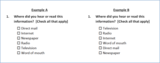
Hi, we are Pei-Pei Lei and Carla Hillerns from the Office of Survey Research at the University of Massachusetts Medical School. Have you ever selected an answer to a survey question without reading all of the choices? Maybe you paid more attention to the first choice than the rest? Today, we’d like to share a technique that helps to minimize the impact of these types of scenarios - randomized ordering of survey response options.
Randomizing the order of response options may improve data quality by reducing the order effect in your survey. When there is a list of response options, respondents often have a tendency of selecting the most prominent. For example, in a paper survey, the first option may be most apparent. In a phone survey, the last option may be most memorable. If implementing an online survey, there may be a tendency to choose from the middle of a long list - because the center is more prominent.
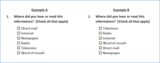
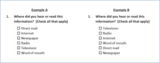
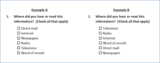
By randomizing the order, all options have the same possibility of appearing in each response position. In Example A below, "Direct mail" appears in the top spot. However, in Example B, the responses have been randomly reassigned and "Television" now appears at the top.
Hot Tips:
Do not randomize the order if the response options are better suited to a pre-determined sequence, such as months of the year or alphabetization, or if using a validated instrument that needs to maintain the full survey as developed.
If the response list is divided into sub-categories, you can randomize the category order as well as the items within each category.
If your list includes "Other (Please specify: __________)" or "None of the above", keep these at the bottom so the question makes sense!
If using the same set of response options for multiple questions, apply the first randomized ordering to the subsequent questions to avoid confusion.
Randomization is not a cure for all questionnaire design challenges. For example, respondents probably won’t pay as much attention to each response option if the list is extremely long or the options are excessively wordy. So be reasonable in your design.
Lesson Learned: It’s easy to administer randomization in web and telephone surveys if your survey platform supports this function. A mail survey will require multiple versions of the questionnaire. You’ll also need to account for these multiple versions as part of the data entry process to ensure that responses are coded accurately.
Rad Resources:
The Encyclopedia of Survey Research Methods offers more information on response order effects.
Check with your survey vendor or survey platform on the functionality that’s available to you.
Do you have questions, concerns, kudos, or content to extend this aea365 contribution? Please add them in the comments section for this post on the aea365 webpage so that we may enrich our community of practice. Would you like to submit an aea365 Tip? Please send a note of interest to aea365@eval.org . aea365 is sponsored by the American Evaluation Association and provides a Tip-a-Day by and for evaluators.
AEA365
.
Blog
.
<span class='date ' tip=''><i class='icon-time'></i> Jul 27, 2015 12:02pm</span>
|